
 by
Namecheap built its name on cheap domains. The real question is whether its shared hosting is good enough to run your WordPress site on, or just cheap.
I’ve run sites on Namecheap shared hosting, dealt with its cPanel, its support, and its renewal pricing. Here’s the honest verdict before the full breakdown.
Verdict: Namecheap is the host I’d pick for a first blog, a side project, or any site where price beats raw speed. Its Stellar plan starts at $26.88 for the first year with a free domain included, and it isn’t owned by EIG. Skip it if you need top-tier load times or managed WordPress. I’m rating it 4.3 out of 5 after using its shared hosting and cPanel firsthand.
How I tested: I judged Namecheap on the things that actually bite you later, the cPanel experience, live chat response times, real renewal costs (Stellar jumps from $26.88 to $55.88), backup policy, and everyday loading speed, not just the launch-price sticker.
| Pros | Cons |
|---|---|
| Cheapest shared plans around, Stellar at $26.88 for the first year with a free domain | Stellar gets only twice-weekly backups; AutoBackup starts on Stellar Plus |
| Free site migration plus free SSL (up to 50 per cPanel) | Live chat support is slow to respond and resolve |
| Not owned by EIG, with a 100% uptime guarantee | Average loading speeds, not built for raw performance |
| Familiar cPanel and Anycast-powered premium DNS | Renewal pricing climbs after year one (Stellar to $55.88) |
- vs Hostinger / HostGator / Bluehost: Namecheap undercuts all three on first-year shared pricing and skips EIG ownership.
- vs WP Engine ($25/mo): WP Engine wins on managed WordPress and speed, Namecheap wins on price by a mile.
- vs Cloudways / ScalaHosting: pick Cloudways for cloud-grade performance or ScalaHosting for a managed server of your own, pick Namecheap when budget is the deciding factor.
In this Namecheap hosting review, I’ll walk through the plans, the features that matter, and the trade-offs you only notice after a year.
Here are the topics under which this article will be discussed:
About Namecheap
Namecheap was founded in 2000 by Richard Kirkendall. They started basically with one purpose: to provide the cheapest domain names. That’s from where its name Namecheap comes.
But by time Namecheap has added hosting, managed WordPress, VPNs, reseller and other cloud services to their portfolio.
Namecheap has emerged as one of the largest hosting & domain companies with more than 24 million domains under management for customers all across the world.
This is one of the few hosting companies that do not belong to the Endurance International Group (EIG), now part of Newfold Digital, the company that runs BlueHost, Hostgator and other popular hosting brands.
Why should you use Namecheap hosting?
If you have been looking for a reliable, secure, and remarkably cheap shared hosting service to run your WordPress website, Namecheap can be the best place to host your website.
In the upcoming sections of this Namecheap hosting review, I will discuss all the pros and cons of using Namecheap along with the details of its pricing.
Before proceeding towards the actual review, let us understand what you stand to gain by subscribing to this hosting service.
Cheapest plans
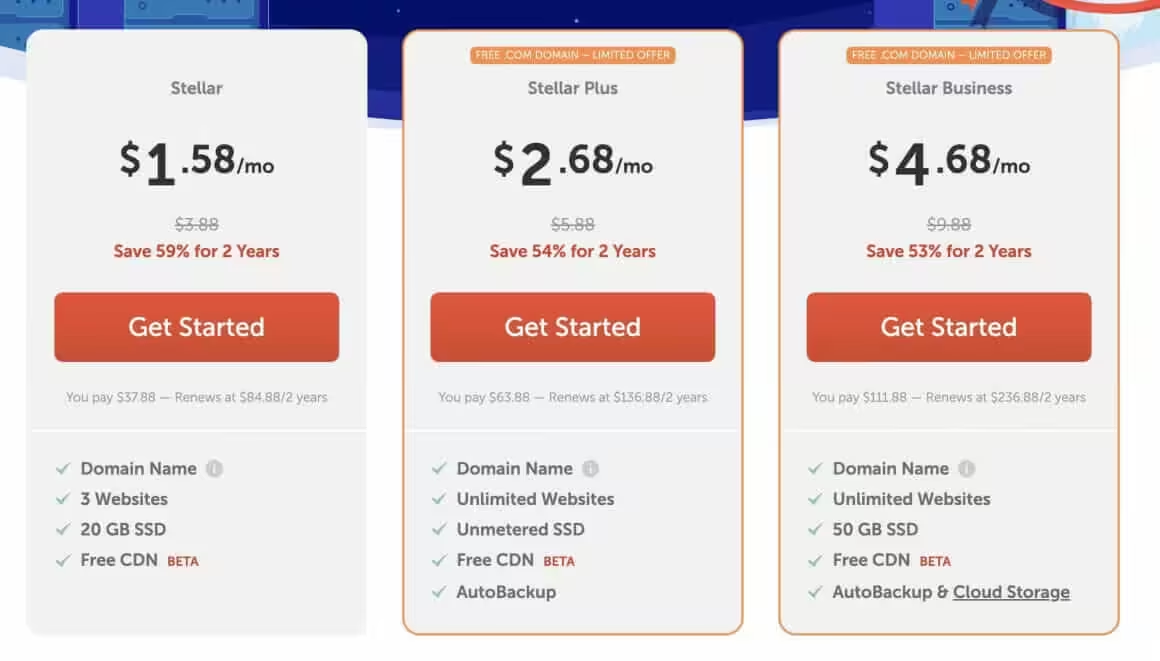
It’s widely acknowledged that Namecheap presently offers the cheapest shared hosting plans in the market. As a matter of fact, their entry plan even bundles a free domain for the first year. To adequately match the budget needs of a massive customer base, Namecheap offers an extensive range of shared hosting plans.
Along with great features and affordable prices, Namecheap also offers a free domain for the first year and free Domain Privacy protection.
Its shared hosting plans begin at merely $26.88 for the first year and go up to $58.88 for the first year of even its ultimate hosting plan, Stellar Business. This plan gives you access to advanced hosting features such as faster speeds and superior security.
Most importantly, Namecheap’s basic shared hosting plan allows you to install up to three domains.
Even the so-called cheapest hosting companies such as Hostinger, JustHost, HostGator, and Bluehost cannot match the present offers provided by Namecheap.
Free hosting migration
If you wish to migrate your website from another hosting service to Namecheap shared hosting, then you’ll be delighted to know that Namecheap offers free site migration services. Everyone knows how challenging it is to migrate all your site files to another hosting platform without losing files. In this regard, Namecheap’s well-trained migration team will help you migrate your website to their hosting servers for no additional cost whatsoever.
Free migration services offered by Namecheap include:
- cPanel website migration
- Website without cPanel migration (like Managed Hosting services)
- Email transfers
- Transfers to a dedicated server or VPS
cPanel
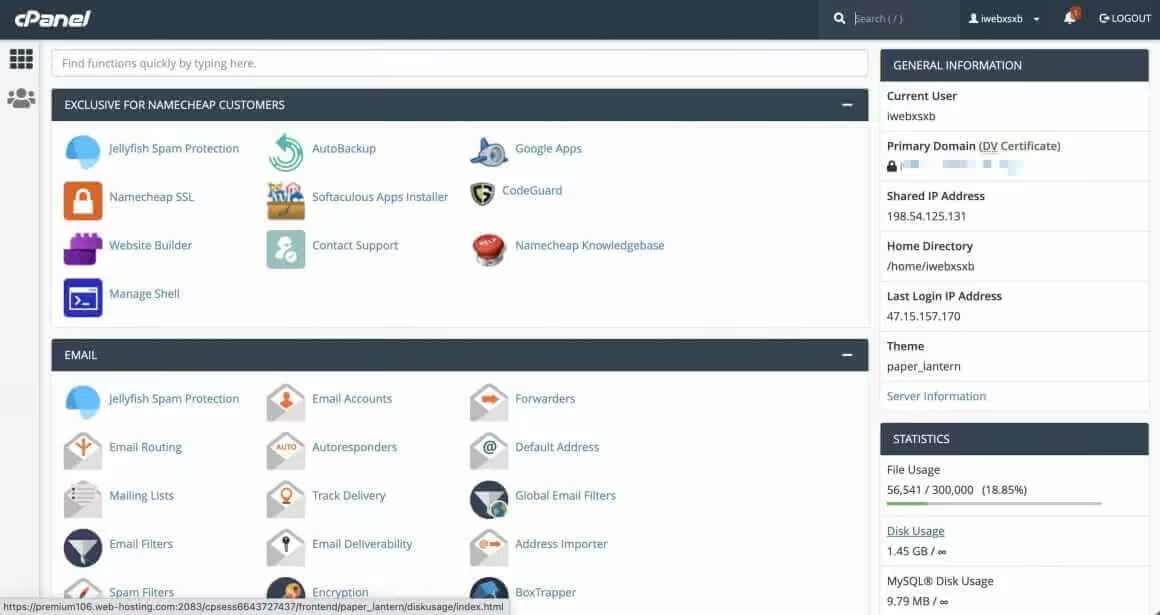
A control panel or cPanel gives you a user-friendly interface where you can easily manage and maintain everything related to your website, such as databases, emails, website backups, domain parking, and so on.
With Namecheap’s cPanel, you can access everything from domains and email accounts to the file manager in one place. It also allows you to modify your files and database information, create new tables, or delete them if needed. Even beginners can conveniently manage their cPanel account from Namecheap.
24×7 customer support
Support team availability is an important factor to consider when choosing a shared hosting platform. In this regard, Namecheap offers a not-so-great, 24×7 support assistance to all its hosting users and allows you to connect with them in three different ways:
- Knowledgebase
- Submit a Ticket
- Live Chat
I haven’t liked how they handle the chat. They are very slow in responding to queries and finding out resolutions.
But nevertheless, this is one of the downsides of a cheaper product.
To access Namecheap chat support, you just need to log into your cPanel account by entering your username and password.
Users who haven’t registered with Namecheap yet can just use its “Submit a Ticket” page to clear their doubts regarding the hosting or domain registration.
Let us now discuss each of the above three customer support options in detail.
- Knowledgebase: This is a large database that contains numerous articles, video tutorials, and answers to all the prominent questions pertaining to everything related to hosting.
- Submit a Ticket: This system serves to handle users’ issues when they are unable to find an answer or solution to their issues or queries on the Namecheap Knowledgebase. You simply need to enter your cPanel details and attach the files or images (if any) before submitting to resolve any issues related to web hosting.
- Live Chat: With Namecheap’s Live Chat feature, you just need to choose a category related to the problem you’re facing (such as billing, hosting, domain, and so on) and enter your queries to start a conversation with the support team.
Secure servers
You must be aware of the fact that website hacking has become an alarmingly common phenomenon nowadays. It leads to thousands of websites getting compromised each and every day, leading to an enormous loss in sales.
To prevent such security breaches, you must choose a dedicated and reliable hosting service that prioritizes the security of its websites and hosting environment.
Namecheap fulfills these criteria by providing its hosting servers with Domain Privacy, SSL certificates, incredible OS and data servers.
It provides both Domain Privacy and SSL certificates to every customer free of cost.
In case you don’t know, Domain Privacy (formerly WhoisGuard) keeps each domain owner’s contact information safe and out of the public Whois database, while SSL certificates protect your website’s customers against identity theft.
They especially come in handy for online transactions.
Premium DNS
A Domain Name Server or DNS has a direct impact on your website security and performance, including:
- Redundancy
- Speed of queries
- Security
Users running an e-commerce store/digital media agency or dealing with high-traffic websites require a high-performance premium DNS instead of ordinary or free DNS. Namecheap comes with premium DNS for website security enhancements, running on a global Anycast network.
To get access and avail of various useful benefits, apart from 100% uptime and full security, you need to pay a meager fee of $4.88 for the first year ($9.98 a year on renewal).
By comparison, other domain registrants such as GoDaddy tend to charge pretty high fees for premium DNS services.
Free SSL
When you use Namecheap for hosting and domain registration, it installs SSL certificates for all new domains, subdomains, and addon domains. As a result, you get enhanced security for all your domains and websites.
Secure Sockets Layer or SSL certificates provide protection in three different layers, as shown below:
- Encryption prevents your website users’ activity from being tracked.
- Data integrity prevents your website files from getting corrupted when they’re being transferred.
- Authentication safeguards your website from all kinds of hackers.
You might be wondering what the qualifications for free SSL certificates from Namecheap shared hosting are. Basically, you can qualify if you:
- Have created a new shared hosting account with Namecheap.
- Are using a shared hosting plan with your newly created account.
- Are adding new domain names or addon domains to your existing hosting account with a Namecheap shared hosting plan.
Note that you will receive a free SSL for every unique domain and subdomain from Namecheap hosting.
Every cPanel account can have a maximum of 50 free SSLs.
Performance
Regardless of the hosting platform, you prefer to use, you require a secure and faster website performance to keep your website safe from hackers and other security threats.
In this regard, Namecheap offers a truly amazing shared hosting environment for all its users. It uses the best infield Cloud-based Linux servers that enhance the reliability and website performance of all the shared hosting servers.
Benefits of Namecheap’s shared hosting OS include:
- It aids in securing the hosting environment servers from slowing down due to clients’ activities.
- It segregates all of its shared hosting server users and provides bulletproof security to each of them in order to limit security breaches.
- It usually limits the malware and viruses within any client’s website whose files are stored in their databases and servers.
Also, their shared hosting servers run on:
- Dell PowerEdge M1000e blade enclosure hardware
- Full redundancy, from power supply to network card
- A high-speed SAN for storage
To sum up, Namecheap’s shared hosting servers are all located in a faster, better, and safer OS environment that protects your website from various security threats such as malware, brute force attacks, DDoS attacks, and so on.
100% uptime
Namecheap offers an excellent monthly uptime guarantee of 100%. Users who get any downtime issues can readily claim for their uptime guarantee.
They will then be eligible for a Service cycle prolongation for the time for which the service was unreachable (a maximum of one month of free hosting from Namecheap).
When it comes to non-scheduled maintenance and downtime issues, Namecheap offers a one-day service cycle prolongation for every hour of downtime experienced.
Having better uptime gives you the following benefits:
- Better user experience
- Better user retention rate
- Your website will run smoothly without any crashing or lagging issues
Useful apps
Namecheap readily integrates with more than 100 amazing apps, including everything from website building to productivity apps. Some notable ones are:
- Uptime monitoring from Namecheap: Using this free app, you can monitor your website’s uptime, track and report your downtime issues, and view your website’s overall uptime activity.
- Sitejet AI Website Builder: It is included free with every shared hosting plan. Enter your business name and industry, and it generates a full site you can customize with drag and drop.
- Strikingly: It is a paid app that allows you to easily turn your regular website into a highly mobile-responsive one. Since it is supported by Namecheap, you can easily access it from your cPanel dashboard.
Why you shouldn’t use Namecheap hosting?
We’ve extensively discussed the positives of using Namecheap shared hosting to run your WordPress website(s) at an economical price. Now the honest part.
Skip Namecheap hosting if you need top-tier speed or true managed WordPress. Its loading times are average and Stellar’s backups are basic. For raw performance choose Cloudways, and for managed WordPress with hands-on support, WP Engine is the better fit even at $25 per month.
When it comes to the negatives, my primary grouse is that the entry Stellar plan only gets twice-weekly backups; automated AutoBackup starts on Stellar Plus.
It gets somewhat expensive after a year of your hosting renewal, although it’s still much cheaper compared to other hosting services.
Also, average website loading speeds leave something to be desired.
I have already talked about how I didn’t like their slow customer support, didn’t I?
Pricing
Obviously, a proper review of Namecheap shared hosting cannot be complete without a detailed discussion about the cost of its hosting plans. As of now, Namecheap offers the following plans in its shared hosting environment:
- Stellar
- Stellar Plus
- Stellar Business
Let us now discuss the features and pricing of each of these plans in detail.
1. Stellar
Stellar is Namecheap’s starter shared hosting plan. Priced at just $26.88 for the first year, it is also the cheapest plan available. It is a great choice for beginners who are looking for the most affordable option. Unfortunately, it only allows you to host up to three websites in a hosting account. Other features of this plan include:
- 100% uptime guaranteed
- 20 GB of SSD disk space
- Access to more than 100 free apps with one-click installs
- Backups twice a week
- Create up to 30 email accounts, autoresponders and forwarders
- Create up to 50 FTP users
- Hosting up to 3 domains (and adding up to 30 subdomains)
- Manage up to fifty MySQL databases
- 50 free SSL certificates
- Unlimited parking domains
- Unmetered bandwidth
After a year, you will have to pay a renewal fee of $55.88 for another year.
2. Stellar Plus
Stellar Plus is for users who want a more feature-laden shared hosting plan at a reasonable price. It costs just $34.88 for the first year and lets you install unlimited websites on the same hosting account.
Along with all the features of the Stellar plan, the Stellar Plus plan gives you access to:
- Unmetered SSD disk space
- Hosting unlimited websites on the same hosting account
- Create unlimited email accounts, autoresponders and forwarders
- Create unlimited FTP users
- Free SSL certificates included
- Adding unlimited domains
- Unlimited MySQL databases
The renewal fee for this plan is $85.44 for one year.
3. Stellar Business
This is Namecheap’s most complete shared plan. It gives you access to a wide range of hosting features, such as AutoBackup and 50 GB of storage. You need to pay just $58.88 for the first year and will be able to install an unlimited number of websites.
Along with all the features of Stellar Plus, you will get access to the following:
- 50 GB SSD disk space (Cloud Storage on the US datacenter)
- Adding unlimited subdomains
- Create unlimited FTP users
- Hosting unlimited domains
- Twice-weekly backups plus AutoBackup
The renewal cost for the Stellar Business plan is $128.88 for one year.
Also, all of Namecheap’s shared hosting plans come with a 24×7 customer support live chat option.
FAQ
Does Namecheap offer monthly hosting plans?
Yes, it does. If you wish to avail of Namecheap’s monthly option, then here’s an overview of the pricing plans:
1. Stellar – $5.88 per month
2. Stellar Plus – $7.88 per month
3. Stellar Business – $11.88 per month
Is it possible to cancel your subscription with Namecheap?
Yes, you may cancel your shared hosting plan and cPanel user account with Namecheap whenever you want. However, you will only get your money back if you ask for a refund within the first 30 days of your date of purchase, and only if you didn’t start on a free trial. You can either cancel your account directly from your Namecheap cPanel or contact their support team via the ticketing system or live chat to finish the cancellation process.
Is it possible to upgrade or downgrade to a better-shared hosting plan in the future?
Yes, it is. Namecheap offers a useful ticketing system where you can sign in to your cPanel account and contact the customer support team to upgrade or downgrade your shared hosting plans.
Does Namecheap offer refunds?
Yes. First-time shared hosting customers can ask for a refund within 30 days of purchase, unless they started on a free trial.
Namecheap Hosting Review
Having been in the domain and hosting business since 2000, it promises dependable service as well as reliability.
It gives you access to amazing features such as 100% uptime, WordPress and cPanel with all of its plans.
Thus, you will be able to conveniently manage all your websites, databases, files, and emails in one place.
I hope this review aptly highlights the pros and cons of Namecheap and helps you make a wise decision regarding your purchase.
I rate Namecheap hosting 4.3 stars out of 5 and recommend this for most business sites and blogs.
If Namecheap’s hosting doesn’t meet your needs, consider Cloudways for cloud-based performance or ScalaHosting for a managed cloud server with SPanel and email included.
Namecheap Hosting
Pros
- Stellar costs $26.88 for the first year, with a free domain included.
- Free site migration, including email transfers and sites without cPanel.
- Free SSL on every domain and subdomain, up to 50 per cPanel account.
- A 100% uptime guarantee with service time credited back for downtime.
- It isn't owned by EIG, the group behind Bluehost and HostGator.
Cons
- Live chat support is slow to respond and slow to resolve issues.
- Loading speeds are average, so it isn't built for raw performance.
- Stellar gets only twice-weekly backups, and AutoBackup starts on Stellar Plus.
- Renewals climb after year one, with Stellar going from $26.88 to $55.88.
Summary
Namecheap shared hosting suits a first blog or side project where price matters more than raw speed. Stellar costs $26.88 for the first year and includes a free domain, free migration and free SSL. Expect average loading speeds, slow live chat and a renewal of $55.88 a year.
Price: USD 26.88 /year
See Namecheap hosting plansWant the notes that don't make it into posts?
From the Workbench is my email for people who run a site or a small product business. Each issue is one of three things:
- Releases: what I shipped, and whether it matters for your site.
- Field notes: what moved in WordPress and search, and what I'd do about it.
- Essays: building, pricing and writing, worked out the slow way.
Free, and it goes out only when there's something worth sending. No fixed schedule, no padding.
Disclaimer: This site is reader-supported. If you buy through some links, I may earn a small commission at no extra cost to you. I only recommend tools I trust and would use myself. Your support helps keep gauravtiwari.org free and focused on real-world advice. Thanks. - Gaurav Tiwari