
 by
Does schema markup for AI Overviews actually get a page cited? Is FAQ schema still worth adding, and which JSON-LD types matter now that Google answers so many queries on the results page itself?
These are fair questions, because structured data is the one part of SEO that looks like it was written for machines. The trouble is that the effort usually goes to the wrong place. Duplicate graphs pile up, retired markup stays on every post, and the things that actually decide eligibility (a stray noindex, a snippet restriction, a site-level setting in Search Console) never get checked.
The short answer to the first question is no. Google’s own documentation on AI features says there’s no special schema.org markup to add, and I take that at face value. I’d use schema to describe the page accurately and to earn rich results, and I’d judge AI Overview visibility by eligibility checks and Search Console data.
Below is what Google documents today, what I’d implement on a WordPress site and how to measure the result without fooling yourself.
A page that is indexed, eligible for a snippet and on a site included in Search generative AI features can appear as a supporting link. Schema markup doesn’t add a 5th condition, and it doesn’t push an eligible page into the answer.
Does Schema Markup Help AI Overviews?
Not directly. Google’s AI features documentation says there are no additional technical requirements for appearing in AI Overviews or AI Mode, and no special schema.org structured data to add. A page needs to be indexed and eligible to show a snippet in Search.
Google’s newer guide to optimizing for generative AI features goes further. It says structured data “isn’t required for generative AI search” and lists overfocusing on structured data among the things site owners don’t need to worry about, next to llms.txt files, content “chunking” and rewriting pages for AI.
Schema still has 3 jobs worth doing:
- Rich result eligibility. Breadcrumbs, product details, review stars and other supported features still read structured data.
- Clear facts about the page. The headline, author, dates and publisher become explicit instead of guessed.
- Consistent entities. One Organization or Person node, reused across the site, tells Google the same story on every URL.
Those are good reasons on their own. I’d just stop selling them, to a client or to yourself, as an AI Overview tactic.
How AI Overviews Choose Supporting Links
AI Overviews show a short summary with links on queries where Google thinks a summary adds value, and they don’t appear on every query. AI Mode handles longer, multi-step questions and follow-ups. Both are built on Search, so the links they show come from Google’s index and its ranking systems.
Two details explain why the links vary so much:
- Query fan-out. Both features can run several related searches in the background and pull supporting pages from each one, so a page can appear for a query it never targeted.
- Different models. Google says AI Overviews and AI Mode may use different models and techniques, so the same question can surface different links in each.
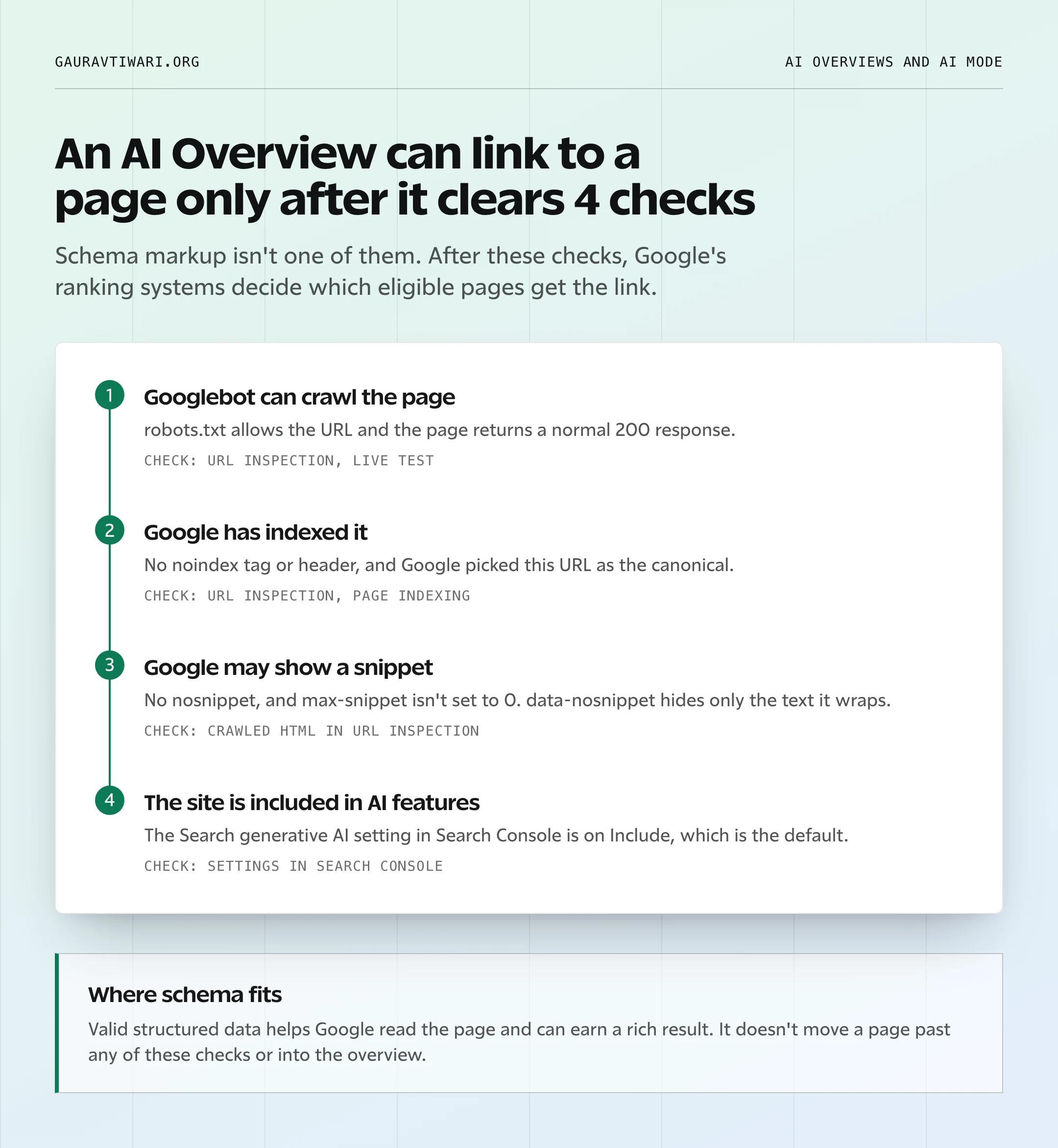
The 4th check is newer than most advice on this topic. Google’s generative AI guide now says a site must be included in Search generative AI features in Search Console to be eligible. Include is the default, so most sites are already in.
The Search Generative AI Setting
The setting lives under Settings in Search Console. It has 2 states:
- Include (default): links and content from the site can appear in AI Overviews, AI Mode and generative AI features in Discover.
- Exclude: the site’s links and content don’t appear in those features, and the site gets no impressions or traffic from them.
Google says this control isn’t used as a ranking or inclusion signal for the rest of Search. It doesn’t affect AI training either, which is what Google-Extended is for. A change generally takes a few days to apply.
Schema.org, Rich Results and AI Overviews
Most of the confusion comes from treating 3 different things as one. Schema.org is a vocabulary, and Google rich results are search features that read a small part of it. AI Overviews are a separate feature that needs neither.
| Layer | What it is | Needs structured data? | What success looks like | How to check |
|---|---|---|---|---|
| Schema.org vocabulary | An open set of types and properties used by many systems | It is the markup | A valid, consistent graph | Schema Markup Validator |
| Google rich results | Search features with their own documentation | Yes, following each feature’s guide | An enhanced result, which Google never guarantees | Rich Results Test and Search Console reports |
| AI Overviews and AI Mode | Generated answers with supporting links | No | Impressions as a supporting link | Generative AI performance report |
The practical consequence is that a type existing on schema.org doesn’t make it a type Google uses. And passing the Rich Results Test says nothing about whether an AI Overview will link to the page, because each tool checks only its own layer.
Controls That Change Eligibility
If a page never shows up in AI features, I’d look at these controls before touching any markup. Each one does something different, and 2 of them get mixed up all the time.
| Control | Where it lives | What it changes | Effect on AI Overviews |
|---|---|---|---|
| robots.txt for Googlebot | robots.txt file | Whether Google can crawl the URL | A page Google can’t crawl can’t be a supporting link |
| noindex | Robots meta tag or X-Robots-Tag header | Removes the page from Search | Removes it from AI features too |
| nosnippet | Robots meta tag or header | No text snippet for the page | Text from the page isn’t shown in AI features |
| max-snippet | Robots meta tag or header | Caps the snippet length | Limits how much text Google can show |
| data-nosnippet | HTML attribute on an element | Hides that element from snippets | Only that text is held back |
| Search generative AI setting | Search Console, Settings | Site-level include or exclude | Exclude removes the site from AI Overviews, AI Mode and Discover AI features |
| Google-Extended | robots.txt user agent token | Use of content for Gemini training and grounding | None on Search or AI Overviews |
Every tag in this table works only after Google recrawls the page, which can take days or longer. URL Inspection shows the HTML Googlebot actually fetched, so it’s the place to confirm a tag is really there.
Google-Extended Is Not an AI Overviews Switch
Google-Extended is a robots.txt token that controls whether Google can use crawled content to train future Gemini models and to ground answers in Gemini Apps and Vertex AI. The Google crawler documentation says it doesn’t affect a site’s inclusion in Google Search and isn’t a ranking signal.
So blocking it is a training decision. If the goal is to stay out of AI Overviews, the Search generative AI setting is the documented route, and noindex or nosnippet are the blunt ones. I covered the Cloudflare side in how to block AI training without blocking Google Search.
Which Schema Types Still Matter
For a blog or publisher site, the list is short. I rank types by how well Google documents them, how often a publisher needs them and how much damage a mistake does.
| Priority | Type | What Google uses it for | Worth adding? |
|---|---|---|---|
| First | Article or BlogPosting | Headline, dates, images and author | Yes, on every post |
| First | Organization or Person | Site owner details, logo, knowledge panel facts | Yes, once, on the home or about page |
| Second | BreadcrumbList | The breadcrumb trail in results | Yes, when breadcrumbs are visible |
| Second | Product, Offer and merchant listings | Product snippets and shopping results | Only on real product pages |
| Second | Review and AggregateRating | Review snippets for supported types | Only for genuine reviews of one item |
| Retire | FAQPage | Nothing in Google Search since May 7, 2026 | No, as a rich result or an AI tactic |
| Retire | HowTo | Nothing, since 2023 | No |
| Skip | Types a plugin adds by default, such as a decorative ItemList | Nothing visible | No |
Article and BlogPosting
Google’s Article structured data has no required properties. Google asks for the properties that apply, and these are the ones I’d always fill:
headlinethat matches the visible titleimagewith crawlable URLs, ideally in 16×9, 4×3 and 1×1 versions of at least 50,000 pixels eachdatePublishedanddateModifiedin ISO 8601 format with a time zoneauthoras a Person or Organization withnameand aurlorsameAs
Each author goes in their own author field. Google asks site owners not to merge several names into one string or put a job title inside name.
It is wise to pick the most specific type that’s true. BlogPosting fits a blog post, and NewsArticle suits news reporting. dateModified should change only when the content changed, because a plugin that bumps it on every save tells Google the page is fresher than it is.
Organization and Person
Google recommends Organization markup on the home page or one page that describes the organization. It doesn’t need to be on every page. For a personal site like this one, a Person node does the same job.
The fields I’d include:
name,urlandlogosameAslinks to real profiles only- contact details or an address only where they’re real and relevant
- the most specific accurate subtype, such as OnlineStore
- a stable
@id, such ashttps://example.com/#organization
The @id matters more than people think. It lets every post point to the same entity instead of describing it again with slightly different details.
BreadcrumbList
Breadcrumb markup should follow the trail a reader actually sees. Google recommends a typical user path to the page rather than a copy of the URL folders, so a post filed under one category gets that category in the trail even if the URL has no folder at all.
Product, Offer and Reviews
Product markup belongs on pages that sell or describe one product. Google treats product snippets and merchant listings as separate experiences, and a Merchant Center feed can carry the same data for stores.
Review markup is where publishers get into trouble. Google’s review snippet guidelines set these limits:
- A review has to be about one specific item, not a category or a list.
- A business can’t mark up reviews about itself on its own pages with LocalBusiness or Organization markup, and that includes embedded third-party review widgets.
- Ratings collected on other sites can’t be pulled into your own markup.
- Fake reviews and undisclosed incentivized reviews break a guideline Google added in July 2026.
A “best X” roundup with AggregateRating stars on the whole post is the usual mistake. I explained the compliant setup in how to add star ratings to WordPress posts.
FAQPage and HowTo
Both of these had their rich results taken away in stages:
- August 2023: Google limited FAQ rich results to well-known government and health sites.
- September 14, 2023: Google removed the HowTo documentation because the rich result was no longer shown.
- May 7, 2026: FAQ rich results stopped appearing in Google Search for every site.
- June 15, 2026: Google removed the FAQ structured data documentation.
A visible FAQ section is still useful for readers, and this site keeps them. The FAQPage JSON-LD behind it earns nothing in Google Search now, and Google has never listed it as an AI Overview requirement. The full history is in my guide to FAQ schema in WordPress.
I’d also turn off any plugin setting that adds FAQPage markup to every post by default. The same goes for other types a plugin offers just because it can. Google’s guidelines say the main structured data type should reflect the main focus of the page, and a recipe type on a woodworking post helps nobody.
A Clean JSON-LD Graph for WordPress
The cleanest setup is one connected graph per page, with each entity defined once and referenced by @id. These are the rules I’d follow:
- One Organization or Person node for the site owner, with the same
@idon every page - One Person node per real author, matching the visible byline
- One main entity per URL, usually BlogPosting or Product
- A BreadcrumbList only where breadcrumbs are visible
- References by
@idinstead of repeated copies of the same entity - Nothing in the JSON-LD that a reader can’t see on the page, apart from admin details such as a logo URL
This example shows the shape for a blog post. It is a sketch to learn from, not markup to paste as is:
{
  "@context": "https://schema.org",
  "@graph": [
    {
      "@type": "Person",
      "@id": "https://example.com/#person",
      "name": "Jane Doe",
      "url": "https://example.com/about/",
      "sameAs": ["https://www.linkedin.com/in/janedoe"]
    },
    {
      "@type": "WebSite",
      "@id": "https://example.com/#website",
      "url": "https://example.com/",
      "name": "Example Blog",
      "publisher": { "@id": "https://example.com/#person" }
    },
    {
      "@type": "WebPage",
      "@id": "https://example.com/schema-guide/#webpage",
      "url": "https://example.com/schema-guide/",
      "isPartOf": { "@id": "https://example.com/#website" },
      "breadcrumb": { "@id": "https://example.com/schema-guide/#breadcrumb" }
    },
    {
      "@type": "BlogPosting",
      "@id": "https://example.com/schema-guide/#article",
      "headline": "How to Use Schema Markup",
      "datePublished": "2026-11-09T09:00:00+05:30",
      "dateModified": "2026-11-09T09:00:00+05:30",
      "image": ["https://example.com/images/schema-guide-16x9.jpg"],
      "author": { "@id": "https://example.com/#person" },
      "publisher": { "@id": "https://example.com/#person" },
      "mainEntityOfPage": { "@id": "https://example.com/schema-guide/#webpage" }
    },
    {
      "@type": "BreadcrumbList",
      "@id": "https://example.com/schema-guide/#breadcrumb",
      "itemListElement": [
        { "@type": "ListItem", "position": 1, "name": "Blog", "item": "https://example.com/blog/" },
        { "@type": "ListItem", "position": 2, "name": "How to Use Schema Markup" }
      ]
    }
  ]
}
Every value in it has to match the page: the headline, the byline, the dates and the breadcrumb trail.
What I Found on This Site
I checked the JSON-LD on my own entity SEO audit post. This site runs Rank Math, the WordPress SEO plugin that handles titles, sitemaps and schema here, and its Pro version prints one graph with 6 nodes:
- Person
- WebSite
- ImageObject
- BreadcrumbList
- WebPage
- NewsArticle
The author and the publisher both point to the same #person @id, which is exactly what a personal site wants. 2 things weren’t perfect, and both are common:
- The headline doesn’t match the H1. The schema
headlinecomes from the SEO title, “Entity SEO Audit: 5 Checks to Reduce Brand Confusion”, while the page shows “Entity SEO Audit: Build a Brand Google Can Verify”. Both describe the page, but the visible title is the safer source. - The type is NewsArticle on a blog post. Google’s Article documentation covers both types, so this costs nothing in Search today. BlogPosting is still the more accurate label.
Neither of these will make or break AI Overview visibility. This is the kind of drift that builds up on any site that has run an SEO plugin for years, and it’s cheap to fix.
Duplicate and Conflicting Schema
Most broken graphs on WordPress come from more than one plugin writing schema. These are the usual collisions:
- The theme, the SEO plugin and a schema plugin each print an Organization with a different name or logo.
- An author box plugin adds a Person with a different URL than the SEO plugin’s author.
- WooCommerce, a review plugin and the SEO plugin each print Product markup with different prices or stock.
- An old FAQ block still adds FAQPage to every post.
This is the order I’d follow to clean it up:
- An inventory of every
application/ld+jsonblock, in the page source and in the rendered page - One primary schema source, usually the SEO plugin
- Overlapping schema modules switched off everywhere else
- Names, URLs, logos and dates lined up with what the page shows
- A fresh test of a post, a page, a category archive and a product
If you’re still choosing the plugin that owns your schema, my Rank Math vs Yoast comparison covers how each one handles it.
WordPress Rollout Checklist
Before changing any markup, I’d take a baseline so there’s something honest to compare against later:
- a verified Search Console property
- the Search generative AI setting confirmed as Include, unless excluding is a deliberate choice
- indexable templates for posts, pages and products
- an export of the Generative AI performance report, if the property has enough impressions to show it
- the top 20 URLs by organic clicks, and by generative AI impressions where available
Then I’d work through the changes in this order:
| Order | Change | Effort | Why it sits here |
|---|---|---|---|
| 1 | Crawl and index blockers on important pages | Medium | Eligibility comes before everything else |
| 2 | One Organization or Person node with logo and sameAs | Small | Home or about page only |
| 3 | Author Person nodes that match visible bylines and bios | Medium | Follows Google’s author guidance |
| 4 | Article fields synced to the visible title, dates and images | Small | Fixes headline and date drift |
| 5 | Visible breadcrumbs plus BreadcrumbList | Small | Only if the site uses breadcrumbs |
| 6 | Automatic FAQ and HowTo markup turned off | Small | Visible FAQs can stay |
| 7 | Product and Offer accuracy | Medium to large | Stores only |
| 8 | Review markup audit | Medium | The biggest policy risk |
| 9 | Content structure on the top pages | Large | Editorial work, not schema |
| 10 | Measurement setup | Medium | Covered in the next sections |
Validation Workflow
Each tool checks a different thing, so I’d use them in this order:
- The Schema Markup Validator checks the vocabulary and the graph. It doesn’t check anything Google-specific.
- The Rich Results Test checks eligibility for Google’s supported rich results. Critical errors come first.
- URL Inspection in Search Console shows what Googlebot fetched and whether the page is indexed. It’s also where you request indexing after a fix.
- The enhancement reports in Search Console track valid and invalid items after a deploy, for the features Google still shows.
None of these predicts AI Overview selection, so a clean pass tells you the markup is correct and nothing more.
Content Structure That Helps Readers
Google’s guidance for generative AI features points back to the basics:
- original, people-first content
- clear headings and sections
- important content in text that Googlebot can read
- internal links and a good page experience
It also warns against scaled content made only to catch fan-out queries, and its spam policies now apply to generative AI responses too.
These habits help a reader first, and they also make a page easier to quote:
- an answer in the first lines of a section when the heading is a question
- passages that make sense on their own, with the subject named instead of “it” or “this”
- real HTML structure, with headings in order, lists and tables for comparisons
- original evidence such as screenshots, measurements and dated observations
- a visible FAQ for genuine follow-up questions
- an updated date only when the content changed
What I wouldn’t claim is that any of this has a fixed size or count. Google says there’s no need to chunk content for AI, and nobody outside Google knows an ideal passage length. I went deeper on formatting in how to format blog posts for AI search and in my AI search content optimization checklist.
How to Measure AI Overview Visibility
Measurement is where most reports go wrong, because 5 different things get called “AI Overview traffic.” I’d keep them apart:
| What you track | What it means | Where the evidence comes from |
|---|---|---|
| Feature presence | An AI Overview or AI Mode answer appeared for the query | Manual checks of a fixed query set |
| Supporting-link impression | A link to your page was shown in the feature | Generative AI performance report |
| Mention in the answer | The generated text used your brand or content | Manual checks only, since Search Console has no citations metric |
| Click | Someone clicked your link from the feature | Performance report, inside the Web search type |
| Visit and conversion | What happened on the site afterward | GA4, server logs and conversion tags |
What Search Console Shows
Search Console now counts AI features in 2 places, and they answer different questions.
The Performance report. Impressions, clicks and position from AI Overviews and AI Mode are counted inside the normal Web search type, mixed with every other result. Google’s counting rules for these features:
- An AI Overview takes one position, and every link in it gets that same position.
- A click on an external link in an AI Overview or AI Mode counts as a click.
- A follow-up question in AI Mode counts as a new query.
The Generative AI performance report. Google announced it on June 3, 2026 and rolled it out to all sites worldwide on August 31, 2026. It shows impressions only, with no clicks or CTR. The details:
- dimensions for pages, countries, dates and devices
- search type filters for “Web: text-based” and “Web: multimodal”
- a separate report for Discover
- no data when the site doesn’t have enough generative AI impressions, or when the site is excluded through the Search generative AI setting
It is an impressions report for supporting links. I’d never present it as a citations ledger, and I’d treat third-party AI Overview trackers as estimates from their own samples, not as Google’s numbers.
A Controlled Query Panel
Search Console can’t tell you whether an AI Overview appeared and linked to someone else, so I’d add a small manual panel. This is the setup I’d use:
- 30 to 50 queries mapped to target URLs, mixing informational, comparison, how-to and brand queries
- one fixed country, with mobile and desktop recorded separately
- a logged-out browser profile to keep personalization low
- for each check: the date and time, whether an AI Overview appeared, whether your URL was a supporting link, which competitors were linked and a screenshot
- the same person following the same steps, every week or every 2 weeks
From that, 2 rates are honest to report: how often the feature appears for your panel, and how often your URL is a supporting link when it does.
Results move for reasons that have nothing to do with your markup:
- location and language
- leftover personalization
- Google’s own experiments and interface tests
- small changes in query wording
- page updates during the test
- seasonal demand
- a panel too small to show a real change
GA4 and Server Logs
GA4 has no clean “AI Overview” channel. Clicks from AI features usually arrive with a Google referrer, mixed with other organic clicks. My suggestion is to join GA4 landing-page data with the pages that gained generative AI impressions in Search Console, for the same dates. The attribution limit should sit right next to those numbers.
Server logs show Googlebot crawling, which helps with crawl hygiene. They show nothing about citations.
Testing a Schema Change
If you want to see what a markup cleanup does, I’d set it up as a small test rather than a sitewide change:
- a group of 10 to 20 URLs that get the schema cleanup and nothing else
- a control group of similar URLs with no changes
- content rewrites kept out of the schema group, or run as a group of their own
- rich result validity, search appearance and indexing issues as the main measures
- generative AI impressions on those URLs as a secondary observation
Whatever moves, I’d report it as an association. A schema fix and a jump in AI impressions in the same month don’t prove that one caused the other.
A 30, 60 and 90 Day Plan
| Window | Work | What to compare |
|---|---|---|
| Day 0 | Baselines from the Performance report, the Generative AI report, rich result status and the first panel run | Nothing yet |
| Days 1 to 30 | Crawl and index fixes, consistent Organization, Person and Article data, conflicting schema removed, sample URLs validated and recrawled | Rich result errors before and after |
| Days 31 to 60 | Breadcrumb, product and review cleanup, content structure on the top panel URLs, the second panel run | Invalid item counts and panel rates |
| Days 61 to 90 | Generative AI impression trends read with their caveats, next content priorities decided | Impressions by page, panel rates and conversions |
At the end, I’d write the result up in a fixed format so nobody overclaims:
- changes shipped
- URLs in the test and control groups
- rich result validity before and after
- generative AI impressions before and after, for the property and the top URLs
- query panel presence and supporting-link rates
- anything else that changed in the same period
- the claims the report doesn’t make
Troubleshooting
Most problems trace back to one layer. This is where I’d look first:
| Symptom | Likely cause | What I’d check first |
|---|---|---|
| No supporting links anywhere on the site | Eligibility, the AI setting or low demand | The Search generative AI setting, indexed pages and whether target queries show AI Overviews at all |
| The Generative AI report is missing | Too few impressions, or the site is excluded | The setting, then the query panel while volume builds |
| Rich Results Test fails | Markup errors | Critical errors and missing required properties, then the plugin printing them |
| The validator passes but no rich result shows | The type isn’t a Google feature | Whether Google still supports the type, such as FAQ or HowTo |
| 2 different Organization names in the source | A plugin conflict | Every ld+json block on the page |
| Review stars on blog posts | Review markup on a list or category | itemReviewed and the review guidelines |
| A snippet still shows after adding nosnippet | No recrawl yet, or the tag isn’t in the fetched HTML | The crawled HTML in URL Inspection |
| Google-Extended is blocked but the site still appears in AI Overviews | Expected behavior | The Search generative AI setting, if exclusion is the goal |
FAQs on Schema and AI Overviews
No. Google says adding an llms.txt file will neither help nor harm a site’s visibility or rankings in its generative AI features. It is worth keeping only if another system you care about reads it.
Not in Search Console. The Generative AI performance report breaks impressions down by page, country, date and device, with no query dimension. A small manual query panel fills that gap.
Google can issue a manual action for structured data that breaks its guidelines, such as markup for content readers can’t see. That action removes rich result eligibility for the affected pages, and Google says it doesn’t change how those pages rank in web search.
Rank Math builds a connected graph with a Person or Organization, WebSite, WebPage and an article type, which covers the types that matter for a blog. I’d still check that the headline and author match the visible page and switch off any FAQ markup you don’t need. No plugin setting is specific to AI Overviews, because Google doesn’t require one.
Google has to recrawl the page first. Requesting indexing in URL Inspection can speed that up for a single URL, and rich result reports usually update over the following days. The Search generative AI setting generally takes a few days to apply.
Final Remarks
If you’re still unsure whether another week of schema work will move your AI visibility, I’d look at the order of the work instead. Eligibility comes first, then a clean graph that matches the page, then honest measurement. Schema sits in the middle of that list, and describing the page accurately is the job I’d ask of it.
If your site has years of plugin schema stacked on top of each other, my schema and structured data service covers the audit and the cleanup.
Tell Google you want more of this.
Add Gaurav Tiwari as a preferred sourceOne tap, and this site shows up more often in your own Top Stories, AI Overviews and AI Mode. Remove it any time.
Disclaimer: This site is reader-supported. If you buy through some links, I may earn a small commission at no extra cost to you. I only recommend tools I trust and would use myself. Your support helps keep gauravtiwari.org free and focused on real-world advice. Thanks. - Gaurav Tiwari