
Emailit for EmDash Send EmDash Email Through Emailit
Without an email provider, EmDash can only show invite links for you to share by hand. I wrote this plugin to give it one.
It sends EmDash’s invites, magic-link sign-ins, account recovery and plugin email through Emailit, an email sending service with an API.
pnpm add @gatilab/emdash-emailit- Free on npm
- MIT licensed, with no paid tier and no license key.
- 1 permission
hooks.email-transport:register.- EmDash 1.1 or later
- Tested on EmDash 1.4.0.
- New for EmDash
- It isn’t a port. WordPress sends mail on its own.
What Emailit for EmDash Does One Provider for Every Email
Once it’s registered, EmDash and its plugins send through it.
EmDash’s Own Mail
Invites, magic-link sign-ins and account recovery.
Plugin Email
Any plugin email sent with ctx.email.send() goes through it too.
An Encrypted API Key
The key is stored encrypted in the admin, or read from the EMAILIT_API_KEY environment variable.
Editable Sender Details
From name, From address and Reply-To are editable in the admin. A message’s own Reply-To always wins.
Failures Are Reported
A failed send throws with Emailit’s status and message. EmDash then reports the failure to whatever sent the email.
HTML for Text-Only Mail
A text-only message gets an HTML version, with the text escaped in a pre-formatted block.
What the Settings Look Like in the EmDash admin
I took these on a test copy of an EmDash site with the plugin installed.
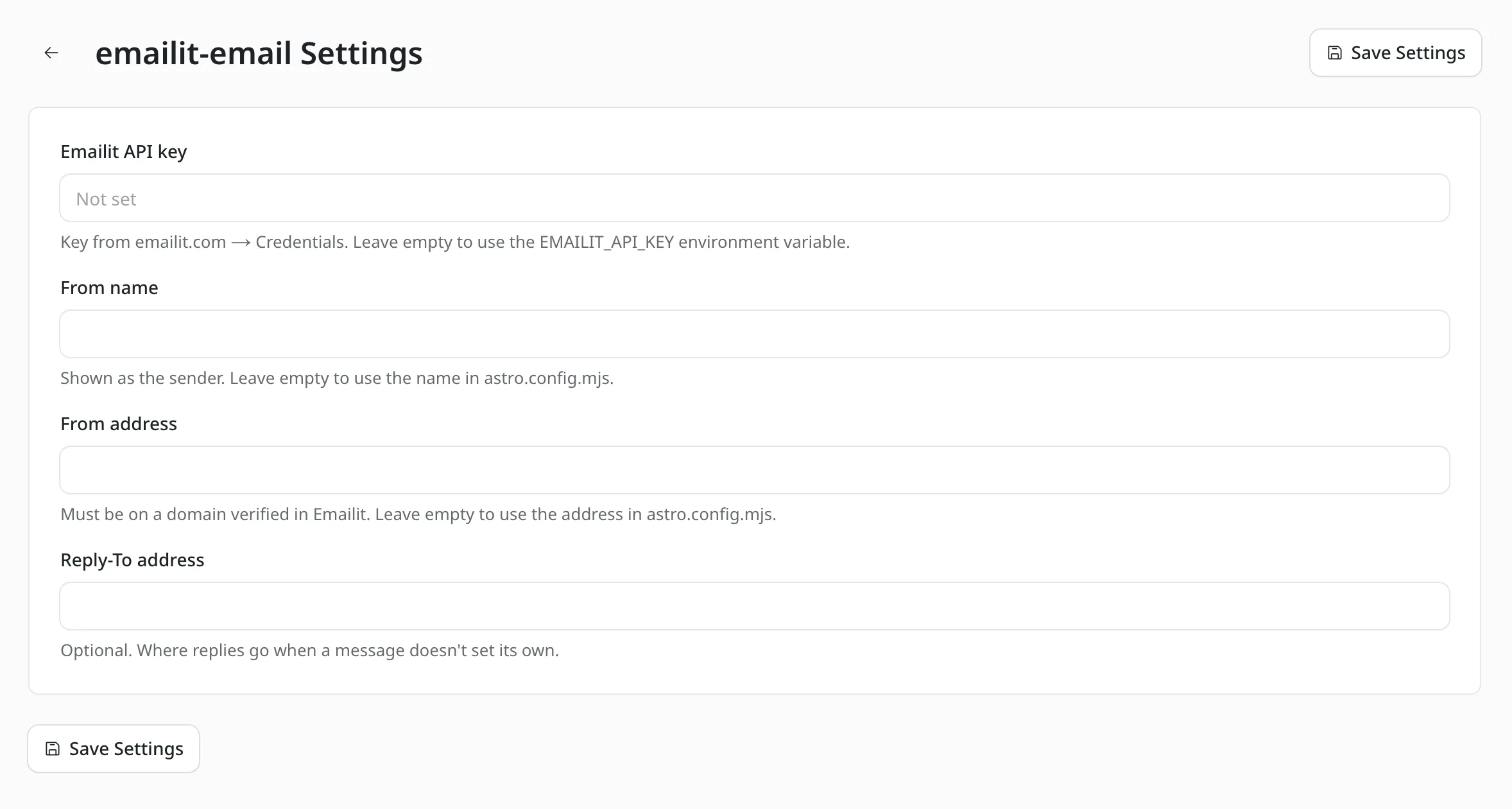
The settings screen
The API key, From name, From address and Reply-To address. An empty field falls back to the environment variable or the values in astro.config.mjs.
How to Install Emailit for EmDash
You need an Emailit account and a sending domain you’ve verified there.
Add the Package
Run this in your EmDash project.
pnpm add @gatilab/emdash-emailitRegister the Plugin
The
fromaddress must be on a domain you’ve verified in Emailit. When this is the only email provider, EmDash selects it automatically.// astro.config.mjs import emdash from "emdash/astro"; import { emailit } from "@gatilab/emdash-emailit"; export default defineConfig({ integrations: [ emdash({ plugins: [emailit({ from: "Example <noreply@example.com>", replyTo: "hello@example.com" })], }), ], });Add the API Key
The key goes in Plugins › emailit-email › Settings, or in the
EMAILIT_API_KEYenvironment variable. Encrypted settings needEMDASH_ENCRYPTION_KEYon the site, and this command generates one.npx emdash secrets generateSend a Test
Settings › Email › Send test email in the admin sends a real email.
The Settings And What Each Falls Back To
Each admin setting has a fallback, so the plugin also works from config alone.
| Setting | Fallback When Empty |
|---|---|
| Emailit API key (stored encrypted) | The EMAILIT_API_KEY environment variable |
| From name | The name in from |
| From address | The address in from |
| Reply-To | replyTo. A message’s own Reply-To always wins. |
On Cloudflare Workers, EMAILIT_API_KEY is read from process.env, which Workers fill from secrets when the nodejs_compat flag is on.
What Emailit for EmDash Handles
The plugin is a transport. It delivers the mail that EmDash and its plugins create.
On WordPress this job belongs to plugins such as WP Mail SMTP, FluentSMTP and Post SMTP.
It Sends
- Invites
- Magic-link sign-ins
- Account recovery email
- Plugin email sent with
ctx.email.send()
It Leaves to You
- An Emailit account and API key
- A sending domain verified in Emailit
- The content of each email, which comes from EmDash or the plugin that sends it
- A safe copy of your encryption key: secrets encrypted with a lost key can’t be read
Permissions It Asks For
One, and it’s the one an email provider needs.
hooks.email-transport:register- Registers the plugin as EmDash’s email transport.
What It Needs
These come from the package and from Emailit.
- EmDash
- 1.1 or later. Tested on 1.4.0.
- Emailit
- An account, an API key and a verified sending domain.
- Encryption key
EMDASH_ENCRYPTION_KEY, when the API key is stored in the admin.- License
- MIT. Free to use, change and ship.
Emailit for EmDash Questions
Cost, the API key, testing and Cloudflare Workers.
Have a question that isn’t here? Ask me directly.
Is Emailit for EmDash Free?
The plugin is free and MIT licensed. Emailit is a separate service with its own account and pricing.
What Is Emailit?
Emailit is an email sending service. The plugin posts each message to its v2 emails API with the sender, recipient, subject, text and HTML.
Do I Need It if My Site Already Has an Email Provider?
No. EmDash needs one email provider. This plugin is for sites that want that provider to be Emailit.
Where Is the API Key Stored?
Encrypted in the plugin settings, which needs EMDASH_ENCRYPTION_KEY on the site. With the setting empty, the plugin reads the EMAILIT_API_KEY environment variable.
How Do I Check That Email Works?
Settings › Email › Send test email in the EmDash admin sends a real email through the plugin.
Does It Work on Cloudflare Workers?
Yes. On Workers, EMAILIT_API_KEY is read from process.env, which Workers fill from secrets when the nodejs_compat flag is on.
More EmDash Plugins For the Rest of Your Site
Emailit covers delivery. These 8 cover the other jobs a WordPress site usually leaves to plugins.
- Core FormsHTML forms with a submissions inbox
- Lead CaptureLead magnets with gated downloads
- Content Blocks10 editorial blocks with schema
- Dynamic DatesDate shortcodes that stay current
- Link ManagerBranded /go/ short links
- Product BoxBuying boxes with live Amazon prices
- FootnotesNumbered footnotes from a shortcode
- Scripts ManagerPer-page CSS, JavaScript and HTML