
Core Forms for EmDash HTML Forms With an Inbox and Spam Checks
A contact form built on WordPress has no EmDash version to move to, so it breaks on the new site. I ported Core Forms to fix that. You write the fields as plain HTML, and the plugin turns that markup into a working form.
It checks every submission for spam, saves it to an inbox in the EmDash admin and sends your emails and webhooks. Forms exported from the WordPress plugin import as they are.
pnpm add @gatilab/emdash-core-forms- Free on npm
- MIT licensed, with no paid tier and no license key.
- 2 permissions
email:sendandnetwork:request:unrestricted.- EmDash 1.1 or later
- Tested on EmDash 1.4.0.
- WordPress forms import
- Form IDs, field names and messages stay the same.
What Core Forms Does From Plain HTML to a Working Form
The form is your HTML. The plugin adds everything around it.
Plain HTML Fields
A form is a few labels, inputs and a button. Fields marked required or type="email" are validated on the server as well as in the browser.
Spam Protection
Every form gets a honeypot, a rate limit per IP and a duplicate check. A form can also use Turnstile, reCAPTCHA v3 or hCaptcha.
AJAX With a Fallback
With JavaScript, the form posts in the background and shows its message inline. Without it, the browser posts normally and the message renders on the same page.
A Submissions Inbox
Submissions land in the EmDash admin with unread counts per form. You can filter them, mark spam, delete in bulk and export a form’s submissions as CSV.
Email, Autoresponder and Webhook Actions
Actions run after the response is sent, so a slow webhook never delays the visitor. Templates accept the WordPress plugin’s tokens, such as [all] and [CF_FORM_TITLE].
Events for Your Scripts
The form dispatches cf-submit, cf-success and cf-error events, so analytics code written for the WordPress plugin keeps working.
What Core Forms Looks Like in the admin and on the page
I took these on a test copy of an EmDash site with the plugin installed.
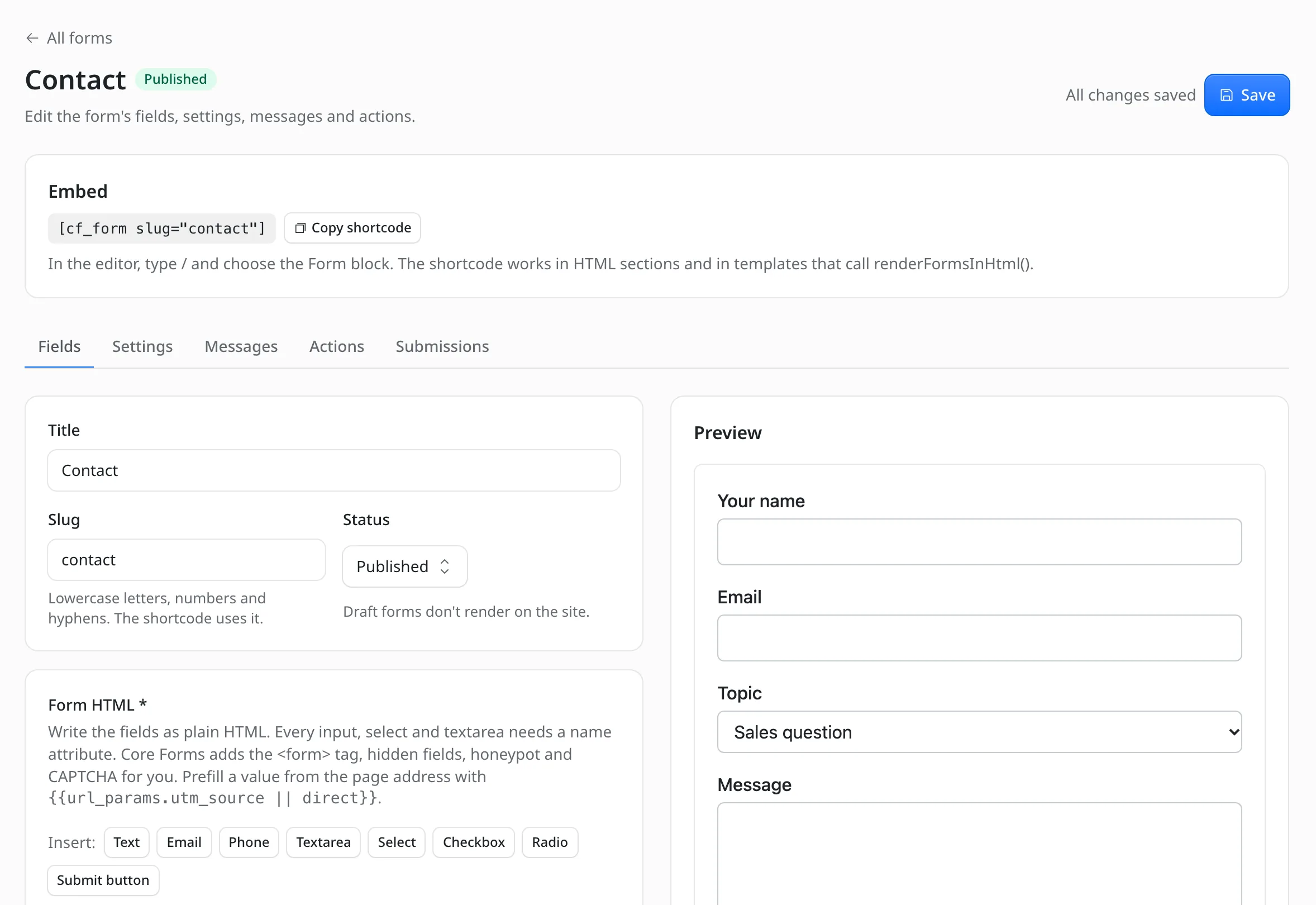
The form editor
You write the fields as plain HTML and the preview beside it shows the form. The embed shortcode sits at the top.
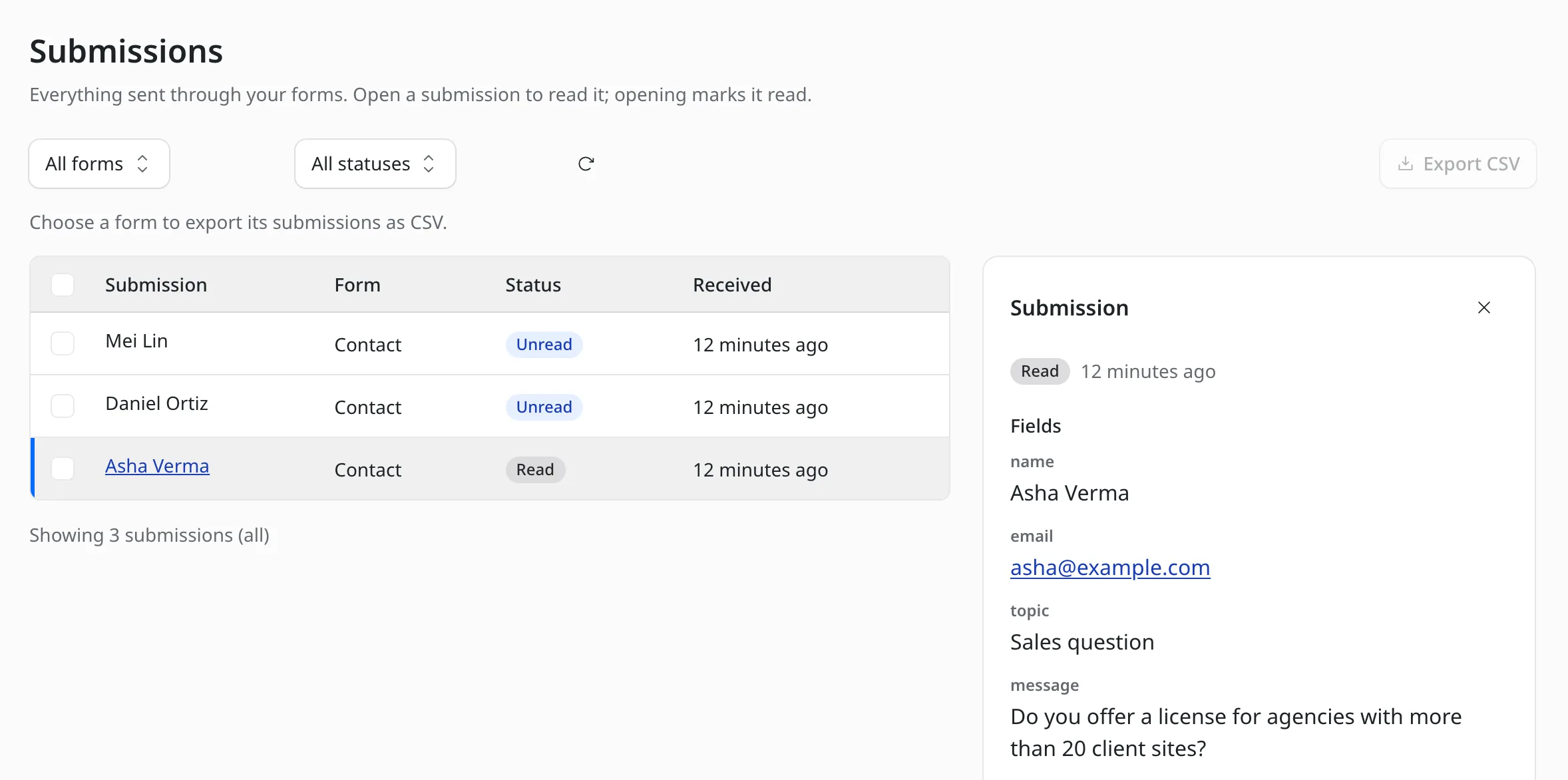
The submissions inbox
Open a submission to read every field. Opening it marks it read.
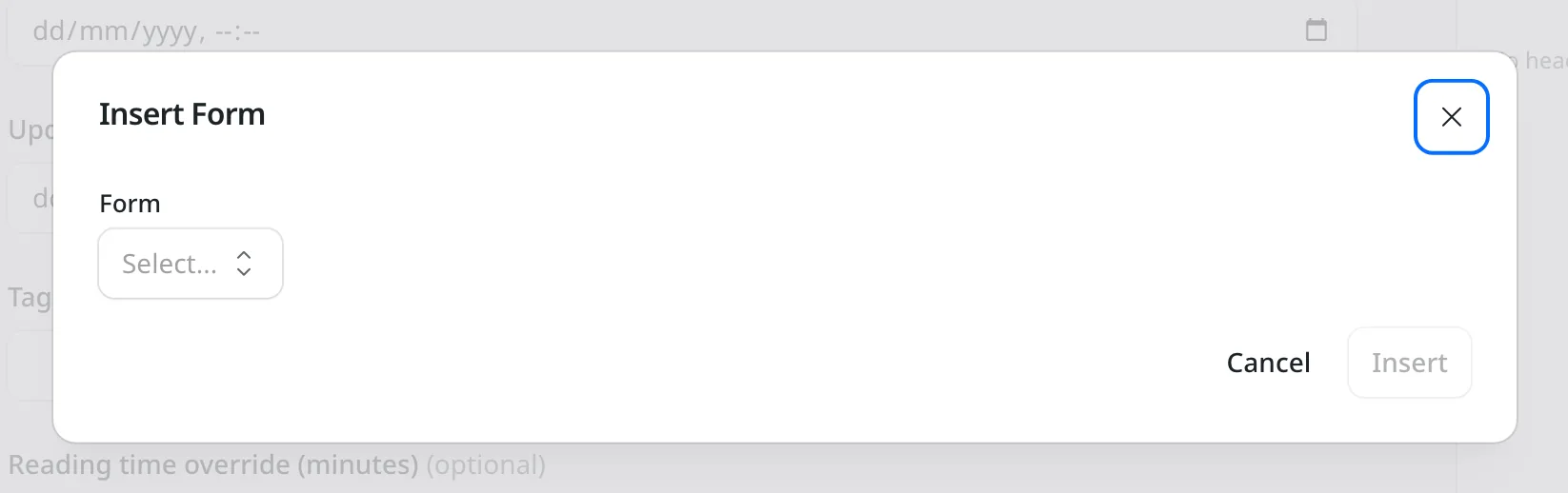
The Form block
Type / in the editor, choose Form and pick a saved form.
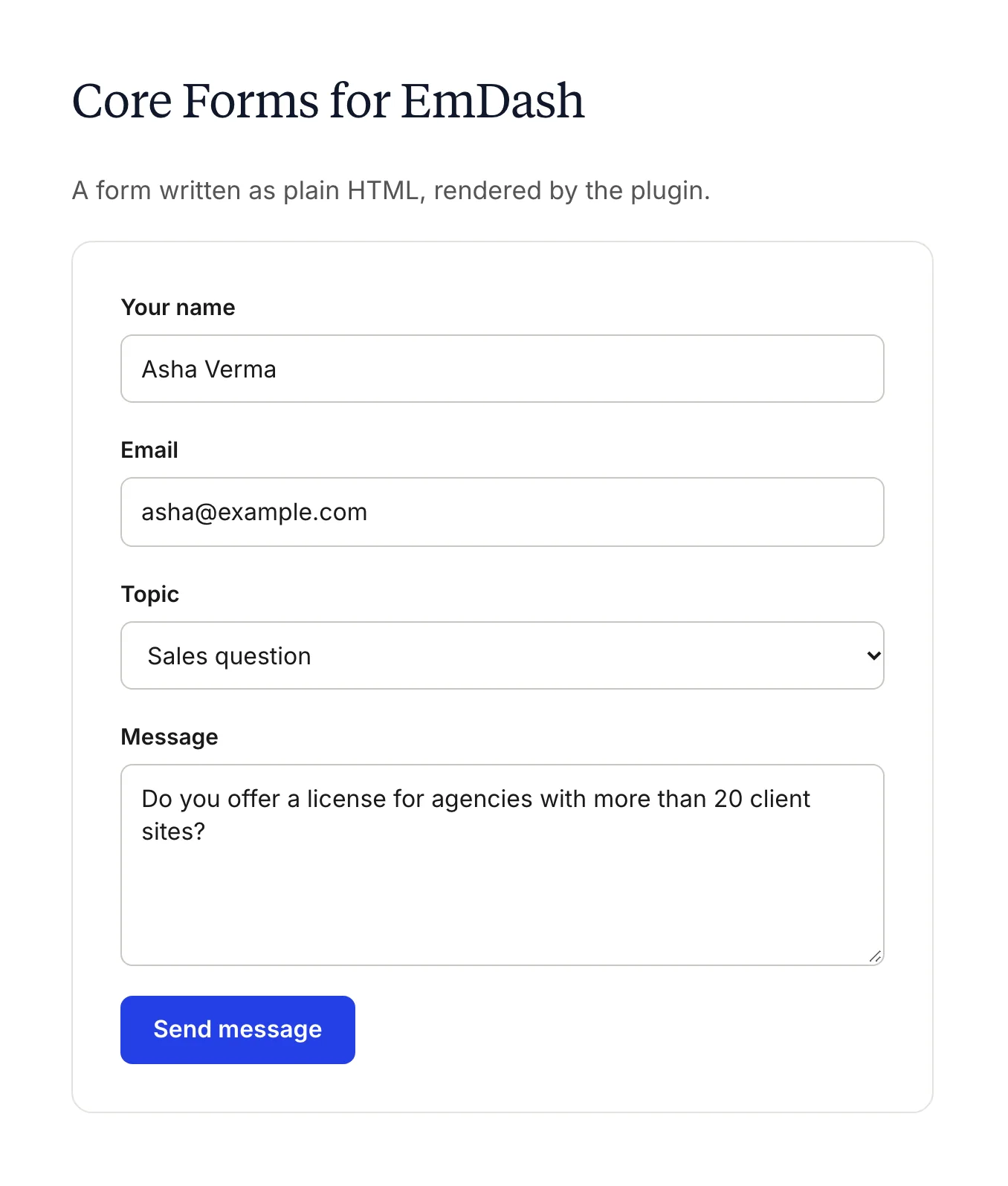
The form on the page
The same contact form on a test page. I styled it with a few lines of CSS for the demo, and your own CSS works the same way.
How to Install Core Forms for EmDash
The setup takes 3 steps. You add the package, register it in astro.config.mjs and place a form.
Add the Package
Run this in your EmDash project.
pnpm add @gatilab/emdash-core-formsRegister the Plugin
EmDash then asks you to approve the plugin’s 2 permissions.
// astro.config.mjs
import { coreForms } from "@gatilab/emdash-core-forms";

emdash({
	plugins: [coreForms()],
});
Show a Form
In the editor, insert the Form block and pick a form. In an Astro template, I’d use the component.
---
import { CoreForm } from "@gatilab/emdash-core-forms/astro";
---
<CoreForm slug="contact" />
How a Submission Is Handled 7 Checks, in This Order
The first check that fails ends the request with that form’s message.
| Check | What Happens |
|---|---|
| 1. Availability | The form must be published, inside its open and close schedule and under its submission limit. |
| 2. Honeypot | A bot that fills the hidden field gets a fake success. Nothing is stored or sent. |
| 3. Rate limit | Each IP gets a set number of submissions per form per hour. IPs are hashed before they’re used as keys. |
| 4. Validation | Required fields, email fields and maxlength, plus size limits of 20 KB per field, 200 KB per submission and 200 fields. |
| 5. CAPTCHA | Runs only when the form uses one. |
| 6. Duplicate check | The same answers from the same visitor within 10 minutes count as a success, but nothing new is stored. |
| 7. Save and act | The submission is stored if the form keeps submissions. The actions run after the response is sent. |
Only fields declared in the form’s markup are kept, so nobody can add extra keys to stored data, emails or webhooks.
Moving Forms From WordPress
Core Forms for EmDash reads the WordPress plugin’s export as it is. WordPress IDs are kept, so a [cf_form id="…"] embed inside imported content keeps working.
Re-importing updates forms in place.
Core Forms for EmDash
Carries Over
- Form IDs and field names
- Messages, settings and action templates
- Front-end markup, so existing CSS still applies
cf-*event listeners[cf_form]embeds inside imported content
Doesn’t Carry Over
- File uploads: the inputs render, but the server drops the files
- The
create_commentaction and other WordPress-only actions, which are imported but don’t run - Logged-in user tokens such as
[CF_USER_*], which render empty - A From address per action, because EmDash sends from your email provider’s address
The export is a short read-only WP-CLI script that ships with the package. After it runs, Import on the Forms screen takes the file.
wp eval-file export-core-forms.php > core-forms.jsonPermissions It Asks For
EmDash asks you to approve each one when you register the plugin. The plugin declares 2. EmDash’s Plugins screen lists 3, because it shows the unrestricted network permission as 2 lines.
email:send- Email and autoresponder actions. It needs an email provider plugin, such as Emailit for EmDash.
network:request:unrestricted- Webhooks to your own URLs and CAPTCHA verification.
What It Needs
These come from the package’s peer dependencies.
- EmDash
- 1.1 or later. Tested on 1.4.0.
- Astro
- 6 or later.
- React
- 19 or later, for the admin screens.
- License
- MIT. Free to use, change and ship.
Core Forms for EmDash Questions
Cost, CAPTCHA, email and what moves over from WordPress.
Have a question that isn’t here? Ask me directly.
Is Core Forms for EmDash Free?
Yes. It’s free and MIT licensed, with no paid tier and no license key. You can use it on client sites and change the code.
Do I Need the WordPress Plugin to Use It?
No. You can create forms from scratch on the Forms screen in the EmDash admin. The WordPress import is there for sites that already run Core Forms.
Which CAPTCHA Services Does It Support?
Cloudflare Turnstile, Google reCAPTCHA v3 and hCaptcha. You add the keys in the plugin settings and pick a provider per form. Secret keys are stored as secrets.
How Does It Send Email?
Through whichever email provider plugin your EmDash site uses. EmDash’s email API sends from the address set in that provider, so a From address per action isn’t used. In development, EmDash captures the mail at /_emdash/api/dev/emails.
Do Forms Work Without JavaScript?
Yes. The browser posts the form normally and lands back on the same page, where the message renders in place. One limit applies: EmDash only lets plugins redirect within the site, so a redirect URL on another site shows the success message instead.
Can Visitors Upload Files?
Not yet. File inputs render, but the server drops the files. If your forms depend on uploads, I’d wait for that before moving them.
More EmDash Plugins For the Rest of Your Site
Core Forms covers forms. These 8 cover the other jobs a WordPress site usually leaves to plugins.
- Lead CaptureLead magnets with gated downloads
- Content Blocks10 editorial blocks with schema
- Dynamic DatesDate shortcodes that stay current
- EmailitEmail delivery through Emailit
- Link ManagerBranded /go/ short links
- Product BoxBuying boxes with live Amazon prices
- FootnotesNumbered footnotes from a shortcode
- Scripts ManagerPer-page CSS, JavaScript and HTML