
Dynamic Dates for EmDash Date Shortcodes That Stay Current
A title like “Best Hosting in [year]” depends on something resolving that shortcode. On EmDash nothing does, so the title shows the raw tag. This plugin is the EmDash port of my Dynamic Month & Year into Posts plugin for WordPress.
It resolves [year], [monthyear], [age] and the rest of its 36 date shortcodes every time a page renders, with no republishing and no cron job.
pnpm add @gatilab/emdash-dynamic-dates- Free on npm
- MIT licensed, with no paid tier and no license key.
- No permissions
- It asks EmDash for no capabilities.
- EmDash 1.1 or later
- Tested on EmDash 1.4.0.
- 36 date shortcodes
- The same tags, attributes and output as the WordPress plugin.
What Dynamic Dates Does The Same Shortcodes, Resolved on Every Render
The dates resolve when a page renders, so the stored content never changes.
36 Date Shortcodes
Years, months, weekdays, Black Friday, days until a date, age and seasons. Each one reads the same attributes as its WordPress version.
SEO Variables Too
Rank Math’s %currentyear% and Yoast’s %%currentyear%% resolve as well.
A Countdown Block
The server renders the count, and a few lines of JavaScript recompute it in the browser. A cached page never shows yesterday’s number.
Meta Tags Covered
Shortcodes in the description and in the Open Graph and Twitter tags that <EmDashHead> renders resolve automatically.
Raw Values in the Editor
In EmDash’s inline editor, the raw value passes through untouched. Editors always see and save [year], never the year it resolves to.
Your Own Shortcodes
The same registry accepts your own tags, such as a company name or a price. A handler that throws leaves its shortcode as written and the page still renders.
What Dynamic Dates Looks Like in the editor and on the page
I took these on a test copy of an EmDash site with the plugin installed.
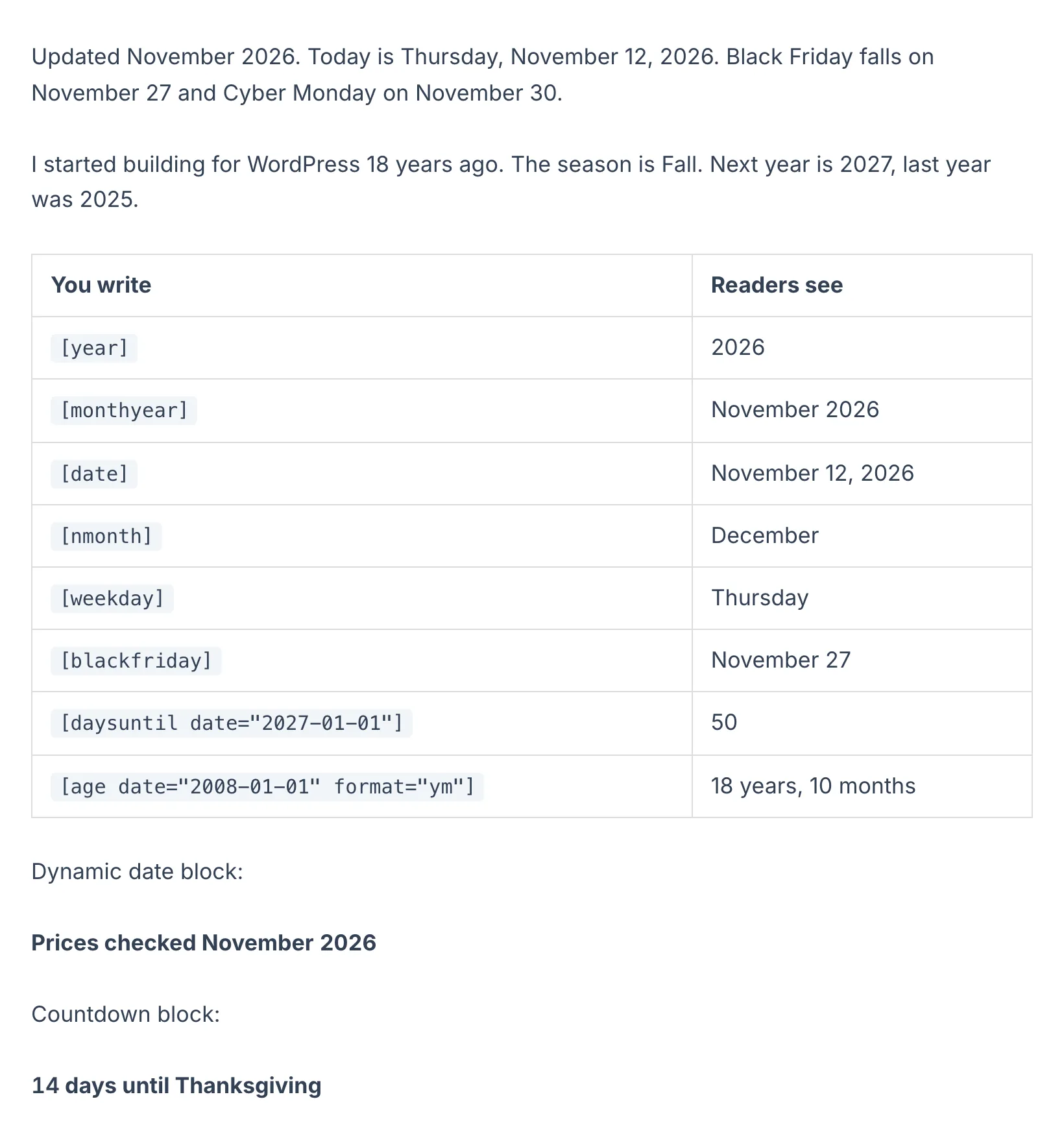
Shortcodes and what readers see
The left column is what I typed. The right column is what the page showed on the day of the test.
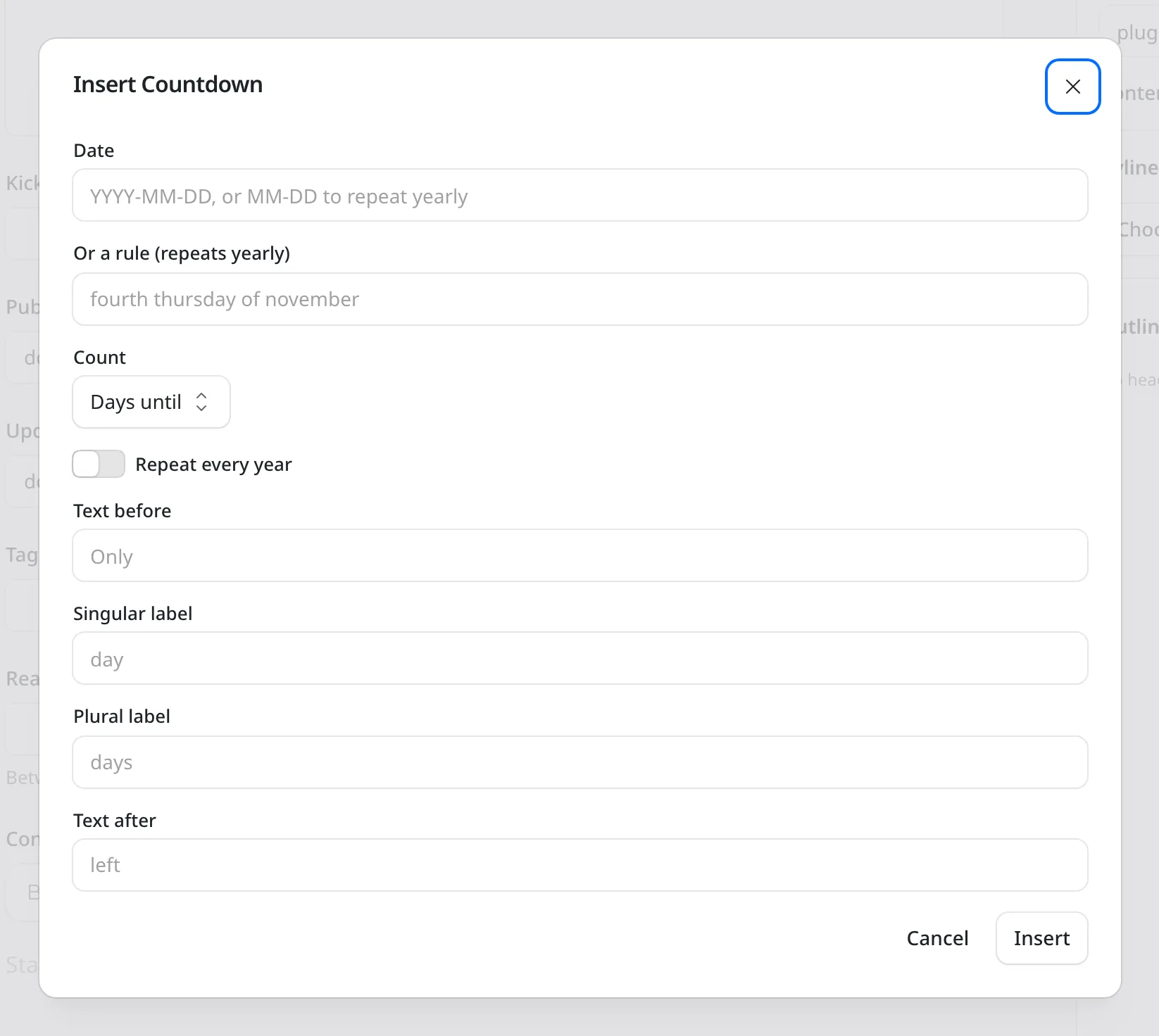
The Countdown block
It takes a date or a yearly rule, such as fourth thursday of november, and the text around the number.
How to Install Dynamic Dates for EmDash
EmDash has no global content filter like WordPress’s the_content, so shortcodes resolve where text is rendered. That adds a template change to the usual setup.
Add the Package
Run this in your EmDash project.
pnpm add @gatilab/emdash-dynamic-datesRegister the Plugin
timeZonedecides when today rolls over. It falls back to the site setting, then UTC.// astro.config.mjs import emdash from "emdash/astro"; import { dynamicDates } from "@gatilab/emdash-dynamic-dates"; export default defineConfig({ integrations: [ emdash({ plugins: [dynamicDates({ timeZone: "Asia/Kolkata" })], }), ], });Swap the Content Component
<DynamicPortableText>replaces EmDash’s<PortableText>. It resolves text, headings and the string fields of custom blocks, and it skips code blocks and URLs.--- import { DynamicPortableText } from "@gatilab/emdash-dynamic-dates/astro"; --- <DynamicPortableText value={post.data.content} published={post.data.publishedAt} modified={post.data.updatedAt} />Resolve the Title
EmDash doesn’t render
<title>, so your template resolves that one.--- import { resolveShortcodes } from "@gatilab/emdash-dynamic-dates/core"; --- <title>{resolveShortcodes(seoTitle)}</title>
The Shortcodes With Example Output
The examples show the output on October 5, 2026.
| Shortcode | Output |
|---|---|
[year] [year n=2] | 2026, 2028 |
[nyear] [pyear] | 2027, 2025 |
[month] [mon] | October, Oct |
[date] | October 5, 2026 |
[monthyear] [nmonthyear] | October 2026, November 2026 |
[weekday] [wd] | Monday, Mon |
[blackfriday] [cybermonday] | November 27, November 30 |
[daysuntil date="2026-12-25"] | 81 |
[age date="2008-01-01"] | 18 |
[age date="2008-01-01" format="ym"] | 18 years, 9 months |
[season] [season region="south"] | Fall, Spring |
[datepublished] [datemodified] | The entry’s dates, in your date format |
[[year]] prints a literal [year]. Tags are case-sensitive, as in WordPress, and unknown tags are left alone.
Moving Dates From WordPress
There’s nothing to export. The shortcodes travel inside your content, and the port reads them the way the WordPress plugin did.
The test suite checks the port’s output against output captured from the WordPress plugin.
Dynamic Dates for EmDash
Carries Over
- Every shortcode and attribute
- The same output formats as the WordPress plugin
- Rank Math and Yoast year variables
Doesn’t Carry Over
- Automatic resolution in content: you swap
<PortableText>for<DynamicPortableText> - The
<title>tag, which your template resolves
Permissions It Asks For
None. It reads text and returns text.
- Capabilities
- None.
page:metadatahook- Resolves shortcodes in the SEO tags that
<EmDashHead>renders. TheresolveMetadataoption controls it.
What It Needs
These come from the package’s peer dependencies.
- EmDash
- 1.1 or later. Tested on 1.4.0.
- Astro
- 6 or later.
- License
- MIT. Free to use, change and ship.
Dynamic Dates for EmDash Questions
Cost, WordPress parity, templates and caching.
Have a question that isn’t here? Ask me directly.
Is Dynamic Dates for EmDash Free?
Yes. It’s free and MIT licensed, with no paid tier and no license key.
Will My WordPress Shortcodes Render the Same?
Yes. The port uses the same shortcodes, attributes and output formats, and its test suite compares the output with output captured from the WordPress plugin.
Why Do I Have to Change My Templates?
EmDash stores content as Portable Text and has no global content filter. So the shortcodes resolve where text is rendered: through <DynamicPortableText> for content and resolveShortcodes() for strings such as the title.
Will a Cached Page Show an Old Date?
A cached page shows the date from the moment it was rendered. The countdown block is the exception, because it recomputes in the browser.
Can I Change the Time Zone and Language?
Yes. timeZone takes an IANA zone and decides when today rolls over. locale sets the month and day names, so fr-FR gives French names.
Can I Add My Own Shortcodes?
Yes. The registry takes your own tags with their defaults and a handler. The handler gets the attributes and the date renderer.
More EmDash Plugins For the Rest of Your Site
Dynamic Dates keeps dates current. These 8 cover the other jobs a WordPress site usually leaves to plugins.
- Core FormsHTML forms with a submissions inbox
- Lead CaptureLead magnets with gated downloads
- Content Blocks10 editorial blocks with schema
- EmailitEmail delivery through Emailit
- Link ManagerBranded /go/ short links
- Product BoxBuying boxes with live Amazon prices
- FootnotesNumbered footnotes from a shortcode
- Scripts ManagerPer-page CSS, JavaScript and HTML