
Content Blocks for EmDash 10 Editorial Blocks for the EmDash Editor
Review and tutorial posts lean on FAQs, callouts, pros and cons and comparisons. Those have no EmDash version, so I ported my GT ACF Blocks set.
Each block has an editor form in the EmDash admin and an Astro renderer for the public site. The FAQ and product review blocks can also output JSON-LD.
pnpm add @gatilab/emdash-content-blocks- Free on npm
- MIT licensed, with no paid tier and no license key.
- No permissions
- No hooks, routes, settings or network access.
- EmDash 1.1 or later
- Tested on EmDash 1.4.0.
- 0 runtime dependencies
- One small inline script, only on pages with an interactive checklist.
What Content Blocks Adds Blocks That Render Without Wiring
The blocks appear in the editor’s slash menu, and EmDash’s own <PortableText> renders them.
10 Blocks in the Slash Menu
FAQ, callout, expert opinion, stats, product review, pros and cons, comparison, checklist, social thread and related links.
Structured Data
The FAQ block can output FAQPage JSON-LD. The product review block can output Product or SoftwareApplication with a single Review.
Light and Dark Mode
Colors come from CSS custom properties, so a few overrides on :root match the blocks to your theme.
Accessible by Default
The FAQ uses native <details>, so it works with the keyboard and without JavaScript. Interactive controls are at least 44 px tall.
Sanitized Rich Text
HTML fields pass through a small sanitizer on the server. Scripts, styles and iframes are removed, and only safe links are kept.
Override Any Renderer
A component you pass to <PortableText> replaces the plugin’s renderer for that block type.
What the Blocks Look Like in the editor and on the page
I took these on a test copy of an EmDash site with the plugin installed.
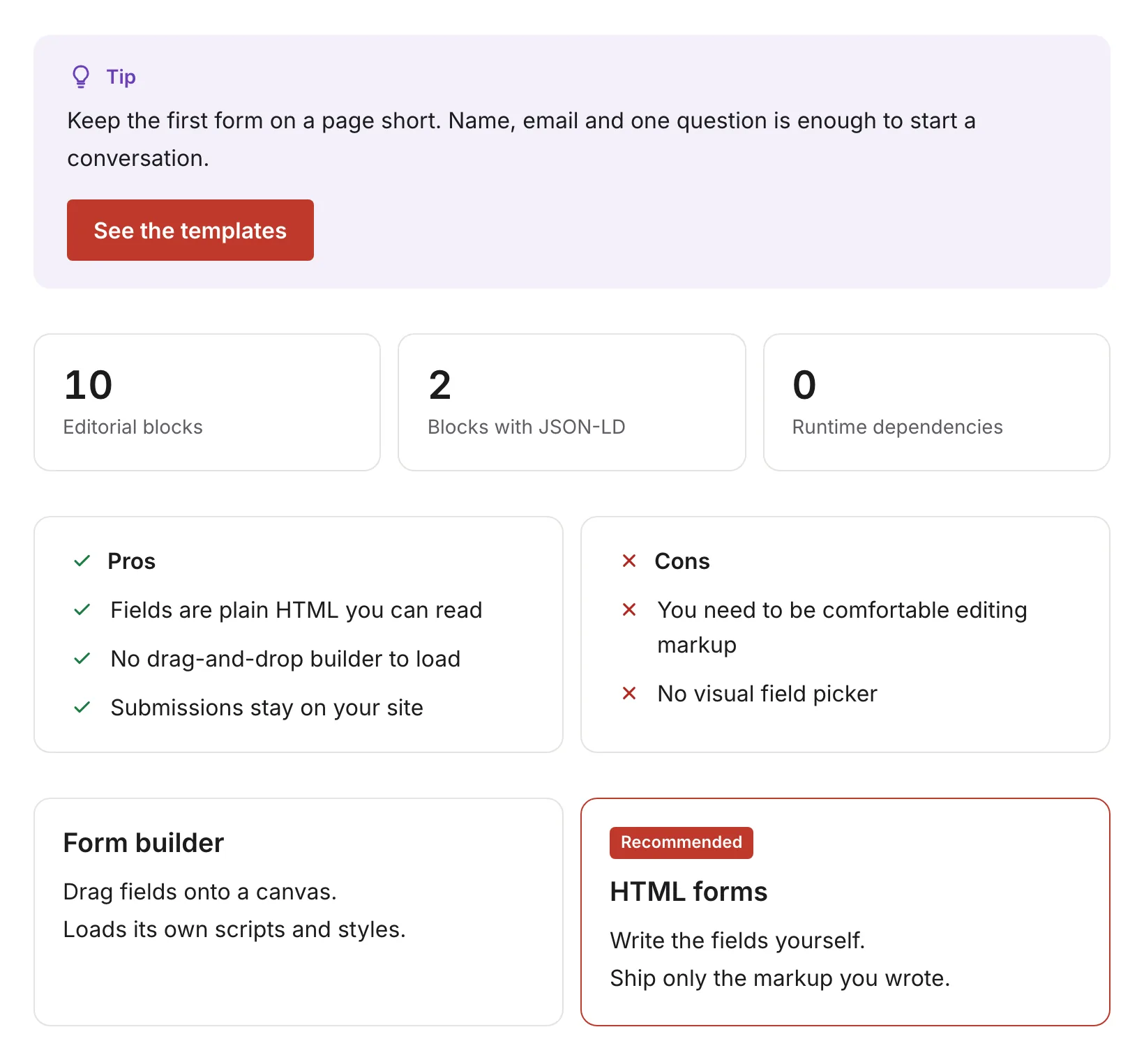
Callout, stats, pros and cons, comparison
4 of the 10 blocks on a test page.
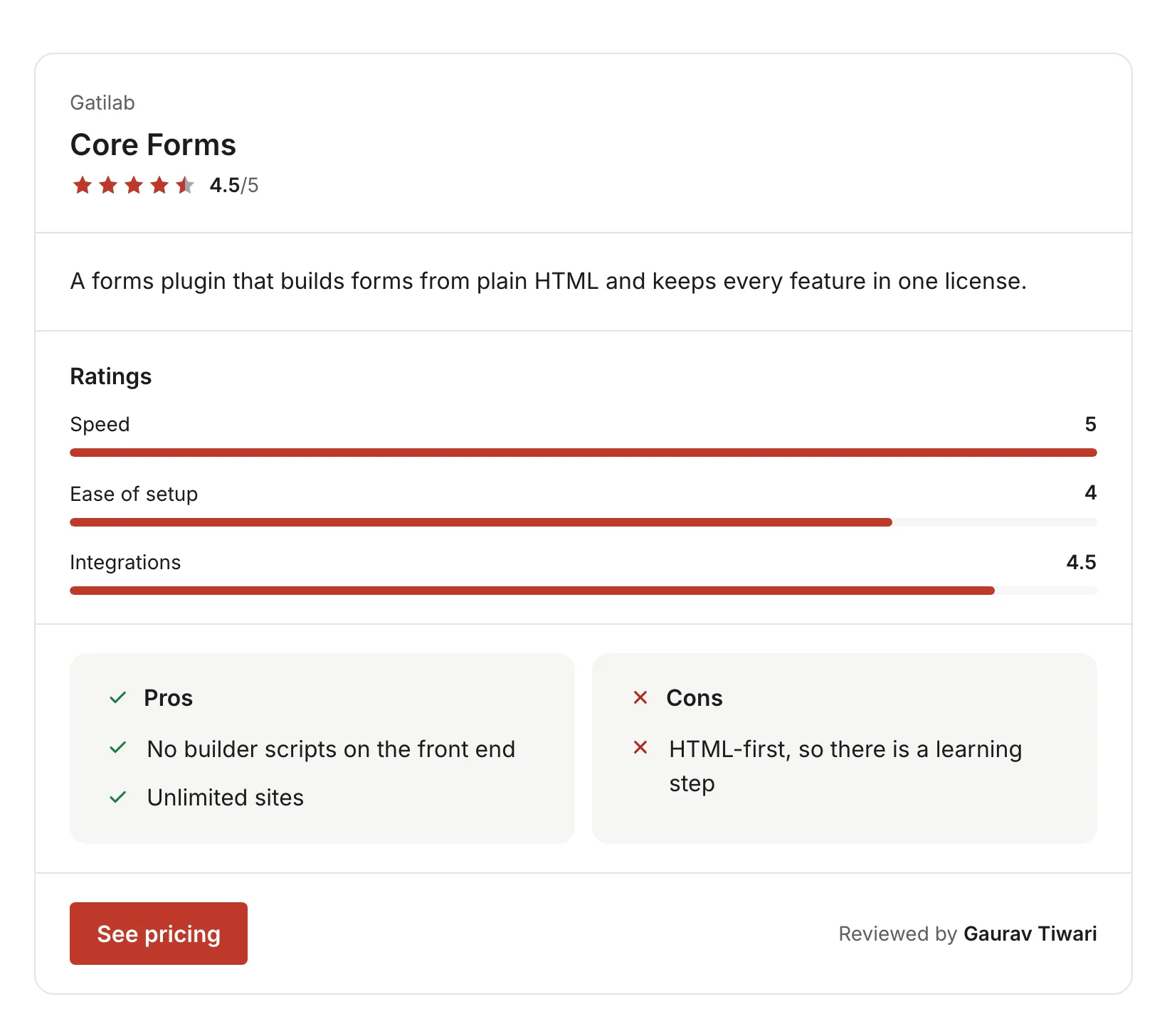
The review card
A star rating, rating bars, pros and cons, a button and the reviewer’s name.
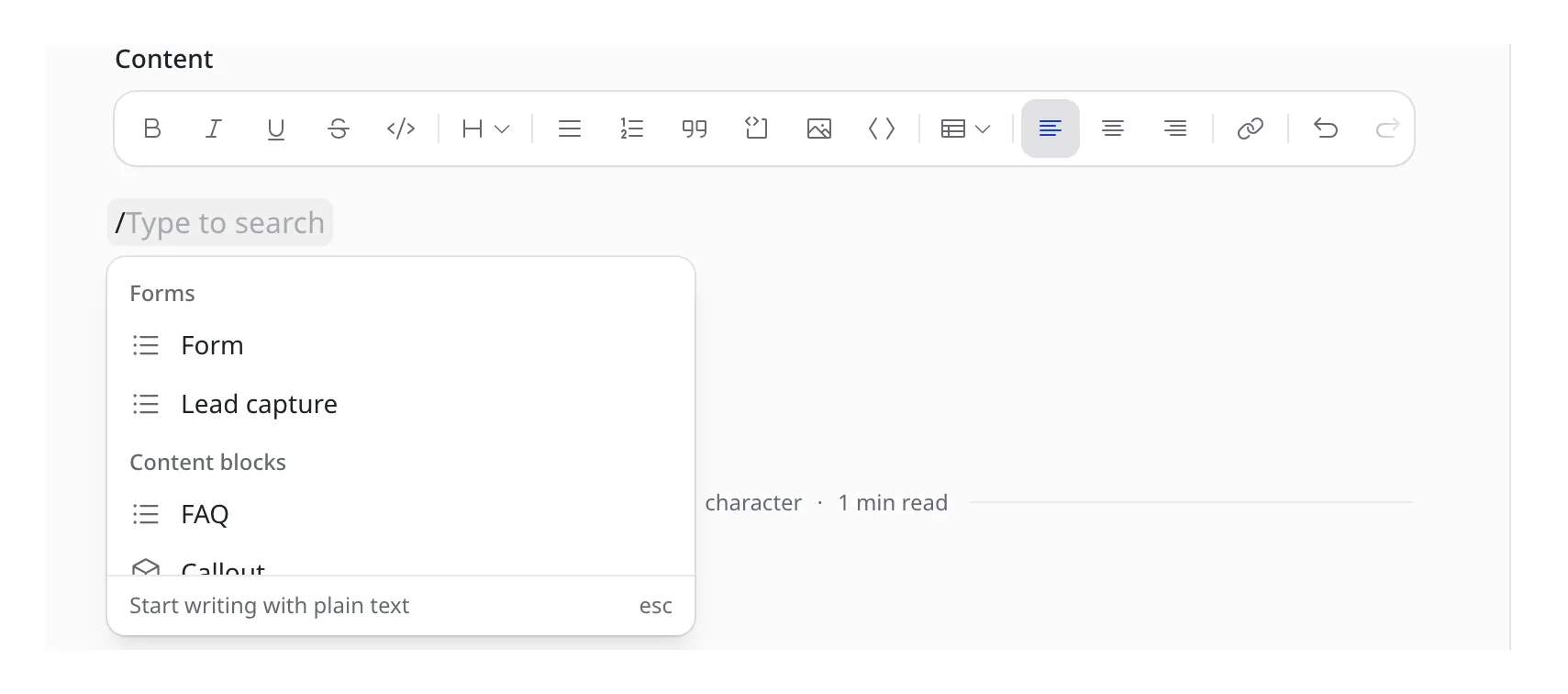
The slash menu
Type / in the editor and the blocks appear under Content blocks.
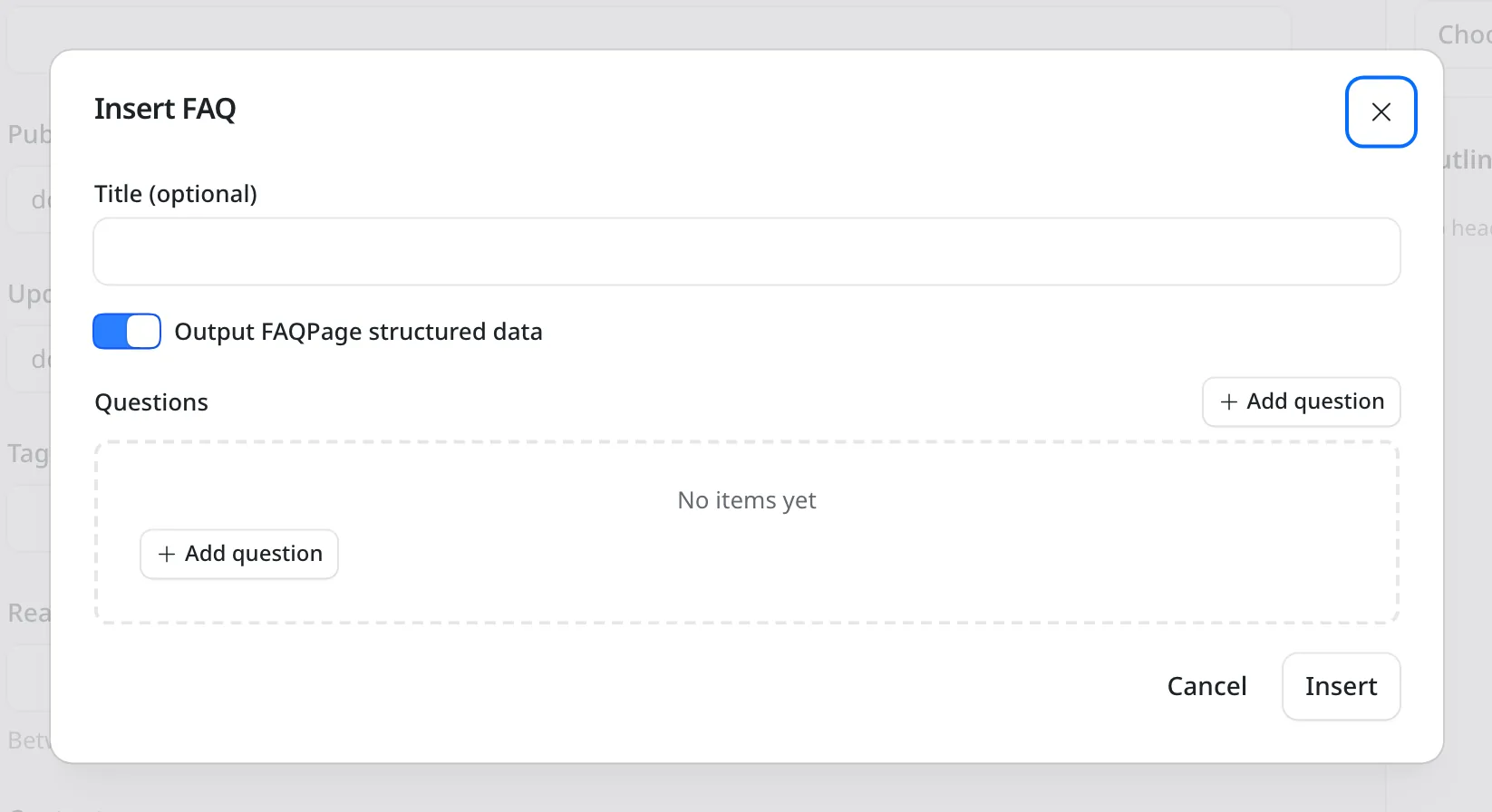
The FAQ block
You add questions one at a time. The switch controls the FAQPage structured data.
How to Install Content Blocks for EmDash
Content Blocks needs no component wiring. You add the package, register it and restart the dev server.
Add the Package
Run this in your EmDash project.
pnpm add @gatilab/emdash-content-blocksRegister the Plugin
Native plugins go in
plugins, notsandboxed. The dev server needs a restart after the change.// astro.config.mjs import { defineConfig } from "astro/config"; import emdash from "emdash/astro"; import { contentBlocks } from "@gatilab/emdash-content-blocks"; export default defineConfig({ integrations: [ emdash({ plugins: [contentBlocks()], }), ], });Limit the Blocks (Optional)
The
blocksoption limits what editors can insert. Renderers for every type stay registered, so existing content keeps rendering.contentBlocks({ blocks: ["faq", "callout", "productReview"], category: "Editorial", });
The 10 Blocks And What Each One Renders
Field-by-field shapes are in the repository’s SCHEMAS.md file.
| Block | Renders | Structured Data |
|---|---|---|
| FAQ | Accordion panels built on native <details>, with no JavaScript | FAQPage (toggle) |
| Callout | A tinted note with a tone icon, a text label, a body and an optional button | None |
| Expert opinion | A quote panel with a photo, name and role | None |
| Stats | A grid of headline numbers with labels | None |
| Product review | Image, stars, price, summary, feature scores, pros and cons, a button and a byline | Product or SoftwareApplication with one Review (toggle) |
| Pros and cons | Two labeled lists, side by side on wide screens | None |
| Comparison | 2 to 4 options side by side, with one marked Recommended | None |
| Checklist | A static list, or real checkboxes with progress saved in the browser | None |
| Social thread | A generic social post thread mock-up, with no platform branding | None |
| Related links | A titled list of further reading | None |
Moving Blocks From WordPress
Content Blocks is the EmDash port of GT ACF Blocks, so the data those blocks stored fits the same shapes here.
There’s no export script for this one. The package gives you a validator to check converted blocks before you import them.
Content Blocks for EmDash
Carries Over
- FAQ, callout, review and the other block data
- WordPress image objects with their alt text and size
- Text that relied on automatic paragraphs
Doesn’t Carry Over
- Translated labels: the renderers ship English UI text, so translating means overriding a renderer
- A ready-made import: converting the stored blocks is a script you write
validateBlock() reports missing fields as errors and smaller problems, such as an unknown tone, as warnings.
import { validateBlock } from "@gatilab/emdash-content-blocks";

const result = validateBlock(node);
if (!result.valid) console.error(result.errors);
Permissions It Asks For
None. It only adds blocks and their renderers.
- Capabilities
- None. The plugin registers no hooks or routes and makes no network requests.
- Trust model
- It’s a native plugin, so it runs in the host process like any other npm dependency of your site.
What It Needs
These come from the package’s peer dependencies.
- EmDash
- 1.1 or later. Tested on 1.4.0.
- Astro
- 7.
- Runtime dependencies
- None.
- License
- MIT. Free to use, change and ship.
Content Blocks for EmDash Questions
Cost, setup, structured data and theming.
Have a question that isn’t here? Ask me directly.
Is Content Blocks for EmDash Free?
Yes. It’s free and MIT licensed, with no paid tier and no license key.
Do I Need to Wire Up Components?
No. EmDash’s <PortableText> renders the blocks automatically once the plugin is registered.
Which Blocks Output Structured Data?
Two of them, and each has its own toggle. The FAQ block outputs FAQPage, and the product review block outputs Product or SoftwareApplication with a single Review. Search engines expect one FAQPage per page, so I’d turn the toggle off on any second FAQ block.
Can I Match the Blocks to My Theme?
Yes. The blocks inherit your site’s typography and read their colors from CSS custom properties, such as --gtcb-accent-override and --gtcb-radius-override.
Can I Translate the Labels?
The renderers include a few English strings, such as Pros, Cons and Recommended. Translating them means overriding the affected renderer.
How Is the Product Review Block Different From Product Box?
The product review block is your editorial verdict, with feature ratings, pros and cons and a byline. Product Box for EmDash is a buying unit with prices and buy buttons. On one page, I’d keep structured data on only one of the two for the same product.
More EmDash Plugins For the Rest of Your Site
Content Blocks covers editorial blocks. These 8 cover the other jobs a WordPress site usually leaves to plugins.
- Core FormsHTML forms with a submissions inbox
- Lead CaptureLead magnets with gated downloads
- Dynamic DatesDate shortcodes that stay current
- EmailitEmail delivery through Emailit
- Link ManagerBranded /go/ short links
- Product BoxBuying boxes with live Amazon prices
- FootnotesNumbered footnotes from a shortcode
- Scripts ManagerPer-page CSS, JavaScript and HTML