
Link Manager for EmDash Branded Short Links With Country Rules
An affiliate site has links like yoursite.com/go/hostinger in every old post. If nothing answers those URLs after a move to EmDash, each one becomes a 404.
Link Manager for EmDash answers them. Each link sends visitors where you point it, with the redirect type, rel and noindex you choose, and every click is counted without storing who clicked.
pnpm add @gatilab/emdash-link-manager- Free on npm
- MIT licensed, with no paid tier and no license key.
- No permissions
- It uses only its own storage, settings and cron.
- EmDash 1.4 or later
- Tested on EmDash 1.4.0.
- GT Link Manager imports
- Links, categories, country rules and click history.
What Link Manager Does Redirects, Country Rules and Click Stats
A link is a name, a slug and a destination. The rest is optional.
Fast Redirects
Resolving a link takes one settings read and one primary-key read. The redirect goes out before the click is recorded.
301, 302 or 307 per Link
Each link also takes nofollow, sponsored and ugc flags and an optional noindex header.
Country Targeting
India can go to amazon.in and the EU to amazon.de, with a 404 option for everyone else. The country comes from Cloudflare or another CDN’s header, with no GeoIP database.
Click Stats With No Personal Data
Each click records the date, the country and the referring site’s host. It stores no IP address, user agent or cookie, and bots are skipped.
A Managed Link Block
Editors pick a link from a list and get a button or a text link with the right rel. If the link is later deleted, the block renders nothing.
Real 404s
A dead, disabled or mistyped short link returns 404 with your site’s 404 page. It never serves a page at 200.
What Link Manager Looks Like in the EmDash admin
I took these on a test copy of an EmDash site with the plugin installed.
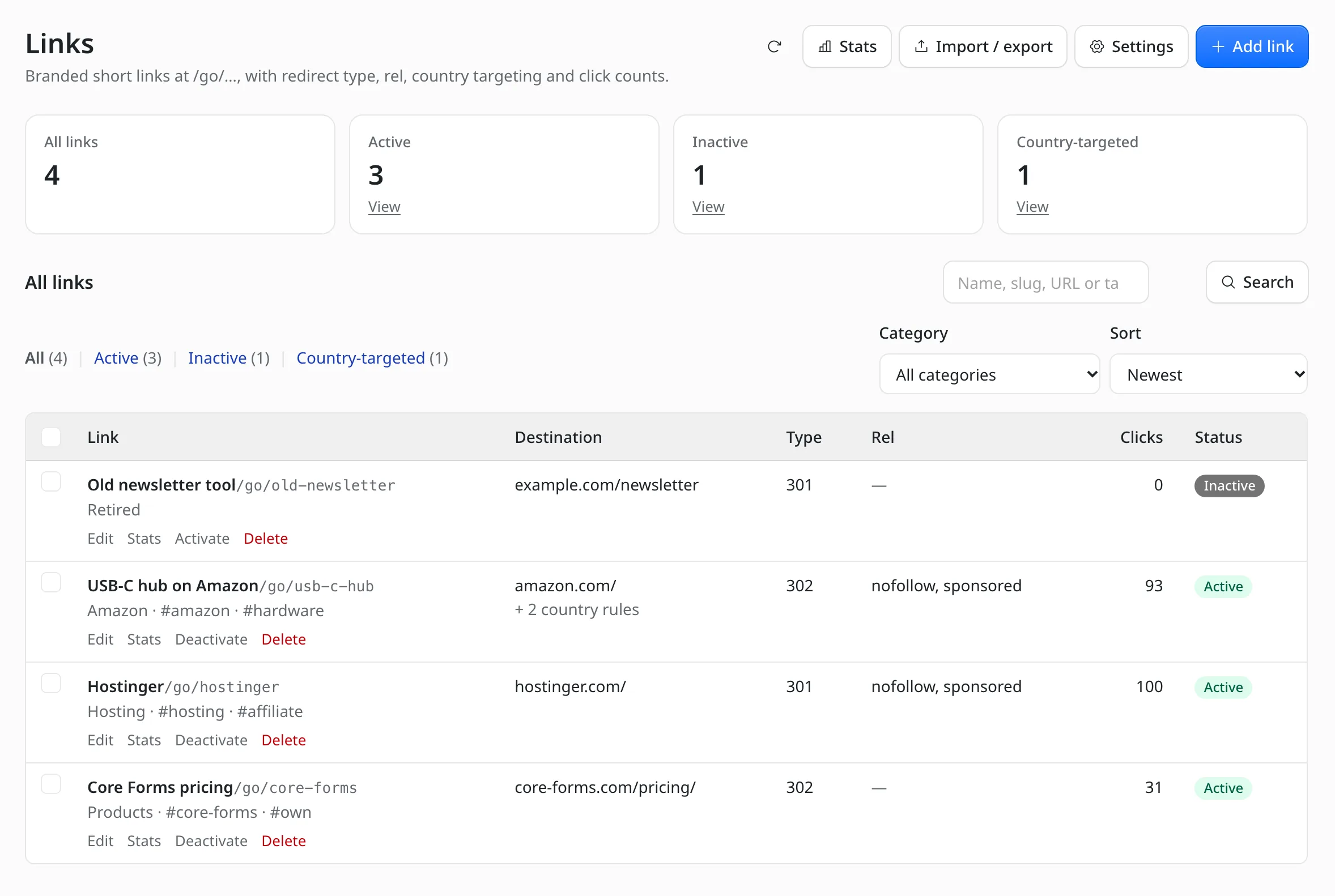
All links in one list
Each link shows its destination, redirect type, rel values, clicks and status. The filters cover active, inactive and country-targeted links.
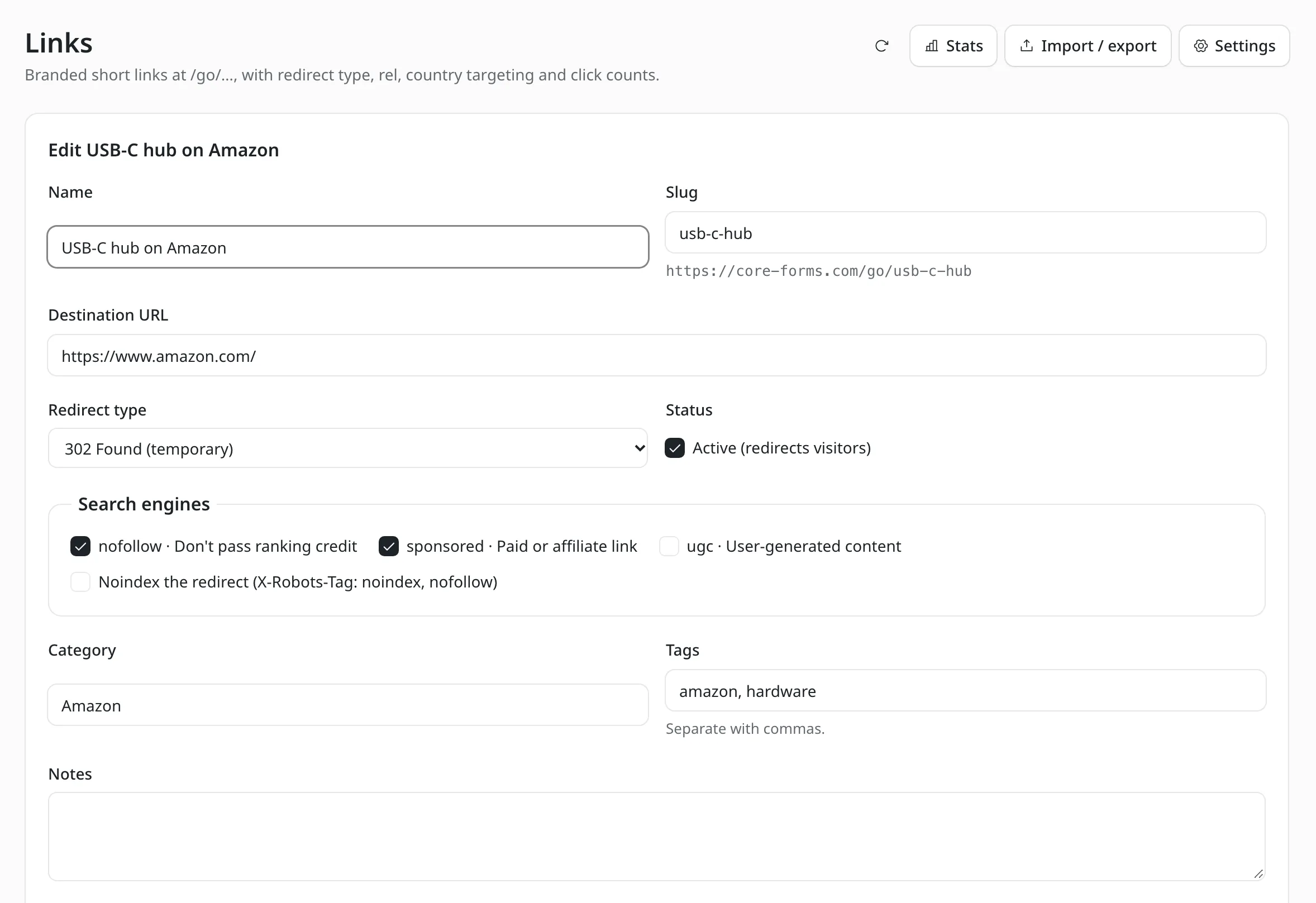
The link editor
Name, slug, destination, redirect type and the rel checkboxes for nofollow, sponsored and ugc.
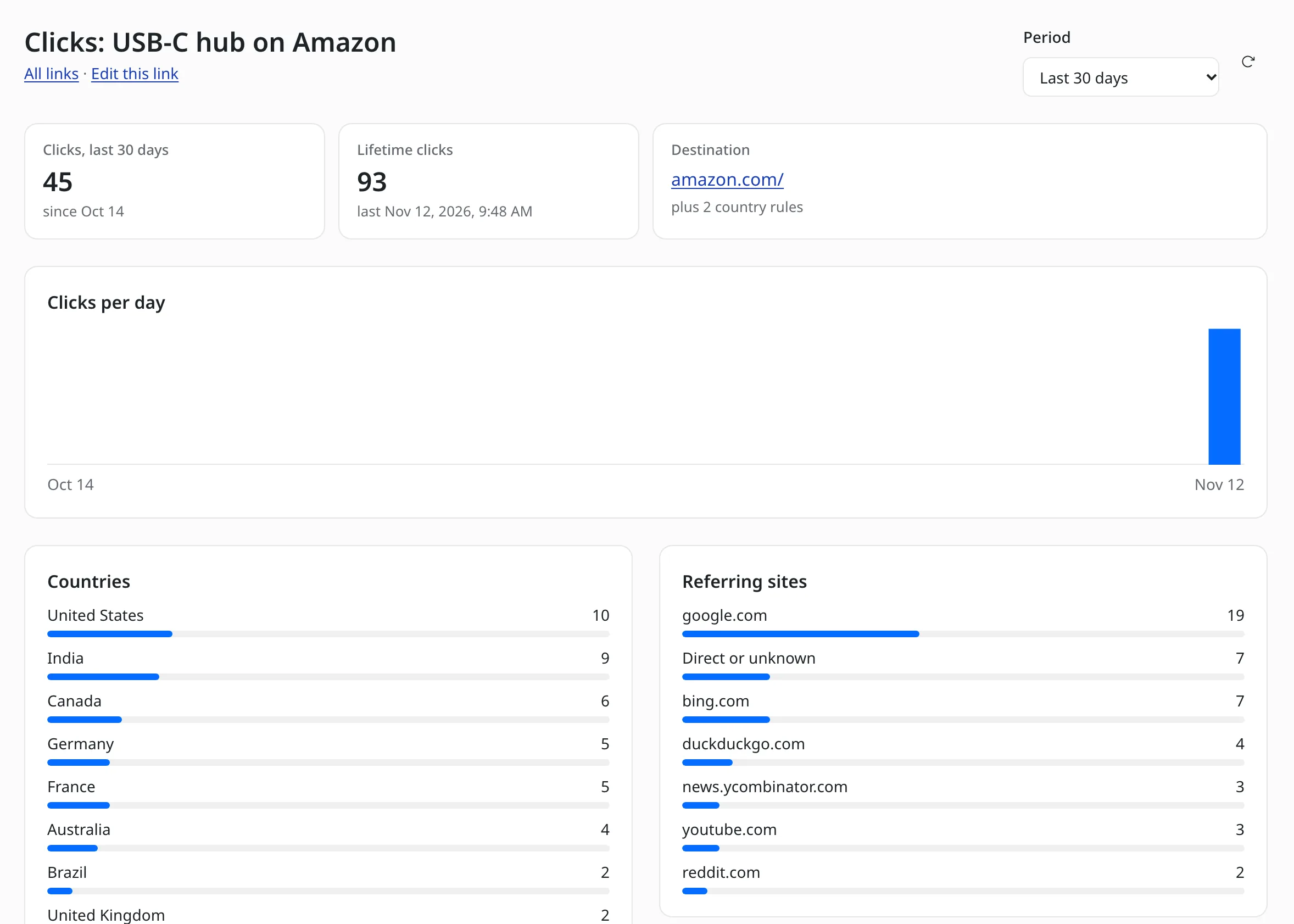
Stats for one link
Clicks per day, countries and referring sites for a single link. The numbers here are test data.
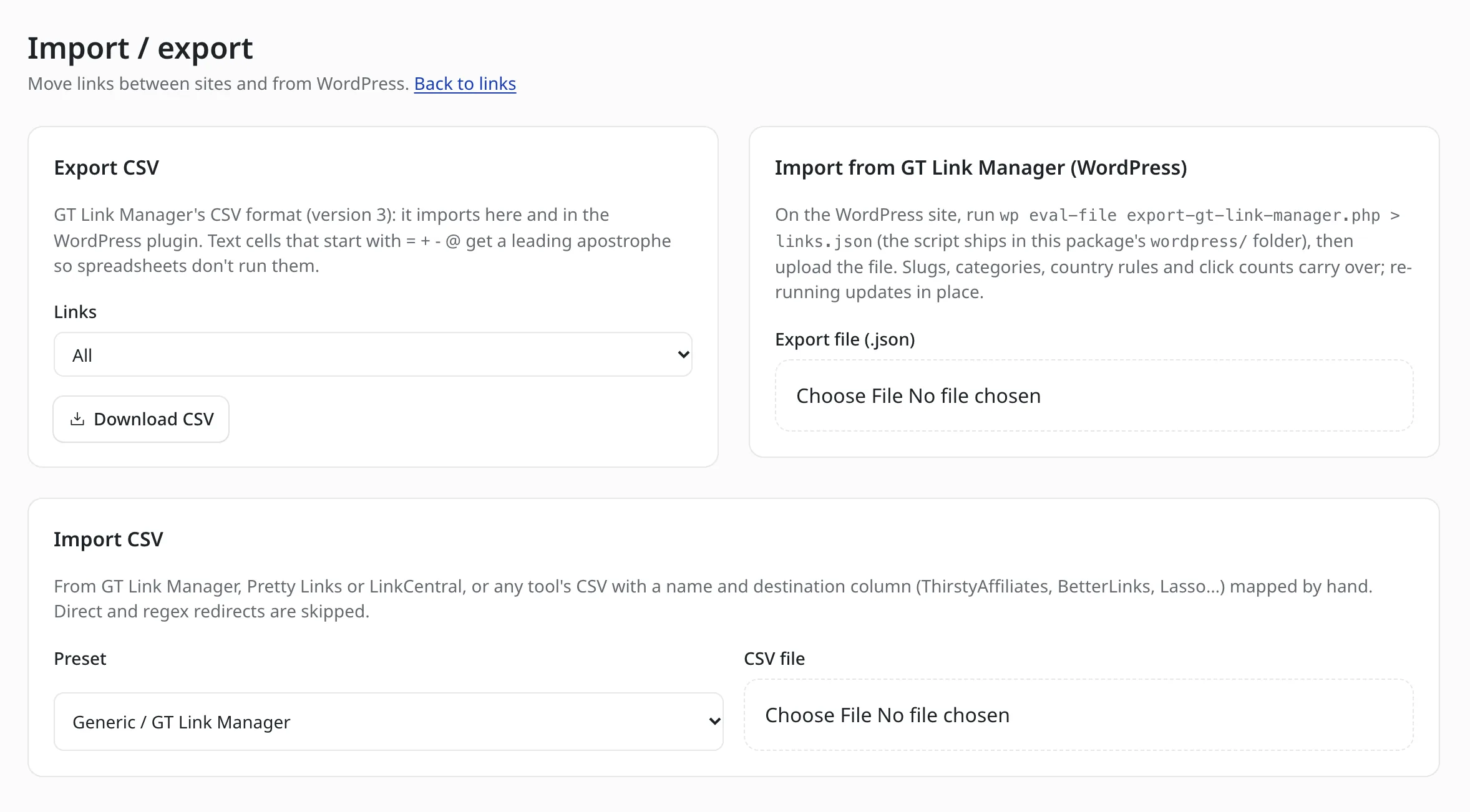
Import and export
A CSV export, a CSV import with presets and a JSON import from GT Link Manager for WordPress.
How to Install Link Manager for EmDash
Link Manager has 2 parts: the plugin and a site middleware that answers /go/ URLs.
Add the Package
Run this in your EmDash project.
pnpm add @gatilab/emdash-link-managerRegister the Plugin and the Middleware
EmDash plugin routes live under
/_emdash/api/plugins/and can’t answer arbitrary site paths, solinkManagerSite()runs in the site itself.// astro.config.mjs import emdash from "emdash/astro"; import { linkManager } from "@gatilab/emdash-link-manager"; import { linkManagerSite } from "@gatilab/emdash-link-manager/site"; export default defineConfig({ integrations: [emdash({ plugins: [linkManager()] }), linkManagerSite()], });Add Your Links
Links in the admin sidebar takes a name, a slug and a destination URL. For a country-targeted link, I’d pick 302 or 307, because browsers cache a 301 and pin the visitor to the first country.
Give Inline Links Their rel
For branded URLs pasted into the editor’s normal link tool, the plugin’s mark components add each link’s
relflags when the page renders.--- import { PortableText } from "emdash/ui"; import { markComponents } from "@gatilab/emdash-link-manager/astro"; --- <PortableText value={post.data.content} components={{ mark: markComponents }} />
The Settings And Their Defaults
The retention defaults match GT Link Manager’s Advanced Analytics.
| Setting | Default | Notes |
|---|---|---|
| Link prefix | go | Links live at /prefix/slug. Changing it breaks links already shared with the old prefix. |
| Default redirect type | 301 | For new links. |
| Record clicks | On | Date, country and referring host. |
| Skip bots and prefetches | On | Crawlers, link unfurlers and monitoring tools aren’t counted. |
| Keep individual clicks for | 7 days | After that, clicks remain only as daily totals. |
| Keep daily totals for | 90 days | 0 keeps them forever. |
| Country detection | Auto | Reads Cloudflare first, then your custom header and the common CDN country headers. |
The stats are counts of redirect requests. They aren’t unique visitors or conversions.
Moving Links From GT Link Manager
The export script only reads. It exports your links and categories, plus daily click totals if Advanced Analytics was ever on. The file holds no visitor data.
Re-running the import updates links in place, so you can import again right before you switch DNS. I’d also set the Link prefix to the one your WordPress site used, so every published /go/ URL keeps working.
Link Manager for EmDash
Carries Over
- Name, slug, URL, redirect type, rel, noindex, tags and notes
- Categories, with a child category as Parent / Child
- Country targeting and rules, including the 404 fallback
- The lifetime click counter and daily click history
Doesn’t Carry Over
- Direct and regex mode links, which are skipped and listed
- Trashed links, unless you tick the box to import them as inactive
- Device, browser and campaign reports
- The Novashare integration and the WordPress hooks
The script runs on the WordPress server with WP-CLI. The file then goes to Links › Import / export › Import from GT Link Manager.
wp eval-file export-gt-link-manager.php > links.jsonPermissions It Asks For
None. The plugin works inside its own storage.
- Capabilities
- None. It only uses its own storage, settings and cron.
- Who can manage links
- Anyone with the
content:createpermission. CSV and WordPress imports needplugins:manage.
What It Needs
These come from the package’s peer dependencies.
- EmDash
- 1.4 or later.
- Astro
- 7.
- React
- 19 or later, for the admin screens.
- Country targeting
- Works best on Cloudflare Workers. Elsewhere, a CDN or proxy has to send a country header.
- License
- MIT. Free to use, change and ship.
Link Manager for EmDash Questions
Cost, old links, imports and what a click stores.
Have a question that isn’t here? Ask me directly.
Is Link Manager for EmDash Free?
Yes. It’s free and MIT licensed, with no paid tier and no license key.
Will My Existing /go/ Links Keep Working?
Yes, once you import them and set the Link prefix to the one your WordPress site used. The export includes that prefix. Slugs follow WordPress’s sanitize_title(), so they come over unchanged.
Can I Import From Pretty Links or ThirstyAffiliates?
Yes, through CSV. The importer has presets for Pretty Links and LinkCentral. A file from ThirstyAffiliates, BetterLinks or Lasso imports once you map its name and destination columns. Up to 10,000 rows go in one run.
What Does It Store About a Click?
The date, the country and the referring site’s host. It stores no IP address, user agent, cookie or full referrer URL. Recording can be turned off under Record clicks.
Does Country Targeting Need a GeoIP Database?
No. The country comes from Cloudflare or from a header your CDN or proxy sends. Without one of those, the country rules have nothing to read.
Can AI Tools Manage Links?
Yes. The plugin exposes 4 MCP tools: list_links, get_link, save_link and link_stats. They use the same routes and permissions as the admin.
More EmDash Plugins For the Rest of Your Site
Link Manager covers short links. These 8 cover the other jobs a WordPress site usually leaves to plugins.
- Core FormsHTML forms with a submissions inbox
- Lead CaptureLead magnets with gated downloads
- Content Blocks10 editorial blocks with schema
- Dynamic DatesDate shortcodes that stay current
- EmailitEmail delivery through Emailit
- Product BoxBuying boxes with live Amazon prices
- FootnotesNumbered footnotes from a shortcode
- Scripts ManagerPer-page CSS, JavaScript and HTML