
Lead Capture for EmDash Lead Magnets With Gated Downloads
A lead magnet only works when the file stays behind the form. EmDash had nothing for that job, so I ported the Lead Capture drop-in from the Marketers Delight theme.
A visitor enters an email address and gets your PDF, template pack or spreadsheet through a personal download link. Leads land in an inbox in the EmDash admin.
pnpm add @gatilab/emdash-lead-capture- Free on npm
- MIT licensed, with no paid tier and no license key.
- 3 permissions
email:send,network:requestandusers:read.- EmDash 1.1 or later
- Tested on EmDash 1.4.0.
- 8 newsletter services
- Mailchimp, Kit, MailerLite, Brevo, Beehiiv, SendFox and more.
What Lead Capture Does Gate the File, Keep the Lead
The block handles the form, the email and the download link. You only supply the file URL.
The File Stays Gated
The resource URL never appears in the page. The form carries its configuration encrypted, and each visitor gets a personal, expiring link.
Optional Double Opt-In
With double opt-in on, a lead confirms by email before the file goes out.
Newsletter Forwarding
Opt-ins go to Mailchimp, Kit, ConvertKit (v3), MailerLite, Brevo, Beehiiv, SendFox or Emailit. The checkbox starts unticked, and the wording a visitor agreed to is stored with the lead.
Spam Protection
A honeypot, plus rate limits of 5 per IP and 3 per email every 10 minutes. Akismet runs too if you add a key.
Conversion Stats
The plugin counts impressions and submissions per page per day.
A Leads Inbox
Views by status, search, bulk actions, resend and CSV export. Privacy export and erase work by email address, and old leads are removed on the retention you set.
What Lead Capture Looks Like in the admin and on the page
I took these on a test copy of an EmDash site with the plugin installed.
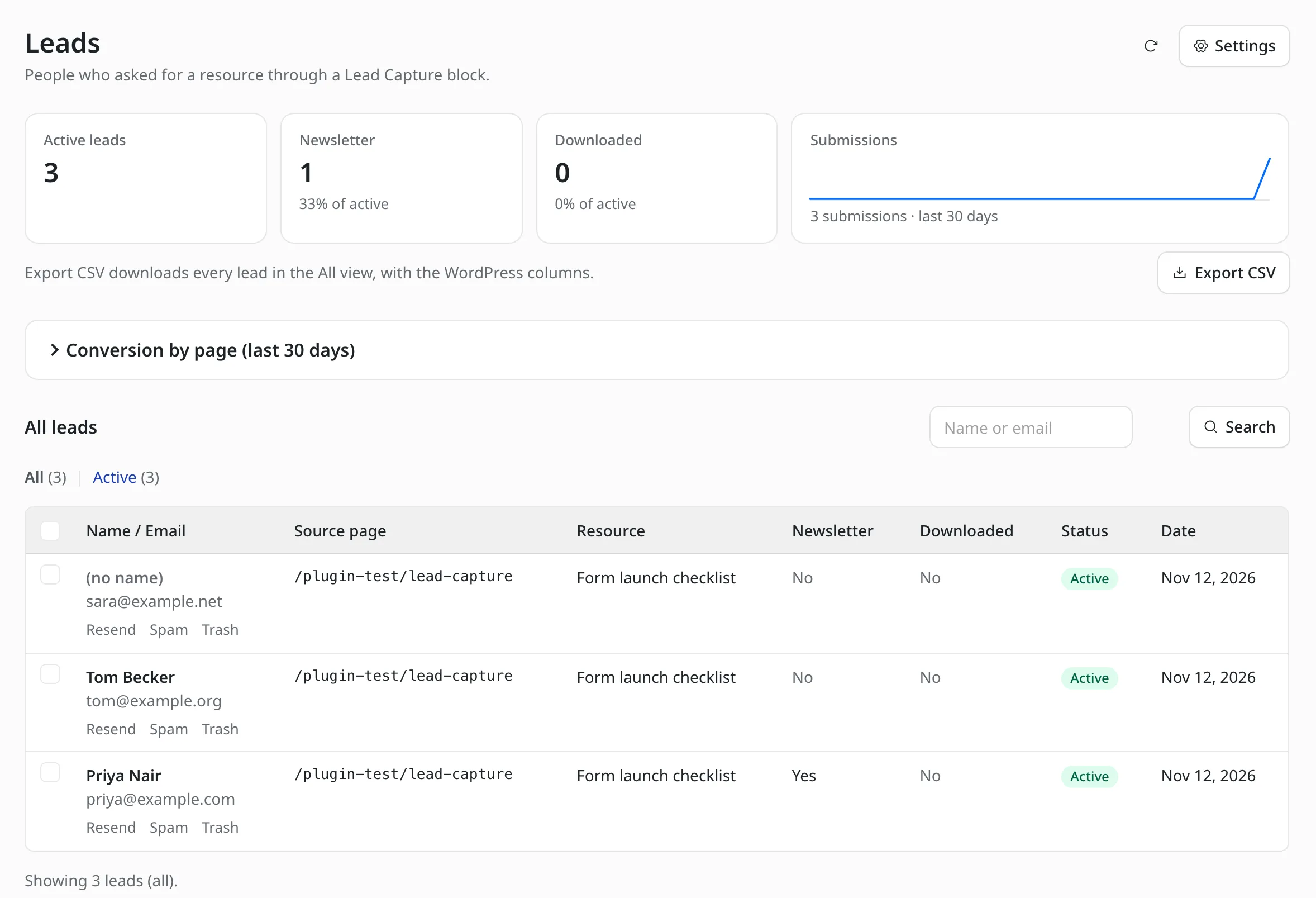
The leads inbox
Each lead shows the source page, the resource asked for, the newsletter choice and whether the file was downloaded. Export CSV downloads the list.
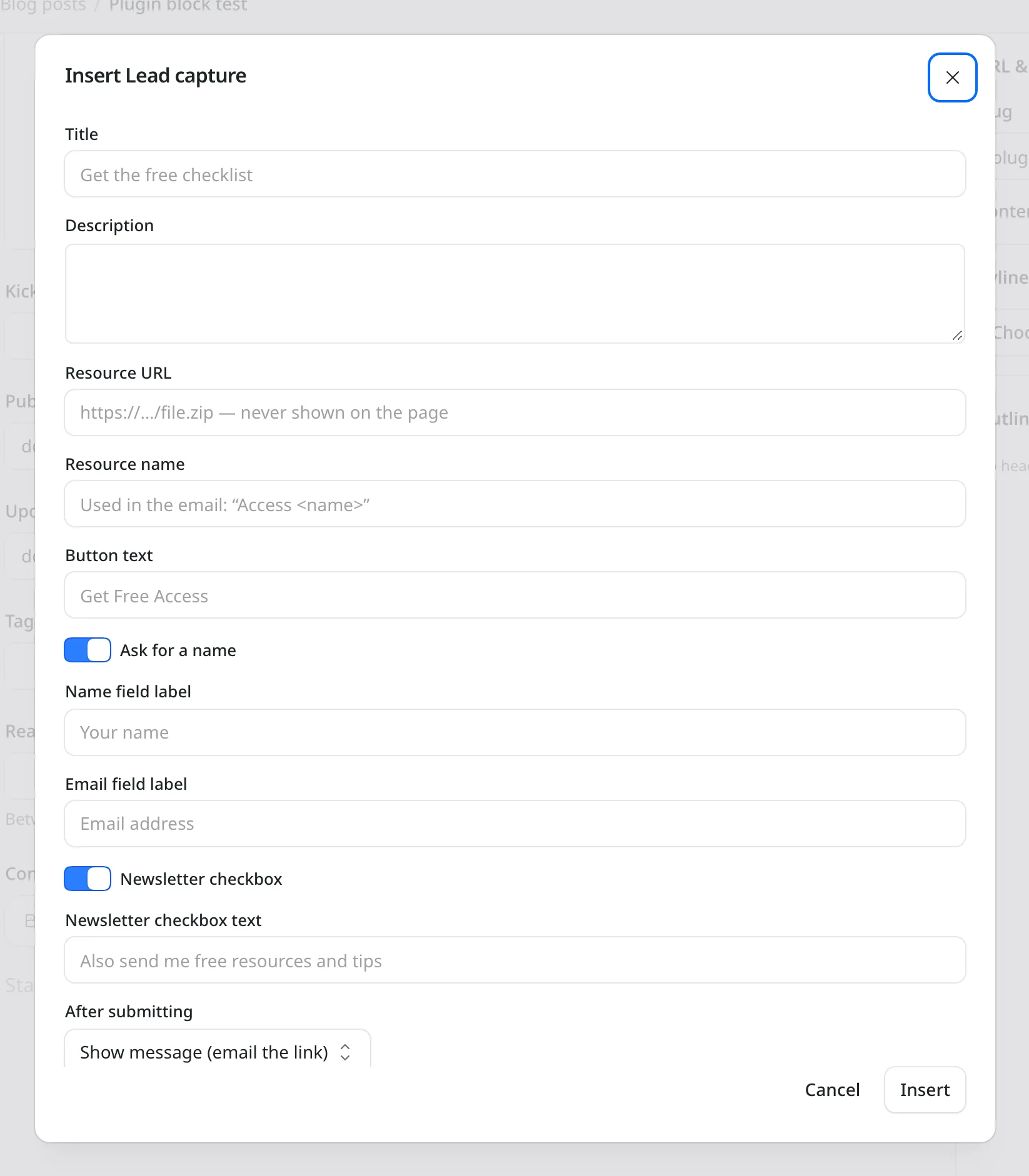
The Lead Capture block
The block form holds the title, the resource URL, the field labels and what happens after submitting.
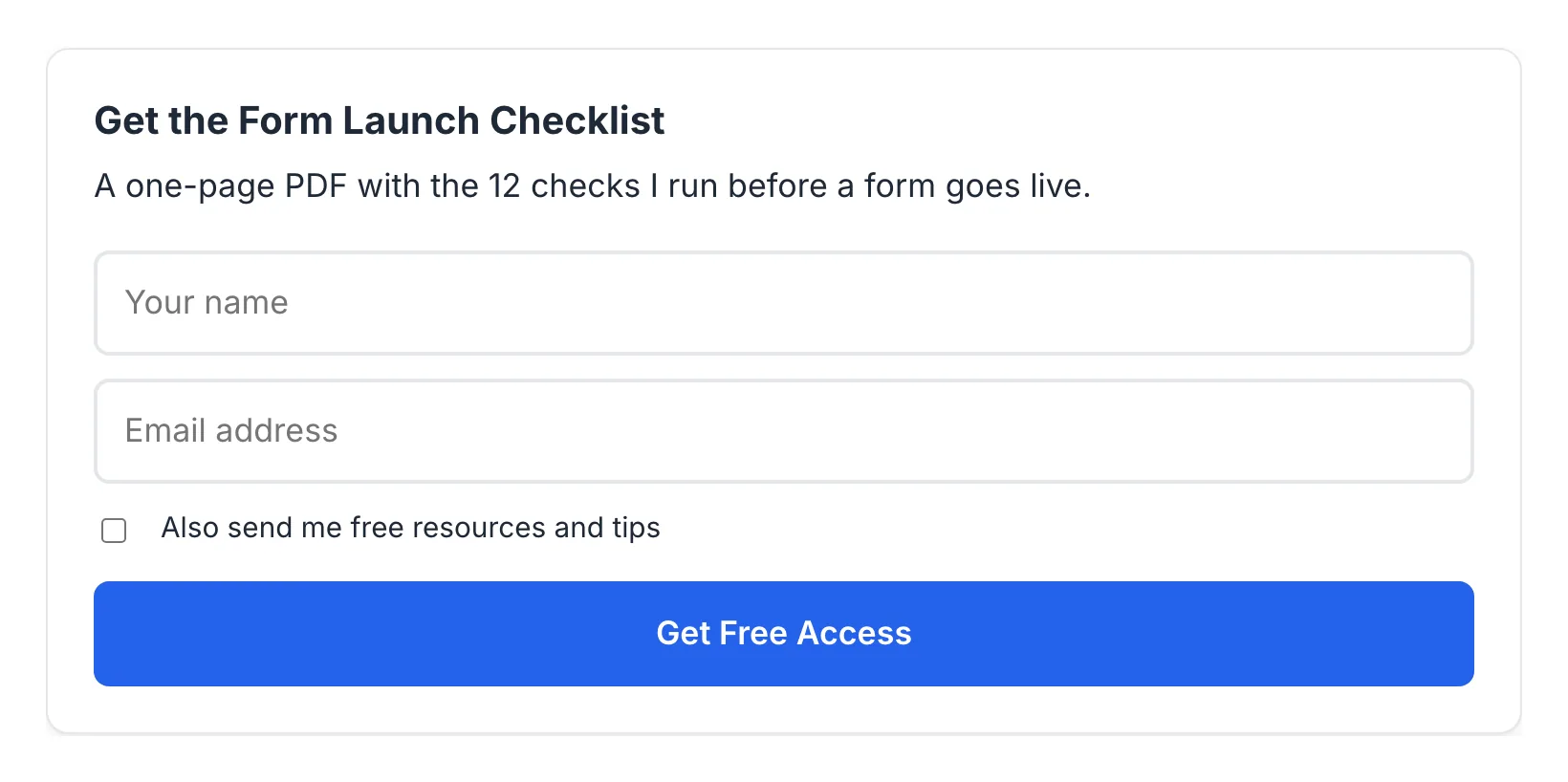
The form on the page
A name field, an email field, the newsletter checkbox and one button.
How to Install Lead Capture for EmDash
Lead Capture has 2 parts: the plugin and a small site middleware that answers download links.
Add the Package
Run this in your EmDash project.
pnpm add @gatilab/emdash-lead-captureRegister the Plugin and the Middleware
leadCaptureSite()answers download and confirmation links. EmDash plugin routes can’t redirect a visitor to a file on another host, so this part runs in the site itself.// astro.config.mjs import emdash from "emdash/astro"; import { leadCapture } from "@gatilab/emdash-lead-capture"; import { leadCaptureSite } from "@gatilab/emdash-lead-capture/site"; export default defineConfig({ integrations: [emdash({ plugins: [leadCapture()] }), leadCaptureSite()], });Add the Styles
The block ships the drop-in’s stylesheet, which builds on the Marketers Delight theme’s form classes. On any other theme, I’d import the standalone base styles once.
import "@gatilab/emdash-lead-capture/styles/standalone.css";Insert the Block
Type
/in the editor and choose Lead capture. Every field is optional except the resource URL.
The Lead Capture Block Fields You Can Set
Every field is optional except the resource URL.
| Field | Notes |
|---|---|
| Title and description | The description accepts a few inline tags: links, bold, italics and code. |
| Resource URL | Any https:// URL or a path on your site. It’s never shown on the page. |
| Resource name | Used in the email. |
| After submitting | Show a message, show the message plus an instant download button, or redirect to a thank-you page. With double opt-in, the file is only sent after confirmation. |
| Newsletter service and list | Leave the service empty to use the site default from settings. |
| Style | Card, Inline (attached button) or Capsule (pill). Inline and Capsule never ask for a name. |
The look is adjustable with --lc-* custom properties, such as --lc-accent and --lc-radius.
Moving Leads From WordPress
The export script is read-only. It exports leads, daily stats and each source post’s path.
Blocks need no conversion, because the block keeps the WordPress block’s attributes.
Marketers Delight Lead Capture
Lead Capture for EmDash
Carries Over
- Block attributes, unchanged
- Leads and daily stats
- Each lead’s source page
- Lead tokens, so download links you already emailed keep working
Doesn’t Carry Over
- FluentCRM forwarding, because FluentCRM is a WordPress plugin
- The Optins and Content Upgrades bridges. Their imported leads keep their source type
- Post IDs as lead keys: leads are keyed by page path here
The script runs with WP-CLI, and the file goes to the plugin’s import admin route. The file holds personal data, so I’d handle it like any other export of leads.
wp eval-file export-lead-capture.php > lead-capture.jsonPermissions It Asks For
EmDash asks you to approve each one when you register the plugin.
email:send- Delivery and confirmation emails.
network:request- Limited to the newsletter services’ and Akismet’s API hosts.
users:read- The first admin’s address, used as the default for owner notifications.
What It Needs
These come from the package’s peer dependencies and its settings.
- EmDash
- 1.1 or later. Tested on 1.4.0.
- Astro
- 7.
- React
- 19 or later, for the admin screens.
- Encryption key
EMDASH_ENCRYPTION_KEY, for the API keys stored in settings.- License
- MIT. Free to use, change and ship.
Lead Capture for EmDash Questions
Cost, file protection, email and newsletter services.
Have a question that isn’t here? Ask me directly.
Is Lead Capture for EmDash Free?
Yes. It’s free and MIT licensed, with no paid tier and no license key.
Can Someone Find the File Without Signing Up?
Not from the page. The resource URL never appears in the HTML, and each visitor gets a personal link. You set how many days a link stays valid, and 0 means links never expire. The link still leads to the file’s own URL, so I’d keep that URL hard to guess.
Which Newsletter Services Does It Forward To?
Mailchimp, Kit, ConvertKit (v3), MailerLite, Brevo, Beehiiv, SendFox and Emailit. A failed forward is retried twice, 5 and 10 minutes later, and then appears under failed forwards in the admin.
How Does It Send the Download Email?
Through your EmDash email provider by default. With an Emailit API key in the plugin settings and Send via Emailit on, it sends through Emailit instead. That lets you set the From name and address.
Do I Need the Marketers Delight Theme?
No. On other themes, the standalone stylesheet supplies the base styles, and the --lc-* custom properties change the look.
What Happens When the Same Person Signs Up Twice?
An active lead gets a fresh link. A pending lead gets the confirmation email again, and a trashed lead is restored.
More EmDash Plugins For the Rest of Your Site
Lead Capture collects the email address. These 8 cover the other jobs a WordPress site usually leaves to plugins.
- Core FormsHTML forms with a submissions inbox
- Content Blocks10 editorial blocks with schema
- Dynamic DatesDate shortcodes that stay current
- EmailitEmail delivery through Emailit
- Link ManagerBranded /go/ short links
- Product BoxBuying boxes with live Amazon prices
- FootnotesNumbered footnotes from a shortcode
- Scripts ManagerPer-page CSS, JavaScript and HTML