
Footnotes for EmDash Numbered Notes From One Shortcode
On EmDash, the plain content renderer prints [fn] as text. Footnotes written on WordPress show up as raw shortcodes in the middle of a sentence.
I ported the Footnotes drop-in from the Marketers Delight theme to fix that. [fn]Your note[/fn] becomes a superscript number with a hover preview, plus a numbered list at the end of the entry that links back to every citation.
pnpm add @gatilab/emdash-footnotes- Free on npm
- MIT licensed, with no paid tier and no license key.
- No permissions
- It asks EmDash for no capabilities.
- EmDash 1.4 or later
- Tested on EmDash 1.4.0.
- The WordPress shortcode
- Numbering, element IDs and class names match the drop-in.
What Footnotes Does References, Previews and a Linked List
You write the note where it belongs in the sentence. The plugin numbers it and builds the list.
The Shortcode
[fn]Your note[/fn] in a paragraph becomes a numbered reference. Formatting and links inside the note are kept.
3 Preview Styles
A tooltip on hover and focus, a click-to-open toggle or a margin note. With previews off, the number is a plain link to the list.
6 Numbering Styles
Decimal, lower or upper roman, lower or upper letters, or symbols such as *, † and ‡.
Named Notes
A note with an ID can be cited more than once. It keeps one number, and the list links back to each citation.
Accessible Markup
References and the list use the doc-noteref, doc-endnotes and doc-backlink roles. Tooltips open on keyboard focus and close with Escape.
A Footnotes List Block
Where the block sits, the list renders. Without it, the list goes at the end of the entry.
What Footnotes Look Like in the admin and on the page
I took these on a test copy of an EmDash site with the plugin installed.
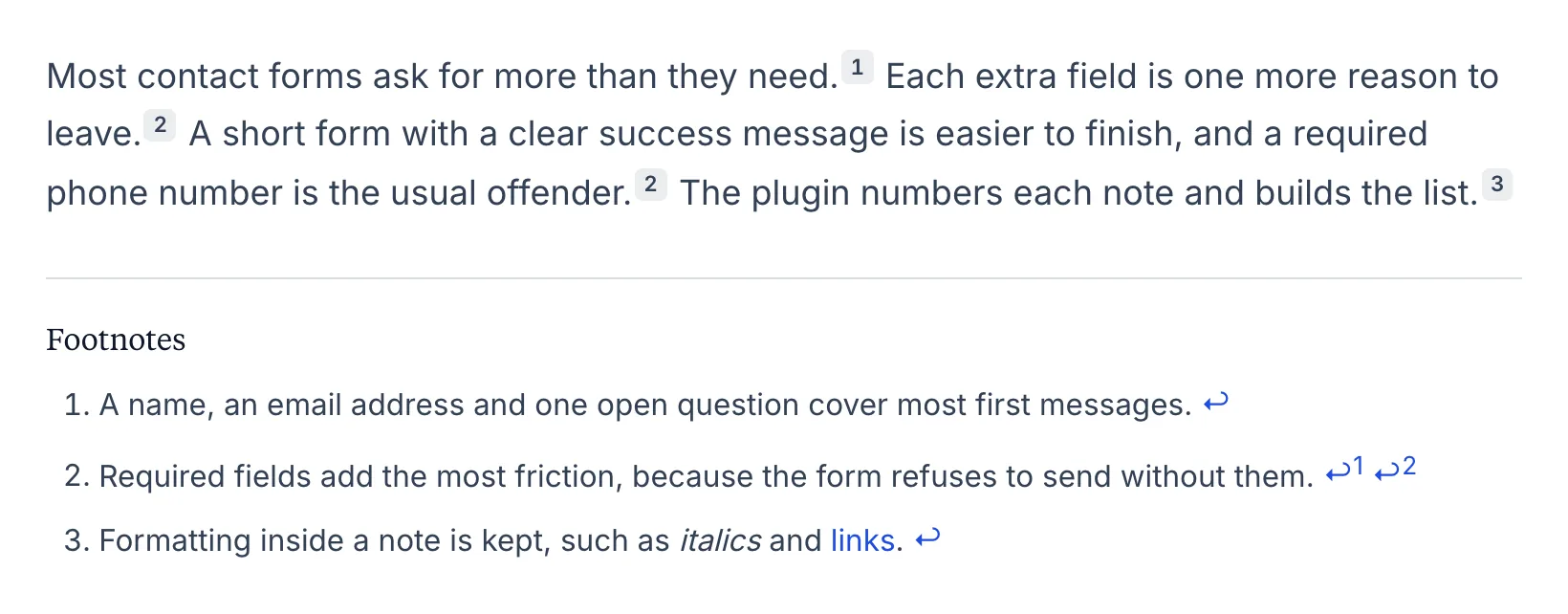
Footnotes on the page
Numbered markers in the text and the list below with back-links. A note used twice gets 2 back-links.
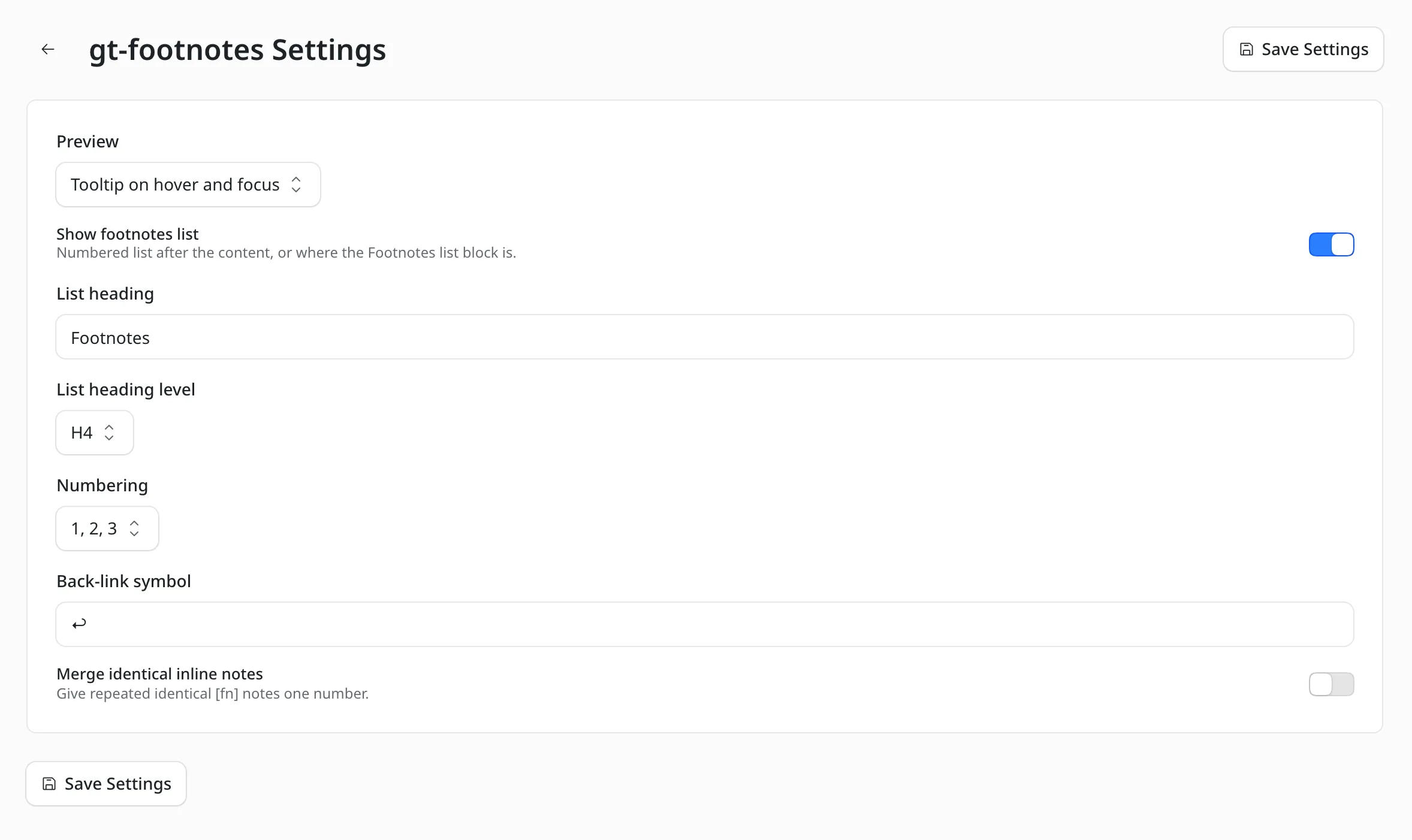
The settings screen
The preview style, the list heading and its level, the numbering and the back-link symbol.
How to Install Footnotes for EmDash
EmDash has no global content filter, so the shortcodes are processed where content renders. That means one template change.
Add the Package
Run this in your EmDash project.
pnpm add @gatilab/emdash-footnotesRegister the Plugin
Options can also be set in the admin or passed as props. Props win over admin settings, and admin settings win over the config.
// astro.config.mjs
import emdash from "emdash/astro";
import { footnotes } from "@gatilab/emdash-footnotes";

export default defineConfig({
	integrations: [
		emdash({
			plugins: [footnotes({ preview: "tooltip" })],
		}),
	],
});
Swap the Content Component
<FootnotesPortableText>takes every<PortableText>prop and passes it on. In visual-editing mode it hands the value through untouched, so editors always edit the raw shortcode.--- import { FootnotesPortableText } from "@gatilab/emdash-footnotes/astro"; --- <FootnotesPortableText value={post.data.content} />
Writing Footnotes What You Type and What You Get
One shortcode covers inline notes, named notes and margin notes.
| You Write | You Get |
|---|---|
[fn]Measured on five sites.[/fn] | An inline note with its own number. |
[fn id="hosts"] | A named note, defined in the list block or in definitions. |
[fn id="hosts"]Hosts tested: A, B.[/fn] | Defines hosts and cites it. Later references reuse it. |
[fn align="right"]…[/fn] | Puts this margin note on the right, in sidenote mode. |
[[fn]] | The literal text [fn]. |
Shortcodes inside code formatting and code blocks are left as text.
Moving Footnotes From WordPress
Footnotes needs no export, because the [fn] shortcodes travel inside your content.
Links to #footnote_… anchors keep working, because the element IDs match the drop-in.
Marketers Delight Footnotes
Footnotes for EmDash
Carries Over
- The
[fn]shortcode and its attributes - Numbering and element IDs
- Class names, so theme CSS written for
.footnoteand.footnoteskeeps working
Doesn’t Carry Over
- The Footnotes meta box. Named notes are defined in the list block or the
definitionsoption - Margin notes as the default. Tooltips are the default here, and
preview: "sidenote"brings margin notes back - A number that is always a button. Here it’s a link to the list, and a button only when the list is off
Permissions It Asks For
None. It reads content and returns markup.
- Capabilities
- None.
page:metadatahook- Removes
[fn]notes from the description, Open Graph and Twitter tags. ThestripMetadataoption controls it.
What It Needs
These come from the package’s peer dependencies.
- EmDash
- 1.4 or later.
- Astro
- 6 or later.
- Margin notes
- Sidenotes float into the margin from 1200px wide and toggle below that, so they need empty space beside the text column.
- License
- MIT. Free to use, change and ship.
Footnotes for EmDash Questions
Cost, the editor, repeated notes and JavaScript.
Have a question that isn’t here? Ask me directly.
Is Footnotes for EmDash Free?
Yes. It’s free and MIT licensed, with no paid tier and no license key.
Why Does My Page Show the Shortcode as Text?
The content is going through EmDash’s plain <PortableText>. <FootnotesPortableText> in its place processes the shortcodes.
Is There a Footnote Button in the Editor?
No. EmDash 1.4 lets plugins add blocks, but not marks or annotations. So the shortcode is how you write a footnote in the editor.
Can I Cite the Same Note Twice?
Yes. Give the note an ID, as in [fn id="hosts"]. It keeps one number, each citation gets its own ID and the list links back to each one.
Do Footnotes Work Without JavaScript?
Yes. Numbers still link to the list, and tooltips still work.
Does It Work With Dynamic Dates?
Yes, with one limit. EmDash keeps the first contribution for each meta tag. For a description that holds both a footnote and a date shortcode, whichever plugin runs first wins. Dynamic Dates for EmDash has its own page.
More EmDash Plugins For the Rest of Your Site
Footnotes covers references. These 8 cover the other jobs a WordPress site usually leaves to plugins.
- Core FormsHTML forms with a submissions inbox
- Lead CaptureLead magnets with gated downloads
- Content Blocks10 editorial blocks with schema
- Dynamic DatesDate shortcodes that stay current
- EmailitEmail delivery through Emailit
- Link ManagerBranded /go/ short links
- Product BoxBuying boxes with live Amazon prices
- Scripts ManagerPer-page CSS, JavaScript and HTML