
Scripts Manager for EmDash Custom Code on Any Entry or Site-Wide
Sooner or later one page needs its own CSS, a tracking snippet or a verification tag. On WordPress that code lived in a scripts plugin, and after a move to EmDash it needs a new home.
Scripts Manager for EmDash adds custom CSS, JavaScript, head HTML and footer HTML to any content entry, plus site-wide code for the head, the start of the body and the footer. Only administrators can see or change any of it.
pnpm add @gatilab/emdash-scripts-manager- Free on npm
- MIT licensed, with no paid tier and no license key.
- 2 permissions
hooks.page-fragments:registerandcontent:read.- EmDash 1.4 or later
- Tested on EmDash 1.4.0.
- Administrators only
- Editors see a notice in place of the code.
What Scripts Manager Does Per-Entry Code, Global Code and Named Records
The code is stored in the plugin, away from the entry, and printed in a fixed order.
A Scripts Panel on Every Entry
CSS, JavaScript, head HTML, footer HTML and body classes, beside every saved entry in any collection.
Global Code
Site-wide code for <head>, the start of <body> and before </body>, in the plugin settings.
Site-Wide Records
Named snippets with a location, a priority and a loading strategy. Each record can be turned on and off.
Classic, Deferred or Module JavaScript
An entry’s script can run where it’s printed, as a module or deferred, in the head or before </body>.
A Fixed Output Order
Global code always comes before an entry’s code, so an entry’s CSS can override what loads above it.
Diagnostics
The panel warns about wrapper tags inside CSS or JavaScript, document.write(), insecure URLs, blocking head scripts and duplicate assets.
What Scripts Manager Looks Like in the EmDash admin
I took these on a test copy of an EmDash site with the plugin installed.
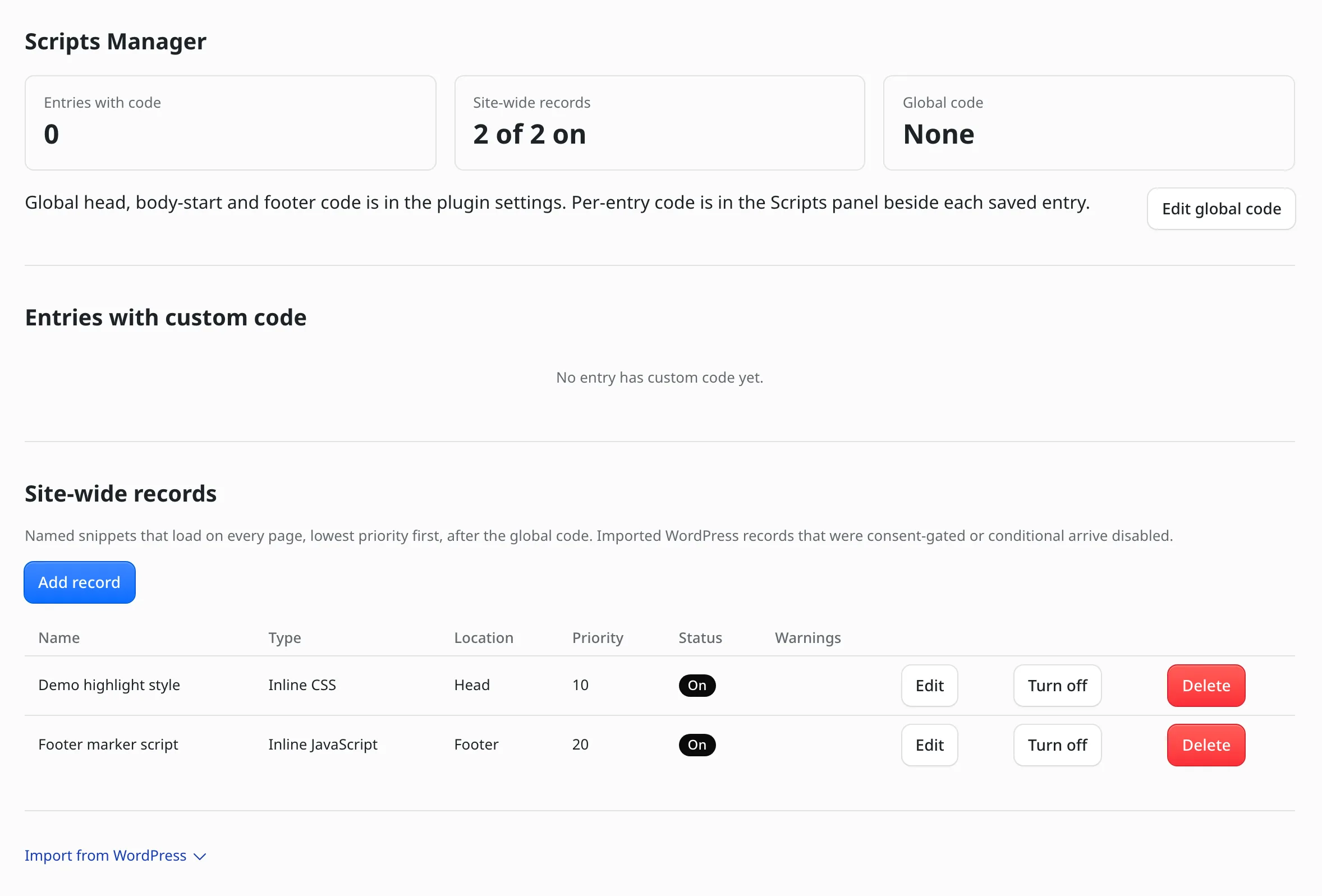
The Scripts Manager screen
Site-wide records list their type, location, priority and status. Each one can be turned off without deleting it.
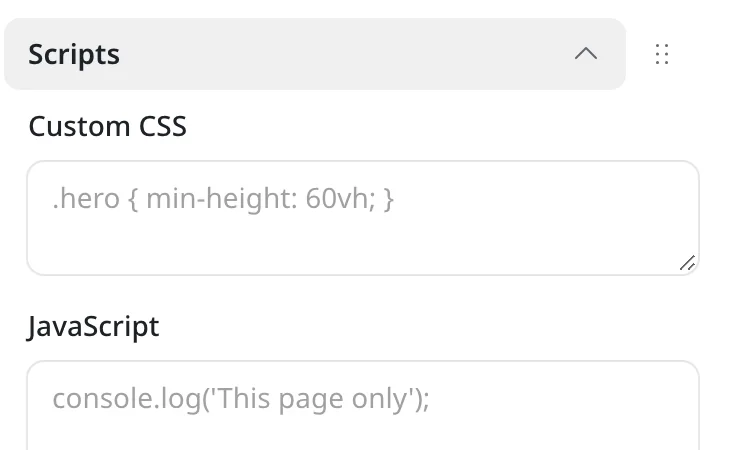
Per-entry code
A Scripts panel beside an entry holds Custom CSS and JavaScript for that page only.
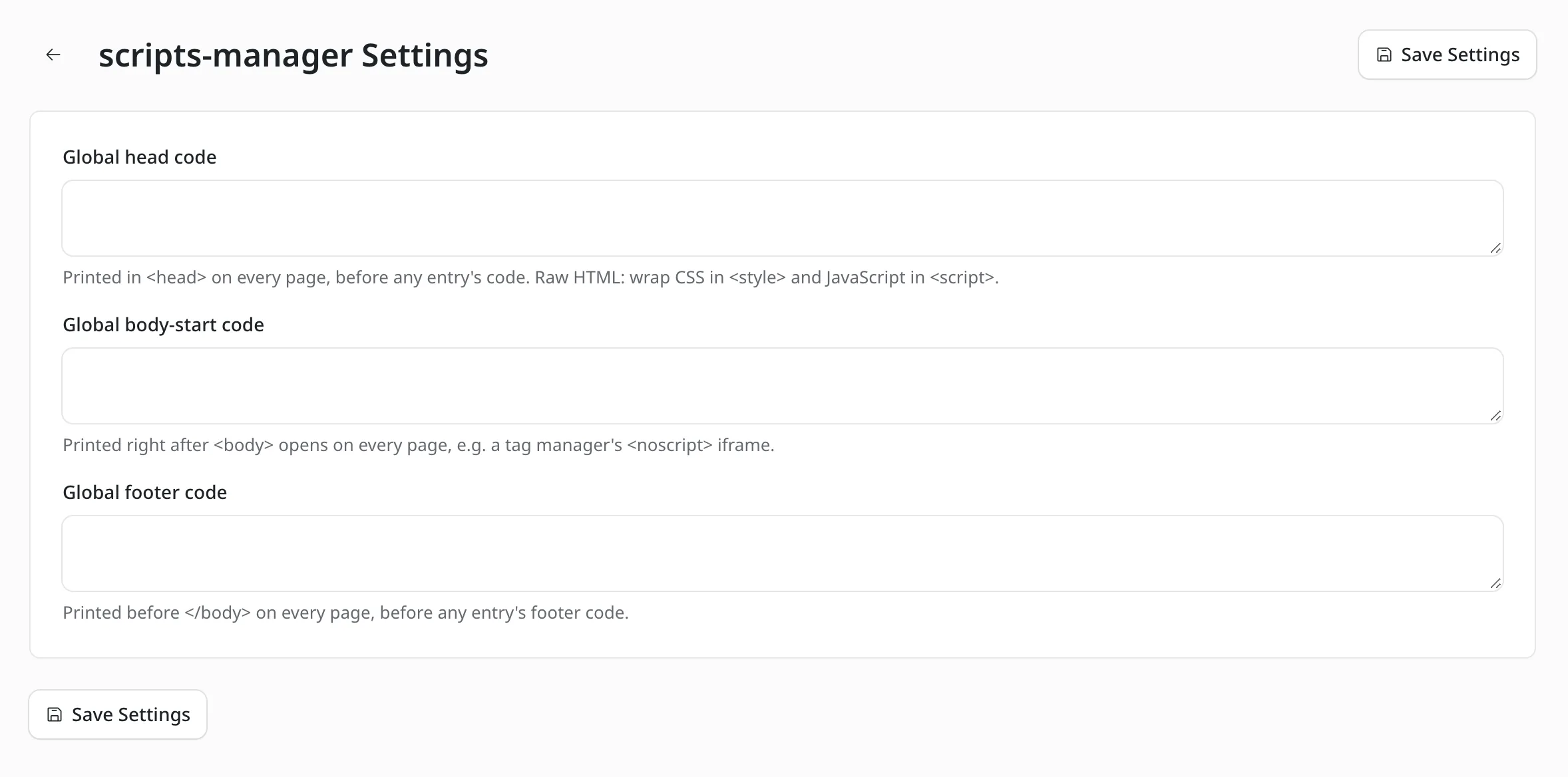
Global code
Head, body-start and footer code that prints on every page.
How to Install Scripts Manager for EmDash
If your layout already renders EmDash’s head and body components, the first 2 steps are the whole setup.
Add the Package
Run this in your EmDash project.
pnpm add @gatilab/emdash-scripts-managerRegister the Plugin
scriptsManager({ collections: ["posts", "pages"] })limits the Scripts panel to some collections.// astro.config.mjs import emdash from "emdash/astro"; import { scriptsManager } from "@gatilab/emdash-scripts-manager"; export default defineConfig({ integrations: [emdash({ plugins: [scriptsManager()] })], });Check Your Layout
The plugin prints its code through EmDash’s
page:fragmentshook, so the layout needs EmDash’s 3 components.--- import { EmDashHead, EmDashBodyStart, EmDashBodyEnd } from "emdash/ui"; --- <html> <head> <EmDashHead page={page} /> </head> <body> <EmDashBodyStart page={page} /> <slot /> <EmDashBodyEnd page={page} /> </body> </html>Add Your Code
The Scripts panel sits beside every saved entry. Saving updates the live page right away, because this code isn’t part of the entry’s drafts, revisions or scheduled publishing.
The Output Order Where Each Piece of Code Prints
Records run lowest priority first, and empty fields print nothing.
| Place | Order |
|---|---|
<head> | Global head code, then records in the head, entry head HTML, entry CSS and entry JavaScript placed in the head. |
Start of <body> | Entry body classes, then global body-start code and records at body start. |
Before </body> | Global footer code, then records in the footer, entry footer HTML and entry JavaScript. |
The limits are 48 KiB per field, 192 KiB per entry, 48 KiB per record and 500 records.
Moving Scripts From WordPress
The export is a read-only WP-CLI script. Posts are matched to entries by slug, and posts that don’t match are listed in the report.
Re-running the import is safe. Entries that already have code are kept unless overwrite is on.
Marketers Delight Scripts Manager
Scripts Manager for EmDash
Carries Over
- Global head and footer code
- Per-post head HTML, footer HTML and body classes
- Named Scripts Manager 3 records with their location and priority
Doesn’t Carry Over
- Consent categories and visibility conditions. Those records arrive switched off, with a note saying why
- Category and tag scripts
- The built-in GA4, Tag Manager, pixel and chat integrations
- Per-post Scripts Optimization dequeue choices
After the script runs, the file goes into Import from WordPress on the plugin page.
wp eval-file export-scripts-manager.php > scripts.jsonPermissions It Asks For
EmDash asks you to approve each one when you register the plugin.
hooks.page-fragments:register- Prints code into public pages. EmDash only runs this hook for trusted (native) plugins.
content:read- Entry titles in the admin list, slug matching during the WordPress import, and removing an entry’s code when the entry is permanently deleted.
What It Needs
These come from the package’s peer dependencies and its trust model.
- EmDash
- 1.4 or later.
- Astro
- 7.
- Role
- An administrator (EmDash role 50) to view, save, import or export code.
- License
- MIT. Free to use, change and ship.
Scripts Manager for EmDash Questions
Cost, who can edit code, revisions and consent.
Have a question that isn’t here? Ask me directly.
Is Scripts Manager for EmDash Free?
Yes. It’s free and MIT licensed, with no paid tier and no license key.
Who Can Edit the Code?
Administrators only. Editors and authors who open the Scripts panel see a notice that only administrators can change it, and their saves are refused. If you give someone the administrator role, you’re trusting them with script access to every page.
Is the Code Sanitized?
No. What an administrator enters is stored and printed exactly. The one change is that </script inside JavaScript and </style inside CSS are escaped, so a string in your code can’t close the element early.
Does Saving Code Create a Revision?
No. Per-entry code sits in plugin storage and isn’t stored in the entry. Saving updates the live page right away, and editing the entry can never change its code.
Why Doesn’t My Deferred Script Run?
A deferred script loads from a data: URL, because browsers ignore defer on inline scripts. A Content-Security-Policy has to allow data: in script-src for it to run.
Does It Handle Cookie Consent?
No. Consent categories and the consent API aren’t ported. A WordPress record that waited for consent is imported turned off, so it doesn’t start loading on every page.
More EmDash Plugins For the Rest of Your Site
Scripts Manager covers custom code. These 8 cover the other jobs a WordPress site usually leaves to plugins.
- Core FormsHTML forms with a submissions inbox
- Lead CaptureLead magnets with gated downloads
- Content Blocks10 editorial blocks with schema
- Dynamic DatesDate shortcodes that stay current
- EmailitEmail delivery through Emailit
- Link ManagerBranded /go/ short links
- Product BoxBuying boxes with live Amazon prices
- FootnotesNumbered footnotes from a shortcode