
 by
by
Rank Math vs Yoast is the first real decision on most new WordPress sites, and the two plugins have moved far enough apart in the last couple of years that the old comparisons don’t hold anymore. So, if you are picking between the two, or wondering whether it is worth switching, this comparison can surely help.
Rank Math is my default for most self-hosted sites, mainly because its free version ships a redirect manager, a 404 monitor and a proper role manager, and it puts less weight into the block editor. Yoast is the better fit for an editorial team that leans on its readability checks, its predefined SEO roles and the Local, News and Video plugins that come bundled with Premium. And a site that already runs one of them properly should generally stay where it is unless the other plugin solves a specific problem.
I run Rank Math on this site and ran Yoast before it, and for this comparison I measured both free plugins on matching WordPress installs, with a third install that had no SEO plugin at all as the control.
One test bench cannot tell you how either plugin behaves on a 40,000-post store, and nothing in a lab can show which one ranks better, so I say plainly where the evidence stops. What it can show is what each plugin gives you for free, what each one costs on the front end, in the admin and in the editor, and what the paid tiers cost today.
There is a migration checklist near the end that you can copy before switching in either direction. Or, if you would rather have someone look at your setup before you decide, I am always available for a chat. Let’s get into it.
Find your situation in the table below, then read the section that matters to you.
| Your situation | Start with |
|---|---|
| You want free redirects and a 404 log | Rank Math Free |
| Your writers use readability guidance | Yoast |
| You own several sites yourself | Rank Math PRO |
| You need Local, News and Video SEO in one purchase | Yoast Premium |
| Nobody will configure the site after launch | Yoast, because it outputs metadata with zero setup |
| You run a WooCommerce store | Test both against your real product pages |
| You run a large site that already works | Keep the current plugin and test on staging |
The table is the short version. The rest of the page is the evidence for each row, and the section on switching is the part I’d read twice before touching a live site.
How I Tested Rank Math and Yoast
Two WordPress sites running the same setup, the same theme and the same content, built from one script so they started out identical. One got Rank Math, one got Yoast. A third site with the same setup and no SEO plugin at all acted as the control, so I could tell what each plugin added rather than guessing.
Before either plugin went on, all three sites returned identical query counts on every screen I measured and identical head bytes. That parity check is why the numbers below mean anything. Each page was requested 12 times, the first 3 thrown away as warmup, and the median taken from the rest. The test ran in July 2026 on the free versions available then, and both plugins have shipped updates since, so the numbers are a snapshot of that bench rather than a property of the current release.
Before the tables, I want to be clear about what each kind of number can and cannot prove:
- A query count says how many database queries a plugin adds to a page, not how expensive these queries are or how well they cache.
- Resource bytes in the editor say how much JavaScript and CSS the browser has to fetch and parse, not how long the sidebar takes to respond while you type.
- Autoloaded bytes say what WordPress reads from
wp_optionson every request, and a difference of a couple of kilobytes is a footprint detail, not a speed result. - Millisecond timings hold for comparing the two plugins on the same bench and do not transfer to your host.
- Nothing here measures rankings.
Read every table below with that list in mind and the results become useful instead of dramatic.
Rank Math vs Yoast at a Glance
The short comparison covers the two free versions, with the measurements from the test bench in the lower half of the table.
| Free version | Rank Math | Yoast SEO |
|---|---|---|
| Works with zero setup | No, the wizard must run first | Yes |
| Redirect manager | Free | Premium |
| 404 monitor | Free | Not offered |
| SEO roles and permissions | Free Role Manager with per-module controls | SEO Editor and SEO Manager roles, plus capabilities a developer can assign |
| Meta description written by default | Yes | No |
| Readability and inclusive-language checks | Basic | Stronger |
| Text link counter | Free | Free |
| Contextual link suggestions while writing | Free, basic | Premium |
| Upgrade prompts per admin screen | 1.5 | 6.7 |
| Extra JavaScript in the block editor | 1.61 MB | 3.93 MB |
| Extra front-end queries per page | 8 | 8 |
| Autoloaded bytes added | 11,960 | 14,028 |
| Disk footprint | 14 MB | 21 MB |
| Data kept after a normal delete | Yes | Yes |
Rank Math gives away more, and Yoast works before you touch a setting. Everything else in this table is a difference of degree, and the sections below say how much each one matters.
Free Features That Affect Daily Work
Most of the daily work in an SEO plugin is not analysis. It is the redirect when a URL moves and the 404 log when something breaks, and this is where the two free versions differ the most.
Redirects and 404 Monitoring
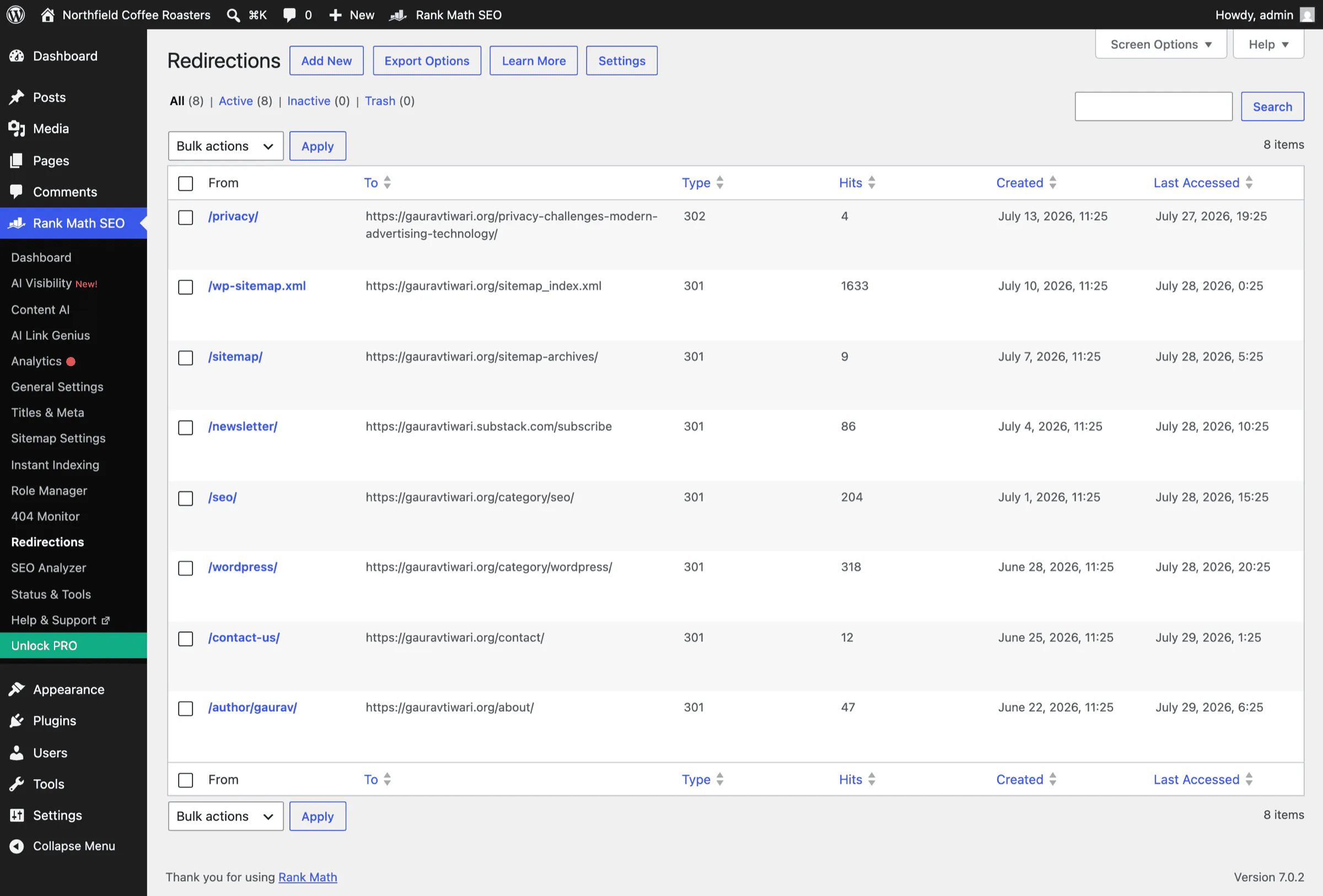
Go to the redirects screen in each free version and this one is settled in a single look.
Rank Math shows you a working redirections table: From, To, Type, Hits, Created and Last Accessed, with add, import, export and settings on top. It is a functioning tool.
Yoast shows you a picture of the Yoast logo and a button that says “Unlock with Yoast SEO Premium”. Regex redirects and the redirect method sit underneath it with padlocks on them.
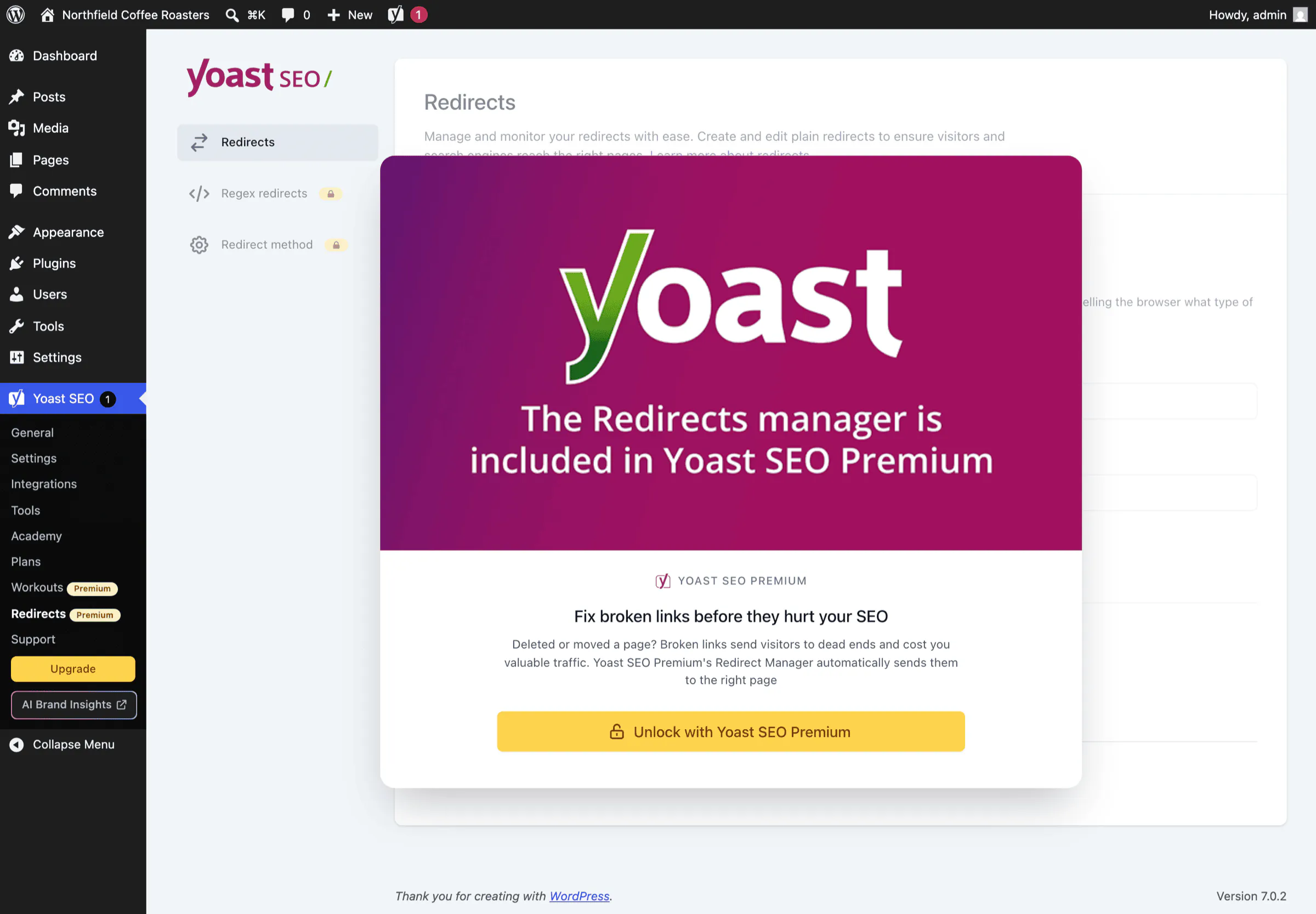
Same slot in the menu, same price of zero, and one of them is a tool while the other is a poster of a tool.
The 404 monitor follows the same pattern. Rank Math includes one in the free plugin and Yoast doesn’t offer one at any tier. One thing a 404 monitor does not do is find orphaned pages, and people generally expect it to. It records requests for URLs that no longer exist, while an orphaned page still returns a 200 and simply has nothing linking to it. That job belongs to the internal linking tools further down.
There is a catch, and it’s a real one. Rank Math ships these modules switched off. Redirections, 404 Monitor and Role Manager are all disabled on a fresh install, along with Image SEO and Local SEO, so the features that win this section are the ones you have to go and find.
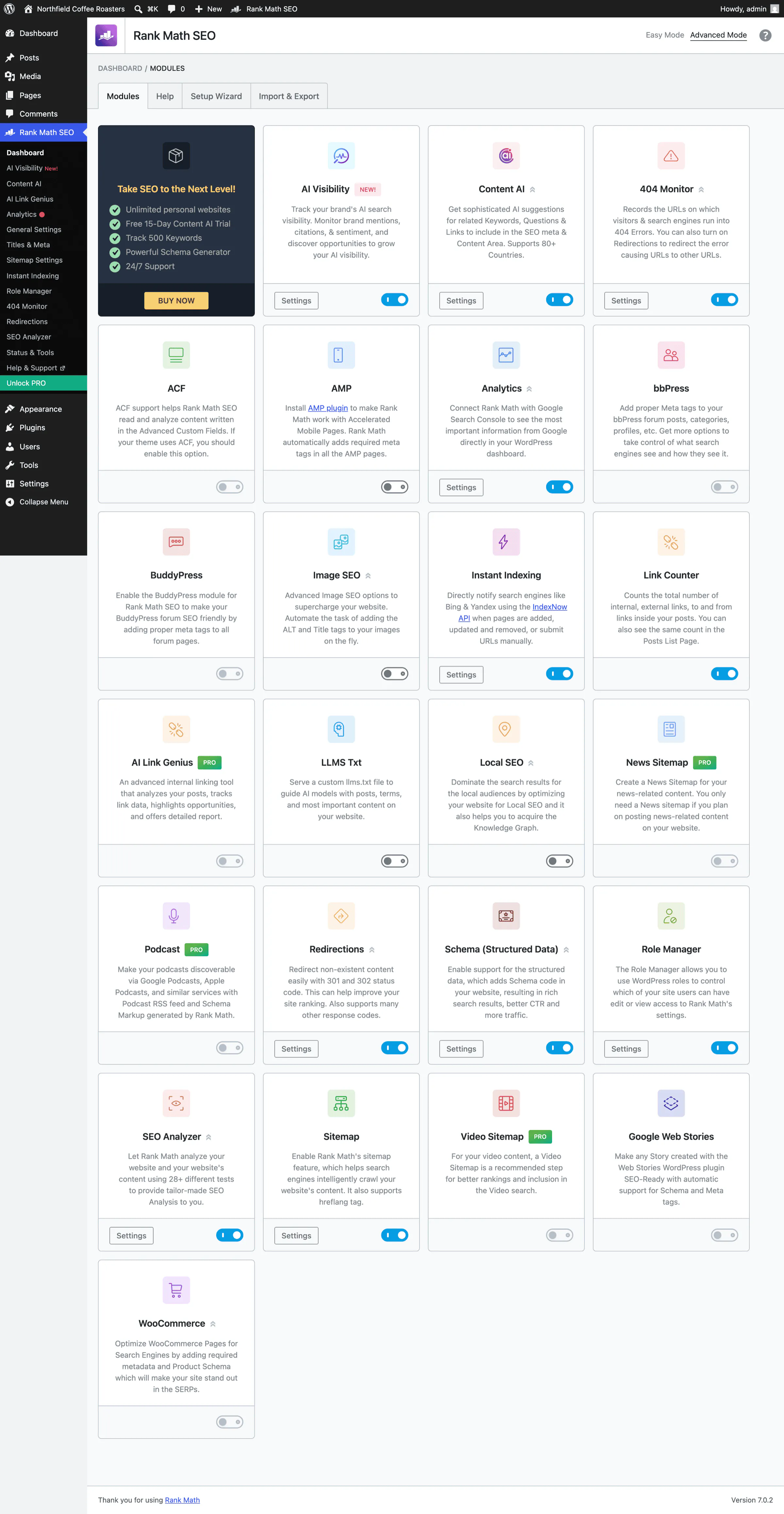
Turning them on costs you 3 more database tables, taking Rank Math from 18 to 21 in my install. The advantage is real, and it isn’t free of consequences.
Roles and Permissions
Both plugins let you control who can touch the SEO settings. They do it in different shapes, and the shape decides who can use it:
- Rank Math has a Role Manager module in the free plugin, a visual matrix of which WordPress role can see which module, from the general settings down to the 404 monitor and the redirections.
- Yoast registers 2 roles on top of the WordPress Editor role, SEO Editor and SEO Manager, and it registers its own capabilities such as
wpseo_manage_optionsandwpseo_edit_advanced_metadatathat a developer can hand to any other role through a filter.
Rank Math’s version is the one an administrator can use without opening a code editor. Yoast’s version is the one a developer can wire into a permission setup that already exists in code. If your writers need to be kept out of the settings screens and there is no developer on call, Rank Math’s matrix is the easier tool, and if you already manage roles in code, Yoast’s capabilities slot into that without a new screen to learn.
The 77 capabilities Yoast adds against Rank Math’s 26 come up again in the database section. These are a footprint detail rather than a verdict, because more capabilities can simply mean a finer permission model.
Internal Linking
The basics are the same on both sides. Each free plugin counts the links into and out of a post, and Yoast shows those counts as 2 columns in the Posts list. The differences start when you want the plugin to suggest a link:
- Rank Math’s free Link Suggestions module, once you switch it on under Titles & Meta, lists posts that share a focus keyword or are marked as pillar content, inside the editor sidebar.
- Yoast keeps its contextual link suggestions, the ones that read the paragraph you are writing, in Premium, along with the orphaned content filter.
- Sitewide link auditing and automation are paid on both sides: AI Link Genius in Rank Math’s paid plans, and the linking tools and workouts in Yoast Premium.
For a solo blog the free counters are enough. For a site with a few hundred posts and no linking plan, the plugin matters less than the plan does; the guide to internal linking for WordPress covers the plan, and if you inherited the site, finding and fixing orphan pages is the place to start before you buy either plugin’s paid linking tool.
Content and Readability Analysis
Both editors give you a focus keyword field, a score and a list of checks, and the two panels look alike at a glance. The differences are in what each one checks:
- Rank Math runs a denser list of SEO checks and lets you optimize a post for up to 5 focus keywords in the free version, with the cap removed in PRO.
- Yoast’s free version analyzes 1 focus keyphrase per post, and Premium raises that to 5 and adds synonyms.
- Yoast’s readability analysis is stronger than Rank Math’s, and it adds an inclusive language check that Rank Math has no equivalent for.
- Related keyphrases are available to free and Premium Yoast users alike through its Semrush integration, with a free Semrush account limited to 10 requests a day. Premium adds the one-click button that turns a suggestion into a separately analyzed keyphrase, which is what the padlock in the free sidebar is guarding.
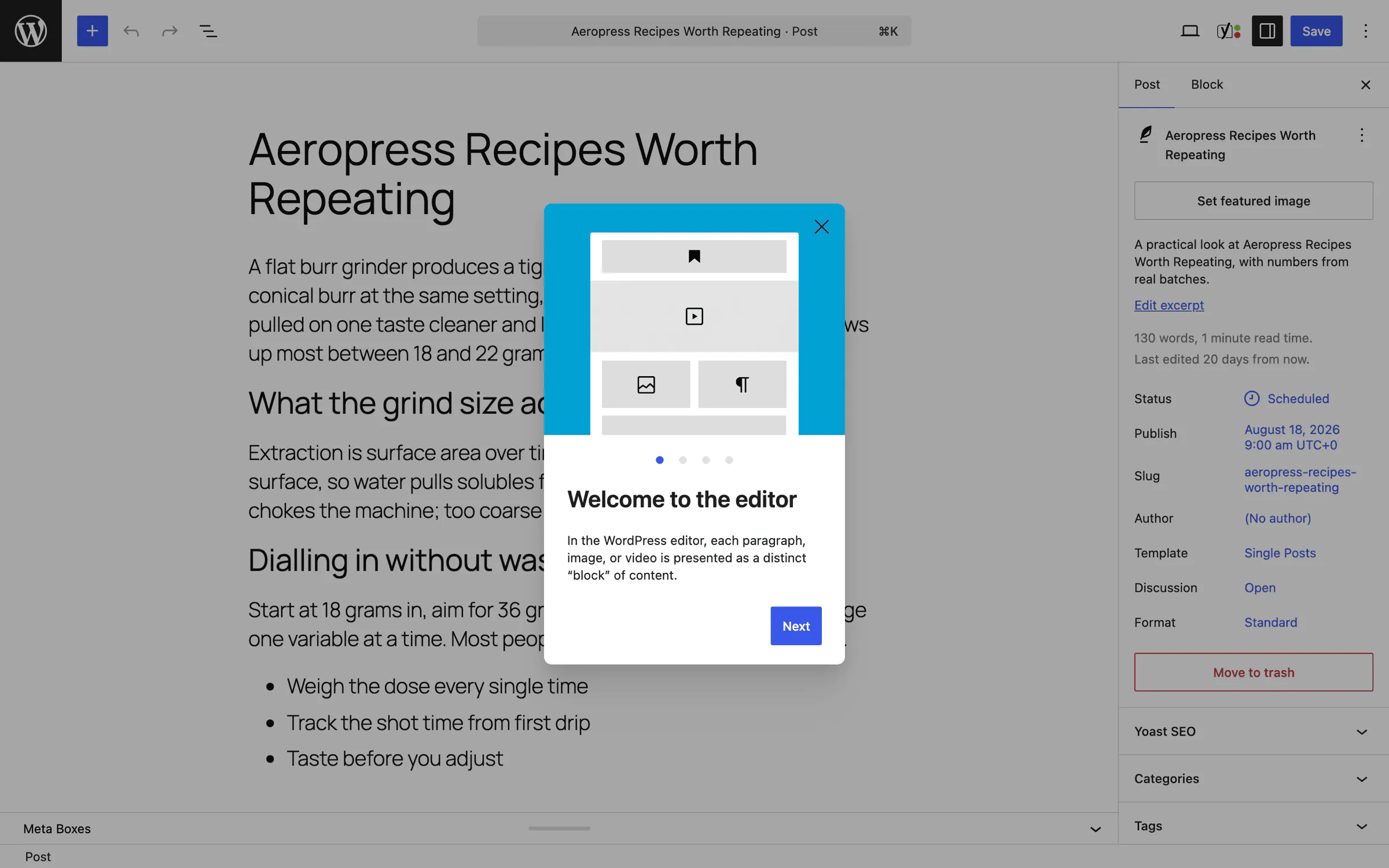
If your writers read the readability panel and act on it, Yoast earns its place on that alone. If they close the sidebar and write, the panel is furniture on both sides.
Setup and Editing Experience
How a plugin behaves before anyone configures it matters more than it sounds, because plenty of sites have an SEO plugin installed by whoever built them and never opened again.
First Activation
Activate each plugin, change nothing, and look at what lands in the <head> of the same post.
| Fresh activation, no wizard | Rank Math | Yoast |
|---|---|---|
| Open Graph tags | 0 | 6 |
| Twitter card tags | 0 | 3 |
| JSON-LD schema blocks | 0 | 1 |
| Plugin markers in head | 0 | 3 |
In the versions I tested, Rank Math emitted nothing at all until rank_math_wizard_completed flipped to true: no meta description, no Open Graph tag and no schema. Yoast started working the second it activated.
On the sites nobody ever opened again, Rank Math has been decorative the entire time.
Complete the wizard and the picture inverts. Rank Math then outputs a meta description, 6 Open Graph tags, 5 Twitter tags and a schema block, in 3,529 extra head bytes. Yoast outputs no meta description, 6 Open Graph tags, 3 Twitter tags and a schema block, in 5,032 extra head bytes, so Rank Math gives you more metadata in fewer bytes.
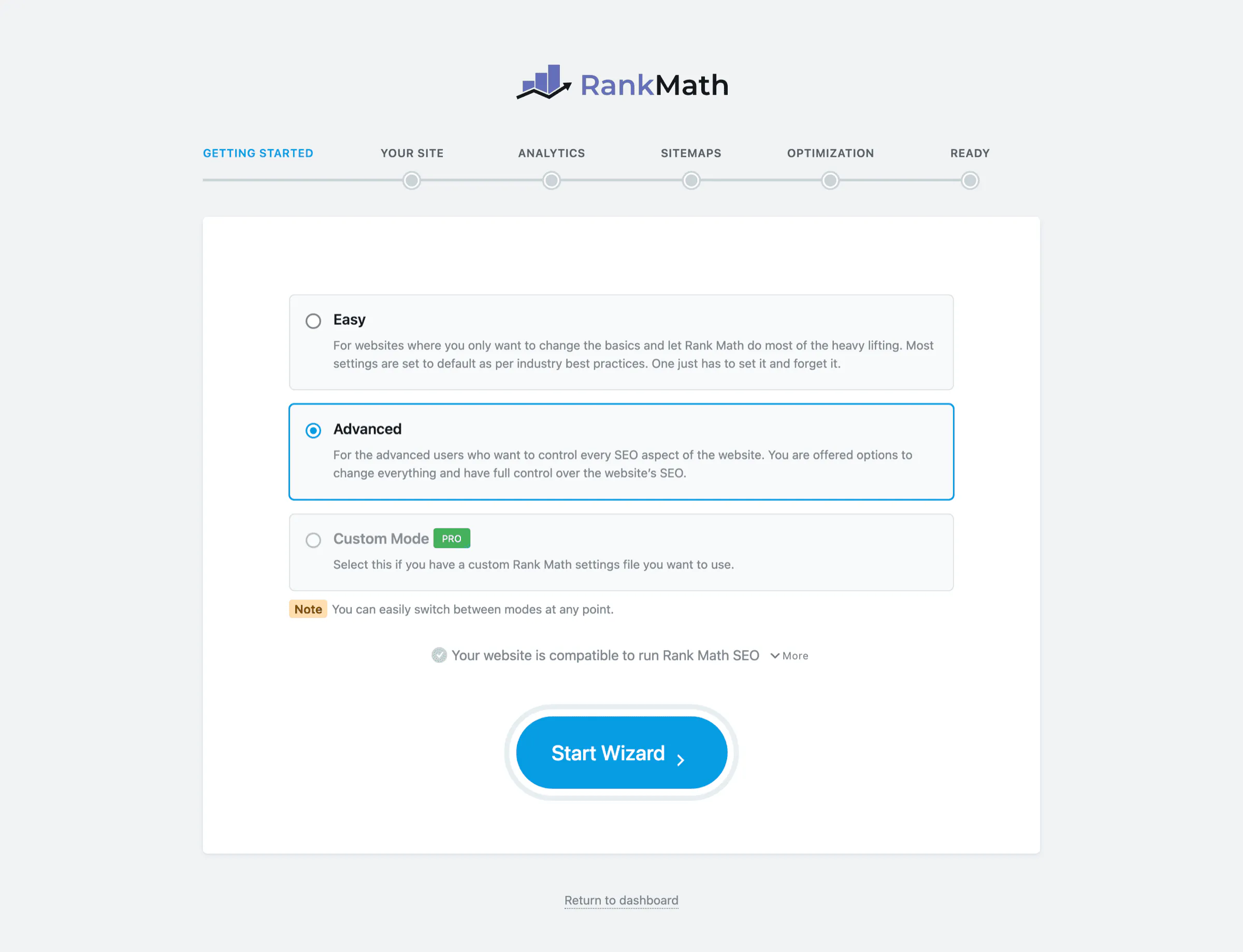
Yoast is the plugin for a site nobody will configure, and Rank Math is the plugin for a site somebody will configure once. The behavior is worth reconfirming on the current release before you rely on it either way.
Block Editor Workflow
Open the panel on the same post in each and the difference in priorities is immediate. Rank Math opens on the Google snippet preview, the focus keyword field and a numbered list of exactly what’s wrong with the post. Yoast opened on a webinar promotion, with the focus keyphrase field below it.
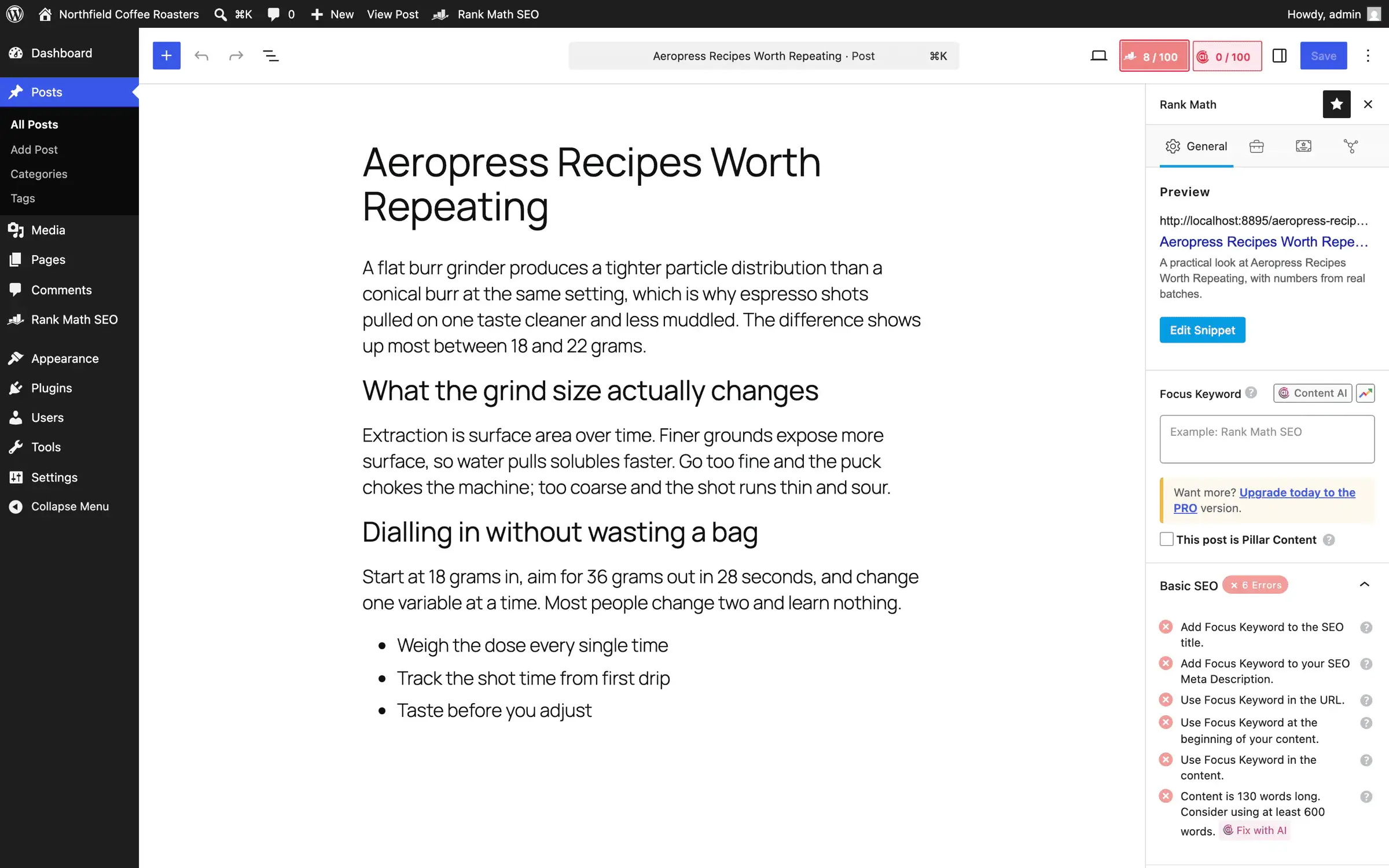
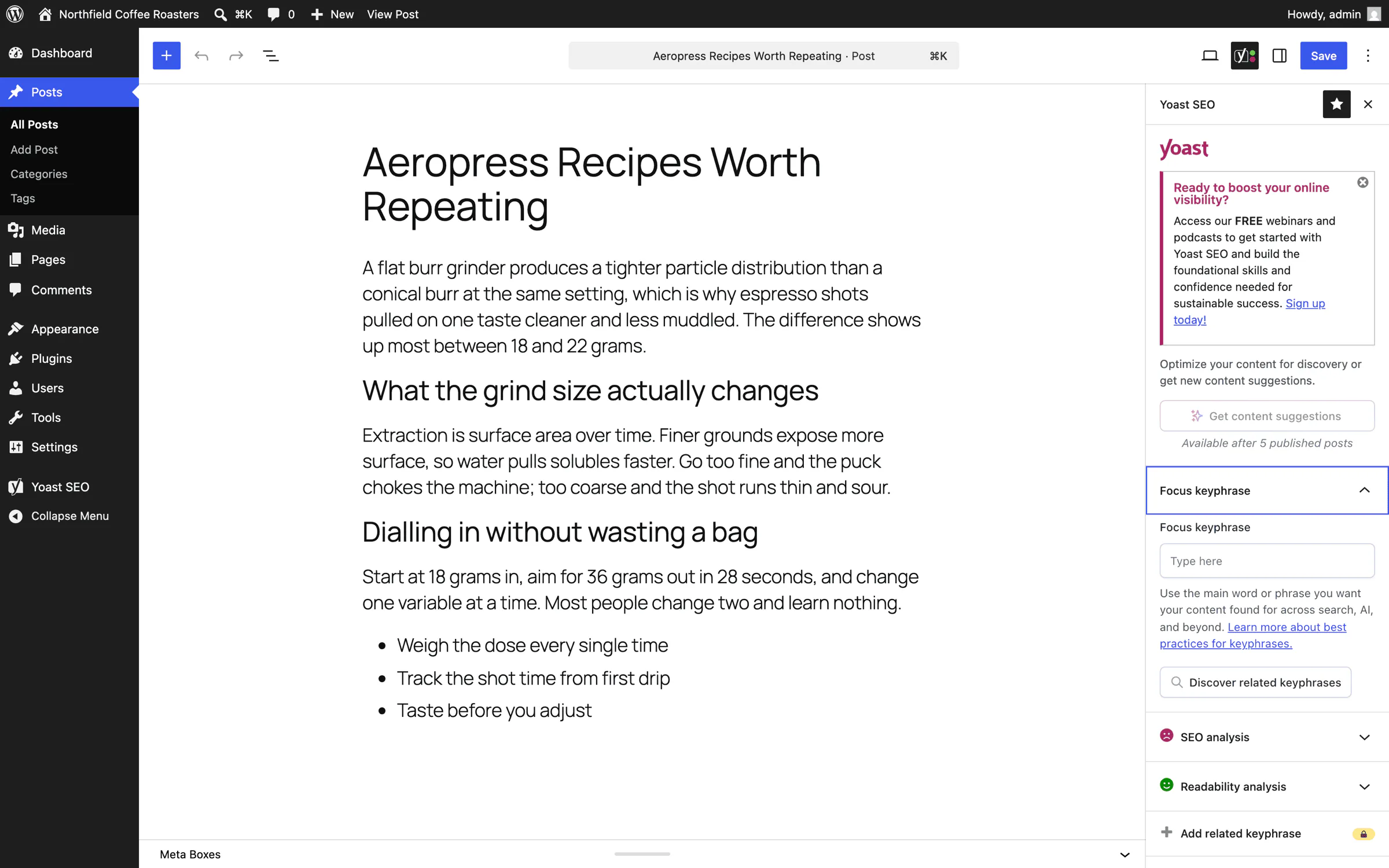
Everybody complains about upsells in free plugins and nobody counts them, so I did. I walked every admin screen in both plugins and counted the distinct buttons and links whose text or destination was an upgrade prompt, then deduplicated by screen and by URL.
| Free admin UI | Rank Math | Yoast |
|---|---|---|
| Distinct screens measured | 15 | 10 |
| Total upgrade prompts | 22 | 67 |
| Average per screen | 1.5 | 6.7 |
| “PRO” or “Premium” badges | 19 | 65 |
| On the 6 screens both plugins have | 9 | 24 |
The fair comparison is the last row. Yoast’s raw total is inflated by its Academy page, which carries 26 prompts on its own and has no equivalent in Rank Math. On the 6 screens that exist in both plugins, Yoast showed 2.7 times as many upgrade prompts.

Rank Math isn’t innocent here. It keeps a permanent green “Unlock PRO” button pinned to the bottom of its admin menu and puts PRO badges on modules you can see but can’t use. It is just quieter about it.
Counts like these change with every release, so take the ratio rather than the totals: Yoast sells harder inside the free admin, and Rank Math sells quietly.
Schema, Sitemaps and Technical SEO
Neither plugin’s technical output is a reason to switch, because both cover the basics properly. The differences sit at the edges and in what is paid.
Schema Output
The two plugins approach structured data from opposite ends:
- Yoast builds a connected schema graph out of the box, with Organization or Person, WebSite, WebPage, Article and BreadcrumbList linked together, plus FAQ and How-to blocks in the editor. You make very few decisions and the graph is correct.
- Rank Math’s free version ships 18 predefined schema types plus a few extras and a per-post schema picker. The custom schema builder, schema templates and unlimited multiple schemas on one post are PRO, where Rank Math lists support for more than 840 types.
Yoast is the pick when you want a correct graph with no decisions, and Rank Math is the pick when you want to choose and edit schema per post without paying, with PRO for custom schema. Whichever you use, run a representative post through Google’s Rich Results Test after setup, because missing fields cause more failures than the plugin does.
Sitemaps and Indexing Controls
Both plugins replace WordPress core’s built-in sitemap and both return a 301 on /wp-sitemap.xml. After that they diverge on defaults:
- Rank Math generates 3 sub-sitemaps by default: posts, pages and categories.
- Yoast generates 4, adding
post_tag. - Both support IndexNow in the free version, so Bing and the other IndexNow engines hear about a URL the moment you publish it.
- News and video sitemaps are paid on both sides: Rank Math PRO for the News, Video and Podcast sitemaps, and the News SEO and Video SEO plugins bundled with Yoast Premium.
Neither tag default is universally right. Tag archives that nobody tends, with a post or two each, are thin pages you don’t want indexed, and Rank Math’s default protects you from that. Tag archives that somebody maintains as topic hubs are worth keeping in, and Yoast’s default assumes you do. It is wise to check the archive setting once instead of trusting either default.
Canonicals, Robots and Breadcrumbs
Both plugins set a canonical URL and robots directives per post and per post type, both output breadcrumbs through a block, a shortcode or a theme function, and both give you archive controls for authors, dates, attachments and paginated pages. These are the fields a migration has to preserve, and the switching section lists them for that reason.
Compatibility is the one place the two have drifted apart, as of early September 2026:
- Rank Math 1.0.277.2 requires WordPress 6.7 or later and PHP 7.4 or later.
- Yoast SEO 28.4 requires WordPress 6.9 or later and PHP 7.4 or later.
A site stuck on an older WordPress release should update WordPress rather than pick an SEO plugin around it.
Rank Math vs Yoast Performance
On the front end the two are tied. The admin and the editor are where they differ, and they differ in opposite directions.
Front-End Queries and Output
Measured against the control site on the 3 page types a blog serves most:
| Front end | No plugin | Rank Math | Yoast |
|---|---|---|---|
| Home, queries | 27 | 35 (+8) | 35 (+8) |
| Single post, queries | 31 | 39 (+8) | 39 (+8) |
| Category archive, queries | 27 | 35 (+8) | 35 (+8) |
| Single post, head bytes | 48,565 | +3,529 | +5,032 |
Both plugins added exactly 8 database queries on the home page, the single post and the category archive, and the timing differences stayed inside the noise. That is a tie on this small site. It is not proof that the code paths are identical, because a query count says nothing about how heavy each query is, how well it caches or how it behaves with 50,000 rows in an indexables table. It says both plugins add the same number of them here.
Rank Math shipped about 1.5 KB less markup per post while outputting more metadata.
WordPress Admin Timings
The admin is a different story, and neither plugin comes out clean:
| Admin screen | Rank Math | Yoast |
|---|---|---|
| Post list | +78 ms, +39 queries | +19 ms, +30 queries |
| Dashboard | +32 ms, +25 queries | +16 ms, +3 queries |
| Post editor | +33 ms, +30 queries | +24 ms, +18 queries |
| Plugins screen | +16 ms, +23 queries | +54 ms, +1 query |
Rank Math is the heavier of the two across most of the admin, and the post list is its worst screen by a distance. Yoast’s one slow result is the Plugins screen, where it added 54 ms on a single extra query. I did not profile where those 54 ms go. With only 1 query added, the time is being spent outside the database, and the usual suspects on that screen are notifications and remote update checks, but that is a guess and not a measurement.
Block Editor Payload
This is where the gap is widest:
| Loaded into the block editor | No plugin | Rank Math | Yoast |
|---|---|---|---|
| JavaScript files | 94 | +16 | +39 |
| JavaScript bytes | 6.17 MB | +1.61 MB | +3.93 MB |
| CSS files | 5 | +11 | +16 |
| CSS bytes | 37 KB | +402 KB | +551 KB |
Yoast loaded 3.93 MB of extra JavaScript into the screen where you write, against Rank Math’s 1.61 MB. That is 2.44 times as much, or about 59% less for Rank Math, whichever way you prefer to read it. Part of that weight is most likely Yoast’s readability and inclusive-language analysis, which runs in the browser, so you are paying bytes for a feature Rank Math doesn’t match.
What I did not measure is how that payload feels: script execution time, long tasks, memory and input delay while the analysis runs. Bytes have to be fetched and parsed, so a 2.3 MB difference is not nothing on a slow laptop, but I can’t tell you every writer will notice it, and I won’t pretend to.
Rank Math had the smaller editor footprint, Yoast was faster on most admin screens, and the front end was a tie. None of these three is big enough to switch a working site for.
Database Footprint and Cleanup
Measured against the control site, cache flushed, read straight out of wp_options.
| Added vs a site with no SEO plugin | Rank Math | Yoast |
|---|---|---|
| Option rows | +38 | +16 |
| Autoloaded rows | +20 | +7 |
| Autoloaded bytes | +11,960 | +14,028 |
wp_user_roles bytes | +889 | +2,206 |
| Capabilities across all roles | +26 | +77 |
| Scheduled cron events | +9 | +6 |
| Database tables | +6 | +6 |
| Disk footprint | 14 MB | 21 MB |
The interesting row is autoloaded bytes, because it inverts what the row above it suggests. Yoast writes fewer than half as many option rows as Rank Math and still loads 2,068 more bytes on every request, because its options are bigger, and most of that gap is wp_user_roles, where Yoast’s 77 capabilities weigh more than Rank Math’s 26.
Two kilobytes is a footprint detail. I found no speed difference I could attribute to it, and it should not move your decision on its own. If you inherit a site that has been through 3 or 4 SEO plugins, the cleanup in clean up autoloaded wp_options bloat is the one that matters, and this delta is not.
Both add exactly 6 tables, but these are different in character. 4 of Rank Math’s 6 are Action Scheduler, a shared library you probably already have if you run WooCommerce. Yoast’s 6 are all its own indexables infrastructure, and these exist to make its other queries faster on a big site.
What Remains After a Normal Uninstall
I deactivated and deleted both plugins through WordPress, the way anyone would, and then counted what was left:
- Rank Math left all 9 of its tables and 23 option rows behind.
- Yoast left all 6 of its tables, 23 option rows and 2 usermeta rows behind.
Both keep the data on purpose, so a reinstall picks up your settings, and both document a complete cleanup for the day you leave for good:
- Rank Math removes everything on delete once you add
add_filter( 'rank_math_clear_data_on_uninstall', '__return_true' );to your theme or a small plugin before you deactivate it. - Yoast documents a manual database cleanup: search for entries containing
wpseoandwp_yoast, then drop its indexable, hierarchy, migrations, primary term, links and prominent words tables.
Back up the database before either cleanup, because both are meant to be irreversible. A site that has been through Yoast, then All in One SEO, then Rank Math without those cleanups is carrying 3 sets of tables and a few dozen orphaned option rows that nobody will ever look at again.
Rank Math vs Yoast Pricing
Both free tiers are usable, so the paid question only matters once you want regex redirects, more keyphrases, contextual link suggestions, rank tracking or the specialist sitemaps. When it does matter, the headline prices look close and the license terms do not.
The list prices below are what each vendor showed in early September 2026, before tax. Rank Math bills in euros and Yoast in US dollars, and I have left them in their own currencies because a converted figure goes stale faster than the prices do. Both sites geolocate, so check your own currency before you budget.
| Plan | First year | Renewal | Sites covered |
|---|---|---|---|
| Rank Math PRO | €95.88 | €107.88 | Unlimited sites you own; client sites excluded |
| Rank Math Business | €299.88 | €335.88 | 100 client sites, 10,000 tracked keywords |
| Rank Math Agency | €659.88 | €779.88 | 500 client sites, 50,000 tracked keywords |
| Yoast SEO Premium | $118.80 | Same price listed | 1 install or domain |
| Yoast WooCommerce SEO | $178.80 | Same price listed | 1 install or domain |
| Yoast SEO AI+ | $358.80 | Same price listed | 1 install or domain |
What each paid tier bundles:
- Rank Math PRO adds rank tracking for 500 keywords, the custom schema builder, the PRO WooCommerce and Local SEO modules, News and Video sitemaps, a 15-day Content AI trial and 24/7 support. Business and Agency add AI Link Genius, a broken link checker, client-site licensing and 10,000 or 50,000 tracked keywords.
- Yoast SEO Premium includes the Premium plugin plus Local SEO, News SEO and Video SEO, 1 seat of the Google Docs add-on, Yoast SEO Academy, 24/7 support and its AI writing tools with no separate credits.
- Yoast WooCommerce SEO is everything in Premium plus the WooCommerce plugin.
- Yoast SEO AI+ is Premium and the WooCommerce tools plus AI Brand Insights, which tracks mentions, sentiment and citations of your brand across ChatGPT, Gemini, Claude and Perplexity.
The license terms are the part of this section that actually decides it:
- Rank Math PRO covers every site you personally own on 1 license and excludes client sites. Business and Agency are the client-site plans.
- Yoast needs 1 subscription per install or domain, with an exception for a network-activated multisite that uses subfolders.
- Yoast publishes volume discounts that start at 5 subscriptions: 5% at 5, 15% at 10, 20% at 25, 25% at 30, 30% at 40 and custom pricing at 50. These apply only when the subscriptions are bought in the same order.
If you run 1 site, the 2 entry prices are in the same range and Yoast throws in 3 extra plugins, a Google Docs seat and its training, which is a real argument for it. If you run 5 sites of your own, Yoast is 5 subscriptions with 5% off and Rank Math is still 1 license. For an agency, Rank Math publishes flat allowances for 100 and 500 client sites, while Yoast’s ladder tops out at 30% off before the “talk to us” tier, so the Rank Math side wins on price by a wide margin and the Yoast side answers with bundled Local, News and Video tools on every client site plus its support.
WooCommerce, Local Sites and Publishers
A blog and a store don’t need the same plugin, and this is where a universal winner stops making sense. These are the cases where the answer changes with the site.
WooCommerce Stores
The two plugins put WooCommerce at different price points:
- Rank Math’s free plugin includes a WooCommerce module with product schema and store URL options, and the PRO module adds advanced product schema fields such as brand and product identifiers.
- Yoast keeps its store features in the $178.80 WooCommerce SEO package: product schema with price, availability, ratings and identifiers, product sitemaps that skip cart, checkout and filter pages, variant handling, breadcrumb trails and extra structured data such as brand, color and material.
Decide this one on your real product pages. Take a handful of products with variations, run each plugin’s output through the Rich Results Test and check the identifiers, the variations and the category templates. A feature count settles nothing here.
Local Businesses
A single-location business gets local business schema and opening hours from Rank Math’s free Local SEO module, and multiple locations are a PRO feature. Yoast’s Local SEO plugin is bundled with Premium, handles single and multiple locations, and adds a store locator. So a one-location business is fine on Rank Math free, and a multi-location business pays either way and should compare the two on how each one handles its locations, not on the plugin’s name.
News, Video and Podcast Publishers
Both need a paid tier here. Rank Math PRO carries the News, Video and Podcast sitemaps, and Yoast Premium bundles News SEO and Video SEO. If you publish in these formats at volume, price the paid tier of both, then lean to Yoast when you would also use the Google Docs add-on and the training, and to Rank Math when you have several of your own sites to cover on the one license.
Large Editorial Teams
A team that writes all day wants guardrails, and Yoast has more of them: readability and inclusive-language checks, the predefined SEO roles, the SEO workouts, Academy access and 24/7 support. A setup with one administrator managing many sites wants control and price, and that is Rank Math: the visual role manager, free bulk editing, denser SEO checks and 1 license across every site the administrator owns.
AI Features and Privacy
Both plugins have spent the last two years adding AI to the sidebar, and this is the part of the comparison where you should be most suspicious of everyone, including me. I tested what ships in the free versions. Everything about the paid tiers below comes from the plugins’ own documentation and admin screens rather than from use.
On the Rank Math side:
- Content AI moved from word credits to feature-based usage starting with Rank Math SEO 1.0.269 and PRO 3.0.112. Each run of a tool now counts as 1 use against a monthly limit for that tool, and free users get 1 to 5 uses per feature.
- Every paid SEO plan includes a 15-day trial of a Content AI plan rather than a standing allowance, so Content AI should be budgeted as its own subscription if you will use it.
- AI Visibility is a free module that reports how your brand shows up across AI answer engines. AI Link Genius, which suggests and bulk-applies internal links, is paid.
- Rank Math’s own disclosure on WordPress.org says its features send keywords, the site URL, account tokens, post content and image data to its servers, depending on which modules are switched on.
On the Yoast side:
- Premium includes AI title and description generation, in bulk or per page, and its in-editor AI tools, with no separate account and no credit purchase.
- Yoast SEO AI+ is a separate $358.80 package that adds AI Brand Insights, a dashboard tracking mentions, sentiment and citations across ChatGPT, Gemini, Claude and Perplexity.
- The free plugin manages an
llms.txtfile, and so does Rank Math’s. The bot blocker that controls which AI crawlers may use your content for training is Premium.
None of this is a reason to migrate a stable site. Google’s own guidance for its AI features in Search says the normal Search requirements apply and there is no extra technical requirement, so an llms.txt file and a visibility dashboard change what you can see, not what you rank for. Compare output quality, monthly limits, what data leaves your server and the total price before you switch any of it on for a client.
How to Switch Without Changing SEO Output
Switching SEO plugins can be safe, and a finished import is not the same thing as a validated migration. Search engines see the public output, so the public output is what you compare, in this order:
- Take a complete file and database backup.
- Export the current plugin’s settings and its redirects to a file you keep outside WordPress.
- Crawl the live site and save titles, descriptions, canonicals, robots directives, social tags, schema, status codes and redirect chains.
- Clone the site to staging.
- Run the new plugin’s importer on staging.
- Crawl staging and compare it field by field with the production crawl.
- Spot-check representative posts, pages, products, categories, tags, custom post types, paginated archives and attachment URLs by hand.
- Validate the XML sitemaps and the structured data.
- Test every redirect the business depends on.
- Deploy only after every unexplained difference is resolved, then recrawl and watch Search Console for a few weeks.
Rank Math’s importer reads Yoast’s titles, descriptions, focus keywords and robots settings, and it imports the redirects from Yoast SEO Premium as well. I would still export those redirects to a CSV first and test every rule that uses a regular expression or a condition after the import, because those are the ones that map least cleanly between the two plugins.
Going the other way, Yoast’s import tool lists Rank Math among the plugins it reads metadata from, and Yoast publishes a migration guide for it. I have not run that direction on a real site, so give it the same staging crawl rather than my word.
Focus keywords are the least important field to check, because search engines never see them. Canonicals, robots directives, schema, sitemap membership and redirects deserve the first look, and a missing noindex on an archive you wanted excluded is the mistake that costs the most and shows up last.
There is no rule that says the old plugin must stay installed for a fixed period. Keep it deactivated, not deleted, until you have compared the live crawl once more after the switch, then remove it with its documented cleanup from the database section above.
The Limits
Every comparison has edges, and here are mine, so you know where the evidence stops before you read the verdict.
- The environment was a controlled test bench, not a production host. Both plugins ran in the same place, so comparing them against each other holds. The raw millisecond figures do not transfer to a live server, which is why I have leaned on query counts and byte counts throughout.
- It was one site each, on one machine, on one afternoon in July 2026, on the free versions current then. 12 runs per URL with warmup discarded is enough to beat the noise on a 78 ms difference. It is not enough to call a 5 ms difference real, and I haven’t.
- The test site was small. Yoast’s indexables tables exist specifically to keep large sites fast, and a small site is exactly where that investment looks like pure overhead. On a site with thousands of posts the admin numbers could move in Yoast’s favor, and I have not tested that.
- Editor responsiveness was not measured, only bytes. Script execution time, long tasks, memory and typing latency are the numbers that would turn the payload table into a responsiveness verdict, and they are not here.
- Neither plugin’s paid tier was tested. The Premium and PRO comparisons are read off pricing pages and documentation, not used, and support quality was not tested at all.
- None of these measurements is a ranking. Nothing in this article shows that either plugin makes a page rank better than the other, because that isn’t something a lab can show.
Which Plugin Should You Choose?
With those limits in view, this is how I’d decide.
Choose Rank Math when you will open the settings once. You get a redirect manager, a 404 monitor and a visual role manager for nothing, a quieter admin, a lighter editor and 1 license for every site you own. That covers most self-hosted blogs and most client sites where somebody is going to be moving URLs around.
Choose Yoast when nobody is going to configure anything after launch, when your writers use the readability and inclusive-language checks, or when you would use the bundled Local, News and Video plugins on 1 site. Its predefined SEO roles and 24/7 support matter more to a team than a lighter editor does.
Keep your current plugin when the site is configured properly and the other plugin doesn’t solve a problem you can name. I’ve watched people spend a weekend switching SEO plugins on a site whose real problem was that nothing linked to anything. If that sounds familiar, fix the internal linking before you touch the plugin.
Test both when you run a WooCommerce store or a site with tens of thousands of posts. Do it on staging, against your own templates, before you commit either way.
I run Rank Math on this site. If you want the long version of why, the full Rank Math review covers my configuration, and the comparison of every major WordPress SEO plugin is the place to go if neither of these two is quite right. Yoast SEO is free on the plugin directory if you want to test both yourself.
FAQs on Rank Math vs Yoast
Is Rank Math better than Yoast?
Rank Math is better for a site that wants free redirects, a built-in 404 monitor, per-module role controls and 1 license across several sites you own. Yoast is better for a writing team that uses its readability and inclusive-language checks, its predefined SEO roles, its training and support, and the Local, News and Video plugins bundled with Premium. Neither one is better for every site.
Which is faster, Rank Math or Yoast?
On matching test sites, both plugins added the same 8 database queries per front-end page and the timing difference sat inside the noise. Yoast was faster on most admin screens, and Rank Math loaded about 59% fewer extra JavaScript bytes into the block editor, 1.61 MB against 3.93 MB. Those numbers come from one small site in July 2026 and say nothing about how the editor feels while you type.
Can I use Rank Math and Yoast together?
You should not run both with their metadata, schema, sitemap, breadcrumb or redirect features enabled at the same time. Even when one plugin detects the other, check the rendered page source and the sitemap yourself rather than assuming the conflict handling works everywhere. The safe route is to import the old plugin’s data into the new one on staging, verify it, and then deactivate the old plugin.
Will switching from Yoast to Rank Math hurt rankings?
It can, if the migration changes titles, canonicals, robots directives, schema, sitemap membership, breadcrumbs or redirects. Run the import on staging, crawl before and after, and compare those fields on representative URLs before you deploy. Focus keywords are the least important thing to check, because search engines never see them.
Which plugin is cheaper for multiple sites?
Rank Math PRO covers every site you personally own on 1 license, with client sites excluded, and its Business and Agency plans cover 100 and 500 client sites. Yoast licenses each install or domain separately and publishes automatic discounts that start at 5% for 5 subscriptions and reach 30% at 40, when they are bought in the same order. For 2 or more sites of your own, Rank Math is the cheaper license.
Which is better for WooCommerce, Rank Math or Yoast?
Rank Math includes a basic WooCommerce module in the free plugin and advanced product schema in PRO. Yoast sells a $178.80 a year WooCommerce SEO package that bundles Premium, Local, News and Video SEO with product schema, product sitemaps and variant handling. Test both against your real product pages, variations and identifiers before you decide, because the feature lists do not settle it.
Do Rank Math and Yoast remove their data when deleted?
No. A normal deactivate and delete leaves both plugins’ tables and options in the database so a reinstall picks up your settings. Rank Math removes everything on delete when you add the rank_math_clear_data_on_uninstall filter first, and Yoast documents a manual cleanup of its wpseo options and wp_yoast tables. Back up the database before either, because the cleanup is irreversible.
Which plugin works with older WordPress versions?
As of September 2026, Rank Math 1.0.277.2 requires WordPress 6.7 or later and Yoast SEO 28.4 requires WordPress 6.9 or later, and both need PHP 7.4 or later. If your site is on an older WordPress release, update WordPress first instead of choosing an SEO plugin around it.
Is Rank Math PRO worth paying for?
Rank Math PRO is worth it when you need rank tracking, the custom schema builder, advanced WooCommerce or multi-location Local SEO, News and Video sitemaps, or 1 license across several sites you own. An ordinary blog gets most of what it needs from the free version once the Redirections, 404 Monitor and Role Manager modules are switched on.
Should I switch if my current SEO plugin works?
Usually not. Switch only when the other plugin solves a problem you can name, such as redirect management, editorial permissions, a schema type you need, a publishing sitemap or license cost across sites. A correctly configured plugin you already have is worth more than a slightly better plugin behind an incomplete migration.
Final Remarks
If you have read this far, you know the two plugins are closer than either camp admits. The one idea I’d keep is that a plugin produces output and the output is what ranks: correct titles, canonicals, schema and redirects on every URL, whichever name is on the sidebar.
When a client asks me which one to install, I tell them the same three things. Fix the content and the internal linking first, because the plugin cannot rank a page nothing points to. Finish the setup on the day you install it and switch on the modules you need, because a half-configured SEO plugin does less than you think: Rank Math outputs nothing until the wizard is done, and Yoast indexes your tag archives until you tell it not to. And never switch and delete on the same day; keep the old plugin deactivated until you have compared the live crawl once more.
The migration checklist above is the thing to copy before you touch anything. And if you would rather have someone look at the site before you decide, I am a chat away.
That’s it from my side. I hope it helps you pick the right one.
Tell Google you want more of this.
Add Gaurav Tiwari as a preferred sourceOne tap, and this site shows up more often in your own Top Stories, AI Overviews and AI Mode. Remove it any time.
Disclaimer: This site is reader-supported. If you buy through some links, I may earn a small commission at no extra cost to you. I only recommend tools I trust and would use myself. Your support helps keep gauravtiwari.org free and focused on real-world advice. Thanks. - Gaurav Tiwari
