
 by
by
I gave Claude a single line instruction: “Audit gauravtiwari.org’s SEO using Rank Math MCP.” The Rank Math MCP server did the rest. Claude opened the server on my WordPress site, ran the audit, returned a score of 80 out of 100, listed the failed tests, and offered to fix them one by one. No CSV export. No screenshot juggling. No prompt-writing gymnastics just to get Rank Math data into an AI assistant.
The process is quite simple. After setting Rank Math MCP up, I just ran a command.
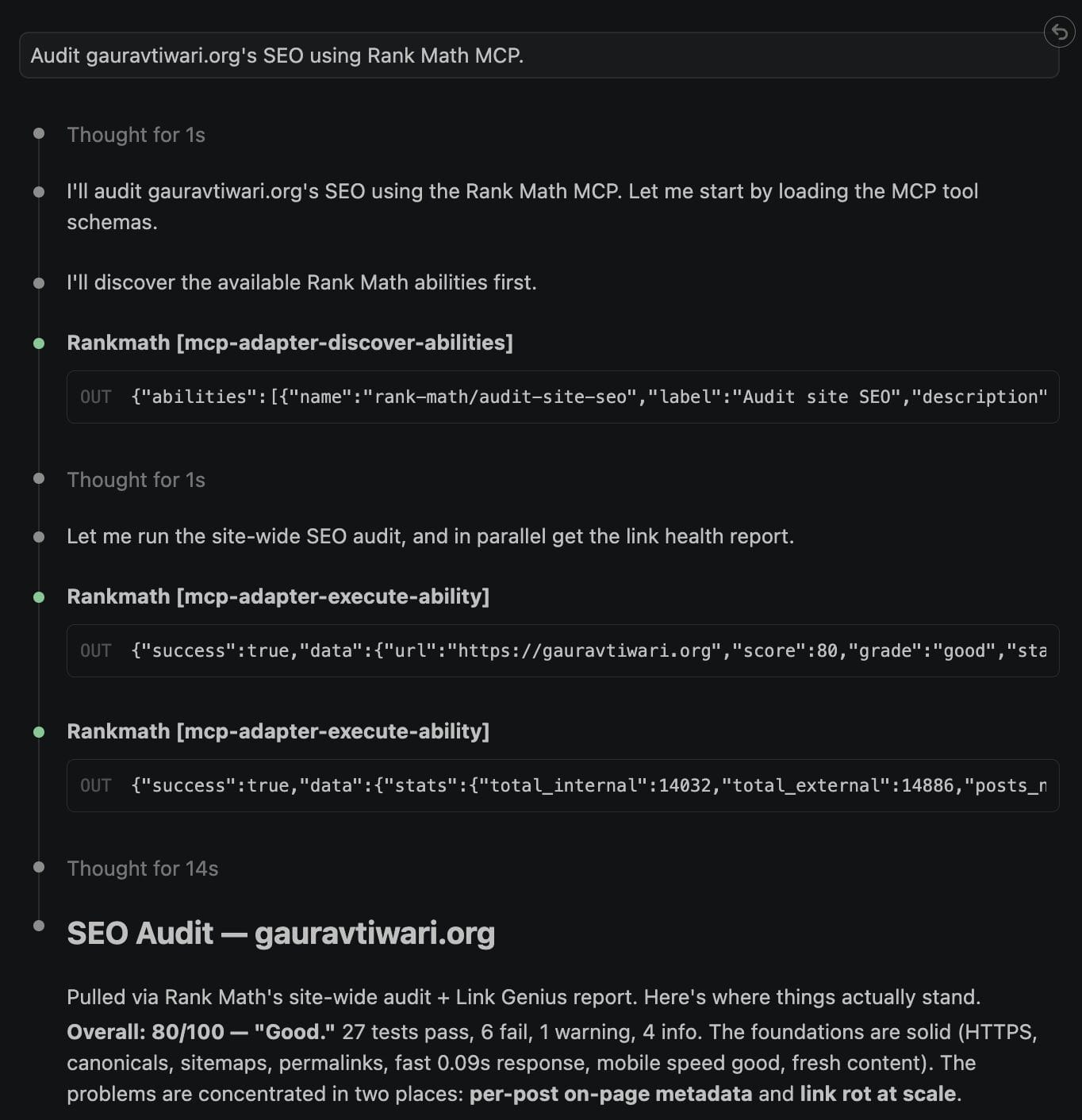
And voilà, it came with a proper analysis of my website, including the problems, what is good, what is bad, etc. It even directed me towards what to do and what to fix first. See.
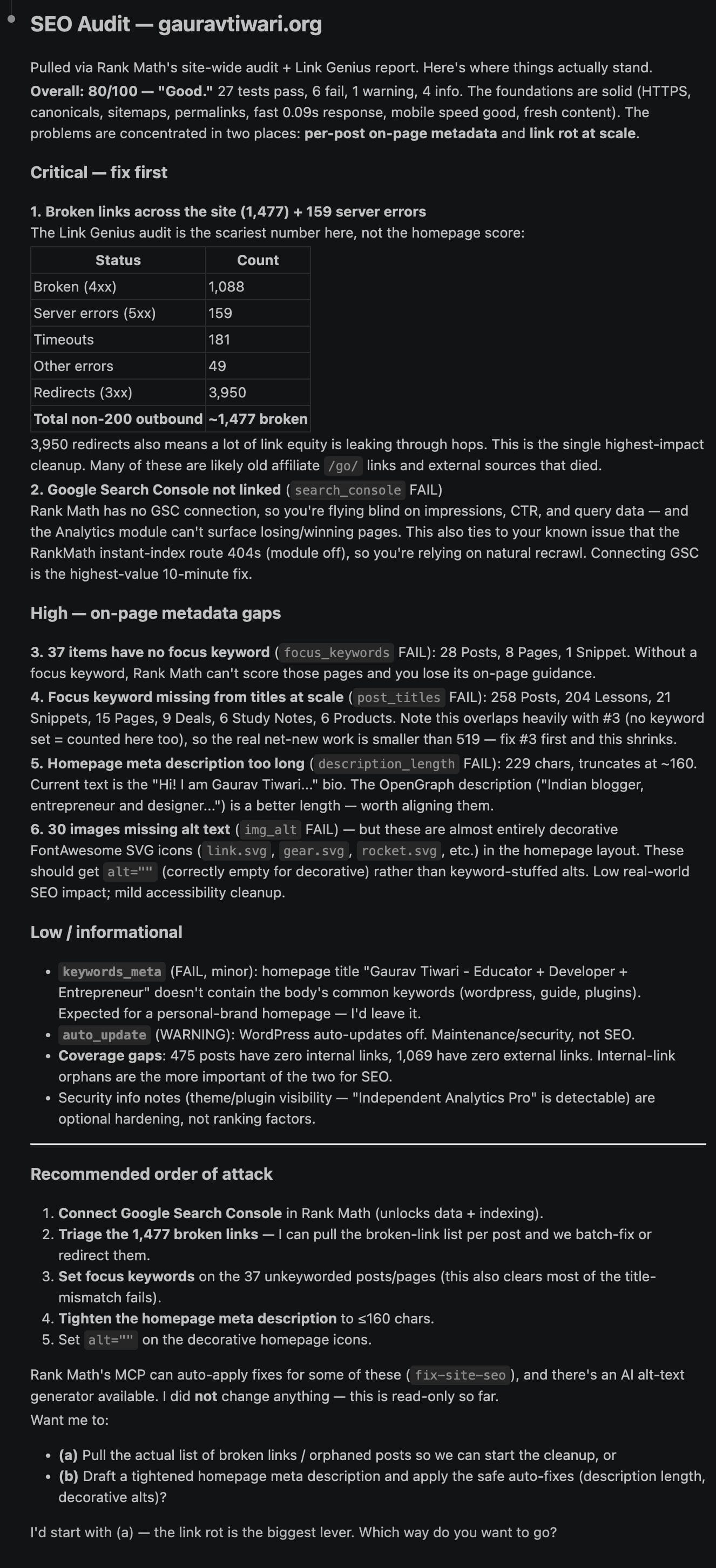
This is amazing.
That’s the shift worth paying attention to. Rank Math isn’t only a sidebar you open after writing anymore. It can expose SEO audits, link reports, schema data, and post metadata to an AI assistant through MCP, then let that assistant take approved actions. I’ve used Rank Math since 2018, moved to Pro on June 2, 2021, and renewed every year because it kept replacing heavier SEO workflows. The MCP server is the first Rank Math feature that changes who does the repetitive SEO work.
This guide shows how the Rank Math MCP server works, how to connect it to Claude Desktop, Claude Code, Cursor, Claude.ai, or ChatGPT without mixing up their setup flows, and where the guardrails belong so you get automation without handing over the whole site.
What the Rank Math MCP server actually is
MCP stands for Model Context Protocol. It is a standard way for an AI assistant to discover what a tool can do, inspect the inputs it needs, and call that tool directly. Instead of pasting Rank Math reports into chat, Claude can ask WordPress what abilities are available and run the right one.
Rank Math ships that bridge inside the plugin. It bundles the official wordpress/mcp-adapter library and registers its SEO features as “abilities” through the WordPress Abilities API. The result is a live endpoint on your own domain that any MCP-aware AI client can use. There is no separate plugin to install and no settings screen to hunt down. Once Rank Math is active, the server is available at /wp-json/mcp/mcp-adapter-default-server.
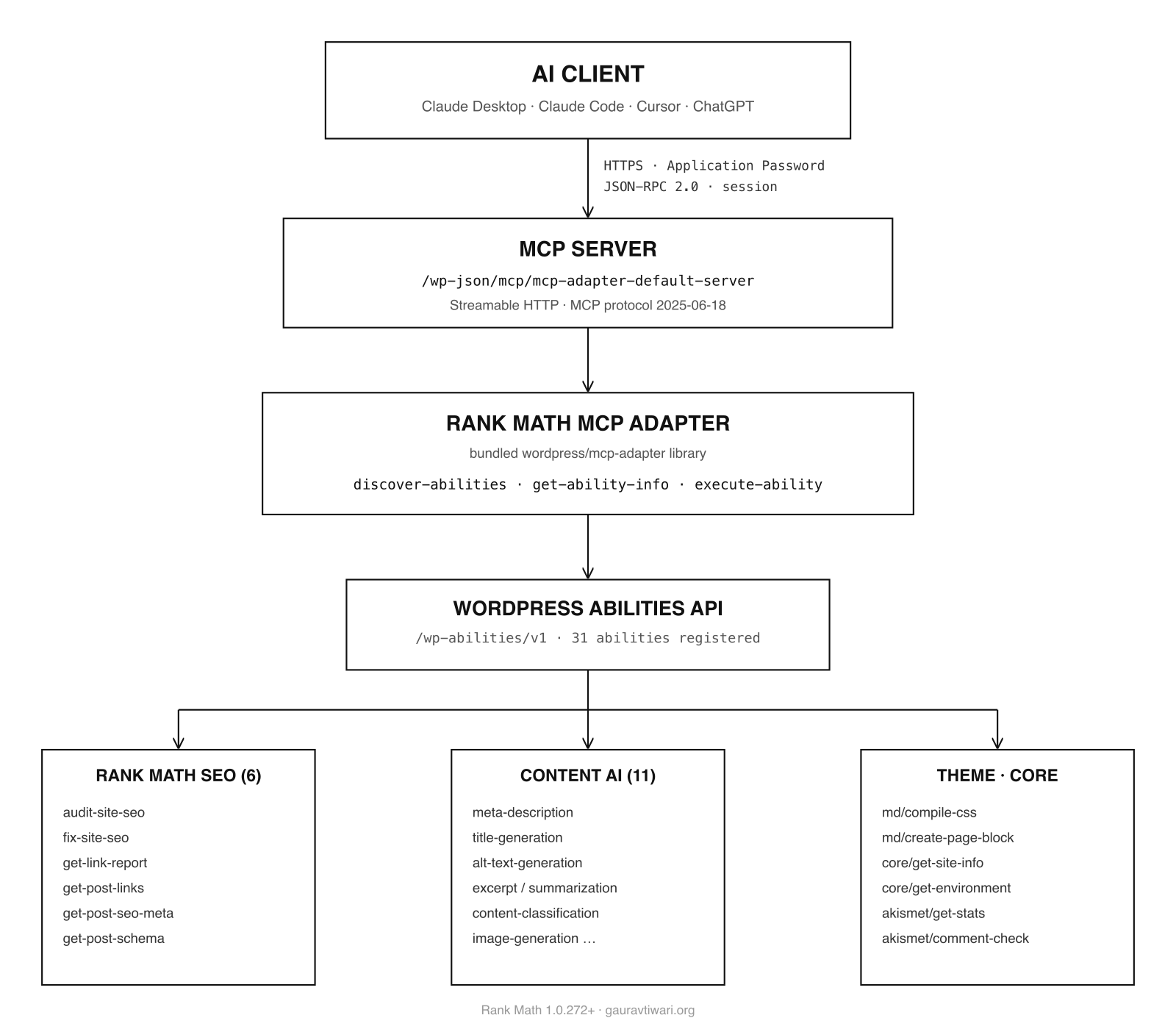
On my own install (Rank Math 1.0.272 with Pro 3.0.115), the server negotiates MCP protocol 2025-06-18 over Streamable HTTP using JSON-RPC. A live tools/list call returns three adapter tools: mcp-adapter-discover-abilities, mcp-adapter-get-ability-info, and mcp-adapter-execute-ability. Behind those tools, discovery currently returns nine public abilities: six Rank Math SEO abilities and three ai/* helper abilities. The six Rank Math abilities are the heart of this article.
The 6 Rank Math SEO tools you get
Rank Math exposes six SEO abilities through MCP, and Rank Math documents them in its MCP tools knowledge base. The practical thing to notice is the split: five abilities only read data, and one can write. That is what decides how much freedom you should give the assistant.
| Tool (ability) | What it does | Writes? |
|---|---|---|
rank-math/audit-site-seo | Runs a site-wide SEO audit and returns a score, a grade, and per-test findings, each with a fix hint and a knowledge-base link. Pass a URL to audit another site; Rank Math documents competitor audit as a Pro use case. | No |
rank-math/fix-site-seo | Applies Rank Math’s automatic fix for one failing test from the audit. | Yes |
rank-math/get-post-seo-meta | Returns a post’s SEO title, description, focus keyword, robots, canonical, Open Graph fields, and SEO score. | No |
rank-math/get-link-report | Returns site-wide link stats. Free shows internal/external counts and posts with no internal or external links; Pro adds broken links, redirects, nofollow counts, and HTTP status distribution. | No |
rank-math/get-post-links | Returns every link on a post with its URL, anchor text, and follow status. | No |
rank-math/get-post-schema | Returns the schema markup attached to a post and the schema types available. | No |
That read/write split is why I am comfortable testing this on a real site. Let the AI inspect as much as it needs. Slow down only when it asks to run fix-site-seo, because that is the one tool that changes something.
To prove this isn’t theory, I ran the audit against my own site through the MCP server (earlier than the 80/100 score I got). Here’s the real shape of what came back:
{
  "success": true,
  "data": {
    "url": "https://gauravtiwari.org",
    "score": 56,
    "grade": "average",
    "statuses": { "ok": 4, "fail": 3, "warning": 1 },
    "total_tests": 8,
    "remote_api_status": "unavailable",
    "findings": [
      {
        "test_id": "auto_update",
        "category": "priority",
        "status": "warning",
        "title": "Automatic Updates",
        "fix_hint": null,
        "kb_link": "https://rankmath.com/kb/seo-analysis/?#priority"
      }
    ]
  }
}
Yes, my own site scored 56 in that attempt. I’ll own that, that’s the point of an honest tool. Two things to read here, though. First, remote_api_status came back “unavailable,” which means the remote rankmath.com tests didn’t run in my session (they need a connected Rank Math account), so this is the local-only partial score. Second, the top “failing” item was automatic updates being off, which is a deliberate choice on a site where I test things, not an accident. The value isn’t the number. It’s that an AI now gets the structured findings, with fix hints and KB links attached, and can act on them.
I later connected with the Rank Math account and then ran the audit again to reach the 80/100 score.
Beyond the six SEO tools, my live server currently exposes three ai/* helper abilities: alt text generation, post details, and post term lookup. Treat that list as a moving surface. Rank Math and the WordPress MCP Adapter can expose more abilities as modules change, so discovery matters more than memorizing a fixed count. It is useful if you already rely on the Rank Math sidebar, but it is not the same as getting eleven separate Content AI writing tools.
How one Rank Math MCP request works
The clever part is the interface. Rank Math does not dump every SEO ability into your AI client as a separate top-level tool. That would bury the assistant in noise. Instead, the WordPress MCP Adapter exposes three tools that act as a front desk for everything else:
discover-abilities: lists every ability the site offers. No arguments.get-ability-info: returns the full schema for one ability, so the AI knows the exact parameters.execute-ability: runs an ability by name with a parameters object.
So the AI discovers what is available, inspects the ability it wants, then executes that ability with the right parameters. Small surface, full reach. It is the same pattern good API design has used for years, and it keeps the assistant from inventing tool names that do not exist.
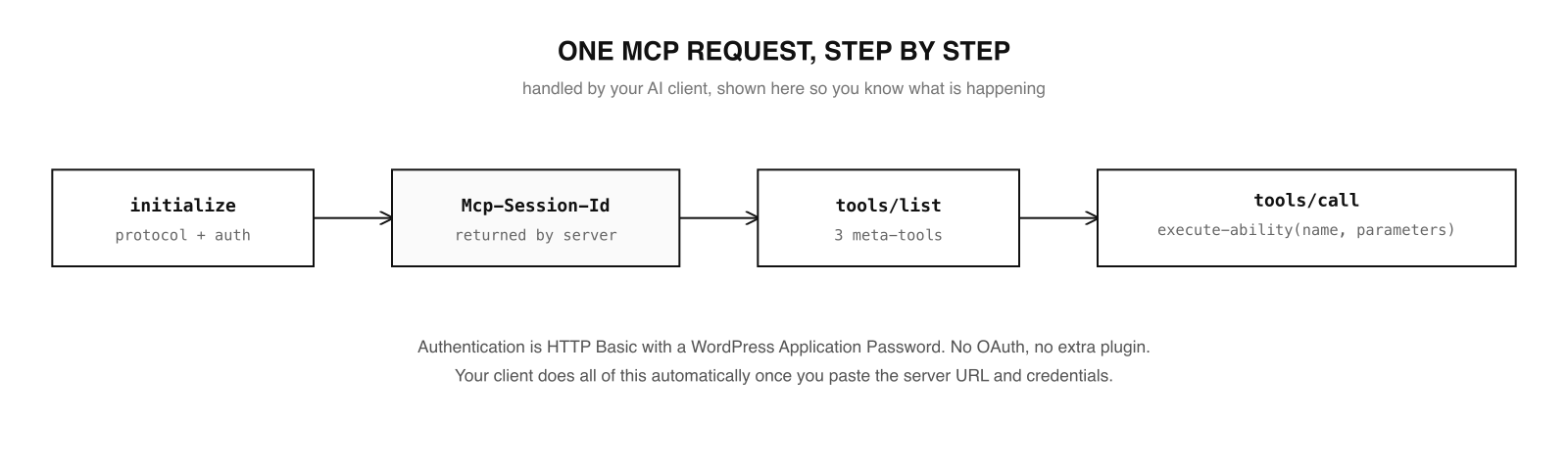
You don’t have to think about any of that day to day. Your MCP client handles the handshake, the session, and the tool calls automatically. I’m showing it only so that when something goes wrong, you understand what the moving parts are.
How to set up the Rank Math MCP server
Setup is still a five-minute job, but the client matters. You need Rank Math 1.0.272 or newer (the free version works for the core tools), WordPress Application Passwords, and the MCP server URL from your own domain. The mistake to avoid is mixing remote connector flows with local .mcp.json flows.
Step 1: Create an Application Password
This is the credential your AI client uses to authenticate. In WordPress, go to Users, then your Profile, and scroll to Application Passwords. Give it a name you’ll recognize later (I name mine after the client, like “Claude”), click Add, and copy the password it shows you once. You can’t see it again, and you can revoke it any time.
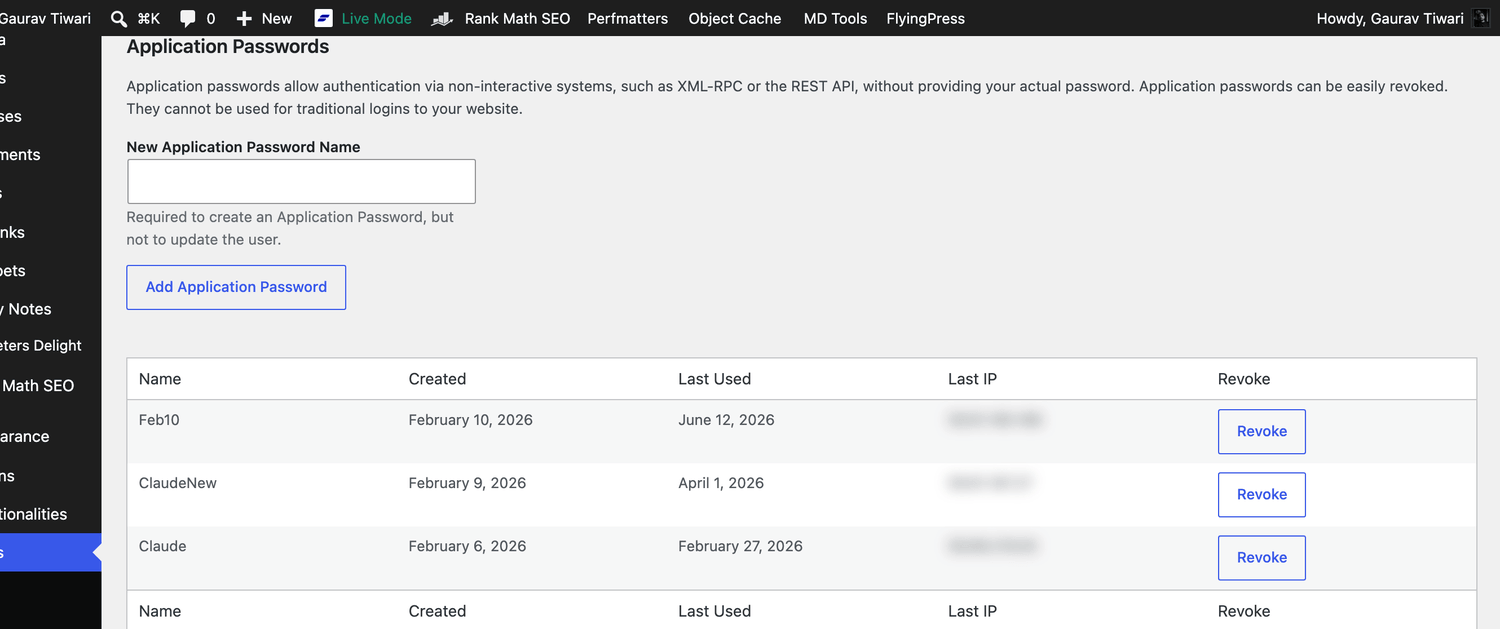
Save this Application password to .env file somewhere on your computer. Copy the path for future use. This is how I markup my .env file for best results.
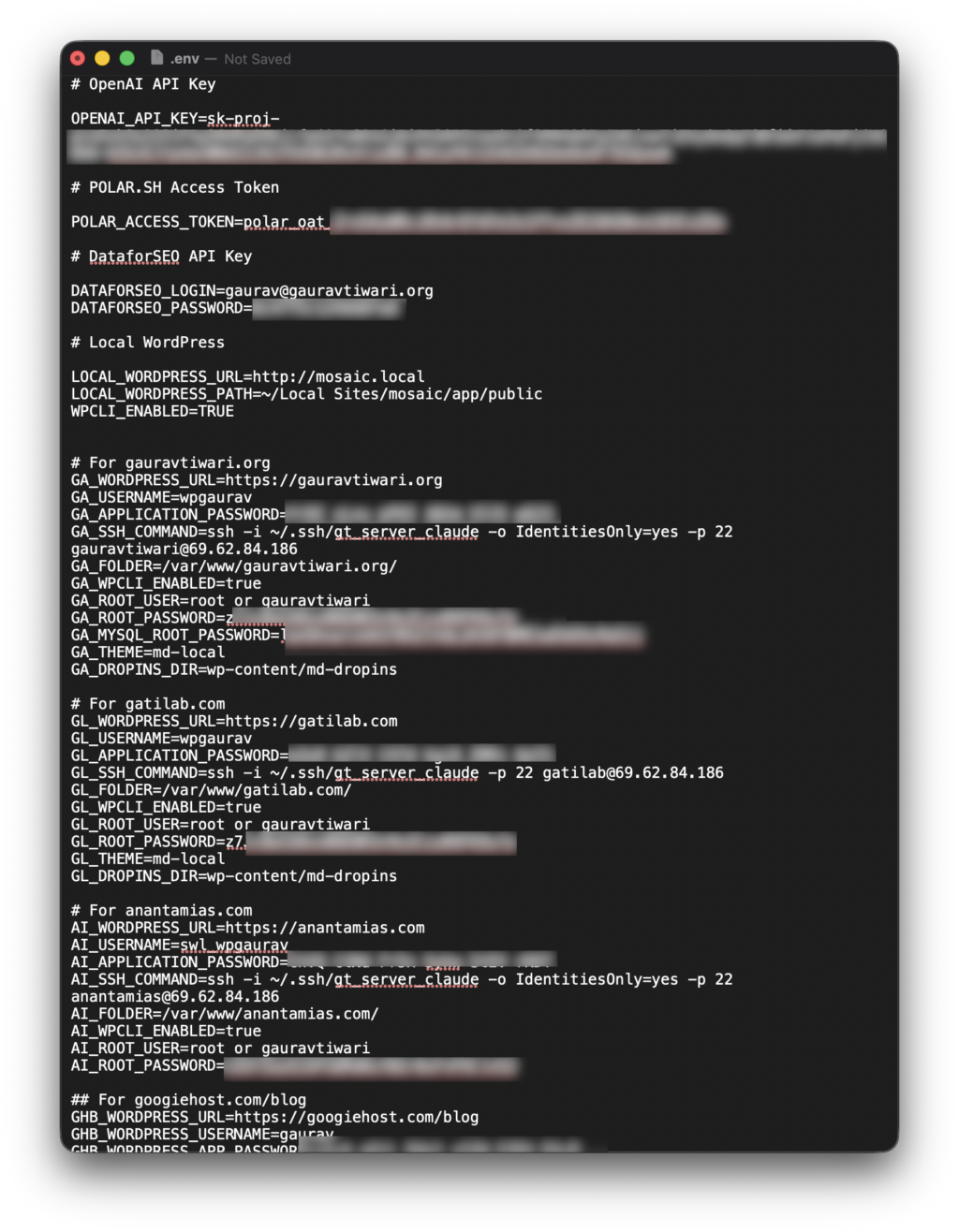
You use need APPLICATION_PASSWORD and USERNAME to use the Rank Math MCP server. But you can also add the rest as you move forward for the best results. Having proper SSH credentials gets you better and more in-depth results.
Step 2: Grab your MCP server URL
It’s always the same path on your domain:
https://yoursite.com/wp-json/mcp/mcp-adapter-default-serverThat URL is the remote endpoint. A direct MCP client can call it over Streamable HTTP. Claude Desktop, Cursor, and Claude Code can also use the WordPress remote proxy, which keeps authentication in local environment variables.
Step 3: Use the right client path
Easiest ways to do this: All you need to do is ask your AI tool to do this:
Save Rank Math MCP server and related skills from my site example.com for future use using https://gauravtiwari.org/rank-math-mcp-server/ - use .env credentials from {FOLDER_PATH}/.env to connect to the server or ask for credentials if not provided.
Copy this and paste to your favorite AI assistant, and it will do the rest for you. You don’t need to do anything else.
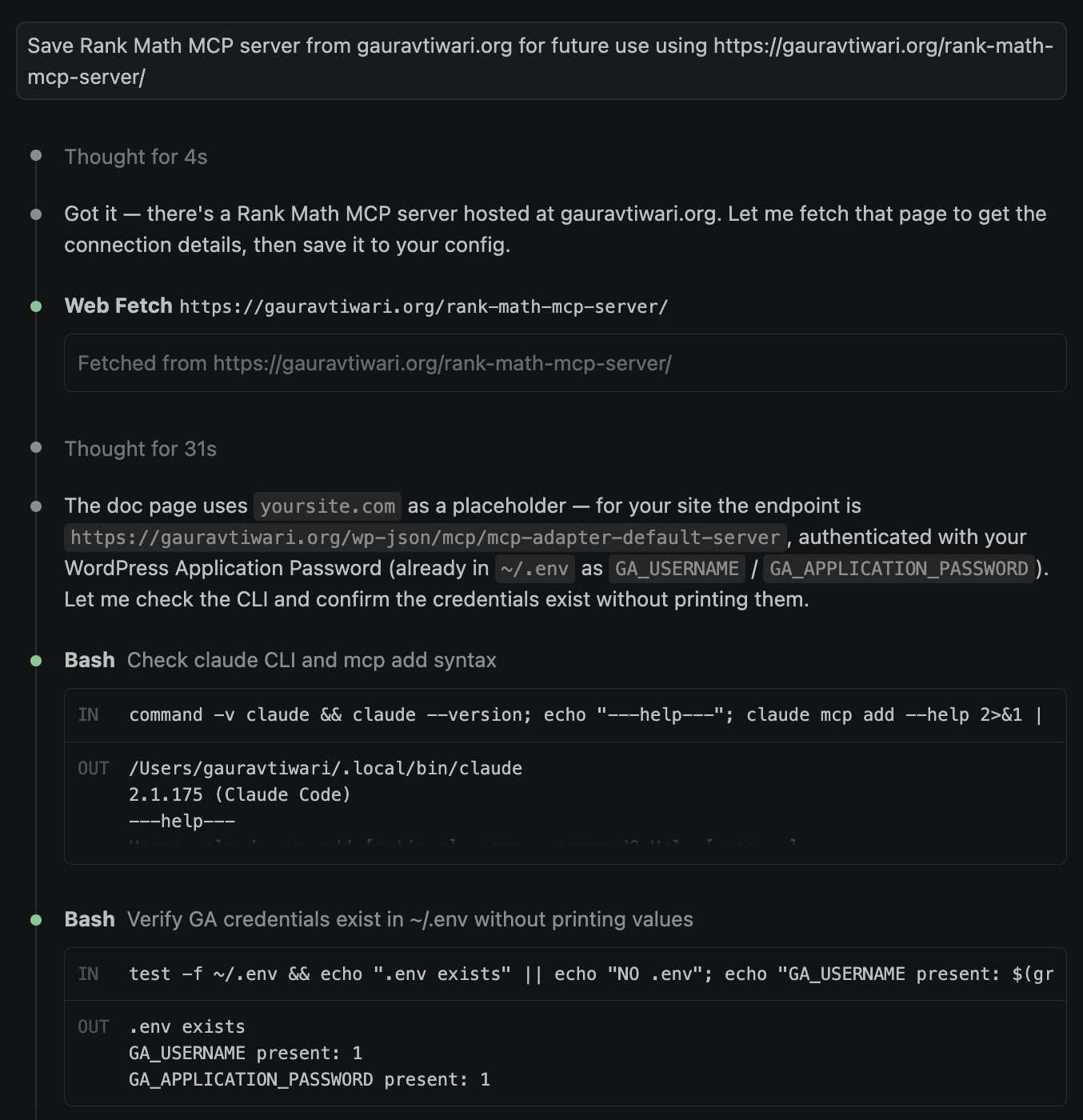
Here is what it did:
- Fetched the connection details from my rank-math-mcp-server page (this one) — the doc uses
yoursite.comas a placeholder, so the real endpoint for your site ishttps://example.com/wp-json/mcp/mcp-adapter-default-server(streamable HTTP, WordPress Application Password auth). - Verified it’s a live MCP server — the
initializehandshake returnedMCP Adapter Default Server v1.0.0exposing tools, resources, prompts, logging, and completions. - Saved it at user scope as
rankmath, built the Basic-auth header from your existing~/.envcredentials (wpgaurav/GA_APPLICATION_PASSWORD) — no credentials were printed or hardcoded. - Confirmed
✔ Connectedand recorded it in memory.
rankmath  →  https://gauravtiwari.org/wp-json/mcp/mcp-adapter-default-server (HTTP)  ✔ Connected

Scope: User config (available in all your projects)
File modified: ~/.claude.json · Remove anytime with claude mcp remove rankmath -s user
But if you want to do it manually, here is the full guide.
For Claude Desktop, Cursor, and Claude Code, the most reliable config is the WordPress remote proxy. It lets your AI client start a local MCP process, while the proxy talks to your WordPress endpoint with the Application Password.
{
  "mcpServers": {
    "rankmath": {
      "command": "npx",
      "args": ["-y", "@automattic/mcp-wordpress-remote@latest"],
      "env": {
        "WP_API_URL": "https://yoursite.com/wp-json/mcp/mcp-adapter-default-server",
        "WP_API_USERNAME": "your_wp_username",
        "WP_API_PASSWORD": "your_application_password"
      }
    }
  }
}- Claude Desktop: open Claude, Settings, Developer, then Edit Config. Save the config and restart Claude Desktop.
- Cursor: open Cursor Settings, Tools and MCP, then Add Custom MCP. Paste the same config and enable it.
- Claude Code: put the same
mcpServersobject in your project.mcp.jsonor your user-level MCP config.
If your client supports remote Streamable HTTP with custom headers, direct config can work too. I tested this live on gauravtiwari.org. The auth header is Basic plus the base64 encoding of username:application_password. Do not paste the placeholder as-is.
{
  "mcpServers": {
    "rankmath": {
      "type": "http",
      "url": "https://yoursite.com/wp-json/mcp/mcp-adapter-default-server",
      "headers": {
        "Authorization": "Basic REPLACE_WITH_BASE64_USERNAME_COLON_APPLICATION_PASSWORD"
      }
    }
  }
}
Claude.ai custom connectors use Customize, Connectors, then Add custom connector, and the server must be reachable from Anthropic’s cloud. ChatGPT uses Developer Mode under Settings, Apps and Connectors, Advanced settings, then Settings, Connectors, Create. ChatGPT does not read .mcp.json. If a connector flow cannot pass WordPress Application Password auth directly, put the Application Password in a small proxy layer instead of pasting it into chat.
After connecting, ask the assistant to list MCP tools. A healthy WordPress MCP Adapter connection should show mcp-adapter-discover-abilities, mcp-adapter-get-ability-info, and mcp-adapter-execute-ability. Then ask it to run discovery. That is where Rank Math abilities like rank-math/audit-site-seo appear.
The core workflow: audit and fix your SEO with one prompt
The practical workflow is simple: ask for an audit, review the findings, approve one fix, then re-audit. The Rank Math MCP server turns that loop into a conversation instead of a tab marathon.
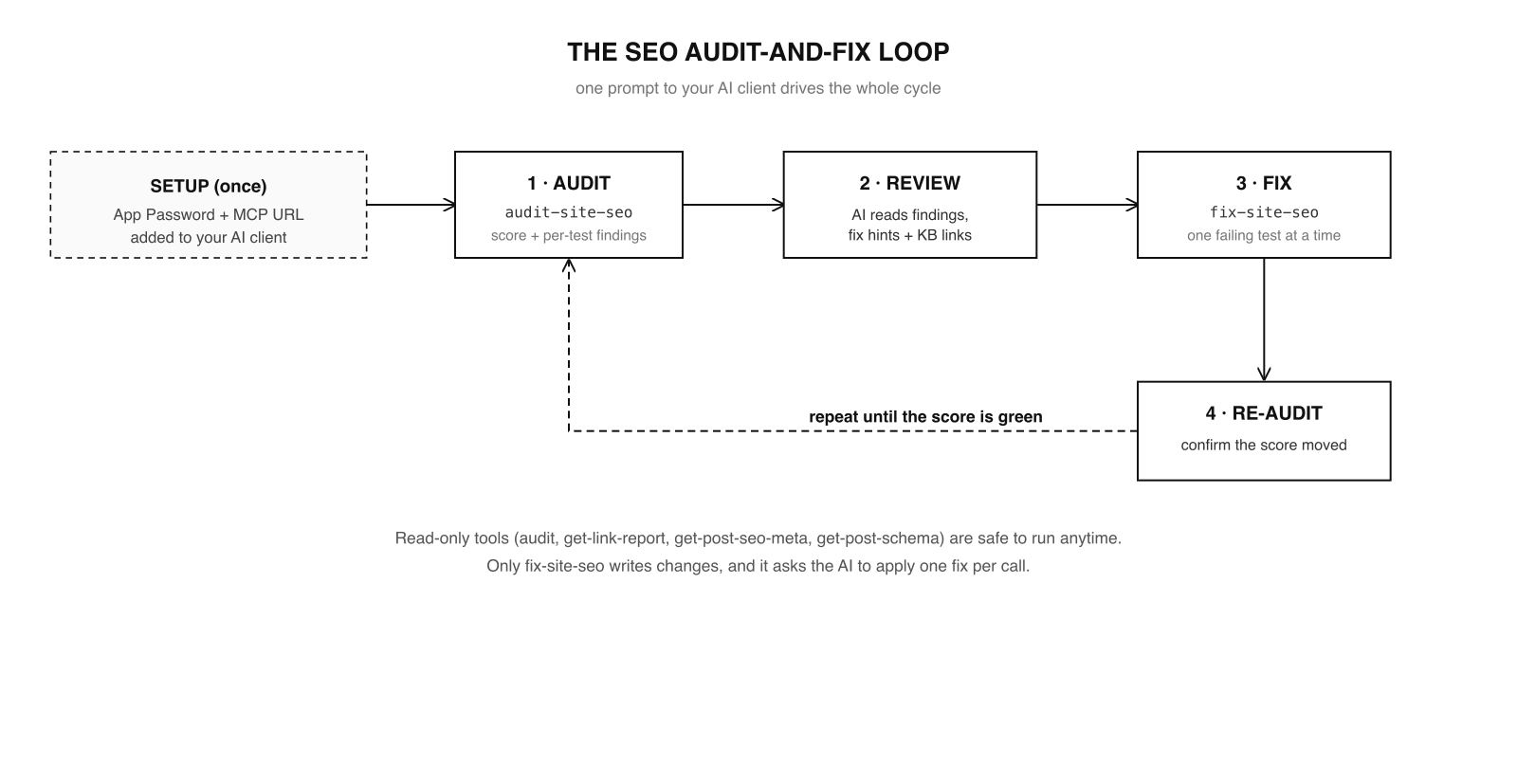
In practice it goes like this. I tell Claude: “Audit my site’s SEO and walk me through the priority issues.” It calls audit-site-seo, reads the findings, and gives me a plain-English summary grouped by priority, with each item’s fix hint and KB link. I pick which ones to fix. For each approved item, it calls fix-site-seo with that test’s ID, one at a time, then re-runs the audit to confirm the score moved. That re-audit step is the part people skip and shouldn’t. It’s how you prove the change did what you wanted instead of trusting a green checkmark.
Run the read-only tools freely, but treat fix-site-seo like a live edit. Fix one test, re-audit, repeat. You stay in control of every change to the actual site, and you get a clean trail of what changed and why.
How to maximize the benefits
The audit loop is the headline, but the read-only tools are where the quiet wins live. After years of doing this work by hand, these are the workflows I’d actually reach for.
Optimize a single post end to end. Point the AI at a post ID. It pulls get-post-seo-meta to read the current title, description, focus keyword, and score, then drafts a sharper meta description for you to review, checks internal links with get-post-links, and confirms the right schema with get-post-schema. One pass, the whole on-page picture.
Hunt down weak links. get-link-report gives free users site-wide internal and external link counts, plus posts with no internal or external links. On Pro, it adds broken links, redirects, nofollow counts, and HTTP status distribution. That is the version that replaces a separate crawler for the first pass.
Audit a competitor. audit-site-seo can take a URL, so you can point it at a rival and get structured findings for their page. Rank Math marks competitor audit as Pro, so do not promise this workflow to free users. When you have Pro, it is a fast way to see what they’re getting right that you’re not.
Chain it with your other tools. This is the practical win. An agent connected to both Rank Math and your Google Search Console data can read which queries are slipping, then check the on-page issues through Rank Math in the same conversation. That is the kind of cross-tool work that used to need a human switching tabs.
Where would I keep a human firmly in the loop? Anything that touches content quality, originality, or schema accuracy. The MCP server can tell you a finding exists. It can’t tell you whether your 600-word review actually earned its rating. That judgment is still yours.
A free Claude skill to drive it (copy this)
The WordPress MCP Adapter gives the AI three top-level tools, but it does not teach the AI how to do SEO well with them. That is what a skill is for. I wrote a small Claude skill that turns those adapter tools into a usable SEO playbook, with the exact Rank Math ability names, the audit-and-fix loop, and the guardrails baked in. Drop it into ~/.claude/skills/rank-math-seo/SKILL.md and Claude will follow the workflow instead of improvising.
---
name: rank-math-seo
description: Audit and fix WordPress SEO through the Rank Math MCP server.
  Use when the user wants to run an SEO audit, fix failing SEO tests, read or
  improve a post's SEO title / meta description / focus keyword, check links,
  or inspect schema on a WordPress site running Rank Math.
---

# Rank Math SEO (via MCP)

The connected server gives you three top-level MCP tools:
- mcp-adapter-discover-abilities
- mcp-adapter-get-ability-info (ability_name)
- mcp-adapter-execute-ability (ability_name + parameters)

Run mcp-adapter-discover-abilities once, then route Rank Math work through
mcp-adapter-execute-ability.

## The Rank Math abilities
- rank-math/audit-site-seo    params {refresh, url} - score, grade, findings[] (read)
- rank-math/fix-site-seo      params {test_id, value, post_limit} - applies one fix (WRITES)
- rank-math/get-post-seo-meta params {post_id} - title, description, focus keyword, score (read)
- rank-math/get-link-report   params {include_posts} - link counts; Pro adds broken/status data (read)
- rank-math/get-post-links    params {post_id} - links + anchors + follow status (read)
- rank-math/get-post-schema   params {post_id} - schema markup + available types (read)

## Guardrails
- Read-only abilities are free to run. Only rank-math/fix-site-seo writes; confirm
  with the user first and fix ONE test_id at a time, then re-audit.
- Never print the Application Password or full MCP URL back to the user.
- A partial audit (remote_api_status: unavailable) is local-only; say so.
- Competitor audits and deep link reports may require Rank Math Pro.
- Any meta description you propose must match the page content.

## Core loop: audit and fix
1. Run mcp-adapter-discover-abilities to confirm the Rank Math abilities exist.
2. Run mcp-adapter-execute-ability with ability_name rank-math/audit-site-seo
   and parameters {"refresh": true}.
3. Summarize failing/warning findings in plain language using fix_hint and kb_link,
   priority category first.
4. For each fix the user approves, run mcp-adapter-execute-ability with ability_name
   rank-math/fix-site-seo and parameters {"test_id": "..."}. One at a time.
5. Re-run rank-math/audit-site-seo, report the new score, repeat until green.

## Optimize one post
Run get-post-seo-meta, draft a better 140-155 character description, run
get-post-links, then run get-post-schema. Report recommendations first. Apply
changes only after approval.
Save the skill, connect the server, and your assistant stops treating Rank Math like a random toolbox. It gets a workflow. Tweak the guardrails to match how much autonomy you are comfortable giving it.
Security and the guardrails that matter
You’re handing an AI a credential to your live site, so treat it like one. A few rules I follow:
- Use a named Application Password, not your login. It’s scoped, it shows up in your profile, and you can revoke it in one click the moment you stop testing.
- Remember that only one Rank Math SEO ability writes. Five of the six SEO abilities can’t change anything. The single write ability,
rank-math/fix-site-seo, should always run with your approval, one fix at a time. - Never paste the URL and password into a public chat or screenshot. Together they are full API access to your site.
- Give it to people, not to bots you don’t control. The MCP server is as trustworthy as the client and the person on the other end of it.
The honest limitations
This is new, and it shows in a few places. There is no settings screen because the server is headless, which surprises people who go looking for a toggle. The audit’s remote tests can come back unavailable if your site is not connected to a Rank Math account, so you sometimes get a local-only score. MCP client support across the AI ecosystem is still maturing, so Claude Desktop, Cursor, Claude Code, Claude.ai, and ChatGPT do not all connect the same way. The link report and competitor audit are also deeper on Pro than free. None of this is a dealbreaker. It is the reality of a feature that landed early, which is exactly when learning it gives you an edge.
Frequently asked questions
Is the Rank Math MCP server free?
Yes. The MCP server is built into Rank Math, so there is no separate plugin or subscription just for the server. The core SEO tools work on the free version. Competitor audits and the deeper Link Genius report are Pro features, but you can start on free.
Which Rank Math version added the MCP server?
It ships in recent Rank Math releases. On my own site it’s running on version 1.0.272. Update Rank Math to the latest version and the server endpoint becomes available automatically at /wp-json/mcp/mcp-adapter-default-server. There’s no toggle to flip.
Is it safe to give an AI access to my site through MCP?
It’s as safe as the credential and the client you use. Connect with a named WordPress Application Password, which is scoped and revocable in one click. And remember the safety net built into the tools: five of the six Rank Math SEO abilities are read-only. Only fix-site-seo can change anything, and a good setup runs it one fix at a time with your approval.
Which AI clients work with the Rank Math MCP server?
Claude Desktop, Claude Code, Cursor, Claude.ai, and ChatGPT can work with MCP, but they do not all use the same setup path. Claude Desktop, Cursor, and Claude Code can use a local config with the WordPress remote proxy. Claude.ai and ChatGPT use connector flows and need a public HTTPS endpoint. On the WordPress side, Rank Math provides the MCP endpoint and you authenticate with an Application Password.
Does the MCP server replace the Rank Math dashboard?
No. It’s an additional way in, built for AI assistants. The Rank Math dashboard, the post sidebar, the SEO Analysis report, and everything else work exactly as before. The MCP server just lets an AI read and act on the same data conversationally.
Can it edit my posts and content?
The Rank Math SEO abilities do not rewrite your articles. rank-math/fix-site-seo applies supported settings-level fixes for failing audit tests, not content changes. Anything that touches your actual writing still goes through you, or through a separate AI workflow you explicitly approve.
How is this different from the WordPress REST API?
The REST API is a fixed set of endpoints you script against. MCP lets an AI discover your site’s abilities and call them conversationally, using a standard protocol every modern assistant understands. The authentication is the same Application Password, but the experience is an assistant that figures out the right tool instead of you writing the request.
Do I need Rank Math Pro to use it?
No for the core tools. The site audit, post SEO metadata, schema, and post links work on the free version. Pro is needed for competitor audit workflows and deeper site-wide link reporting, including broken links, redirects, nofollow counts, and HTTP status distribution.
The bottom line
Agentic SEO did not arrive with a press release. It arrived quietly inside a plugin millions of us already run. I have used Rank Math since 2018 and I have seen plenty of features come and go, but this is the one that changes the job. The people who get value from it will not be the ones collecting AI tools. They will be the ones connecting one assistant to one real workflow, measuring what changed, and keeping approval on the risky parts. The server is already live on your site. Connect it, run one audit, fix one approved item, and re-audit.
Tell Google you want more of this.
Add Gaurav Tiwari as a preferred sourceOne tap, and this site shows up more often in your own Top Stories, AI Overviews and AI Mode. Remove it any time.
Disclaimer: This site is reader-supported. If you buy through some links, I may earn a small commission at no extra cost to you. I only recommend tools I trust and would use myself. Your support helps keep gauravtiwari.org free and focused on real-world advice. Thanks. - Gaurav Tiwari