
 by
by
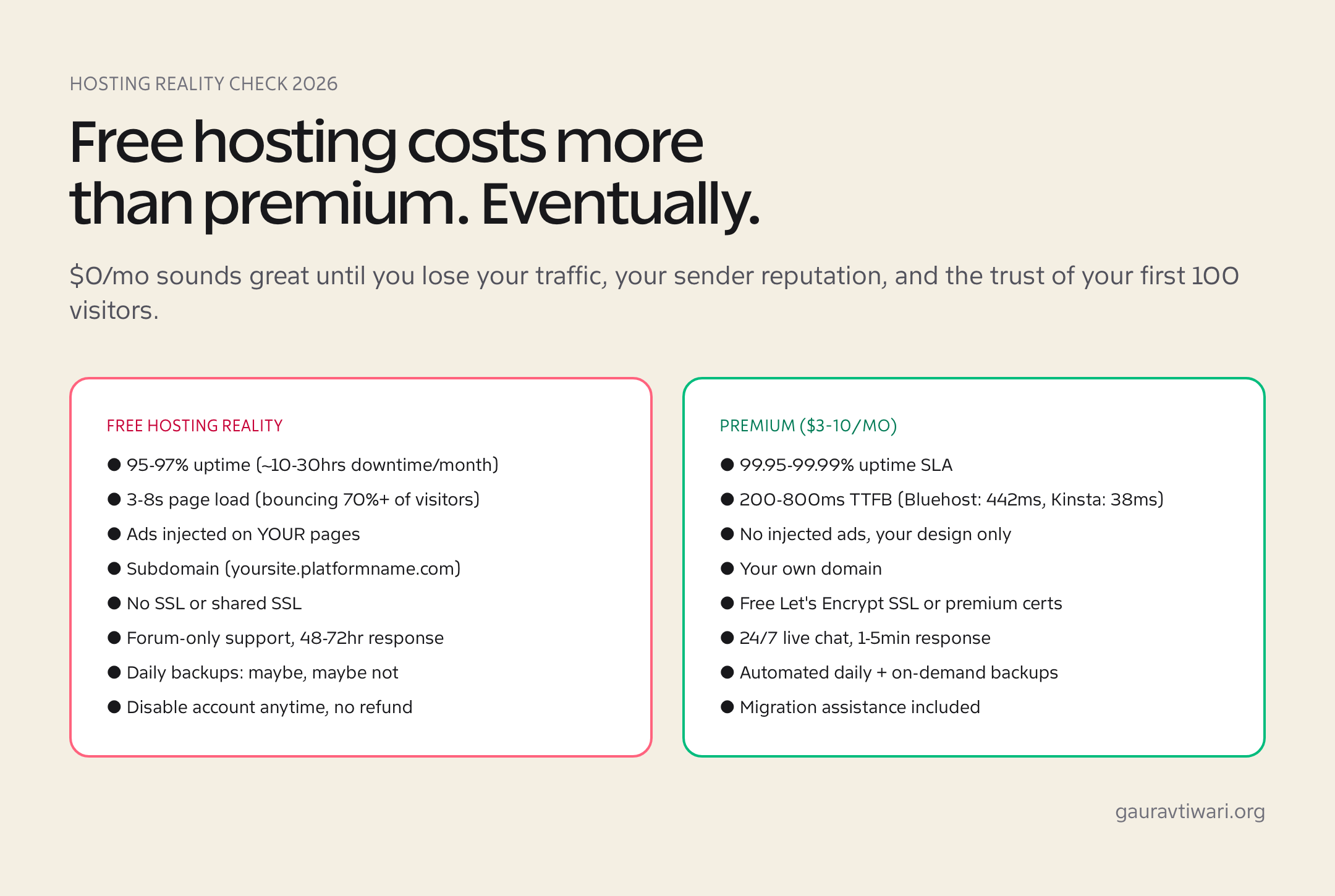
Cheapest website hosting can be a smart buy when the low price does not hide weak support, missing backups, ugly renewal pricing or a server so crowded that your first real traffic spike breaks the site. Cheap is fine. Fragile is not.
My rule is simple: buy the cheapest plan that keeps the site fast, backed up and easy to move. If a host makes migration painful, buries renewal prices or treats SSL like a luxury add-on, the deal is already getting expensive.

Cheapest Website Hosting: The Buying Answer
For most beginners, cheapest website hosting means a low-cost shared plan from Namecheap, Hostinger or a similar budget host. For a test site, student portfolio, small blog or early affiliate project, that is enough. For a revenue site, WooCommerce store, course platform or client site, cheap hosting should be treated as a starting point, not the final stack.
DataForSEO confirms the intent behind this page. In the US data I pulled, cheapest website hosting, cheapest web hosting, cheap website hosting and cheap web hosting each show about 9,900 monthly searches with a CPC around $33.88. Cheap WordPress hosting shows about 1,600 monthly searches with a CPC around $38.87. Hosting companies pay heavily for these clicks because one cheap signup can turn into years of renewals. That is exactly why you should slow down before buying.
The clean answer? Only a few current offers are truly under $2/month. IONOS, HostArmada and AccuWeb sit under or at that line in my June 12, 2026 check. Namecheap is close, but the static shared-hosting table I checked showed Stellar at $2.28/month. Hostinger, DreamHost, Bluehost, HostGator, ScalaHosting and Cloudways are still worth comparing, but they are either near-budget options or upgrade paths.
If you want the broader market beyond bargain shared hosting, compare this with my best web hosting services guide. This page is narrower. It is about finding the cheapest usable starting point without getting trapped by the sticker price.
| Provider | Current price signal checked June 12, 2026 | Best fit | Watch this |
|---|---|---|---|
| Namecheap | Stellar appeared at $2.28/month in the shared-hosting table. | Small sites, domain-plus-hosting buyers, portfolio projects. | View Namecheap |
| IONOS | Plus promo showed $1/month for a 1-year term, then $14/month. | Short-term budget projects where renewal math is tracked. | Useful promo, sharp renewal jump. |
| HostArmada | Start Dock showed $1.99/month on a 36-month term, regular $9.95/month. | Budget buyers who want cPanel, daily backups and a cloud-style shared stack. | Long commitment and renewal price. |
| AccuWeb Hosting | $1.99/month budget offer, with messaging around same-price renewal. | Strict-budget beginners who want a low monthly entry. | Verify terms at checkout before trusting the claim. |
| Hostinger | Premium plan showed $2.99/month for 48 months, renewing at $10.99/month. | Beginners who want clean onboarding and better WordPress tools. | View Hostinger |
| DreamHost | Launch plan showed $2.89/month for the first year, auto-renewing at $10.99/month. | Small sites that value backups and a calmer setup. | Not under $2, but still budget-friendly. |
| Bluehost | Starter showed $3.99/month on a 36-month term. | First-time WordPress users who want familiar onboarding. | View Bluehost |
| HostGator | The public page I checked did not expose a clean static dollar amount, but it clearly says promotional rates apply to the initial term only and renew at the regular rate in the control panel. | Legacy budget-host comparisons. | Mostly a benchmark now. |
| ScalaHosting | Web hosting showed from $2.95/month. | Budget users who want stronger resources than bare shared hosting. | Not an under-$2 pick. |
| Cloudways | Managed cloud hosting starts around $11/month. | Sites that have outgrown bargain shared hosting. | View Cloudways |
The Under-$2 Hosting Reality Check
I checked current public pricing signals against official pages where possible. Hostinger showed its Premium web hosting plan at $2.99/month for a 48-month term and renewal at $10.99/month. Namecheap showed Stellar at $2.28/month in the shared-hosting table. IONOS showed a $1/month Plus promo for a 1-year term, then $14/month.
That is the whole cheap hosting game in three lines. The promo price gets you in. The renewal price decides whether you stay happy. The included features decide whether the plan is usable before renewal even arrives.
Namecheap also published May 2026 shared-hosting renewal changes, with Stellar renewing at $55.88/year or $5.88 month-to-month. That makes the first-term number close to the under-$2 line, but not the whole cost story. DreamHost showed $2.89/month for the first year on Launch, then $10.99/month. HostArmada showed $1.99/month on Start Dock with a regular price of $9.95/month. Cloudways starts around $11/month because it is managed cloud hosting, not bargain shared hosting.
So no, I would not keep the old promise that every serious option here is under $2/month. That was too neat. The better comparison is this: which cheap host gives you enough room to publish, learn and leave without drama?
| Price you see | Question to ask | Why it matters |
|---|---|---|
| $1 to $1.99/month | How long is that price valid? | Most ultra-cheap prices require annual, biennial or triennial billing. |
| Free domain | What does the domain renew at? | The domain can become the hidden second-year cost. |
| Free backups | Daily, weekly or paid restore? | A backup you cannot restore quickly is not a safety net. |
| Unlimited bandwidth | What are the CPU, RAM, inode and fair-use limits? | Shared hosting limits usually appear before bandwidth becomes the problem. |
| Free email | How many mailboxes, and for how long? | Some hosts include email only for the first year or only on higher plans. |
My Shortlist For Cheapest Website Hosting
These are the 10 providers I would actually put in front of a budget buyer. Not all are equal. Not all are under $2. But each one explains a real choice people make when shopping for budget web hosting.
1. Namecheap
Namecheap is the cleanest near-$2 pick for small sites because the offer is easy to understand and the brand is already strong for domains. It works well for a personal blog, portfolio, small brochure site or test project where you want the domain and hosting bill to stay quiet.
The limitation is performance headroom. Namecheap shared hosting can be fine for lightweight WordPress, but I would not build a growing store or a heavy publication on the smallest plan. If you are choosing between the two obvious budget names, my Hostinger vs Namecheap hosting comparison will help.
2. IONOS
IONOS is the aggressive promo pick. The $1/month Plus offer looks good on the page because it gives buyers a real under-$2 entry point. But the renewal jump is the story. A $1 promo that turns into $14/month is still useful if you planned for it. It is painful if you forgot.
I would use IONOS for a short-term project, a proof-of-concept site or a buyer who is organized enough to calendar the renewal date. I would not recommend it to someone who never checks billing emails. That person needs boring pricing more than a dramatic discount.
3. HostArmada
HostArmada is one of the few hosts still showing a standard shared plan near $1.99/month. The Start Dock plan gives you cPanel, NVMe storage and daily backups in a budget-friendly package. That is a stronger feature mix than some old-school bargain hosts offer.
The catch is the term. The best price usually means a long billing commitment, and the regular price is much higher. If you are buying it, run the two-year or three-year math before checkout. Cheap hosting should not require optimism as a payment method.
4. AccuWeb Hosting
AccuWeb is interesting because it pushes the $1.99/month message while also talking about renewal transparency. That is rare in this market. The offer can make sense for a strict-budget beginner, especially if you want a tiny WordPress site with SSL, email and backups without moving to a larger host.
My caution is simple: verify the final checkout terms. Hosting pages, coupon terms and product lines change. If the price truly renews at the same level for the plan you choose, AccuWeb deserves attention. If the checkout tells a different story, trust the checkout.
5. Hostinger
Hostinger is no longer an under-$2 recommendation in my current check, but it is still one of the easiest cheap website hosting choices for beginners. The dashboard is cleaner than many budget hosts, WordPress setup is smoother, and the onboarding does not feel trapped in 2013. That matters more than people admit. Check the current Hostinger plan only if you want the simple path.
The risk is renewal and scale. If the site gets plugin-heavy or starts earning money, the lowest plan can become tight. Before choosing it, read my Hostinger alternatives guide so you know the exit paths.
6. DreamHost
DreamHost sits above the under-$2 line, but it belongs here because its budget entry is still close and the feature mix is calmer than many promo-first hosts. The Launch plan showed $2.89/month for the first year, daily automated backups and a clear $10.99/month renewal.
That clarity matters. DreamHost is not the cheapest name in the table, but I would rather see a buyer understand the real cost than get seduced by a $1 badge and forget the renewal. For small WordPress sites, this can be a sensible compromise.
7. Bluehost
Bluehost is here because beginners compare it constantly. It is familiar, WordPress-friendly and heavily marketed. The current Starter signal I checked was $3.99/month on a 36-month term, so it is not an under-$2 host. I would check Bluehost only if you value the onboarding enough to pay the later price.
My honest take: Bluehost is a comparison benchmark more than my first cheap-hosting pick. It can work for beginners, but renewal math and bundled upsells need attention. If you are already comfortable with WordPress, you may find better value elsewhere.
8. HostGator
HostGator used to be one of the default names people mentioned when they talked about cheap web hosting. It still appears in comparisons, but the public page I checked did not give me a clean static under-$2 price. It did make the renewal pattern clear: promo rates apply to the initial term only and renew later at the regular rate in your control panel.
I include HostGator because buyers still search for it, not because it is the cleanest deal today. If you already know cPanel and want a familiar shared host, compare it. If you are starting from zero, I would check Namecheap or Hostinger first.
9. ScalaHosting
ScalaHosting is a near-budget pick, not a lowest-price pick. Its web hosting starts around $2.95/month, and the feature story is stronger than the bare cheapest plans: SSL, backups, migration support, NVMe storage and more developer-friendly tools on some plans.
This is the type of host I would compare when $1.99 hosting feels too cramped but managed cloud hosting feels premature. You pay a little more for breathing room. For many WordPress sites, that is the smarter cheap.
10. Cloudways
Cloudways does not belong in the under $2/month hosting bucket. It starts around $11/month because it is managed cloud hosting. I keep it in this article because it is the upgrade path I would consider when cheap shared hosting starts costing time. I would check Cloudways when the site is already earning or supporting client work.
For developers, freelancers and site owners with real traffic, Cloudways can be cheaper than spending hours fighting shared-hosting limits. The invoice is higher. The hidden labor cost can be lower. That is the math cheap-hosting articles often skip.
What Cheap Hosting Actually Includes
Cheap web hosting usually gives you shared server resources, storage, bandwidth under fair-use limits, SSL, a control panel, one-click WordPress installation and some level of email. That is enough for a beginner blog, resume site, small landing page or early affiliate project. It is not enough for every site.
If WordPress is the site you are building, compare this article with my dedicated WordPress hosting guide. Cheap WordPress hosting works when the site is lean: lightweight theme, controlled plugins, compressed images, caching and no heavy WooCommerce load.
The difference between cheap and bad is not the monthly number. It is whether the host gives you clean backups, predictable renewals and enough server response headroom after WordPress is installed. I would rather pay $3 to $6/month for a reliable low-cost host than pay $1.99/month and spend a weekend debugging timeouts.
How I Judge A Cheap Host Before I Recommend It
I do not judge cheapest website hosting by the checkout page alone. I judge it by what happens after WordPress is installed, the first plugin update runs and the first real visitor lands on a content-heavy page. That is where bargain hosting either proves itself or quietly steals time.
- Renewal price: the second invoice matters more than the first coupon.
- Backups: daily backups and fast restore beat vague backup promises.
- Server response: a clean WordPress install should not already feel slow.
- Migration rules: a good cheap host lets you leave without drama.
- Support clarity: I want direct answers about PHP versions, inode limits, cache layers and restore policy.
My third test is how easy it is to leave. This sounds negative, but it is healthy. Good hosts make migration boring because they know some customers will grow into better plans. Bad hosts make migration confusing because friction protects renewal revenue.
When Cheap Hosting Is Good Enough
Budget web hosting is good enough when the site is simple, traffic is modest and downtime would be annoying rather than business-damaging. A personal blog, student portfolio, resume site, local service page and early affiliate blog can all begin on a low-cost shared plan.
Keep the stack lean. Use a lightweight theme, avoid plugin hoarding, compress images and add a real caching plugin. If speed matters, pair this article with my guides on WordPress caching plugins and WordPress CDN setup. A cheap host with a disciplined WordPress setup can beat a pricier host with a bloated site.
That last sentence matters. Hosting is not magic. If a site loads eight ad scripts, five page-builder libraries and uncompressed hero images, even decent hosting will look bad. Cheap hosting gives you less room for mistakes, so the site itself has to be cleaner.
When Cheap Hosting Becomes Expensive
Cheap hosting becomes expensive when it slows down work, loses trust or forces technical compromises. I have seen site owners spend more time chasing plugin conflicts, backup gaps and server timeouts than the hosting plan ever saved them. That is the wrong kind of frugal.
If the site handles payments, client leads, course sales, paid ads or brand reputation, do not optimize only for the monthly invoice. Optimize for recovery time, speed and support quality. Slow pages also hurt conversions, which is why I keep returning to one boring but profitable point: website speed matters for traffic and conversions.
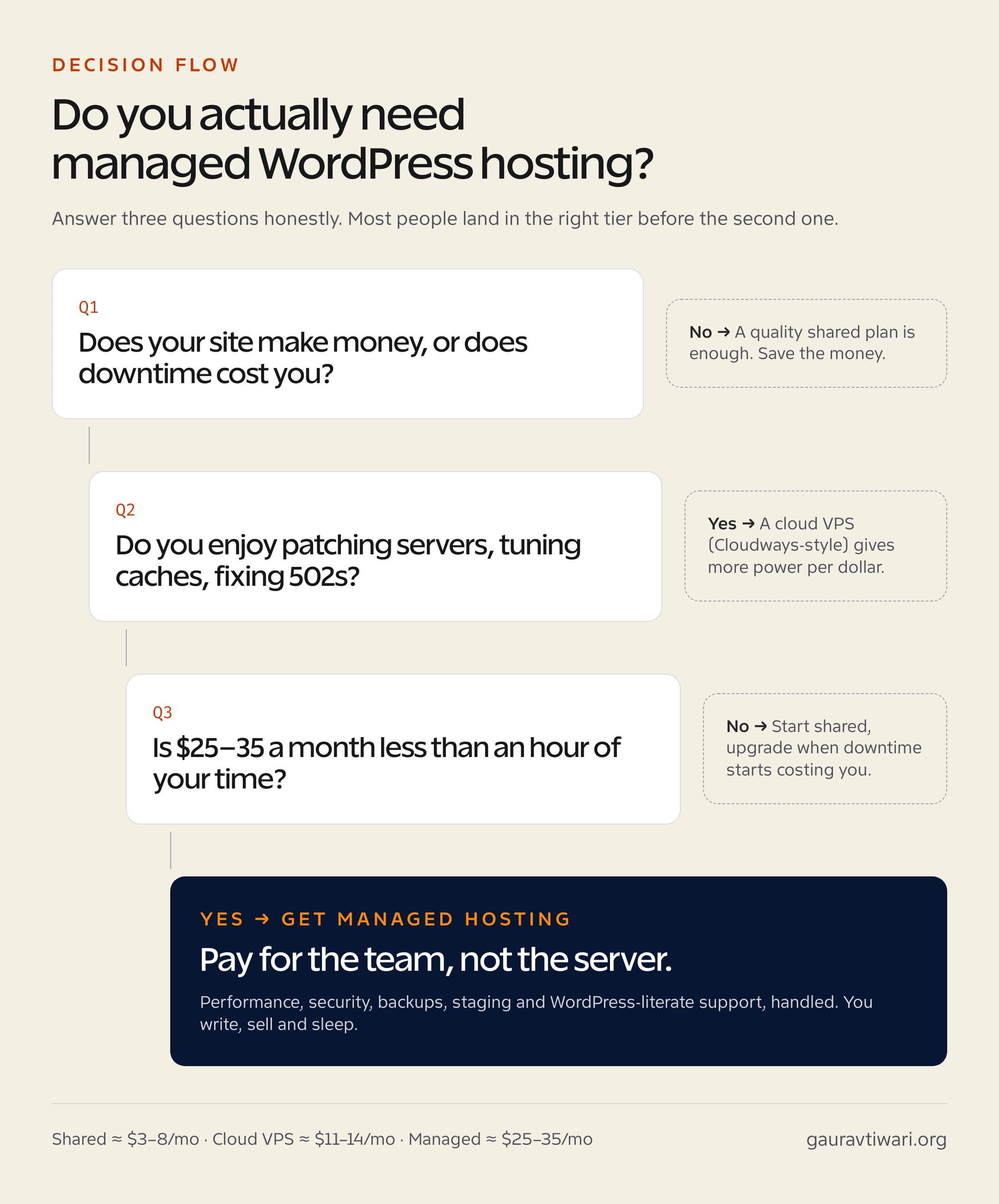
Upgrade when server response slows down on a clean site, support answers get vague, traffic spikes become stressful, backups are not trustworthy or your time is worth more than the difference between $2 and $11/month. That is the point where Cloudways, managed WordPress hosting or a better VPS stack starts making sense.
My Buying Checklist
Before buying the cheapest website hosting plan, run this check. It saves more money than another coupon code.
- Calculate the first-term price and renewal price for the same billing length.
- Check whether the best price requires 12, 24, 36 or 48 months upfront.
- Confirm free SSL, backups, email limits, CDN support and migration policy.
- Check PHP version support, especially for WordPress and modern plugins.
- Look for inode, CPU, RAM and fair-use limits before trusting “unlimited” claims.
- Avoid bundled extras you do not need in year one.
- Choose a host you can leave without drama if traffic grows.
My stance: start cheap if the project is still proving itself. Upgrade quickly when the site earns money, supports clients or carries your reputation. Hosting should feel boring. If the cheapest plan makes the site fragile, you did not save money. You moved the cost into your future calendar.
FAQs About Cheapest Website Hosting
These are the questions I would answer before buying a budget hosting plan or recommending one to a beginner.
What is the cheapest website hosting that is still usable?
For most beginners, Namecheap, Hostinger, IONOS, HostArmada and AccuWeb are the first cheapest website hosting options to check. The right pick depends on renewal pricing, backups, support and whether the site runs WordPress.
Is under $2/month hosting real?
Yes, but it is usually promotional pricing or tied to a longer billing term. Always check renewal cost, refund rules, backup policy, SSL, email limits and cancellation terms before buying under $2/month hosting.
Is cheap hosting good for WordPress?
Cheap WordPress hosting is fine for a small blog, portfolio, test site or early affiliate project. For WooCommerce, paid traffic, courses or revenue-heavy sites, use stronger managed WordPress hosting or cloud hosting.
Which cheap host has the clearest renewal pricing?
Namecheap and DreamHost are easier to read than many promo-heavy hosts, but pricing changes. The safest habit is to calculate first-term cost and renewal cost before checkout, then save the renewal date in your calendar.
Should I buy the longest hosting term?
Buy the longest term only when you already trust the host and the refund policy. A long discount helps when the host is good. It hurts when you outgrow the plan quickly or discover support is weak.
When should I upgrade from cheap hosting?
Upgrade when slow response times, backup gaps, support delays, traffic spikes or revenue risk start costing more than the hosting savings. That is when managed cloud hosting or better WordPress hosting becomes cheaper in practice.
Does cheap hosting hurt SEO?
Cheap hosting can hurt SEO if it causes slow pages, frequent downtime or poor Core Web Vitals. A lightweight WordPress setup on a decent budget host can rank fine. A bloated site on weak shared hosting will struggle.
Tell Google you want more of this.
Add Gaurav Tiwari as a preferred sourceOne tap, and this site shows up more often in your own Top Stories, AI Overviews and AI Mode. Remove it any time.
Disclaimer: This site is reader-supported. If you buy through some links, I may earn a small commission at no extra cost to you. I only recommend tools I trust and would use myself. Your support helps keep gauravtiwari.org free and focused on real-world advice. Thanks. - Gaurav Tiwari