
 by
by
OpenClaw hosting has changed a lot in a few months. When the project first took off, the only real route was a Linux VPS and a Docker install you looked after yourself. Now there are fully managed OpenClaw plans, one-click VPS images and the old do-it-yourself route, and these are different products with different prices and different people responsible for keeping the thing updated. So, if you are trying to choose OpenClaw hosting and the options look confusing, this guide should help you sort them out.
I have set up and looked after a fair number of Linux servers over the years, for my own sites and for clients.
Every setup is different, so one guide cannot fit every use. But most of this decision comes down to the same few things, mainly who handles OpenClaw updates, how much RAM you need and what the plan costs after the first term, and I will try to cover those properly.
I have also put a short checklist at the end that you can run through before paying. Or, if you would rather have someone set the server up for you, I am always available for a chat. Let’s get started.
OpenClaw V2 shipped as version 2026.8.1 on August 30, 2026. That is the V2 milestone, not the newest build: the official release list has already moved on to 2026.9.1, and it moves most weeks. When a host advertises “OpenClaw 2.0”, read it as the minimum its image carries and check the version the server reports after deployment.
Best OpenClaw Hosting at a Glance
There is no single best host for everyone here, because a managed plan and a bare VPS are not the same product. These are my picks by situation, and each one links to its own section below.
- Best managed starting point: Hostinger Managed OpenClaw, for anyone who never wants to see a terminal.
- Best managed plan with a real server behind it: xCloud, 6GB of RAM and one-click recovery, if you budget on the renewal price.
- Best managed plan with terminal access: Cloudways, validated OpenClaw updates and no renewal jump.
- Best self-managed VPS with root access: Hostinger OpenClaw VPS, 4GB on the KVM 1 plan with a 30-day refund.
- Cheapest one-click 4GB plan: HostArmada, the Flux plan on annual billing.
- Most RAM for the money: Contabo, 8GB at the entry price with OpenClaw preinstalled.
- Best documented DIY route: DigitalOcean, on a clean Ubuntu image rather than the Marketplace app.
- Best DIY option in Europe: Hetzner, with an official OpenClaw guide and EU data centers.
- Lowest yearly bill: RackNerd, a 4GB box for about $60 a year if the deal is live when you look.
- Free, for testing only: Oracle Cloud Free Tier, when Ampere capacity is available in your region.
OpenClaw Hosting Comparison
Two tables, because the two questions are different. The first one tells you who does the work after you pay. The second one tells you what the entry plan costs, including the number most pricing cards hide, which is the renewal.
| Host | Type | Who updates OpenClaw | Backups and restore | Root or terminal |
|---|---|---|---|---|
| Hostinger Managed OpenClaw | Fully managed | Hostinger | Included | Dashboard only |
| xCloud | Fully managed, dedicated server | xCloud | Automated backups, one-click recovery | No root |
| Cloudways | Fully managed | Cloudways, validated before rollout | Automated backups, one-click restore | Terminal, no root |
| Hostinger OpenClaw VPS | One-click, self-managed | You, with one-click updates in the panel | Panel backups and snapshots | Root |
| HostArmada | One-click, self-managed | You | Automated backups, manual snapshots | Root |
| Contabo | One-click, self-managed | You | Auto backup as a paid add-on | Root |
| DigitalOcean | DIY | You | Paid droplet backups and snapshots | Root |
| Hetzner | DIY | You | Paid backups and snapshots | Root |
| RackNerd | DIY | You | Nothing bundled | Root |
| Oracle Cloud Free Tier | DIY | You | 5 free volume backups | Root |
“Managed VPS” on a sales page generally means the host manages the hardware and the operating system. Only the first three rows manage OpenClaw itself, and that is the line that decides how much of this guide you need to read.
| Host | Entry plan | vCPU / RAM / storage | Intro price | Billing term | Renews at |
|---|---|---|---|---|---|
| Hostinger Managed OpenClaw | AI automation apps | Not listed | $5.99/mo | 2 years, paid upfront | $11.99/mo |
| xCloud | OpenClaw | 4 / 6GB / 100GB NVMe | $9.99/mo | Monthly | $19.99/mo |
| Cloudways | Scout | 1 / 2GB / 50GB | $9.99/mo | Monthly | $9.99/mo |
| Cloudways | Operator | 2 / 4GB / 80GB | $19.99/mo | Monthly | $19.99/mo |
| Hostinger OpenClaw VPS | KVM 1 | 1 / 4GB / 50GB NVMe | $6.49/mo | 2 years, paid upfront | $11.99/mo |
| HostArmada | Flux | 2 / 4GB / 80GB NVMe | $5.18/mo | Annual | Not shown on the plan page |
| Contabo | Cloud VPS 4 | 4 / 8GB / 100GB SSD | About €5.50/mo incl. VAT | 24 months | Depends on region and term |
| DigitalOcean | Basic 2GB | 1 / 2GB / 50GB | $12/mo | Hourly, no commitment | $12/mo |
| Hetzner | CX23 | 2 / 4GB / 40GB | About €5.49/mo plus VAT | Hourly, no commitment | Same |
| RackNerd | 4GB KVM special | 3 / 4GB / 60GB | $59.99/yr | Annual | Check the cart |
| Oracle Cloud Free Tier | Ampere A1 | Up to 2 OCPU / 12GB / 200GB | $0 | Always Free limits | $0 within limits |
Every price above is the provider’s standing rate in September 2026, before any short promotion; Cloudways, for one, was halving its plans under a summer offer when I checked. The two Hostinger plans and the xCloud plan roughly double at renewal, so compare those on the second number, not the first.
The host is the small decision. Who owns the updates and the restore is the big one.
What OpenClaw V2 Changed for Hosting Buyers
Before the provider sections, I want to ensure the version story is clear, because it changes how you should read a “one-click OpenClaw” badge. OpenClaw V2 was the largest release the project has shipped, and it touched the parts of the software a host has to keep working.
The Version Number
V2 shipped as version 2026.8.1 on August 30, 2026. That number is the V2 milestone, not the newest build. The project releases on a year-month-count scheme and the official release list had already moved to 2026.9.1 within the first week of September, so a host that advertises “OpenClaw 2.0” is telling you the minimum, not the current state of its image.
The Browser Interface
The Control UI, the browser dashboard the gateway serves, was rebuilt in V2 as a first-class place to finish setup, return to running work and follow a task live. That makes remote access to the dashboard more useful than it used to be. It does not make it safe to expose the gateway to the internet. A good host should make a private, authenticated route to that dashboard easy, through an SSH tunnel, Tailscale or its own authenticated proxy, and I have marked below which ones do.
Installation and Node.js
Docker is no longer the default way in. The official installer sets up a native install on a clean Linux box, provisions a supported Node.js runtime if the server has none and can register the gateway as a system service. The supported runtimes, in case you are building the box yourself:
- Node 26, which the project recommends because the gateway starts faster and uses less memory on it
- Node 24.15 or newer on the 24 line, which the installer picks on Linux when Node is missing
- Node 22.22.3 or newer on the 22 line
- Node 25.9 or newer; Node 23 is not supported at all
Docker is still a fine option when you want container isolation or you already run everything through Compose, but it is now the alternative route, and its network defaults are different from a native install. More on that in the setup section.
Image Freshness
A provider can advertise one-click OpenClaw while shipping an image built months ago, and after V2 the gap between an old image and the current release is bigger than a few bug fixes. DigitalOcean’s Marketplace listing is the clearest example: its headline names 2026.8.2 while its own software table lists 2026.5.6. So I now check two things for every host, the version on the marketing page and the version the box reports after deployment, and I treat the second one as the truth.
Backups and Upgrades
V2 also changed how upgrades behave, and the 2026.9.1 release went further by separating the update work OpenClaw can finish on its own from the work that needs your attention first. Updating a stateful automation service without a verified backup was never a good idea. Now that the CLI has a proper backup command, I treat backup and restore as a ranking factor for hosts rather than a nice extra.
Managed OpenClaw Hosting vs a VPS
There are broadly three ways to host OpenClaw now, plus a fourth that lives in your own house. The right one depends less on your budget than on how much of the operations work you want to own.
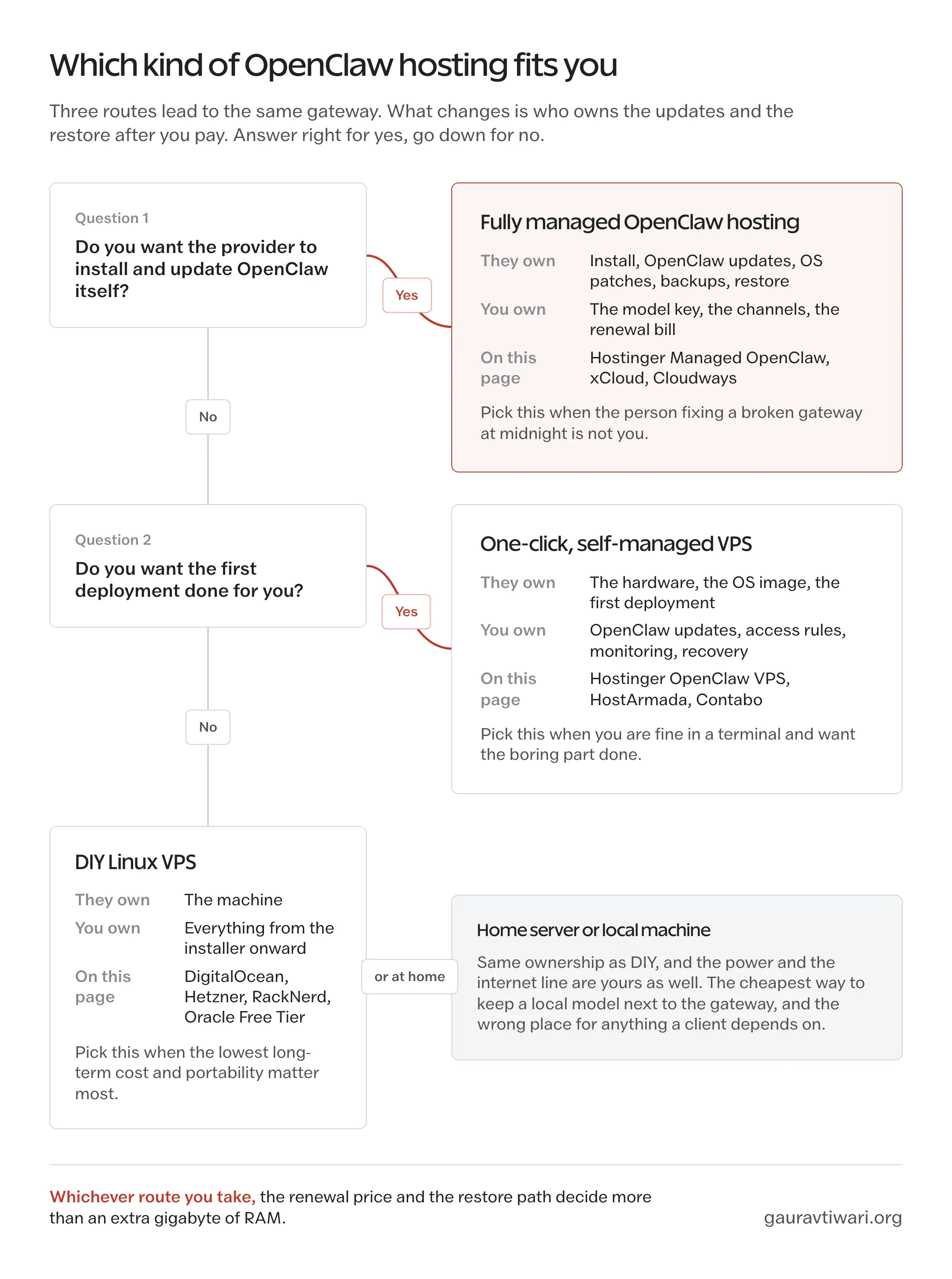
Fully Managed OpenClaw Hosting
A fully managed plan should cover the application layer, not only the machine. That means the provider installs OpenClaw, applies OpenClaw updates, patches the operating system, takes backups, monitors the service and can restore it when something breaks. Hostinger’s managed plan, xCloud and Cloudways sell this. You give up root access and some control over versions in exchange for never touching the server. A managed plan should be chosen when the person who has to fix a broken gateway at midnight is not you.
One-Click but Self-Managed VPS
Hostinger’s OpenClaw VPS, HostArmada and Contabo automate the first deployment. The image comes with OpenClaw installed, you get root access and a panel, and from that moment the updates, the access control, the monitoring and the recovery are yours. This is the middle path, and it is the one I would pick for most technical readers: the boring part is done for you, the control stays with you and the price is the lowest of the three routes for a 4GB box.
DIY Linux VPS
A plain Ubuntu server from DigitalOcean, Hetzner, RackNerd or Oracle, with the official installer run by hand. It costs the least over a long period, it moves between providers with a backup archive and it teaches you how the gateway works. It also means every decision is yours, including the ones you did not know you were making, such as what the gateway binds to and which user it runs as. The setup section below covers those.
Home Server or Local Machine
A Mac mini, a mini PC or an old laptop under the desk is a real option, and it is the cheapest way to keep a local model close to the gateway. The tradeoffs are the ones you would expect: residential power and internet, no snapshots unless you build them and a messaging agent that goes quiet when the house router restarts. It suits a privacy-first setup where you will accept some downtime. It does not suit anything a client depends on.
OpenClaw Server Requirements
The OpenClaw gateway is a Node.js process. In the usual setup it sends every prompt to a cloud model, so the heavy computation happens on the provider’s hardware and your server mostly routes messages, holds state and runs tools. That is why the official DigitalOcean guide starts from a 1GB droplet with 2GB of swap, and why that works for one person testing things.
I would not run a daily-use agent on 1GB, though. Browser automation, several channels, long sessions and the occasional update all want headroom, and RAM is the spec that runs out first. The table gives my starting points by workload. These are practical starting points from the documentation and the way the gateway behaves, not official minimums and not benchmarks.
| Workload | Starting point | What matters |
|---|---|---|
| Testing, one user, cloud model | 1 to 2GB | 1GB needs swap and watching; fine for a trial, not for daily use |
| Regular personal use | 4GB | Room for a few channels, logs, updates and light browser tasks |
| Several integrations or browser automation | 4 to 8GB | Concurrent browser sessions matter more than the number of channels |
| Small trusted team | 8GB or more | Separate gateways when users do not share the same trust boundary |
| Local model on the same box | Model-specific, often 16GB or more | Quantization, context length, runtime and the speed you will accept decide it |
4GB is where I would start for a personal agent on a cloud model, and it is the size most of the entry plans above happen to sell.
Local Models and GPU
Self-hosted and local are not the same thing, and a lot of the RAM confusion comes from mixing them up. OpenClaw does not need a GPU when it calls a cloud model. A GPU matters only when you also want the model itself on the server, through Ollama or LM Studio, so that no prompt leaves the machine. At that point the model sets the requirement: an 8-billion-parameter model at 4-bit quantization wants roughly 8GB for its weights before the gateway, the context window and the operating system get anything, and the response speed on CPU alone will test your patience. For that route, a dedicated box or a GPU instance is the sensible unit, and the cheap dedicated server options I have compared separately are a better starting point than any 4GB VPS on this page.
How I Compared These Hosts
Promotional prices change, so I record the billing term and the renewal rate rather than only the lowest monthly figure a card shows. For each host I looked at:
- Deployment type: fully managed, one-click self-managed or DIY
- Who handles operating-system updates and who handles OpenClaw updates
- OpenClaw version or image freshness, where the provider states one
- vCPU, RAM, storage and transfer on the entry plan
- Intro price, required commitment and renewal price
- Backups, snapshots and the restore path
- Private access and authentication defaults for the dashboard
- Root or terminal access
- Regions, and how easy it is to leave with your data
One boundary to keep in mind while reading. Unless a section says otherwise, what I say about a host comes from its published plan pages and from the OpenClaw documentation in early September 2026, not from a long-running benchmark on that host. Where I have an opinion, it is about the product as sold, and I say so.
Best Fully Managed OpenClaw Hosting
Three providers sell OpenClaw as an application they run for you. They look similar on the pricing card and differ a lot underneath, mainly in what you get for the money and what happens at renewal.
Hostinger Managed OpenClaw
Hostinger’s managed plan is my starting point for anyone who has never run a server and does not want to learn now. Hostinger installs OpenClaw, handles security, updates and backups, pairs the agent with Telegram from a visual setup flow and includes some AI credits to get you talking to it. There is no command line in the normal path at all.
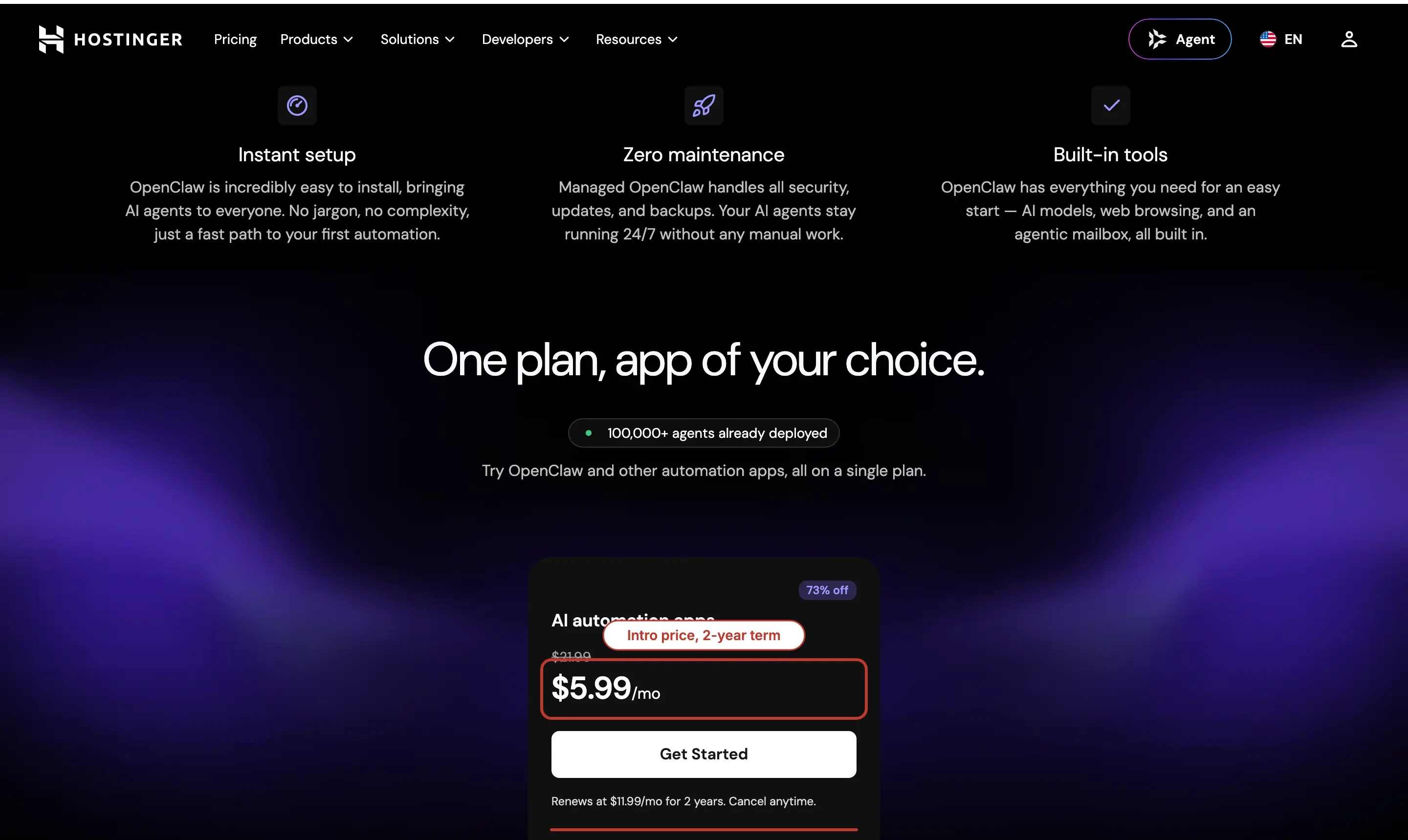
- Intro price: $5.99 a month on a 2-year term, paid upfront
- Renewal: $11.99 a month
- Refund window: 30 days
- Server size: not listed on the plan page
That last bullet tells you who this is for. Hostinger is selling an outcome, a working assistant on Telegram, not a machine, and it does not expect the buyer to ask about vCPUs. If you do care about vCPUs, the OpenClaw VPS a few sections down is the same company selling you the machine instead. My one caution is the renewal, which is exactly double. Treat the first term as a cheap, refundable trial and decide before month 24 whether $11.99 is still worth it against xCloud and Cloudways.
xCloud
xCloud sells a fully managed OpenClaw service with a dedicated server included, and the hardware is the best of the three managed plans. It is the plan I would pick when I want the convenience of managed hosting and also want the agent to have room to run browser tasks without hitting the ceiling.
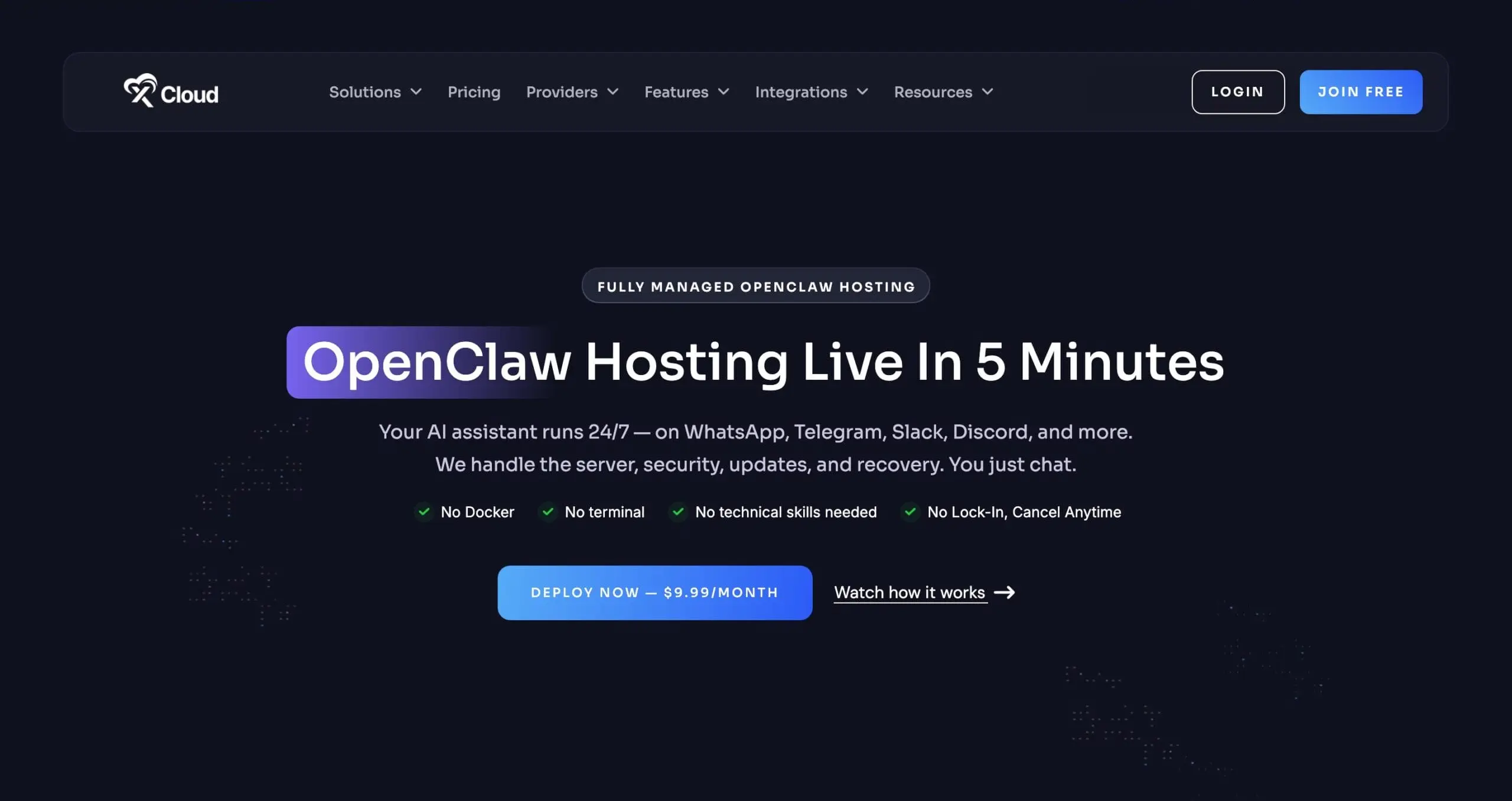
- Server: 4 vCPU, 6GB RAM, 100GB NVMe, 30TB transfer
- Intro price: $9.99 a month
- Renewal: $19.99 a month
- Managed: provisioning, patching, monitoring, automated backups and one-click recovery
- Channels: Telegram and WhatsApp pairing during setup, no Docker or SSH
The appeal is not only the RAM. xCloud takes responsibility for the whole stack, which is what managed should mean, and one-click recovery is the feature I would ask every managed host about first. The limitation is the same one as Hostinger: the price you see is the intro, and the renewal doubles it. At $19.99 it is still a fair price for a managed 6GB server, but compare it at that number against Cloudways’ 4GB Operator plan before you decide the extra RAM matters to you.
Cloudways
Cloudways has a proper managed OpenClaw product now, and it is the one I would choose when I want managed operations and a terminal at the same time. Cloudways deploys OpenClaw, validates each OpenClaw update before rolling it out, applies security updates, runs automated backups with one-click restore, gives you the OpenClaw dashboard directly from its own panel and lets you bring your own model API key.
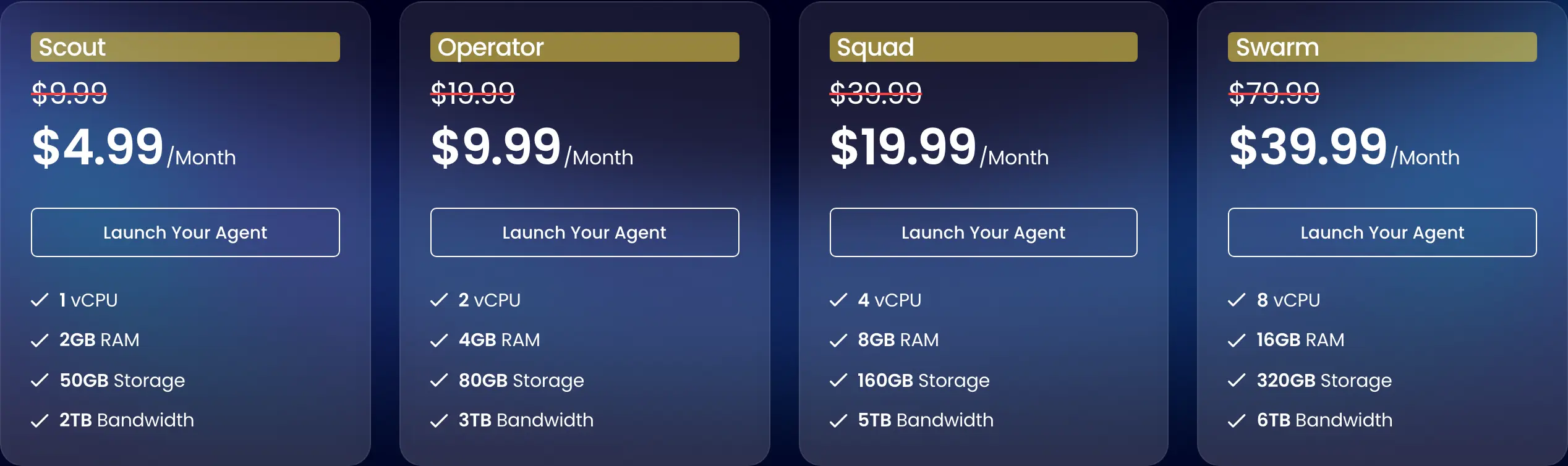
- Scout: 1 vCPU, 2GB RAM, 50GB storage, 2TB transfer, $9.99 a month
- Operator: 2 vCPU, 4GB RAM, 80GB storage, 3TB transfer, $19.99 a month
- Squad and Swarm: 8GB at $39.99 and 16GB at $79.99 for teams
- Billing: monthly, and Cloudways states there is no renewal jump
- Promotions: those are the standing prices; Cloudways runs short offers on top, and its summer offer halved every plan until the middle of September 2026, so read the card on the day
- Access: terminal on every plan for OpenClaw CLI commands, but no root
It does not give you the most RAM per dollar, and that is not what it is selling. The 2GB Scout plan is enough for one person on a cloud model and gets tight the moment browser automation starts, so I would treat Operator as the real personal plan. What you pay for is validated application updates and predictable billing, and if you already run sites on Cloudways the OpenClaw server sits in the same panel and the same invoice. If you are shopping Cloudways more broadly, my Cloudways alternatives comparison covers the rest of the platform.
Best One-Click OpenClaw VPS Hosting
These three deploy OpenClaw for you and then hand you the keys. The initial deployment is automated. The rest of the life of the server is yours, which is the part the phrase “one-click” leaves out.
Hostinger OpenClaw VPS
This is a different product from the managed plan above, and the naming does not help. The OpenClaw VPS is a KVM server with the OpenClaw template applied, a Docker manager and one-click updates in Hostinger’s panel, and full root access. Hostinger keeps the hardware running. OpenClaw, its configuration, its access rules and its recovery are yours.
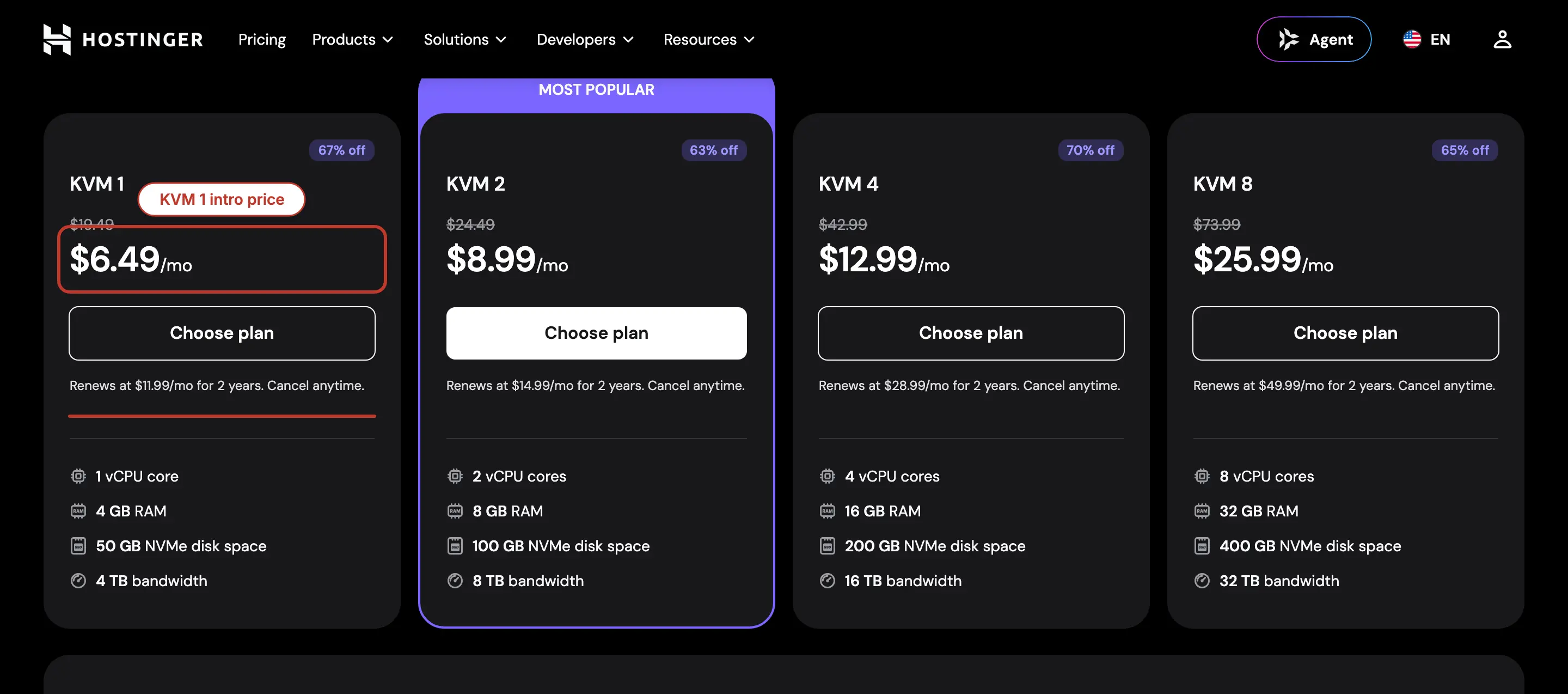
- KVM 1: 1 vCPU, 4GB RAM, 50GB NVMe, 4TB transfer, $6.49 a month on a 2-year term, renews at $11.99
- KVM 2: 2 vCPU, 8GB RAM, 100GB NVMe, 8TB transfer, $8.99 a month, renews at $14.99
- Refund window: 30 days
- Hardware: AMD EPYC, NVMe, data centers on several continents
For a developer who wants root and a 4GB box today, KVM 1 is my pick among the one-click plans, mainly because the 30-day refund lets you walk away if the setup does not suit you. The “one-click updates” button updates the container image the panel manages. It does not read the release notes or take a verified backup for you, so use it the way the update section below describes, not as a set-and-forget switch. And once again, the intro price is half the renewal.
HostArmada
HostArmada sells OpenClaw preinstalled on 4 VPS sizes, and its Flux plan is the cheapest one-click 4GB box on this page. Servers come up in 10 to 15 minutes with root access, a dedicated IPv4, DDoS filtering, automated backups and manual snapshots you can restore from.
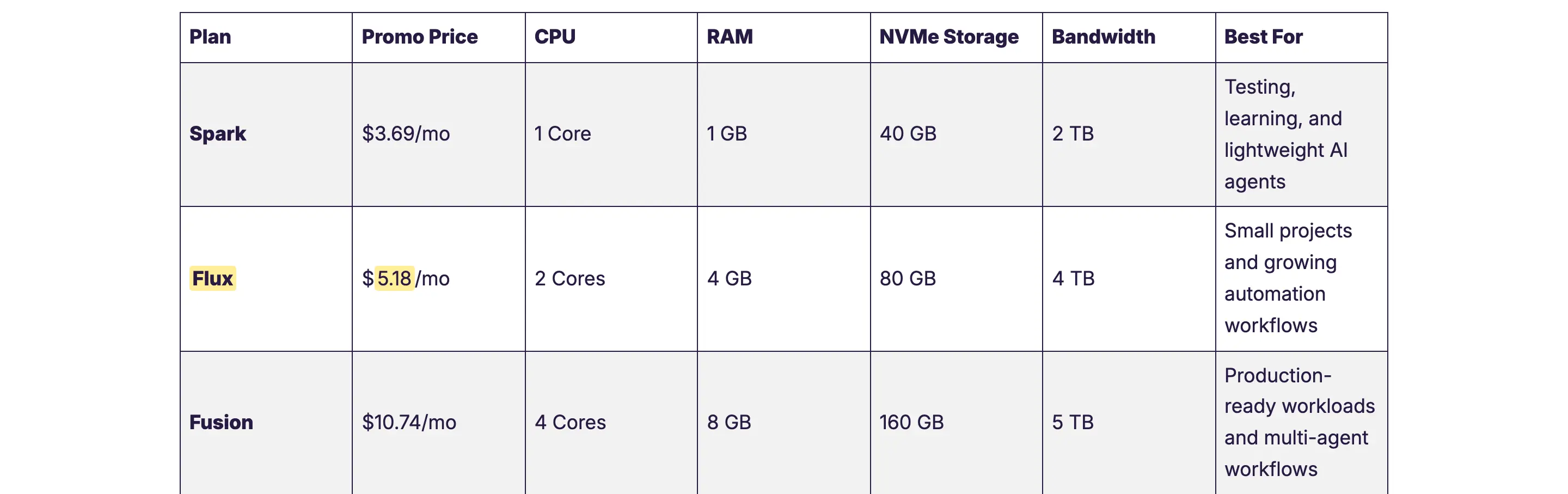
- Spark: 1 core, 1GB, 40GB NVMe, $3.69 a month, too small for anything beyond a test
- Flux: 2 cores, 4GB, 80GB NVMe, $5.18 a month
- Fusion: 4 cores, 8GB, 160GB NVMe, $10.74 a month
- Ignition: 8 cores, 16GB, 320GB NVMe, $16.89 a month
- Billing: annual for those prices; renewal is not shown on the plan page, so read it in the cart
- Refund window: 7 days on VPS
HostArmada is clear that this is a self-managed service. It automates the deployment and looks after the infrastructure, and updates, security, monitoring and any software change are on you. The 7-day refund is short next to Hostinger’s 30, so I would not buy the annual plan on a whim. For someone who wants root, snapshots and the lowest 4GB price with the install already done, Flux is the value pick, and Fusion is the one to take if browser automation is on the plan.
Contabo
Contabo is the most hardware for the money, as usual. The Cloud VPS 4 gives you 4 vCPU, 8GB of RAM and 100GB of SSD with OpenClaw preinstalled through a free one-click option, for about €5.50 a month including VAT on a 24-month term in the EU price list. That is double the RAM of every other entry plan here except Oracle’s free tier.
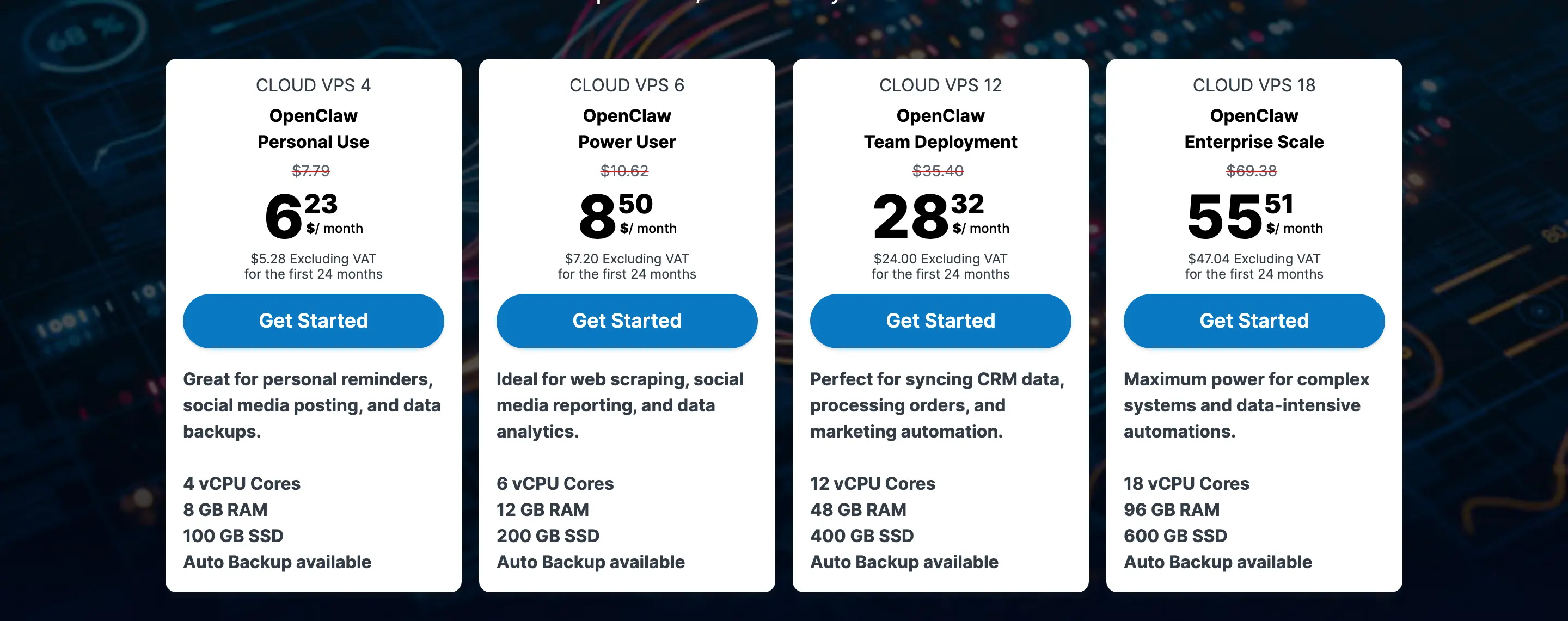
- Cloud VPS 4: 4 vCPU, 8GB RAM, 100GB SSD, OpenClaw preinstalled
- Cloud VPS 6: 6 vCPU, 12GB RAM, 200GB SSD, about €7.50 a month on the same term
- Backups: automatic backup is a paid add-on, not included
- Price: changes with region, billing term, storage choice, tax and whichever promotion is running; the US list showed the same plan between roughly $6 and $8, so the figure in your cart is the one that counts
I would choose Contabo when the RAM is the point, for several channels, long conversation history or a small local model experiment later, and when I am fine owning updates and buying the backup add-on. It is also the cheapest sane path toward eventually running a model on the box. I would not choose it for the polish; the panel and the provisioning are functional rather than quick, and there is no refund window to fall back on.
Best DIY VPS Options for OpenClaw
These are plain Linux servers. Nothing is preinstalled, the official installer takes a few minutes, and you get the lowest long-term cost and the most control. The step-by-step setup is in the next section; these are the boxes I would run it on.
DigitalOcean
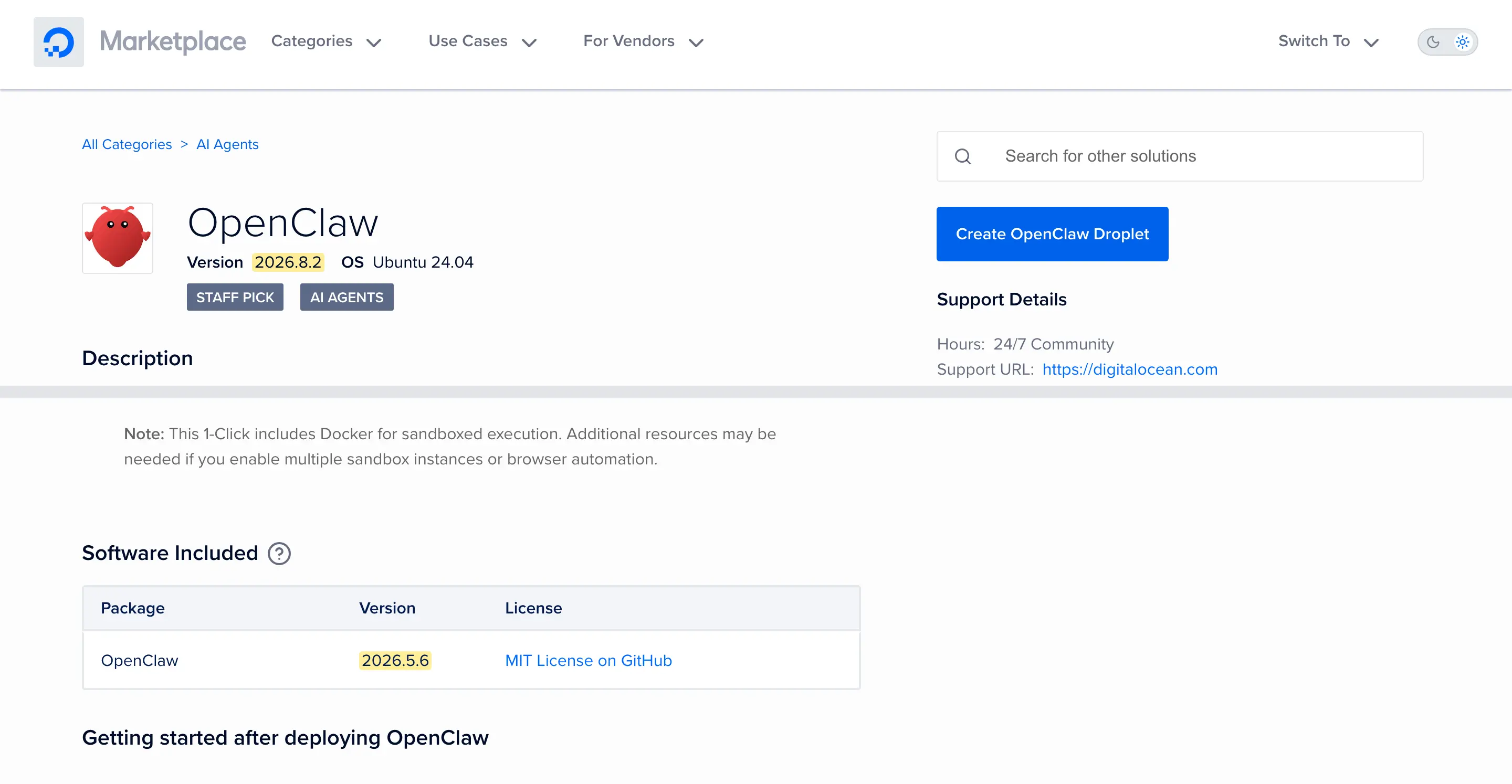
DigitalOcean is the best documented DIY route, because the OpenClaw project maintains its own step-by-step guide for it. That guide starts from a clean Ubuntu 24.04 droplet, not from the Marketplace app, and I would follow it. The project’s advice on Marketplace images is to use one only after you have read its startup scripts and firewall defaults, and DigitalOcean’s own OpenClaw listing shows why the caution is warranted: the page headline names 2026.8.2 while its software table lists 2026.5.6.
- Basic 1GB: 1 vCPU, 25GB SSD, $6 a month; the official guide’s starting size, with 2GB of swap added
- Basic 2GB: 1 vCPU, 50GB SSD, $12 a month
- Basic 4GB: 2 vCPU, 80GB SSD, $24 a month, my size for daily use
- Billing: per second, no commitment; backups and snapshots are paid extras
Whichever image you deploy, run the post-install checks before you connect a single channel. The version line is the important one, because it tells you whether you are on the release you think you are on:
openclaw --version
openclaw status
openclaw doctor --non-interactive
openclaw security audit --deep
Those 4 commands take a minute, and the last one tells you what the image left open. DigitalOcean is the priciest per gigabyte on this page, and what you get for that is a well-documented, predictable platform that I already use for client setups. If you want the droplet built and handed over, that is a service I offer through my DigitalOcean hosting services page.
Hetzner
Hetzner is the DIY pick for anyone in Europe, or anyone who wants the gateway’s state to stay in EU data centers. The OpenClaw project has an official Hetzner guide as well, built around Docker Compose, a Hetzner Cloud Firewall that allows only port 22 in, and an SSH tunnel to the dashboard.
- CX23: 2 vCPU, 4GB RAM, 40GB storage, about €5.49 a month plus VAT in Germany and Finland
- CAX11: the ARM equivalent at about €5.99 a month plus VAT
- IPv4: an extra €0.50 a month; skip it if you reach the box over Tailscale and IPv6
- Note from the guide: building the image from source wants 6GB, so use the prebuilt image on a 4GB box
Hetzner raised prices in June 2026, so the older numbers you will find in forum threads are out of date, and Singapore costs more than the European locations. Even after the increase, a 4GB Hetzner box is one of the cheapest reliable servers you can rent by the hour, and it is where several of my own sites lived before they moved to a Hostinger VPS. The Hetzner vs Vultr vs RackNerd comparison has that story and the performance numbers.
RackNerd
RackNerd is the lowest yearly bill on this page when its specials page has the deal you want, and it is a deals page, so what it has changes. The one that fits OpenClaw in cloud-model mode is a 4GB KVM box at $59.99 a year, which works out to about $5 a month paid annually.
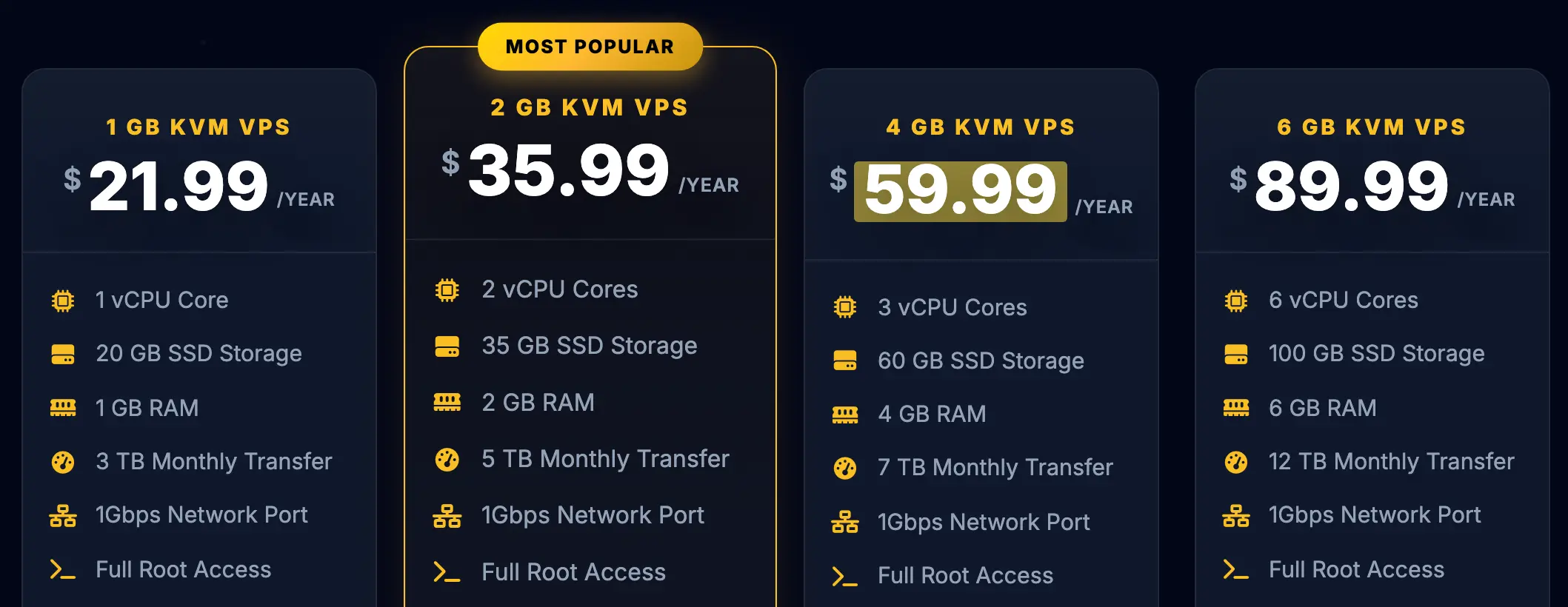
- 4GB special: 3 vCPU, 60GB SSD, 7TB transfer, $59.99 a year
- Billing: annual only at that price
- Setup: manual; no OpenClaw image
- Backups: nothing bundled, so schedule your own with the backup command below
I use RackNerd for cheap staging boxes and it does that job well. For an always-on agent, I would buy it only with a working backup routine and the understanding that support is budget-tier. Check the renewal figure in the cart before paying; the specials page does not promise one.
Oracle Cloud Free Tier
Oracle’s Always Free tier can run OpenClaw at no cost, and I would use it for experiments and for a personal agent I could afford to lose. The Ampere A1 allowance is generous on paper: enough hours each month for 2 OCPUs and 12GB of RAM sustained, plus 200GB of block storage and 5 volume backups.
- Compute: up to 2 OCPU and 12GB on Ampere A1 within the monthly hour limits, as 1 instance or 2
- Architecture: ARM, so use arm64 images and packages
- Capacity: A1 instances are often unavailable in a region for days at a time
- Reclamation: Oracle reclaims an Always Free instance that sits under 20% CPU, network and memory use for 7 days
An idle agent is exactly the kind of instance that reclamation rule targets, and a busy one may not get created at all in a region without capacity. So the free tier is a real option for learning and testing, and a poor foundation for a workflow that has to be there tomorrow.
The Real Cost of Hosting OpenClaw
The server is generally the smaller part of the bill. An agent that runs scheduled tasks and browses the web while you sleep spends model tokens the whole time, and nothing on a hosting comparison table shows that. These are the four lines I would budget.
Server cost. $6 to $12 a month buys a 4GB box on most of the plans above. The intro price on a 2-year term is a loan against the renewal, so the number to compare is the renewal, or the monthly rate with no commitment.
Model and API cost. Every reply and every tool call runs on the model provider you configure, and media understanding, embeddings, web search providers and image generation each bill separately when you switch them on. There is no spend cap by default. My ChatGPT API pricing breakdown walks through what a million tokens costs on each model and how to keep it down, and the same arithmetic applies to whichever model you point OpenClaw at.
Subscriptions instead of API keys. V2 widened the first-time setup options, and OpenClaw’s documentation lists subscription-style routes that bill outside its own usage screen, including Anthropic’s Claude login path with extra usage enabled and OpenAI’s Codex plans. The documentation also notes that Claude CLI reuse is a sanctioned pattern. Provider terms change, so check the model-provider page during setup rather than assuming a consumer subscription doubles as an API budget.
Backups and management. Managed plans include backups and restore. On a VPS you either pay the host for snapshots, roughly a fifth of the server price at Hetzner and a similar proportion elsewhere, or you run the OpenClaw backup command on a schedule and store the archive somewhere else. Both are cheap, and not doing either is the expensive option.
| Scenario | Hosting | Model | Backups or management | Where the money goes |
|---|---|---|---|---|
| Personal agent, cloud model, self-managed 4GB VPS | $6 to $12 | Usage-based | Your own routine | Model spend passes hosting spend once scheduled tasks run |
| Personal agent on a managed plan | $6 to $20 intro, $12 to $20 at renewal | Usage-based | Included | Convenience now, renewal later |
| Browser-heavy automation | $15 to $40 | Usage-based, higher | Included or add-on | RAM headroom and monitoring |
| Local model on your own hardware | Higher server cost | Little or none | Usually self-managed | Hardware dominates |
The model column is the one that decides your bill, and it is the one no host can quote for you.
How to Deploy OpenClaw on a VPS
This is the native route from the official documentation, which works on any clean Ubuntu 24.04 or Debian server from the DIY list. It takes 10 minutes and it makes the security decisions in the right order. The one-click hosts do most of this for you, but the verification steps at the end apply to them too.
Step 1, patch the box and confirm key login. SSH in, update the system, and make sure your SSH key works before you disable password login. Locking yourself out of a fresh VPS is the most common self-inflicted wound here.
apt update && apt upgrade -yStep 2, run the official installer without onboarding. The installer detects a missing Node.js and provisions a supported version on its own.
curl -fsSL https://openclaw.ai/install.sh | bash -s -- --no-onboardStep 3, create a dedicated user and let its services outlive your login. The gateway should never run as root. The linger setting lets the user’s system service keep running after you log out.
adduser openclaw
usermod -aG sudo openclaw
loginctl enable-linger openclaw
su - openclaw
Step 4, onboard and install the daemon. This walks you through the model provider, writes the gateway token and registers the gateway as a user service.
openclaw onboard --install-daemonStep 5, reach the dashboard privately. The gateway binds to loopback by default on a native install, so the dashboard on port 18789 is not reachable from outside. Keep it that way and open a tunnel from your laptop:
ssh -N -L 18789:127.0.0.1:18789 openclaw@your-server-ipThen open http://127.0.0.1:18789/ in your browser and paste the gateway token. If tunnels annoy you, Tailscale Serve puts the dashboard on your private tailnet with its own authentication and nowhere else. Before you move on, confirm what the gateway is bound to:
ss -tlnp | grep 18789You want 127.0.0.1:18789 in that output. If it says 0.0.0.0:18789, the dashboard is on the open internet, and that gets fixed before anything else.
Step 6, verify the version and audit the install. These are the same four commands from the DigitalOcean section, and they are worth running after every update as well.
openclaw --version
openclaw status
openclaw doctor --non-interactive
openclaw security audit --deep
Step 7, close the firewall. Only SSH needs to be open. If you later put an authenticated reverse proxy in front of the dashboard, open 443 for it then, not now.
ufw default deny incoming
ufw allow 22/tcp
ufw enable
Connect your first channel after that, and lock it to your own account with the channel’s allow list or pairing mode before you tell anyone the bot exists.
If you prefer Docker, the repository’s scripts/docker/setup.sh still builds and starts the gateway with Compose. Two differences matter on a VPS. The Compose setup defaults the gateway bind to lan so the host can reach the published port, and Docker publishes ports past a host firewall unless you also add rules in the DOCKER-USER chain. Pin a version tag such as ghcr.io/openclaw/openclaw:2026.9.1 rather than latest, and run the same audit command inside the container’s environment after setup.
Backups, Updates and Rollback
OpenClaw keeps a lot of state under one directory: the configuration with its embedded tokens, channel credentials, session transcripts, memory, agent workspaces and plugin data. A server snapshot captures all of that at the block level. A verified OpenClaw backup captures it as an archive you can restore on a different box, which is the version I would want when a provider goes away or a bad update lands.
mkdir -p ~/Backups/openclaw
openclaw backup create --output ~/Backups/openclaw --verify
The verify flag checks the archive right after writing it, and an archive you have never verified is a hope, not a backup. Copy the file off the server; a backup that lives next to the thing it backs up dies with it. The command can also run on a schedule and push to a git remote, which is how I would set it on any VPS from the DIY list.
Updates are where people get burned. There are broadly two ways to handle them, and both have their supporters.
What a lot of guides recommend:
Run a Watchtower container with access to the Docker socket, pull the
latestimage every night and restart whatever changed.
What I would run instead:
A verified backup, a read of the release notes, then
openclaw updateon the stable channel, oropenclaw update --tag 2026.9.1when I want a specific build, followed byopenclaw doctorandopenclaw health.
It is the same server and the same update. The first one hands a moving image and the Docker socket to a privileged automation service with nobody watching, and the first breaking configuration change, plugin incompatibility or state migration lands at 3 a.m. with no backup taken a minute earlier. The second one takes a few minutes and leaves you with something to restore. Whoever runs an agent that can execute shell commands on a nightly unattended latest pull must be having a lot of faith in release engineering.
The update command itself does the right things. It detects how OpenClaw was installed, fetches the release, runs the doctor and restarts the managed service. The stable channel is the default; the extended-stable channel never applies automatically, which suits a production box; and --dry-run shows what would change before anything moves.
Rollback has two levels. A code-only rollback is openclaw update --tag with the last version that worked. When the state format changed with the update, code-only is not enough, and the restore path is the pre-update archive extracted to an empty directory, followed by openclaw doctor, a gateway restart and reinstalling plugins. One caveat from the documentation that is easy to miss: messaging credentials with rotating keys, WhatsApp in particular, can fall out of sync after a rollback and need relinking. Plan for that before you need it.
What Self-Hosting Keeps Private
“Your data stays on your server” is the sentence that sells self-hosting, and it is only half true. Self-hosting gives you control over the OpenClaw gateway and its local state. It does not, on its own, make every model request or integration local. The diagram shows where the information actually goes.
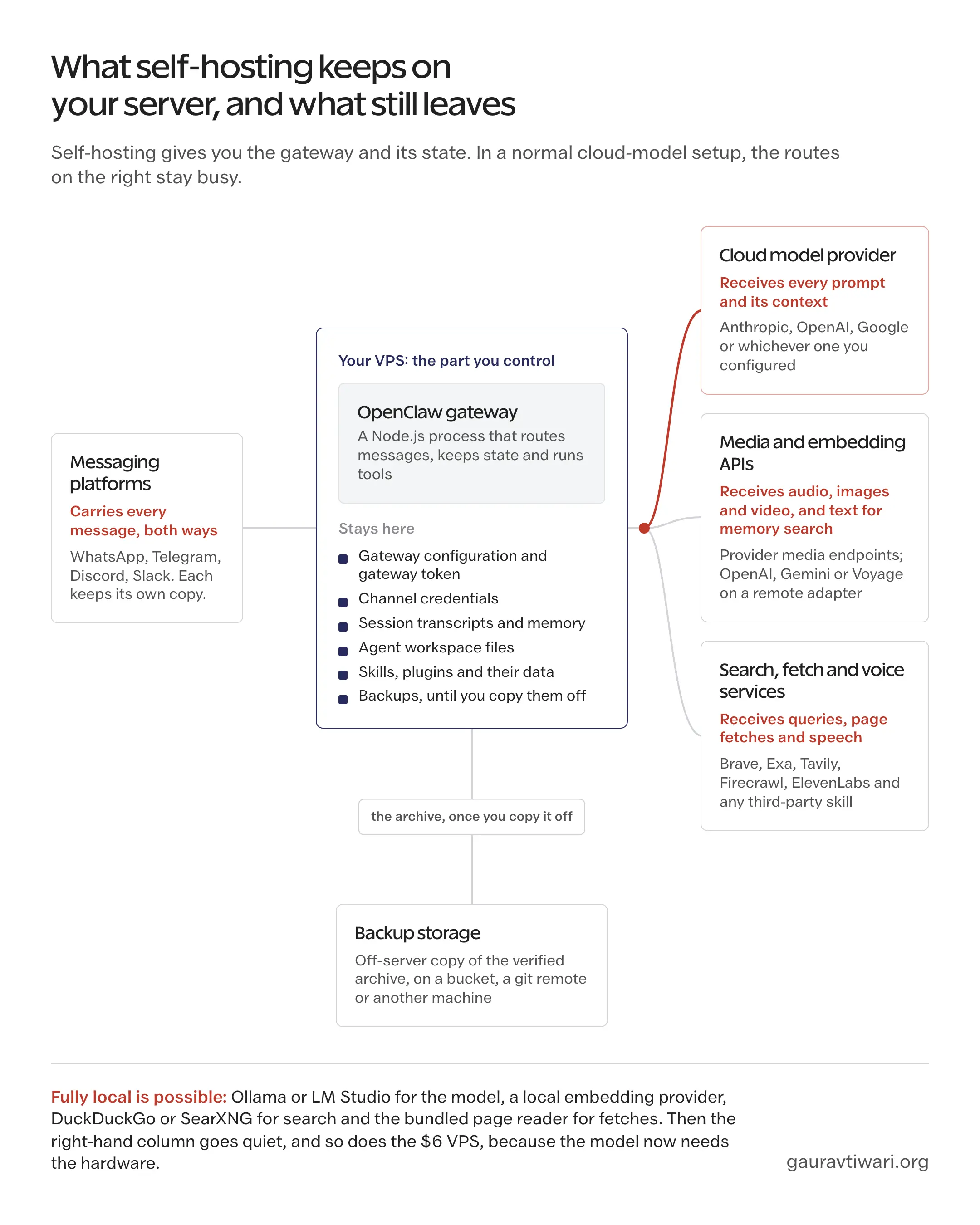
What stays on the VPS:
- The gateway configuration, gateway token and channel credentials
- Session transcripts, memory and the agent’s workspace files
- Skills, plugins and their durable data
- Backups, until you copy them somewhere else
What leaves the VPS in a normal cloud-model setup:
- Every prompt and its context, to the model provider you configured
- Audio, images and video you send for transcription or description, to the provider’s media API
- Text sent for embeddings when memory search uses a remote adapter such as OpenAI, Gemini or Voyage
- Search queries to Brave, Exa or Tavily, page fetches through Firecrawl, speech through ElevenLabs, and whatever a third-party skill calls
- Every message, to the messaging platform that carried it, which keeps its own copy
A fully local setup is possible, and the documentation lists the switches: a local embedding provider for memory search, DuckDuckGo or a self-hosted SearXNG for search, the bundled readability plugin for page fetches instead of a paid service, and Ollama or LM Studio for the model. That is the strongest privacy boundary OpenClaw offers, and it is also the setup that needs the hardware from the local-model section rather than a $6 VPS. The middle position, which is where most people should sit, is a cloud model with locally controlled tools and a clear understanding that the prompts are leaving the box.
OpenClaw Security on a VPS
OpenClaw should be treated as a privileged automation service, not as a website. It reads untrusted content, holds persistent credentials, calls external tools and runs commands with whatever permissions you gave it. Keeping the gateway off the public internet is the first rule and it is not the only one.
The scale of the exposure problem is measured, not guessed. SecurityScorecard’s STRIKE team runs a live count of exposed OpenClaw control panels, and in early September 2026 its dashboard showed 42.9K unique IP addresses across 82 countries, with 15.2K of them, about 35%, appearing vulnerable to remote code execution. Those numbers move every 15 minutes, which is the point: the population of open gateways is large and it refreshes. The older bug people still cite, CVE-2026-25253, is a good example of why version freshness belongs in a hosting decision. Versions before 2026.1.29 accepted a gateway address from a query string and connected to it automatically, token and all, so one click on a malicious page could hand over an exposed instance. Current builds fixed it. An image built before that date did not.
The baseline I would hold on any VPS from this page:
- One gateway per trust boundary. The security model assumes a single operator or a team that trusts each other. Users or clients who do not trust each other get separate gateways, separate credentials and ideally separate OS users or hosts, not one shared login.
- Loopback, tunnel or tailnet for the dashboard. Never a raw gateway on 0.0.0.0 without authentication, and preferably not on a public port at all.
- A dedicated non-root user, with
~/.openclawat 700 and its files at 600. Assume everything in that directory holds a secret. - Scoped credentials. A separate API key per service, and a bot account for each channel rather than your personal one.
- Allow lists on every channel. DMs default to pairing mode with an approval code; keep that, and put groups behind a mention gate.
- Plugins are trusted code. They run in the same process as the gateway. Review the source before installing and pin what you install.
- Approvals or a sandbox for dangerous tools. Leave the confirmation on for shell and file access, or run tools in the optional Docker or Podman sandbox.
- A regular deep audit.
openclaw security audit --deepprobes the live gateway, and--fixapplies the safe corrections such as file permissions. - Verified backups and controlled updates, as described above, because an update is also the moment a fix arrives.
If something does go wrong, the documented order is stop the exposure first, freeze access second, rotate every token and provider key third, and only then read the logs. Doing the reading first is how the second incident happens while you are still investigating the first.
The Limits
Self-hosting OpenClaw is not for everyone, and no host on this page changes that. I would not self-host, on any plan, in these four cases.
You do not want to manage credentials, updates or recovery, and you do not want to pay a managed provider to do it either. An agent with shell access and stale dependencies is a liability, and the free tier does not come with someone to call.
You need contractual support or an uptime commitment. None of the plans here, managed or not, sells an SLA on the OpenClaw application, and a personal VPS has nobody on the other end of a ticket at 2 a.m.
You need people who do not trust each other, clients or customers, to use the same system. One authenticated gateway is not a multi-tenant product, and pretending it is puts every client’s credentials one prompt injection away from the others.
You want a fully local model and cannot budget the hardware. A local 8B model on a 4GB VPS does not run acceptably, and a cloud model defeats the reason you wanted local in the first place. Either buy the box or accept the cloud boundary knowingly.
This guide has its own edges too. It compares products as their pages describe them, so it cannot tell you how a given host behaves under a month of browser automation, and the intro prices in it will move before the renewal prices do. If you are still deciding whether an always-on agent is what you want, the lower-stakes place to start is my roundup of the best AI chatbots like ChatGPT.
What Quietly Ruins It
Most of the OpenClaw hosting failures I have read about were not the host’s fault. These are the habits behind them.
Buying on the intro price. The 2-year plan at $5.99 is $11.99 for the rest of its life, and the comparison you did against a monthly plan was wrong from month 25.
Trusting the version on the marketing page. A one-click image can lag the release list by months, and the first thing you do on a fresh box is connect a channel to an old build. Run the version command before the channel login, not after.
Exposing the dashboard “just for a minute” to set it up from your phone. The minute becomes the default, and the scanners that feed the STRIKE dashboard do not wait for you to finish.
Sharing one gateway with a friend or a client because authentication is on. Authentication decides who can log in. It does not stop one user’s prompt from reaching another user’s credentials through the same agent.
Taking snapshots and never restoring one. A backup routine that has not produced a working restore is a routine, not a backup, and you find that out on the day you need it.
Installing every skill and plugin that looks useful. Each one runs inside the gateway with the gateway’s permissions, and the attack surface grows with the feature list whether or not you use the feature.
Before You Pay
This is the checklist I promised at the top. It takes 5 minutes on any provider’s page and it catches most of the regret.
- The renewal rate. Find the second number, not the first. If the page hides it, the cart will not.
- The billing commitment. How many months you are paying upfront, and what the refund window on that term is.
- The installed OpenClaw version. What the image ships, and whether you can update it yourself the day it falls behind.
- Who owns application updates. The provider, or you. “Managed VPS” does not answer this; ask about OpenClaw specifically.
- The restore process. Not whether backups exist, but how you get one back, how long it takes and whether you can take the archive with you.
Those 5 usually matter more than an extra vCPU or another gigabyte of RAM.
FAQs on OpenClaw Hosting
What is the best OpenClaw hosting?
There is no single best host for every user. I would choose a managed OpenClaw plan, meaning Hostinger’s managed plan, xCloud or Cloudways, when I want the provider to handle deployment, updates, backups and recovery. I would choose a 4GB Linux VPS, such as Hostinger’s OpenClaw VPS, HostArmada or Hetzner, when I want root access, portability and a lower bill over the long run.
Is OpenClaw 2026.8.1 the latest version?
No. Version 2026.8.1 matters because it was the V2 release on August 30, 2026. The official release list had already reached 2026.9.1 in early September 2026, and it keeps moving. Check the current release before you trust a one-click image, and run openclaw --version on the server after deployment.
How much RAM does OpenClaw need?
A 1GB server with swap can run a light cloud-model setup, which is how the official DigitalOcean guide starts. I consider 4GB the practical starting point for daily personal use. Browser automation, several integrations or a small team can justify 8GB or more. These are workload-based starting points, not official minimums.
Does OpenClaw need a GPU?
Not when it sends prompts to a cloud model. A GPU matters only when you run the model on the same machine with Ollama or LM Studio, and then the model, its quantization, the context size and the response speed you expect decide the hardware, not the gateway.
What is the difference between managed OpenClaw hosting and a VPS?
Managed OpenClaw hosting covers the application: installation, OpenClaw updates, security maintenance, backups, monitoring and recovery. A VPS provider keeps the machine running and leaves OpenClaw, the Linux setup, the credentials, the updates and the recovery to you. A one-click VPS sits in between, with the first deployment automated and everything after it yours.
Can I run OpenClaw on shared or cPanel hosting?
Ordinary shared hosting is a poor fit. OpenClaw needs a persistent Node.js process, background services, a supported Node version and control over what the gateway binds to, and a shared account gives you none of those. A VPS, a managed OpenClaw plan or a home server is the right unit.
Is self-hosted OpenClaw completely private?
Not on its own. Self-hosting keeps the gateway, its configuration, credentials, transcripts and workspace on a server you control. Every prompt still goes to the cloud model you configured, and messages, search queries and media go to the services that handle them. Full privacy needs a local model and locally controlled tools, which changes the hardware requirement.
Can I use an existing ChatGPT or Claude subscription with OpenClaw?
OpenClaw’s documentation lists subscription-style routes that bill outside its own usage screen, including Anthropic’s Claude login path with extra usage enabled and OpenAI’s Codex plans, alongside API keys and local models. Provider terms change, so confirm the current model-provider page during setup instead of assuming a consumer plan works as an API budget.
How should I update OpenClaw safely?
Take a verified backup with openclaw backup create --verify, read the release notes, run openclaw update on the stable channel or pin a version with --tag, then run openclaw doctor, openclaw health and a deep security audit. I would not pull a moving latest container tag into a production gateway unattended.
Is Oracle Cloud really free for OpenClaw?
Oracle’s Always Free tier includes enough Ampere A1 hours for 2 OCPUs and 12GB of RAM within its monthly limits, plus 200GB of storage. Capacity is often unavailable, and Oracle reclaims an instance that sits under 20% use for 7 days. It suits experiments and a personal agent you can afford to lose, not a workflow you depend on.
Final Remarks
If you have read this far, you already know more about OpenClaw hosting than the pricing cards want you to. The one idea I would keep is that who looks after the updates and the restore matters more than which company’s name is on the invoice, and every plan on this page answers that question differently.
When a client asks me which way to go, I tell them the same three things. Start with a managed plan if the thought of a broken gateway at midnight is a real worry, because the extra few dollars a month buys someone whose job that is. Start with a 4GB self-managed box if you are comfortable in a terminal, because it is cheaper for years and it moves with you. And whichever one you choose, take a verified backup before the first update and restore it once to a scratch server, because that one rehearsal is what makes every later update boring.
The 5-point checklist above is meant to be reused every time a renewal or a new plan comes up, not only once. And if you would rather have someone set the server up and hand it over, I am always available for a chat.
That is all from my side. I hope it helps you.
Tell Google you want more of this.
Add Gaurav Tiwari as a preferred sourceOne tap, and this site shows up more often in your own Top Stories, AI Overviews and AI Mode. Remove it any time.
Disclaimer: This site is reader-supported. If you buy through some links, I may earn a small commission at no extra cost to you. I only recommend tools I trust and would use myself. Your support helps keep gauravtiwari.org free and focused on real-world advice. Thanks. - Gaurav Tiwari