
 by
Can you claim your business in ChatGPT if you’re outside the US? Will a claimed profile make ChatGPT recommend you more often? And what are you agreeing to when you click through?
OpenAI opened Business Hub on November 10, 2026, and most of the advice I’ve seen since says the same thing: claim it today, early movers win. I think that advice is half right. The claim is worth making for many businesses, but it won’t move you up in ChatGPT’s answers, and the terms ask for more than a Google Business Profile does.
The process itself is short. To claim your business in ChatGPT, you sign in, open Business Hub, search for your business and verify it by business phone, business email, a DNS record or Shopify. OpenAI reviews the claim, and then you pass an identity check with Persona, which unlocks editing, insights and the blue check.
I’d claim an online store or a software business now, mainly to correct wrong facts and to see the click data. If your site earns from what it publishes, I’d read Section 10 of the Businesses in ChatGPT Terms before typing anything into the search box.
I added Gatilab, my agency, from India while writing this guide. So the steps below include what Business Hub showed me on each screen.
A claim lets you manage the details you submit and see mentions, website clicks and discovery topics. OpenAI says it “does not guarantee higher placement or sales”, and ChatGPT keeps making its own recommendations.
This video walks through every screen of the Gatilab setup in under 3 minutes, if you’d rather watch than read.
What Is ChatGPT Business Hub?
Business Hub is OpenAI’s dashboard for businesses that appear in ChatGPT. It is part of a beta called Businesses in ChatGPT, which OpenAI announced as a way for businesses to reach ChatGPT’s 1.2 billion weekly users.
After you claim and verify a business, Business Hub gives you 4 things:
- A business profile. People can open it when your business appears in an answer. A blue check appears once OpenAI approves your identity verification.
- Editable business information. You can update your website, description, category, logo, cover photo and delivery and return policies. Retailers can add a product feed with prices and availability.
- Insights. You see mentions, website clicks and discovery topics for the past 28 days, as totals only.
- A Business Agent. This is a separate, labeled chat that answers customer questions from your product and policy information. For now it is limited to eligible ecommerce and online service businesses in the US.
The click data is the part SEOs noticed first. Barry Schwartz wrote on Search Engine Land that Google and Microsoft don’t offer click numbers in their own AI reporting tools, and OpenAI now does.
Claiming is free at launch, and you don’t need an Ads account or a ChatGPT Enterprise agreement. OpenAI’s VP of Monetization, Benji Shomair, told Digiday that the tools are free for now, and he didn’t rule out a paid model later.
As far as I can tell, OpenAI wants businesses to hand over their own facts so ChatGPT depends less on what it can gather elsewhere. BrightLocal reads it the same way and expects other AI assistants to follow.
Who Can Claim a Business in ChatGPT
Eligibility depends on what kind of business you run and where it is. An online business with a website can probably claim now in any country where ChatGPT is available. A physical shop or restaurant outside the US can’t claim yet.
OpenAI’s help page for Business Hub and its Businesses in ChatGPT policy set these rules:
- You must own the business or be authorized to represent it.
- Eligible businesses can claim an existing listing, or add one, where ChatGPT is available and the required verification is supported.
- Local stores and restaurants can currently claim only an existing US listing.
- Claiming starts with businesses that have a website.
- OpenAI can decline a business that raises safety or integrity concerns. It is also holding some categories back until it has safeguards for them, and it hasn’t published a list of those categories.
| Business type | Can you claim now? | What to know |
|---|---|---|
| Online store or software business in the US | Yes, if eligible | A Business Agent is also possible if your category qualifies |
| Online store or software business outside the US | Yes | I created a draft profile from India, and Persona lists India for the government ID |
| Local store or restaurant in the US | Existing listings only | You can’t add a new local listing |
| Local store or restaurant outside the US | Not yet | OpenAI says more markets will follow |
| Service business | Yes, as a website business | The form offers only a physical location or a website |
Business Agents have their own, narrower rules. They are available only to eligible ecommerce and online service businesses in the US, and a verified profile doesn’t guarantee that you can publish one.
Businesses Outside the US
If you run an online business from India, the UK or anywhere else outside the US, this is the part that matters. I added Gatilab from my ChatGPT account in India. The search offered to create the business, the domain check passed and Business Hub saved the profile as a draft.
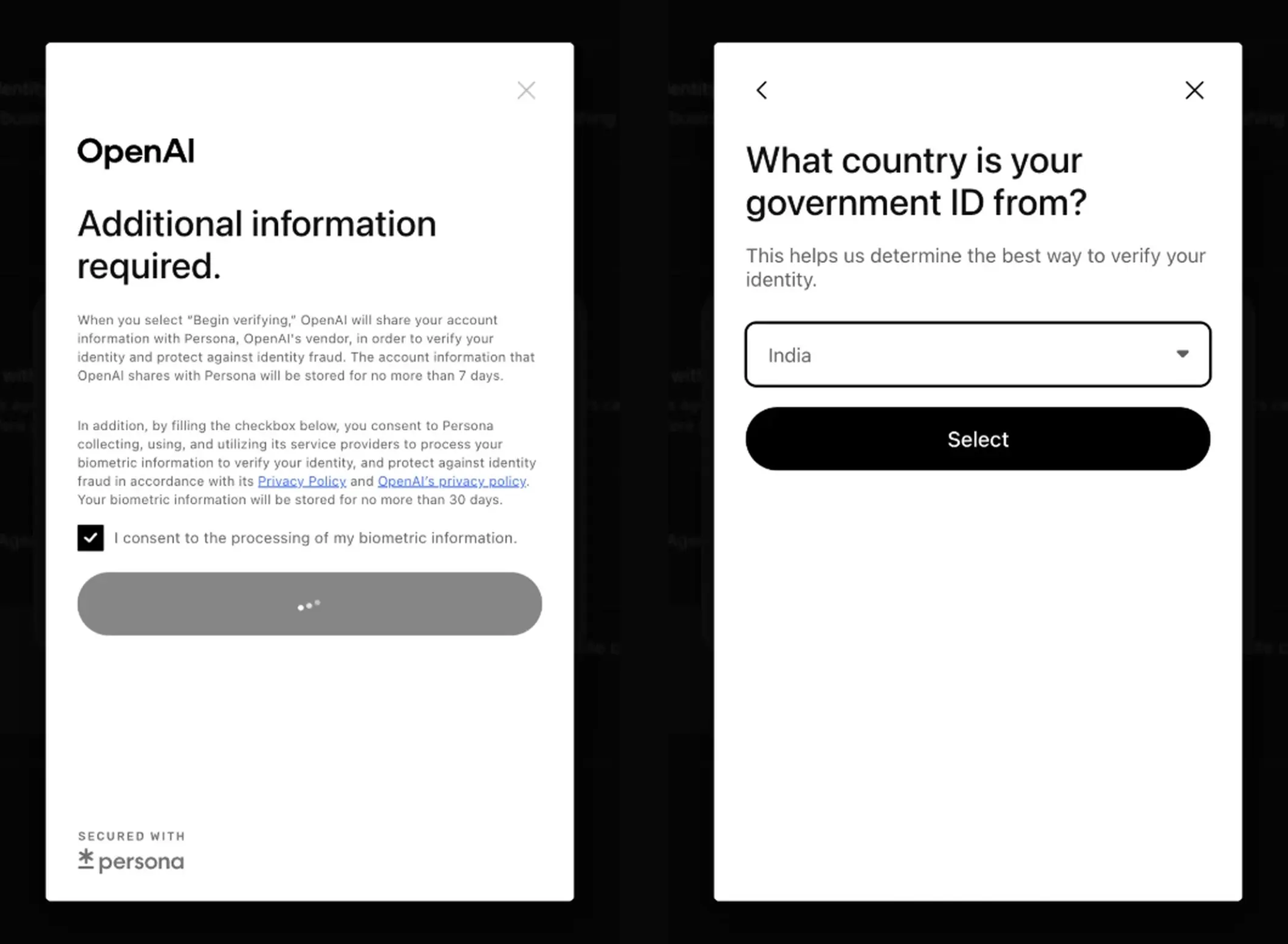
The identity check opened for me too. Persona asked which country my government ID is from, and India was on the list.
One founder who documented the full setup reported a country field in Persona’s business step that was fixed to United States. I haven’t met that screen, and OpenAI’s decision comes later by email. So an Indian company can apply, and approval is the part still to be shown.
Product feeds lean the same way. OpenAI’s product feed specification says the standard upload currently targets the US.
How to Claim Your Business in ChatGPT
The process has two gates. The first is the claim, where you prove a link to the business and OpenAI approves it. The second is identity verification with Persona, and nothing useful unlocks until OpenAI approves that too.
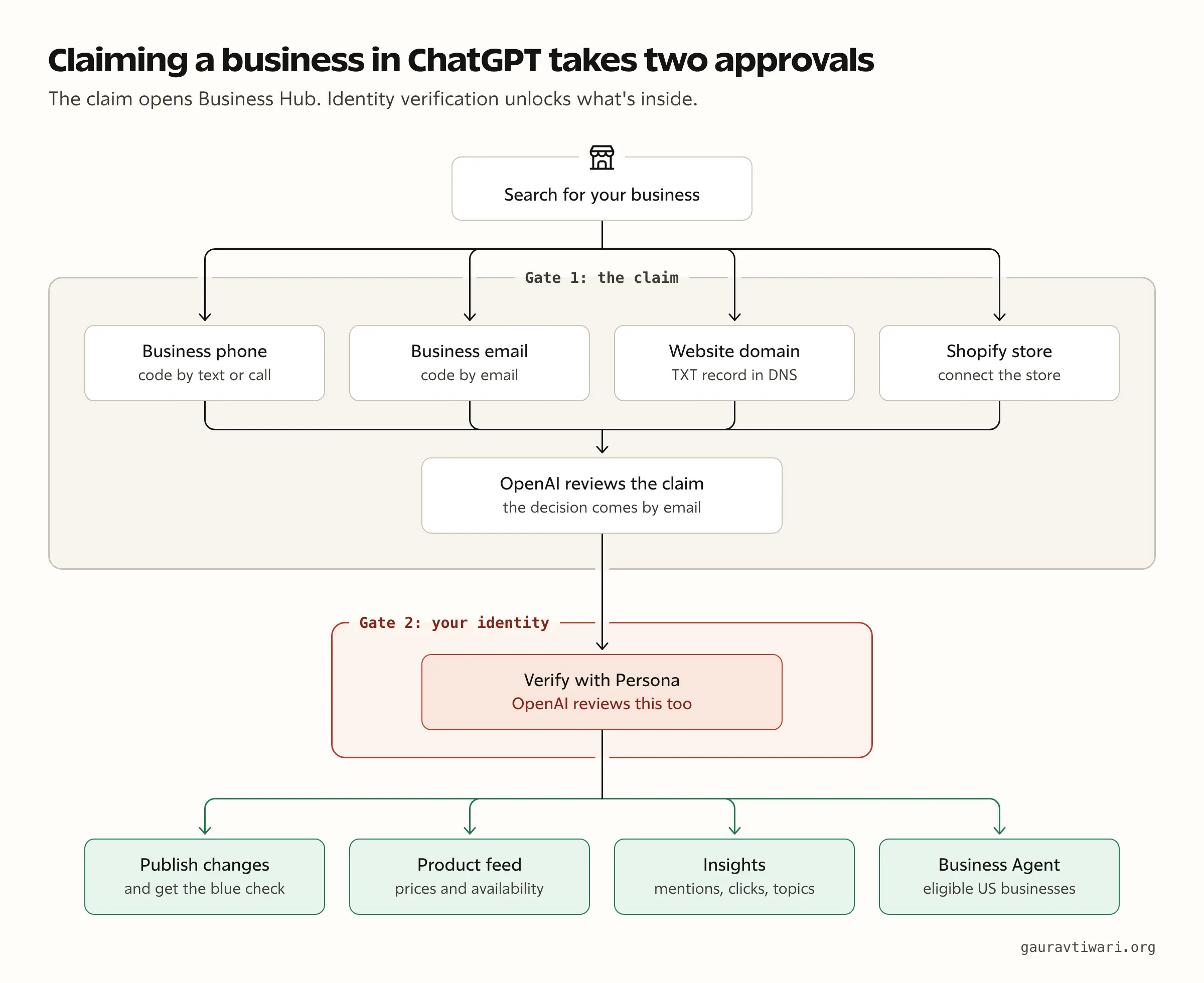
The diagram follows OpenAI’s help page for a business that is already listed. Gatilab wasn’t listed, and for it the first gate was quicker. The domain check passed on the spot and the profile was saved as a draft, with Persona still ahead.
What to Keep Ready
I’d collect these before starting, because one verification method runs on a timer:
- An admin account. This is the ChatGPT account that will manage the business. A work account is the wise choice, since teammates and agencies get added to it later.
- A way to verify. You need access to your DNS settings, or a business phone or business email already associated with the business.
- Identity documents. OpenAI says you may need a government-issued ID, your business registration information and proof that you can represent the business.
- Exact legal details. Your business name, address and registration or tax number should match your official records. OpenAI points to these fields when a Persona check fails.
- A short description and a phone with a camera. People who completed the form say the description is capped at 300 characters and the ID step needs a camera. OpenAI’s help page doesn’t mention either.
- Delivery and return policies. The form for a new business asks for both before it lets you submit, even when you sell a service.
It also helps to ask ChatGPT about your business before you claim and note every wrong answer. That list tells you what to fix once you’re in.
Step 1: Open Business Hub and Find Your Listing
Sign in to ChatGPT and open Business Hub from the sidebar. If you don’t see it there, the direct address chatgpt.com/business-hub works, and that is how I reached it.
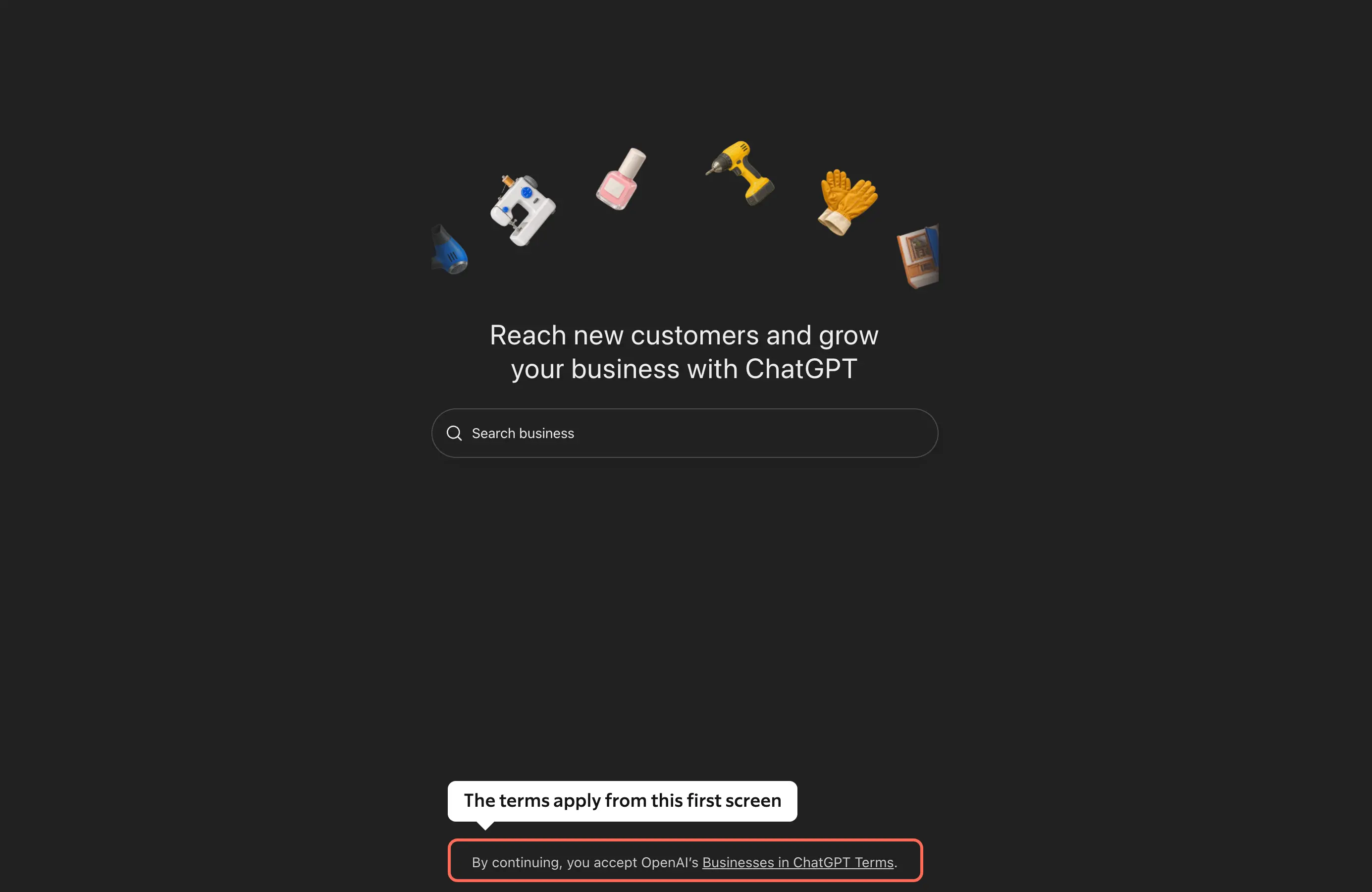
The first screen in my account is a search box with a single line under it. The line says that by continuing, you accept OpenAI’s Businesses in ChatGPT Terms. So the terms apply before you have claimed anything, and I’d read the terms section below before searching.
From there:
- Search for your business by name.
- Select the listing that matches and confirm the ChatGPT account that will manage it.
- Choose one of the verification methods shown.
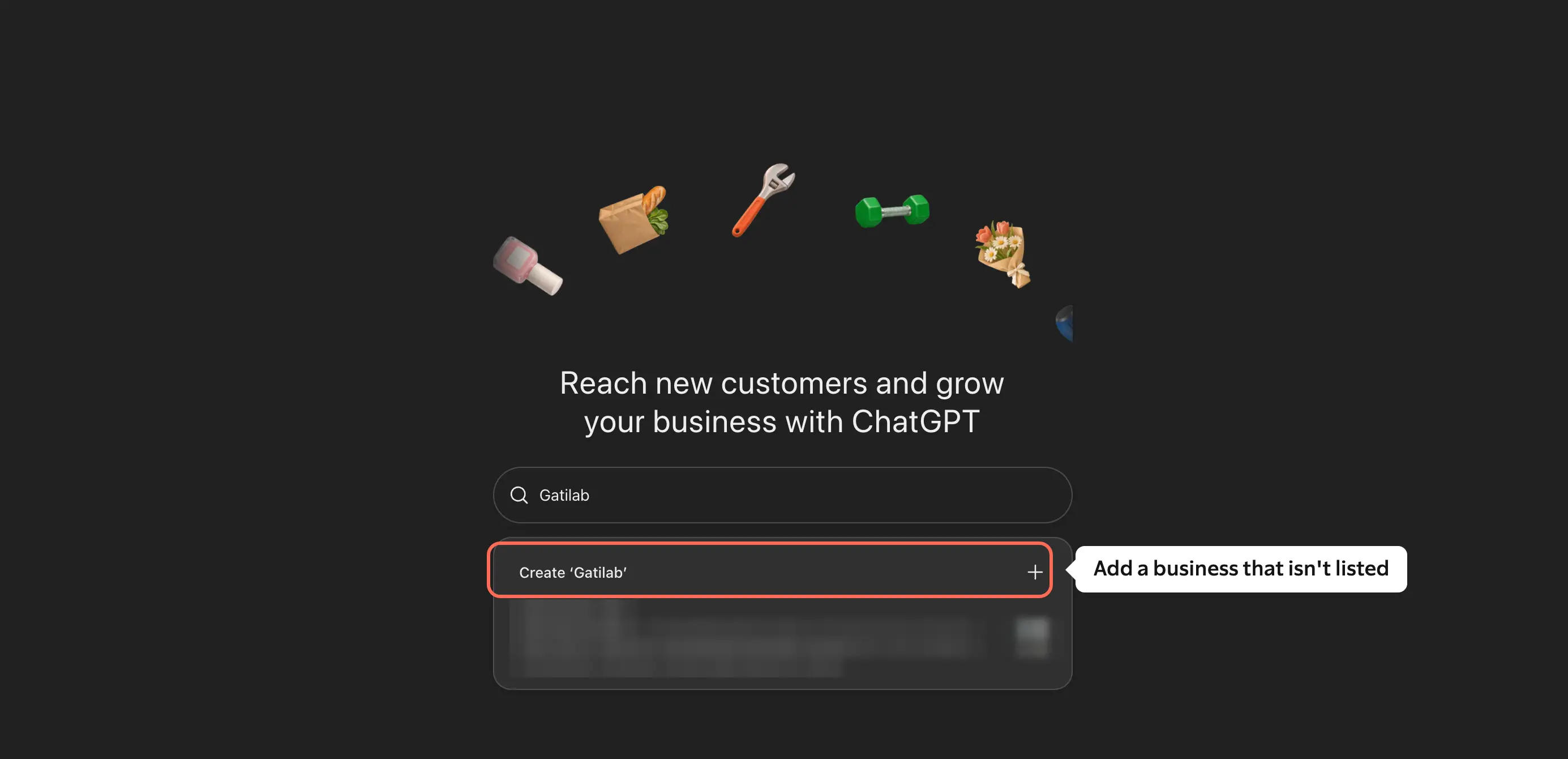
The search matches business names. When I searched for my domain, it returned 10 local listings with similar names across India, and none was my site. A search for Gatilab returned 1 unrelated company and, above it, an option to create Gatilab.
Three situations change this step:
- You received a claim invitation. Open the personal link in the email and sign in with the address that received it.
- You see Contact support. The listing is locked, and you request access through support.
- Your business isn’t listed. Select the Create option at the top of the results. Business Hub then asks how customers usually interact with the business: at a physical location or through a website.
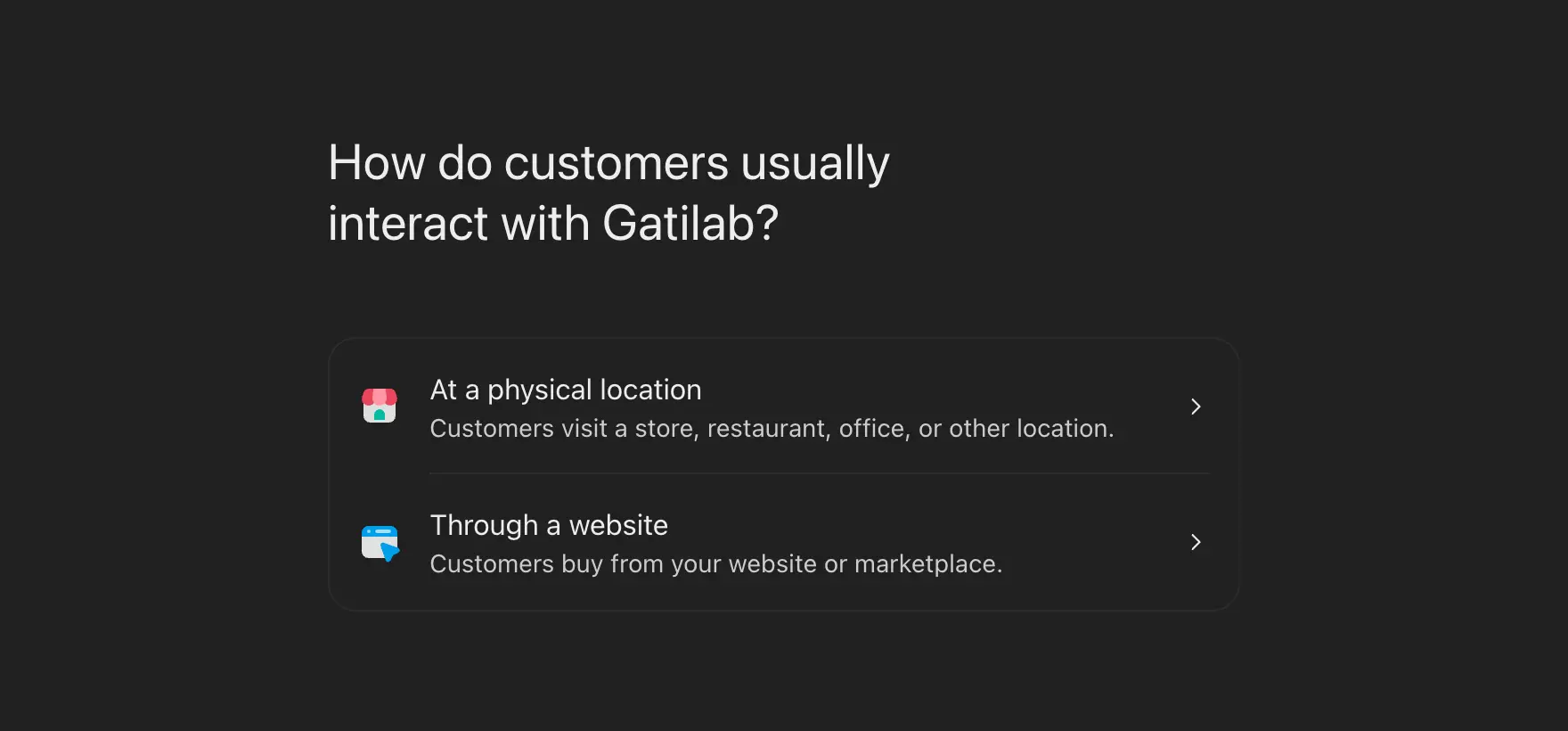
My account showed no separate choice for a service business. Gatilab is an agency, so I chose the website option, and the form later asked about delivery and returns as if it sold goods.
Step 2: Verify Your Claim
OpenAI offers up to 4 methods, and you use one of those it shows for your business.
| Method | What you do |
|---|---|
| Business phone | Select Business phone, choose a text message or an automated call, select Get code and enter the code |
| Business email | Select Business email, then Get code, and enter the code sent to the address associated with the business |
| Website domain | Select Website domain, add the TXT record shown to your DNS, then return and select Verify domain |
| Shopify store | Select Shopify store, then Connect Shopify, review the permissions and select Log in to Shopify |
The domain method is the one I’d pick when you control DNS, because it doesn’t depend on which phone number or email OpenAI has on file. Copy the record type, the name or host and the value exactly as shown.
For Gatilab, the record’s host was openai-business-profile on my domain, and the value started with openai-business-profile= followed by a token. The screen showed an expiry time 30 minutes ahead, so I’d have the DNS panel open before requesting the record.
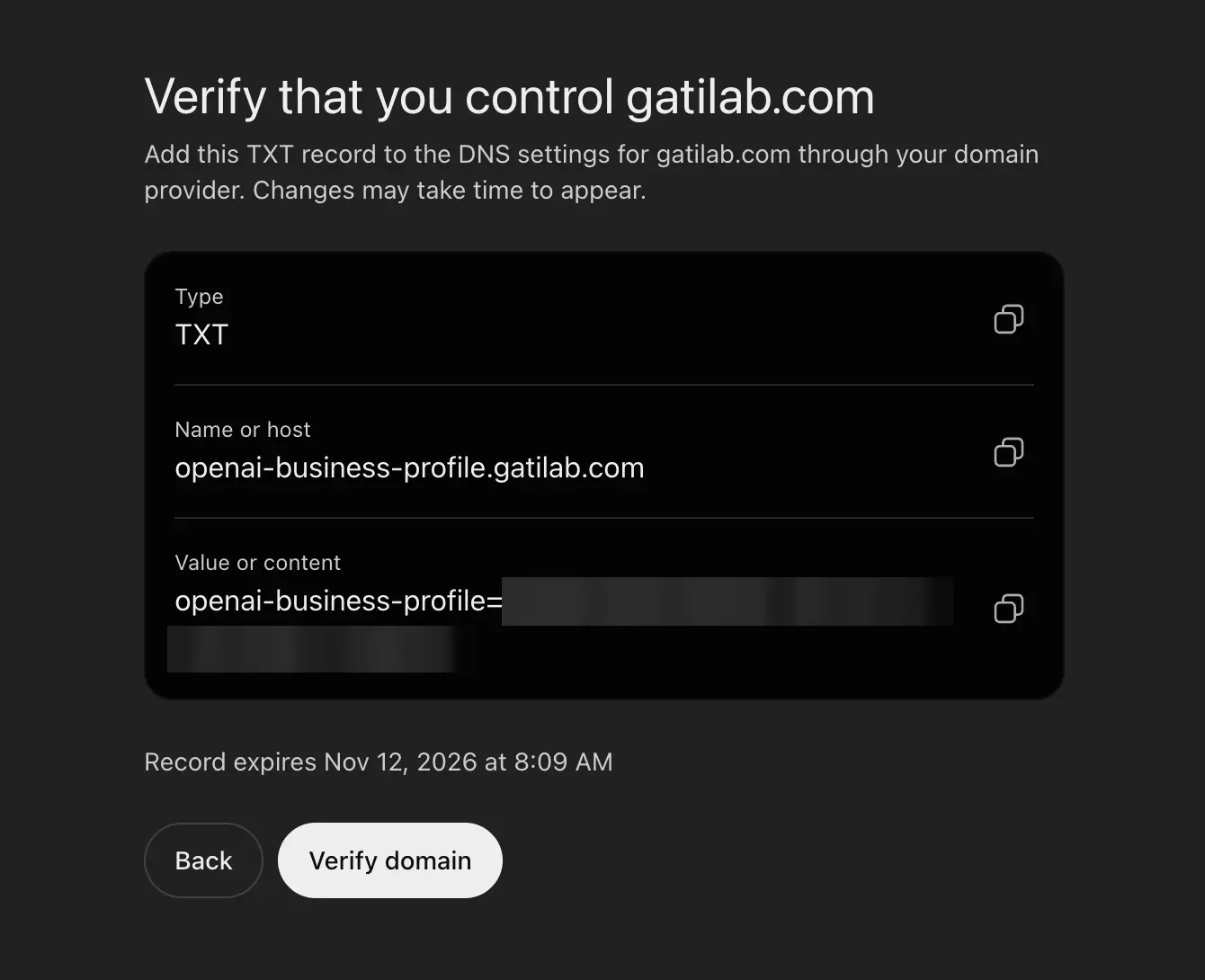
I added the record in Cloudflare and the check passed on the first try. One early user got an error from the email code, which is another reason I’d choose DNS.
Merchants on Shopify can start the same connection from the Shopify admin. Their eligible products already reach ChatGPT through Shopify’s catalog.
Step 3: Wait for Claim Approval
OpenAI reviews the claim and emails a decision or a request for more information. You can select Cancel claim while it is under review. I didn’t get this wait with a new business, because the form moved straight on after the domain check.
If someone else has already claimed your business, open its profile, select the more options menu and choose Dispute ownership. You then verify with Persona that you are authorized to represent it.
Step 4: Verify Your Identity With Persona
Persona is the identity verification company OpenAI uses for this step. Its approval is what lets you publish changes, connect a product feed, view insights and create a Business Agent.
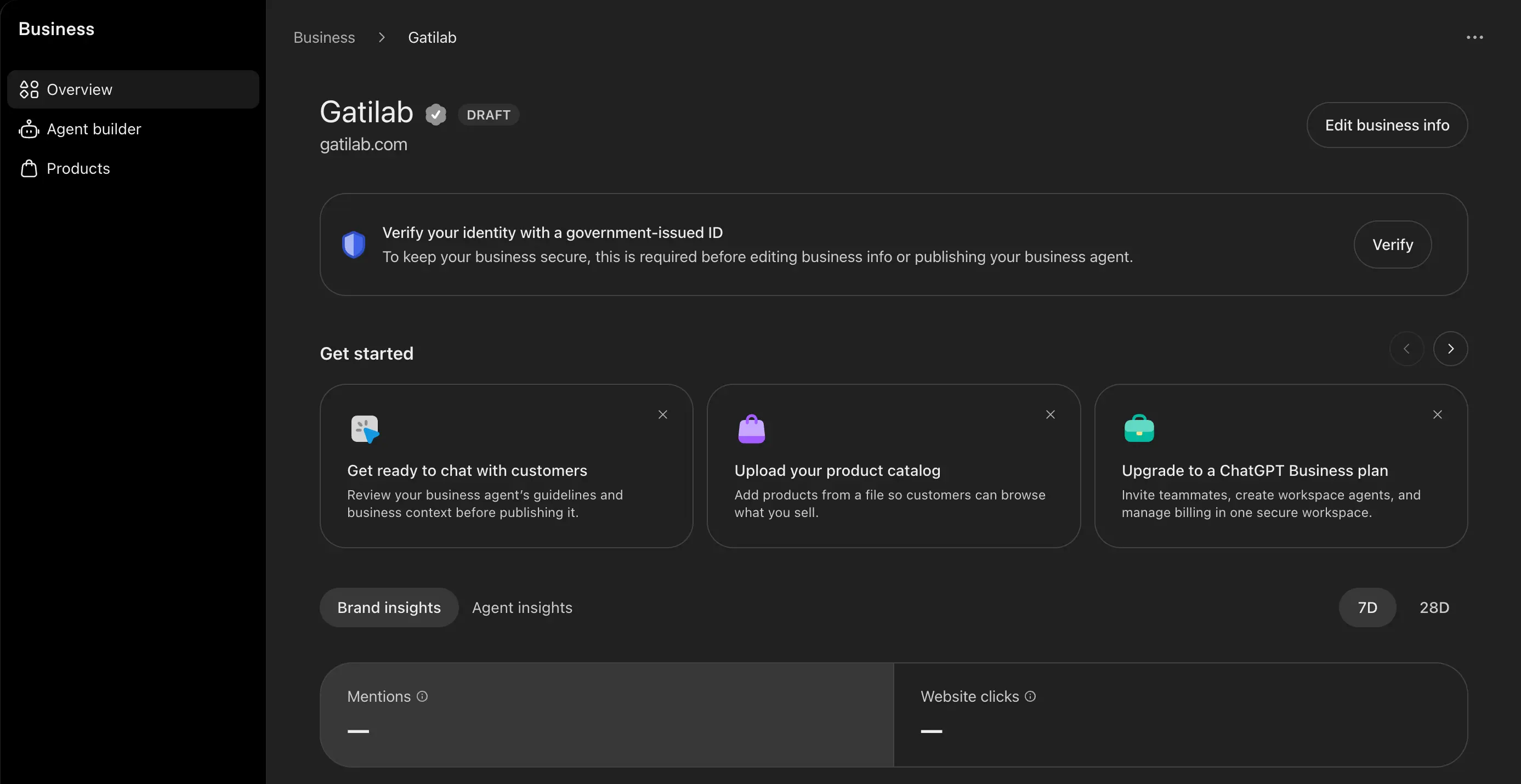
My draft’s overview says the same in one notice. Identity verification with a government-issued ID is required before editing business information or publishing an agent.
Selecting Verify opened a consent screen first. It says OpenAI shares your account information with Persona, which stores it for up to 7 days. It also asks you to consent to Persona processing your biometric information, which is stored for up to 30 days. The next screen asks which country your government ID is from.
- Select Verify on the overview, or Verify with Persona during a claim, and continue to Persona.
- Submit the business and identity information Persona asks for.
- Wait for OpenAI’s email. Submitting the form doesn’t mean you are approved.
If you claimed with another method first, you can do this later. Open the Business tab, select your profile, find Complete verification with Persona and select Verify.
Three details here are easy to miss:
- The blue check comes from this step. OpenAI’s help page says claiming alone doesn’t add the verified badge. Its marketing page describes the check more loosely, as a sign that a business has been claimed, so I’d go by the help page.
- A new profile publishes on approval. If you use Persona to create a new profile, OpenAI’s approval publishes it automatically. There is no separate publish button, so I’d continue only when you’re ready to be listed.
- The review takes days. OpenAI says review time varies. The founder who documented the setup spent about 27 minutes on the forms and was told to expect status updates over the next few days.
Step 5: Update Your Business Information
Once both approvals are in, you can open the profile in the Business tab and update the website, description, category, logo, cover photo and delivery and return policies. OpenAI reviews changes before it publishes them, and ChatGPT may still use other sources in its answers.
When you add a new business, the same fields come up during setup. This is what I saw while adding Gatilab:
- Category. The list matches category names only, and it has no category for web development or SEO. I chose Marketing agency, and the form then suggested Web designer and Advertising agency.
- Description. The field is optional. Other early users report a 300-character cap with no counter, so mine runs to about 260 characters.
- Contact details. Phone and email are both optional, and I left them blank.
- Delivery. The choices are no delivery, paid delivery and free delivery.
- Returns. The choices are returns not accepted, returns with fees and free returns. Free returns adds a return window, which defaulted to 14 days.
I’d answer the policy questions with care. A line such as “returns not accepted” is something ChatGPT can repeat to a buyer.
After I submitted, Business Hub saved Gatilab as a draft. The same screen offered ad credit and a paid ChatGPT Business plan, and neither is needed to continue.
Teammates, Product Feeds and Business Agents
Three optional steps follow the profile, and none of them is needed to see your insights:
- Teammates and agencies. The admin who claimed the business can add teammates and give an agency access. Each person uses their own ChatGPT account, and a personal claim invitation shouldn’t be forwarded.
- Product feed. Retailers can connect a Shopify feed, upload a CSV or link a hosted file that follows OpenAI’s product feed specification. The specification has 9 required fields, from
item_idandtitletoavailabilityandprice. A feed doesn’t publish an agent or guarantee recommendations. - Business Agent. Eligible US businesses can review the information the agent uses, write its instructions, test it with a real customer question and select Publish. The agent explains products and policies and links to your site. It can’t complete purchases, make bookings or check orders.
If You Change Your Mind
Only an unpublished draft can be deleted. Open the Business tab, select the draft, go to Overview, open the three-dot menu and select Delete draft.
OpenAI says its support team can’t delete, unpublish or hide a published profile. So the decision is easy to reverse before approval and hard to reverse after it.
What Business Hub Insights Measure
Insights show 3 aggregate numbers for the past 28 days. Each one has a definition that changes how you should read it.
Mentions
For an online business, a mention counts when ChatGPT references the business’s website. The brand name alone doesn’t count. For a local business, a mention counts when ChatGPT shows a result for that location, even if nobody opens it.
The tooltip in my Business Hub words it more loosely, as the number of times your business appeared in ChatGPT responses, including citations. I’d go by the help page until OpenAI makes the two match.
So your mentions number is closer to linked citations than to brand mentions. Lily Ray pointed out on X that requiring the website removes the ambiguity of brand names that can mean other things.
My own tracking shows how big that gap can be. When I tracked 14 prompts in ChatGPT over two weeks in July, it named my brand in 3 answers the first week and 4 the second. It cited my site once the first week and twice the second.
As I read OpenAI’s definition, Business Hub would have counted the smaller numbers. That is also why a tracker that counts brand names will show different figures from Business Hub.
Website Clicks
Website clicks show how often people click through to your site. An OpenAI spokesperson told Digiday that these are clicks on links in supported ChatGPT surfaces, and that they don’t confirm a completed visit or a purchase. The tooltip in my account says the same about recorded clicks.
I’d compare the number with referrals from chatgpt.com in your own analytics and note the gap. Lily Ray reported 8 clicks from 26 mentions on one profile, which is about 31%. That is a single early profile, so I wouldn’t use it as a benchmark.
Discovery Topics
Discovery topics are common themes in ChatGPT answers that mentioned or cited your business. They are grouped categories. They don’t show individual prompts, and OpenAI says they don’t directly measure customer intent.
I’d treat each topic as a content brief. A topic you have no strong page for is a gap, and a topic you care about that never appears is a different gap.
What the Insights Leave Out
The report is deliberately narrow, and 4 things are missing from it:
- Prompts and conversations. Businesses never see them, including chats with their own Business Agent.
- Share of voice, competitors and rankings. OpenAI told Digiday that share of voice isn’t part of this beta.
- Small numbers. A blank metric can mean the activity hasn’t reached the reporting threshold, so a blank is different from zero. My draft shows both metrics as unavailable, which is expected before verification.
- A settled metric list. My overview has Mentions, Website clicks and a list of the top 5 discovery topics, with 7-day and 28-day views. Some launch coverage also mentions profile views, which I don’t see there.
One more limit sits in the terms. Section 6 treats these numbers as OpenAI’s confidential information and restricts sharing them beyond service providers who work for you. If you plan to publish your Business Hub screenshots in a case study, I’d read that section first.
How I’d Use the Numbers
This is the routine I’d follow once the numbers appear:
- A baseline in the first week, then a monthly check.
- Website clicks set against chatgpt.com referrals in your analytics or server logs.
- Business Hub mentions set against whatever tracker you already use.
- Discovery topics turned into a short list of pages to write or improve.
The third comparison is the one agencies are waiting for. If a paid tracker’s estimates turn out to be far from OpenAI’s own counts, that changes which of the AI visibility tools are worth paying for.
Does Claiming Improve Your Visibility in ChatGPT?
No, a claim doesn’t raise your visibility on its own. ChatGPT may show your business whether or not you claim it, and it keeps making its own recommendations and comparisons. Shomair told Digiday that claiming shouldn’t change how often a business appears.
What a claim changes is the information ChatGPT can draw on. Accurate details, a current product feed and correct policies give it better facts to work with. OpenAI also says advertising doesn’t influence its independent answers.
An early test by a consultant who ran 6 prompts after launch shows where things stand:
- Restaurants and online stores already had cards with a claim link.
- Software companies and agencies got a plain summary with no claim link.
- None of the 6 results carried a verified badge yet.
- His own card had the right text and photos from two other companies.
That last one is a good reason to check your public card after approval.
Paid placement is separate. A business can sponsor its Business Agent as a destination for ChatGPT ads, and OpenAI labels those placements.
Read the Terms Before You Accept
The Businesses in ChatGPT Terms ask for more than a local listing usually does. I’m not a lawyer and this isn’t legal advice, but these are the clauses I’d read slowly.
| Section | What it says in plain English |
|---|---|
| 4.1 | OpenAI can create and show a listing for your business whether or not you claim it. Claiming doesn’t give you exclusive control, and OpenAI may add to, edit or replace what you submit. |
| 4.1 | By using Business Hub, you agree that OpenAI’s AI assistant may call your business on behalf of its users. The clause links to an opt-out. |
| 4.2 | The display license on basic details (name, address, contact details, category, opening hours and website) is perpetual and irrevocable. |
| 6 | Insight data is OpenAI’s confidential information. You can use it to measure and report on your own use, with limits on sharing it. |
| 9 | You indemnify OpenAI against claims related to your listing, your data and your Business Agent. |
| 10.1 and 10.2 | You agree never to bring a Covered Claim against OpenAI, and you release such claims whether they are known or unknown. |
| 10.3 | Ending the terms doesn’t oblige OpenAI to delete or change products in which your data has been used. |
The Clause Publishers Should Read Twice
Section 10 matters most if your business is its content. The terms define a Covered Claim widely.
It includes claims about the data you submit, and also claims about content published on websites that you or your affiliates own, before or during the term. Claims that OpenAI breached these terms are the exception.
As I read it, a publisher who accepts these terms gives up claims against OpenAI that relate to the content on its own websites, including content published before the claim. That is a large thing to trade for a dashboard.
If you have a licensing deal in progress, or you are keeping a legal claim open, I’d show this section to a lawyer before going past the first screen.
Extra Conditions for Product Feeds
Section 3 applies only if you provide a product feed. You agree to let OpenAI’s crawlers and agents access your websites. You also agree that any text and data mining opt-out you have reserved doesn’t apply to OpenAI.
This one touches my own setup. My robots.txt publishes a Content-Signal line that says no to AI training and yes to search, which I explained in my guide to blocking AI training in Cloudflare. Under Section 3, that line would stop counting for OpenAI the day I connected a feed.
If you sell products and also restrict AI training, I’d decide which of the two matters more before uploading anything.
How to Optimize Your ChatGPT Business Profile
The profile is small, so most of the gain comes from accuracy and consistency. These are the things I’d work on:
- Description. 300 characters that say what you do, who it is for and how to start. A tagline wastes the space.
- Category. The closest truthful category, with the rest explained in the description. The policy bans misleading claims, so keyword stuffing carries risk and no benefit.
- Matching facts. The same name, address, phone, hours and website that appear on your Google Business Profile, in your footer and in your schema markup.
- Policies. Delivery and return answers that match your actual terms, because ChatGPT and your agent may repeat them.
- Images. Your own logo and cover photo, then a look at the public card for wrong images.
- Feed freshness. Stale prices in a feed are worse than no feed.
- Your own pages. Each discovery topic answered in plain language on your site.
The last point carries the most weight. ChatGPT still draws on other sources. So the work in my GEO playbook and my guide to earning citations in AI search still decides most of what it says about you.
ChatGPT Business Hub vs Google Business Profile
Business Hub borrows the claim-and-verify model of local listings, which is why so many people compared it to Google Business Profile at launch. The audience, the data and the terms are different.
| Compare | ChatGPT Business Hub | Google Business Profile |
|---|---|---|
| Built for | Online businesses with a website, plus existing US local listings | Local and service-area businesses |
| How you verify | Phone, email, DNS record or Shopify, then a Persona identity check | Methods Google picks for you, such as phone or text, email, video or mail |
| Review time | Varies, with early reports of a few days | Up to 5 business days, per Google’s verification help |
| What it reports | Mentions, website clicks and discovery topics in ChatGPT | How people find and act on your profile in Google Search and Maps |
Apple Business does the same job for Apple Maps. It reports search taps, place card views and actions such as directions, website taps and calls in Apple Maps. It shows low numbers as zero, where Business Hub leaves them blank.
Each tool reports on its own surface, so you need more than one if your customers use more than one. For AI reporting from Microsoft, the closest thing is the AI Performance report in my Bing Webmaster Tools guide. For the local basics, my guide to getting your business on Google Maps covers Google, Bing Places and Apple.
FAQs on ChatGPT Business Hub
Yes, at launch. You don’t need an Ads account or a ChatGPT Enterprise agreement to claim a business. OpenAI hasn’t ruled out charging later. After I submitted Gatilab, the screen offered ad credit and a paid ChatGPT plan, and neither is required.
OpenAI says review time varies and it emails you the decision. Early users report about half an hour for the forms and a few days for the review. If a Persona check fails or expires, the email explains how to try again.
No. Each brand is managed separately, and claiming the main brand doesn’t claim its locations. OpenAI says central management across a parent company’s brands and locations isn’t available yet.
It may. OpenAI can create and display a listing whether or not you claim it, and ChatGPT can mention any business when a question is relevant. A claim only changes the details you can supply and what you can see.
No. Shopify is one of 4 verification methods and a quick way to connect a product feed. You can claim a business and set up a Business Agent without a Shopify store.
No. The agent explains your products and policies and links to your website, where customers complete the purchase or booking. It also can’t check a customer’s order.
Should You Claim Your Business in ChatGPT?
For most online businesses, yes. The claim costs nothing today, it lets you correct wrong facts and it gives you click data that Google and Microsoft don’t share in their AI reports. I wouldn’t expect a ranking lift from it.
This is how I’d split it:
- Claim now. Online stores and software businesses with a website, US local businesses with an existing listing, and anyone ChatGPT is describing wrongly.
- Read the terms with a lawyer first. Publishers, media sites and anyone with content licensing or copyright interests.
- Wait. Local shops and restaurants outside the US, service businesses until that option opens, and businesses without a website.
I went ahead with Gatilab, my agency, and its profile is now a draft waiting for identity verification. There is one thing I’d weigh before you do the same. The covenant covers you and your affiliates, so claiming one business you control can reach the other sites you run.
Two things could change this advice. Business Hub is a beta, so labels, eligibility and pricing can move. And nobody outside OpenAI knows yet whether claimed data will become ChatGPT’s main source of business facts.
If you want one next step, I’d read Section 10 and then open Business Hub to see whether your business is listed. And if you already track AI answers by hand, my AI visibility tracking workflow gives you numbers to hold against Business Hub once you’re in.
Tell Google you want more of this.
Add Gaurav Tiwari as a preferred sourceOne tap, and this site shows up more often in your own Top Stories, AI Overviews and AI Mode. Remove it any time.
Disclaimer: This site is reader-supported. If you buy through some links, I may earn a small commission at no extra cost to you. I only recommend tools I trust and would use myself. Your support helps keep gauravtiwari.org free and focused on real-world advice. Thanks. - Gaurav Tiwari