
 by
by
Most site owners set up Google Search Console and never open Bing’s version. Bing handled under 5% of searches worldwide and about 9% in the US in August 2026, but its index also feeds DuckDuckGo’s regular results and the sources Microsoft Copilot cites, so a page Bing can’t crawl misses more than one search engine.
To set up Bing Webmaster Tools, verify your site, submit its sitemap and enable an IndexNow integration. Then check URL Inspection to see what Bing knows about an important page. Its Search Performance and AI Performance reports help you review search visibility and supported AI citations separately.
I’ll use Anantam IAS, at anantamias.com, as the example throughout. Its reports show the distinction that matters most here: a successful submission, an indexed page and an AI citation are separate results.
What Is Bing Webmaster Tools?
Bing Webmaster Tools is Microsoft’s free service for managing how a website appears in Bing. You prove that you control the site, then use its reports to understand discovery, crawling and indexing. Search Performance covers search visibility; AI Performance covers visible citations in supported AI experiences.
The reports answer different questions:
- Sitemaps and IndexNow: has Bing received information about your URLs and their changes?
- URL Inspection and Site Explorer: can Bing fetch a page, and what does it know about indexing it?
- Search Performance: which queries and pages receive Bing impressions and clicks?
- AI Performance: which pages are cited across Microsoft Copilot, Bing AI summaries and selected partner experiences?
- Recommendations and Site Scan: which technical issues deserve a closer look?
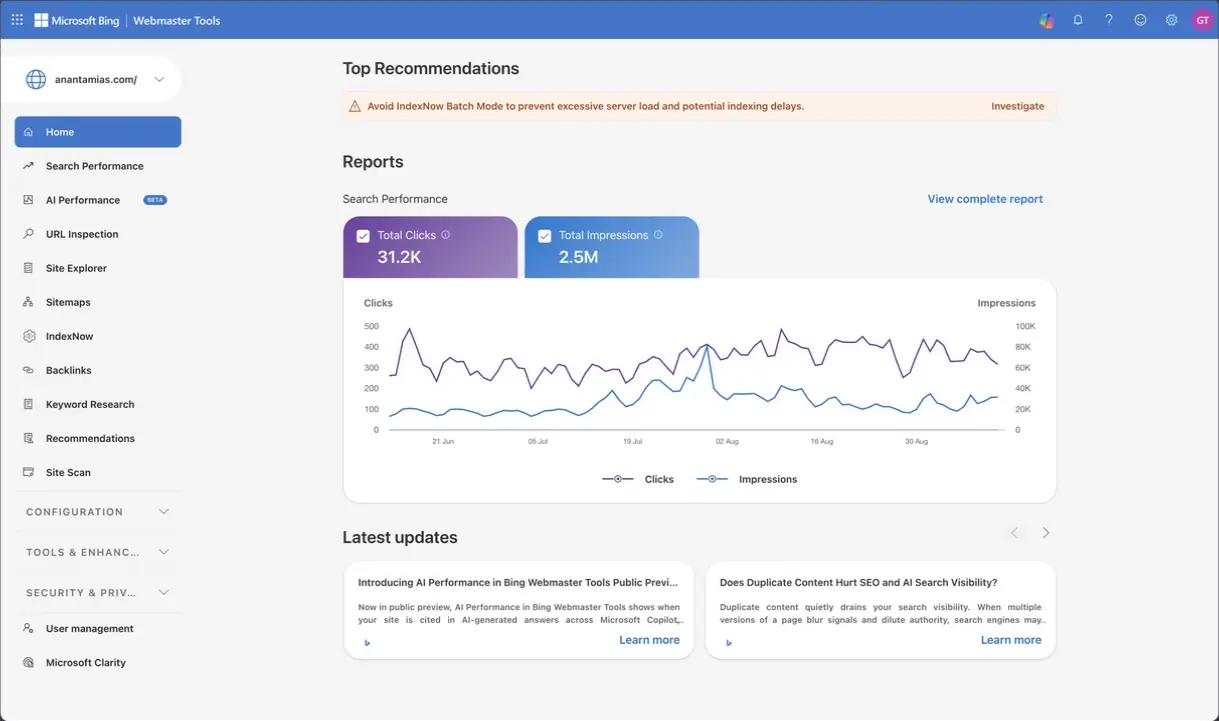
Bing also supplies results to other services. For example, DuckDuckGo says its traditional links and images largely come from Bing, alongside other sources and its own crawling. That makes Bing worth checking, but it does not mean a page indexed by Bing automatically appears in every partner search or AI answer. Each service makes its own retrieval and presentation decisions.
How to Set Up Bing Webmaster Tools
If your site is verified in Google Search Console, I’d start with Bing’s import option. Choose a manual method if you want independent ownership verification. You can use an existing verified Bing property without adding it again.
- Access to the correct Google Search Console property, or permission to edit your site or DNS.
- Your canonical site address, including HTTPS and the correct www or non-www form.
- The sitemap URL produced by your current WordPress setup.
Step 1: Sign In
Open Bing Webmaster Tools and use one of its offered sign-in methods. Microsoft documents Microsoft, Google and Facebook sign-in. If you import from Search Console, the separate Google authorization step must use an account that can access the property you want.
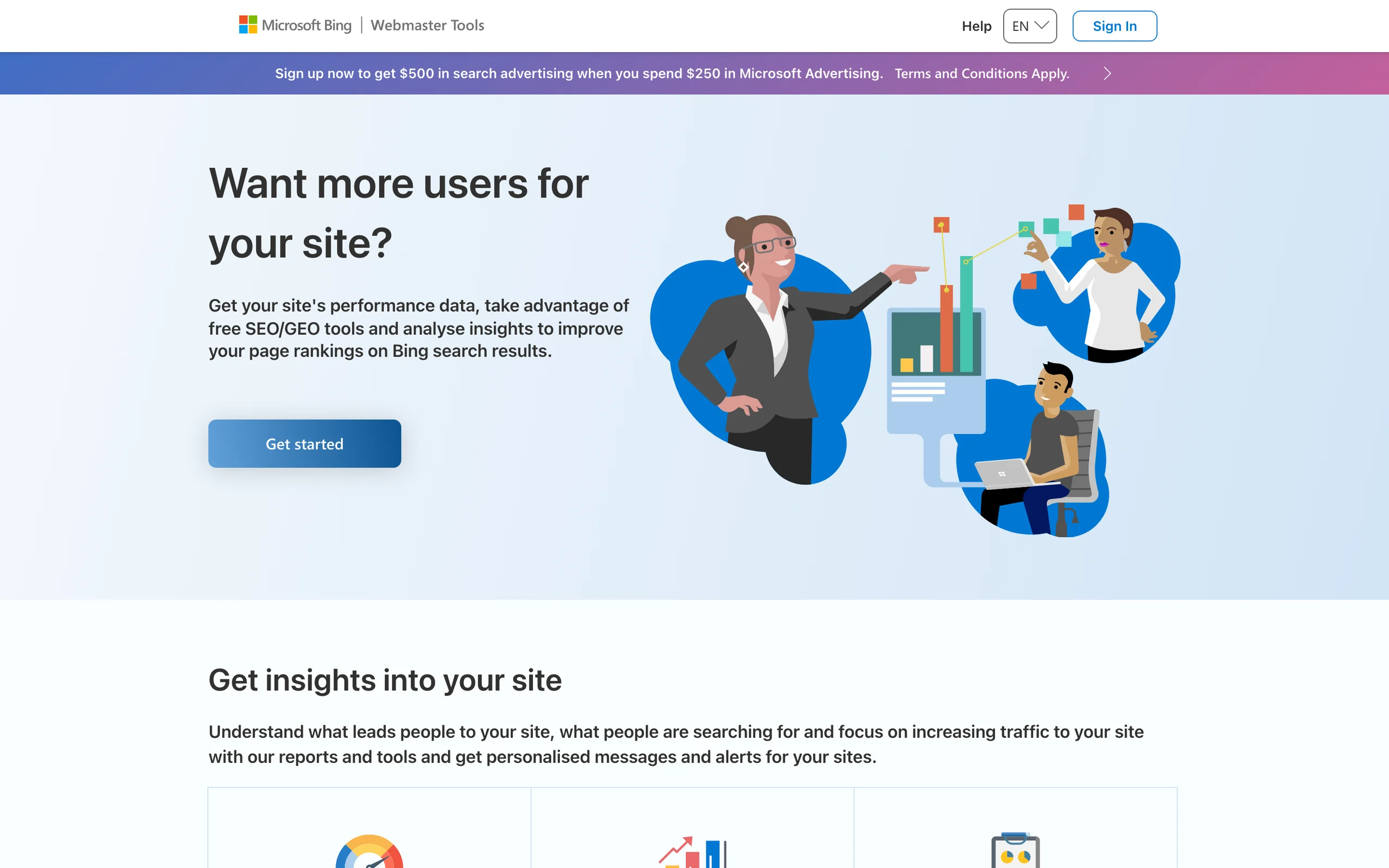
After signing in, check the site selector before opening reports. When you manage several sites, it is easy to read the right report for the wrong domain.
Step 2: Import From Google Search Console
For an existing Bing account, open the website selector and choose Add a site. The import option sits alongside the manual URL entry option.
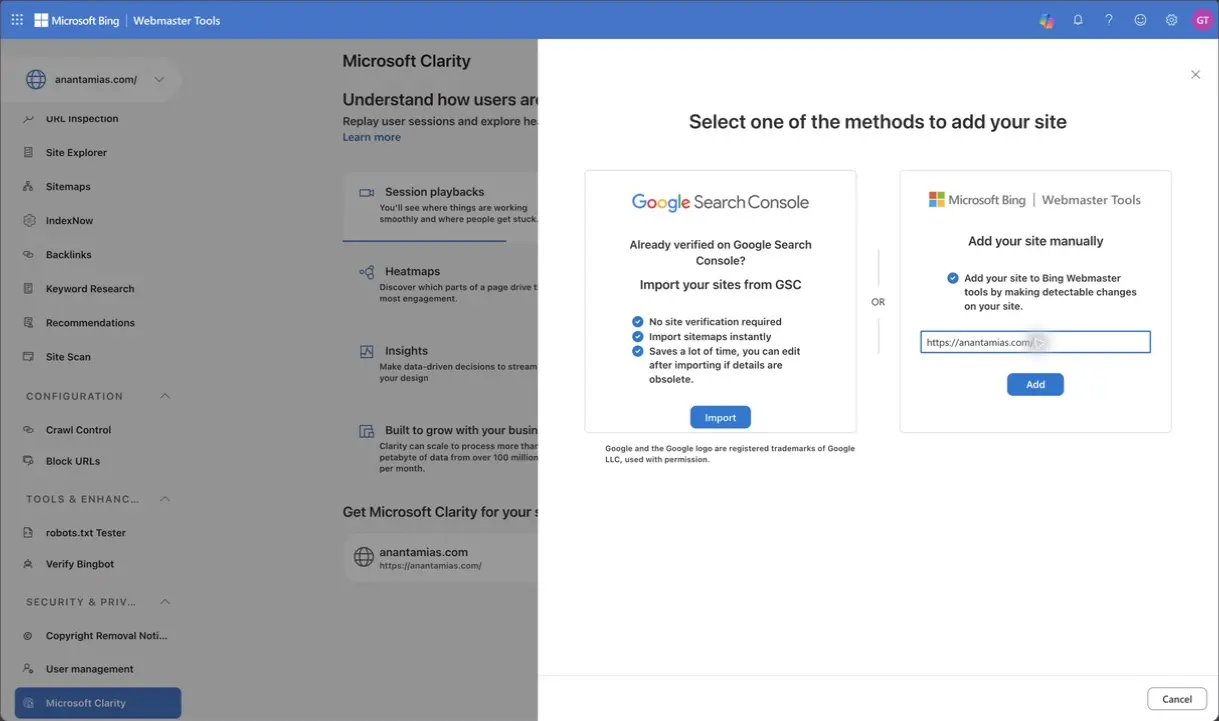
- Choose Import under Google Search Console.
- Select the Google account that has access to the intended property and review the requested access.
- Choose the sites to import and confirm the selection.
- Open the imported property and check its sitemap list. Do not submit a second copy of an already successful sitemap.
Bing uses the imported ownership information to verify the property and can import its sitemaps. It periodically checks that Search Console access, so an import is not a reason to forget ownership permissions. Microsoft’s verification guide covers those checks and the manual alternatives.
Step 3: Verify Ownership Manually
If you are not importing a property, enter your site’s URL and follow one of the methods Bing offers. The important part is keeping the proof in place after verification.
- Domain Connect: if Bing recognizes a supported DNS provider, follow its provider authorization flow.
- DNS CNAME: copy the exact record name and target Bing supplies into your DNS provider. Do not reuse another site’s verification value.
- XML file: put the supplied
BingSiteAuth.xmlfile at the location Bing specifies, normally the site root. - Meta tag: place the
msvalidate.01tag in the homepage head. In Rank Math, the Bing field is under General Settings → Webmaster Tools; use the verification value the field requests.
I prefer DNS verification when you control the records because it can survive a theme or SEO-plugin replacement. A meta tag is also valid, but the component that prints it needs to stay in place. If verification fails, check the public proof before trying again.
Verification does not start Bing’s entire index from zero. However, a newly added property can need time to populate its reports; Microsoft advises allowing around 48 hours for analytics and data. Do not assume that every historical view will be complete immediately.
Step 4: Submit Your Sitemap
Open the sitemap URL before submitting it. A sitemap should return its sitemap content, without a login page, an error or a browser challenge. Many WordPress SEO plugins use /sitemap_index.xml, while WordPress core and other setups can use different paths. The file your site actually generates is the one to use.
- Open Sitemaps in Bing.
- If the correct sitemap is not already listed, choose Submit sitemap.
- Paste the full sitemap URL and submit it. For a sitemap index, Bing can follow the child sitemap references.
- Return to the sitemap row and review its processing status and last crawl.
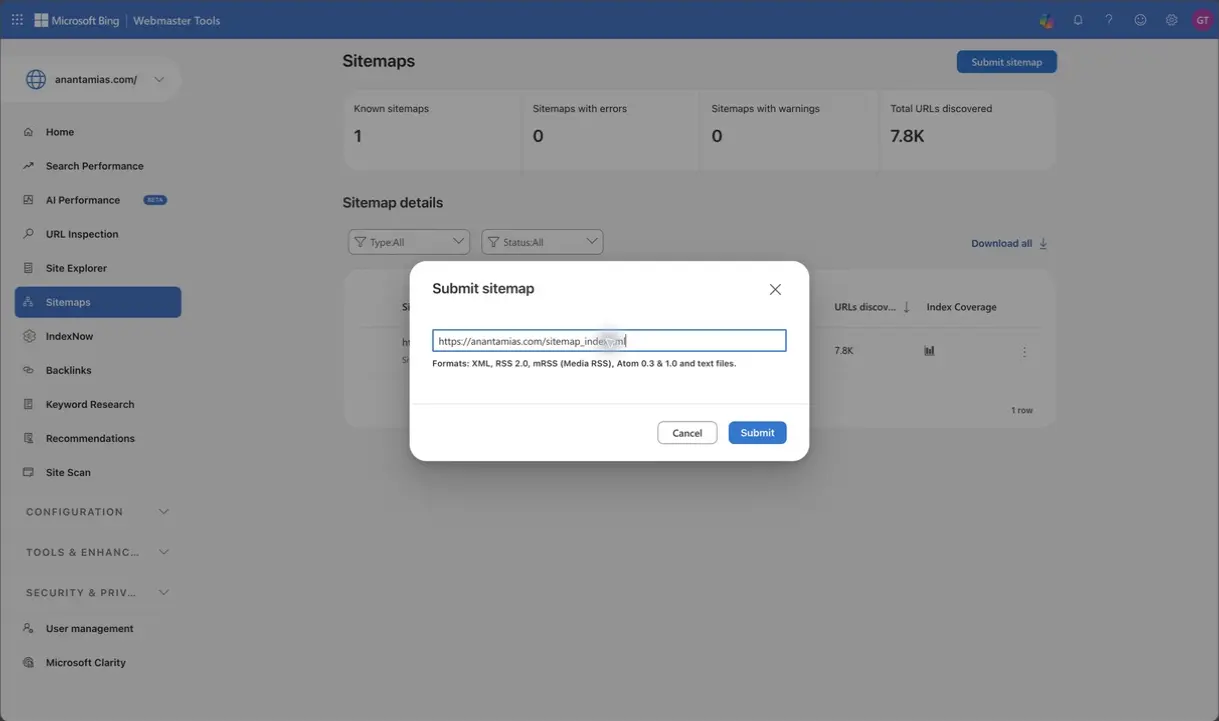
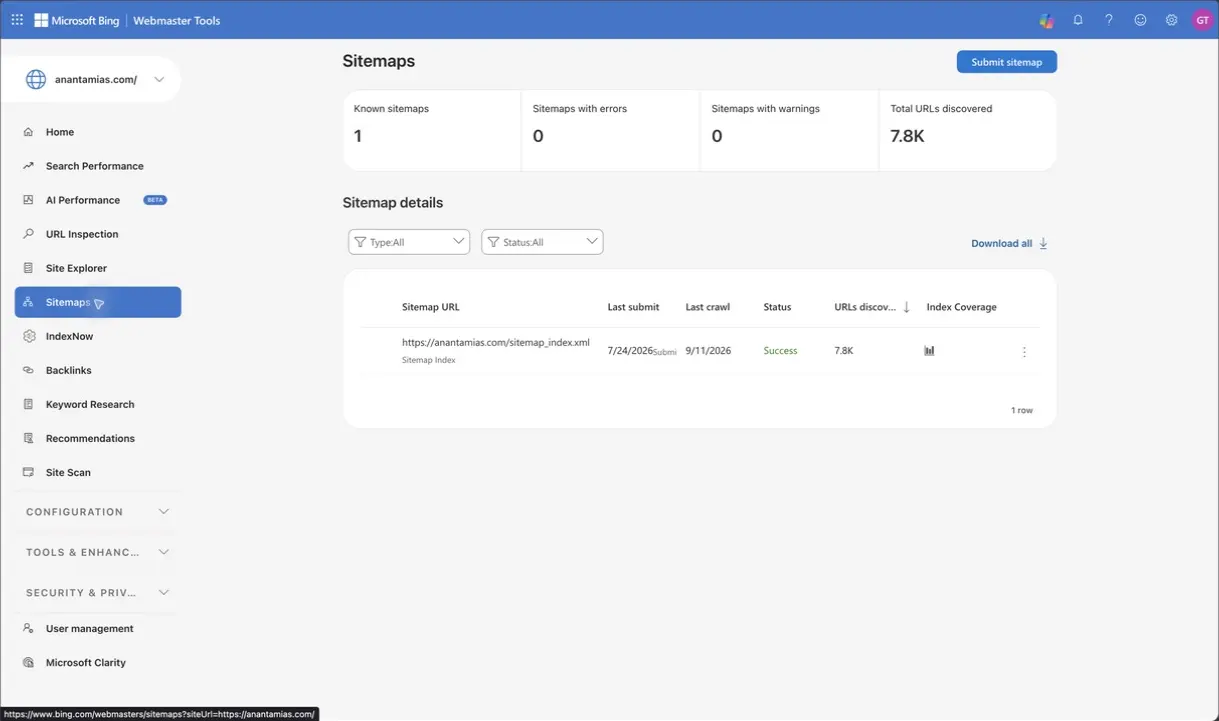
In the Anantam IAS property, https://anantamias.com/sitemap_index.xml already has a Success row. That is a reason to inspect its coverage, rather than submit it again.
- Open Index Coverage beside the sitemap.
- Review the indexed group and any URLs marked as needing attention.
- Open a relevant issue to identify affected pages, then inspect an individual URL before deciding on a fix.
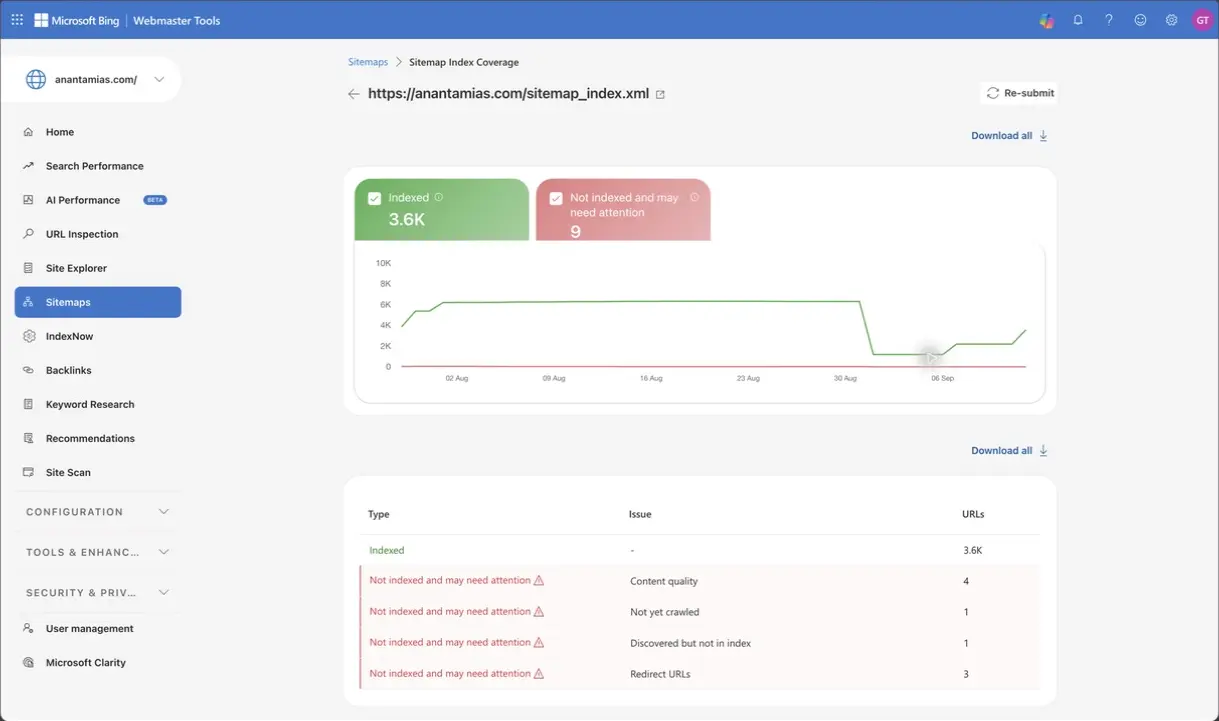
I’d inspect the affected URL before changing anything. A redirect may be intentional, while a content-quality issue needs a content review. Sending the same sitemap again won’t resolve either cause.
Step 5: Turn On IndexNow
A sitemap lists URLs. IndexNow notifies participating services when a URL changes. You can use both, and the next section shows how to check that the notifications are arriving.
How to Set Up IndexNow on WordPress
IndexNow sends a change notification when you publish, update or remove a URL. Submission to one participating endpoint is shared through the protocol. Acceptance is not an indexing guarantee: each recipient still decides whether and when to crawl and include the page.
The official participant list includes Bing, Yandex, Seznam, Naver and Yep, as well as Amazonbot and the Internet Archive. Google is not listed. This is a list of protocol participants, not a list of services that promise to show your page in search results.
Configure Rank Math
If your site already runs Rank Math, its free Instant Indexing module supplies an IndexNow integration. Use one integration for this job so you can tell which component is sending the notifications.
- Open Rank Math SEO → Dashboard and enable Instant Indexing.
- Open Rank Math SEO → Instant Indexing → Settings. If these controls are hidden, check Rank Math’s Advanced Mode.
- Select the public post types you want to submit automatically. Rank Math skips content marked noindex.
- Use Check Key to confirm that the hosted key location returns the expected key. Save any intended configuration changes.
- After your next normal content update, open History and inspect the response. There is no need to publish a dummy article to test the setup.
The setup and key behavior are documented in Rank Math’s IndexNow instructions. Its IndexNow module is different from the separate Instant Indexing for Google integration; the shared name does not make this a Google submission method.
| Response | What It Means | Next Check |
|---|---|---|
| 200 | The notification was accepted. | Check the URL in Bing; acceptance does not prove indexing. |
| 202 | The notification was accepted pending key validation. | Confirm that the hosted key is reachable. |
| 400 | The submitted request or URL is malformed. | Check the URL and request format. |
| 403 / 422 | The key, host or submitted URLs did not pass validation. | Compare the key location, host and URL ownership. |
| 429 | Requests have hit a rate limit. | Back off and investigate repeated or unnecessary submissions. |
A successful History entry tells you that the notification step worked. IndexNow’s FAQ explains why recipients can still decide against indexing the URL.
If you use another SEO plugin, check its own IndexNow settings and plan requirements. For example, Yoast lists IndexNow as a Premium feature. You do not need to replace a working SEO plugin solely to follow the Rank Math example. Rank Math and Yoast differ in more than this feature.
Check What Bing Received
Open IndexNow in Bing Webmaster Tools and find a recent URL. The list shows submission time and source, with a View action for details. It is a recent sample, so the absence of one URL is not enough to diagnose a broken integration.
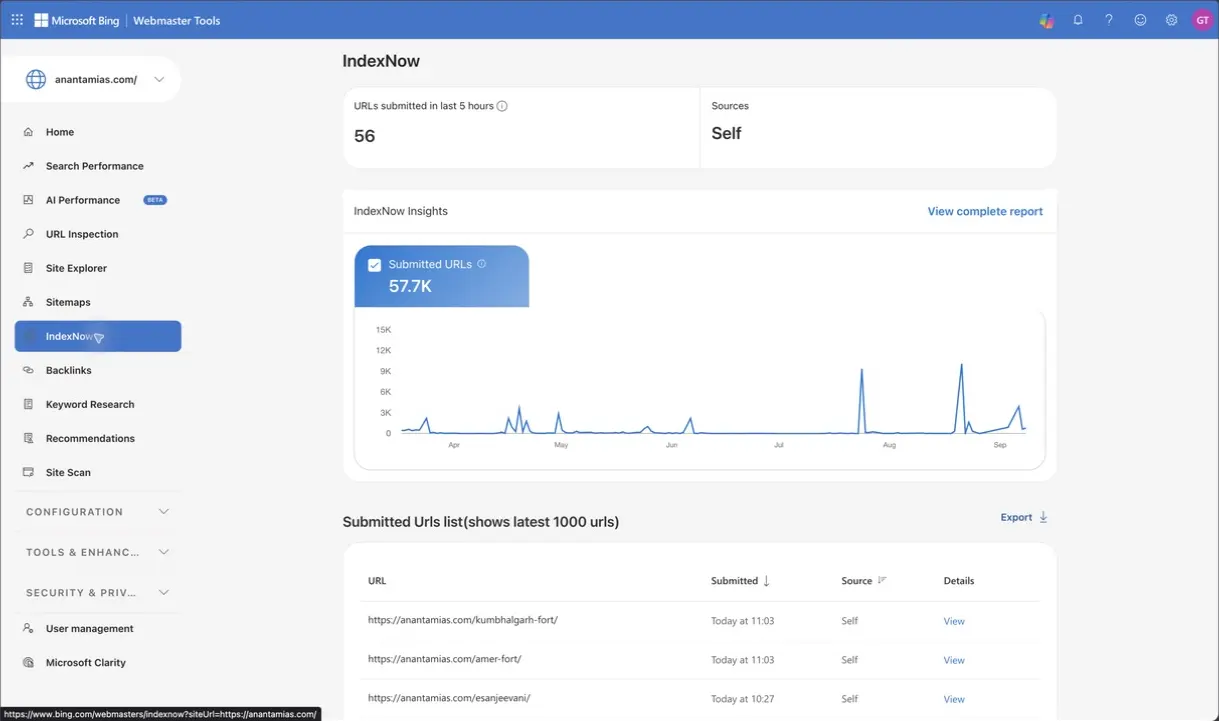
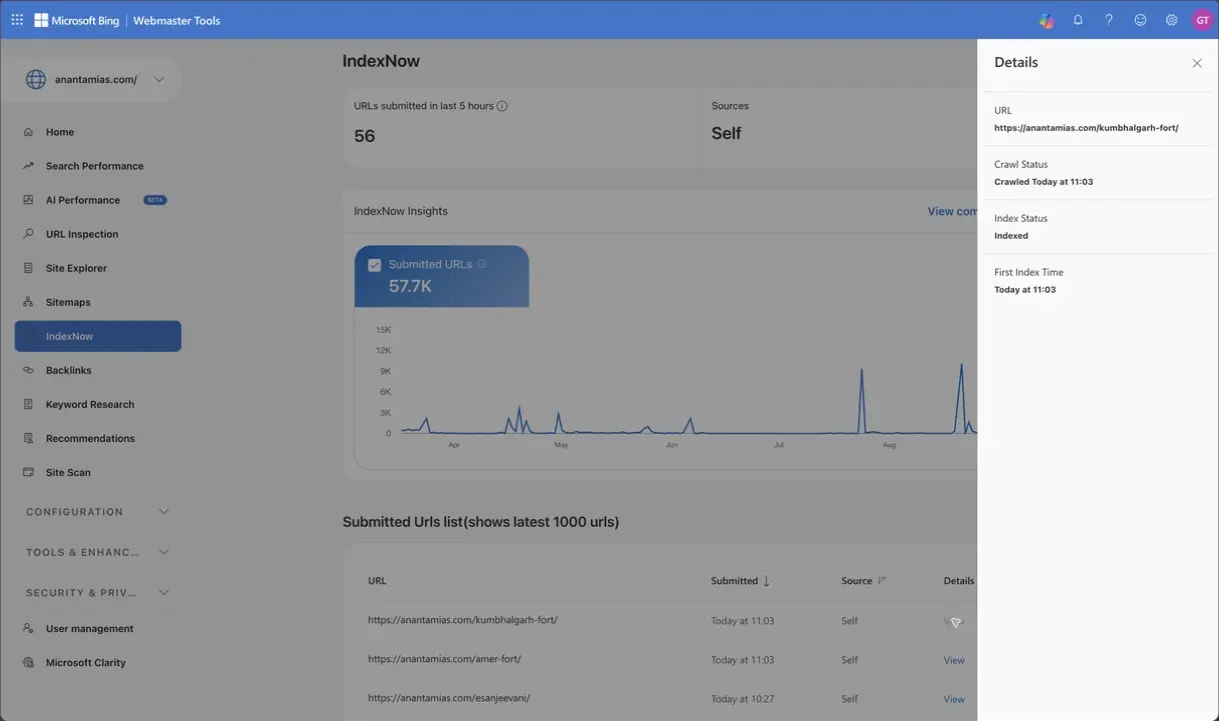
The Kumbhalgarh Fort URL in this example has both crawl and index information. That is useful confirmation for this page, not a promise that every new article will reach the same state on the same schedule.
If submissions seem missing, check the post type, noindex setting and plugin History before blaming the key file. Then check the hosted key and any firewall or cache that could replace its response. Repeatedly submitting an unchanged site adds noise without fixing the underlying problem.
How to Use Bing Webmaster Tools Reports
I would begin with the report that answers the immediate question. For a missing page, that is URL Inspection. For a change in search visibility, it is Search Performance. The sequence below connects the reports so you can follow an observation through to a specific page.
Search Performance
Select a reporting period and search source first. The current interface has a 24 M option alongside shorter periods, Custom and Compare; the data available to a particular property can still vary. Keywords and Pages describe web traffic, so they should not be read as a breakdown of every search source in the headline total.
- Start with 3 M for a broad view, or choose a period relevant to the change you are investigating.
- Use Keywords to review queries and Pages to locate the affected content.
- Check Device and Country before assuming that a site-wide change affects every audience.
- Select a page to review its associated queries. Keep the same period and source when comparing results.
- Use Download or Download all for the chart or table you want to examine outside Bing.
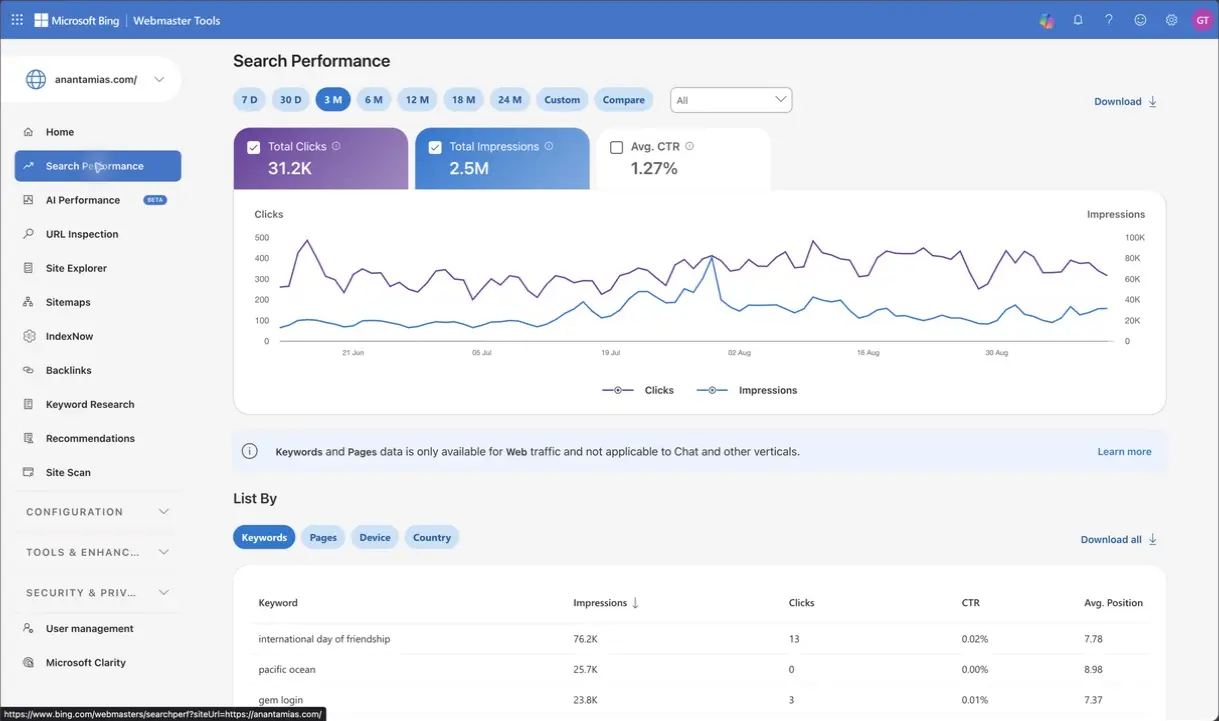
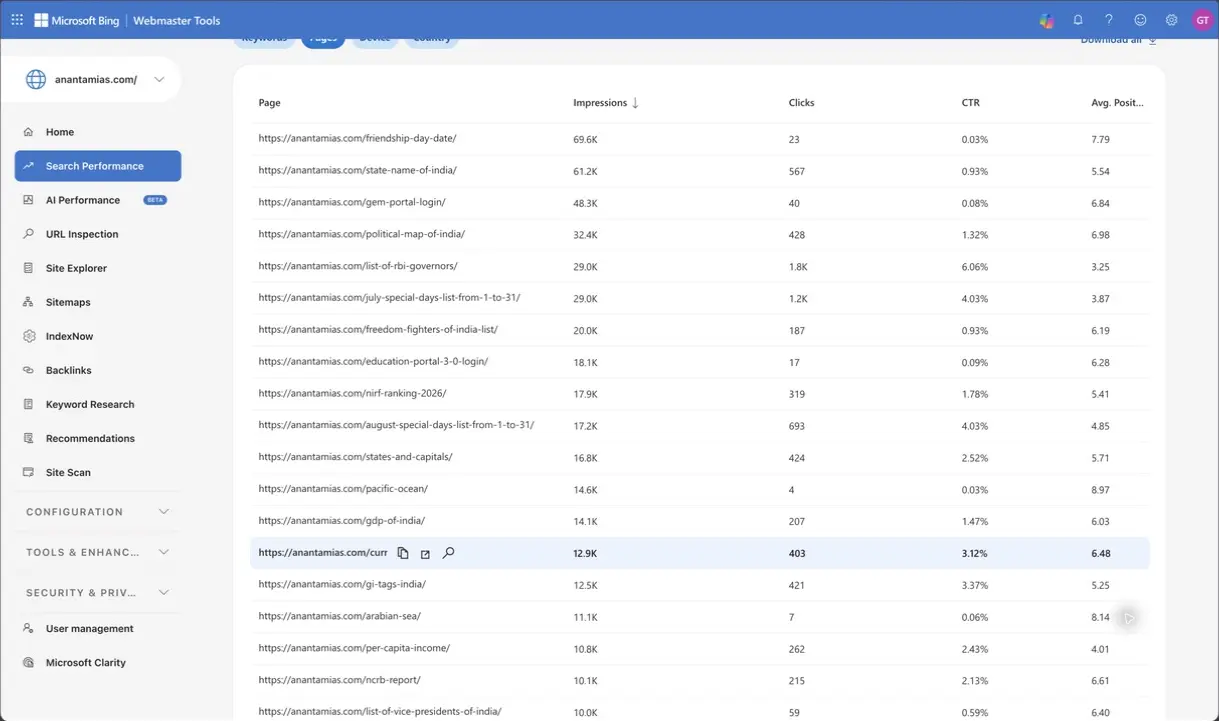
CTR should be read beside the query and average position. A broad informational query and a search for your exact site name have different expectations. There is no universal 2% cutoff at which every title needs rewriting, and Bing’s average position is not the same measurement as your Google position.
URL Inspection
URL Inspection is the place to check a specific page. Paste the full canonical URL, choose Inspect and begin with Bing Index. The expandable status card separates discovery, crawl and index information.
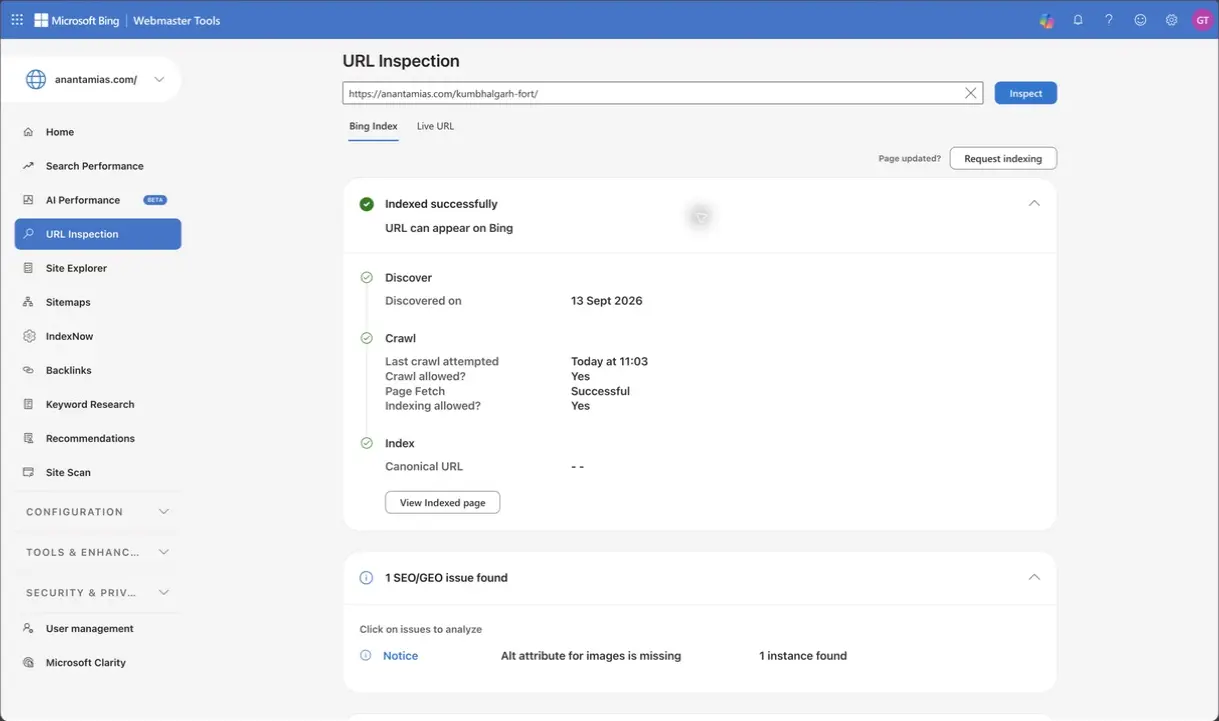
- Bing Index: what Bing currently reports about its stored view of the page.
- Live URL: whether Bing can fetch the current version and whether it is eligible for indexing.
- SEO/GEO issues: suggestions or problems to inspect; a notice can exist on an indexed page.
- Markup: detected structured-data types. Detection does not guarantee a particular search appearance.
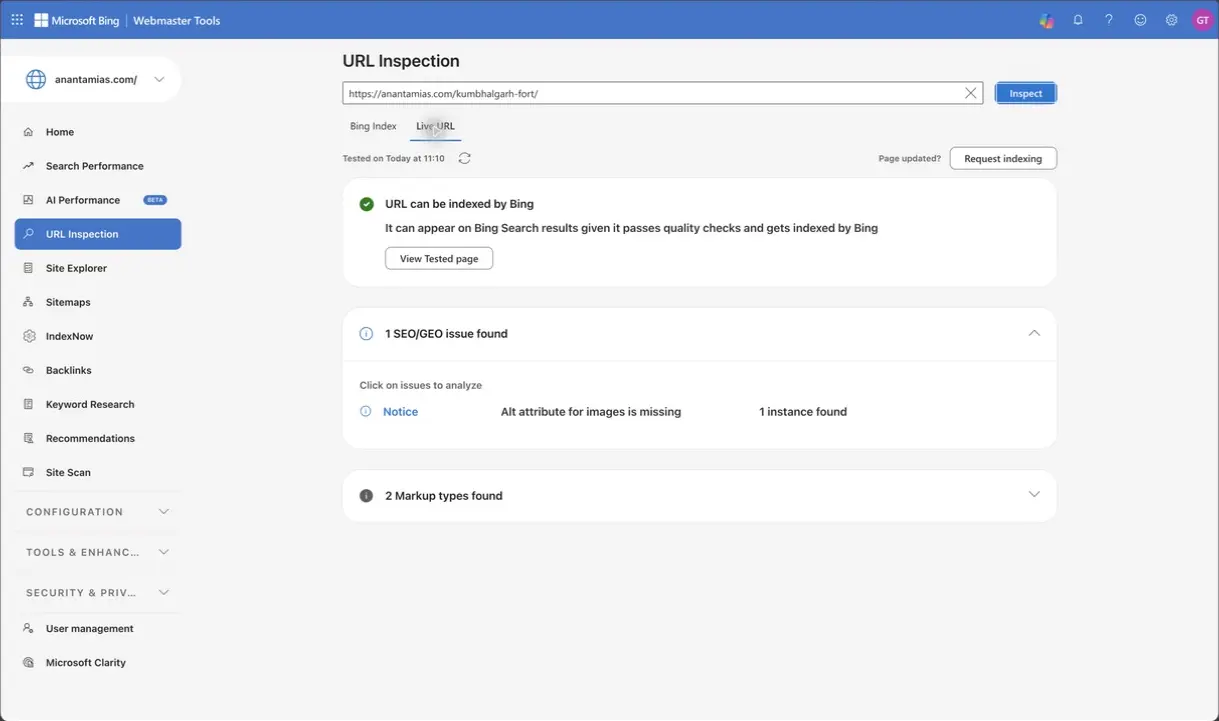
The Anantam IAS example shows an indexed page with an image-alt notice. Removing that notice can improve the page, but it would be wrong to describe the notice as proof that indexing had failed. After fixing a genuine blocker, run Live URL again and use Request indexing if the updated page needs reconsideration.
Site Explorer
Site Explorer groups URLs into the hosts and folders Bing knows about. Open a relevant folder, choose the status filter and select a URL to see its details. This is useful when a problem appears to affect a directory rather than one article.
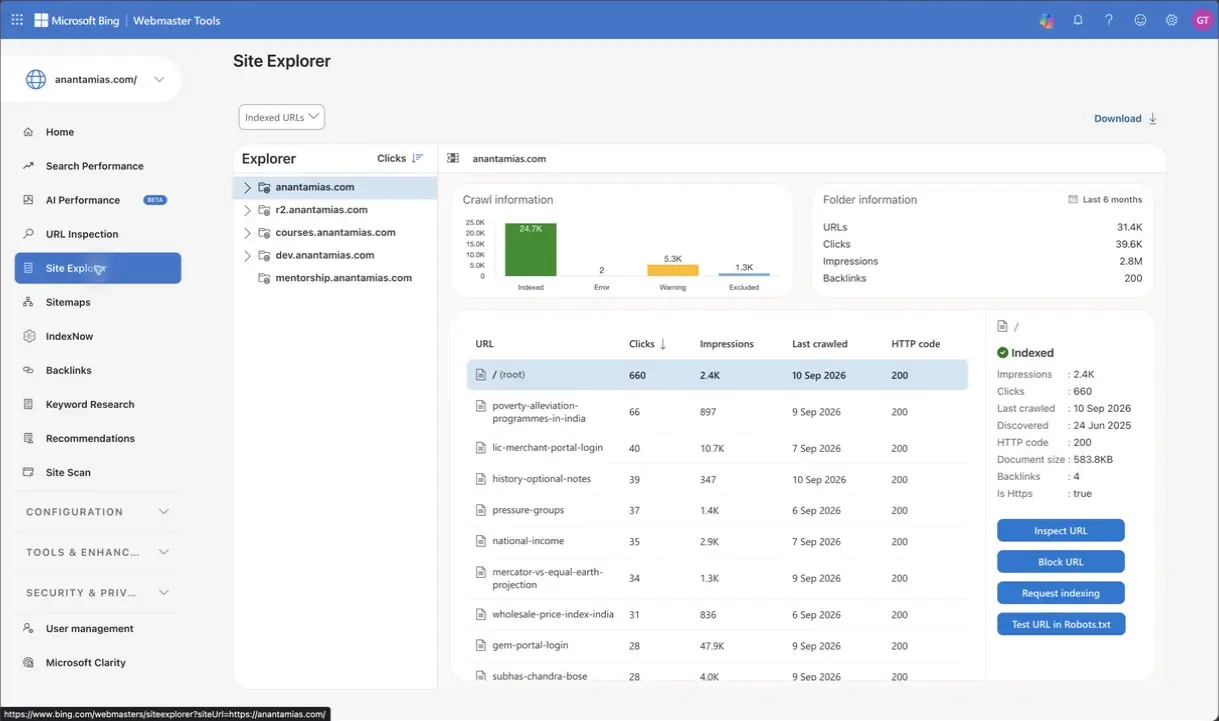
An excluded page is not automatically a defect. A deliberate redirect, a private page or a duplicate may belong outside the index. The useful question is whether the status matches the purpose of that URL.
Recommendations
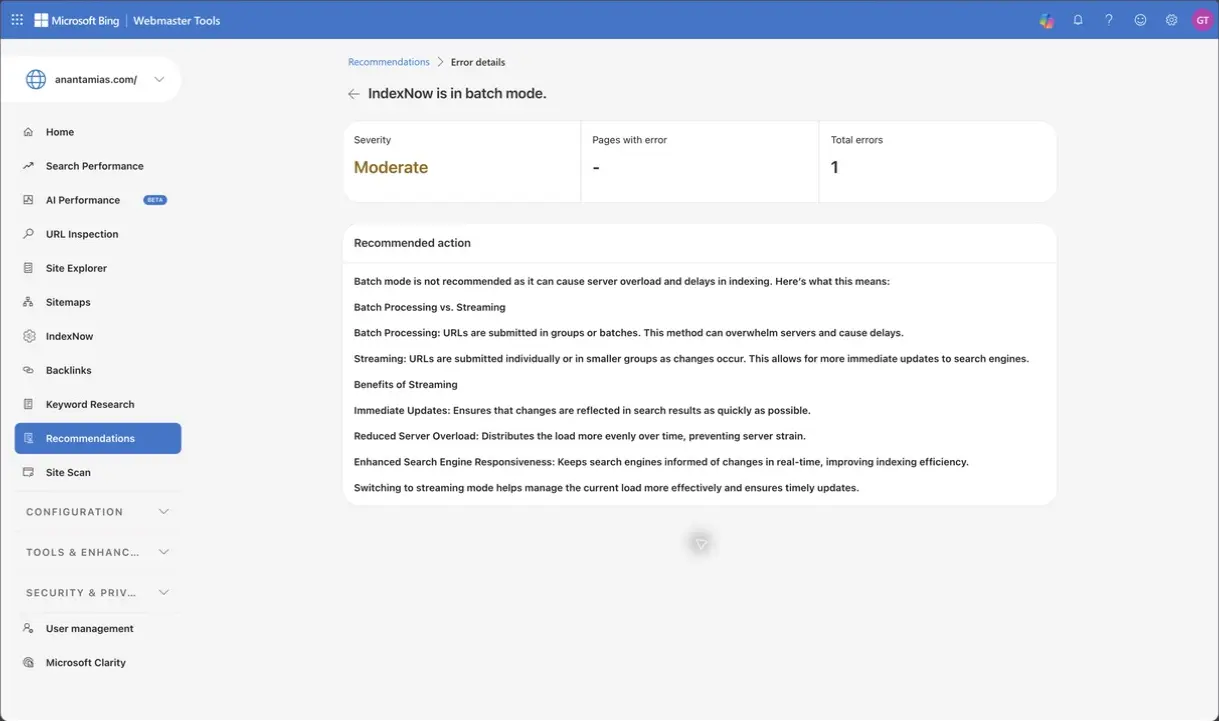
Recommendations groups issues by severity and links to explanations. Open the issue, read the recommended action and inspect affected examples where Bing supplies them. Its severity label helps you prioritize; it does not identify the responsible plugin or prove the full diagnosis.
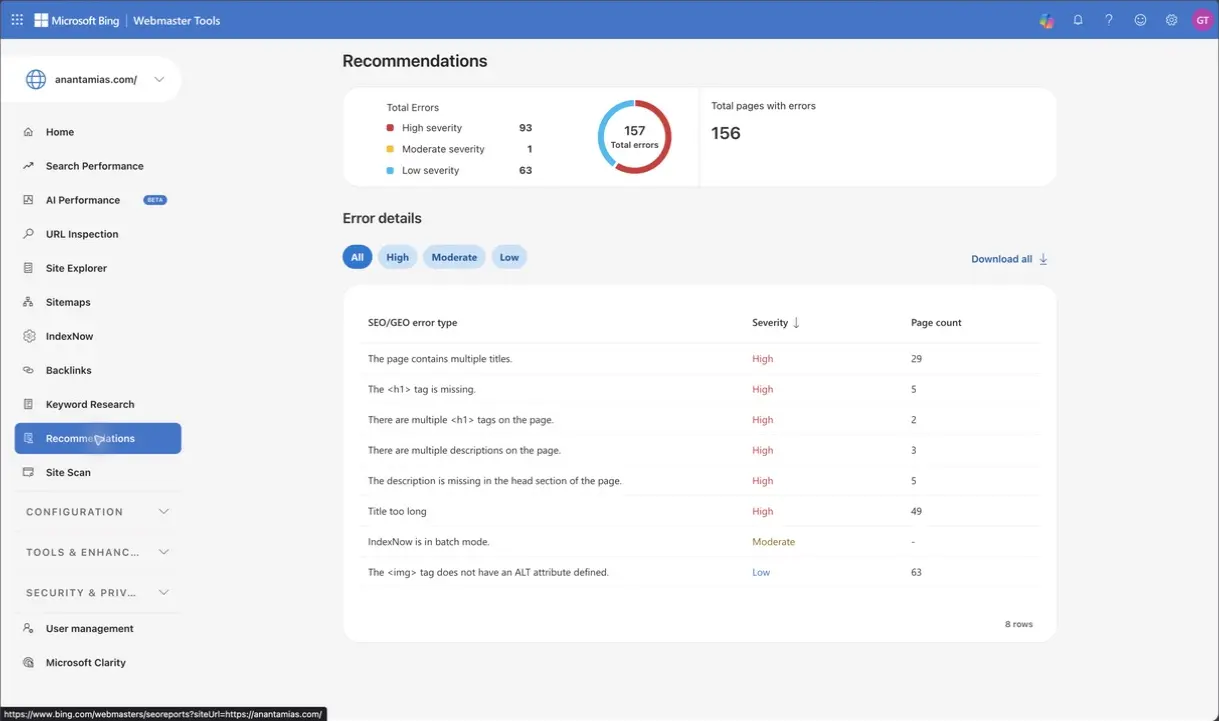
For example, Anantam IAS has an IndexNow is in batch mode recommendation. Bing’s explanation favors notifications as changes occur, rather than accumulating them into large delayed submissions. A scheduled job or integration should be inspected before you decide what to change.
Site Scan
Site Scan is an on-demand technical audit. It is separate from Recommendations and from Bing’s indexing reports. If a previous scan exists, read that report before spending quota on another one.
- Choose Start new scan and give it a recognizable name.
- Select the scope: Website, Sitemap or URL list. Use the smallest scope that answers your question.
- Check the domain or directory and the page limit. Include subdomains only when they belong in the audit.
- Check the remaining quota and advanced crawl settings before starting.
- After the scan finishes, review errors, warnings and notices, then verify the relevant pages.
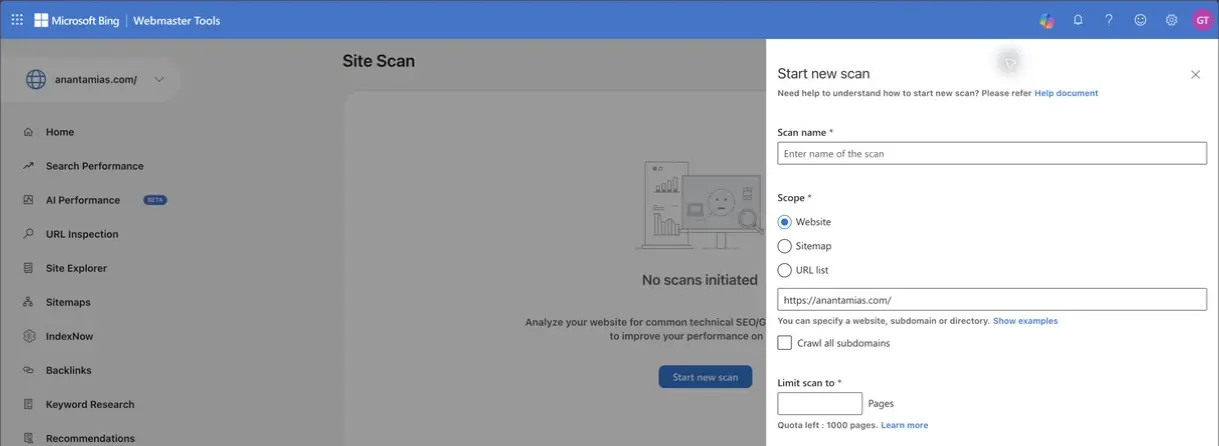
This property has no completed Site Scan report in the example, so the screenshot shows its setup controls. A zero quota or an unfinished scan is a reason to wait or review existing results. Also, the scan form says its crawler is not yet using Bingbot IP addresses, so a scan failure alone does not establish that normal Bingbot crawling is blocked.
Backlinks
Open Backlinks For Your Site and switch between Domains, Pages and Anchor texts. A referring domain is a linking website; referring pages are individual pages containing links. Those are different counts.
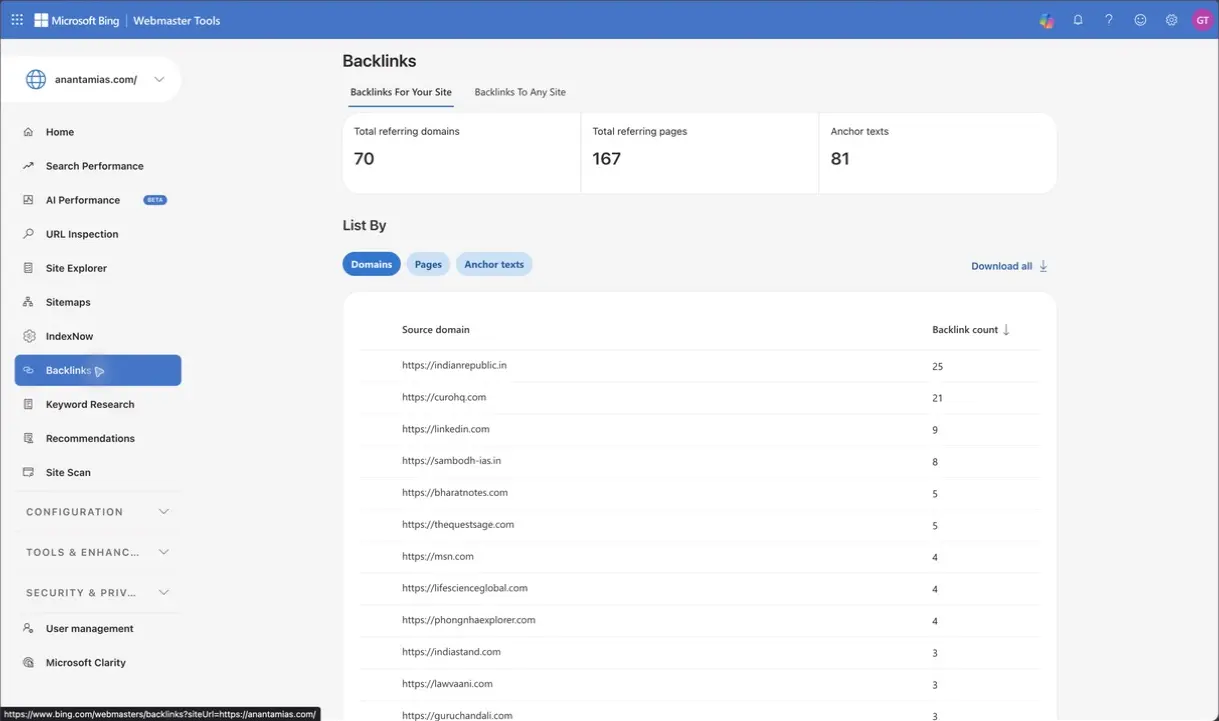
The Backlinks To Any Site tab provides a comparison route for another domain. Bing’s crawl gives you a view of links it has found, not a complete inventory of every link on the web. A suspicious-looking domain is a reason to inspect a link, not an instruction to disavow it.
Keyword Research
Enter a topic relevant to your readers, choose Get details and check the country, language, device and duration controls. For Anantam IAS, upsc syllabus gives a useful starting point because the topic matches its exam-preparation audience.
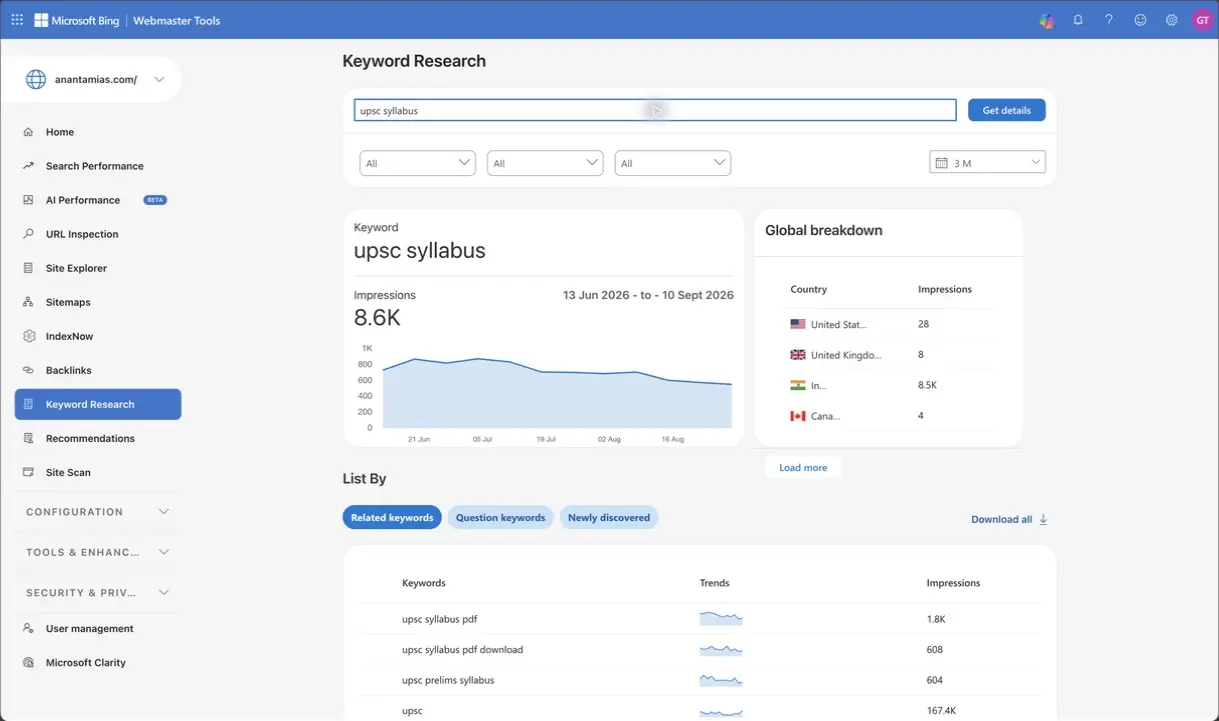
- Related keywords: adjacent wording to compare with the questions your page answers.
- Question keywords: question-shaped suggestions when Bing has enough data to show them.
- Newly discovered: newly identified terms worth checking for relevance.
The Question keywords tab is empty for this example under the selected settings. An empty result does not mean nobody asks questions about the syllabus. Try a more specific seed or another relevant period, and check whether your existing pages already answer the topic before creating another article.
Robots.txt Tester and Crawl Control
Open Tools & Enhancements → robots.txt Tester to check an exact URL against the fetched robots.txt rules. Wait for the file to load, enter the URL, select the relevant bot and choose Test. The result concerns permission to crawl, not the final indexing decision.
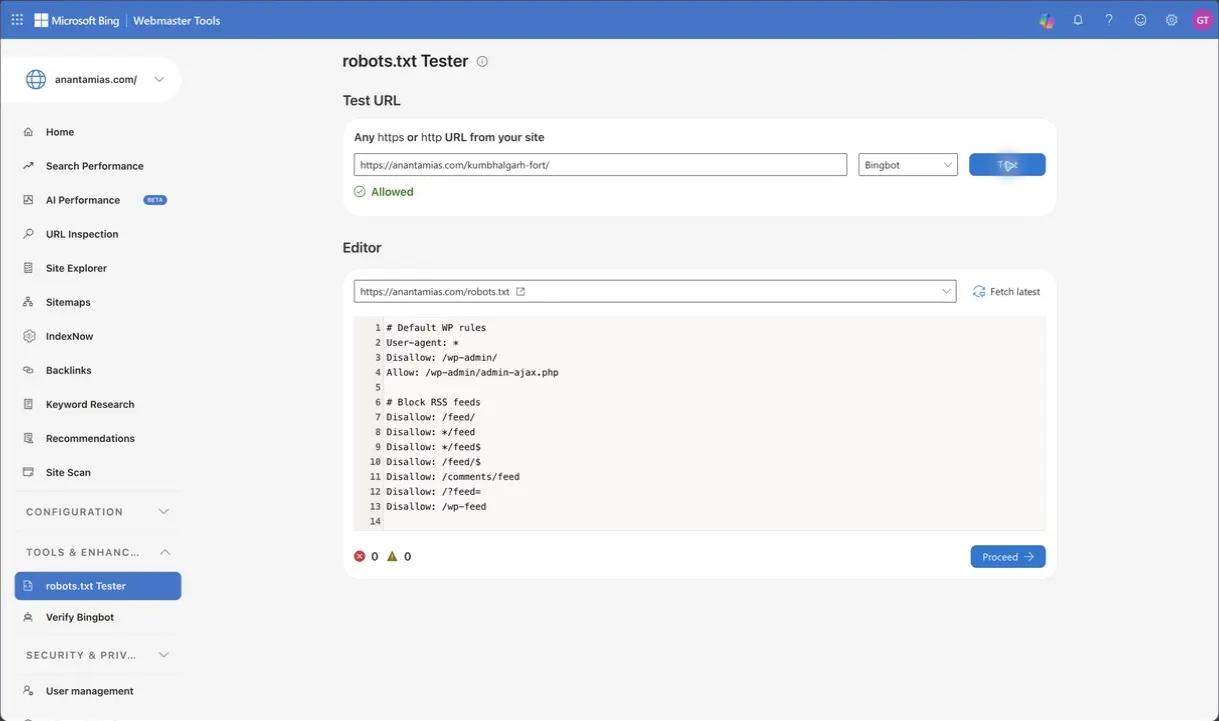
The editor is a place to test a proposed rule. It does not mean that merely typing a change there has updated the file served by WordPress. Keep a copy of the original rules and verify the hosted file after any intentional change.
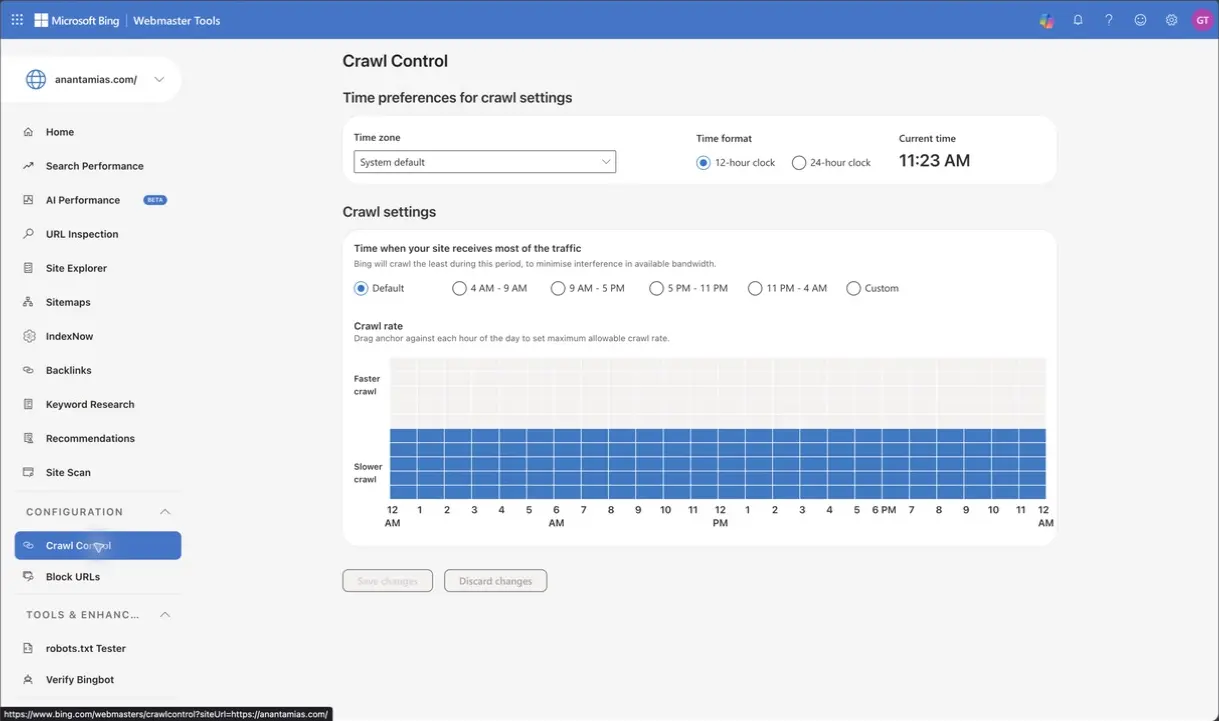
Under Configuration → Crawl Control, you can express a crawl schedule for a server that struggles at particular times. Leave a working schedule alone unless server evidence gives you a reason to change it. Bing also honors crawl-delay; a robots.txt directive can take precedence over the dashboard’s crawl-rate preference.
Microsoft Clarity and Other Controls
Clarity adds behavior analytics such as heatmaps and recordings after its tracking is configured. It helps you investigate what visitors do on a page; Search Performance answers how Bing search traffic reached it. A recording can suggest a usability problem, but scrolling behavior alone does not prove that the introduction is the cause.
The remaining controls have narrower jobs:
- Verify Bingbot: check a crawler IP when reviewing server logs. A user-agent string alone does not prove the request came from Bing.
- Configuration → Block URLs: review temporary search-result blocks. Blocking a URL is not an ordinary optimization step.
- Security & Privacy → Copyright Removal Notices: review notices affecting the property when a specific issue requires it.
- User management: review access when someone joins or leaves the team. Share the appropriate site access instead of sharing your account password.
How to Read the AI Performance Report
Open AI Performance and choose your date range. The Anantam IAS dashboard labels its citation sources as Microsoft Copilots and Partners. The report concerns supported Microsoft and partner experiences; it is not a complete monitor for every AI service.
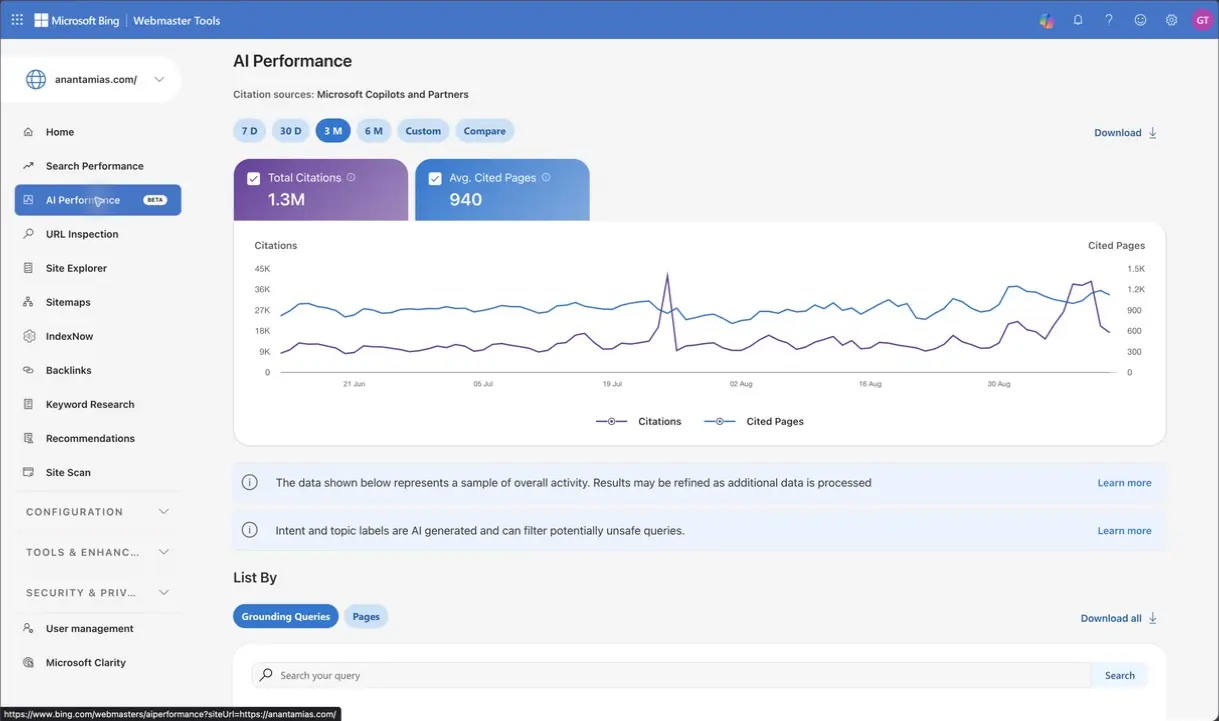
- Total Citations: how often the site appears as a visible source in the report’s supported experiences.
- Average Cited Pages: the average number of distinct pages cited per day in the selected period.
- Grounding Queries: grouped retrieval phrases associated with those citations. They are not complete user prompts.
- Pages: the URLs receiving citations, with a route to their associated grounding queries.
Microsoft introduced this reporting in its AI Performance public preview in February 2026, then added the Intents, Topics, Citation Share and Compare views in June 2026. Citation frequency does not tell you the position of your link within an answer or how many visitors subsequently clicked it.
Follow a Query to Its Pages
I’d open a relevant grounding query and inspect the pages associated with it before deciding what to improve:
- Keep the period fixed and open Grounding Queries.
- Find a phrase relevant to your site, or use Search your query.
- Review its Intent, Topic, Citations and Citation Share columns.
- Select the query to open the associated Pages view.
- Review the actual pages before deciding whether to update existing content or write something new.
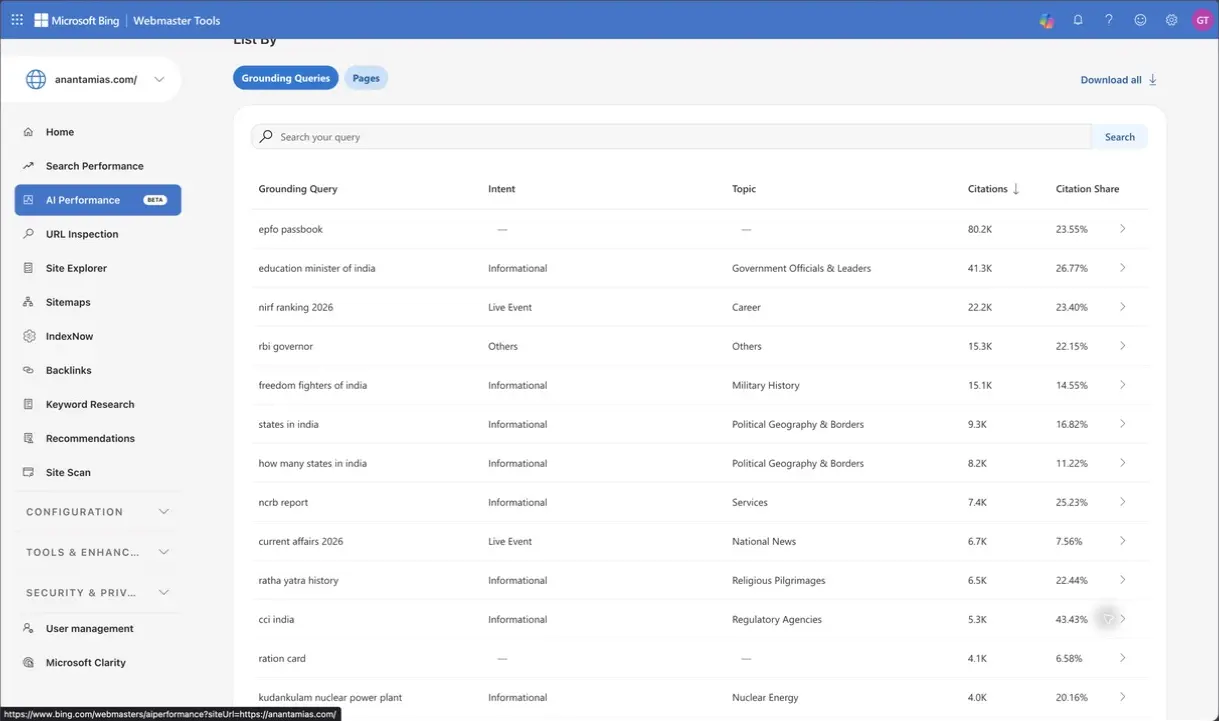
For example, selecting how many states in india opens several cited Anantam IAS URLs, including /state-name-of-india/ and /total-state-in-india/. A grounding phrase does not belong to only one page, and a page can be associated with several phrases.
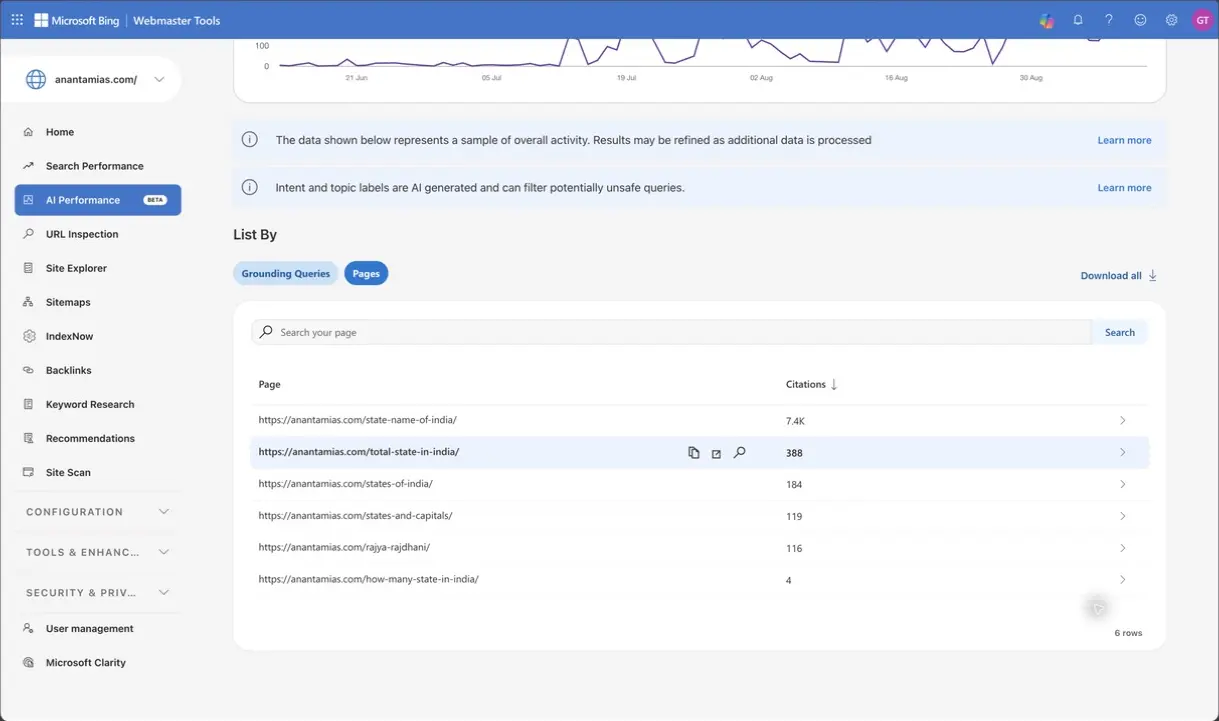
That mapping does not prove these pages compete with one another or that a redirect is needed. It gives you a concrete set of pages to compare for purpose, accuracy and duplication. A useful update starts with what the reader needs, not with copying every grounding phrase into a heading.
Use Intents, Topics and Citation Share
I would read these labels and percentages in the context of the query. Keep their limits in mind:
- Intent: Bing’s estimated type of information need. Classifications can be imperfect, particularly for an ambiguous phrase.
- Topic: a broader grouping for related queries. Use it to find patterns, then inspect the individual phrases.
- Citation Share: your site’s share of citations for that grounding query. It is not a percentage of users, visits or all AI answers.
The AI Performance documentation also explains that Citation Share does not expose the domains holding the remaining share. There is no universal percentage below which a page needs rewriting. Relevance, coverage and the query’s context still decide that.
Compare Periods and Export
Choose Compare to place one reporting period beside another. The dialog offers recent-period comparisons and custom dates. Keep the property, filters and period lengths consistent before you interpret the difference.
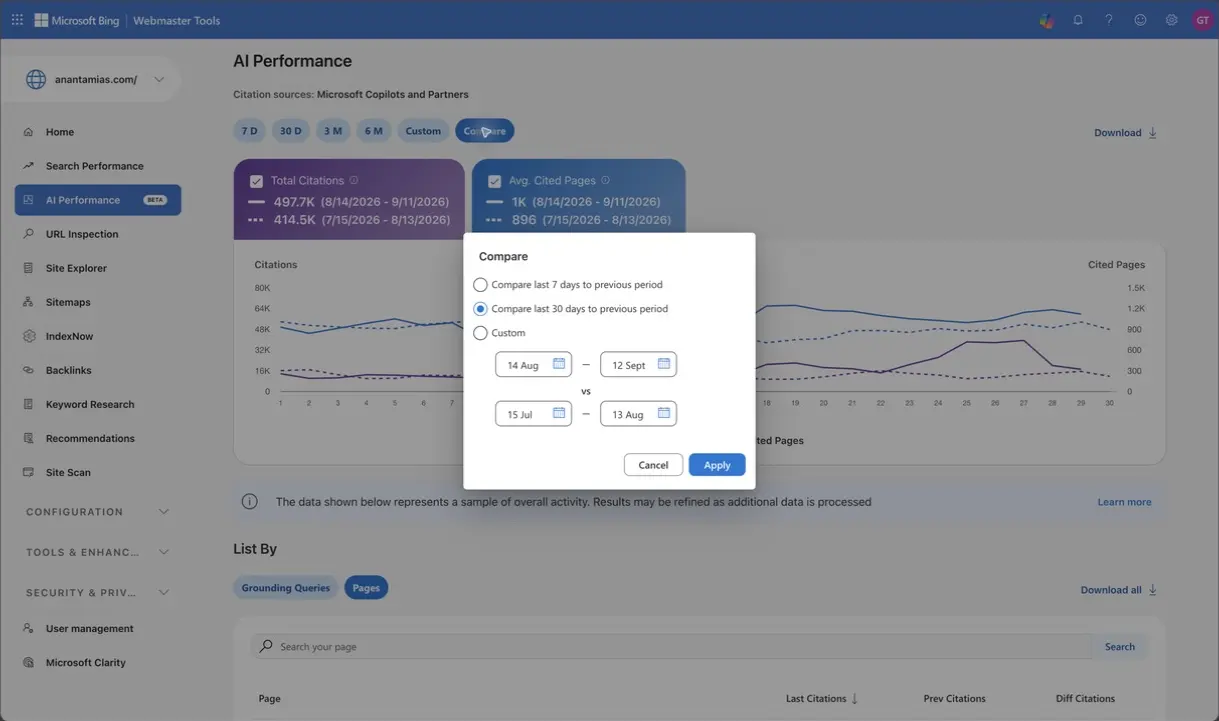
Use the table’s download control when you need the associated rows. Keep the selected dates and filters alongside the export. A later increase could reflect different questions, other websites, reporting changes or model behavior as well as a change to your own content; Compare does not isolate the cause.
Bing explicitly describes the query data as a sample that can change as processing continues. A missing row does not prove zero citations, and filtered chart totals may differ from table totals. For a wider measurement plan, my AI visibility tracking workflow explains how to keep those observations separate.
If a cited page needs a clearer answer, improve the answer and its supporting detail. The guide to formatting posts for AI search can help with that. But a page with ordinary search impressions and no visible citations has not automatically failed a formatting test.
Bing Webmaster Tools vs Google Search Console
Both consoles are worth using because they report on different search systems. Google Search Console’s Generative AI performance report reached all sites worldwide on August 31, 2026, so both now have AI reporting, and the difference is what each one measures.
| Task | Bing Webmaster Tools | Google Search Console |
|---|---|---|
| Connect a site | Import verified Search Console properties or use offered ownership methods. | Verify through an applicable domain or URL-prefix method. |
| Notify about changes | Sitemaps, IndexNow and supported URL-submission tools. | Sitemaps and individual indexing requests; no IndexNow participation. |
| Search reporting | Clicks, impressions, CTR and query/page details; current UI includes 24 M. | Clicks, impressions, CTR and position, with its own filters and history. |
| AI reporting | Visible citations, cited pages and grouped grounding queries in supported experiences. | Generative AI impressions for supported Google Search features. |
| Links | Own-site backlink views and an any-site comparison route. | Links reporting for your property. |
| Technical investigation | URL Inspection, Site Explorer, Recommendations, Site Scan and robots tester. | URL Inspection, indexing and other technical reports. |
| Keyword discovery | A dedicated Keyword Research tool. | Performance queries describe your existing visibility; no equivalent standalone keyword-research tool. |
Google’s Generative AI report documentation describes impressions for AI Overviews and AI Mode. Those impressions cannot be added to Bing citations as though both were the same unit. If your Google property is not connected yet, the Search Console setup guide covers that setup.
Troubleshooting Bing Webmaster Tools
I’d begin troubleshooting with an exact URL and the result you expected. Then use the relevant check below to find where the process differs:
| What You See | What to Check Next |
|---|---|
| Ownership verification fails | The exact DNS record, hosted XML file or homepage tag; redirects, caching and access restrictions can interfere. |
| Sitemap fails | Open its URL, inspect the response and confirm it is a valid sitemap rather than HTML or a login page. |
| Sitemap succeeds but a page is absent | Open Index Coverage and URL Inspection. Check the specific reason; submission does not require Bing to index every entry. |
| A live test passes but the indexed view is old | The tests describe different points in time. Check crawl timing, then request reconsideration for a corrected page when appropriate. |
| IndexNow returns an error | Read the response code and check the key, URL host and integration log before trying another sender. |
| A report is empty | Check the property, selected period, filters and processing delay. Sampled or low-volume activity may not appear. |
| A security layer blocks the fetch | Investigate the precise response and verified crawler traffic. Do not disable site-wide protection just to make a test turn green. |
| A plugin or script can no longer reach the Bing API | Microsoft retired the older SOAP and POX APIs on August 31, 2026. Update the tool to one that uses the REST/JSON API. |
The next action should follow the failed check. A missing meta description, a blocked crawl and a page Bing chooses not to index are different problems, even when they appear in the same dashboard.
The Limits
Bing Webmaster Tools can show what Bing knows about your site and give you ways to submit changes. It cannot promise inclusion, a ranking, an AI citation or a fixed traffic increase.
- Reports can lag behind a change and differ in scope, aggregation or sampling.
- Site Scan covers the scope and allowance you select; it is not proof that every part of a large site is healthy.
- Backlink and keyword data reflect Bing’s observations. They are not complete measurements of the whole web.
- AI citations describe visible sourcing in supported experiences. Analytics is still needed to measure visits and conversions.
What Quietly Ruins It
Removing ownership proof during a redesign. A tag, file or DNS record can look disposable after setup, but verification still depends on it. Check that proof when changing the component that supplies it.
Sending unchanged URLs repeatedly. A retry should respond to a real delivery failure or content change, not serve as a daily ritual. Rate limits will not repair a sitemap, noindex directive or content problem.
Treating every warning as an indexing failure. The Anantam IAS URL Inspection example shows why that does not work: a page can be indexed while Bing still has a suggestion for improving it.
Writing pages just to chase a citation count. The query-to-page mapping is useful precisely because it lets you inspect what already exists. Another overlapping page can add maintenance work without answering a new question.
FAQs on Bing Webmaster Tools
Is Bing Webmaster Tools free?
Yes. Bing Webmaster Tools provides its reporting and site-management tools without a subscription fee. A tool such as Site Scan can still have a usage quota, and a third-party plugin’s integration may have its own plan requirements.
Do I need Bing Webmaster Tools if I already use Google Search Console?
Yes. The consoles cover different search systems. Bing supplies its own search and AI citation reports, while Google Search Console includes a separate Generative AI impressions report. Connecting one does not replace the other.
How long does Bing take to index a new page?
There is no guaranteed time. IndexNow tells participating services that a URL changed; each service decides whether and when to crawl and index it. Check the exact page in URL Inspection rather than treating a successful submission as proof of indexing.
Does Google support IndexNow?
Google is not on the official IndexNow participant list. Use Google’s supported sitemap and indexing-request tools for Google Search. A WordPress plugin labeled Instant Indexing does not make every submission route apply to every engine.
How do I see where AI answers cite my site?
Open AI Performance, choose a period and connect Grounding Queries with the Pages view. Bing reports supported Microsoft and partner experiences. It is not a complete view of all AI services, and citations do not measure visits or conversions.
Which verification method is best for a WordPress site?
Importing an accessible, verified Search Console property is convenient. Independent DNS verification can survive a theme or plugin change. A meta tag or XML file is also valid when it stays accessible. Use the method you can maintain, and keep the ownership proof in place.
Final Remarks
Choose an important URL and follow its submission, crawling and indexing information through the reports. When a result differs from what you expect, inspect that specific step before changing settings.
Keep the checklist for your next content update or redesign, and use comparable dates when you return to the reports.
Tell Google you want more of this.
Add Gaurav Tiwari as a preferred sourceOne tap, and this site shows up more often in your own Top Stories, AI Overviews and AI Mode. Remove it any time.
Disclaimer: This site is reader-supported. If you buy through some links, I may earn a small commission at no extra cost to you. I only recommend tools I trust and would use myself. Your support helps keep gauravtiwari.org free and focused on real-world advice. Thanks. - Gaurav Tiwari