
 by
by
Going by the 2026 studies, the best time to post on Instagram is a weekday evening between about 6 and 9 p.m. in your audience’s time zone, or a midweek lunch slot. Wednesday was the strongest day in Buffer’s analysis of 9.6 million posts, and Tuesday and Wednesday led in Sprout Social’s. Those are starting points, and the time that wins for your account is the one your own posts repeatedly perform well at.
I’d choose a few workable times, compare similar posts and keep a record of the results. Your own Insights can help you choose the first candidates.
What Is the Best Time to Post on Instagram?
If you have no account data, I’d try a weekday lunch or evening slot and compare it with another practical time. Once you have Insights, use your audience’s active hours to choose candidates and test similar posts at those times.
The large studies do not all measure the same thing:
| Study | What the Published Findings Describe | How to Use It |
|---|---|---|
| Buffer | Median engagement rates across 9.6 million Instagram posts from January 2024 to December 2025, updated in September 2026. The study combines formats rather than running a separate Reels experiment. | Use its day-by-day times as candidates for your own posts. |
| Sprout Social | Peak engagement windows, with Tuesday and Wednesday strongest. Its March 2026 edition covers nearly 2 billion engagements across 307,000 profiles on six networks, collected from November 2025 to February 2026. | Do not treat the headline sample as Instagram-only or the findings as a timing guarantee. |
| Hootsuite | Day and industry recommendations from more than 1 million posts analyzed with Critical Truth, localized across 118 countries and updated in July 2026. | Check the relevant audience and time convention before copying a window. |
| Metricool | A 6 to 9 p.m. peak in its 2026 study of more than 24 million posts from 375,000 accounts. Its Reels findings still come from a separate 2024 study. | Keep activity volume, average post performance and the age of the data separate. |
| Later | Higher engagement for early-morning posts in a sample collected from January to October 2024, despite the article’s 2026 title. | Treat the early slot as a different finding to test, rather than dismissing it or calling it a new universal rule. |
These studies observe different sets of posts and accounts. A difference between their charts could come from the audience mix, the metric, the collection period or the time-zone treatment. The charts alone cannot prove that reduced competition caused an overnight post to do better.
A count of studies mentioning a broad time band also loses detail. A 5 p.m. recommendation and an 8 p.m. recommendation can land in the same evening box while giving you quite different posting times.
Best Time to Post on Instagram by Day
Use Buffer’s leading daily slot and Hootsuite’s reported windows as separate candidates, following each publisher’s time convention. I’d compare them with your own account data before choosing a schedule.
| Day | Buffer: Leading Slot | Hootsuite: Reported Window |
|---|---|---|
| Monday | 7 p.m. | 3 p.m. to 9 p.m. |
| Tuesday | 7 p.m. | 5 a.m. to 8 a.m.; 3 p.m. to 7 p.m. |
| Wednesday | Noon | 5 p.m. |
| Thursday | 9 a.m. | 4 p.m. to 5 p.m. |
| Friday | 10 p.m. | Around 4 p.m. |
| Saturday | 9 p.m. | 11 a.m.; around 5 p.m. |
| Sunday | 9 p.m. | Noon to 3 p.m. |
Thursday shows how much the benchmarks can differ: Buffer favors morning and Hootsuite late afternoon. I’d use your account data to choose which deserves a place in your test.
I would use the week like this when planning a first test:
- Monday and Tuesday: compare a workable afternoon or evening slot with the activity pattern in your account.
- Wednesday and Thursday: include a daytime candidate if your audience data supports it. An evening-only test would miss that possibility.
- Friday to Sunday: keep posts relevant to your audience and actual events. A general benchmark is not a reason for a local restaurant to skip the day its customers are making plans.
Best Day to Post on Instagram
Tuesday, Wednesday and Thursday deserve consideration when you need a midweek starting point. Buffer’s sample favors Wednesday overall, while Sprout Social emphasizes Tuesday and Wednesday. That is useful direction for a pilot, rather than proof that your weekend content should wait.
The best day also has to fit the purpose of the post. A registration deadline, a live event or a same-day offer should arrive while someone can still act on it. Moving useful information past its deadline to satisfy a benchmark defeats the reason for posting it.
Best Time to Post Instagram Reels, Carousels and Stories
Instagram explains that Feed, Reels and Stories use different ranking systems. Your test should therefore compare the same format and purpose across time slots. Otherwise a stronger video or a more useful topic can look like a better hour.
Reels
Use your account’s audience activity and the general benchmarks to choose candidate hours, then compare similar Reels. Buffer explicitly says its timing analysis combines formats, so its evening guidance should not be presented as the result of a Reels-only timing experiment.
Trial reels are the cleanest way I know to test a Reel at a new time without touching what your followers see. Instagram shows a trial reel to non-followers first and reports its Insights within 24 hours, and you can choose to share it with everyone automatically if it performs. You need a public account with at least 200 followers on a professional account or 1,000 on a personal one.
- Record the Reel’s topic, length and whether it was boosted or a collaboration.
- Use the same observation age for every Reel. A later checkpoint can capture distribution that continues after the first day.
- Consider the available watch and interaction metrics alongside your goal. Do not assume that a midnight post reaches non-followers because fewer creators are uploading then.
Carousels
Compare carousels with a similar purpose and amount of material. A practical checklist and a personal photo collection ask for different kinds of attention, even though both use several slides.
- Use saves when returning to the information is part of the goal.
- Use shares or a relevant action when the post asks people to pass something on or respond.
- Keep the slide design and opening promise consistent enough that the timing comparison means something.
Stories
For Stories, the time of an event or the period when someone can reply may matter more than a general feed-post chart. Instagram’s ranking explanation includes viewing history, engagement history and closeness; it does not promise a fixed place in the tray whenever you publish.
Compare similar Story sequences at the same age, before their normal 24-hour expiry. Keep the number of frames and the type of interaction similar. A poll and a sequence of announcements are not interchangeable observations.
Best Time to Post on Instagram by Industry
Industry research is useful when its audience resembles yours. It still describes a sample, and businesses within the same category can serve very different people.
For example, Hootsuite reports these industry windows:
- Dining, hospitality and tourism: Wednesday, 11 a.m. to 3 p.m.
- Financial services: Wednesday, 11 a.m. to 2 p.m., or Friday, 11 a.m. to 4 p.m.
- Healthcare: Monday, 1 p.m. to 3 p.m.; Thursday, 9 a.m. to noon; or Saturday, 8 a.m. to 11 a.m.
Choose a time that leaves the reader able to act. A restaurant’s booking reminder should arrive before someone chooses where to eat; a registration reminder needs to leave time to sign up.
Worst Time to Post on Instagram
There is no single worst hour for every account. An inconvenient slot with little relevant audience activity is a poor starting point, but the studies disagree even about overnight posting: Later’s early-morning finding runs against the usual evening advice.
A slot becomes unhelpful when it repeatedly produces weak results for your goal, or when you cannot maintain it. Check these problems before blaming the clock:
- The post arrives after the event, deadline or decision it concerns.
- Your chosen region is asleep while another time zone dominates the benchmark you copied.
- The time only works when you sacrifice sleep or rush unfinished content.
- Your comparison mixes formats, paid promotion or different measurement ages.
A better publishing time cannot supply a missing reason to watch, save, share or respond. Improve the post itself before treating the minute as the main problem.
How to Find Your Own Best Time to Post on Instagram
Start with a three-week pilot if it fits your normal posting frequency. The purpose is to find a promising routine, not to prove a causal effect from a handful of posts. A small or inconsistent sample needs more time.
Step 1: Check Your Insights Access
Open your Instagram dashboard before changing account type. Instagram’s current Help Center says public personal and professional accounts can view Insights. A professional-account conversion is therefore not a necessary first step for everyone.
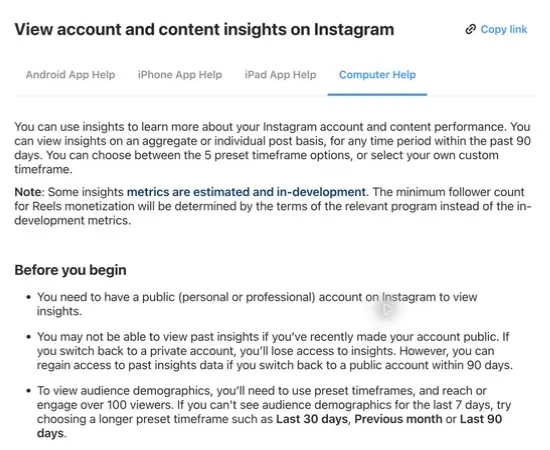
- On the web: open Dashboard. Professional accounts use Insights under For professionals; public personal accounts use Your dashboard under Your insights and tools.
- Choose Account or Content: use the Insights dropdown, then set a date range.
- On the app: open your profile’s dashboard or Insights entry. The labels available to your account can vary.
A recently public account may not have the past information you expect. Switching back to private removes Insights access, according to Instagram’s help, though access returns if you go public again within 90 days. Your privacy choice should fit the account’s purpose; it should not be changed casually just to reveal a chart.
Step 2: Read Follower Active Times
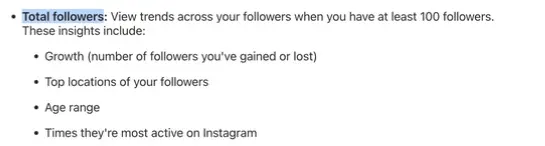
Open the follower or New followers section and look for the active-times information. Instagram’s help describes follower trends, locations and active times under Total followers once the account has at least 100 followers.
- Choose a representative date range rather than relying only on an unusual week.
- Record the exact labels and time-zone information shown by the interface.
- Use the tallest activity periods to suggest test windows, while remembering that being online is different from paying attention to your content.
- If the chart is unavailable, check the follower threshold and available preset periods. Begin with a benchmark candidate and your own post log if needed.
Step 3: Choose a Goal and Comparable Windows
Pick the main metric before choosing a winner. A time that maximizes views may not be the time that produces the most useful enquiries or follows.
| Goal | Possible Primary Measure | Useful Context |
|---|---|---|
| Discovery | Unique viewers or accounts reached, using the exact available label. | Follower/non-follower breakdown and relevant actions. |
| Useful reference content | Saves per account reached, when both measures are available. | Absolute saves and whether the posts answer comparable questions. |
| Conversation or enquiries | A consistently tracked reply or enquiry measure. | The prompt, offer and availability of someone to respond. |
| Video attention | A consistently available watch metric. | Video length, views and the number of accounts reached. |
Choose two or three practical windows. They might represent lunch, early evening and later evening, or two separate peaks in your own audience chart. There is no rule that they must be exactly 4 hours apart.
Step 4: Rotate the Windows Across the Same Days
Use the same format and a similar topic mix, and rotate the windows across your usual publishing days. This example assumes three posts a week; it is not an instruction to post more often.
| Week | Tuesday | Thursday | Sunday |
|---|---|---|---|
| 1 | Window A | Window B | Window C |
| 2 | Window B | Window C | Window A |
| 3 | Window C | Window A | Window B |
Each window now appears once on each weekday. That reduces one obvious source of confusion: comparing Tuesday lunch with Sunday evening and attributing the whole difference to the hour. It still cannot remove every content or audience difference.
- Rotate comparable topics as well as times. Do not reserve every strongest idea for one window.
- Separate boosted posts, collaborations, giveaways and unusual events from the ordinary comparison.
- If you publish less often, extend the pilot instead of adding weak posts to fill the table.
- Record missed slots and unusual conditions instead of silently deleting disappointing results.
Step 5: Measure Every Post at the Same Age
Open View insights on each post or Reel and record your chosen metric at a consistent checkpoint, such as 24 hours after publication. A one-hour note is optional, and it should not replace the later measurement you chose for the comparison.
- Views can include repeated displays or plays.
- Viewers or Accounts reached concern unique accounts, according to the definition shown for that metric.
- Interactions include actions such as likes, comments, saves and shares.
- Unavailable is not zero. Keep the metric label and its definition rather than filling a missing field with a guess.
Likes are not meaningless, and shares should not automatically be renamed direct-message sends. Use the metric your interface supplies. If you calculate a rate, keep the same numerator and denominator for every post, and also retain the underlying counts.
Step 6: Review the Typical Result
Compare similar numbers of usable posts per window and start with the median of your chosen measure. The median is the middle value after sorting the results, which makes it less sensitive to a single unusually large post.
Here is a hypothetical example using accounts reached at 24 hours:
| Window | Results From Three Posts | Median |
|---|---|---|
| A | 100, 110, 900 | 110 |
| B | 160, 170, 180 | 170 |
| C | 130, 140, 150 | 140 |
Window A has the largest individual result and the highest average, but Window B has the stronger typical result in this small example. That makes B worth testing further. It does not prove B will always win.
- Check whether the result repeats across weeks and comparable topics.
- If the difference is small relative to the variation between posts, record the result as inconclusive.
- Keep the easier time when the evidence does not justify a harder routine.
- Extend the pilot or repeat it when the audience, content mix or business goal changes.
Posting before an activity peak can be one of your test conditions. It should not be an automatic 15-to-30-minute adjustment applied to every slot. Test the exact times you wrote down, then decide from the observed results.
Time Zones and a Global Audience
There are three clocks to keep straight: the time convention in a benchmark, the zone used by your Insights or scheduler and the local time of the audience you want to reach. They may agree, but you should not assume they do.
- Use the location information available in Insights to identify relevant regions. A country with several time zones needs a more specific choice.
- Record the scheduler’s time zone beside the exact time in your planner. Do not convert a time twice because two interfaces use different labels.
- Check daylight-saving changes for the audience region. A recurring US evening slot does not stay at the same Indian time throughout the year.
- For a widely distributed audience, compare windows aimed at the important regions. Do not automatically double your posting frequency just because there are two large groups.
For example, 6 p.m. in New York on September 14, 2026 is 3:30 a.m. in India on September 15. That example is a time conversion, not a recommended posting slot. Scheduling makes such a slot practical if your own results justify using it.
How to Schedule Instagram Posts
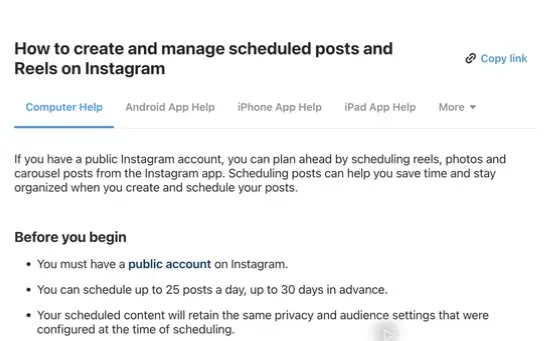
Instagram’s current English help instructions describe scheduling photos, carousels and Reels from the app for public accounts. The documented limit is up to 30 days ahead and 25 posts a day. Limits and available features can change, so the date picker on your account is the final check before committing a schedule.
- Create the post or Reel and complete the media, caption and other intended options.
- Open More options. Some interfaces may use a different settings label.
- Enable Schedule this post or Schedule this reel and choose the date and time.
- Confirm the selection, return to the final screen and choose Schedule.
- Open the profile menu and Scheduled content to confirm that the intended item appears.
Instagram currently lists product tagging, collaborative posts, sponsored posts and fundraisers as incompatible with this scheduled-content flow. Check the exact features your post needs before assuming that every post can use it.
Stories and team workflows may need a different scheduling route, such as Meta Business Suite or a third-party tool. Check the connected account, format support and whether publication is automatic or depends on a reminder. A reminder is not the same as a post that has been scheduled to publish automatically.
A third-party scheduler earns its place when it solves a workflow problem. The social media automation tools roundup covers the choices. SocialPilot offers scheduling and approval workflows for client accounts, while Vista Social provides shared planning and publishing tools. Compare the current plan and format requirements before paying; an account-specific recommendation is useful, but it still needs checking against your results.
The Limits
A timing test can improve a routine. It cannot isolate every reason one post did better, and the Insights activity chart does not reveal a secret hour that guarantees distribution.
- The sample includes the content you chose to publish. Topic, quality, promotion and audience changes can affect the comparison.
- A three-week pilot may be too small, especially for an account that posts infrequently or has highly variable results.
- Insights labels and availability can change. Keep the exact metric definition rather than joining unlike values into one trend.
- Instagram’s own ranking explanation includes several predictions and signals, including post information and prior interactions. It does not establish a universal one-hour deadline for a post to succeed.
Your first frame, caption and relevance still deserve attention. The sensible aim is a repeatable schedule that supports good content, without letting a search for the perfect minute delay the next useful post.
What Quietly Ruins It
Changing the hour, format and topic together. A stronger Reel posted in the evening does not establish that evening beats lunch for your carousels. Keep the comparison narrow enough to learn from it.
Recording one post after a day and another after a week. The second had more time to collect results. A consistent observation age matters more than an extra decimal place in your spreadsheet.
Letting one viral post choose the schedule. Keep that result in the log, inspect what made it different and compare the median as well as the average before changing a working routine.
Treating a total as a rate. More total shares can come from more posts or more reach. Compare equal groups or a consistently defined rate when that is the question you want to answer.
Staying awake for a time that has not earned the effort. Use scheduling when it supports a demonstrated audience need. If two windows perform similarly, the one you can maintain is usually the better operational choice.
FAQs on Instagram Posting Times
What is the best time to post on Instagram on Sunday?
Treat Sunday afternoon and evening as candidates rather than one guaranteed window. The benchmarks in the day-by-day table disagree. Choose a time that fits your audience and the purpose of the post, then compare it with another workable slot.
Does the Instagram algorithm care what time I post?
Timing can matter, but it is one part of ranking. Instagram’s explanation includes when a Feed post was shared alongside signals about the post and the viewer’s interactions. That does not establish a fixed first-hour deadline or guarantee that posting at a peak will improve reach.
Is it better to post at the peak or before it?
Either can be a test condition. There is no universal lead time that every account must use. Write down the exact times, rotate comparable posts across them and compare results at the same age.
How many followers do I need to see Most Active Times in Insights?
Instagram’s current help describes follower trends and active times under Total followers once you have at least 100 followers. Some other audience metrics have different thresholds. If a view is missing, check its definition and try an available preset period before assuming the entire Insights feature is unavailable.
Do Instagram Reels have a different best time than photos?
They may behave differently on your account, but a study that combines formats cannot prove a separate best hour for Reels. Test similar Reels against one another and use the same measurement checkpoint, rather than comparing a Reel with a photo.
How far in advance can I schedule Instagram posts?
Instagram’s current English help documents up to 30 days ahead and 25 scheduled posts a day for public accounts. Use More options in the app’s creation flow and confirm the item under Scheduled content. Check the date picker and feature restrictions because limits and availability can change.
Final Remarks
I’d choose a practical time, record what happens and give another window a fair comparison. Keep the result provisional until it repeats.
Use the planner to keep the time, post type and measurement checkpoint consistent across your test.
Tell Google you want more of this.
Add Gaurav Tiwari as a preferred sourceOne tap, and this site shows up more often in your own Top Stories, AI Overviews and AI Mode. Remove it any time.
Disclaimer: This site is reader-supported. If you buy through some links, I may earn a small commission at no extra cost to you. I only recommend tools I trust and would use myself. Your support helps keep gauravtiwari.org free and focused on real-world advice. Thanks. - Gaurav Tiwari