
 by
by
You have a Halloween sale or event coming up, and most Halloween email templates online are either a design locked inside one platform’s editor or a list of subject lines. “Spooktacular savings” still leaves you to write the body, choose the button and decide which email goes out first, usually in the same weeks you are busiest. That rushed writing is how the deadline in one email ends up not matching the one on the checkout page.
The 7 Halloween email templates below are complete emails, sorted by campaign stage. Each one has a subject line, preview text, body copy and a button, and every detail you need to change sits in [SQUARE BRACKETS] so nothing made up survives into the send. If Halloween is less than 2 weeks away, the late-start schedule below tells you which ones to drop. Pick the ones that match what you are actually running:
- Running a Halloween sale: emails 1 to 4, then email 7
- Hosting a Halloween event or workshop: emails 5, 6 and 7
- No discount and no event: the no-sale newsletter and email 7
Prefer a single file you can open anywhere? Download every email as one text file.
Choose the Right Halloween Email
Every email in a campaign should ask for one thing. When the second email asks for the same thing as the first and adds nothing new, it reads as pressure. Match each email to the action you need, and leave out any email whose skip condition fits your campaign:
| It asks the reader to | Send it | Skip it if | |
|---|---|---|---|
| 1. Teaser | Plan for the sale | 3 to 7 days before the sale | The dates or discount may still change |
| 2. Sale announcement | Buy now | The morning the sale starts | You are not running a sale |
| 3. Mid-sale reminder | Pick something | Halfway through a 5+ day sale | The sale lasts 4 days or less |
| 4. Last chance | Buy before the deadline | Final day, 4+ hours before the end | The end time is not fixed |
| 5. Event invitation | RSVP | 2 to 3 weeks before the event | Date, venue or RSVP link is not final |
| 6. Event reminder | Show up prepared | The day before, to people who RSVPed | They never RSVPed |
| No-sale newsletter | Click to see your hours or news | Any time in the 2 weeks before Halloween | You have nothing useful to share |
| 7. Thank you | Reply, look or come back | 1 to 3 days after Halloween | You have no true detail to share |
If you have time for only one email, I’d write email 2. Every other sale email either points to it or follows it, so a clear announcement does more for the campaign than a clever teaser.
The last-chance email needs a stricter rule than the rest. Send it only when the sale has a fixed end time you will keep. The FTC’s CAN-SPAM guidance says a subject line must accurately reflect the content of the message, and the FTC’s staff report on dark patterns lists “deal ends soon” claims with no real deadline among the tactics it treats as deceptive. Beyond the legal side, a “final day” sale that gets extended makes every deadline you announce after it easier to ignore.
Halloween Email Schedule
Halloween shopping starts early. The National Retail Federation’s 2026 Halloween survey of 7,889 US consumers found:
- 49% plan to start shopping in September or earlier
- 13% plan to shop at local and small businesses, up from 7% a decade ago
- 26% will look for coupons or sales if prices come in higher than expected
- Total spending is expected to reach $13.5 billion, about $115 per person
That leaves about half of shoppers buying in October, so a campaign that starts in mid-October still meets plenty of them. What runs out first is time for delivery and planning: a product that ships needs an order-by date, and an event needs enough notice for people to keep the evening free. Count every send from your real sale dates or event date:
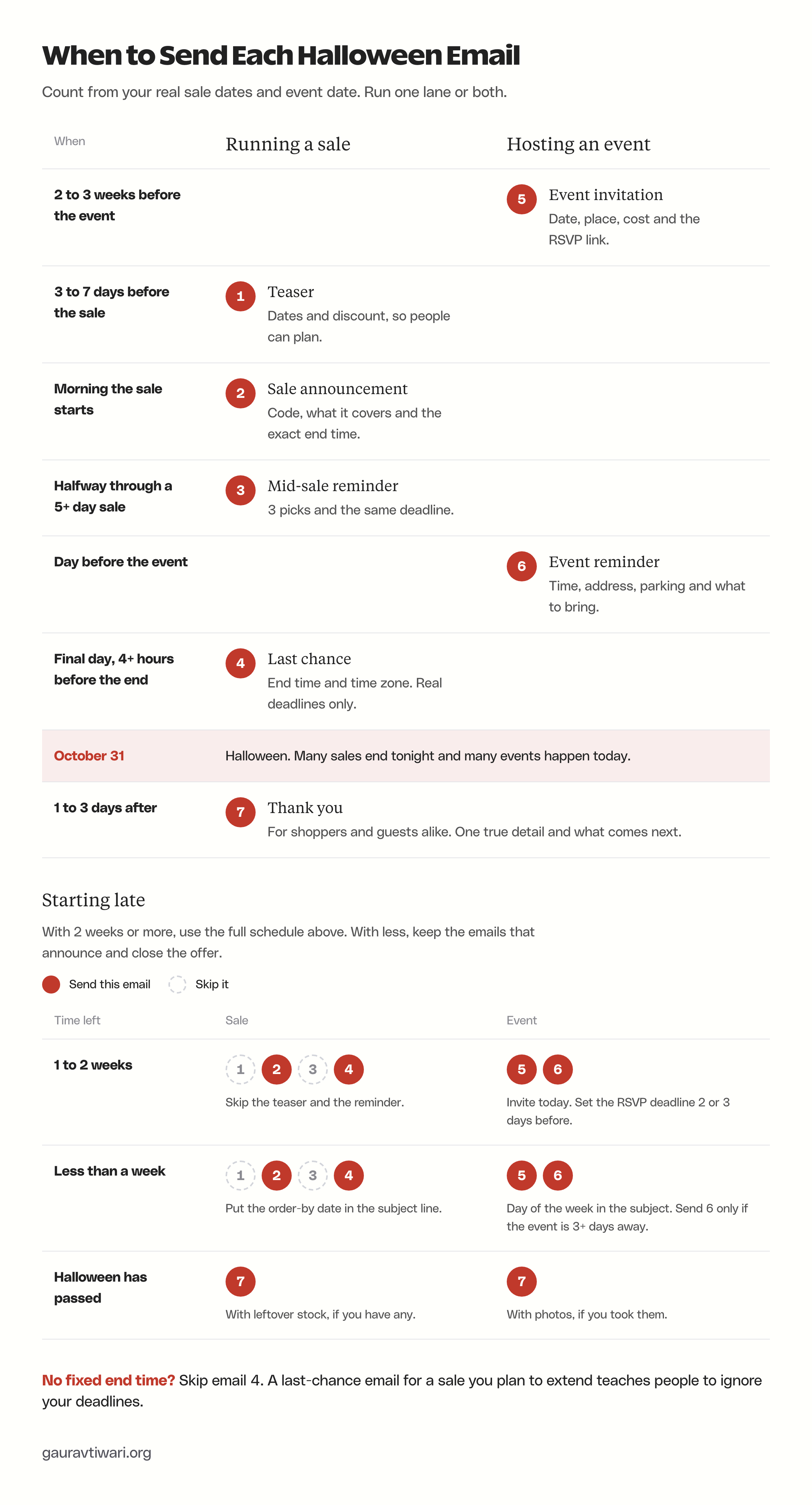
A short sale needs fewer emails. For a 2-day sale, the teaser, the announcement and the last-chance email are enough, and the thank-you can wait until after Halloween.
Late-Start Schedule
If Halloween is close, keep the emails that do the work: the one that announces the offer and the one that closes it. The emails that only build up to the offer are the first to go.
| Time left | For a sale, send | For an event, send |
|---|---|---|
| 2 weeks or more | The full plan: teaser, announcement, a mid-sale reminder for a 5+ day sale, last chance and thank-you | The invitation now, the reminder the day before and the thank-you |
| 1 to 2 weeks | Skip the teaser. Send the announcement, the last-chance email and the thank-you | The invitation today with an RSVP deadline 2 or 3 days before the event, then the reminder |
| Less than a week | The announcement and the last-chance email only | The invitation with the day of the week in the subject line, and the reminder if the event is 3 or more days away |
| Halloween has passed | The thank-you, with leftover stock if you have any | The thank-you, with photos if you took them |
In the last week before Halloween, the order-by date matters more than the size of the discount for anything that ships. Check your carrier’s cut-off and put that date in the announcement subject line as well as in the body.
Halloween Sale Email Templates
These 4 emails take a Halloween sale from the heads-up to the final hours. Copy [DISCOUNT], [CODE] and the end date from your checkout settings rather than from memory, because the email and the checkout have to agree on the time and the time zone.
Teaser Email
The teaser gives people the dates and the discount before there is anything to buy, which is the whole point: all they can do is plan. Skip it if the discount or the dates could still change, because correcting a teaser means sending one more email that only says you got the first one wrong.
Subject: Our Halloween sale starts [START DAY]
Or: A Halloween heads-up for our subscribers
Or: Mark [START DATE] for [BUSINESS NAME]
Preview text: [DISCOUNT] off [PRODUCT OR COLLECTION], and you hear about it first.

Hi [FIRST NAME],

A quick heads-up before Halloween week gets busy.

Our Halloween sale starts on [START DATE] and runs until [END DATE, TIME AND TIME ZONE]. You will get [DISCOUNT] off [PRODUCT OR COLLECTION].

[Optional: Subscribers get early access from [EARLY ACCESS TIME AND TIME ZONE]. Watch your inbox that morning.]

If there's something you've had your eye on, note it down now so you can grab it on day one.

Button: Browse [PRODUCT OR COLLECTION] ([LINK TO PRODUCT OR COLLECTION])

See you on [START DAY],
[YOUR NAME]
[BUSINESS NAME]

[BUSINESS NAME], [POSTAL ADDRESS]
You're getting this email because you signed up at [WHERE THEY SIGNED UP].
Unsubscribe: [UNSUBSCRIBE LINK]
Sale Announcement Email
This is the one email every Halloween sale needs. It answers the 3 questions a buyer has before clicking:
- What is discounted
- How to get the discount
- Until when, with the time zone
Keep the exclusions line even when it feels like bad news. A buyer who finds out at checkout that the code does not cover their item feels tricked, and is less likely to open your next email.
Subject: Our Halloween sale is on: [DISCOUNT] off [PRODUCT OR COLLECTION]
Or: [DISCOUNT] off for Halloween, until [END DAY]
Or: No tricks: [DISCOUNT] off [PRODUCT OR COLLECTION]
Preview text: Use code [CODE] by [END DATE, TIME AND TIME ZONE]. Details inside.

Hi [FIRST NAME],

Our Halloween sale is live. From now until [END DATE, TIME AND TIME ZONE], you get [DISCOUNT] off [PRODUCT OR COLLECTION].

How it works:

- Use code [CODE] at checkout. [OR, IF IT APPLIES AUTOMATICALLY: The discount shows at checkout, no code needed.]
- The offer covers [ELIGIBLE PRODUCTS]. It does not include [EXCLUSIONS].
- Order by [ORDER-BY DATE] for delivery or pickup before Halloween.

[ONE LINE ABOUT YOUR MOST POPULAR HALLOWEEN ITEM AND WHO IT SUITS.]

Button: Shop the Halloween sale ([LINK TO SALE PAGE])

Happy Halloween,
[YOUR NAME]
[BUSINESS NAME]

[BUSINESS NAME], [POSTAL ADDRESS]
You're getting this email because you signed up at [WHERE THEY SIGNED UP].
Unsubscribe: [UNSUBSCRIBE LINK]
Mid-Sale Reminder Email
A reminder earns its place by adding something new. This one adds 3 picks and who each one suits, which helps the person who opened the sale email and could not decide. For a sale of 4 days or less, skip it and let the last-chance email do the reminding.
Subject: 3 Halloween picks from [BUSINESS NAME]
Or: Not sure what to pick? Start with these 3
Or: Still deciding? Here is what people are choosing
Preview text: Three picks to make it easier. [DISCOUNT] off until [END DAY].

Hi [FIRST NAME],

If you haven't picked anything from our Halloween sale yet, here are 3 places to start:

- [PRODUCT 1]: [WHO IT SUITS, IN ONE LINE]
- [PRODUCT 2]: [WHO IT SUITS, IN ONE LINE]
- [PRODUCT 3]: [WHO IT SUITS, IN ONE LINE]

[DISCOUNT] still applies to all 3 with code [CODE] until [END DATE, TIME AND TIME ZONE].

[Optional: Ordering a gift? [GIFT WRAP, GIFT NOTE OR DELIVERY DETAIL].]

Button: See the 3 picks ([LINK TO PICKS OR SALE PAGE])

Thanks,
[YOUR NAME]
[BUSINESS NAME]

[BUSINESS NAME], [POSTAL ADDRESS]
You're getting this email because you signed up at [WHERE THEY SIGNED UP].
Unsubscribe: [UNSUBSCRIBE LINK]
Last-Chance Email
Send it on the final day with at least 4 hours left, so someone who checks email once in the afternoon still has time to order. Keep it short, because the reader needs only the end time, its time zone and the link. The stock line stays out unless the number is true at the moment you send.
Subject: Last day: [DISCOUNT] off ends at [END TIME AND TIME ZONE]
Or: Our Halloween sale ends tonight
Or: Final hours for [DISCOUNT] off [PRODUCT OR COLLECTION]
Preview text: After [END TIME], prices go back to normal. Code [CODE].

Hi [FIRST NAME],

A short one today. Our Halloween sale ends at [END TIME AND TIME ZONE] tonight. After that, [PRODUCT OR COLLECTION] goes back to full price.

If you have been meaning to order, code [CODE] still works until then.

[Only if true: [ITEM] is down to its last [NUMBER] in stock.]

Button: Order before [END TIME] ([LINK TO SALE PAGE])

Thank you for shopping small this Halloween.
[YOUR NAME]
[BUSINESS NAME]

[BUSINESS NAME], [POSTAL ADDRESS]
You're getting this email because you signed up at [WHERE THEY SIGNED UP].
Unsubscribe: [UNSUBSCRIBE LINK]
Leave people who already bought out of the reminder and the last-chance email. Someone who ordered on day one does not need to hear that the sale is ending, and the people who clicked but did not order are the ones those 2 emails are for. Most platforms can do this with a purchase tag from your store integration or a segment, the same building blocks used for email automation.
A resend to “non-openers” is less useful than it sounds. Apple Mail Privacy Protection marks many emails as opened automatically, so people who never read the announcement can drop out of that segment. Excluding buyers works better because orders come from your store, while some opens are registered by Apple’s servers rather than a person.
Halloween Event Email Templates
An invitation asks people to show up, so the practical details carry the email. A reader should find all of these without scrolling past a long welcome:
- The date and start time
- The place, or how the online link arrives
- What happens and what it costs
- How and by when to RSVP
For a party flyer or a printed invitation to hand out at the counter, the free Halloween party invitations you can edit in Canva carry the same details in a format people can pin to the fridge.
Event Invitation Email
Send it 2 to 3 weeks out so people can put the date on their calendar, and set an RSVP deadline so you get a headcount for treats, seats or materials.
Subject: You're invited: [EVENT NAME] on [EVENT DATE]
Or: Join us for Halloween at [BUSINESS NAME]
Or: [EVENT NAME]: [EVENT DATE], [START TIME]
Preview text: [WHAT HAPPENS, IN A FEW WORDS]. RSVP by [RSVP DEADLINE].

Hi [FIRST NAME],

We're hosting [EVENT NAME] this Halloween, and we would love to see you there.

- When: [EVENT DATE], [START TIME] to [END TIME] [TIME ZONE]
- Where: [VENUE NAME AND ADDRESS, OR "ONLINE: WE WILL SEND THE LINK AFTER YOU RSVP"]
- What happens: [2 OR 3 ACTIVITIES]
- Cost: [FREE, OR THE PRICE AND WHAT IT INCLUDES]
- Good to know: [AGES, ACCESSIBILITY, PARKING, WHAT TO BRING]

Please RSVP by [RSVP DEADLINE] so we can plan [TREATS, SEATS OR MATERIALS] for everyone.

[Only if true: Spaces are limited to [CAPACITY].]

Button: RSVP for [EVENT NAME] ([RSVP LINK])

Hope to see you there,
[YOUR NAME]
[BUSINESS NAME]

[BUSINESS NAME], [POSTAL ADDRESS]
You're getting this email because you signed up at [WHERE THEY SIGNED UP].
Unsubscribe: [UNSUBSCRIBE LINK]
For a free workshop, class or community event with nothing to sell, keep the same details list and swap in this subject, preview text and opening:
Subject: Free Halloween [WORKSHOP OR CLASS] on [EVENT DATE]: save your seat
Preview text: [WHAT PEOPLE WILL MAKE OR LEARN] in [LENGTH]. No purchase needed.

We're running a free Halloween [WORKSHOP OR CLASS] on [EVENT DATE], and you're invited. In [LENGTH], you will [WHAT PEOPLE WILL MAKE OR LEARN]. There's nothing to buy. Just bring [WHAT TO BRING, IF ANYTHING].

Button: Save my seat ([RSVP LINK])
Event Reminder Email
Send this only to people who RSVPed, the day before. It repeats the time and address in one place so nobody has to dig out the invitation, and the cancel link frees up spots you can offer to someone else.
Subject: Tomorrow: [EVENT NAME] at [START TIME]
Or: See you tomorrow at [BUSINESS NAME]
Or: Your [EVENT NAME] details for tomorrow
Preview text: Time, address and what to bring, all in one place.

Hi [FIRST NAME],

[EVENT NAME] is tomorrow, and we're looking forward to seeing you. Here is everything in one place:

- Time: [START TIME] to [END TIME] [TIME ZONE]
- Address: [VENUE ADDRESS] (map: [MAP LINK]), or join online here: [JOIN LINK]
- Parking or entry: [PARKING OR ENTRY DETAIL]
- Bring: [WHAT TO BRING, OR "NOTHING, WE HAVE IT COVERED"]

Can't make it any more? Reply to this email or use the link below so we can offer your spot to someone else.

Button: Change or cancel my RSVP ([RSVP MANAGEMENT LINK])

See you tomorrow,
[YOUR NAME]
[BUSINESS NAME]

[BUSINESS NAME], [POSTAL ADDRESS]
You're getting this email because you signed up at [WHERE THEY SIGNED UP].
Unsubscribe: [UNSUBSCRIBE LINK]
Halloween Newsletter Email
A clinic, an agency or a shop that is not discounting still has reasons to email in October: changed hours, a seasonal product, a local event or a safety note for Halloween night. A no-sale Halloween newsletter works when it gives people one thing they can use this week and asks for nothing more than a click.
No-Sale Newsletter Email
Lead with the item that changes what a reader does this week, which is usually your hours, and stop at 3 items. If your brand is usually formal, the word “Halloween” in the subject line is enough seasonal touch.
Subject: Our Halloween hours and what is new this week
Or: [NUMBER] Halloween ideas from [BUSINESS NAME]
Or: What we are making for Halloween this year
Preview text: [MOST USEFUL ITEM, IN A FEW WORDS]. No sale, just a quick update.

Hi [FIRST NAME],

A quick Halloween update from [BUSINESS NAME].

- Hours: [HALLOWEEN HOURS, OR "OUR USUAL HOURS, NO CHANGES"]
- New this week: [ONE PRODUCT, SERVICE OR PIECE OF WORK, IN ONE LINE]
- Worth knowing: [ONE USEFUL TIP, LOCAL EVENT OR SAFETY NOTE FOR HALLOWEEN NIGHT]

[Optional: [WHAT YOU ARE DOING FOR HALLOWEEN, SUCH AS HANDING OUT TREATS AT THE DOOR].]

Button: [SEE WHAT IS NEW / CHECK OUR HOURS] ([LINK])

Have a safe Halloween,
[YOUR NAME]
[BUSINESS NAME]

[BUSINESS NAME], [POSTAL ADDRESS]
You're getting this email because you signed up at [WHERE THEY SIGNED UP].
Unsubscribe: [UNSUBSCRIBE LINK]
Post-Halloween Thank-You Email
The thank-you email is the easiest one to write well because nothing in it is for sale. It works when it carries one true detail, for example:
- What you made for Halloween
- What the event raised for a cause
- What sold out, and when it comes back
Without a real detail, skip it. A thank-you that could have come from any business gives the reader nothing to reply to, and the reply is the most useful thing this email can bring back.
Thank-You Email
The closing question is there for a practical reason. The replies tell you what to change next October, and they cost you nothing to collect.
Subject: Thank you for a great Halloween
Or: Halloween is over. Here is what comes next at [BUSINESS NAME]
Or: Photos from [EVENT NAME]
Preview text: A thank-you, [PHOTOS OR ONE REAL RESULT] and what we have planned for November.

Hi [FIRST NAME],

Thank you for [SHOPPING WITH US / COMING TO EVENT NAME] this Halloween.

[ONE TRUE DETAIL, FOR EXAMPLE WHAT YOU RAISED, MADE OR SOLD OUT OF. DELETE THIS LINE IF YOU DO NOT HAVE ONE.]

[Optional: Photos from the day are here: [PHOTO LINK].]

[Optional: Leftover Halloween stock is [DISCOUNT] off until [DATE] while it lasts.]

Next up: [WHAT IS COMING, SUCH AS HOLIDAY HOURS, A NEW COLLECTION OR YOUR NEXT EVENT].

One question before you go: what should we do differently next Halloween? Just hit reply. We read every answer.

Button: [SEE THE PHOTOS / SHOP WHAT IS LEFT] ([LINK])

Thanks again,
[YOUR NAME]
[BUSINESS NAME]

[BUSINESS NAME], [POSTAL ADDRESS]
You're getting this email because you signed up at [WHERE THEY SIGNED UP].
Unsubscribe: [UNSUBSCRIBE LINK]
Halloween Email Subject Lines
A Halloween subject line has 2 jobs: say what is inside and stand out among the other October emails in the same inbox. Clarity does the first job and a light seasonal word can do the second. When they fight, keep clarity. “No tricks: 20% off candles” works because the offer survives the pun. “A spooktacular surprise awaits” tells nobody anything.
Each template above already carries 3 subject lines. The lines in this section are extra options that do not repeat them, grouped by the email they belong to.
A few rules before the list:
- Put the offer or the event name in the first few words, because phones cut long subject lines short.
- Use one emoji at most, and check that the subject still makes sense without it.
- Never add “Re:” or “Fwd:” to look like a reply. Google’s email sender guidelines tell senders not to use them unless the message really is a reply or a forward.
- Pair each subject with preview text that adds a detail, such as the code, the end day or the RSVP deadline, instead of repeating the subject.
None of these lines comes with an open-rate promise. If your platform can A/B test subject lines, test 2 from the same intent on part of your list and judge the result by clicks, for the reason explained in the measuring section below.
Halloween wording works when it fits the job of the email. These words map to a stage of the campaign without hiding the offer:
| Word or phrase | Fits | Example subject line |
|---|---|---|
| No tricks | A plain discount with no catch | No tricks: 20% off every candle until Friday |
| Treat yourself | The sale announcement | Treat yourself: 15% off autumn bakes this week |
| Brewing | The teaser | Something is brewing: our sale starts Monday |
| Witching hour | A last-chance email for a sale that ends at midnight | Witching hour: 20% off ends at midnight ET |
| Costumes welcome | An event invitation | Costumes welcome: pottery night this Friday |
| Spooktacular, fang-tastic | Nothing, usually | Skip them: they take space the offer needs and read the same in every inbox |
Sale Announcement
- Halloween sale: [DISCOUNT] off starts now (preview: Code [CODE], until [END DAY].)
- Treat yourself: [DISCOUNT] off [PRODUCT] this week
- [DISCOUNT] off everything in [COLLECTION] for Halloween
- Our Halloween sale opens for subscribers first (preview: Early access now, the public sale on [DATE].)
- Halloween deal: [PRODUCT] for [SALE PRICE]
Teaser
- Something is brewing for [START DATE]
- Save the date: our Halloween sale starts [START DAY]
- Coming [START DAY]: [DISCOUNT] off [PRODUCT] (preview: Subscribers hear first. Here are the dates.)
Reminder
- Order by [DATE] to get it before Halloween (preview: Delivery cut-off for [REGION OR SERVICE].)
- Halfway through our Halloween sale
- Our most-ordered Halloween item this week (preview: Plus 2 more picks, still [DISCOUNT] off.)
Last Chance
- Witching hour: [DISCOUNT] off ends at midnight [TIME ZONE]
- Ends today: [DISCOUNT] off [PRODUCT] (preview: Full price returns at [END TIME].)
- Code [CODE] stops working at [END TIME]
Event Invitation
- Costumes welcome: [EVENT NAME], [DATE]
- Halloween at [BUSINESS NAME] this [DAY OF THE WEEK] (preview: [START TIME], [FREE OR PRICE], RSVP by [DEADLINE].)
- Bring the kids: [EVENT NAME] on [DATE]
No Discount
- A quick Halloween update from [BUSINESS NAME]
- Our hours on Halloween night
- A few Halloween notes from [BUSINESS NAME] (preview: No sale, just things we think you will find useful.)
Thank You
- We raised [AMOUNT] for [CAUSE]. Thank you
- Leftover Halloween stock, [DISCOUNT] off (preview: Until [DATE] or until it runs out.)
- One question about Halloween (preview: Your reply shapes what we do next year.)
Use the Templates in Your Email Platform
There are 2 ways to use these templates. The plain-text route works in every email platform: paste the body into the normal editor, use the platform’s own button block for the button and replace [FIRST NAME] with its first-name tag. Give that tag a fallback such as “there”, so a subscriber with no name on file reads “Hi there,” instead of a blank.
The HTML route uses the files in the pack’s html folder. Each one is a single 600px column built with tables and inline styles, which is still how email HTML has to be written because classic Outlook for Windows ignores most modern CSS. The files use no images, so they read the same when a mail app blocks images.
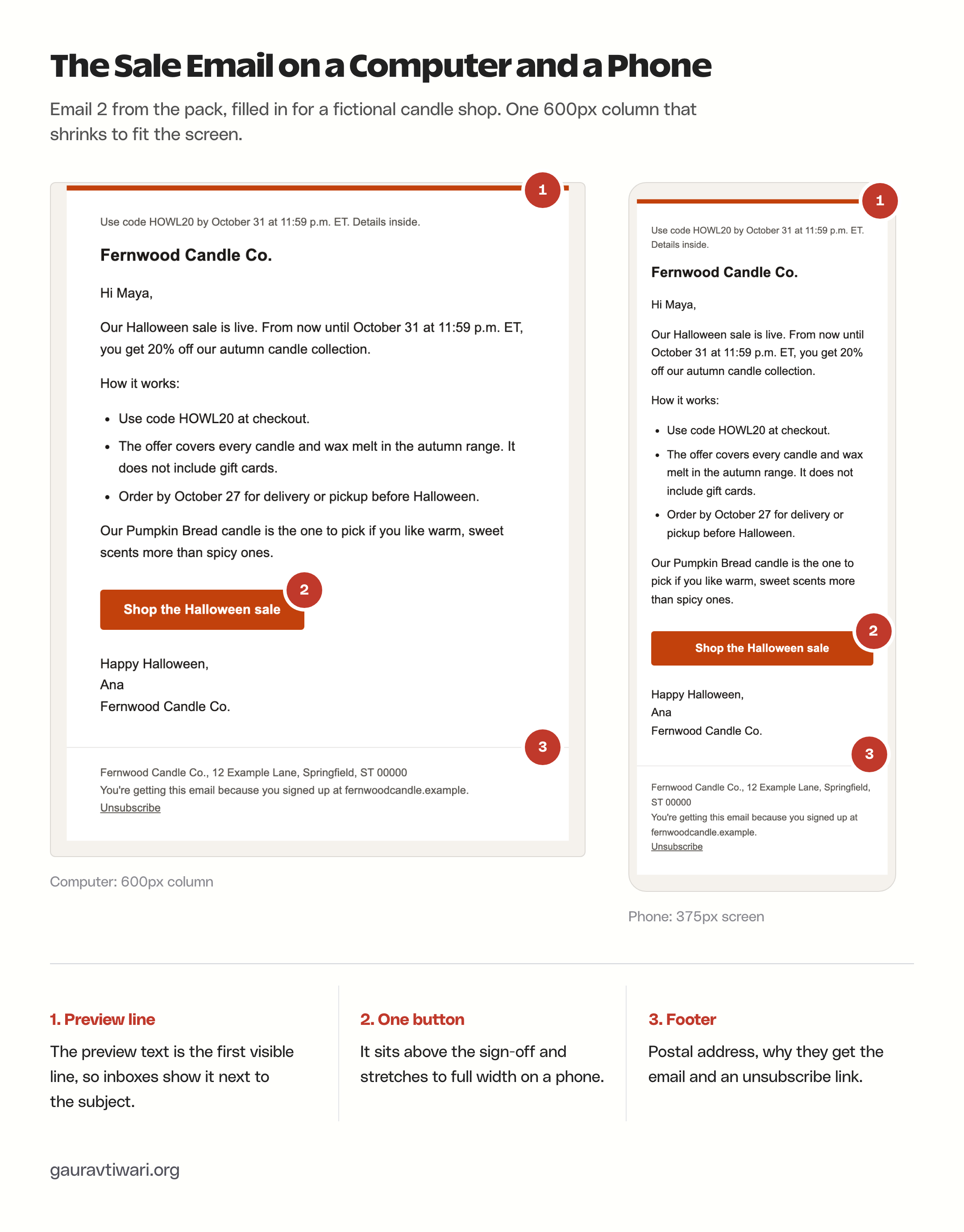
To use an HTML file, paste it into your platform’s code editor and swap 2 placeholders for the platform’s own tags:
- Mailchimp, the long-running email marketing platform, takes HTML through “Code your own” and “Paste in code” on the Standard plan or higher, in its legacy builder. Use
*|FNAME|*for the first name and*|UNSUB|*for the unsubscribe link, which Mailchimp requires in every email. - MailerLite, an email marketing platform with a free plan, includes its custom HTML editor on every plan, the free one included. Use
{$name|default('there')}for the first name and{$unsubscribe}for the unsubscribe link. - FluentCRM, an email marketing plugin that runs inside WordPress, accepts the file as a Raw HTML template. Use
{{contact.first_name|there}}and##crm.unsubscribe_url##. - Brevo, an email and SMS marketing platform, has an HTML custom code editor where you can paste or upload the file. Insert the unsubscribe link from Brevo’s own personalization options after pasting.
The HTML renders cleanly at desktop and phone widths. Mail apps still add their own quirks, so a test send from your platform to a Gmail and an Outlook address is the final check before you schedule anything.
If you are choosing or upgrading a platform for this campaign, the SaaS Halloween deals page lists this season’s discounts on MailerLite, Brevo and other email tools, and the WordPress Halloween deals page covers FluentCRM and MailPoet. For a fuller comparison outside the sale season, my guide to the best email marketing software goes platform by platform.
Check the Email Before Sending
Run this check on every email in the campaign, not only the first one. Each item is easy to catch before sending and impossible to fix after:
- Every [PLACEHOLDER] is gone. Search the email for “[” before you schedule it.
- The discount, code, dates and time zone match the checkout or booking page exactly.
- The subject, preview text, body and button all point to the same action.
- The first-name tag has a fallback.
- Every link opens the right page on a phone.
- People who already bought are left out of the reminder and last-chance emails.
- The footer has your postal address and a working unsubscribe link. CAN-SPAM requires both in commercial email to US recipients, and an unsubscribe request has to be honored within 10 business days.
- Everyone on the list agreed to hear from you. Consent rules in Canada, the UK and the EU are stricter than the US rules, so check what applies before you email past buyers who never subscribed.
- If the list has not been mailed in months, run it through one of the email verification tools first, so old addresses bounce in the checker instead of in your send.
- If you send more than 5,000 emails a day to Gmail addresses or to Outlook.com and Hotmail addresses, or bulk mail to Yahoo, your domain has to meet stricter rules. Your platform handles most of the headers, but the DNS records are yours to set up:
- SPF, DKIM and a DMARC record that lines up with your From address
- One-click unsubscribe on marketing email, which Gmail and Yahoo require
- A spam complaint rate below 0.3%, with Google recommending under 0.1%
What to Measure
A Halloween campaign should be judged against a baseline. MailerLite’s benchmark report for 2026, built from 3.6 million campaigns sent between December 2024 and November 2025, gives a fair one:
- All industries: 43.46% average open rate and 2.09% click rate
- E-commerce: 32.67% average open rate and 1.07% click rate
- Unsubscribe rate: 0.22% across all industries
Read open rates with care. The same report notes that Apple Mail Privacy Protection marks emails as opened automatically, so the real open rate is lower than the number in your dashboard. Clicks and orders are the numbers to judge a Halloween campaign by, and the guide to the email marketing metrics worth tracking covers the rest. On a list of 2,000 shoppers, the e-commerce average works out to about 21 clicks per email, which is the scale to expect before you decide that a subject line failed.
Add UTM tags to the button links in each email, such as utm_campaign=halloween with a different utm_content per email, and your analytics will show which email brought the order. Then start with email 2: fill it in from your checkout settings, send yourself a test and schedule the rest around its dates. If Halloween is less than a week away, emails 2 and 4 are the whole campaign.
FAQs on Halloween Email Templates
Repeat the facts exactly: the discount, the code, the end time and what the offer covers. Keep the headline phrase close too, so the person who clicks lands on the promise they just read. The rest of the page can say more than the email.
For a sale, 3 to 5 across the campaign is enough: a teaser, the announcement, a last-chance email and a thank-you, plus a mid-sale reminder only for a sale of 5 days or longer. For an event, send the invitation, a reminder to people who RSVPed and a thank-you. Avoid sending the same person more than one marketing email in a day.
Yes, as long as the email has a real reason to exist. A clinic, agency or accounting firm can send holiday hours, a community event or a thank-you with one true detail. Start with the no-sale newsletter template and keep the Halloween touch light if your brand is usually formal.
Only if it counts down to the real end time. Email countdown timers are images generated when the email is opened, so they do not show when a mail app blocks images, and the end time and time zone still need to be written in the text. A timer that resets, or a deadline you later extend, is the kind of false urgency the FTC treats as deceptive.
Say plainly that the sale is extended, give the new fixed end time and send that email only to people who have not bought. Update the checkout and the sale page before the email goes out, and do not send another “last chance” email for the same sale.
For a handful of personal contacts, yes. For a customer list, use an email marketing platform: personal mailboxes have daily sending limits, and a platform adds the unsubscribe link, postal address and bounce handling that marketing email needs.
Yes. You can edit, rename and send them for your own business, and the pack downloads directly without a signup.
Tell Google you want more of this.
Add Gaurav Tiwari as a preferred sourceOne tap, and this site shows up more often in your own Top Stories, AI Overviews and AI Mode. Remove it any time.
Disclaimer: This site is reader-supported. If you buy through some links, I may earn a small commission at no extra cost to you. I only recommend tools I trust and would use myself. Your support helps keep gauravtiwari.org free and focused on real-world advice. Thanks. - Gaurav Tiwari