
 by
by
Halloween lights that run on a hand switch go on late, stay on all night or get forgotten on the one evening the trick-or-treaters come. A cheap mechanical timer helps for a week, and then sunset moves and the lights come on in daylight or well after dark.
The easier way to automate Halloween lights is a smart plug with a sunset schedule. The plug switches the lights on a few minutes before it gets dark and off at a fixed time, every night, with no edits as sunset moves. It only works safely when the plug suits your region, your load and the place it sits in, so that check comes first and the app setup comes second.
I want to make sure the basic idea is clear before the steps. A smart plug only switches power, so the plug has to be rated for its spot and the lights have to cooperate when power arrives. If you still have to pick the lights, my guide to the best Halloween lights for indoor and outdoor decor covers strings, projectors and inflatables, and this page picks up once they are on the porch.
What You Need to Automate Halloween Lights
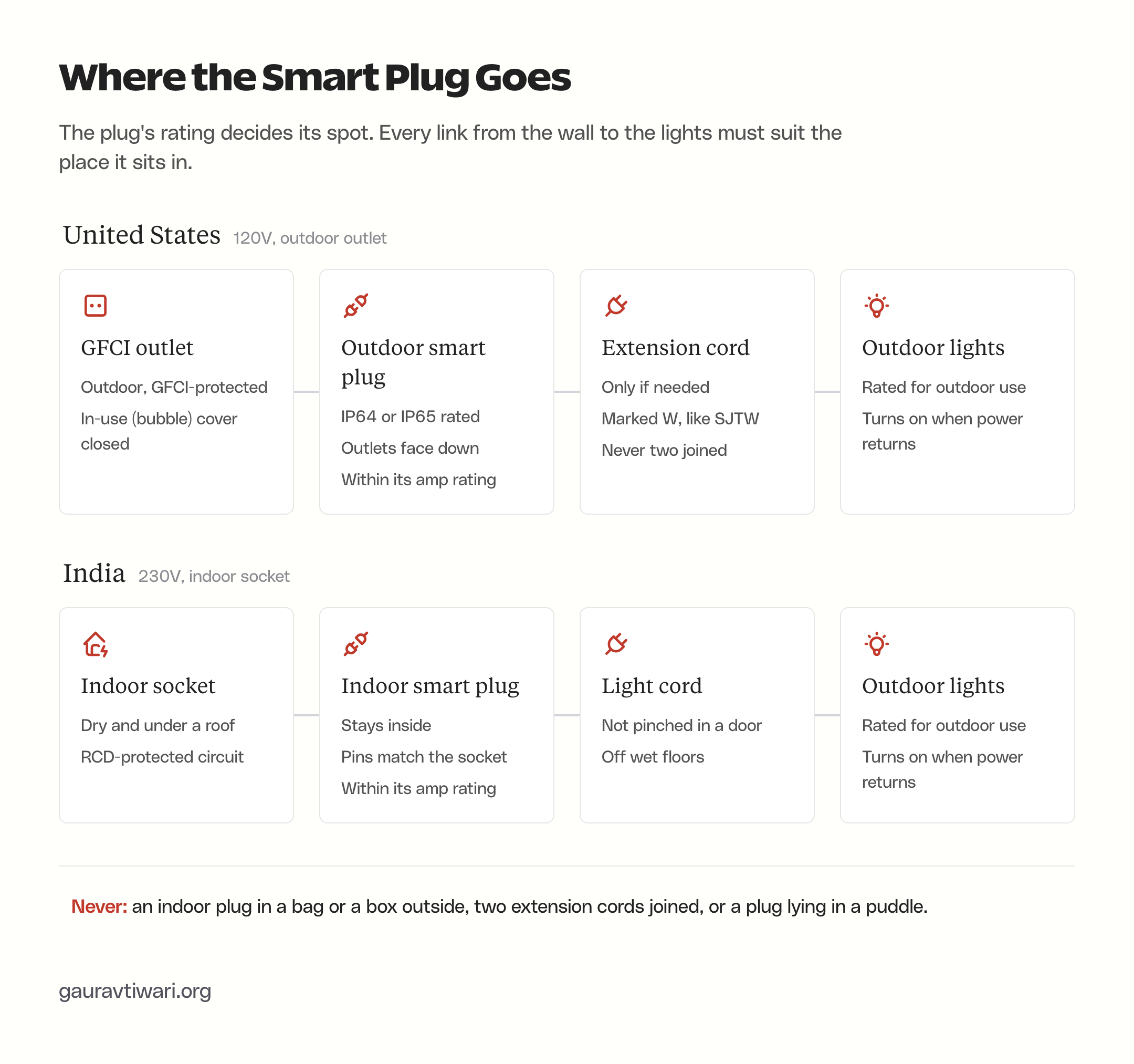
The list is short, but every item on it has a rating that matters. In the US the plug usually lives outdoors, and in India it usually lives indoors, which changes what you buy:
- A smart plug rated for its spot: an outdoor-rated plug (IP64 or IP65) for an outdoor outlet, or an ordinary indoor plug kept at a dry indoor socket.
- A protected circuit: a GFCI outlet outdoors in the US, or a circuit behind an RCD (RCCB) in India.
- 2.4 GHz Wi-Fi at the outlet: the outdoor plugs on this page connect over 2.4 GHz only, so check the signal where the plug will sit.
- Lights rated for outdoor use that turn on by themselves when power returns.
- The plug’s own app for the schedule, plus Alexa, Google Home or Apple Home if you want voice control or routines.
Check the Lights Before the Plug
A smart plug only switches power on and off. Whatever happens after power arrives is up to the light, and a light that needs a button press defeats the whole schedule. Simple plug-in string lights come back on as soon as they get power. Lights with a button, a remote, a mode memory or their own timer may not.
There are three things worth checking on every light before it goes on a schedule:
- Power-return behavior: plug the light into a switched outlet or power strip, switch it off for 10 seconds and switch it back on. If it stays dark or comes back in the wrong mode, a smart plug can’t fix that. Projectors and app-controlled lights are the ones to test first.
- Built-in timers: plenty of Halloween strings sold on Amazon and Walmart have a timer that runs 6 hours on and 18 hours off once you press the button. Switch that timer off and set the light to steady on, or the two timers will fight each other.
- The load: the label on the light or its adapter gives watts or amps. Add up everything on one plug and keep the total well under the plug’s rating.
The load math is easier than it looks. Amps are watts divided by volts, so a 15-amp plug on a 120-volt US outlet carries up to about 1,800 watts, and a 16-amp plug on a 230-volt Indian socket carries about 3,680 watts. Northlight, a large seasonal-lighting brand, rates its 100-bulb LED mini string at about 5 watts and its 100-bulb incandescent set at about 41. That gap is why the US Consumer Product Safety Commission says never to string together more than three sets of incandescent lights.
Some plugs carry a separate, lower limit for LED loads. Leviton rates its outdoor plug at 15 amps in general but only 5 amps for LED lighting, because LED drivers can draw a large rush of current at the moment they switch on. Blower inflatables and fog machines usually draw far more than lights, so their nameplate is the number that decides how much else can share the plug.
Choose a Smart Plug for Your Region
A smart plug is an adapter that sits between the wall outlet and the light and switches power from an app, a schedule or a voice assistant. For Halloween lights, the region decides the model before any feature does, because US and Indian plugs have different pins, voltages and outdoor options.
Outdoor Smart Plugs in the US
US outdoor smart plugs are built for wet weather and plug into an outdoor outlet. The ones worth buying share a few traits:
- IP64 or IP65: both ratings mean dust-tight housings that handle splashing or jets of water. IP44 resists splashes but isn’t dust-tight.
- ETL or UL listing: a safety lab has tested the plug. Most outdoor plugs are ETL-listed, and Leviton’s is UL-listed.
- 15 amps in total: on two-outlet models, that limit is shared by both outlets.
- GFCI required: TP-Link’s datasheets say its outdoor plugs must go into a GFCI outlet outdoors or in wet locations.
TP-Link also says plainly that only products rated for outdoor use should be used outdoors, and that an indoor plug used outside may void its warranty. Wrapping an indoor plug in a plastic bag or a food container leaves it an indoor plug, and a sealed wrap can hold condensation right next to the live contacts.
Matter is the other feature worth checking. A Matter-certified plug can join Apple Home, Alexa, Google Home and SmartThings at the same time, and it is controlled over your home network. The outdoor Matter plugs on this page run Matter over Wi-Fi, so they need no Thread border router, though Apple Home still needs a home hub to run automations.
Tapo P400M
The Tapo P400M is the plug I’d buy for most US porches. It has 2 outlets that you can schedule separately, so string lights and a projector can keep different hours on one plug, and Matter lets it join whichever voice assistant you already use.

- 2 independent outlets, 15 A and 1,800 W maximum in total.
- IP65 housing, ETL-listed, rated for -20 to 50°C (-4 to 122°F).
- Matter certified: Apple Home, Alexa, Google Home and SmartThings.
- Sunrise and sunset schedules with an offset in the Tapo app; 2.4 GHz Wi-Fi only.
The catch is the shared limit. Both outlets draw from one 15-amp budget, so two blower inflatables and a fog machine may need a second plug on a second outlet.
Kasa KP401
The Kasa KP401 is the low-cost single-outlet option. It suits one string of lights or one projector on an outlet you already have, when you use Alexa or Google Home and don’t need Apple Home.

- 1 outlet, 15 A, 1/2 HP motor rating.
- IP64, ETL-listed, with a cover for the socket when it is not in use.
- Works with Alexa and Google Home; the Matter version is sold as the KP401M.
- Sunrise and sunset schedules with an offset in the Kasa app; 2.4 GHz Wi-Fi only.
A single outlet means everything on it shares one schedule. If the projector and the string lights need different hours, the two-outlet Tapo is the better buy.
Leviton Decora Smart Outdoor Plug (D215O)
The Leviton D215O costs more and earns it for anyone who wants the display to keep running when the internet doesn’t. Leviton says its schedules are stored on the plug and keep running during a temporary internet outage, and a built-in light sensor can switch lights on at dusk without any schedule at all.

- 1 outlet, 15 A general, but 5 A for LED loads and 1,500 W for incandescent.
- IP65, UL-listed.
- Matter: Apple Home (with a HomePod or Apple TV hub), Alexa, Google Home and SmartThings.
- Sunrise and sunset schedules in the My Leviton app, plus the dusk sensor.
The 5-amp LED limit is the number to watch. It is still around 600 watts at 120 volts, which covers a lot of LED strings, but it is lower than the 15 amps printed on the box.
Smart Plugs in India
The smart plugs that Tapo, Wipro and Philips WiZ sell in India are indoor plugs with no weather rating, and the US models above won’t fit Indian sockets or run on 230 volts. So the Indian setup keeps the plug indoors, at a dry socket inside the house or under a covered verandah, and only the light’s cord goes out.
These details decide which plug fits and how it is protected:
- Pins and sockets: most Indian homes have 6 A sockets (Type D, three round pins) for small appliances and 16 A sockets (Type M, larger pins) for heavy ones. Check the listing photos and buy a plug whose pins match the socket you will use.
- Rating: Halloween or Diwali lights draw very little, so a 6 A or 10 A plug is plenty. A 16 A plug matters only if it has to sit in a 16 A socket.
- Protection: India’s Central Electricity Authority safety regulations of 2023 require installations to be protected by a residual current device, usually a 30 mA RCCB at the distribution board. If your board has none, get an electrician to add one before you run anything outdoors.
- Accessories: plugs and sockets sold in India fall under IS 1293 and BIS certification, so any extension board or adapter in the chain should carry the ISI mark, such as the Anchor by Panasonic board below.
Tapo P110
The Tapo P110 is the Indian plug I’d pick for lights, because it runs in the same Tapo app as the P400M. That gives you the same sunset schedules and the same TP-Link behavior on schedules that run without the internet.

- Rated 220 to 230 V, 16 A and 3,680 W maximum.
- Indoor use: operating range 0 to 40°C with no weather rating.
- Works with Alexa and Google Assistant; 2.4 GHz Wi-Fi only.
- Schedules, countdown timers, Away Mode and energy monitoring in the Tapo app.
It is a 16 A plug, so check that its pins suit the socket you have in mind before you order. The energy reading is handy here: once the lights are on, the app shows exactly how many watts the display draws.
Cords, Covers and Extension Boards
The plug is only one link in the chain. These picks cover the cords, covers and boards that the safety checks further down ask for, matched to the 15-amp US plugs and the indoor Indian setup above.
Southwire 25 ft 14/3 SJTW Outdoor Extension Cord
This is the cord for a porch where the lights can’t reach the smart plug. Its 14-gauge wire is rated for 15 amps, the same limit as the US plugs above, so the cord can carry everything the plug can.

- 25 ft of 14/3 cord with an SJTW jacket; the W marks it for outdoor use.
- Rated 15 A at 125 V, UL and cUL listed.
- A lighted end shows when power is reaching the lights.
If 25 feet falls short, buy one longer cord rather than joining two.
Leviton 5980 Extra-Duty In-Use Cover
A flat flip lid can’t close while something is plugged in, so it protects the outlet only when nothing is using it. Leviton’s extra-duty in-use cover closes over the plug and leaves a channel at the bottom for the cords to exit.

- Leviton lists it as compliant with NEC 2017 section 406.9(B)(1), the in-use cover rule.
- Extra-duty rated under UL 514D.
- Inserts for single, duplex and Decora or GFCI outlets; vertical mount.
Fitting it means taking the old cover off a live outlet box, so switch that circuit off at the breaker first or have an electrician do it. A two-outlet outdoor smart plug is bulky, so check the cover’s depth against the plug before you buy.
Flemoon Outdoor Cord Connection Box
Where the extension cord meets the light’s plug, the join sits out in the weather on the porch or the lawn. A connection box keeps that join closed and dry.
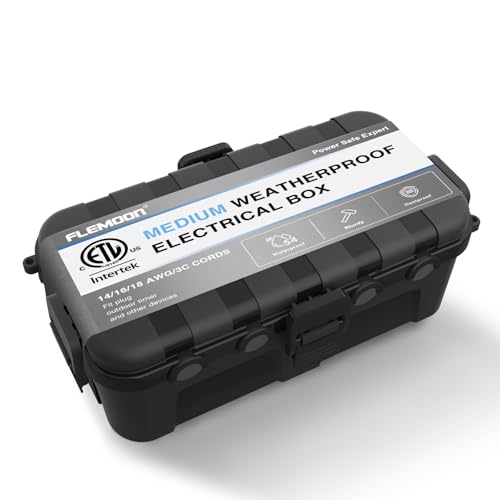
- IP54, ETL certified to UL 50 and UL 50E.
- 6 gasketed cable ports for cords up to 14/3.
- Room inside for a plug-and-socket join or a short outdoor power strip.
Flemoon says to lay the box flat, never upright, and never in standing water. It is for the cord join only. The smart plug stays on the outlet, and an indoor plug shut inside this box is still an indoor plug.
Anchor by Panasonic 4-Socket Extension Board
In India, the light’s cord sometimes can’t reach from the door to the socket where the smart plug sits. An ISI-marked extension board used indoors closes that gap.

- 4 universal sockets rated 6 A each, with a master switch.
- 2 m cord with an ISI-certified 3-pin plug.
- Surge protection built in.
At 230 volts, 6 A works out to about 1,380 watts, far more than Halloween or Diwali lights draw. The board is made for home and office use, so it stays inside with the smart plug.
Set Up the Smart Plug
Setting up a smart plug for Halloween lights works the same way in the Tapo, Kasa and Leviton apps. Do it with the plug at its final outlet, because a plug that pairs fine in the kitchen can lose Wi-Fi on the porch:
- Plug the smart plug into its final outlet and leave the lights unplugged for now.
- Install the plug’s app (Tapo, Kasa or My Leviton), sign in and allow the permissions it asks for. Most models use Bluetooth during setup, and an iPhone also asks for Local Network access.
- Add the device from the app’s + button and pick your model. Join your 2.4 GHz Wi-Fi network when asked; these plugs don’t connect to 5 GHz.
- Name each outlet after what it powers, such as “Porch lights” or “Projector”. Voice assistants use these names.
- Open the app settings and check the time zone and home location. Sunset schedules use them, and a wrong location makes a sunset schedule fire at another city’s sunset.
- Install any firmware update the app offers, then plug the lights in and switch them on and off from the app once.
A Matter plug adds one step. Pair it in its own app first, then share it to Apple Home, Alexa or Google Home with the new pairing code the first app generates. TP-Link’s EP40M datasheet also notes that Matter setup needs IPv6 turned on in the router.
Schedule Halloween Lights
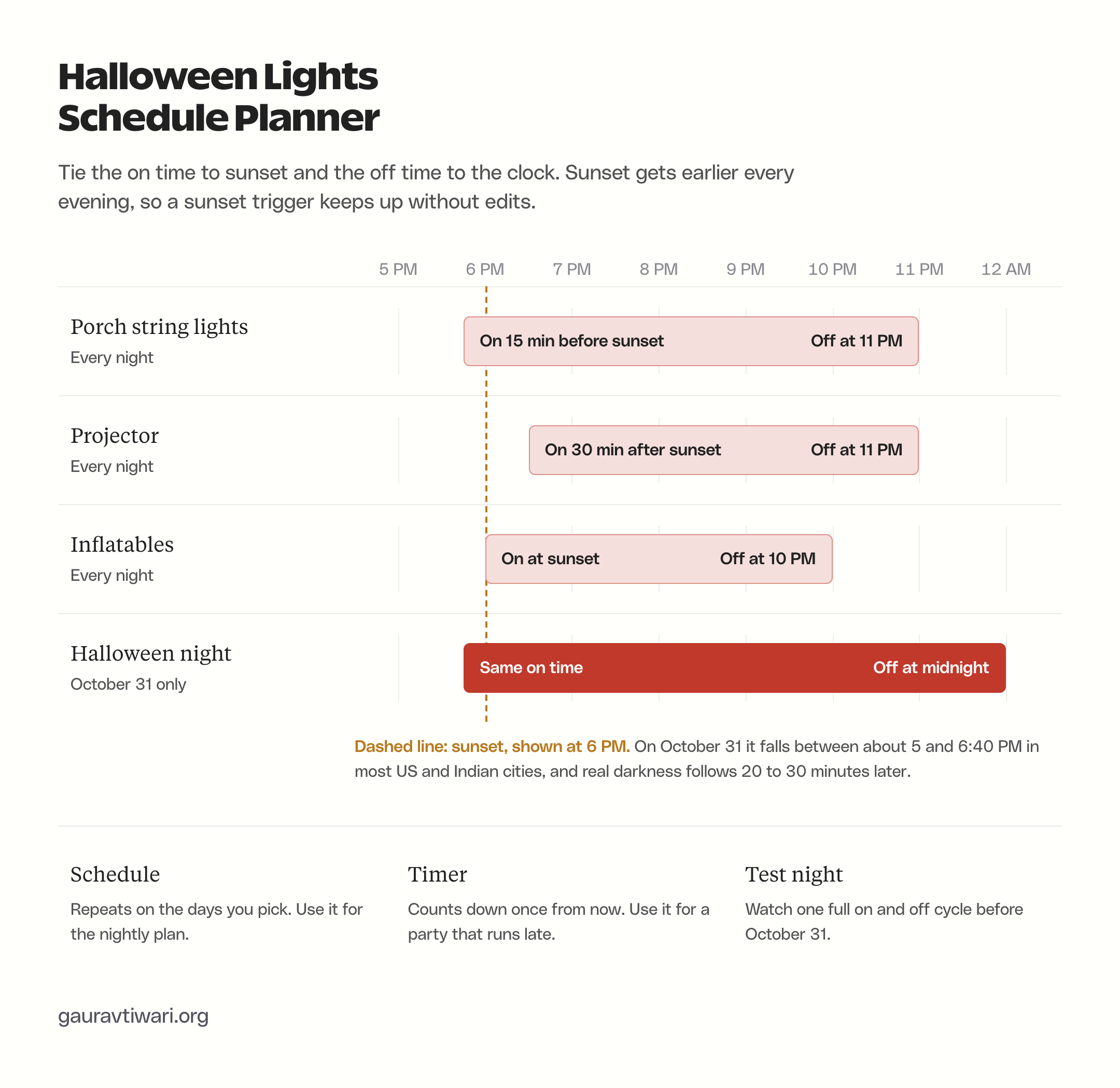
A good Halloween schedule ties the on time to sunset and the off time to the clock. Sunset moves about 10 to 25 minutes earlier between mid-October and Halloween, depending on the city, so a fixed on time drifts out of step while a sunset trigger moves with it.
In the Tapo and Kasa apps, open the plug, tap Schedule, tap +, and choose Custom Time, Sunrise or Sunset. Sunrise and Sunset take an offset, so “15 minutes before sunset” is one setting. Pick the days to repeat, save, then add a second schedule for the off time. TP-Link’s schedule guide walks through the same screens with Away Mode and the timer.
A Halloween lights smart plug timer usually offers three modes that look alike in the app but do different jobs:
- Schedule: repeats at a set time or at sunrise or sunset on the days you pick. This is the one for nightly lights.
- Timer: a one-time countdown from now, such as “off in 2 hours”. Use it when a party runs late.
- Away Mode: switches the plug on and off at random between two times to make a house look occupied. It is the wrong tool for a display.
Projectors deserve a later start than string lights. Real darkness, the end of civil twilight, arrives about 20 to 35 minutes after sunset across the US and India, and a projected image looks washed out before then. These 2026 sunset times, in local time, show how far sunset moves through the season:
| City | Oct 15 | Oct 31 | Nov 8 |
|---|---|---|---|
| New York | 6:18 PM | 5:55 PM | 4:46 PM |
| Chicago | 6:11 PM | 5:48 PM | 4:38 PM |
| Denver | 6:23 PM | 6:01 PM | 4:52 PM |
| Los Angeles | 6:21 PM | 6:03 PM | 4:56 PM |
| Seattle | 6:24 PM | 5:55 PM | 4:44 PM |
| Delhi | 5:53 PM | 5:38 PM | 5:33 PM |
| Mumbai | 6:17 PM | 6:07 PM | 6:03 PM |
| Bengaluru | 6:02 PM | 5:54 PM | 5:52 PM |
| Kolkata | 5:13 PM | 5:01 PM | 4:57 PM |
Two dates explain the November column. US daylight saving time ends on November 1, the morning after Halloween, so US sunset jumps an hour earlier on the clock overnight and a 6 PM schedule would switch on more than an hour after sunset. In India there is no clock change, and Diwali falls on November 8, so the same sunset schedule can simply keep running from Halloween through Diwali.
Halloween 2026 falls on a Saturday. Instead of editing the nightly schedule, add a one-day schedule for October 31 with a later off time, or start a countdown timer from the porch when the last group of kids leaves.
Use Alexa, Google Home or Apple Home Routines
The plug’s own app is the best home for the schedule, for a reason covered in the next section. Routines in Alexa, Google Home or Apple Home are still useful when you want one command to switch several brands together, or when the plug’s app lacks sunset triggers. Whichever you use, keep the schedule in one place only. Two schedules on the same plug from two apps will fight, and the lights end up switching at times nobody set.
Alexa
In the Alexa app, open More, then Routines, and tap +. Add an event, choose Schedule and pick Sunset, with an offset if you want one. Add an action, choose Smart Home, pick the plug and set it to on, then save. Make a second routine at a fixed time to switch it off. Amazon’s routine help covers the same flow, and an account can hold up to 200 routines.
Google Home
In the Google Home app, open Automations, tap Add and choose Household. Add a starter, choose sunrise or sunset with an offset, then add an action that turns the plug on, and save. Google says household automations need a home address in the app, and only members with manager access can create them. Google’s starter list shows the sunset and offset options.
Apple Home
In the Home app, tap Add, then Add Automation, then A Time of Day Occurs. Pick Sunset, choose an offset if you want one, select the plug, set it to turn on and tap Done. Apple’s automation guide covers the steps. Time-based automations need a home hub, which means a HomePod or an Apple TV, because Apple says an iPad can’t act as a hub on the latest version of Apple Home. My piece on Apple TV as a smart home hub explains what the hub does.
Test Manual Control
A schedule you can’t override in a hurry is a liability on a busy night. Before the display goes live, check that you can switch it off three ways, so a tangled cord or a soaked string can be cut in seconds:
- The button on the plug: every plug on this page has one, and the two-outlet Tapo P400M has one for each outlet.
- The app: the on and off toggle works from anywhere while the plug is online.
- Voice: “Alexa, turn off porch lights” or the Google or Siri version, once the plug is shared.
TP-Link notes that pressing the button or the app toggle cancels a running countdown timer, but repeating schedules keep running and will switch the lights on again the next evening. That is usually what you want. It also means a light you switched off because something was wrong comes back on tomorrow unless you pause its schedule too.
What Happens When Power or Wi-Fi Drops
Schedules made in the plug’s own app keep running through an internet outage on TP-Link and Leviton plugs. TP-Link says its timer and schedule features run locally on the device and keep working when the internet is down, and Leviton says the same about the schedules stored on its plug.
Each case behaves a little differently:
- Internet down, power on: schedules made in the plug’s app keep running. Voice control and remote app control stop until the connection returns.
- Power cut, then internet back: the plug reconnects, resyncs its clock and the schedules carry on. TP-Link says its plugs keep their settings through a power cut.
- Power cut and internet down together: TP-Link says the plug must reconnect to the internet to resync its clock after a power cut, and until it does, schedules, timers and Away Mode won’t run.
- Routines in Alexa, Google Home or multi-device app automations: treat these as internet-dependent. TP-Link says its multi-device Smart Actions need an internet connection.
- After power returns: some TP-Link plugs go back to their last on or off state. The light then decides whether it actually lights up, which is why the 10-second test earlier matters.
So the most reliable way to automate Halloween lights keeps the schedule on the plug and uses voice assistants for control only. If your area loses power often, the Leviton’s light sensor is the one option on this page that can switch lights on at dusk without a working clock.
Fix a Schedule That Doesn’t Run
When a schedule fires at the wrong time or not at all, the cause is usually one of a short list. Work through it in this order; the first three come from TP-Link’s own troubleshooting steps:
- Check the time zone and location in the app settings. A sunset schedule built on the wrong city runs at that city’s sunset.
- Update the app and the plug’s firmware.
- Restart the router. If the plug still won’t keep time, TP-Link suggests setting the router’s DNS to 8.8.8.8 and 8.8.4.4.
- Look for a second schedule on the same plug in another app, and delete one of them.
- Check the light itself: a built-in timer, a remote left on “off” or a mode memory can keep it dark while the plug is on.
- Press TEST and then RESET on the GFCI outlet. A tripped GFCI after rain looks exactly like a schedule that failed.
- Check the Wi-Fi signal at the outlet. A plug that keeps dropping offline needs the router closer or a mesh point nearer the door.
Outdoor Safety Checks
Automation makes the lights easier to forget, which makes the wiring worth one careful look before the season starts. These checks apply in both countries:
- Outdoor outlets need protection: GFCI in the US, an RCD-protected circuit in India.
- Keep the outlet covered: a US outdoor outlet that has something plugged in needs an in-use cover, the deep “bubble” type that closes over the plug, such as the Leviton extra-duty cover.
- Mount the plug with its outlets facing down and off the ground, so water runs off instead of into the sockets.
- Use outdoor cords only: in the US, the cord jacket should carry a W in its type, such as the Southwire 14/3 SJTW cord. Never join two extension cords.
- Keep cords out of doors and windows: a cord pinched in a door frame wears through its insulation.
- Respect the labels: use lights marked for outdoor use outside, and follow the CPSC’s limit of three incandescent sets strung together.
FAQs on Halloween Light Automation
It can if the total load stays under the plug’s rating and everything shares one schedule. A two-outlet outdoor plug is the easier choice for a mixed display, because string lights and a projector can keep different hours. Blower inflatables draw the most, so check their nameplate before you add them to a plug that already runs lights.
Plain plug-in inflatables work well, because the blower starts as soon as it gets power and the figure deflates when the plug switches off. Give them an earlier off time than the lights if the blower noise bothers anyone.
Only if the lights come back on by themselves when power returns. Lights with a remote or an app can wake up in their last mode or wake up off, depending on the model, and the listing rarely says which. Switch the power off and on once before you build a schedule around them.
Yes. A sunset schedule needs no changes as the season moves, so the only edits are the off time and the days it repeats. In the US, check the schedule once after daylight saving time ends on November 1.
Set up one plug and one schedule tonight, watch it switch on and off once, and add the rest of the display only after that first cycle works. October 31 is a bad night to find out the projector needs a button press.
Tell Google you want more of this.
Add Gaurav Tiwari as a preferred sourceOne tap, and this site shows up more often in your own Top Stories, AI Overviews and AI Mode. Remove it any time.
Disclaimer: This site is reader-supported. If you buy through some links, I may earn a small commission at no extra cost to you. I only recommend tools I trust and would use myself. Your support helps keep gauravtiwari.org free and focused on real-world advice. Thanks. - Gaurav Tiwari