
My WordPress Block Editor Setup: ACF Blocks, Custom Styles, and More
The WordPress block editor is more powerful than most developers realize. With the right setup combining ACF blocks, custom styles and strategic configuration, Gutenberg delivers page-builder-level flexibility with cleaner output. This article covers my personal block editor setup, including custom ACF blocks, style configurations and the workflow that powers gauravtiwari.org.
 by
by
The WordPress block editor (Gutenberg) is more powerful than most developers realize. With the right setup, it delivers page-builder-level flexibility with a fraction of the overhead.
I’m talking 15-20KB of JavaScript instead of 300KB+.
Same design control. Better performance. No vendor lock-in.
Also see my Perfmatters for removing bloat.
I’ve spent 2 years building a block editor workflow that handles everything from simple blog posts to complex landing pages. This setup powers my WordPress freelancing business and every client site I build.
The stack: custom blocks, registered styles, a CSS framework and the hooks that tie it together.
Why I Chose the Block Editor Over Page Builders
The block editor wasn’t always this capable. But after years of development, it now handles complex layouts natively. Here’s what made me commit to this approach.
- Performance is controllable: Page builders load their entire framework on every page. The block editor outputs static HTML. A complex landing page I built recently: 156KB total page weight, 18KB JavaScript, PageSpeed mobile score of 92. The same design in Elementor would be 600KB+ with scores in the 40s. Even the best WordPress caching plugin can’t fix bloated source code.
- No vendor lock-in: Block content is stored as HTML comments in
post_content. Switch themes? Content stays. Stop using a plugin? Blocks gracefully degrade. Compare that to page builder shortcodes that become gibberish when you deactivate the plugin. - WordPress core investment: Automattic is pouring resources into Gutenberg development. Full Site Editing, block themes, the Interactivity API. The block editor is WordPress’s future. Building on it means building on a stable, improving foundation. Plus, Block Editor add-ons are getting better by every passing day.
- Cleaner client editing: Fewer options means fewer mistakes. Clients pick from dropdown styles instead of dragging sliders. They insert patterns instead of building from scratch. Support calls dropped significantly.
- Transferable skills: Understanding blocks, hooks and patterns makes you a better WordPress developer. Page builder knowledge is vendor-specific. Block editor knowledge applies everywhere WordPress runs.
Remark: I still use page builders like Bricks, Elementor & Divi wherever required as I have layouts, templates and CSS frameworks readymade for these.
The Performance Advantage
I built the same marketing homepage twice on identical WordPress hosting: once with a popular page builder, once with GenerateBlocks Pro. Same inputs.
The full breakdown is in my Kadence Blocks vs GenerateBlocks comparison.
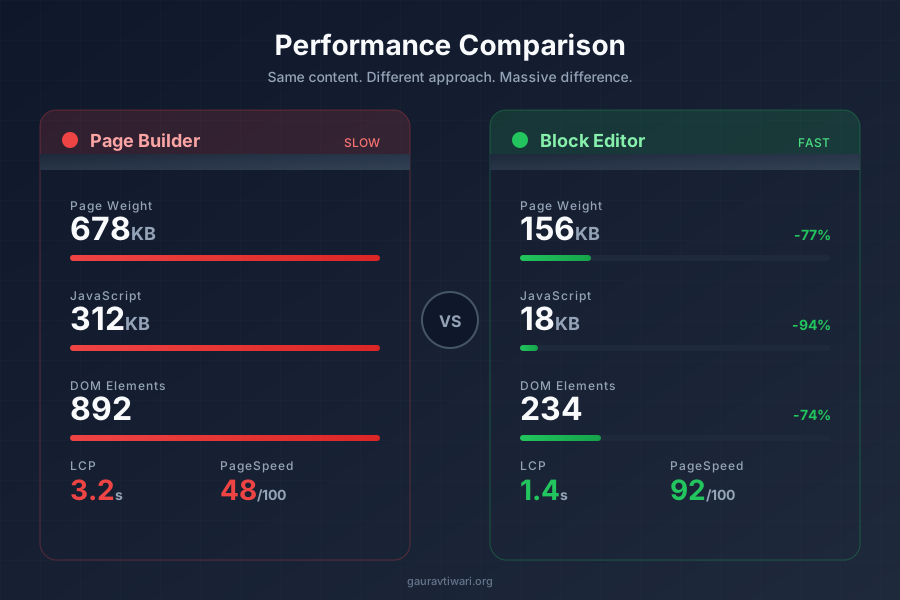
Same visual design. Same content.
The difference is architectural.
Why blocks are lighter: The block editor outputs static HTML with CSS classes. No JavaScript framework initializes on page load. No widget library loads “just in case.”
The should_load_separate_core_block_assets filter means WordPress loads CSS only for blocks used on the page. A WordPress CDN amplifies that advantage.
My Complete Block Editor Stack
Here’s the technical architecture that powers every site I build. Each component serves a specific purpose.
The Core Foundation
Block editor + Marketers Delight (my active theme, with a custom child theme) handles 90% of layouts. You could also use a block theme like OllieWP or TwentyTwentyFive. See my migrating to block themes guide for more details.
- Columns and layouts (Group, Columns blocks)
- Media (Image, Gallery, Cover blocks)
- Calls-to-action (Buttons block)
- Typography and spacing control via theme.json

GenerateBlocks Pro fills the advanced layout gaps. CSS Grid and Flexbox controls without writing code. Query loops with design control.
It adds 15-20KB instead of 300KB+.
This site ran on GeneratePress with GenerateBlocks for years, and I loved that stack before moving to my own theme. It still rivals any GeneratePress alternative for a lightweight build.
I love GenerateBlocks so much that I have even created an HTML to GenerateBlocks for my own needs and opened it for anyone to use.
The Marketers Delight Theme and MD_dropins
The theme running this site is Marketers Delight (MD) with a custom child theme I built on top. MD is a typography-first theme framework with modular CSS architecture. It’s not a block theme in the FSE sense, but it’s fully block-ready with align-wide support, custom color palette and theme.json integration.
What makes MD different from other themes is MD_dropins, the plugin framework that ships with it. MD_dropins adds 20+ native Gutenberg blocks to the editor: callouts, key takeaways, FAQ sections with schema markup, inline polls, CTAs, content upgrades, spoiler blocks, related content panels and more.
These blocks use ES5 JavaScript with no build step. They register via wp.blocks.registerBlockType() and render server-side through PHP callbacks.
The MD blocks complement my ACF blocks. Where ACF blocks handle structured data (product boxes, testimonials, comparison tables), MD blocks handle editorial content (callouts, steps, FAQs).
Each MD block has a 60+ icon library, multiple color presets and popup integration built in. The CSS compiles to /wp-content/uploads/md-blocks/, so each block’s stylesheet loads only when the block is present.
The theme.json integration means I control spacing, typography and colors from a single config file. The editor color palette (Primary #C0392B, Secondary #2D3748, Tertiary #16A085, Action #2563EB, Accent #F59E0B) stays consistent across core blocks, MD blocks and ACF blocks.
My Own WordPress Plugins
I’ve built several plugins that are part of this setup. These aren’t third-party dependencies. I maintain the code, so there’s no waiting for vendor updates or dealing with feature bloat.
- ACF Blocks provides structured Gutenberg content, including product boxes and review layouts. Its field groups register automatically, with Secure Custom Fields or ACF Pro as the field framework. The current GT ACF Blocks download includes the supported block collection.
- Functionalities is a modular toolkit for responsibilities such as fonts, snippets and redirects. Each module can be enabled when the site needs it; overlapping features should have a clear owner.
- Dynamic Month & Year inserts dynamic dates into content and meta using shortcodes and blocks. Every article that says “2026” uses this plugin to render the current year automatically.
- GT Link Manager handles affiliate link redirects with custom database tables and direct lookups. No external API calls, no tracking overhead. Just fast
/go/product-slug/redirects. - Page Blocks Builder stores hand-written HTML, CSS and JavaScript sections as native blocks with a live preview. I use it for landing sections and dynamic templates that core blocks and GenerateBlocks don’t cover.
Core Forms: The Form Plugin I Built for This Stack
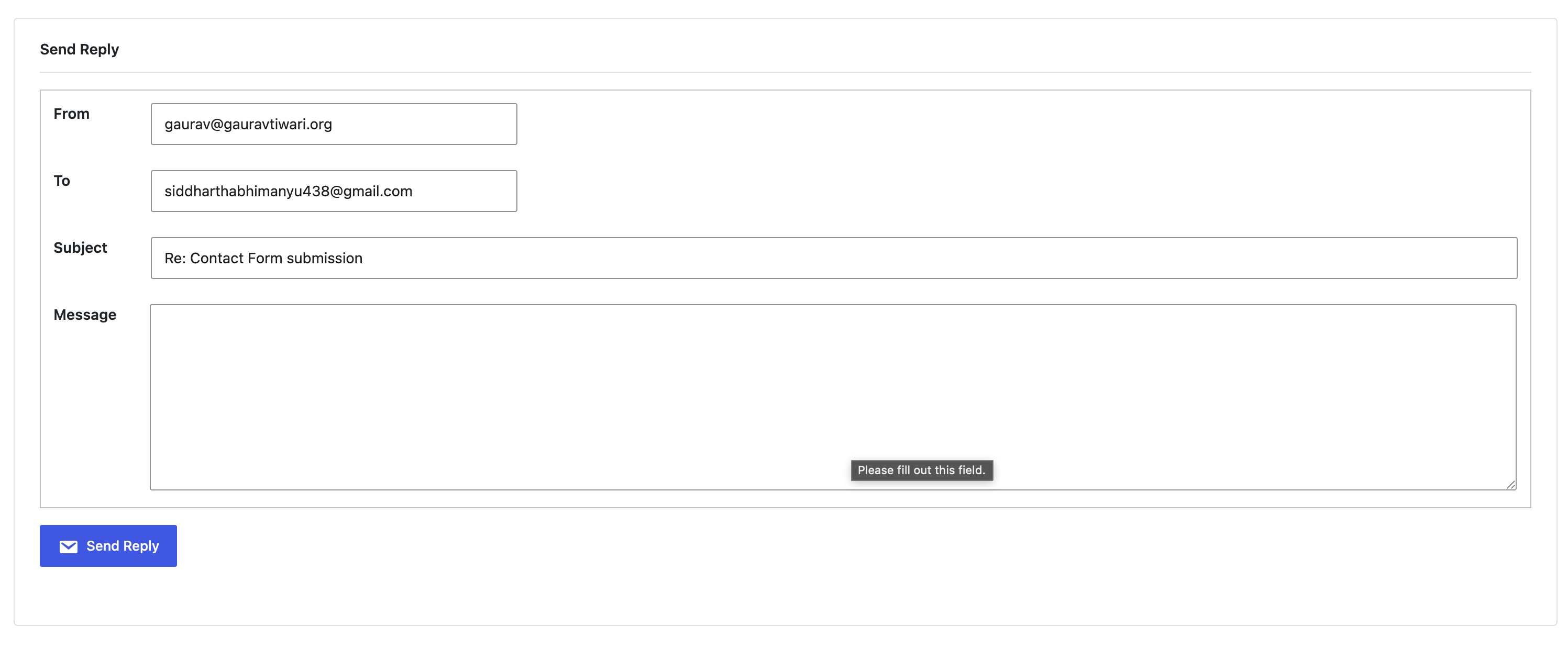
Core Forms exists because every other form plugin violated the performance principles behind this stack.
WPForms loads 350KB+ of assets. Gravity Forms injects jQuery and its own CSS framework. Even “lightweight” options like Fluent Forms add 80-100KB of frontend JavaScript.
Not acceptable.
Core Forms takes the opposite approach. You write the HTML markup. The plugin handles submissions, spam protection (honeypot + timestamp validation), email notifications and webhooks.
Entirely server-side.
Zero frontend JavaScript by default. No inline styles. No layout shift from dynamically injected elements.
Your form renders as clean HTML with your own class names, styled by your own CSS.
The block editor integration works the way it should. Drop a Core Forms block, select your form and it renders a live preview in the editor.
Submissions are stored in a custom database table with CSV export. Webhooks push data to Zapier, Make or any external endpoint.
Conditional fields and template variables are included. Pay $59 once and keep lifetime updates.
Performance and SEO Stack
The block editor setup only delivers those PageSpeed scores because of the performance stack behind it.
- GT Performance, my own free plugin, handles page caching and ships the Redis object-cache drop-in this site runs on. It took over from FlyingPress, which did the caching job here before.
- Perfmatters disables unused WordPress features: emojis, embeds, dashicons on frontend, XML-RPC and per-page script/style management. See my Perfmatters review for the full breakdown.
- Redis provides persistent object caching through that GT Performance drop-in. Database queries that WordPress repeats on every page load get served from Redis instead. On a content-heavy site with 2,000+ posts, this cuts TTFB significantly.
- Rank Math SEO PRO handles schema markup, sitemaps, redirects and SEO analytics. Paired with Rank Math’s Instant Indexing plugin for pushing new content to Google and Bing within minutes of publishing.
Commerce and Community
2 recent additions to the stack that extend what the site can do beyond content publishing.
- FluentCart Pro handles digital product sales, subscriptions and software licensing directly inside WordPress. No WooCommerce dependency, no 50-plugin ecosystem. Clean checkout, license key management and order tracking.
- FluentCommunity Pro powers a members-only community with messaging, content spaces and user profiles. It runs inside WordPress without external platforms. Combined with FluentSMTP for transactional emails, the entire member experience stays on one stack.
Custom Block Styles Architecture
This is where the real power comes from. I use register_block_style() to add 50+ design variations to core blocks:
add_action('init', function() {
    // Helper function for batch registration
    $register_styles = function($block, $styles) {
        foreach ($styles as $name => $label) {
            register_block_style($block, [
                'name'  => $name,
                'label' => __($label, 'theme-textdomain')
            ]);
        }
    };
    // Paragraph styles - 20 variations
    $register_styles('core/paragraph', [
        'note'                => 'Note',
        'notice'              => 'Notice',
        'info'                => 'Info',
        'minimal'             => 'Minimal',
        'intro'               => 'Intro',
        'serif'               => 'Serif',
        'card'                => 'Card',
        'aside'               => 'Aside L',
        'aside-right'         => 'Aside R',
        'callout'             => 'Callout',
        'highlight-box'       => 'Highlight Box',
        'cta-box'             => 'CTA Box',
        'urgent'              => 'Urgent',
        'success-box'         => 'Success Box',
        'tip'                 => 'Tip',
        'premium'             => 'Premium',
        'stats'               => 'Stats',
        'testimonial-snippet' => 'Testimonial Snippet',
        'feature'             => 'Feature',
        'offer'               => 'Offer',
        'bordered'            => 'Bordered',
        'dark'                => 'Dark',
    ]);
    // Heading styles - 16 variations
    $register_styles('core/heading', [
        'serif'              => 'Serif',
        'h1'                 => 'H1',
        'h2'                 => 'H2',
        'h3'                 => 'H3',
        'label'              => 'Label',
        'numbered'           => 'Numbered',
        'centered-heading'   => 'Centered',
        'underline-gradient' => 'Underline Gradient',
        'thick-border'       => 'Thick Border',
        'accent-bar'         => 'Accent Bar',
        'box-heading'        => 'Box Heading',
        'ribbon'             => 'Ribbon',
        'highlight'          => 'Highlight',
        'sticker'            => 'Sticker',
        'brackets'           => 'Brackets',
        'section'            => 'Section',
    ]);
    // List styles
    $register_styles('core/list', [
        'numbered'           => 'Numbered',
        'list-checkmark'     => 'Checkmark',
        'list-cross'         => 'Cross',
        'checked'            => 'Checked Card',
        'cancel'             => 'Cancel Card',
        'list'               => 'List',
        'arrow-square-right' => 'Arrow Right',
    ]);
    // Image styles
    $register_styles('core/image', [
        'rounder'      => 'Rounder',
        'shadow'       => 'Shadow',
        'shadow-round' => 'Shadow Round',
        'browser-shot' => 'Browser Shot',
    ]);
    // Post featured image - same styles as images
    $register_styles('core/post-featured-image', [
        'rounder'      => 'Rounder',
        'shadow'       => 'Shadow',
        'shadow-round' => 'Shadow Round',
        'browser-shot' => 'Browser Shot',
    ]);
    // Group styles
    $register_styles('core/group', [
        'shadow-round' => 'Shadow Round',
        'card'         => 'Card',
        'overlay'      => 'Overlay',
        'aside'        => 'Aside L',
        'aside-right'  => 'Aside R',
    ]);
    // Quote styles - 8 variations
    $register_styles('core/quote', [
        'newstyle'     => 'New Style',
        'testimonial'  => 'Testimonial',
        'gradient'     => 'Gradient',
        'large-quotes' => 'Large Quotes',
        'elegant'      => 'Elegant',
        'bold'         => 'Bold',
        'soft-card'    => 'Soft Card',
        'success'      => 'Success',
    ]);
    // Button styles
    $register_styles('core/button', [
        'link'      => 'Link',
        'primary'   => 'Primary',
        'secondary' => 'Secondary',
        'outline'   => 'Outline',
    ]);
    // Separator styles - 13 variations
    $register_styles('core/separator', [
        'gradient-sep' => 'Gradient',
        'dotted-sep'   => 'Dotted',
        'dashed-sep'   => 'Dashed',
        'double-sep'   => 'Double Line',
        'thick-sep'    => 'Thick',
        'fade-sep'     => 'Fade',
        'diamond-sep'  => 'Diamond',
        'star-sep'     => 'Stars',
        'numbered-sep' => 'Numbered',
        'wave-sep'     => 'Wave',
        'arrows-sep'   => 'Arrows',
        'slash-sep'    => 'Slash',
        'ornament-sep' => 'Ornament',
    ]);
    // Table styles
    $register_styles('core/table', [
        'small-table' => 'Small Table',
        'ratings'     => 'Ratings',
    ]);
});
When a user selects “Callout” style for a paragraph, WordPress adds the is-style-callout class. My CSS targets that class.
Zero runtime JavaScript.
The style appears in a dropdown in the block sidebar. Clients pick from a menu instead of fighting with padding sliders.
Editor-Frontend Style Synchronization
The CSS for these block styles loads identically in both the block editor and frontend:
function gt_enqueue_styles_everywhere() {
    // Grid layout system
    wp_enqueue_style(
        'grid-style-css',
        '/static/css/grid.css',
        array(),
        7
    );
    // Block style variations
    wp_enqueue_style(
        'custom-block-styles-css',
        '/static/css/block-styles.css',
        array(),
        7
    );
}
// Load on frontend
add_action( 'wp_enqueue_scripts', 'gt_enqueue_styles_everywhere' );
// Load in Gutenberg editor
add_action( 'enqueue_block_editor_assets', 'gt_enqueue_styles_everywhere' );
// Optimize core block CSS loading
add_filter( 'should_load_separate_core_block_assets', '__return_true', 11 );
The enqueue_block_editor_assets hook is key. It injects stylesheets into the iframe-based block editor. What I see while editing is what renders on the frontend.
No builder surprises.
The should_load_separate_core_block_assets filter with priority 11 (after default) tells WordPress to only load CSS for blocks actually present on each page. A blog post with paragraphs and images doesn’t load table, code block or calendar styles. On a typical page, this cuts 15-30KB of unused CSS.
ACF Blocks: The Custom Block System
When core blocks and GenerateBlocks don’t cover a use case, I build ACF blocks using the Block v3 API. I’ve created structured publishing blocks for my sites, and they ship as GT ACF Blocks: 29 blocks that sit in their own ACF Blocks category in the inserter.
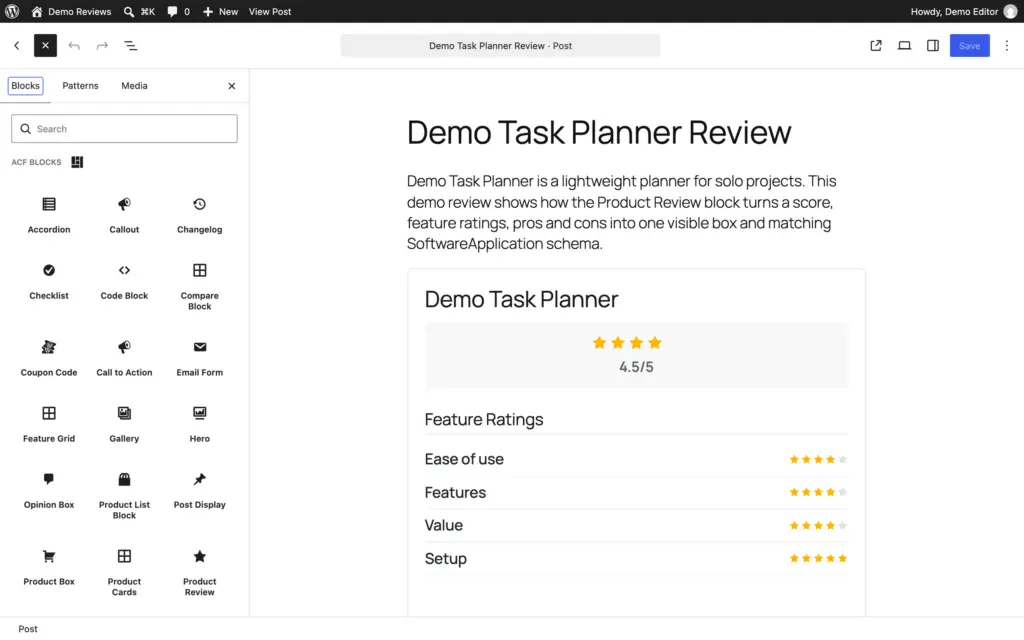


Content & Layout:
- Accordion (native
<details>element, no JavaScript) - Hero sections with configurable backgrounds
- Feature Grid with icon support
- Tabs with accessible markup
- Callout boxes with multiple style presets
- Opinion Box for editorial content
Media & Embeds:
- Video block with lazy loading
- Gallery with lightbox integration
- URL Preview (fetches Open Graph data)
E-commerce & Affiliate:
- Product Cards for multi-product layouts
- Product Box for single product features
- Product Review with optional review structured data
- Coupon Code with copy-to-clipboard
- Comparison tables
Social Proof:
- Testimonial with an optional star rating
- Team Member cards
- Star Rating (reader votes, with optional AggregateRating schema)
Conversion:
- CTA sections with configurable text and links
- Email capture forms
Data Display:
- Stats counters
- Pros & Cons lists
- Code Block with syntax highlighting
- Table of Contents (auto-generated from headings)
Each block uses ACF’s Block v3 API with automatic field registration. Example structure for a testimonial block:
// block.json
{
    "name": "acf/testimonial",
    "title": "Testimonial",
    "category": "theme",
    "acf": {
        "mode": "preview",
        "renderTemplate": "blocks/testimonial/render.php"
    },
    "supports": {
        "align": ["wide", "full"],
        "jsx": true
    }
}
The render template outputs semantic HTML. The ACF fields provide a form interface. Clients fill in labeled fields for the quote, author name, title or company, photo and rating.
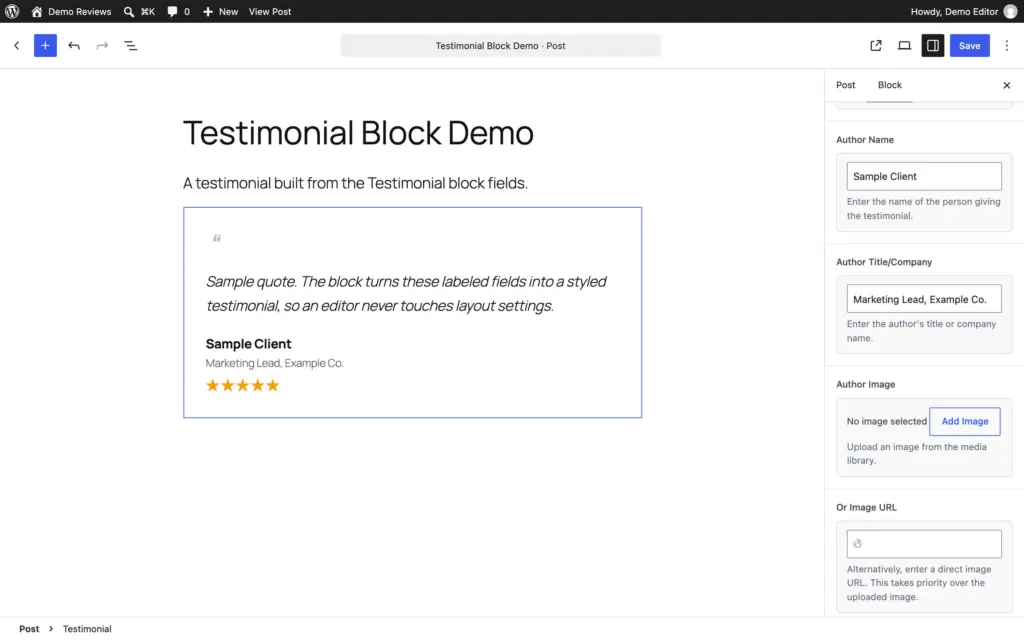
No box dragging.
The output stays controlled, consistent and fast.
The code samples on this page use the native WordPress Code block.
Page Blocks Builder: Dynamic Sections Without a Template Language
For dynamic content that queries the database, I use my own Page Blocks Builder. It replaced Tangible Loops & Logic in this stack. A Page Block is an HTML, CSS and JavaScript section that sits in the block editor with a live preview, and when a section needs data, it runs plain PHP.
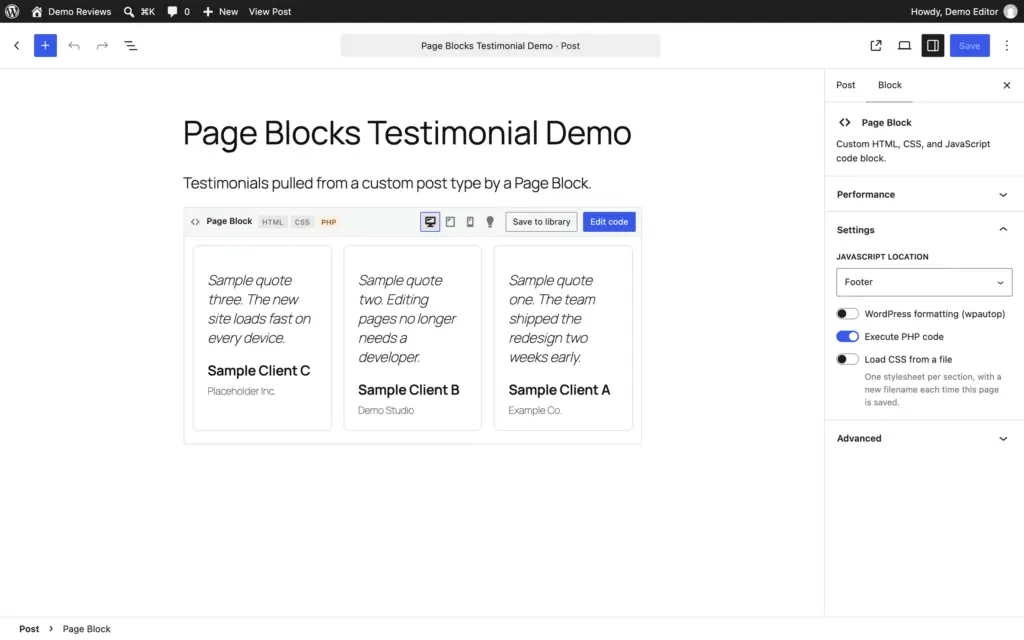
The testimonial grid I used to build with Loops & Logic tags is now an ordinary query inside the section:
<div class="testimonial-grid">
<?php
$testimonials = new WP_Query( array(
	'post_type'      => 'testimonial',
	'posts_per_page' => 6,
) );
while ( $testimonials->have_posts() ) : $testimonials->the_post();
	$photo = get_field( 'author_photo' ); ?>
	<article class="testimonial-card">
		<blockquote><?php the_content(); ?></blockquote>
		<footer>
			<?php if ( $photo ) : ?>
				<img src="<?php echo esc_url( $photo['url'] ); ?>" alt="" class="avatar">
			<?php endif; ?>
			<cite><?php echo esc_html( get_field( 'author_name' ) ); ?></cite>
			<span class="company"><?php echo esc_html( get_field( 'author_company' ) ); ?></span>
		</footer>
	</article>
<?php endwhile; wp_reset_postdata(); ?>
</div>
It queries the testimonial post type, loops through the results and prints each quote with its ACF fields. The if around the photo does the job the old <If> tag did. The preview is rendered on the server, so what the editor shows is what visitors get.
There’s no template syntax to learn if you already know WordPress, and nothing breaks when a templating plugin changes its tags. PHP only runs when the site opts in with GT_PB_ALLOW_PHP in wp-config.php, and only for code whose save-time checksum still matches, so a stray database edit can’t execute.
What it adds over a template language:
- A reusable library: save a section once, link it anywhere, and every linked placement updates together.
- Theme regions: assign a library block to the header, hero, sidebar, footer or 404 region, or to hooks like
wp_headandloop_end. - A live preview with desktop, tablet and mobile presets and a dark-scheme toggle.
- A shortcode and a REST API for placing and managing sections outside the editor.
- Optional AI generation with your own OpenAI, Anthropic or Gemini API key.
The trade-off is the usual one for a plugin block: deactivate Page Blocks Builder and those sections stop rendering, although the code stays in the database.
Block Patterns for Reusable Layouts
Block patterns are pre-built block configurations that clients can insert and customize. I use register_block_pattern() for complex layouts:
register_block_pattern(
    'theme/hero-cta',
    array(
        'title'       => 'Hero with CTA',
        'description' => 'Full-width hero section with heading, text, and button',
        'categories'  => array( 'featured', 'hero' ),
        'keywords'    => array( 'hero', 'banner', 'cta' ),
        'blockTypes'  => array( 'core/group' ),
        'content'     => '<!-- wp:group {"align":"full","className":"hero-section"} -->
            <div class="wp-block-group alignfull hero-section">
                <!-- wp:heading {"level":1} --><h1>Headline Here</h1><!-- /wp:heading -->
                <!-- wp:paragraph --><p>Supporting text goes here.</p><!-- /wp:paragraph -->
                <!-- wp:buttons -->
                <div class="wp-block-buttons">
                    <!-- wp:button --><div class="wp-block-button"><a class="wp-block-button__link">Get Started</a></div><!-- /wp:button -->
                </div>
                <!-- /wp:buttons -->
            </div>
            <!-- /wp:group -->',
    )
);
Patterns are static block markup. No JavaScript. No runtime PHP.
The client inserts the pattern and edits the text. Done.
Page-builder ease, without the runtime cost.
The MD Theme CSS Framework
The MD theme ships with a 3,200+ line utility-first CSS framework that integrates with the block editor.
MD_dropins loads the styles in both the frontend and editor via enqueue_block_editor_assets, so every utility class works identically in both contexts.
CSS variables for everything:
:root {
    /* Layout widths */
    --site-width: 1366px;
    --content-width: 850px;
    /* Colors */
    --color-primary: #C0392B;
    --color-secondary: #262A5D;
    --color-text: #212121;
    --color-bg: #FFFFFC;
    --color-border: #DDDDDD;
    /* Typography */
    --font-body: -apple-system, BlinkMacSystemFont, Inter, "Segoe UI"...;
    --font-head: GTReallySans, Inter...;
    --fs-base: 1.1875rem;
    --fs-xl: 1.5625rem;
    --fs-2xl: 2rem;
    --fs-3xl: 2.75rem;
    --fs-4xl: 4.625rem;
    /* Spacing scale */
    --space-half: 0.9375rem;
    --space-single: 1.875rem;
    --space-mid: 2.8125rem;
    --space-double: 3.75rem;
    --space-triple: 5.625rem;
    --space-quad: 7.5rem;
    /* Shadows */
    --shadow: 0 2px 8px rgba(0, 0, 0, 0.1);
    --shadow-md: 0 4px 16px rgba(0, 0, 0, 0.12);
    --shadow-lg: 0 8px 32px rgba(0, 0, 0, 0.15);
    /* Border radius */
    --radius-m: 0.5rem;
    --radius-l: 0.75rem;
    --radius-xl: 1rem;
    /* Transitions */
    --transition: 0.2s ease;
}
Grid system that works with blocks:
<!-- Equal columns -->
<div class="columns-3 columns-gap-mid">
    <div class="col">Column 1</div>
    <div class="col">Column 2</div>
    <div class="col">Column 3</div>
</div>
<!-- Asymmetric layouts -->
<div class="columns-40-60 columns-align-center columns-gap-double">
    <div class="col">40% width</div>
    <div class="col">60% width</div>
</div>
The grid system uses CSS Grid under the hood with grid-template-columns: repeat(N, 1fr). It’s responsive by default: 3+ column layouts collapse to 2 columns on tablet, single column on mobile.
Spacing utilities:
<!-- Block padding -->
<div class="block-single">1.875rem padding all sides</div>
<div class="block-double-tb">3.75rem top & bottom only</div>
<!-- Margins -->
<div class="mb-single">1.875rem bottom margin</div>
<div class="mt-double">3.75rem top margin</div>
Typography classes:
<h1 class="huge-title">4.625rem, 900 weight</h1>
<h2 class="main-title text-sep">With underline accent</h2>
<p class="intro">Larger intro paragraph</p>
Component classes:
<div class="box block-single shadow">Card with shadow</div>
<ul class="list-check">Checkmark list</ul>
<a href="#" class="button button-large button-arrow">CTA with arrow</a>
<span class="badge badge-primary">Badge</span>
The key is that all these classes work in the block editor because I load the same CSS via enqueue_block_editor_assets. When I add a Group block and give it class="columns-3 columns-gap-mid", I see the three-column grid immediately in the editor. No preview needed.
How it integrates with block patterns:
register_block_pattern(
    'theme/feature-grid',
    array(
        'title'   => 'Feature Grid',
        'content' => '<!-- wp:group {"className":"block-double"} -->
            <div class="wp-block-group block-double">
                <!-- wp:heading {"className":"main-title text-center text-sep mb-double"} -->
                <h2 class="main-title text-center text-sep mb-double">Features</h2>
                <!-- /wp:heading -->
                <!-- wp:group {"className":"columns-3 columns-gap-mid"} -->
                <div class="wp-block-group columns-3 columns-gap-mid">
                    <!-- wp:group {"className":"col box block-single text-center"} -->
                    <div class="wp-block-group col box block-single text-center">
                        <!-- wp:heading {"level":3,"className":"med-title mb-half"} -->
                        <h3 class="med-title mb-half">Feature Title</h3>
                        <!-- /wp:heading -->
                        <!-- wp:paragraph -->
                        <p>Feature description here.</p>
                        <!-- /wp:paragraph -->
                    </div>
                    <!-- /wp:group -->
                </div>
                <!-- /wp:group -->
            </div>
            <!-- /wp:group -->',
    )
);
The pattern uses MD framework classes. Client inserts it, edits the text, sees the styled result immediately. No page builder needed.
Theme Customizations
Beyond blocks, I use hooks for theme-level customization:
Removing unnecessary assets:
// Remove block library theme styles if using custom
add_action( 'wp_enqueue_scripts', function() {
    wp_dequeue_style( 'wp-block-library-theme' );
}, 100 );
// Remove global styles if managing manually
add_action( 'wp_enqueue_scripts', function() {
    wp_dequeue_style( 'global-styles' );
}, 100 );
Currently, I am not removing global-styles as it is rendered from my theme.json, which is kinda the customizer for the Block Editor. See my theme.json here.
Custom render callbacks:
// Modify core block output
add_filter( 'render_block_core/image', function( $content, $block ) {
    // Add lazy loading, custom classes, etc.
    return $content;
}, 10, 2 );
Block variations via PHP:
// Register block variations server-side
add_filter( 'get_block_type_metadata', function( $metadata ) {
    if ( 'core/group' === $metadata['name'] ) {
        $metadata['variations'] = array_merge(
            $metadata['variations'] ?? array(),
            array(
                array(
                    'name'  => 'card-group',
                    'title' => 'Card Group',
                    'attributes' => array(
                        'className' => 'is-style-card',
                    ),
                ),
            )
        );
    }
    return $metadata;
});
Client Editing: Controlled Flexibility
Instead of page builder’s “everything is possible” approach, I provide curated options:
- Block patterns: Pre-built layouts clients insert and customize
- Block styles: Design variations via dropdown, not sliders
- ACF blocks: Form-based editing with labeled fields
- Locked templates: Page templates with fixed structure, editable content
- Allowed blocks: Per-post-type block restrictions
// Restrict blocks for a custom post type
add_filter( 'allowed_block_types_all', function( $allowed, $context ) {
    if ( 'testimonials' === $context->post->post_type ) {
        return array(
            'core/paragraph',
            'core/image',
            'acf/testimonial',
        );
    }
    return $allowed;
}, 10, 2 );
Clients get exactly the tools they need. Nothing more. Fewer options mean fewer mistakes and faster editing.
That guardrail is rarely necessary after I train a client on the backend.
Download a small teaching plugin with block registration, editor and frontend assets, block.json, CSS, an ACF render example, and setup notes.
Want to Follow My Workflow?
- Read the Block Editor Handbook
- Understand theme.json configuration
- Register your first block styles with
register_block_style() - Create block patterns for common layouts
- Set up
enqueue_block_editor_assetsfor editor CSS - Explore
allowed_block_types_allfor client restrictions - Build your first ACF block
- Use
@wordpress/create-blockfor JavaScript blocks - Learn the
render_blockfilter for output modification - Build a CSS framework or adopt one
- Create a pattern library for your common needs
- Document your system for team use
The WordPress developer resources are comprehensive. The best WordPress blogs cover advanced techniques. 2 weeks of focused learning replace years of page builder dependency.
Common Questions About This Approach
Here is what clients and developers generally ask me.
“Can clients still edit their sites?”
Yes. Often more easily.
The block editor is intuitive. Patterns give clients professional layouts to insert. Block styles appear as dropdown options.
ACF blocks present form fields with clear labels. I use the allowed_block_types_all filter to show only relevant blocks for each post type.
“Is the block editor truly WYSIWYG?”
It is close enough. With shared CSS via enqueue_block_editor_assets, editor and frontend render identically. I preview occasionally for complex layouts, but rarely see surprises.
“Does building take longer?”
Initially, yes.
After the learning curve, I’m faster. No waiting for builder interfaces. No hunting through widget libraries.
Once you have patterns and block styles, new pages come together quickly.
“What about complex animations?”
CSS handles most animations now. For scroll-triggered effects, lightweight libraries like GSAP and WordPress Interactivity API work well. A 5KB script beats 300KB of page builder framework.
“What about accessibility?”
The block editor outputs semantic HTML by default. Core blocks follow WordPress accessibility standards. The best accessibility plugins for WordPress complement this foundation.
What I Miss (And Don’t)
Being honest about tradeoffs.
What I occasionally miss:
- Complex scroll-triggered animations (CSS
@scroll-timelineis coming, but not production-ready) - Visual mega menu builders (my custom-coded theme handles this, though.)
That’s the complete list. The gaps have essentially closed:
- Pre-built widget libraries? The 29 blocks in GT ACF Blocks cover testimonials, CTAs, product boxes, accordions, tabs, comparison tables and more.
- Absolute positioning? GenerateBlocks Pro has full positioning controls with CSS Grid and Flexbox.
- Design variations? 50+ registered block styles give clients design options via dropdown.
- Visual editing?
enqueue_block_editor_assetshook loads identical CSS in editor and frontend.
What I don’t miss at all:
- Performance debugging with no solution
- Update anxiety and regression testing
- Vendor lock-in and migration nightmares
- 300KB+ of JavaScript executing on every page
- Plugin conflicts from builder ecosystem dependencies
- DOM bloat (800+ elements for simple layouts)
- Client calls about broken layouts after accidental edits
The things I miss are edge cases with workarounds. The things I don’t miss were fundamental problems with no solutions. That’s an easy trade.
Results After Two Years
Measurable improvements across the board.
Site performance:
- Average PageSpeed mobile: 48 → 92 (Core Web Vitals passing consistently)
- Average page weight: 1.8MB → 340KB
- Performance complaints: Essentially eliminated
Project efficiency:
- Debugging time: Down 60% (cleaner code, fewer dependencies)
- Maintenance time: Down 40% (fewer plugin conflicts)
- Pattern reuse: 70% of new pages use existing patterns
Client satisfaction:
- “My site is fast” comments: Regular feedback now
- Support requests: Down significantly
- Editing confidence: Clients feel comfortable making changes
Professional development:
- WordPress core understanding: Much deeper
- Code quality: Follows WordPress coding standards
- Skills: Transferable to any WordPress project
When Page Builders Still Make Sense
I’m not dogmatic. There are legitimate use cases.
Valid scenarios:
- Rapid prototyping: Build a quick mockup, then rebuild properly for production
- DIY site owners: People who won’t hire developers and need visual drag-and-drop
- Specific features: Some builders have unique widgets not easily replicated
- Existing investment: Clients with hundreds of pages in Elementor or Divi
The honest calculation: If someone accepts the 300KB+ JavaScript overhead and 800+ DOM element tradeoff, preferring a page builder is a valid choice. I explain the performance cost, show the data and let them decide.
Page builders are improving too. My decade-old experience with WordPress page builders covers the older tradeoffs, while tools like Bricks are faster and more compatible with WordPress core.
Building Your Own Block Editor Workflow
If you want to adopt this approach.
Start with 1 project: Don’t migrate everything at once. Pick your next new project and build it with blocks. Learn in a low-pressure environment.
Master the fundamentals:
- Block Editor Handbook for core concepts
- theme.json documentation for configuration
- Full Site Editing for modern theme development
Build your pattern library: Every pattern you create speeds up future projects. Start with hero sections, feature grids, CTAs, testimonials. Your pattern library becomes a competitive advantage.
Create your block styles: Register styles for the blocks you use most.
Paragraph callouts. Accent headings. Custom list icons.
This takes hours to set up, then saves time on every future build.
Consider the tooling:
- GenerateBlocks for advanced layouts
- ACF Pro for custom blocks
- A lightweight theme like GeneratePress
The initial investment pays off quickly. Within a month, you’ll reach parity with page builder speed. Within 3 months, you’ll be faster.
The Long-Term View
Looking at projects over time reveals clear patterns.
Block-based projects age well: Sites I built with blocks 2 years ago still work perfectly.
WordPress updates don’t break layouts. Theme changes preserve content. The WordPress.com vs WordPress.org distinction matters less because blocks are portable.
Page builder projects require rebuilds: Many page builder sites from 5+ years ago have been rebuilt or abandoned. Lock-in forced complete rebuilds when clients wanted changes. Technology churn consumed budgets.
The maintenance trajectory: Block-based sites get easier to maintain over time.
Fewer dependencies. Simpler debugging. Predictable behavior.
WordPress core improvements benefit your sites automatically. The Gutenberg GitHub repository shows the pace of improvement.
Talking to Clients About This Approach
How I explain the technical choices.
The conversation: “I build with the WordPress block editor instead of page builders. Your site will load faster, pass Core Web Vitals and be easier to maintain. You’ll have full editing capability without the complexity of a page builder interface. The content stays portable if you ever change developers or themes.”
What clients actually care about:
- Speed (show them PageSpeed scores)
- Cost (lower maintenance = lower ongoing costs)
- Control (they can edit without breaking things)
- Future-proofing (content isn’t locked to 1 vendor)
What I demonstrate: Side-by-side comparisons. PageSpeed scores. The editing experience. Total cost of ownership over 3 years.
Data makes the case.
The Broader Industry Movement
This approach is becoming mainstream.
- Enterprise WordPress leads the way: WordPress VIP and enterprise platforms discourage or prohibit page builders. Performance requirements exclude builder overhead. Enterprise clients need sites that pass Core Web Vitals.
- Gutenberg matures rapidly: Full Site Editing works. Block themes are production-ready. The Interactivity API brings dynamic functionality. Each WordPress release closes more gaps.
- SEO requires performance: Google’s Core Web Vitals emphasis has consequences. Page builder sites struggle to pass. Clients who care about rankings can’t afford builder overhead. The best WordPress SEO plugins can’t compensate for slow page loads.
- Community adoption grows: The WordPress developer community increasingly favors blocks. The WordPress Slack channels show growing block expertise. More agencies are making the switch.
For Developers Considering This Approach
Practical advice for making the transition.
Start with 1 project. Build your next new project with blocks. Experience the workflow in a low-stakes environment before committing fully.
Expect a learning curve. Your first block-based projects will take longer.
By project 5, you’ll reach parity. By project 10, you’ll be faster than before.
Build your toolkit:
- Custom block styles for your common design variations
- Pattern library for layouts you use repeatedly
- ACF blocks for content types clients need
- CSS framework (build your own or use GenerateBlocks)
Resources to bookmark:
- Block Editor Handbook
- WordPress Theme Handbook
- ACF Documentation
- Page Blocks Builder on GitHub
- Make WordPress Core Blog
Join the community: WordPress Slack has active channels for block development. The Gutenberg GitHub discussions are valuable. You’re not figuring this out alone.
The transition requires effort. But faster sites, happier clients and more sustainable work make it worthwhile.
Avoiding WordPress plugin bloat starts with choosing the right foundation. My all the plugins I recommend guide covers the rest of the stack.
Foundation first.
Tell Google you want more of this.
Add Gaurav Tiwari as a preferred sourceOne tap, and this site shows up more often in your own Top Stories, AI Overviews and AI Mode. Remove it any time.
Disclaimer: This site is reader-supported. If you buy through some links, I may earn a small commission at no extra cost to you. I only recommend tools I trust and would use myself. Your support helps keep gauravtiwari.org free and focused on real-world advice. Thanks. - Gaurav Tiwari
