
 by
by
FlyingPress replaced WP Rocket on most of the WordPress sites I actively manage because its CSS and JavaScript controls need less cleanup on content-heavy pages. After 18 months of daily use, it remains my default when Core Web Vitals and front-end weight matter more than the easiest possible handoff.
- Verdict Summary: FlyingPress is the fastest real-world WordPress cache plugin I’ve tested, and the one I switched to after a decade on WP Rocket.
- Use it if you run a content site or store on Nginx, Apache, or any LiteSpeed or non-LiteSpeed server and want the best Core Web Vitals with CDN, image optimization, and bloat removal bundled at $59/year.
- Skip it if you don’t have any budget at all, or if you on a LiteSpeed-server based hosting and can handle complex setups (LiteSpeed Cache is free and probably faster sometimes). Skip also if you don’t need a cache plugin at all.
- Rating: 4.7/5.
- Based on: 18 months running FlyingPress on a 3,000+ page site, now on the v5.6 series, plus multiple client migrations from WP Rocket.
- How I tested:
- I ran WP Rocket from 2014 to 2024, then switched gauravtiwari.org to FlyingPress in November 2024 and have run it in production through every release since, now on 5.6.2.
- Every settings screenshot below comes from this live install (3,000+ pages, ads, embeds), not a demo.
- I also migrated several client sites off WP Rocket and tracked Core Web Vitals on each.
- On this site, LCP moved from 3.7s to 2.5s, FCP from 3.2s to 2.6s, and CLS holds at a flat 0 in 28-day Chrome UX field data.

| Pros | Cons |
|---|---|
| Best Core Web Vitals scores in Chrome UX Report data, ahead of WP Rocket | Documentation is thin once you move past basic setup |
| All-in-one: caching, FlyingCDN, image optimization, unused CSS, bloat removal in one plugin | No regex for unused CSS removal; exclusions are manual |
| FlyingCDN runs on Cloudflare Enterprise with 330+ edge locations and edge HTML caching | Smaller community, fewer third-party tutorials than WP Rocket |
| Works on any server (Nginx, Apache, LiteSpeed) at $59/year, matching WP Rocket with more bundled | FlyingCDN is an extra $10/month per site on top of the license |
Choose FlyingPress if you want page caching, unused CSS removal, JavaScript delay, image optimization, and CDN delivery in one performance layer. Keep WP Rocket when a conservative interface, mature documentation, and a familiar client handoff matter more than squeezing the last bit of control from the stack.
- vs WP Rocket: Same $59 entry price, better default performance, and CDN plus image optimization bundled instead of sold as add-ons. WP Rocket wins on polish, docs, and community size.
- vs Perfmatters: Different jobs. FlyingPress does caching, CDN, and image work; Perfmatters does per-page script and asset control. I run both together on every site.
- vs LiteSpeed Cache: LiteSpeed Cache is free and faster, but only on LiteSpeed servers. On any non-LiteSpeed host, FlyingPress is the better paid option.
What is FlyingPress?
FlyingPress is not a complete performance stack. Hosting, database work, asset control, and image compression still decide the ceiling. But as the page-caching layer, it now solves more of those jobs than the plugin I used before it.
Whether you’re a blogger, small business owner, or developer managing large-scale websites, FlyingPress makes performance optimization accessible and effective.
Pricing
FlyingPress offers four pricing plans tailored to different user needs. Prices went up a bit in 2026 (Starter was $49 when I first published this review), so here are the current numbers:

- Starter: $59/year for a single website, ideal for individuals or small blogs.
- Pro: $109/year for up to 3 websites, suited for freelancers or small agencies.
- Business: $229/year for up to 25 websites, perfect for larger agencies or businesses.
- Unlimited: $279/year for unlimited websites, designed for enterprises or developers managing many sites.
All plans include the same features, advanced page caching, top of the class cache preloader, remove unused CSS features, the new Redis object caching, image optimization, and the rest of the performance toolkit.
Check FlyingPress pricing and Features →
What Makes FlyingPress Exceptional?
FlyingPress doesn’t rely on flashy marketing or trendy buzzwords to grab attention. It focuses on what really matters: delivering measurable, tangible, and impactful results for your website’s performance.
Here’s how FlyingPress is raising the bar for WordPress caching and optimization:
1. Unmatched Core Web Vitals Optimization
FlyingPress doesn’t just focus on scoring well on Google PageSpeed Insights, it optimizes for real-world browsing speed. It targets metrics like LCP, CLS, and INP with precision, thanks to features like:
- Faster CSS Optimization:
- The remove unused CSS functionality is miles ahead of WP Rocket. It’s well optimized and filewise, and rather than rendering the whole CSS at once, it removes unused CSS by file.
- Note: On this site, I’ve opted to use Perfmatters‘ “Remove Unused CSS” feature instead of FlyingPress. It’s not a matter of preference but simply because I’ve been using Perfmatters for this specific task for a long time. FlyingPress handles everything else seamlessly here. However, on my other websites, FlyingPress takes care of everything, including unused CSS, and does it brilliantly.
- Comprehensive Caching:
- FlyingPress generates static HTML versions of your pages to speed up load times.
- It includes options for page caching, preload caching, and more, ensuring your site serves the fastest version to every visitor.
- JavaScript Optimization:
- FlyingPress excels in JavaScript optimization by intelligently delaying unnecessary scripts, reducing render-blocking, and ensuring faster load times.
- Its advanced features minimize JavaScript execution, boost interactivity, and improve Core Web Vitals, making websites faster and more user-friendly.
- Lazy Loading for Everything:
- Images, iframes, and even background images are lazy-loaded for faster initial page loads.
- Unique features like Lazy Render HTML Elements help optimize slower parts of your page (e.g., comments or footers).
- Preloading Critical Images: FlyingPress detects images in the viewport and preloads them automatically. This saves you hours of manual effort.
- CDN Integration:
- Comes with FlyingCDN (optional at $10/month per site, 100 GB bandwidth included, and highly recommended) for serving content lightning-fast globally. It integrates quickly using just an API key.
- Powered by Cloudflare Enterprise, it optimizes images, fonts, and other assets for better bandwidth efficiency and lower latency.
- Google Fonts Optimization: FlyingPress lets you self-host, combine, and preload Google Fonts effortlessly. Optionally, you can set fallback fonts for a native font experience.
- Smart Link Preloading: Anticipate user actions and improve bounce rate by preloading pages just before they click, boosting navigation speed.
- Database Cleanup & Automation: It helps you streamline your database with automated optimization and cleanup, ensuring peak performance with zero manual effort.
- Easy Setup:
- No advanced coding knowledge required. The interface is simple and beginner-friendly but powerful enough for advanced users.
All optimizations are centered around improving Largest Contentful Paint (LCP), Interaction to Next Paint (INP), and Cumulative Layout Shift (CLS), metrics that directly impact user experience and SEO.
FlyingPress leads the Chrome UX Report for Core Web Vitals, excelling in metrics like load speed, interactivity, and stability based on real-user data from the HTTP Archive.
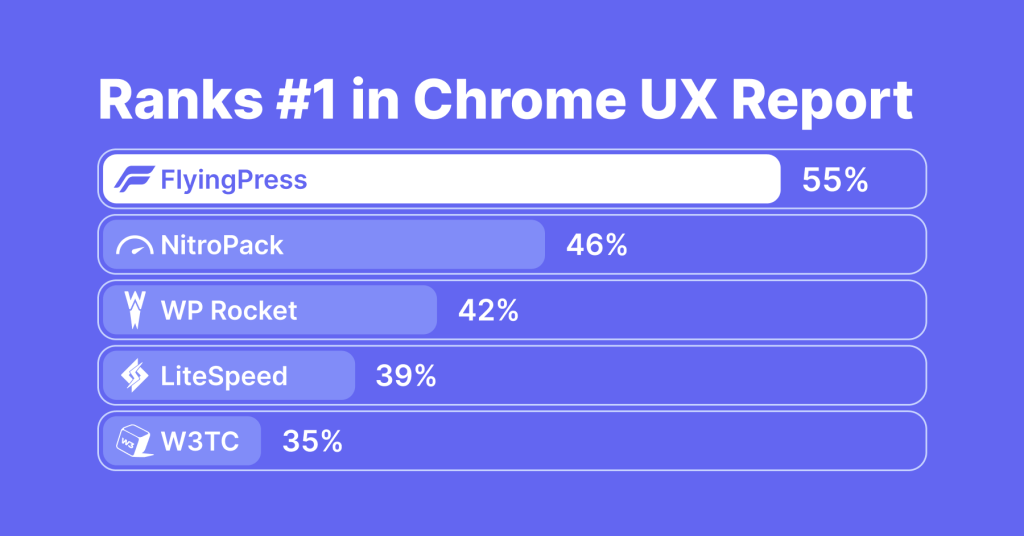
Unlike synthetic tests, FlyingPress focuses on improving actual user experiences, aligning with Google’s priorities for performance. Its top ranking reflects measurable, impactful results that benefit websites worldwide. With a commitment to pushing web performance boundaries, FlyingPress continues to deliver faster, smoother experiences for users. Full data insights are available on their website.
2. FlyingCDN (Paid Service)

FlyingCDN is exclusive optional opt-in CDN service available only to FlyingPress customers. It leverages Cloudflare Enterprise for a level of performance that no other CDN can match. Here’s why FlyingCDN is great:
Key Features
- Edge Page Caching: Speeds up content delivery with cached HTML pages on 330+ edge locations globally.
- Image Optimization: Compresses and serves images in modern formats like WebP for faster loading.
- Global Coverage: Covers 120+ countries, ensuring low latency worldwide.
- Enhanced Security: Provides enterprise-grade DDoS protection and a strong firewall.
- WooCommerce Optimization: Efficiently caches cart pages for seamless shopping.
- Pricing:
$10/site/monthincluding 100 GB bandwidth, then $5 per additional 100 GB. - Integration with FlyingPress: Works seamlessly with FlyingPress, optimizing caching settings automatically for maximum performance. Note that FlyingPress is required for FlyingCDN to work.
- Setup Process: Easy setup with a detailed guide, requiring DNS updates and API key input into FlyingPress settings.
FlyingCDN combined with FlyingPress ensures faster, secure, and optimized WordPress websites.
Object Caching in FlyingPress
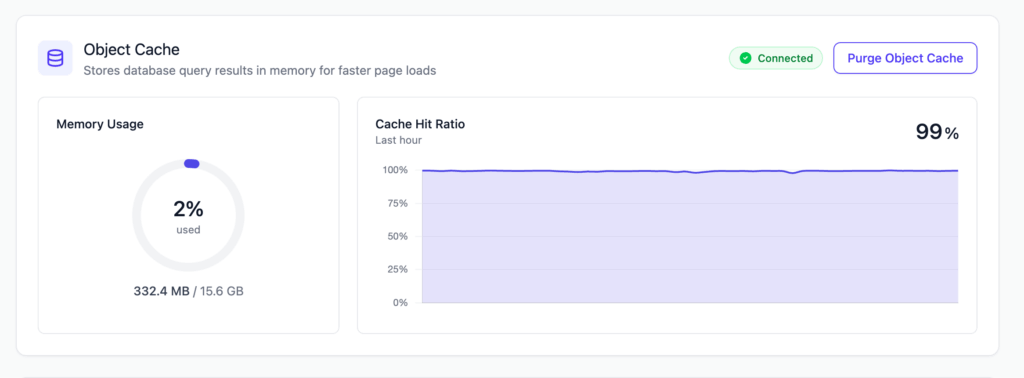
FlyingPress shipped persistent object caching with Redis in v5.6 – making it one of the only two first-class plugins to support this, LiteSpeed Cache being the other. This now makes FlyingPress a priority solution for eCommerce and dynamic sites.
What is Object Caching?
If you are unaware, object caching stores the results of expensive database queries in memory, so WordPress stops rebuilding the same option lookups, term queries, and user meta on every request. Page caching already serves static HTML to logged-out visitors; object caching is what speeds up the parts page caching can’t touch, the logged-in admin, the cart, the dynamic queries behind a WooCommerce or membership site.
Until 5.6 I had to reach for a separate plugin like Redis Object Cache by Till Krüss for this. FlyingPress now does it from the same dashboard: point it at your Redis server and the persistent cache is live, managed alongside the page cache you already trust. On a database-heavy site this is the difference between a snappy admin and one that stalls on every save.
One caveat: One shared Redis instance across several sites needs a separate database number or key prefix per site, or their caches collide, that’s a Redis setup detail, not a FlyingPress flaw.
FlyingPress Object Cache vs Redis Object Cache vs Object Cache Pro
FlyingPress is not the only way to add object caching, so here is how its built-in option compares with the two standalone plugins most people reach for: the free Redis Object Cache plugin and the premium Object Cache Pro, both from the Rhubarb Group. All three sit on Redis. The difference is how much setup, tuning, and diagnostics you get, and what you pay.
| Feature | FlyingPress (built-in) | Redis Object Cache (free) | Object Cache Pro (premium) |
|---|---|---|---|
| Price | Included in the FlyingPress license | Free, open source | Paid subscription, often bundled by hosts like Cloudways and some Kinsta plans |
| Redis backend | phpredis | Predis, phpredis, Relay, clustering, Sentinel | Relay plus phpredis, igbinary serialization, compression |
| Setup | One toggle in the FlyingPress dashboard | Standalone plugin and drop-in, a few wp-config constants | Standalone plugin, license key, drop-in (host-managed on managed stacks) |
| Diagnostics | Minimal, the drop-in is new at version 1.0 | Status screen, basic metrics, WP-CLI | Full analytics dashboard, per-group metrics, WooCommerce tuning |
| Best for | FlyingPress users who want object caching without a second plugin | Any site that wants free, proven object caching | High-traffic WooCommerce, LMS, membership, and agencies |
For most sites already on FlyingPress, the built-in option is the right call: it covers the same Redis backend the free plugin uses, with zero extra setup.
Reach for the free Redis Object Cache plugin if you want object caching without FlyingPress, or you need Predis, Relay, or clustering it doesn’t expose yet.
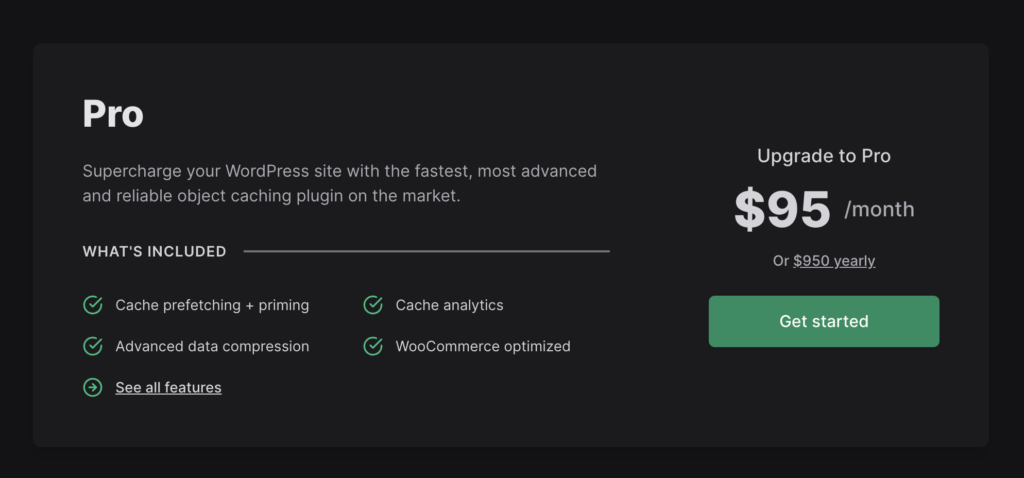
Object Cache Pro earns its price only on heavy, logged-in workloads, busy WooCommerce stores, LMS, and membership sites, where its Relay backend and analytics pay for themselves. I have tested Redis Object Cache plugin extensively but only have minor experience with Object Cache Pro plugin. If you are reading this article, 99% chance is that you don’t need Object Cache’s pro version – which obviously costs a lot and is tailored only to businesses.
How Actively FlyingPress Is Developed
FlyingPress ships meaningful updates on a steady cadence, and the recent releases show it. One quietly important change: FlyingPress replaced Action Scheduler with its own lightweight queue for background jobs. If you’ve ever watched wp_actionscheduler_actions bloat into hundreds of thousands of rows and drag your admin down, you know why that matters. Preloads and purges now run through a lean, purpose-built system instead of a shared library doing everything for everyone.
- Cloudflare integration, rebuilt. Automatic zone detection, scoped API token support, more reliable rule management, and the CDN tab now surfaces configuration errors instead of failing silently. As someone who runs the Cloudflare mode on this site, this is the upgrade I noticed first.
- Vitals tab grew filters. You can now slice your real-user Core Web Vitals by country and by page, which turns the built-in monitoring from a vanity chart into an actual diagnostic tool.
- Wider host purge support. Expanded cache-purging integrations for supported hosting providers, plus a fix for a critical error during automatic URL purging.
Zoom out to the 5.x series as a whole and the pace is hard to argue with: a reorganized interface, built-in image optimization with WebP and AVIF conversion, real-user vitals monitoring, a leaner background queue, and now Redis object caching. This is what I meant about adaptability when I left WP Rocket, and it’s worth remembering when we get to pricing below.
Why I Ditched WP Rocket After 10 Years
NOTE: These facts were true by the time I switched out of WP Rocket. I am not sure if all (or any, for that matter) points still stand correct right now. I last used WP Rocket in the first quarter of 2025.
I’ve been a loyal WP Rocket user since 2014, back when it was the undisputed king of cache plugins. But in recent years, WP Rocket has struggled to keep up:
- Stagnant Innovation: WP Rocket’s feature set has barely evolved, focusing on SaaS based “plug-and-play” simplicity rather than meaningful performance upgrades.
- Sluggish Remove Unused CSS: WP Rocket inlines unused CSS, which often breaks websites and increases server load.
- Poor CDN Integration: Not that I was using it, RocketCDN is barebones compared to FlyingCDN, lacking HTML caching, geo-replication, and critical optimization features.
- Community Disconnect: WP Rocket’s roadmap feels detached from user feedback, with updates often causing compatibility issues.
- Sensless Pricing Increment: I hate products that don’t take existing users into account when increasing the prices. WP Rocket is too costly now for the features it offers. It now starts at $59 per year (from $39 a couple of years ago.) I understand that pricing changes are time-based but their pricing increment correlated with their recent acquisition. Also, I don’t think they had any ideas about grandfathering the prices.
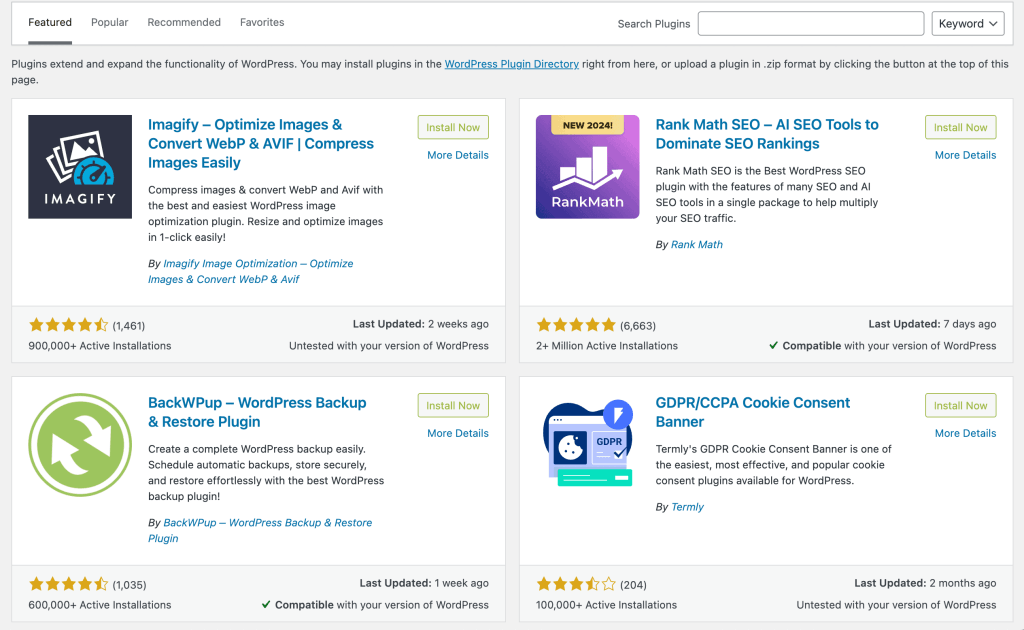
- Adware: Even as a paying WP Rocket user, I couldn’t help but notice constant promotions for their other plugins right in my WordPress dashboard. Every time I accessed the “Add New Plugin” section, there were hooks for their brands like Imagify, Rank Math, BackWPup, and Termly. On top of that, RocketCDN was heavily promoted directly within the WP Rocket settings. It felt more like a marketing showcase than a seamless experience.
Switching to FlyingPress felt a fresh breath. It’s faster, smarter, and more reliable, and above all, it doesn’t force-sell you anything.
FlyingPress Features That Stood Out For me
- FlyingCDN Above All: Not the core plugin feature, but the FlyingCDN add-on has been a steal at $10 per month with 100 GB of bandwidth included. The rankings have improved a lot due to this, and that makes it the most important feature for which I’d use FlyingPress. Update: I moved away to my own in-house developed Cloudflare Worker and R2 CDN.
- Smart Caching: FlyingPress’ cache is very fast and modular. There are options to load and preload caches per page, without scripts & assets, and with scripts & assets. And obviously, there is Object Caching now.
- Lazy Render HTML Elements: This lets you lazy load elements like footers and comment sections, something WP Rocket had too but that came with clumsiness.
- Self-Host YouTube Placeholders: By hosting video thumbnails locally, FlyingPress eliminates external requests, reducing load times and fixing PageSpeed Insights errors.
- Excluding Leading Images from Lazy Load: Instead of manually excluding above-the-fold images, FlyingPress allows you to set a number, simplifying the process.
- Customer Support: I never understood why WP Rocket didn’t have live chat support. But the live chat support on FlyingPress (that also covers FlyingCDN) is exceptional and almost realtime. For a plugin for which you are paying just $59 a year, getting live support is surreal.
My FlyingPress Settings
Here’s how I have set-up FlyingPress for Gaurav Tiwari.
A note before the screenshots: FlyingPress 5 reorganized the interface. The old Cache/CSS/JavaScript/Font/iFrame tabs are now consolidated into Optimization, Images, Caching, CDN, Database, and Bloat. Every screenshot below is my actual production configuration on FlyingPress 5.5.
Caching

- Preload Links on Hover is on. Pages start loading the moment a reader hovers a link, which makes navigation feel instant.
- Auto-refresh Cache is set to every 24 hours, so cached pages never serve stale content for long.
- Separate Mobile Cache stays off. My theme is responsive with identical markup, so a second cache would halve hit rates for nothing.
- I maintain 34 page exclusions (cart, account, and other dynamic pages) and 21 cookie-based bypass rules. The defaults cover most sites; mine accumulated these over 18 months of edge cases.
Optimization: CSS and JavaScript

- Delay All JavaScript is on, set to Defer loading, with 4 exclusions for scripts that genuinely must run early. This single toggle does more for mobile scores than everything else combined.
- Minify CSS and JavaScript is off here because my server stack already serves minified assets. On most hosts, turn it on.
- Remove Unused CSS is off on this site for one historical reason: Perfmatters has handled unused CSS here for years. On every other site I run, FlyingPress does this job, and its file-by-file approach is the best implementation I’ve tested.
- Lazy Load Images, Videos, and Iframes is on with exclusions for above-the-fold images.
- Lightweight YouTube Previews and Self-host Gravatar Images are on. Both remove third-party requests that PageSpeed loves to flag.
Fonts
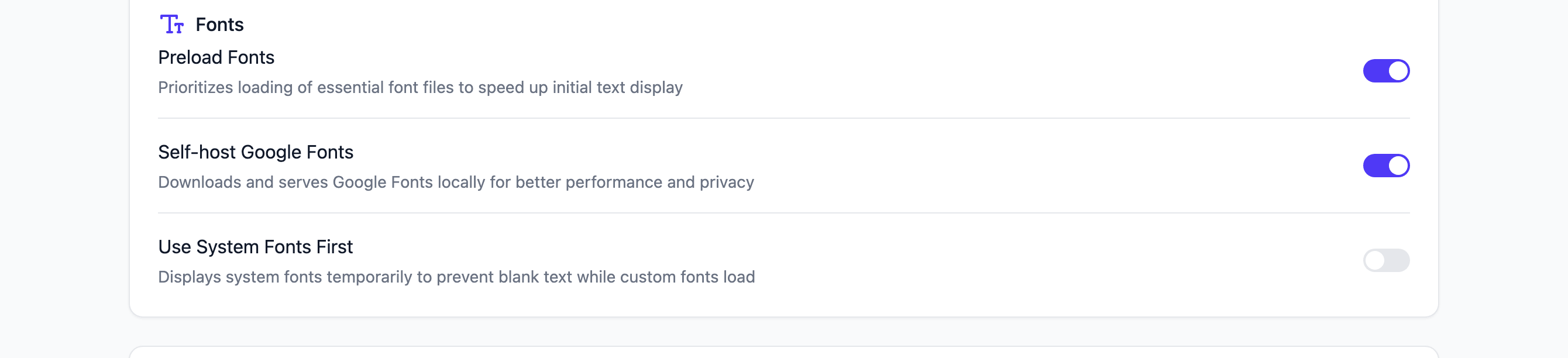
- Preload Fonts is on for the two custom font files this site uses, so text renders without a flash of fallback.
- Self-host Google Fonts is on. Even though this site doesn’t load Google Fonts, I keep it enabled as insurance against any plugin sneaking one in.
- Use System Fonts First stays off; brand typography matters more to me than the few milliseconds it saves.
Images
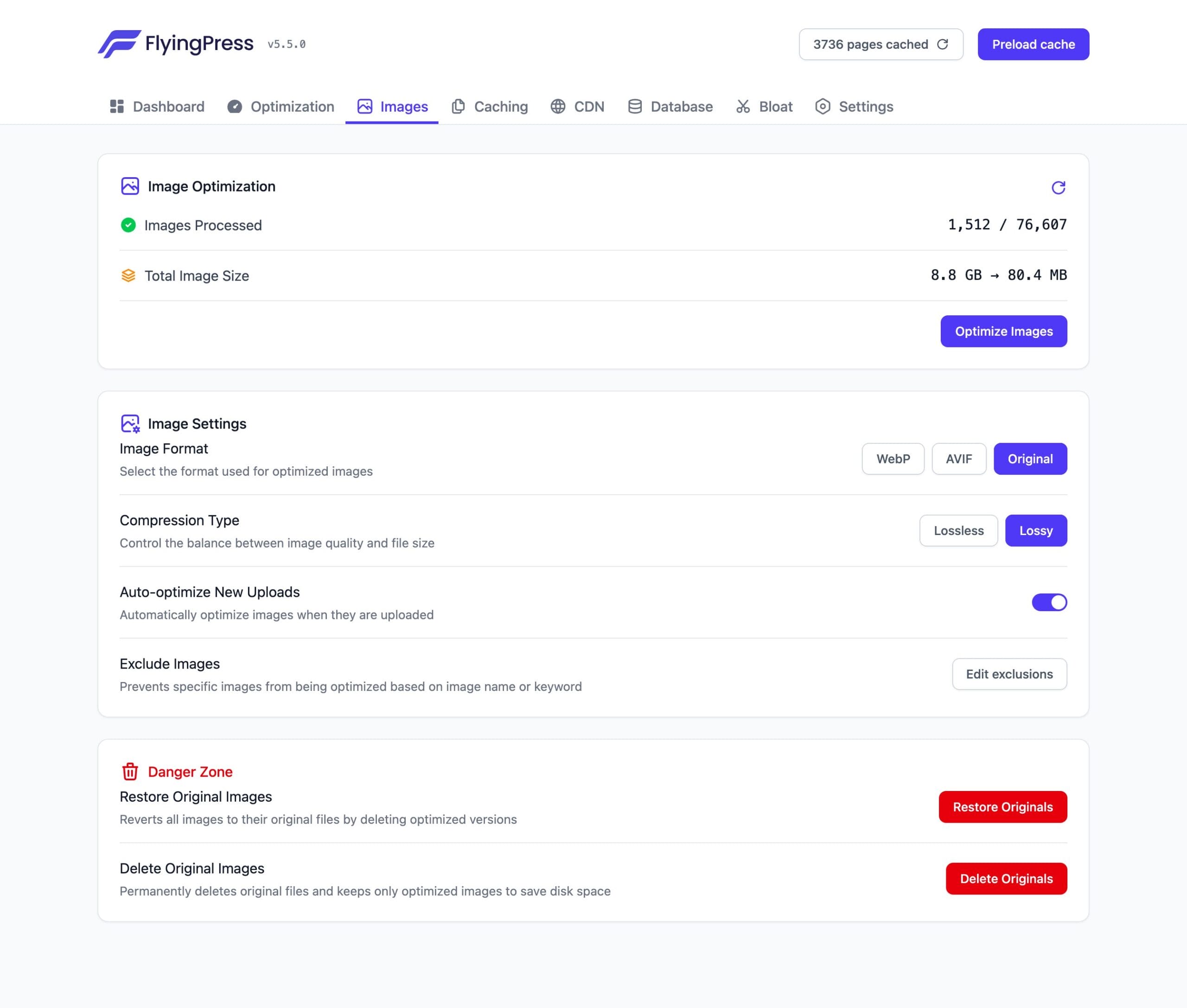
- The compression panel shows what built-in optimization can do: FlyingPress reports my processed originals compressed from 8.8 GB down to 80.4 MB.
- Image Format is set to Original on this site because my Cloudflare R2 pipeline already serves WebP. If you don’t run a separate image stack, set WebP here and let FlyingPress handle conversion.
- Compression Type is Lossy, which is visually indistinguishable for photos and screenshots at a fraction of the size.
- Auto-optimize New Uploads is on, so the pipeline needs zero manual attention.
CDN
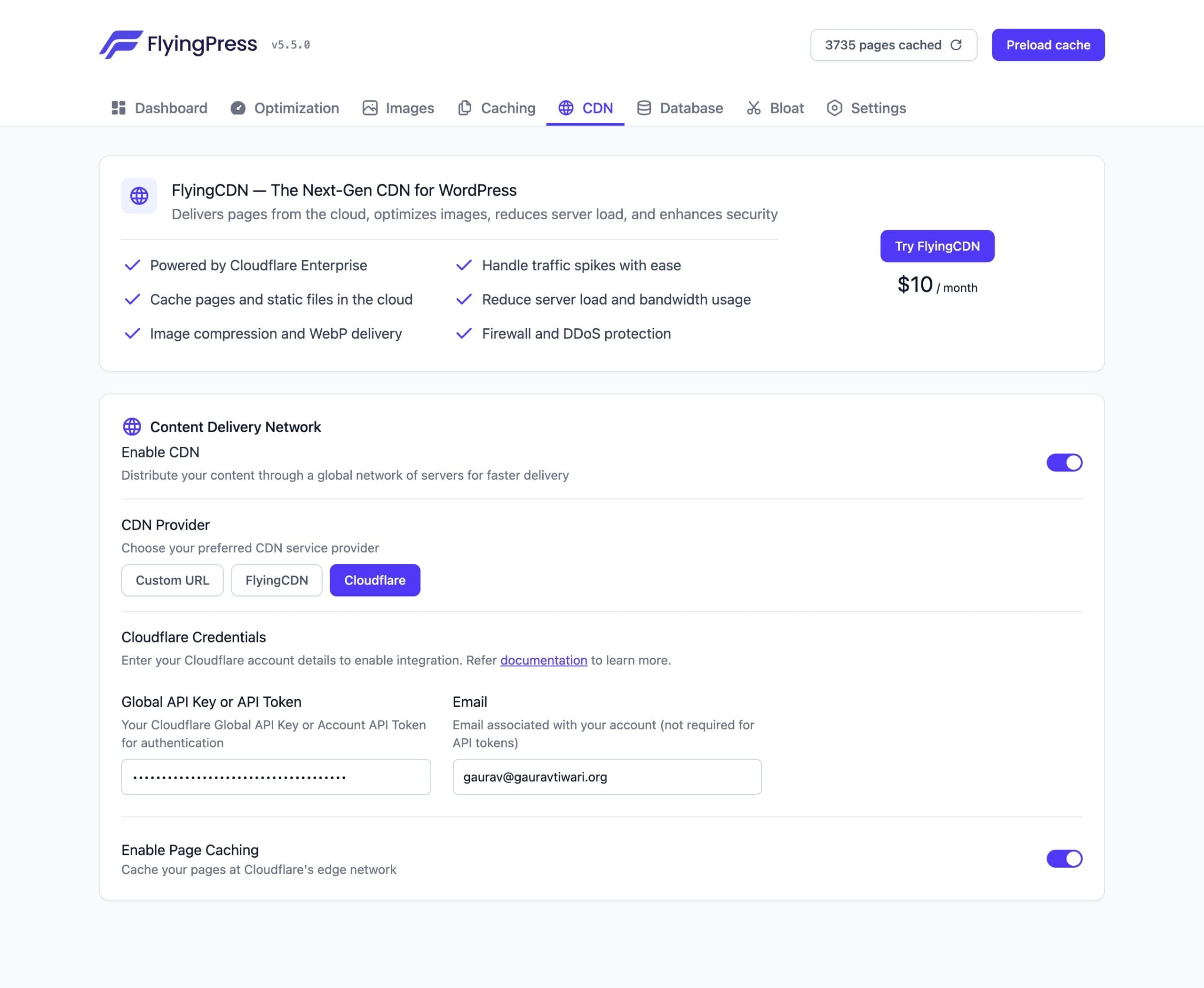
- On this site the CDN tab runs in Cloudflare mode with edge page caching enabled, because my Cloudflare setup predates FlyingCDN and already does the job.
- On client sites without an existing Cloudflare configuration, I enable FlyingCDN instead: $10/month per site with 100 GB included, powered by Cloudflare Enterprise, and it configures itself with one API key.
- Either way, the integration is the cleanest CDN setup I’ve seen in a caching plugin: the settings above took two minutes.
Database

- Honest disclosure: every Database toggle is off on this site because Advanced Database Cleaner handles scheduled cleanups here with finer control.
- If you don’t run a dedicated cleanup plugin, turn on Automatic Cleaning with revisions, spam comments, expired transients, and table optimization. That covers everything most blogs need, free.
Bloat
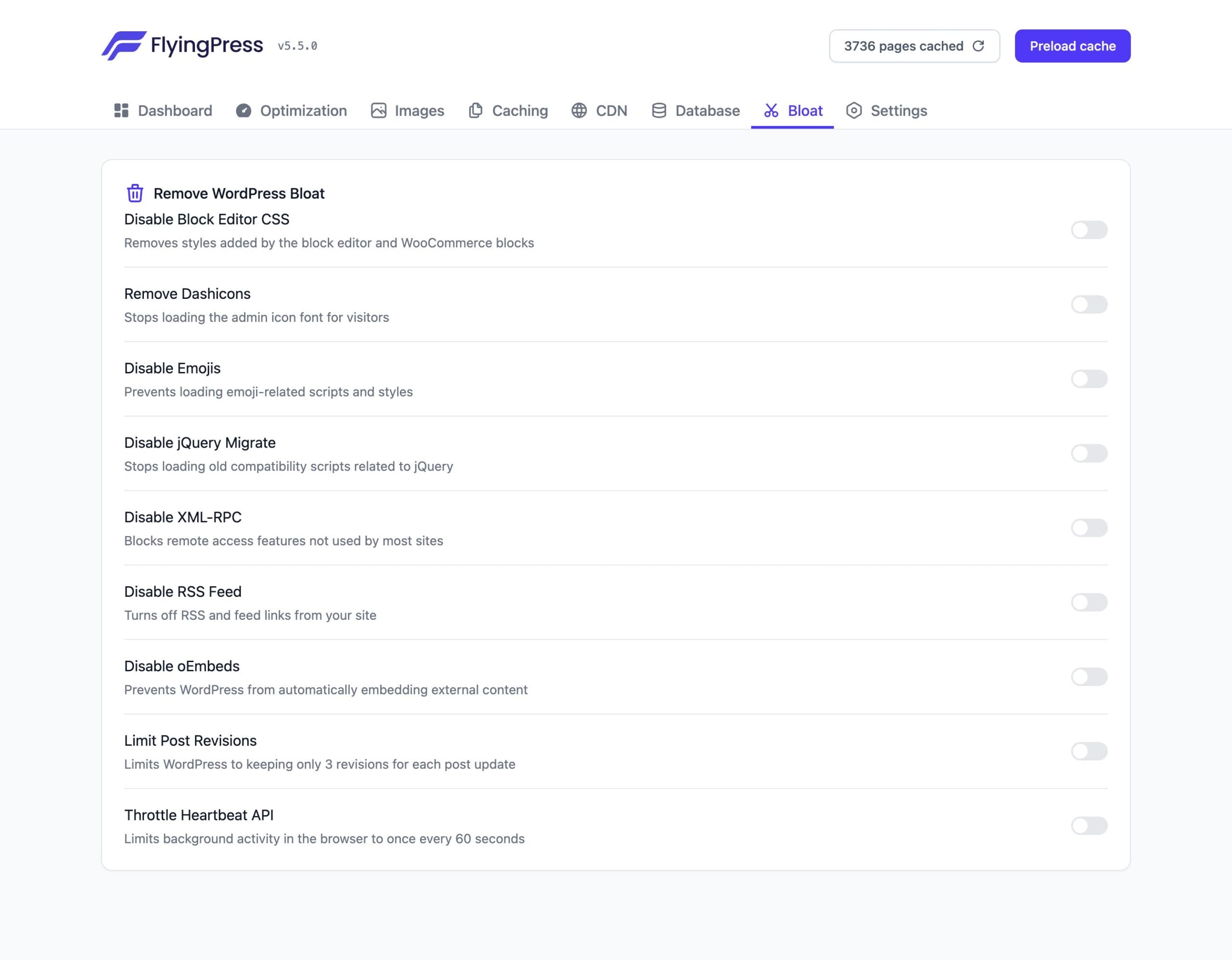
- Same story here: the Bloat toggles are off on this site because Perfmatters and my own Functionalities plugin already strip emojis, XML-RPC, jQuery Migrate, and dashicons.
- If FlyingPress is your only optimization plugin, enable Disable Emojis, Disable jQuery Migrate, Disable XML-RPC, Remove Dashicons, and Throttle Heartbeat API. Skip Disable RSS Feed if anyone subscribes to your content.
- The point stands either way: FlyingPress bundles the bloat-removal features that WP Rocket never bothered to build.
Want the same setup? Every section above shows my exact production settings on FlyingPress 5.6. Work through the seven screenshots top to bottom and you’ll have this site’s configuration in about ten minutes. If you manage multiple sites, FlyingPress also lets you export and import settings as JSON from the Settings tab.
How do I score now?
When I was using WP Rocket, my site’s performance first improved but over the last year it had noticeably slipped, with LCP (Largest Contentful Paint) hitting 3.7 seconds and FCP (First Contentful Paint) at 3.2 seconds.
Since switching to FlyingPress, these metrics have started improving significantly within a few weeks, now at 2.9 seconds for LCP and 2.6 seconds for FCP. However, with over 3,000 pages on gauravtiwari.org, achieving full Core Web Vitals (CWV) compliance across the site will take some time, but the progress is promising. (Update: It’s done. See below.)
For my important pages like this, the CWV is now clear.
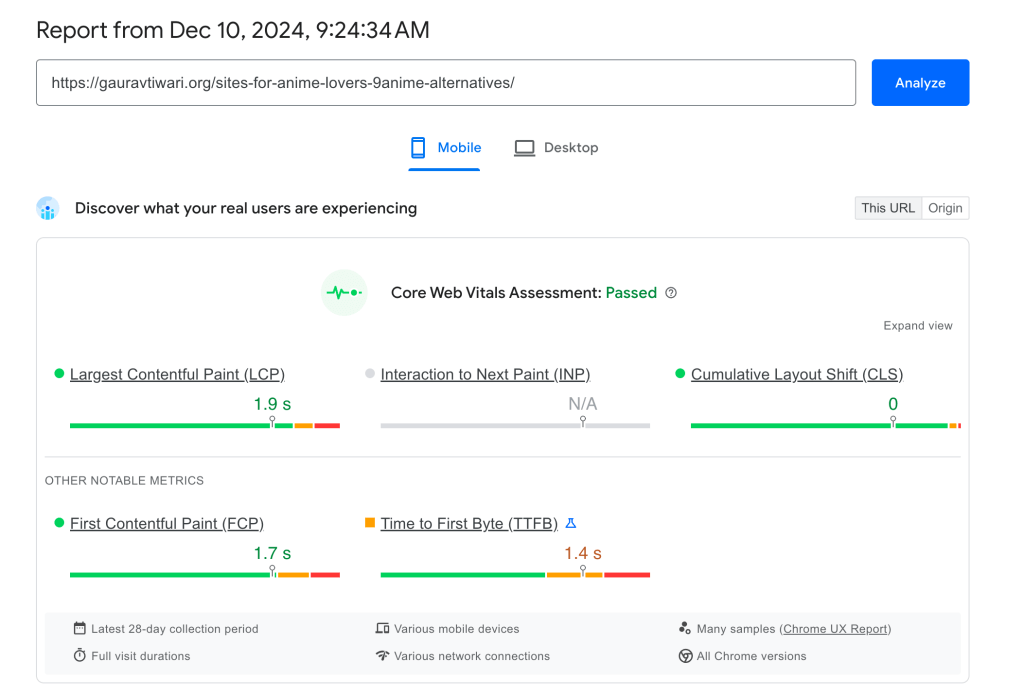
Update: Core Web Vitals for the complete site have now passed the assessment.
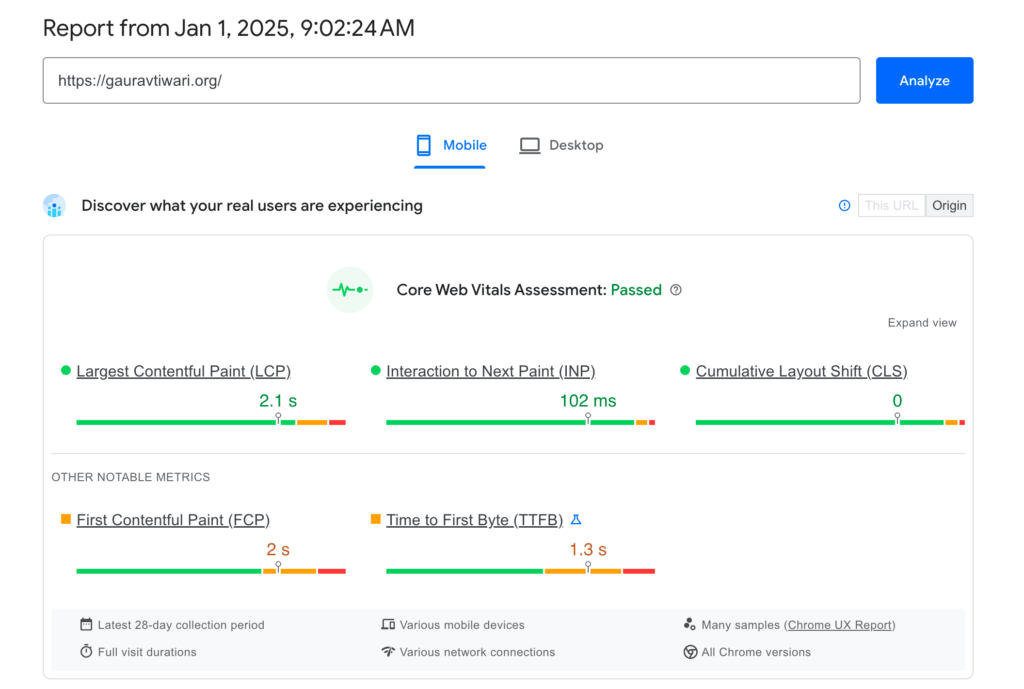
June 2026 check-in: eighteen months after the switch, here is the live 28-day Chrome UX Report field data for this site on mobile. CLS holds at a flat 0, and LCP sits at 2.5 seconds, right at Google’s threshold, which is honest work for a content site now past 3,000 pages with ads and embeds. The fight for the last 200 milliseconds is a hosting and image problem, not a caching one; my Core Web Vitals lesson explains how to read these numbers on your own site.

Who Should Use FlyingPress?
FlyingPress is perfect for:
- Bloggers and business owners who want fast, user-friendly websites.
- Developers who need granular control over optimizations.
- Agencies managing multiple sites, thanks to its reliability and scalability.
Who Should NOT Use FlyingPress
FlyingPress isn’t the right call for everyone, and I’d rather lose the affiliate click than send you to the wrong tool. Skip FlyingPress if:
- You’re on LiteSpeed hosting AND don’t have a budget. Hosts like Hostinger, Hosting.com (formerly A2 Hosting), and many starter plans run LiteSpeed servers. There, LiteSpeed Cache is free, integrates at the server level, and is genuinely faster than any third-party cache plugin. Paying $59 for FlyingPress on LiteSpeed is money is the convenience over LiteSpeed Cache plugin’s complex setup that breaks every few weeks.
- You want the biggest support team and documentation library. FlyingPress docs are thin once you hit an edge case, and the community is smaller. If you lean on tutorials, forum threads, and a deep knowledge base, WP Rocket’s ecosystem is still the safer pick.
- You only need asset and script control. If your caching is already handled and you just want to disable scripts per page, control what loads where, and trim plugin bloat, that’s Perfmatters’ job, not a full caching plugin’s.
FlyingPress vs WP Rocket: Head-to-Head
I used WP Rocket for 10 years before switching to FlyingPress. Both are premium caching plugins. Both work well. But FlyingPress wins on performance, and the data backs it up.
| Feature | FlyingPress | WP Rocket |
|---|---|---|
| Core Web Vitals (Chrome UX) | Best in class | Good, not the best |
| Default Protocol | Optimized out of the box | Needs manual tuning |
| Built-in CDN | Yes (FlyingCDN) | No (requires Cloudflare or third-party) |
| Image Optimization | Built-in (WebP/AVIF) | Requires Imagify (separate plugin) |
| Unused CSS Removal | Yes | Yes |
| Delay JavaScript | Yes | Yes |
| Database Cleanup | Built-in | Built-in |
| Bloat Removal | Built-in (emojis, embeds, dashicons) | Limited |
| Price (1 site) | $59/year | $59/year |
| Renewal Price | Same | Same |
WP Rocket has a larger community with more tutorials. But FlyingPress delivers better default performance and bundles more features natively (CDN, image optimization, bloat removal) at the same $59 entry price, while its multi-site tiers undercut WP Rocket’s.
If you are happy with WP Rocket and your Core Web Vitals are passing, there is no urgent reason to switch. But if you are starting fresh or chasing the best possible performance scores, FlyingPress is the better choice in 2026.
FlyingPress vs LiteSpeed Cache
LiteSpeed Cache is free and excellent, but it only works on LiteSpeed servers. If your host runs LiteSpeed (Hostinger, Hosting.com, Starter plans on many hosts), use LiteSpeed Cache. It integrates at the server level, which gives it a speed advantage no third-party plugin can match.
FlyingPress works on any server: Nginx, Apache, LiteSpeed, OpenLiteSpeed. If you are on Hetzner, Vultr, DigitalOcean, Cloudways (Nginx stack), or any non-LiteSpeed host, FlyingPress is the better option.
The simple rule: LiteSpeed server and no budget? Use LiteSpeed Cache (free). Anything else? Use FlyingPress ($59/year). Do not run both.
FlyingPress Pros and Cons
Pros:
- Best Core Web Vitals scores. Based on Chrome UX Report data, FlyingPress consistently outperforms WP Rocket and other caching plugins on real-world metrics.
- All-in-one. Caching, CDN, image optimization, unused CSS removal, JavaScript deferral, bloat removal, database cleanup. One plugin replaces three or four.
- FlyingCDN is genuinely fast. It runs on Cloudflare Enterprise with 330+ edge locations, including edge HTML caching most CDN setups can’t match. Eliminates the need for a separate Cloudflare or BunnyCDN configuration in most setups.
- More plugin for the same money. FlyingPress matches WP Rocket’s $59 entry price with CDN integration, image optimization, and bloat removal included natively, and its multi-site tiers cost less.
- Works on any server. Nginx, Apache, LiteSpeed, OpenLiteSpeed. No vendor lock-in.
- Clean, minimal interface. No upsells, no bloated dashboard. Settings are organized and straightforward.
Cons:
- Documentation is thin. Getting started is easy but troubleshooting specific issues requires more guidance than what is currently available.
- No regex for unused CSS. Removing specific CSS patterns requires manual exclusion lists. WP Rocket handles this more flexibly.
- Smaller community. Fewer third-party tutorials, fewer forum threads, fewer YouTube walkthroughs compared to WP Rocket.
- FlyingCDN costs extra. The CDN is not included in the plugin price. It costs $10/month per site with 100 GB of bandwidth included, then $5 per additional 100 GB. For high-traffic, media-heavy sites, this adds up.
- No free tier. WP Rocket does not have one either, but LiteSpeed Cache is completely free on LiteSpeed servers.
Is FlyingPress Worth It?
At $59/year for a single site, yes. The math is simple.
FlyingPress replaces your caching plugin ($59/year for WP Rocket), your image optimization plugin (Imagify or ShortPixel, $5-10/month), and potentially your CDN (if you use FlyingCDN instead of a separate service). That is $120-180/year in tools consolidated into one $59 plugin.
More importantly, it delivers better performance than the stack it replaces. I saw measurable Core Web Vitals improvements on every site I migrated from WP Rocket to FlyingPress. Not marginal differences. Meaningful improvements that show up in Chrome UX Report data.
The only scenario where FlyingPress is not worth it: if you are on a LiteSpeed server and LiteSpeed Cache handles your needs for free. In every other scenario, FlyingPress earns its $59.
Problems with FlyingPress
FlyingPress is excellent, but three things deserve honest criticism. The documentation, while helpful, isn’t as thorough or user-centric as it could be. Expanding and simplifying it would greatly benefit users.
Additionally, the lack of a regex option for removing unused CSS makes CSS-tweaking more time-consuming than necessary. Addressing these gaps would make an already excellent plugin even more user-friendly.
And then there’s pricing. I criticized WP Rocket above for raising prices, so fairness demands the same scrutiny here. FlyingPress nudged its prices up in 2026 too: Starter went from $49 to $59 a year. For a stretch it also trimmed the Business plan from 25 sites to 10 at the same $229, a quiet downgrade I flagged at the time. To their credit, they’ve since put Business back to 25 sites at $229, so agencies get the coverage they used to. I’d still rather see prices hold steady, but reversing a limit cut after users pushed back is the opposite of the WP Rocket playbook, and worth saying plainly.
The reason I’m still here is what ships alongside the price. WP Rocket raised prices while its feature set stagnated. FlyingPress raised them while shipping built-in image optimization, a rebuilt Cloudflare integration, real-user vitals monitoring, a leaner background queue, and now Redis object caching in 5.6. Paying a little more for visibly more development is a defensible trade. If the 5.x momentum slows and the prices keep climbing, I’ll write that update too. Same standard for everyone.
Beyond those three, I couldn’t find another issue worth mentioning here.
FlyingPress Review: Indispensable
FlyingPress handles caching, but performance is a full-stack problem. Pair it with Perfmatters for asset management and proper image compression. For the hosting layer, the Hetzner vs Vultr vs RackNerd comparison covers high-performance, low-cost hosting. My performance optimization services include FlyingPress configuration as part of the full stack. And if you want to understand the whole discipline rather than just this plugin, my free caching lesson and the complete speed stack cover everything FlyingPress plugs into.
FlyingPress
Pros
- Best Core Web Vitals scores among all WordPress caching plugins based on Chrome UX data.
- Built-in FlyingCDN eliminates the need for a separate CDN service.
- Native image optimization with WebP/AVIF conversion and lazy loading.
- $59/year for a single site, the same as WP Rocket, with CDN integration and image optimization included; multi-site tiers cost less.
- FlyingCDN runs on Cloudflare Enterprise with 330+ edge locations and edge HTML caching.
- Bloat removal features disable unused WordPress defaults (emojis, embeds, dashicons).
Cons
- Documentation could be more thorough and beginner-friendly.
- No regex option for removing unused CSS. Manual process required.
- Smaller user community than WP Rocket. Fewer third-party tutorials available.
- FlyingCDN is an additional cost ($10/month per site, 100 GB bandwidth included) on top of the plugin license.
Summary
FlyingPress is the best WordPress caching plugin I have used. I switched from WP Rocket after 10 years and have not looked back. It delivers the best Core Web Vitals scores based on Chrome UX data, includes built-in CDN (FlyingCDN), and handles image optimization natively. The only gaps are documentation depth and lack of regex for unused CSS removal. At $59/year for a single site, it matches WP Rocket’s price while outperforming it on every metric I track and bundling CDN, image optimization, and bloat removal natively.
Price: USD 59 /year
Try FlyingPressFrequently Asked Questions
Is FlyingPress better than WP Rocket?
For raw performance, yes. FlyingPress delivers better Core Web Vitals scores based on Chrome UX Report data and includes CDN integration and image optimization at the same $59 entry price. WP Rocket has a more polished interface and a larger community, so it depends on whether you prioritize performance or ecosystem.
Does FlyingPress work with Cloudflare?
Yes. The CDN tab has a dedicated Cloudflare mode with edge page caching, which is exactly how I run it on this site. If you use FlyingCDN instead, you don’t need Cloudflare’s CDN as well, but the two don’t conflict.
Is FlyingPress compatible with all WordPress themes?
Yes. I’ve tested it with GeneratePress, Kadence, Bricks Builder, and custom themes. Occasionally, aggressive JavaScript delay can break interactive elements, but the exclusion settings handle those edge cases easily.
How much does FlyingPress cost?
Starter is $59/year for 1 site, Pro is $109/year for 3 sites, Business is $229/year for 25 sites, and Unlimited is $279/year. All plans include the same features, including the Redis object caching added in 5.6. FlyingCDN costs an additional $10/month per site with 100 GB of bandwidth included.
Should I use FlyingPress with Perfmatters?
Yes. FlyingPress handles caching, CDN, and image optimization. Perfmatters handles asset management: disabling unused scripts per page, fine-grained control over what loads where. I use both on every site I manage.
Does FlyingPress slow down the admin dashboard?
No. FlyingPress only affects the frontend. The admin dashboard performance isn’t impacted, and the plugin settings page loads quickly with a minimal, clean interface.
Can I migrate from WP Rocket to FlyingPress?
Yes. Deactivate WP Rocket, install FlyingPress, configure the settings, and clear the cache. No migration tool needed. The two plugins don’t share configuration, so you start fresh, and this review’s settings section is a working template.
Is FlyingCDN worth the extra cost?
For most sites without an existing Cloudflare setup, yes. It runs on Cloudflare Enterprise with 330+ edge locations and includes edge HTML caching. At $10/month per site with 100 GB of bandwidth included, it replaces a stack of CDN add-ons; sites already invested in Cloudflare APO can skip it, which is what I do here.
Does FlyingPress handle image optimization?
Yes. Built-in image optimization converts images to WebP, applies lazy loading, and serves properly sized responsive images. On my install it compressed 8.8 GB of processed originals to 80.4 MB. It eliminates the need for Imagify or ShortPixel in most cases.
What hosting does FlyingPress work best on?
Any server: Nginx, Apache, LiteSpeed, or OpenLiteSpeed. It performs best on Nginx-based hosting like Hetzner, Vultr, DigitalOcean, or Cloudways. On LiteSpeed servers, the free LiteSpeed Cache plugin may be a better choice since it integrates at the server level.
Does FlyingPress support object caching?
Yes, since version 5.6. FlyingPress can use Redis for persistent object caching, which stores repeated database queries in memory to speed up logged-in pages, carts, and the dynamic queries page caching can’t help. Enable it from the dashboard and run 5.6.2 or later, which fixed an early object-cache bug.
Tell Google you want more of this.
Add Gaurav Tiwari as a preferred sourceOne tap, and this site shows up more often in your own Top Stories, AI Overviews and AI Mode. Remove it any time.
Disclaimer: This site is reader-supported. If you buy through some links, I may earn a small commission at no extra cost to you. I only recommend tools I trust and would use myself. Your support helps keep gauravtiwari.org free and focused on real-world advice. Thanks. - Gaurav Tiwari
