
 by
by
Most WordPress sites are built with a page builder. Almost none of mine are. I’ve shipped hundreds of pages, client sites, my own blog, small web tools, on the same handful of blocks, and a page builder was never invited.
This GenerateBlocks review is what six years of that actually taught me. Where GenerateBlocks beats Elementor and Bricks, where it frustrates beginners, and whether the latest releases finally close the gap on everything a page builder still does better.
GenerateBlocks replaces the page builder on most sites, and it’s the tool I reach for by default. It wins on speed, clean output, and zero lock-in, because it lives inside the native block editor instead of bolting a second app on top. It’s not for you if you want drag-anywhere freeform design or a library of one-click templates. That’s the honest tradeoff. The rest of this review is the proof.
| Tested by | Gaurav Tiwari |
| Using GenerateBlocks since | Launch, February 2020 |
| Versions reviewed | GenerateBlocks 2.3.0 (free) + Pro 2.6.0, live on this site |
| Built with it | Hundreds of pages across personal and client sites |
| License | I pay for GenerateBlocks Pro |
| Pricing checked | June 2026 |
| Best for | Anyone who cares about Core Web Vitals and clean code |
| Avoid if | You want a no-code, drag-anywhere builder with hundreds of templates |
- Last verified: June 2026, against GenerateBlocks 2.3.0 and Pro 2.6.0.
- Sources: the live plugins on this site, the official changelogs, and the WordPress.org plugin page.
- What changed: a full Forms system was added, and CSS Mode landed across blocks.
- May change soon: pricing and the Forms module, which is still young.
GenerateBlocks review at a glance
If you want the scorecard before the deep dive, here’s how GenerateBlocks lands across the dimensions that actually decide whether a tool earns a permanent spot in your stack.
What GenerateBlocks actually is
GenerateBlocks is a small set of blocks that live inside the normal WordPress editor. There’s no separate canvas, no “edit with” button, no second interface to learn. You open the same block editor you already use for posts, and a handful of GenerateBlocks blocks are right there in the inserter.
The genius is the restraint. Where Elementor gives you 90-plus widgets, GenerateBlocks gives you a few primitives that combine into anything: Container and Grid for layout, Text for every kind of words, Media for images, and Shape for SVG icons. Pro adds the interactive pieces, Accordion, Tabs, Carousel, Navigation, and now Forms. Learn five blocks deeply and you stop hunting through widget menus. You just build.
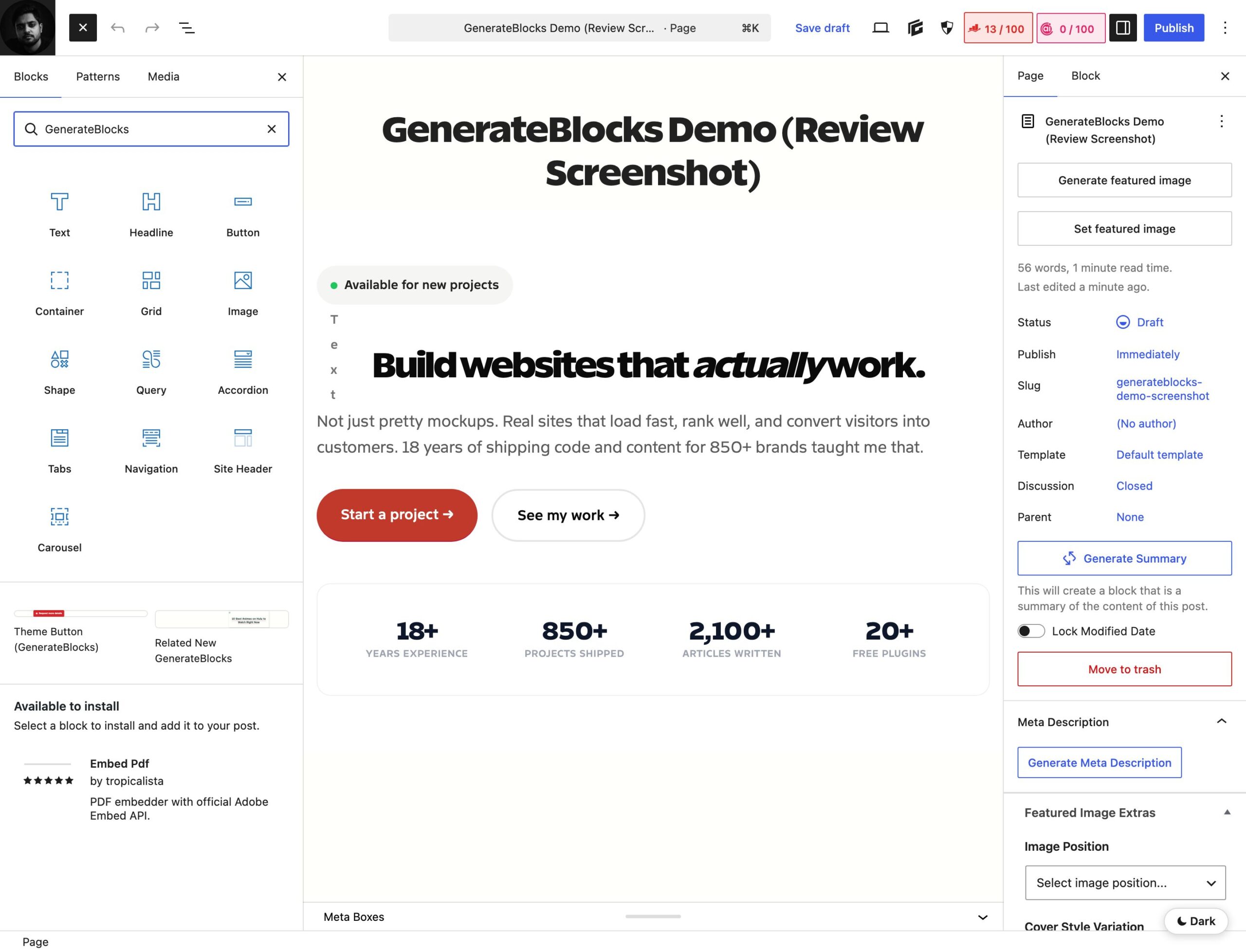
That “native block editor” detail isn’t a marketing line, it’s the whole argument. Because GenerateBlocks outputs real core-compatible blocks, your content isn’t trapped. Turn the plugin off and your pages don’t shatter into shortcode rubble the way an Elementor site does. I ranked it first for exactly this reason in my roundup of the best Gutenberg block plugins, and nothing in 2026 has changed my mind.
The GeneratePress story: how GenerateBlocks grew up
You can’t understand GenerateBlocks without GeneratePress. Tom Usborne launched the GeneratePress theme back in 2014 with one obsession: speed. It became the go-to lightweight theme for developers who wanted control without bloat. GenerateBlocks, which arrived in February 2020, was the natural next step, the layout tools that the theme deliberately left out.
The early versions shipped with just four blocks, and it looked almost too simple. But a later rewrite changed the ceiling entirely: a refactored Query block for dynamic content, dynamic tags for data binding, Accordion and Tabs, and full WCAG accessibility support, all while staying 100% backward compatible with the old blocks. The pattern here matters. GeneratePress ships slowly and rarely breaks things, which is exactly what you want from the foundation of a few hundred client sites.
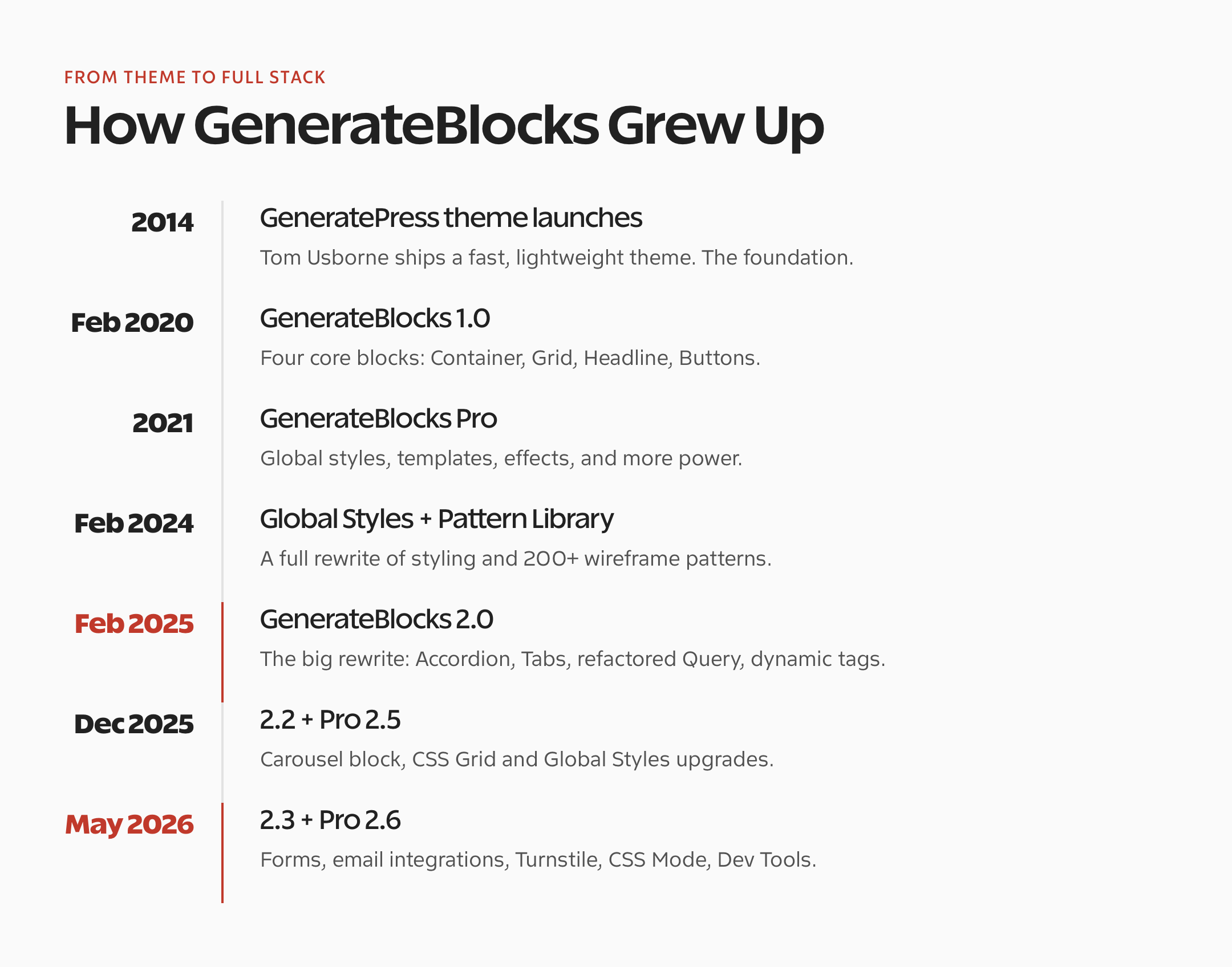
I lived through that whole arc. I watched it go from “a clever container block” to a system that can build a full site, header and footer included. If you want the theme side of the story, I broke down the tiers in my GeneratePress Free vs Premium comparison. The short version: the theme and the blocks are two halves of the same lightweight philosophy and both cover the same GenerateBlocks best use cases.
What’s new in GenerateBlocks
The recent releases are the biggest functional jump in years, and two features stand out. Here’s what they actually changed, running live on this site right now.

A real Forms system
This is the headline. GenerateBlocks Pro now ships a first-class Forms system to help you build fast and beautiful forms: a Form block, field blocks, server-side validation, spam protection, and submission storage, all native to the block editor. You start from a Contact form or Email signup template, and the field blocks drop in ready to style.
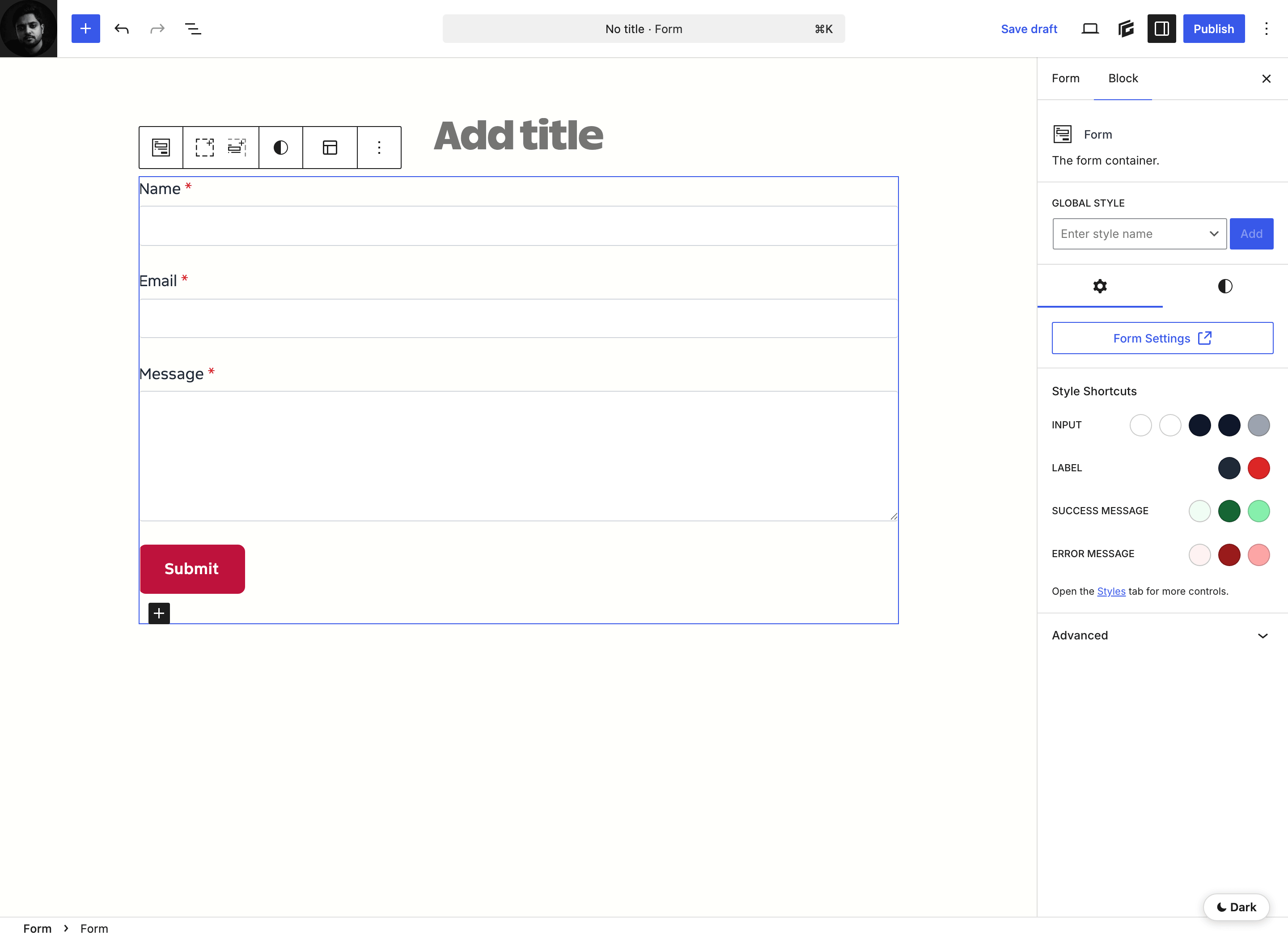
What makes it more than a toy is the integration list. Form submissions can fire emails, confirmation messages, and webhooks, and connect straight to Mailchimp, Kit, MailerLite, ActiveCampaign, and Brevo. Spam is handled with a honeypot plus optional Cloudflare Turnstile. For a lot of small sites, this quietly removes the need for a separate forms plugin entirely. One less thing loading on every page.
CSS Mode for people who actually write CSS
The second big change is CSS Mode, now expanded across blocks and Global Styles. Flip a block into CSS Mode and you get a real code editor for that block’s styles, the exact CSS that generates, editable directly. No fighting toggles when you already know the property you want.
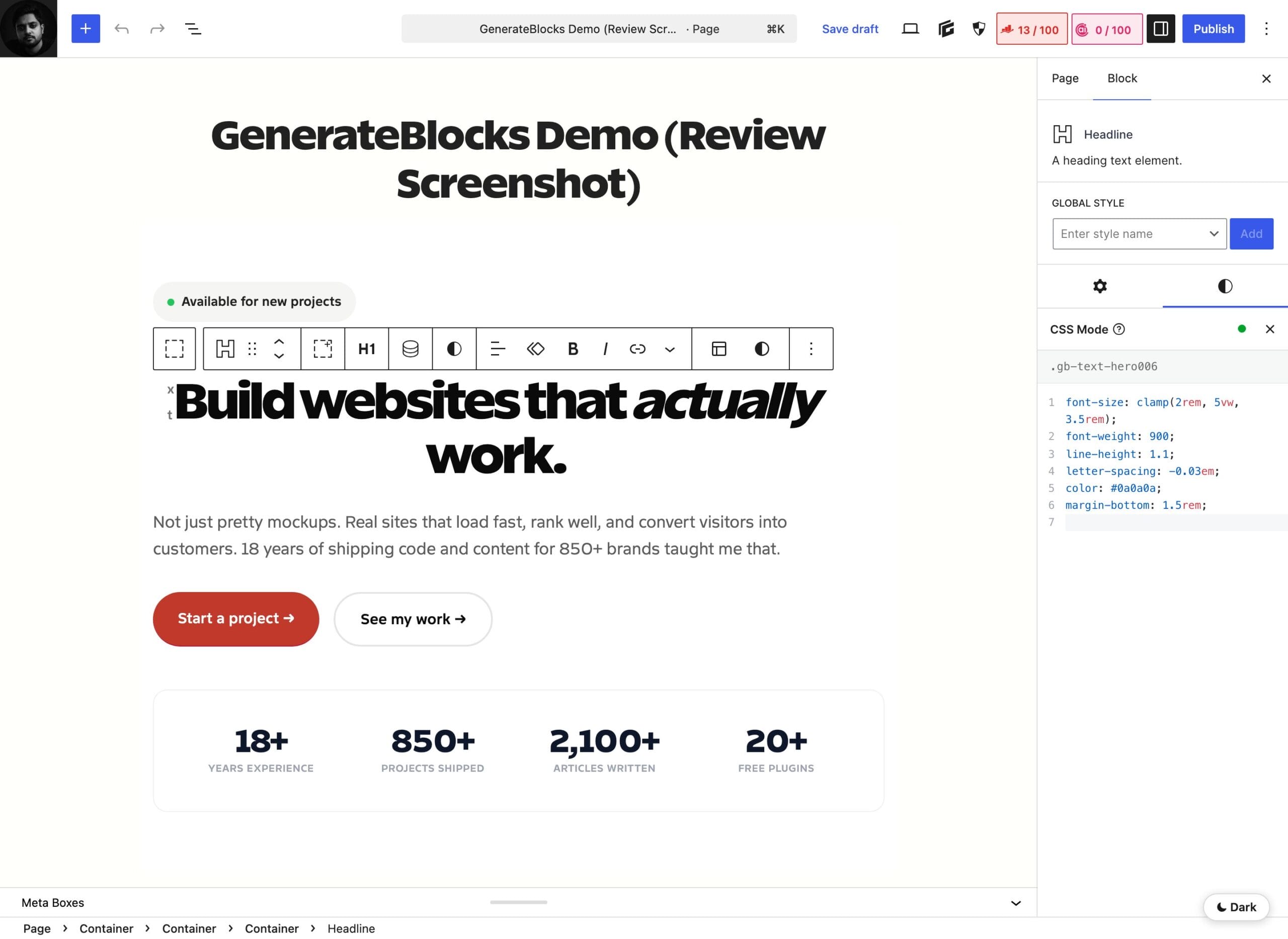
For a developer, this is the feature I didn’t know I was waiting for. It turns GenerateBlocks into something closer to a styling layer over the block editor, where the visual controls and raw CSS sit side by side. Recent updates also hardened security on legacy dynamic URLs and added a Set/Replace button for media. Small things, but they’re the kind of polish that tells you the plugin is maintained by people who use it.
How I actually use GenerateBlocks
Here’s my real setup, not a theoretical one. Every site I touch runs GenerateBlocks plus GenerateBlocks Pro. I build a small library of Global Styles first, named classes like .button__default, .card__boxed, and .gt-inner, so a button or a card looks consistent everywhere and I change it in one place. This site has 45 of them.

That’s the part beginners skip and pros never do. Global Styles turn GenerateBlocks from “a block plugin” into a design system. It’s the same discipline that made me fall for block-based building in the first place, which I wrote about in my piece on my journey with WordPress page builders. If you want the full technical stack, ACF blocks and all, it’s in my WordPress block editor setup.
Installing and using GenerateBlocks: the 5-minute version
One of GenerateBlocks’ best traits is that there’s almost nothing to configure. Here’s the whole getting-started flow, the way I’d set it up on a fresh site.
- Install the plugin. Go to Plugins, Add New, search “GenerateBlocks,” install and activate. It’s free. For the Pro blocks and Global Styles, add GenerateBlocks Pro and drop in your license key.
- Open any page. No separate builder loads. You’re in the normal editor. Hit the inserter and you’ll see the GenerateBlocks blocks.
- Start with a Container. Add a Container or Grid, then nest Text, Media, and Buttons inside. That parent-child structure is the entire mental model.
- Set your Global Styles. Define a couple of button and card classes once. Reuse them everywhere.
- Browse the Pattern Library. For a head start, the built-in patterns give you prebuilt sections you can drop in and restyle.
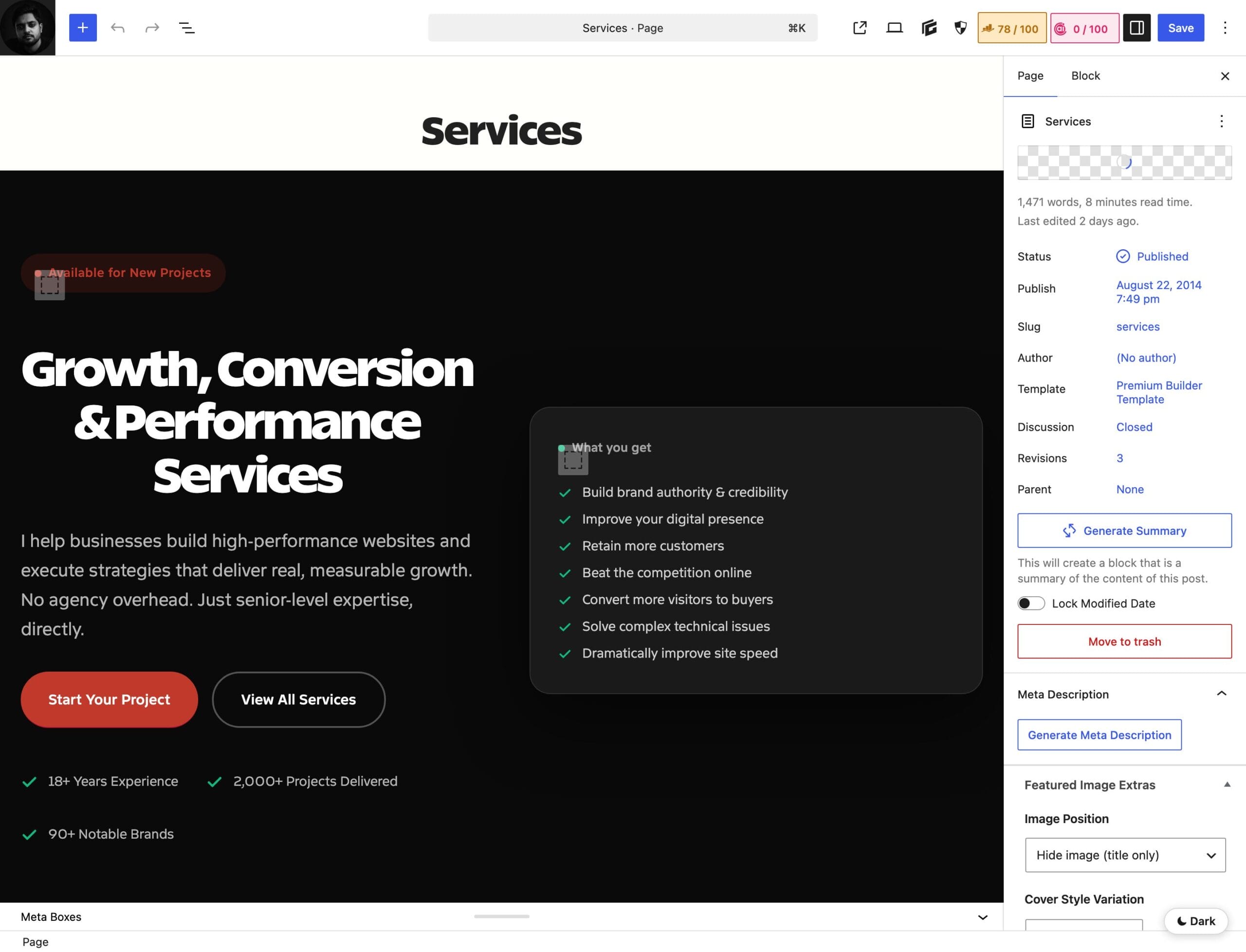
Here’s a real example, my own Services page, built entirely with GenerateBlocks. This is it open in the plain block editor on GeneratePress’s Premium Builder template. No separate builder loads, no second interface, just blocks.
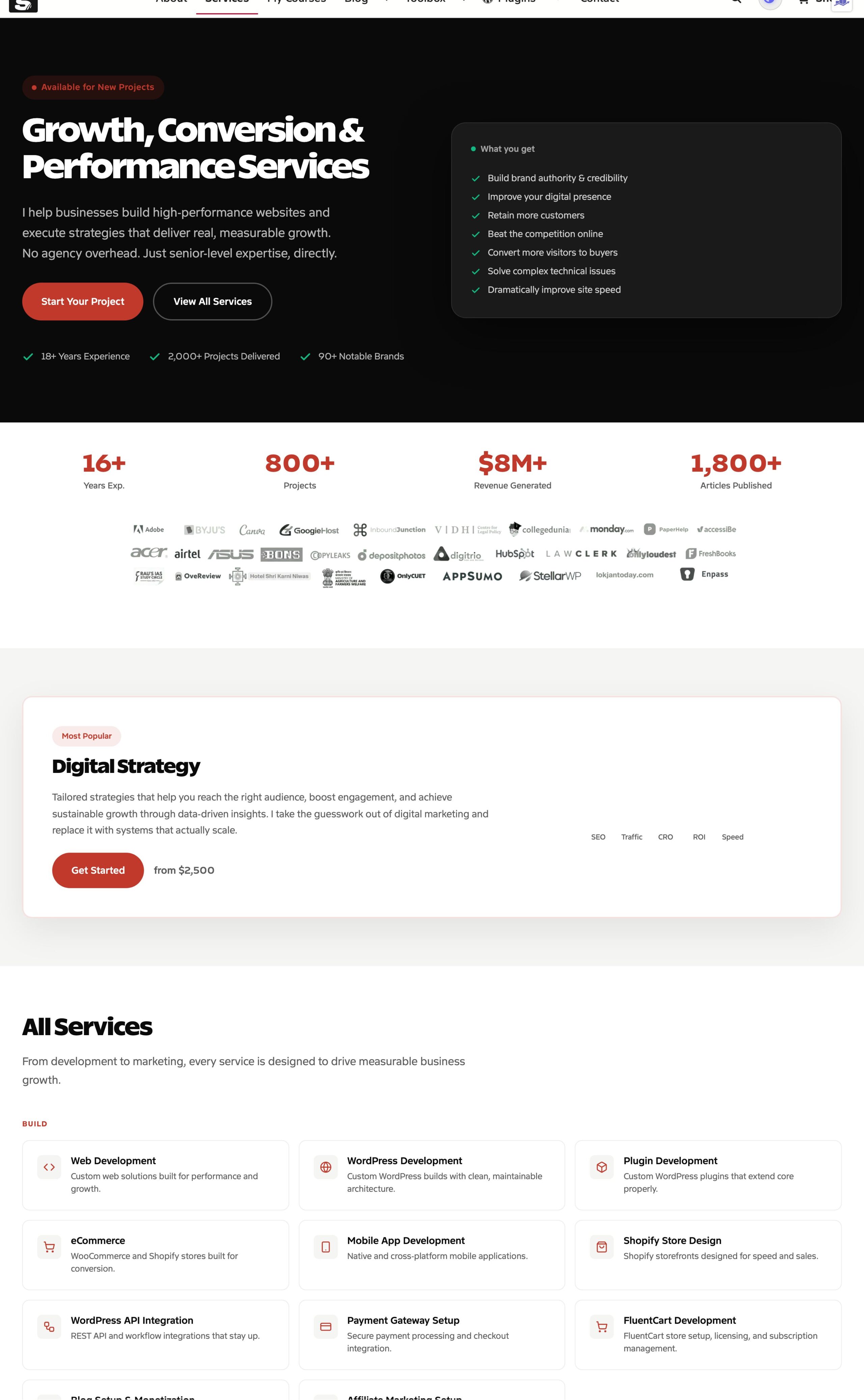
And here’s that same Services page on the front end: a hero, a stats row, brand logos, a featured offer, and the full services grid. All clean GenerateBlocks output, no builder overhead, no render-blocking bloat, just the markup it needs and nothing more.
GenerateBlocks vs Elementor and Bricks
The title of this GenerateBlocks review asks whether it can replace page builders. So let’s put it next to the two that matter most: Elementor, the market giant, and Bricks, the developer darling. The honest answer depends on what you value, but the numbers tell a clear story on performance.
| Dimension | GenerateBlocks | Elementor | Bricks |
|---|---|---|---|
| Architecture | Native block editor | Separate visual builder | Separate visual builder |
| Page weight (same design) | ~331 KB | ~631 KB | Between the two |
| Output | Clean, semantic HTML | Heavy, nested DIVs | Cleaner than Elementor |
| Lock-in | None, stays as core blocks | High, rebuild to leave | High, rebuild to leave |
| Learning curve | Moderate | Low (drag and drop) | Higher |
| Best for | Performance, clean code, devs | No-code designers, templates | Freeform power users |
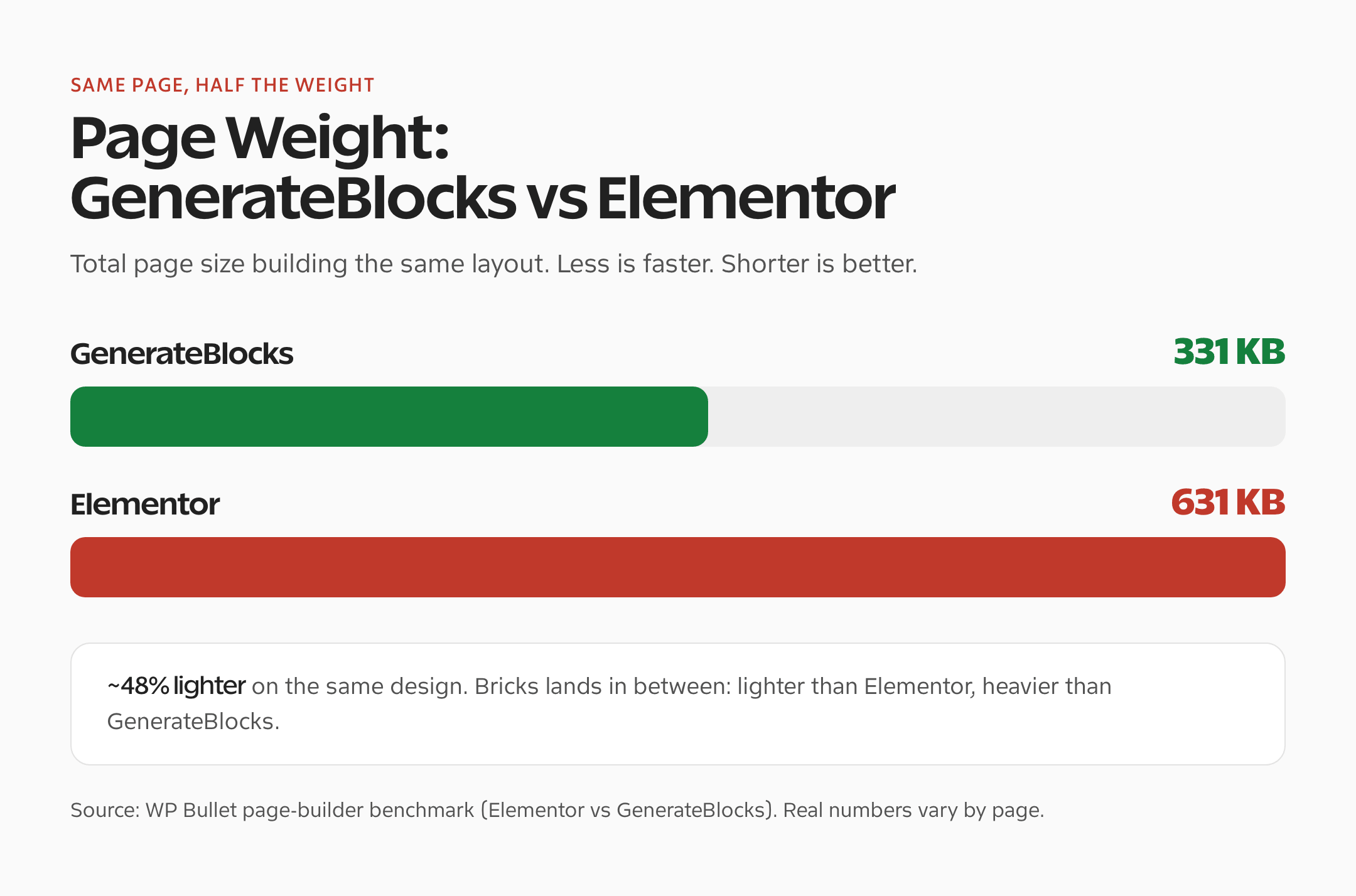
The performance gap is the part people underestimate. In a same-page benchmark, GenerateBlocks produced roughly half the weight of Elementor building the identical layout, and real users have reported mobile PageSpeed scores jumping from the 40s to the high 80s just by switching. That’s not a tweak. That’s the difference between passing and failing Core Web Vitals. I put GenerateBlocks near the top of my best WordPress page builders guide for the same reason.
What about Kadence Blocks, the other big block plugin? It’s genuinely good, just built on a different philosophy: more prebuilt blocks, more out-of-the-box convenience, a little more weight. I gave both a full head-to-head in my Kadence Blocks vs GenerateBlocks comparison, so I won’t repeat it here. Short version: if you want maximum performance and a class-first workflow, GenerateBlocks; if you want abundance and speed of assembly, Kadence.
GenerateBlocks pricing: is it worth it?
GenerateBlocks free is genuinely useful on its own. The four core blocks and basic styling will build a real site with zero spend. Most people should start there.
GenerateBlocks Pro is $99 a year for up to 500 sites, which unlocks Global Styles, the Pattern Library, effects, the interactive blocks, and now Forms. If you build for clients, the better math is GeneratePress One at $149 a year: it bundles GeneratePress Premium, GenerateBlocks Pro, and GenerateCloud into a single license. Buying them separately runs over $250, so the bundle is the obvious move for anyone serious. You can compare the options on the GeneratePress pricing page. One honest note: there’s no lifetime license anymore, so price it as a recurring cost.
What the WordPress.org reviews say
I’m not the only one who feels this way. On WordPress.org, GenerateBlocks holds a 4.9 out of 5 star rating across roughly 120 reviews, with 94% of them five stars, on 200,000-plus active installs. That’s an unusually clean record for a plugin this capable.
The praise clusters exactly where you’d expect: performance and how lightweight it is, the stability of the minimalist approach, and Tom Usborne’s responsive support. One reviewer reported their mobile PageSpeed score going from 49 to 88 after moving off Elementor. The complaints are real but minor, occasional conflicts with other plugins, a few limits in the free version’s responsive controls, the odd translation gap, and a missing “order by random” option in the Query block. Read enough of them and a pattern emerges: people don’t churn off GenerateBlocks. They settle in. You can read them yourself on the official plugin page.
The honest cons: who should not use GenerateBlocks
Every review I’ve ever published about GenerateBlocks has been positive, so let me push hard in the other direction here, because the tradeoffs are real and you deserve them straight.
- The learning curve is real. If you’re coming from Elementor’s drag-anywhere canvas, the Container-and-Grid model feels foreign for a week. You build with structure, not by dropping boxes wherever your cursor is. Most people get it, but the first few pages are slower.
- Fewer ready-made templates. The Pattern Library has grown, but it’s nowhere near Elementor’s or Divi’s ocean of one-click kits. If your workflow is “import a template, swap the text,” you’ll feel the gap.
- No big prebuilt effects library. There’s no large animation and motion library like Elementor’s, so heavy on-scroll motion still leans on CSS or GenerateBlocks’ interactions.
- The Query and Loop blocks have edges. For complex dynamic layouts you can hit limits that need a workaround, like that missing order-by-random option. It’s powerful, but it’s not infinitely flexible.
So who should skip it? If you’re a non-technical user who wants to drag elements freely and assemble a site from prebuilt templates in an afternoon, Elementor or Divi will feel kinder. GenerateBlocks rewards people who think in structure and care about what ships to the browser. That’s the honest line.
Popups, modals, and off-canvas panels (Overlay Panels)
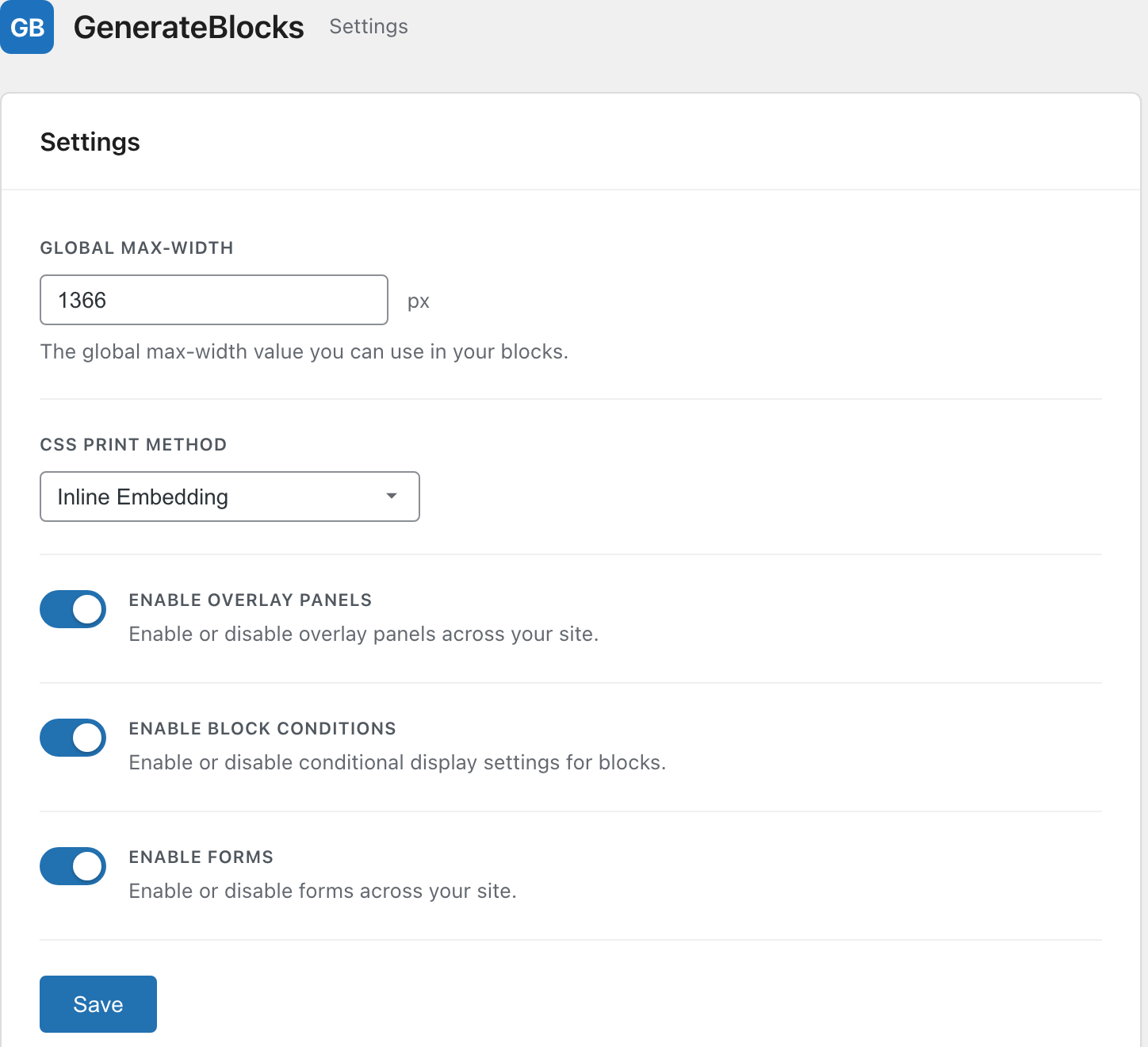
GenerateBlocks Pro includes Overlay Panels, a built-in builder for popups, modal and non-modal windows, off-canvas menus, slide-in panels, tooltips, and even mega menus. You turn it on under Settings with a single toggle, “Enable Overlay Panels.”
It’s a real popup system, not a half-measure. You pick how a panel opens and closes with triggers like click, hover, exit intent, a scroll percentage, a time delay, or a custom event such as a WooCommerce add-to-cart, then you gate it with display conditions on page, post type, user role, device, date and time, referrer, cookies, and more. It’s a Pro feature, so the free version doesn’t include it. If popups were your one reason to skip GenerateBlocks, that’s covered now.
GenerateBlocks review verdict: can it replace page builders?
Yes, for most sites, and it already has for me. GenerateBlocks replaces the page builder on every site I build because it gives me the layout power I need without the page weight, the lock-in, or the second interface. The latest releases, with native Forms and CSS Mode, only widened that lead. The question stopped being “can it replace a page builder” years ago. Now it’s “why would I add a page builder on top of the editor I already have.”
The catch is who it’s for. GenerateBlocks isn’t trying to be the friendliest tool for someone building their first site this weekend. It’s the tool you grow into and then never leave, the one that makes your sites faster, cleaner, and genuinely yours. After six years and a few hundred pages, I’m still using it on everything, and I plan to keep doing exactly that.
GenerateBlocks

Pros
- Native block editor, so there is zero vendor lock-in. Disable it and you keep standard blocks.
- The lightest way to build. Roughly half the page weight of Elementor on the same design.
- GenerateBlocks Pro is $99 a year for up to 500 sites, with no per-site upsell.
- Global Styles turn it into a real design system you change in one place.
- Adds a full Forms system with Mailchimp, Kit, Brevo, and Turnstile.
- New CSS Mode lets you edit a block's CSS directly, perfect for developers.
Cons
- Real learning curve coming from Elementor's drag-anywhere canvas.
- Fewer ready-made templates and kits than Elementor or Divi.
- No large prebuilt animation and effects library like Elementor; heavy motion still leans on CSS.
- The Query and Loop blocks can hit edges on complex dynamic layouts.
Summary
GenerateBlocks is the block plugin I build every site on. It turns the native WordPress editor into a fast, clean layout system with no lock-in, and recent releases added real Forms and CSS Mode. It is not the friendliest tool for a total beginner who wants drag-and-drop and one-click templates, but for anyone who cares about performance and clean code, nothing else comes close.
Price: USD 99 /year
Get GenerateBlocks ProGenerateBlocks review FAQ
Is GenerateBlocks worth it?
Yes, especially the Pro version if you build more than one site. GenerateBlocks Pro is $99 a year for up to 500 sites and unlocks Global Styles, the Pattern Library, and Forms. The free version is genuinely capable too, so you can test the workflow before paying anything.
Is GenerateBlocks better than Elementor?
For performance and clean code, yes. GenerateBlocks builds pages roughly half the weight of Elementor and leaves no lock-in because it outputs native blocks. Elementor wins on drag-and-drop friendliness and its huge template library. For most performance-focused sites, GenerateBlocks is the better long-term choice.
Is the free version of GenerateBlocks good enough?
For a lot of sites, yes. The free four blocks (Container, Grid, Text, Buttons, plus Media and Shape) build real layouts with no spend. You’ll want Pro once you need Global Styles, the interactive blocks like Accordion and Tabs, the Pattern Library, or the new Forms system.
Does GenerateBlocks slow down your site?
No, the opposite. GenerateBlocks only loads the CSS each page actually uses and outputs clean, semantic HTML. In benchmarks it produces about half the page weight of Elementor on the same design, which is why users report big Core Web Vitals and PageSpeed gains after switching.
Do you need GeneratePress to use GenerateBlocks?
No. GenerateBlocks works with any well-coded theme. It’s built by the same team and pairs perfectly with the GeneratePress theme, but it is not a requirement. You can run GenerateBlocks on Blocksy, Kadence, or most block themes without issue.
What’s new in GenerateBlocks?
The two headline additions are a full Forms system (with email integrations and Turnstile spam protection) and expanded CSS Mode for editing a block’s CSS directly. Recent updates also hardened security on legacy dynamic URLs and added a Set/Replace button for media.
How much does GenerateBlocks Pro cost in 2026?
GenerateBlocks Pro is $99 per year for up to 500 sites. The better value for most people is the GeneratePress One bundle at $149 a year, which includes GeneratePress Premium, GenerateBlocks Pro, and GenerateCloud together. There is no lifetime license option currently.
Since you are already here, check out my GenerateBlocks Skills to build websites easily with AI tools like ChatGPT, Claude, and Gemini. It is 100% free and open source.
Tell Google you want more of this.
Add Gaurav Tiwari as a preferred sourceOne tap, and this site shows up more often in your own Top Stories, AI Overviews and AI Mode. Remove it any time.
Disclaimer: This site is reader-supported. If you buy through some links, I may earn a small commission at no extra cost to you. I only recommend tools I trust and would use myself. Your support helps keep gauravtiwari.org free and focused on real-world advice. Thanks. - Gaurav Tiwari