
WordPress Maintenance Plans: What They Include and Who Needs One
A WordPress maintenance plan keeps core, theme, and plugins patched, backed up, monitored, and fast. Here's what one includes, who needs a wordpress maintenance plan versus who can DIY, 2026 pricing tiers, and a weekly/monthly/quarterly checklist. Based on 18 years maintaining 850+ clients.
 by
by
I once watched a small law firm lose three weeks of new client inquiries because nobody had touched their WordPress site in 14 months. An outdated contact-form plugin got exploited, the host quarantined the site, and there was no recent backup. That is the exact problem a WordPress maintenance plan exists to prevent. It is the standing arrangement, yours or someone you pay, that keeps WordPress core, your theme, and every plugin patched, backed up, monitored, and fast, so a single skipped update never turns into a dead website.
So do you need one? Yes, if your site earns money, takes bookings, runs an online store, or you would lose real work if it went down for a day. You can run it yourself if your site is a simple personal blog, you are comfortable in the WordPress dashboard, and you will genuinely log in every week to update and back things up. The honest answer for most people sits in between, and that is what the rest of this guide sorts out: what a plan covers, what it costs in time or money, and exactly what breaks when you ignore it. After 18 years building and maintaining WordPress sites, I have cleaned up the aftermath of skipping it more times than I can count.
Why trust this: 18 years building and maintaining WordPress, 850+ clients, and a standing WordPress care service I run through Gatilab. I have personally cleaned up sites hacked through stale plugins, restored stores from off-site backups, and watched what a skipped update costs. The numbers below are verified for 2026, and the verdict is the one I give paying clients: if your site earns anything, get a wordpress maintenance plan.
Table of Contents
What a WordPress Maintenance Plan Actually Includes
A WordPress maintenance plan is a recurring service that keeps your site secure, current, and online. At minimum it covers seven jobs: core and plugin updates, off-site backups, security monitoring, malware scanning, uptime monitoring, performance tuning, and a human to call when something breaks. Some providers bundle SEO checks, broken-link fixes, and content edits on top.
What changed in 2026: WordPress now powers about 42% of all websites and 59% of every site running a known CMS (W3Techs, 2026), so it stays the internet’s biggest attack target. Patchstack tracked 11,334 new vulnerabilities across the WordPress ecosystem in 2025, and 91% of them were in plugins, not core. WordPress 7.0 shipped on May 20, 2026, and security patches still arrive out of band and auto-apply on most hosts. The takeaway hasn’t changed: the danger lives in your plugins, and updates are the fix.
The simplest way to picture it: it is the difference between owning a car and owning a car with a service contract. The car still drives either way, right up until the day it doesn’t, and then the gap between the two becomes very expensive. Plans run anywhere from $30 a month for a hands-off personal site to $300+ for an e-commerce store that needs daily backups and priority support. Providers like WP Buffs, GoWP, and Maintainn sell tiered versions of this, and I offer a personalized WordPress care plan for clients who want one point of contact instead of a dashboard full of plugins.
Do You Even Need One? A 30-Second Test
Before you spend a rupee or a dollar, answer four questions honestly. If you say yes to two or more, you need a maintenance plan rather than a maybe.
- Does your site make money, take bookings, or collect leads? Downtime is lost revenue, not just inconvenience.
- Do you run an online store or any form that handles customer data? That raises both the security stakes and your legal exposure.
- Have you gone more than a month without logging in to update? Be honest. Most people overestimate how often they do this.
- Would you struggle to rebuild the site from scratch if it vanished tomorrow? If you have no recent backup, you already have a problem.
If you answered no to all four, you probably have a low-stakes personal blog and can run a lightweight DIY routine. Everyone else is carrying risk they can’t see until it bites.
The Seven Things a Real Plan Covers
Here is what each part of a real plan does and why it matters. Skip the marketing language and judge a provider on whether they actually deliver these seven.
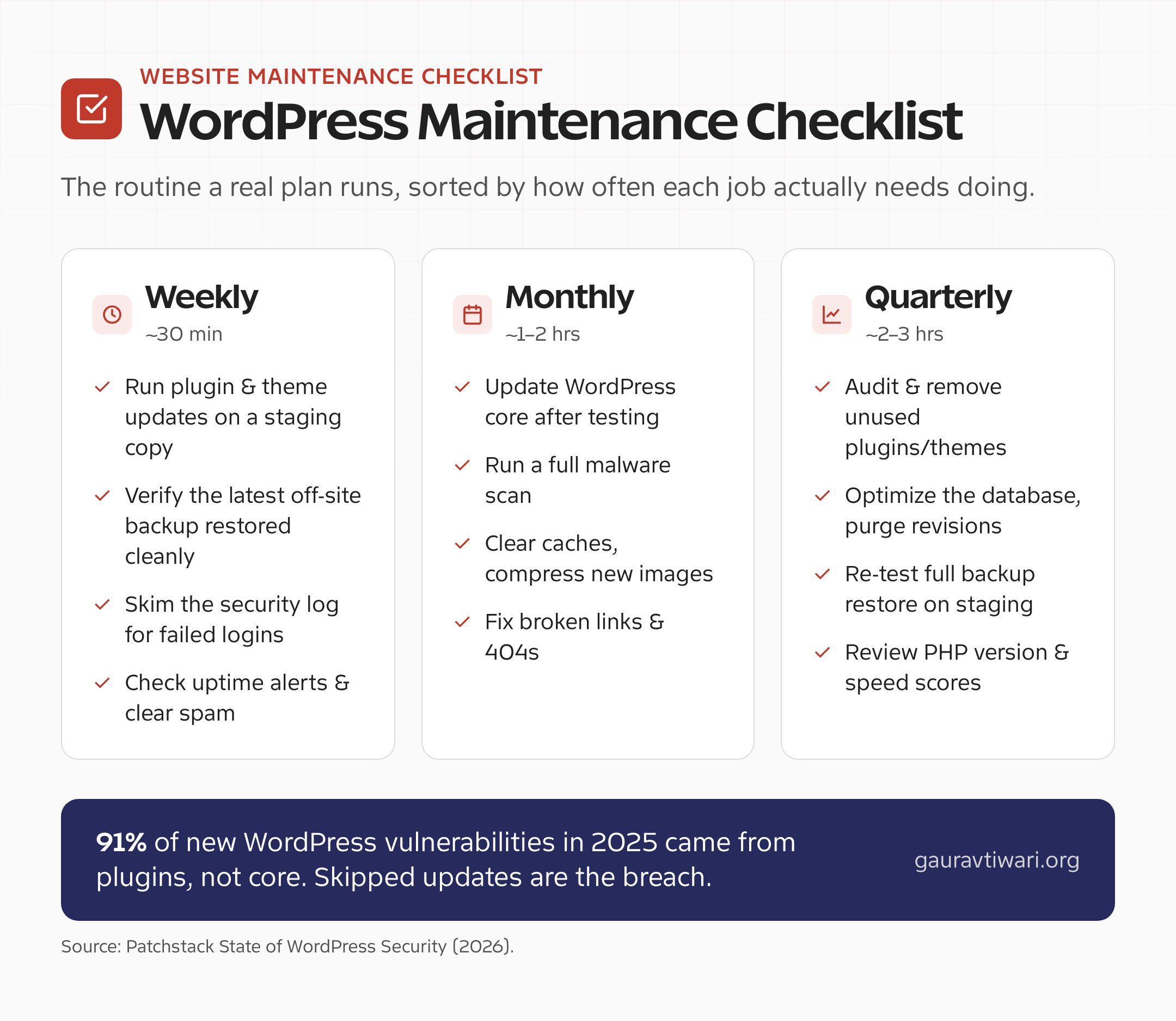
Core, theme, and plugin updates. Every WordPress update closes a known vulnerability or fixes a bug. The catch is that updates also break things when a plugin conflicts. A good plan updates on a staging copy first, checks the live site, and rolls back if something cracks. Doing this yourself means accepting the white-screen-of-death risk on your own time.
Off-site backups. A backup on the same server as your site is not a backup. It is a copy that dies with the server. Plans store backups off-site, daily for active sites, so you can roll back in minutes. I lean on Solid Backups for scheduled off-site copies on client sites, and you can also export the database by hand using my walkthrough on how to back up a MySQL database. If you want to understand why this is non-negotiable, my guide on why you need a WordPress backup plugin walks through the failure cases.
Security monitoring and a firewall. WordPress runs about 42% of the web (W3Techs, 2026), which makes it the favorite target for automated attacks. Monitoring catches brute-force login attempts, file changes, and suspicious traffic before they become a breach. A cloud firewall like Sucuri sits in front of the site and filters bad traffic before it ever reaches WordPress. If you are setting this up yourself, start with my picks for the best WordPress security plugins.
Malware scanning. Monitoring watches the door. Scanning checks whether someone already got in. Daily scans flag injected code, spam links, and backdoors early, while the damage is still small enough to clean instead of rebuild.
Uptime monitoring. A service pings your site every minute and alerts someone the moment it goes down. Without it, you find out your store has been offline for six hours when a customer emails to complain. With it, the fix often starts before you wake up.
Performance tuning. Caching, image compression, and database cleanup keep pages fast as content piles up. Speed is also a ranking factor, so neglect here costs you traffic on top of patience. A free tool like Jetpack Boost handles the easy caching and CSS wins, and you should pair it with a habit of learning to compress images before they bloat your pages. My guide to fixing a slow WordPress site covers the same checks a plan runs monthly.
Support from a human. When a plugin update breaks checkout at 9pm, you want someone who knows your stack to fix it, not a forum thread from 2019. Priority support is the part people undervalue until the night they need it.
DIY vs Done-For-You: An Honest Comparison
This is the real decision, and it comes down to whether your scarcer resource is time or money. Neither answer is wrong. The mistake is pretending you’ll do the DIY work when you won’t.
DIY costs time, not money. Budget two to four hours a month to do it properly: update on staging, verify the live site, run a manual backup, check the security log, and review speed. Plugins like UpdraftPlus (backups), Wordfence (security), and a caching plugin handle most of the heavy lifting, and the plugin licenses run maybe $100 to $200 a year combined. The hidden cost is discipline. The routine only protects you if you actually keep it, every single week, including the weeks you’re busy. That is where most DIY plans quietly fail.
Done-for-you costs money, not time. You pay $30 to $300+ a month and someone else owns the outcome. The value isn’t the task list, it’s that you stop thinking about it and you have one accountable person when something breaks. For anyone whose hourly rate is higher than the cost of a plan, this is simple math: two hours of your month is almost always worth more than the fee.
My rule of thumb: if your site is a hobby and you enjoy the tinkering, DIY. If your site is part of how you earn a living, pay someone, even if that someone is a basic plan. The peace of mind is real and the downside of a missed update is not theoretical.
If you do decide to pay, here is what the money actually buys at each tier. These are 2026 market rates for maintenance-only plans, separate from hosting. Providers like WP Buffs start around $66 a month, and my own care plans are priced to the site rather than a fixed menu.
| Plan Tier | Typical 2026 Price | What a Plan Includes |
|---|---|---|
| Budget / hands-off | $20–$40 / month | Automated updates, daily off-site backups, uptime monitoring, basic security, email support |
| Managed care | $50–$150 / month | Staging-tested updates, human review, weekly checks, performance monitoring, small edits, faster response |
| E-commerce / premium | $200–$500+ / month | Daily tested updates, priority support, malware cleanup, custom SLA, a dedicated point of contact |
What Actually Happens When You Skip It
Skipping maintenance rarely fails gently. It works fine for months, which lulls you into thinking it always will, and then it fails all at once. Here is what that actually looks like in the wild.
You get hacked through a stale plugin. The most common breach I clean up isn’t sophisticated. It’s an attacker exploiting a vulnerability that was patched months ago in an update the owner never installed. The fix can run from a few hours of cleanup to a full rebuild, plus the SEO damage of being flagged by Google.
An update breaks the site and there’s no backup. The flip side: you finally update everything at once after a year, a conflict takes the site down, and you have no recent backup to roll back to. Now you’re rebuilding instead of restoring.
Downtime quietly bleeds revenue and trust. Every minute an e-commerce site is down is a sale you don’t make and a customer who may not come back. Without uptime monitoring, you don’t even know it happened until the damage is done.
The site slows to a crawl. Bloated databases, uncompressed images, and no caching pile up over time. Visitors bounce, rankings slip, and the decline is gradual enough that you blame the market instead of the maintenance you skipped. Speed and clean structure are part of keeping WordPress SEO friendly, so the slowdown quietly costs you search traffic too.
Task-by-Task: What Breaks If You Skip It
If you go the DIY route, this is the actual workload and the actual consequence of letting each piece slide. Print it, pin it, and be honest about which rows you’ll really keep up with.
| Maintenance Task | DIY Effort | What Breaks If You Skip It |
|---|---|---|
| Core, theme, and plugin updates | ~1 hr/month on a staging copy | Known vulnerabilities stay open; hackers exploit patched holes |
| Off-site backups | 15 min/week to verify | No recovery point; one bad update means a full rebuild |
| Security monitoring and firewall | Setup once, review logs weekly | Brute-force and file-change attacks go unnoticed until breach |
| Malware scanning | Automated, review alerts | Injected code and backdoors spread before you catch them |
| Uptime monitoring | Setup once, free tools exist | Site can be down for hours before you find out |
| Performance tuning | ~1 hr/month | Pages slow down, visitors bounce, rankings drop |
| Expert support on call | You are the support | A 9pm checkout bug stays broken until you solve it alone |
The Verdict: Who Should Pay, Who Should DIY
Here’s my straight answer after years of doing this for clients. DIY if your site is a personal blog or portfolio, it doesn’t directly earn money, and you’ll genuinely commit two hours a month to the routine above. Pay for a plan if your site sells anything, books appointments, handles customer data, or you’ve already gone more than a month without logging in to update. The second list describes most real businesses.
And if you’re somewhere in the middle, default to a plan. The cheapest done-for-you tier costs less than one hour of a developer’s emergency rate, and an emergency is exactly what you’re buying insurance against. A maintenance plan is not an expense you tolerate. It is the reason you never have to explain to a customer why the site was down.
Why Outsourcing Often Wins
Why Outsourcing WordPress Maintenance Is a Smart Move
Outsourcing isn’t about being unable to do the work. It’s about deciding your time is better spent elsewhere. When you hand the technical upkeep to someone who does it all day, you get faster issue resolution, proactive care, and a single accountable person instead of a dashboard full of warnings you keep meaning to deal with.
It also saves the hours you’d otherwise lose to troubleshooting plugin conflicts and chasing slow load times. Companies like WP Buffs, GoWP, and Maintainn do this well, and so do I. My WordPress maintenance services are tailored to each site, so you can focus on the work that actually grows your business while the upkeep runs quietly in the background.
The bottom line hasn’t changed in 18 years of doing this. A WordPress maintenance plan saves you time, shields you from costly emergency repairs, and keeps your site fast and online every day. Whether you run a small blog or a large e-commerce store, the cost of maintaining the site is always smaller than the cost of the day it goes down. Decide whether your scarcer resource is time or money, then either commit to the DIY routine or let someone handle it for you. Just don’t choose the third option, which is doing nothing and hoping.
Tell Google you want more of this.
Add Gaurav Tiwari as a preferred sourceOne tap, and this site shows up more often in your own Top Stories, AI Overviews and AI Mode. Remove it any time.
