
 by
How much can the free plan of Bluehost AI Builder do for you? Can 5 credits a day build a website you’d show to a customer, or is it a demo that walks you to the checkout?
I didn’t want to guess, so for this Bluehost AI Builder review I built a site for a made-up bakery on the free plan. I spent 4 credits. They got me a 5-page website, a cake order form, a booking page that enforces opening hours, a Stripe deposit step and an admin dashboard.
So my answer is that the free plan builds a lot more than I expected, including the forms, the booking rules and the dashboard a small business needs. It just can’t get that site found. The free address is hidden from Google and your own domain needs a paid plan, so I’d build on free and pay only when the site is ready for customers.
Bluehost AI Builder is a chat-based website and app builder from the hosting company Bluehost. You describe what your business needs in plain words, it writes the pages and the code behind them, and Bluehost hosts the result. It is still in Early Access, and it is a separate product from Bluehost’s WordPress hosting.
Everything I report here comes from one session on the free plan in November 2026. I haven’t bought a paid plan, connected a domain or talked to support, and I’ll say so wherever that limits what I can tell you.
The free plan is enough to build, test and share a working small-business site with forms, booking rules and a dashboard. It is not enough to run one in public, because the free bluehost.ai address is set to noindex and can’t use your own domain. Paid plans start at $20 a month.
If you’d rather watch than read, this video walks through the same build in under 3 minutes.
What the Free Plan Includes
Bluehost is generous with features and strict about reach. The free plan gets the same builder as the paid plans. What changes is how much you can ask for and where the site lives.
| What you get | Free plan | Paid plans |
|---|---|---|
| Price | $0, with no card | From $20 a month |
| AI credits | 5 a day, up to 30 a month | 100 to 400 a month, with no daily limit |
| Websites and apps | Unlimited | Unlimited |
| Forms, bookings, user accounts and an admin dashboard | Yes | Yes |
| Hosting | Included | Included |
| Site address | A random bluehost.ai subdomain | Your own domain |
| Listed on Google | No, blocked in my test | Not tested |
| Extra credits when you run out | No, top-ups start at Lite | Yes, at $0.30 a credit |
| Human support | Promised 24/7. I didn’t test it | Promised 24/7 |
A credit is 1 message to the AI. Bluehost says the AI’s own follow-up questions are free and that hosting never uses credits. So the whole question comes down to how far 5 messages a day can go, and they went further than I expected.
What I Asked It to Build
I used a fictional business, Cedar Lane Bakery, so no real customer data was involved. I picked a bakery because it needs what most small businesses need: a menu or price list, opening hours, a location and one form that has to work.
This was the whole first prompt:
A website for Cedar Lane Bakery, a small neighborhood bakery in Portland, Oregon. Show our breads and pastries menu, opening hours and location, and add a custom cake order request form.
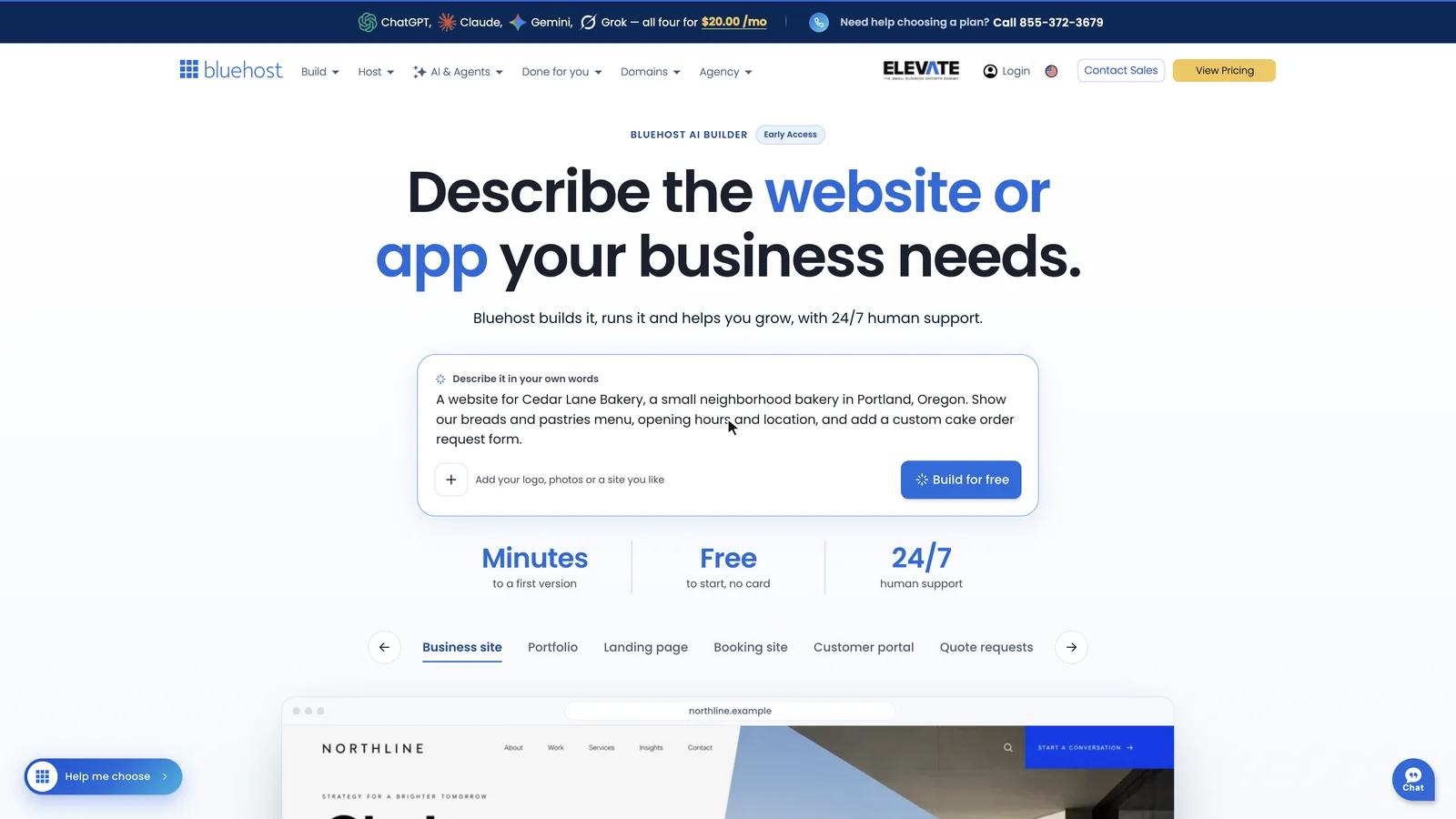
Bluehost asks you to sign up after you click Build for free. You can use Google, Apple, GitHub or an email address, and it doesn’t ask for a card.
What 1 Credit Built
The first version was ready in about 4 minutes, and the builder didn’t ask me a single question on the way. It showed a short checklist while it worked: the site’s look, the menu and hours, the dashboard and then the pages. It also offered 4 optional questions about who I am, which I skipped.
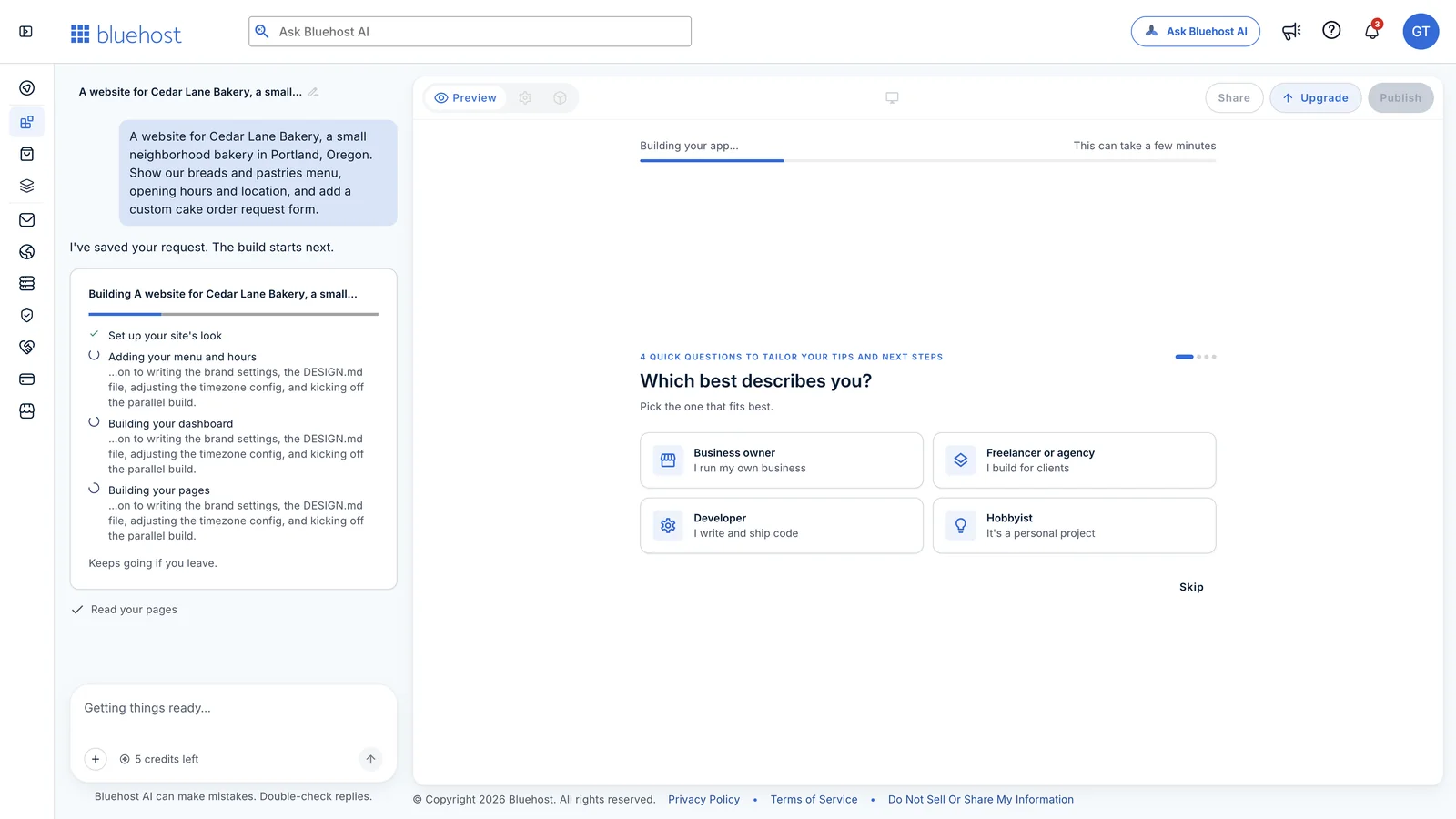
This is what that first credit produced:
- 5 pages: a home page, a full menu, a custom cakes page, a visit page and a contact page.
- A full menu: 16 items in 4 sections, each with a price and a one-line description. One item was even marked sold out.
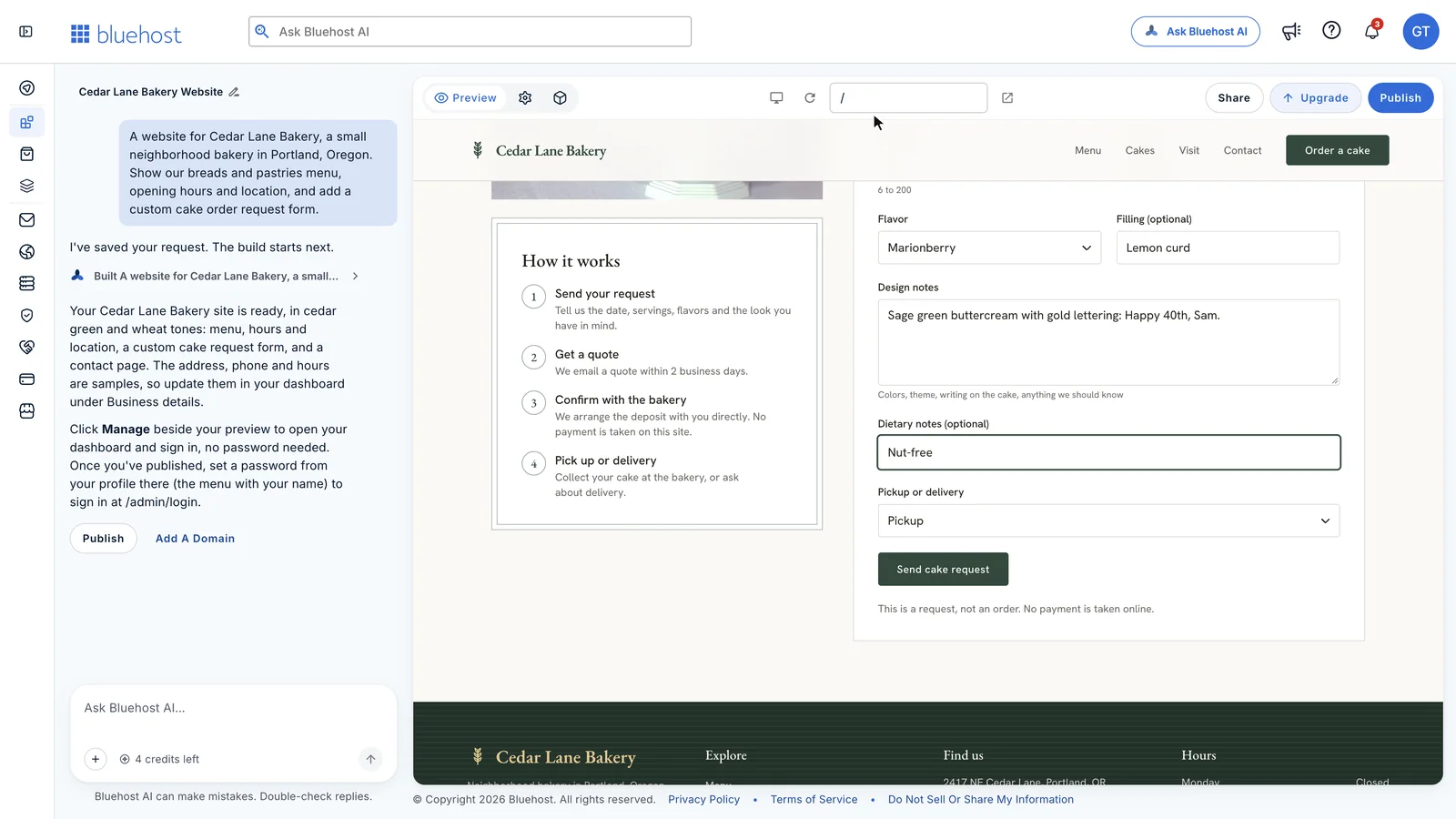
- A cake request form with rules: the event date has to be at least 7 days away, and servings have to be between 6 and 200.
- A contact form with a topic picker, plus a hidden field on both forms that traps spam bots.
- Stock photos with alt text on every image, a color scheme in cedar green and wheat, and a logo mark.
For one sentence of input, I think this is as good as a first version gets. I liked one small decision a lot. The builder marked the address, the phone number and the opening hours as samples on the page itself, so I knew exactly what to replace before going live.
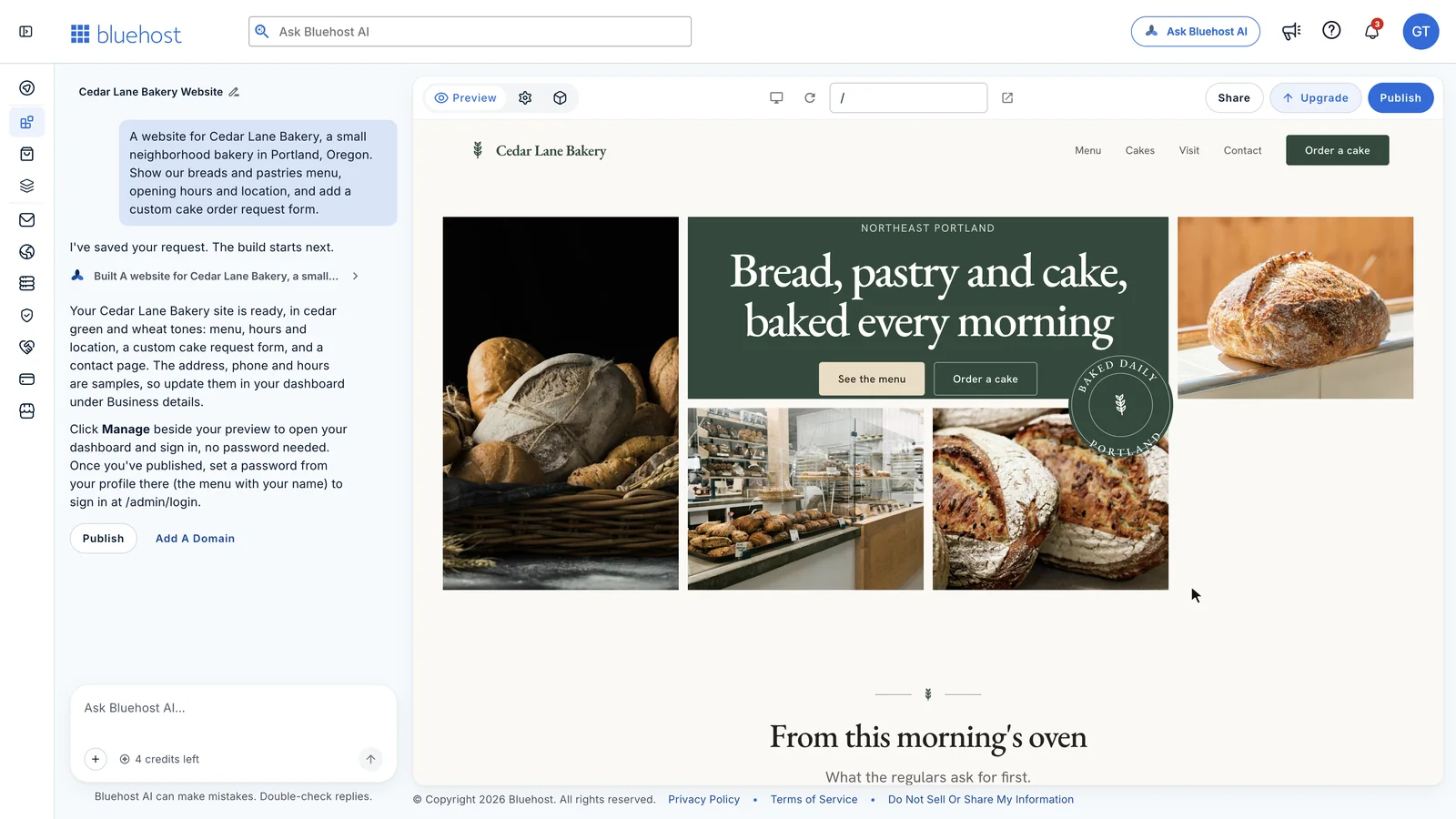
The copy reads like a bakery wrote it, and that is also the risk. The menu items, the prices and the turnaround time are all invented, so it is wise to read every line before you publish. The site now promises a quote within 2 business days, and nobody at the bakery agreed to that.
The Dashboard Behind the Site
The cake form is a working form. I filled it in as a test customer, sent it and then clicked Manage next to the preview. My request was sitting in a dashboard that the builder had made for the bakery.
The dashboard has these sections:
- Cake orders with a status for each request: new, quoted, confirmed, completed or cancelled.
- Menu items and menu sections, where you change names and prices and mark an item sold out.
- Messages from the contact form.
- Business details for the phone, email, address, opening hours and social links.
- Users, so a staff member can get their own login.
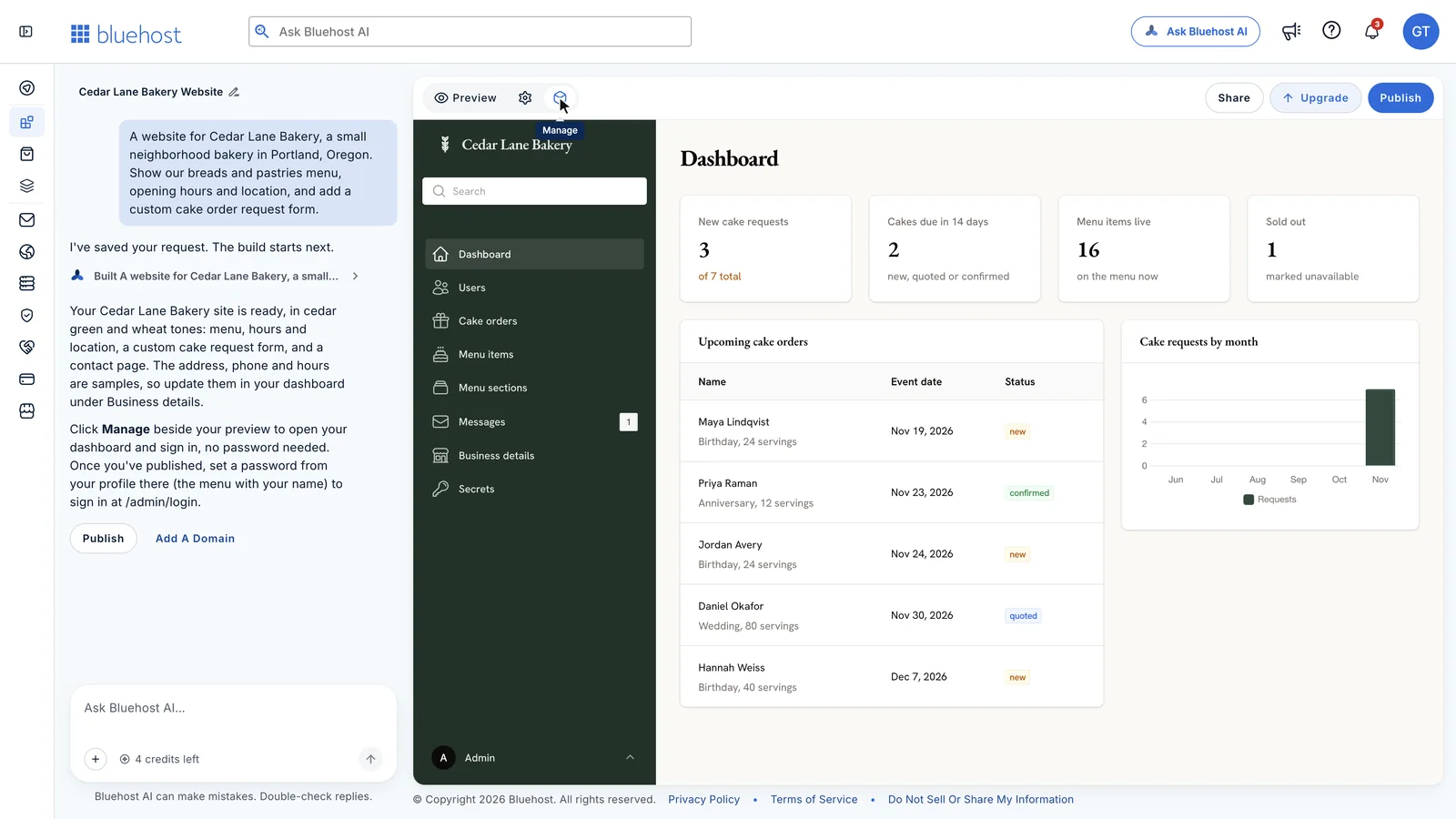
This is the part I didn’t expect from a free plan, and for a small business it matters more than the design. You change a price or the opening hours in a form. It costs no credits, and you never touch the chat.
There are 2 things I’d fix on day one. The builder fills the dashboard with sample orders and messages so the lists aren’t empty, and those need deleting. It also signs you in without a password from inside the builder, so I’d set a password before sharing the admin address with anyone.
What 3 More Credits Added
Each message costs 1 credit, whether it asks for a small fix or a whole new feature. I think that is the most useful thing to know about the free plan, because it means the big requests are the best value.
A Small Edit
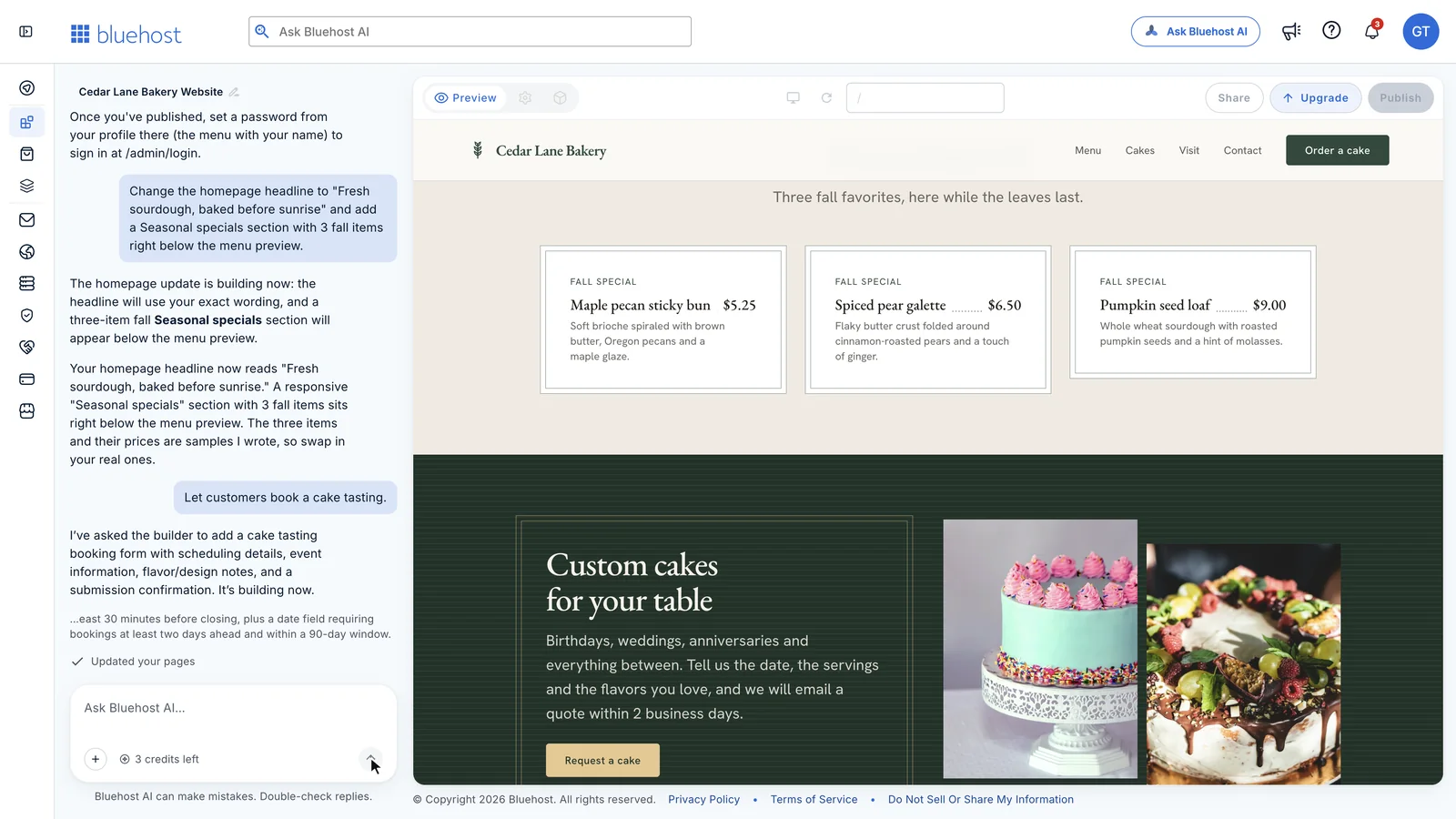
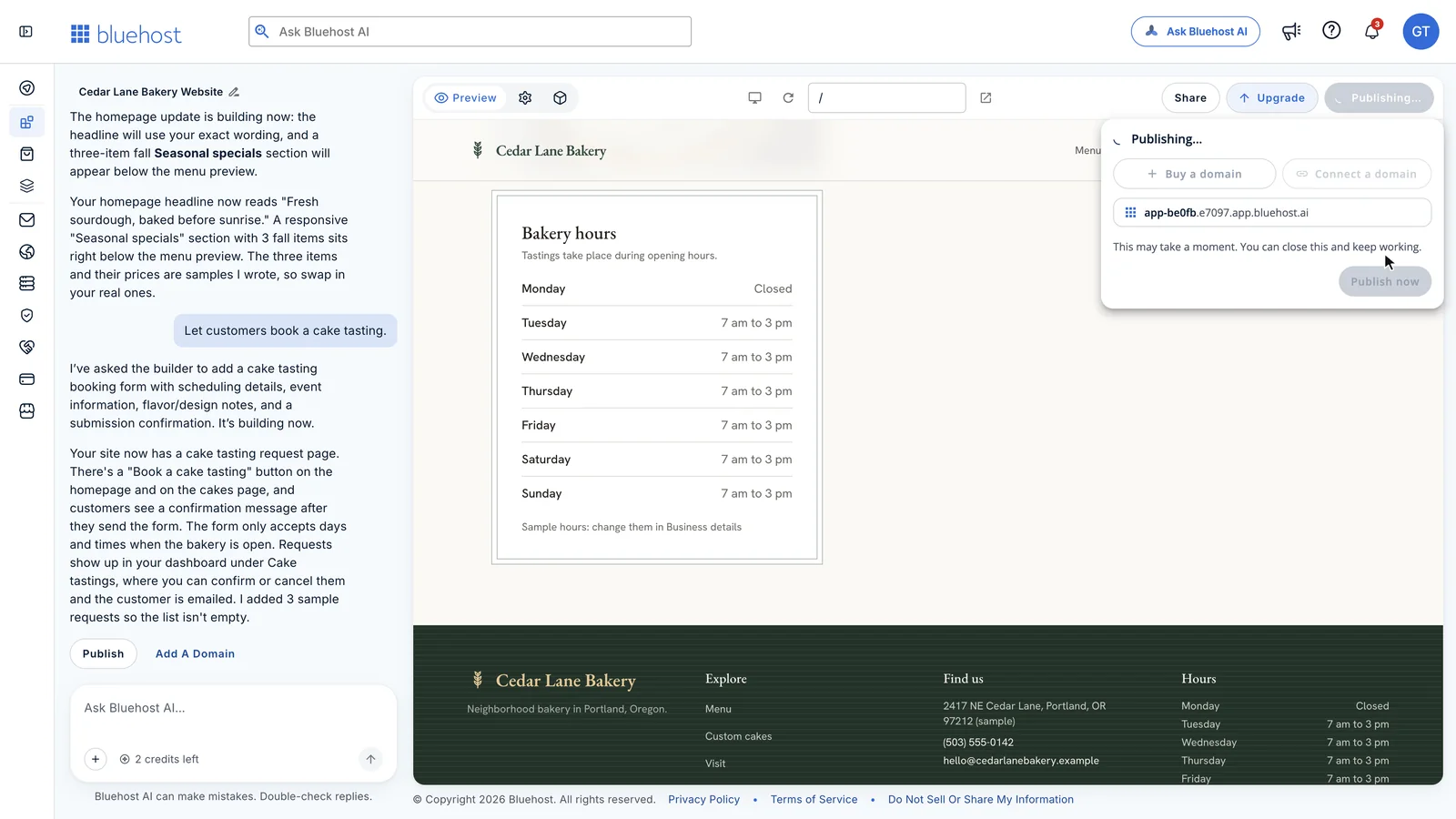
I asked it to change the homepage headline to an exact phrase and to add a Seasonal specials section with 3 fall items. That was 2 changes in 1 message, and it took about 40 seconds. The headline matched my wording, the new section sat where I asked, and the reply told me the 3 items and prices were samples it had written.
A Booking Page From 6 Words
Then I typed a vague request on purpose: “Let customers book a cake tasting.”
Bluehost promotes guided questions with suggested answers, and I expected some here. I didn’t get any. The builder made the decisions itself and built a tasting page in about a minute and a half, with these rules:
- up to 8 guests
- a date at least 2 days away and within the next 90 days
- a time inside the bakery’s opening hours, ending 30 minutes before closing
I tested the rules with 3 requests:
- A Monday: rejected with “We are closed on Mondays. Please pick another day.” The sample hours list Monday as closed.
- A Tuesday at 2:45 PM: rejected with a message asking for a time between 7:00 AM and 2:30 PM.
- A Tuesday at 10:30 AM: accepted, and it appeared in the dashboard under Cake tastings.
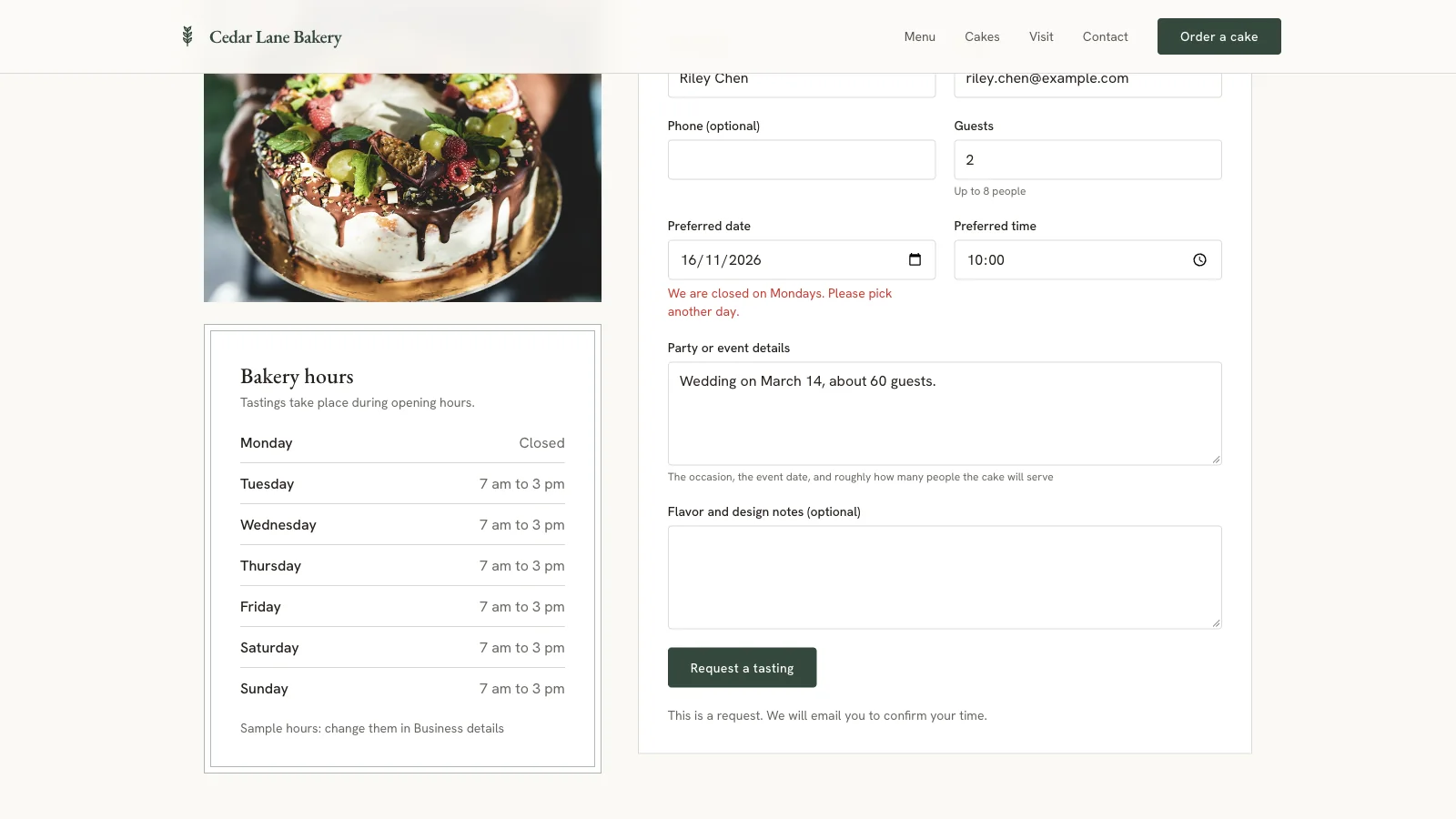
So the rules are enforced when the form is sent, and they follow the hours you set. I was impressed, and a little uneasy too, because the builder chose every one of those rules without asking me. I’d state your own rules in the message.
A Deposit Through Stripe
For the fourth credit, I asked for a $25 deposit on cake requests. The builder added the deposit to the form, a confirmation page and a Deposit column in the dashboard that shows paid or unpaid.
Card payment stays off until you add your own Stripe secret key under Secrets in the dashboard. Until then, each request is saved as unpaid and the customer is told to expect payment details by email. I didn’t add a key, so I can’t tell you how the payment step behaves with real cards.
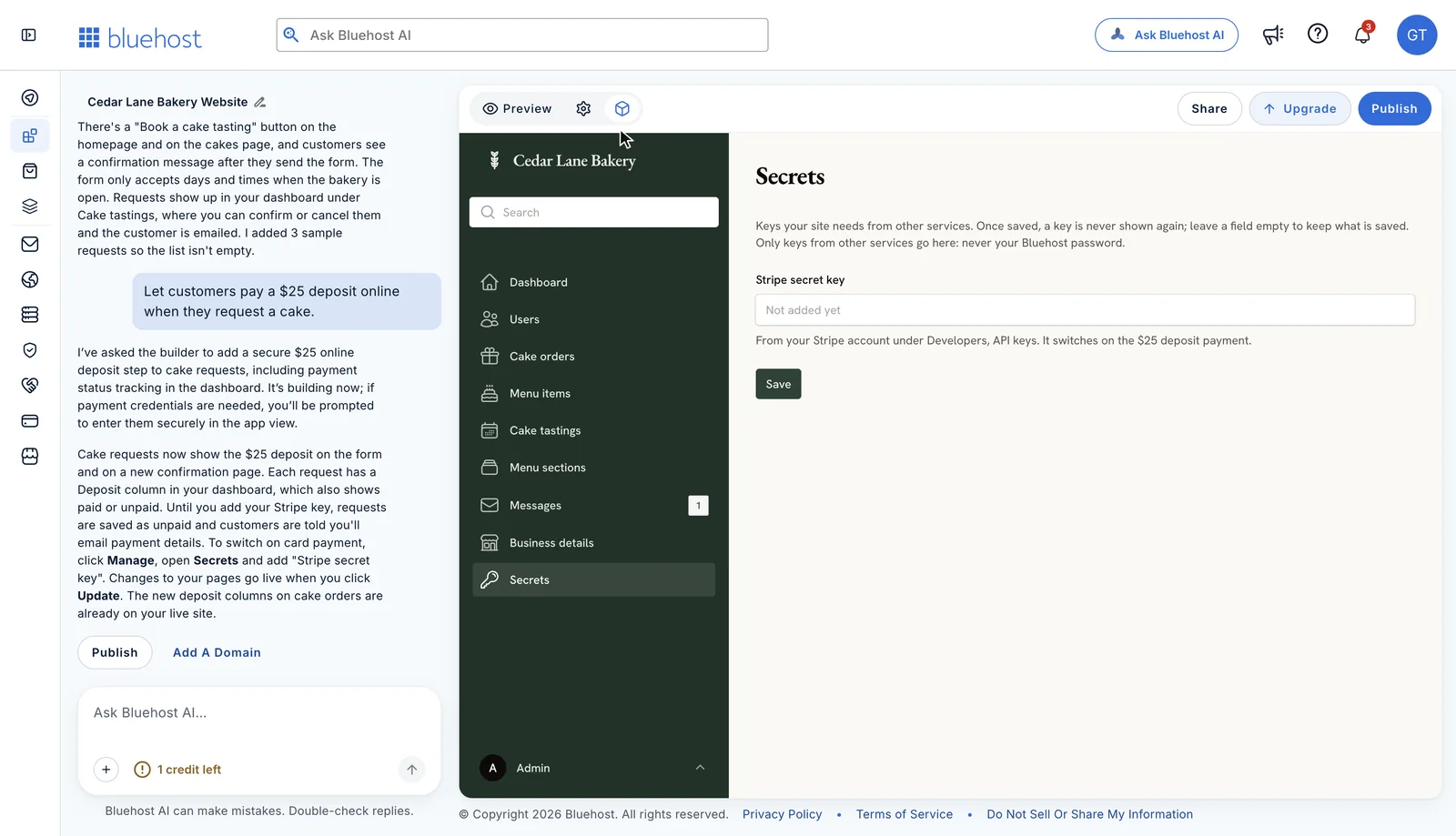
One detail is worth knowing. The builder told me the new deposit columns were already on the live site, before I published the page changes. Page edits wait for you to publish, but changes to the data behind them may not.
What the 4 Credits Cost in Time
These are the times from my session. Yours will vary with the size of the request.
| Step | Time | Credits |
|---|---|---|
| First build from 1 prompt | About 4 minutes | 1 |
| Headline change and a new section | About 40 seconds | 1 |
| Booking page with rules | About 1.5 minutes | 1 |
| $25 deposit with Stripe wiring | About 1.5 minutes | 1 |
| Publishing | About 3 minutes | 0 |
That is a working site with a booking page and a payment step for 4 credits, with 1 left over for the day. I don’t have a complaint about how much the free plan builds.
Publishing on the Free Plan
Publishing is free too. It took 2 clicks and about 3 minutes, and the site went live on a bluehost.ai subdomain.
The live site held up well on the basics:
- No Bluehost badge. The Lite plan lists badge removal as a feature, but I didn’t see a badge on my free site.
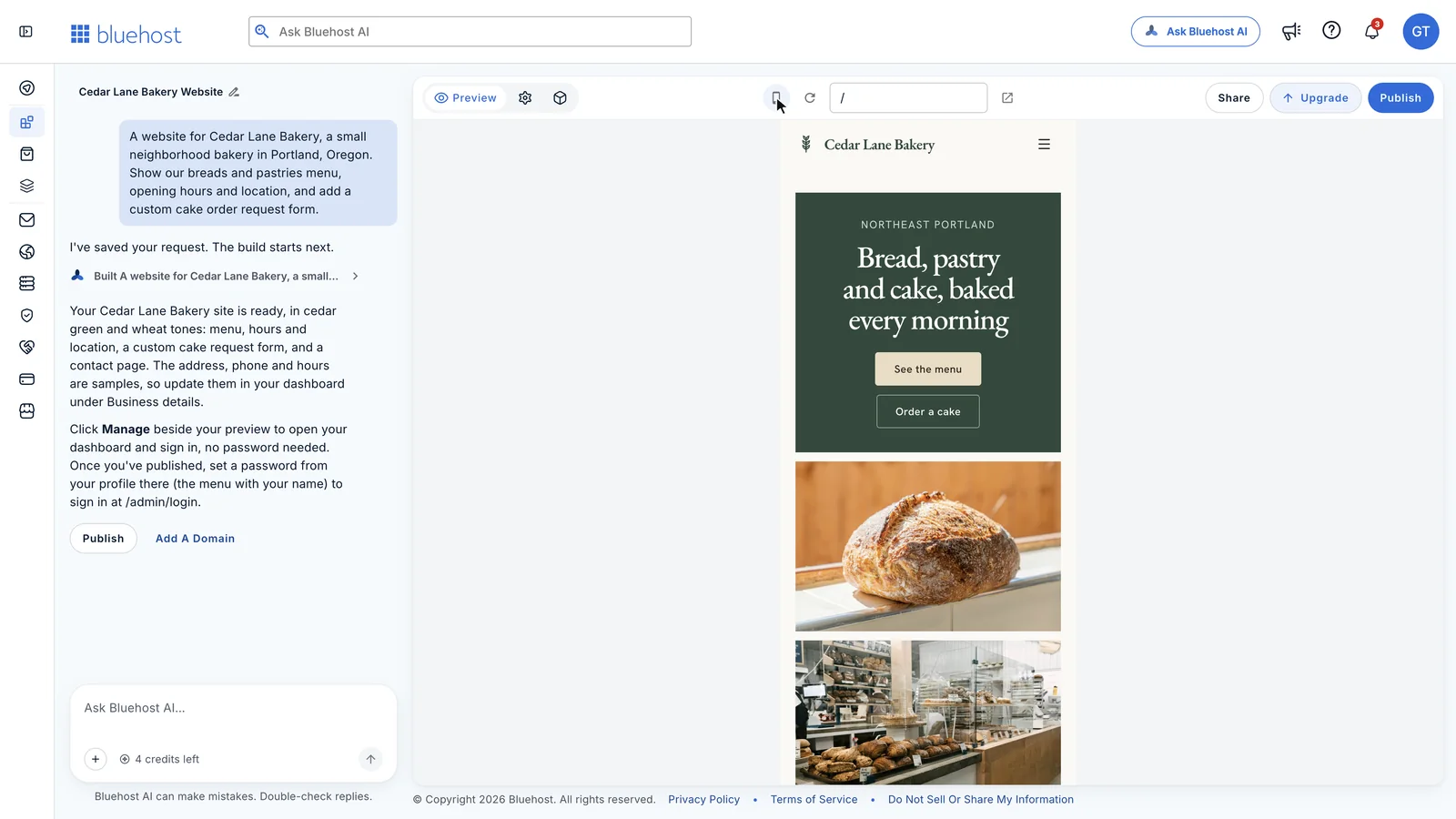
- Phone layout. The pages rearranged cleanly at phone width, with a menu button in place of the navigation links.
- PageSpeed Insights scores. The home page scored 84 for performance on mobile and 93 on desktop, with 100 for accessibility and best practices on both.
- The slow spot. The largest image took 4.4 seconds to appear in the mobile test. The photos load from a stock photo service at 1,080 pixels wide, which is more than a phone needs.
- On-page SEO basics. Each page had a title, a meta description, a single H1 and alt text on all 12 images.
Some things a search-ready site should have were missing. I found no canonical tag, no Open Graph tags for social sharing, no schema markup for a local business, no favicon and no sitemap.
Where the Free Plan Stops
So far the free plan has done everything I asked. This is where it stops. The first 3 limits belong to the free plan, and the last 3 look like limits of the product itself.
Google Can’t List the Free Address
Bluehost’s page calls the builder “search-ready from the first version.” On the free address, every page of my site was sent with this response header:
x-robots-tag: noindex, nofollowThat header tells search engines to keep the page out of their results. PageSpeed Insights flagged the same thing as “Page is blocked from indexing.” So a site on the free bluehost.ai address won’t appear on Google, however good the content is.
I think this is the real paywall. Building is free, and being found costs $20 a month. That is a fair trade as long as you know about it before you print the address on a flyer.
The Address Is Random
My site went live at app-be0fb.e7097.app.bluehost.ai. I wasn’t asked to pick a name, and I didn’t find a way to change it.
It works for sending a link to a partner. I wouldn’t print it on a business card.
5 Credits a Day
The cap is 5 credits a day and 30 a month, and Bluehost lists credit top-ups as a paid feature. My whole build used 4, so 30 a month covers about 7 sessions like mine.
That is plenty while you’re building. It gets tight in a launch week, when you find 10 small things to fix and each one is a message.
AI Search Tools Are Blocked
The site’s robots.txt file allows Googlebot and Bingbot and blocks these crawlers:
- GPTBot and OAI-SearchBot from OpenAI
- ClaudeBot, Claude-SearchBot and Claude-User from Anthropic
- PerplexityBot
- Google-Extended
If you want ChatGPT, Claude or Perplexity to find and recommend your business, this default works against you. I didn’t find a setting for it, and I don’t know if a paid plan changes it. An AI builder that locks AI search tools out of the sites it builds is a strange default.
Form Emails Need Another Account
A new cake request shows up in the dashboard, but nobody gets an email about it until you connect an email provider. The builder supports Resend and Postmark, and its own settings page says Bluehost doesn’t send these emails for you and SMTP isn’t supported.
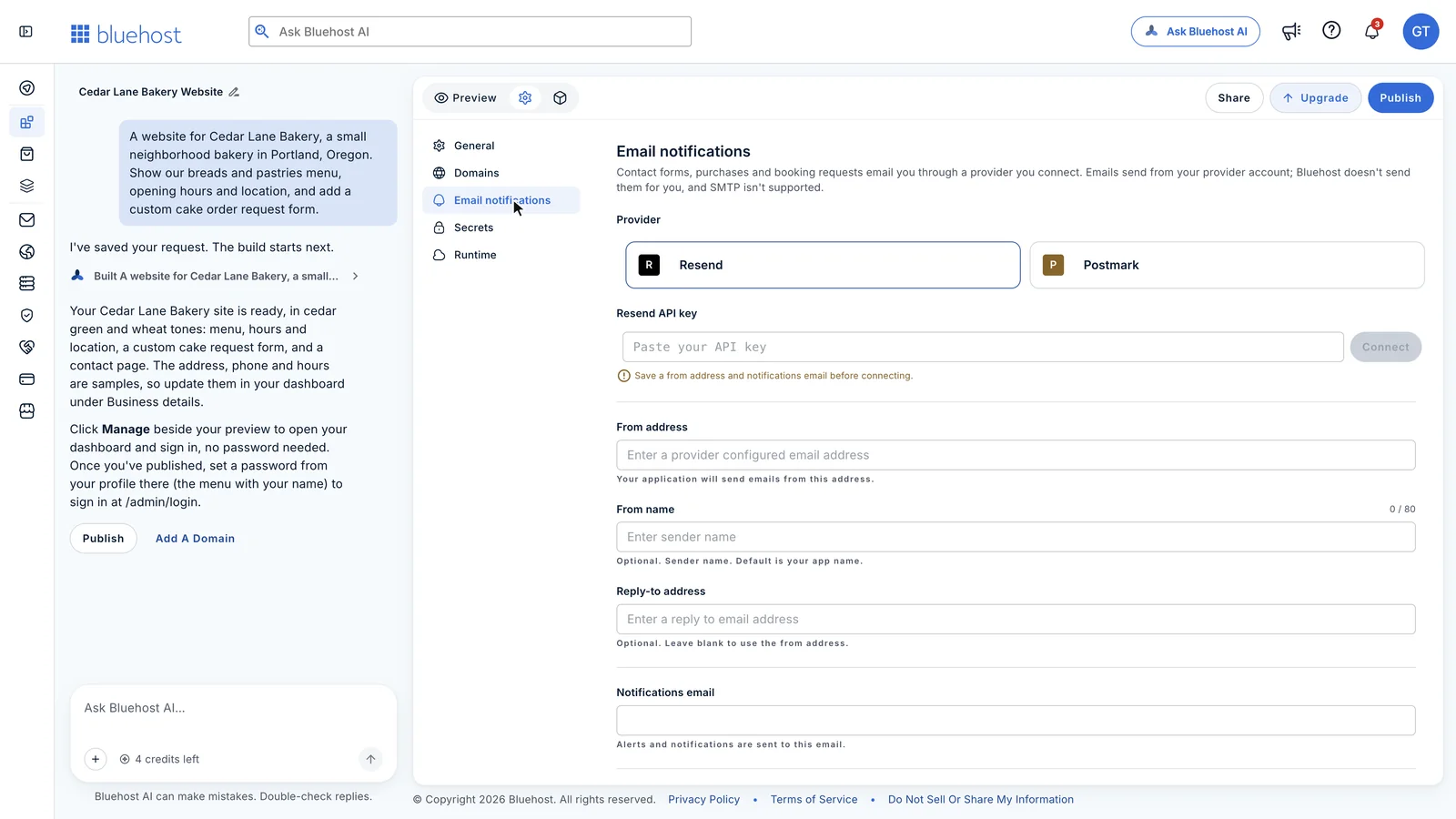
This also affects customers. The dashboard says customers are emailed when you quote, confirm or cancel a request, and that depends on the same connection. A form that tells nobody is a form I wouldn’t trust with someone’s wedding cake.
You Can’t Take the Code With You
This is not WordPress, and I found no option to download or export the code. The site, the dashboard and the data live inside Bluehost AI Builder. I don’t mind that for a bakery, but I’d mind it a lot for a client project.
The Sleep Timer Didn’t Hurt
I expected one more problem and didn’t find it. The Runtime page in settings says the app sleeps after 15 minutes without activity and wakes on the next visit. I left the live site alone for 21 minutes, and the first page still loaded in under a second.
When to upgrade to the paid plan?
I’d stay on the free plan for as long as you’re building, and I’d upgrade on the day you want strangers to find the site. Until then, a paid plan buys you very little.
The free plan is enough in these cases:
- You’re still building. 5 credits a day covers a first version and 4 rounds of changes, and you get 5 more the next day.
- You’re showing a draft. A partner, a client or your team can open the free address and click through everything.
- The site is a tool you share by link. A quote form you send to customers, a booking page in your Instagram bio or a small tracker for your team doesn’t need Google at all.
I’d move to a paid plan when one of these is true:
- You want customers to find you on Google. This is the main reason. The free address is set to noindex, and your own domain needs a paid plan.
- You want a proper address. Your own domain goes on the card, the van and the invoice.
- You keep hitting the daily cap. If you use all 5 credits most days, Lite’s 100 credits with no daily limit will save you a lot of waiting.
- You’re about to launch. Launch week brings a list of small fixes, and you won’t want to spread them over 3 days.
Which Paid Plan
My pick is Lite for almost everyone. Here is the math I’d do before going higher:
- A Lite credit costs $0.20, and a top-up credit costs $0.30.
- In a month where you need 150 credits, Lite plus a 50-credit top-up costs $35. Standard costs $40.
- Standard becomes the cheaper option only past about 165 credits a month.
My whole bakery build used 4 credits, so 100 credits is about 25 sessions like that one. I can’t see a small business needing Standard once the site is live.
How I’d Pay for It
I’d pay monthly for the first month. The product is in Early Access, and I haven’t seen with my own eyes that the noindex header goes away on a custom domain. Once that is confirmed and the site works for you, the 12-month term brings Lite down from $240 to $192 a year.
After connecting a domain, I’d run the home page through PageSpeed Insights. If it still reports “Page is blocked from indexing”, I’d contact Bluehost support before spending anything on marketing.
A paid plan won’t fix everything, as far as I can tell. You’ll still need a Resend or Postmark account for form emails, and I didn’t see a code export on any plan’s feature list.
Bluehost AI Builder Pricing
Every plan includes hosting, and credits only pay for messages to the AI. If you run out, your live site stays online and only new changes pause.
| Plan | Monthly billing | 12-month term | Credits |
|---|---|---|---|
| Free | $0 | $0 | 5 a day, up to 30 a month |
| Lite | $20 a month | $16 a month, billed as $192 | 100 a month |
| Standard | $40 a month | $32 a month, billed as $384 | 200 a month |
| Pro | $80 a month | $64 a month, billed as $768 | 400 a month |
These are the conditions that matter:
- Custom domains start at Lite. The free plan publishes only on the bluehost.ai subdomain.
- Credits expire after 30 days. That applies to plan credits and to top-ups.
- Top-ups come in packs. 50 credits cost $15, 100 cost $30 and 200 cost $60.
- Domains are separate. Registering or renewing a domain is not part of the plan price.
- Pro is easy to miss. The public pricing section lists Lite and Standard, and Pro shows up on the upgrade screen inside the builder.
I think $20 a month is a fair price for the builder, the hosting and a dashboard together. For 5 static pages it is a lot. Bluehost’s own WordPress hosting, which includes a WordPress AI builder, is advertised from $3.99 a month on a 36-month term and renews at $9.99.
Bluehost AI Builder vs Lovable, Bolt, Hostinger and Base44
Bluehost isn’t the first company to sell this idea, so the free plan deserves a comparison. I ran the bakery test only on Bluehost. For the other 4, I’m comparing what each company publishes about its free plan and its cheapest paid plan, and I won’t rank their build quality.
| Builder | Free plan | Cheapest paid plan | Your own domain |
|---|---|---|---|
| Bluehost AI Builder | 5 credits a day, up to 30 a month | Lite at $20 a month for 100 credits | Lite and up |
| Lovable | 5 credits a day, up to 30 a month, plus 20 Cloud credits | Pro at $25 a month for 100 credits | Pro and up |
| Bolt | 300,000 tokens a day, up to 1 million a month | Pro at $25 a month for 10 million tokens | Pro and up |
| Hostinger AI Builder | 250 credits, given once | Premium at $1.99 a month, paid as $95.52 for 48 months | Premium, free for the first year |
| Base44 | 25 message credits a month | Starter at $16 a month, billed yearly, for 100 credits | Starter and up |
This is how I read each one against Bluehost:
- Lovable. Bluehost has matched Lovable’s free plan number for number, at 5 credits a day and 30 a month. The difference is what credits pay for. Lovable says its credits also run deployed apps and AI features, while Bluehost says hosting never uses credits. For a shop that wants the same bill every month, I prefer Bluehost’s way.
- Bolt. Bolt has the most generous free plan for tinkering, and it needs no card. But it counts tokens and it puts Bolt branding on free sites. I find messages easier to budget than tokens, because I can’t tell in advance what a request will cost.
- Hostinger AI Builder. Hostinger folded its Horizons app builder into this product. It is the cheapest route by far if you’ll pay for 48 months upfront, and it lets you edit or export the source code, which I couldn’t find in Bluehost. Its 250 free credits are a one-time gift and don’t refill each month. I’ve reviewed the older Hostinger Website Builder separately.
- Base44. Base44, which Wix owns, gives 25 message credits a month for free. That is a little less than Bluehost’s 30. Its Starter plan is cheaper on yearly billing, and its higher plans add GitHub sync.
My pick depends on who is asking. For a small business owner who wants a working site and someone to call, I’d pick Bluehost. It promises human support on the free plan, its hosting doesn’t eat credits and my free site carried no badge.
For a developer who wants the code, I’d look at Hostinger or Lovable first.
A blog or a content site is a different job, and I’d still build that on WordPress. I’ve covered that route in creating a business website with Bluehost and WordPress. If you only need a few pages, my list of free website builders is the better starting point. I’ve also listed more app tools in how to make an app without coding.
How to Get the Most From the Free Plan
If you want to try it on your own business, this is the order I’d follow. It is built around the 5 free credits a day.
- A specific first prompt. Your first message should name the business, the city, the pages you want and the one form or feature that has to work. Mine named the menu, the hours, the location and 1 form, and that was enough.
- A full read of the first version. Once the build finishes, you should open every page in the preview and switch to the phone view. This is where invented prices and promises get caught.
- Your real details, for free. In Manage, Business details holds the phone, email, address and hours, and the menu and prices have their own screens. Anything you can change in the dashboard costs no credits.
- Bundled requests. A credit buys a message of any size, so I’d put changes that belong together in one message, with exact wording in quotes. My headline change and new section cost 1 credit together.
- Your own rules. Vague requests work, but the builder fills the gaps with its own choices. If bookings need 3 days of notice, your message should say so.
- A test of every form. You should send each form yourself, including one request that ought to fail, such as a booking on a day you’re closed.
- The email connection. A Resend or Postmark account goes under Settings, then Email notifications. Without it, requests sit in the dashboard and nobody is told.
- Publish and share the link. The free address is fine for showing the site around. You get 5 more credits the next day for whatever people point out.
Who Should Use It
I’d use Bluehost AI Builder for a small business site that needs more than pages. A bakery, a salon, a tutor or a repair shop that wants a request form, a booking page and a simple dashboard gets a lot from one prompt here.
I’d choose something else in these cases:
- You want a blog or a content site. That is WordPress work, and Bluehost sells a separate WordPress AI builder with its hosting plans.
- You want to own and move the code. A site you can’t export is a poor fit for a developer or an agency that hands projects over to clients.
- You only need a simple brochure site. A classic drag-and-drop builder is the simpler tool for that job.
Is Bluehost AI Builder Worth It?
On the free plan, yes. It costs nothing, and in about 10 minutes it shows you whether the builder understands your business. On a paid plan, it is worth $20 a month if you need the forms, the booking rules and the dashboard.
My scores below average out to 4.3 out of 5. The builder itself earns the high marks. Search visibility on the free plan and code ownership pull the total down.
Bluehost AI Builder
Pros
- One prompt built a 5-page site with a working order form and an admin dashboard in about 4 minutes.
- Each message costs 1 credit, even for a new booking page or a Stripe deposit step.
- Forms enforce the rules you'd expect, such as rejecting a booking on a closed day.
- Hosting is included on every plan and doesn't use credits.
- No Bluehost badge appeared on my free site.
Cons
- The free bluehost.ai address is sent with a noindex header, so Google won't list the site.
- Your own domain needs a paid plan, from $20 a month.
- Form emails need a Resend or Postmark account, and SMTP isn't supported.
- I found no option to export or download the code.
- The default robots.txt blocks AI search crawlers such as GPTBot and ClaudeBot.
Summary
Bluehost AI Builder turns a one-sentence request into a working small-business site with forms, booking rules and an admin dashboard, and the free plan is enough to build and test all of it. The free bluehost.ai address is set to noindex, so a public site needs the $20 Lite plan and your own domain. I found no way to export the code.
Price: USD 20 /month
Try Bluehost AI Builder FreeFAQs & Doubts
Yes. The free plan costs $0, needs no card and gives 5 credits a day, up to 30 a month. It includes hosting and publishes on a bluehost.ai subdomain. Your own domain needs a paid plan, and those start at $20 a month.
It is enough to build the site, test it and share it by link. It isn’t enough for a site you want customers to find, because every page on the free bluehost.ai address was sent with a noindex header in my test.
No. It builds its own websites and web apps and hosts them, and you manage the content in a dashboard it creates for you. If you want WordPress, Bluehost sells a separate WordPress AI builder with its hosting plans.
Each message to the AI costs 1 credit, whatever its size. My first build took 1 credit, and a 5-page site with a booking page and a deposit step took 4 credits in total. Bluehost says the AI’s own follow-up questions are free.
Bluehost says your live site stays online and only new changes pause. On the free plan you get 5 more credits the next day, up to 30 in a month. Paid plans can buy top-ups at $0.30 a credit.
It can wire up Stripe when you ask. In my test it added a $25 deposit step that stays off until you add your own Stripe secret key in the dashboard. I didn’t add a key, so I haven’t tested a real card payment.
Bluehost says it builds websites and web apps that open in any browser on a phone, tablet or computer. It doesn’t build native apps for the Apple App Store or Google Play.
Final Remarks
If you’re still unsure how much the free plan can do for your business, I’d let it answer for itself. Today’s 5 credits are enough for a first version and 4 rounds of changes, and that told me more than the sales page did.
If the result is close to what you need, I’d move to Lite, connect your domain and check that the noindex header is gone before you share the address. If the first version misses badly, I’d start a fresh project with a more specific prompt before spending credits on patches. You can start your free build with Bluehost AI Builder today.
Tell Google you want more of this.
Add Gaurav Tiwari as a preferred sourceOne tap, and this site shows up more often in your own Top Stories, AI Overviews and AI Mode. Remove it any time.
Disclaimer: This site is reader-supported. If you buy through some links, I may earn a small commission at no extra cost to you. I only recommend tools I trust and would use myself. Your support helps keep gauravtiwari.org free and focused on real-world advice. Thanks. - Gaurav Tiwari