
 by
Is Cloudways Velocity worth $20 a month when Vercel and Render both have free plans? And will a flat price still hold once your Node.js app gets steady traffic?
Those are fair questions, because Node.js hosting usually hands you one of 2 problems. A serverless platform bills by usage, so one busy week can change the invoice. A plain VPS has a fixed price, but you install Node, set up SSL and patch the server yourself.
Cloudways Velocity sits between the two. It is managed Node.js hosting from Cloudways, the host owned by DigitalOcean. You get a server that stays on, Cloudways looks after it and the plan costs the same every month.
My answer is yes if you run 2 or more always-on Node apps, such as a headless front-end, an API and an n8n instance. One Starter server holds up to 5 of them for $20. I’d skip Velocity for a single hobby project, and for traffic that spikes hard, because it doesn’t scale by itself.
I’ve hosted WordPress sites on Cloudways, so the platform is familiar ground for me. Velocity is a new product with no long-term user reports yet, so I’ve judged it on its plans, its documentation and what Cloudways has said on record.
Here’s the short version before the details:
| Question | Answer |
|---|---|
| What it is | Managed Node.js hosting on a server that stays on |
| Starting price | $20 a month for 2 vCPU, 2 GB RAM and up to 5 apps |
| Billing | Flat monthly price, prorated by the day |
| Included | Git deploys, SSL, backups, firewall, Cloudflare Enterprise CDN and PostgreSQL |
| Charges on top | CDN bandwidth over the plan, offsite backup storage and extra disk |
| Main limits | No autoscaling, no SSH, Node.js only and 1 region per server |
| Free trial | 3 days on the Starter and Professional plans |
| Best for | Agencies and small teams with several always-on Node apps |
What Cloudways Velocity Is
Cloudways Velocity is a managed server for Node.js apps. You connect a Git repository and pick a framework, and Cloudways builds the app, starts it and keeps it running.
Before the plans, I want to ensure the basic idea is clear, because it explains both the price and the limits.
Under the hood, each app runs as its own Node process. PM2, a process manager, restarts the app if it crashes. NGINX sits in front and passes visitor requests to it, and Cloudflare’s CDN sits in front of NGINX.
Every app on the server gets its own:
- deployment pipeline and build logs
- domain and SSL certificate
- environment variables
- PM2 process that you can stop and restart
- outbound IP address
What the apps share is the server. The plan’s CPU, RAM, disk and bandwidth are split among all the apps on it, so 5 apps on a 2 GB server have 2 GB between them.
This is the main difference from serverless hosting such as Vercel. A serverless function starts when a request arrives and stops afterwards, and you pay per request. A Velocity app is always running, so there is no cold start, a WebSocket connection can stay open and a scheduled job can run at 3 a.m. with no visitor on the site.
Velocity runs in DigitalOcean data centers across North America, Europe, India, Singapore and Australia. It lives in the same Cloudways account as the company’s WordPress hosting and its Managed AI Agents, which I covered in my OpenClaw hosting comparison.
Cloudways Velocity Pricing
Velocity has 7 plans, and each one is a bigger server with room for more apps. The price is per server, however many apps you run on it.
| Plan | Monthly price | vCPU | RAM | Apps | CDN bandwidth |
|---|---|---|---|---|---|
| Starter | $20 | 2 | 2 GB | 5 | 250 GB |
| Professional | $30 | 2 | 4 GB | 8 | 400 GB |
| Growth | $50 | 4 | 8 GB | 14 | 700 GB |
| Scale | $100 | 8 | 16 GB | 30 | 1,200 GB |
| Plus | $150 | 8 | 32 GB | 50 | 1,500 GB |
| Advanced | $300 | 12 | 48 GB | 100 | 3,000 GB |
| Business | $400 | 16 | 64 GB | 150 | 4,500 GB |
Every plan also includes server bandwidth, from 3 TB on Starter to 9 TB on Business.
This is how the billing works:
- A flat monthly price, invoiced on the 1st of the following month
- Prorated by the day, so a server you delete after 10 days is billed for 10 days
- No yearly contract, and you can move up or down a plan at any time
- A 3-day free trial on the Starter and Professional plans
The plan price covers almost everything, but 3 things are metered on top:
- CDN bandwidth beyond the plan’s allowance: $0.02 per GB
- Offsite backup storage: $0.033 per GB
- Extra disk space: $1 per 10 GB
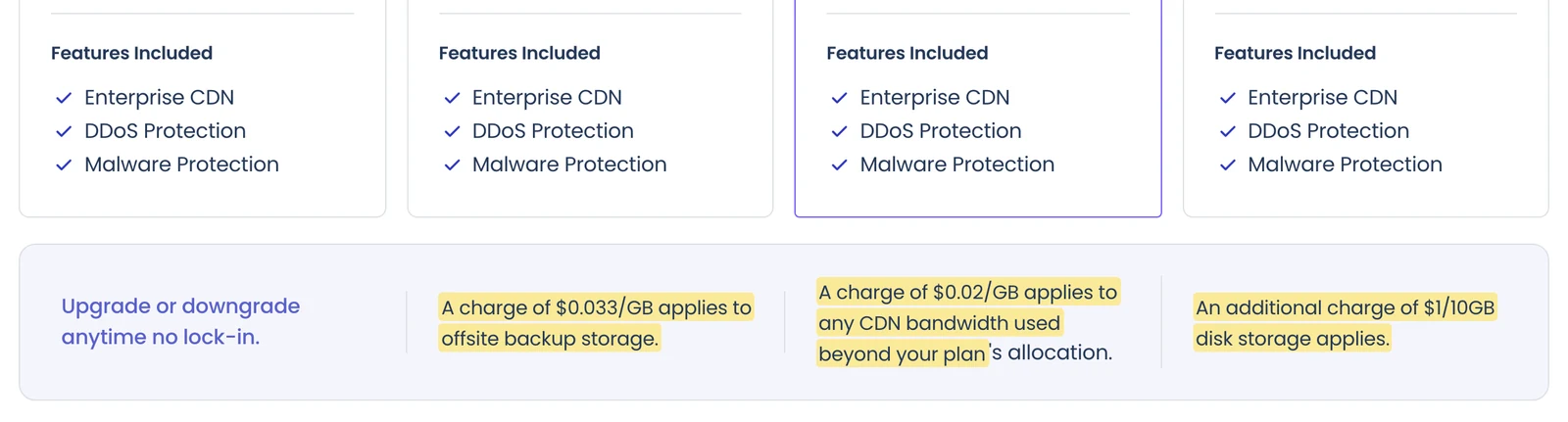
Disk is the one I’d watch. Cloudways doesn’t publish a disk size for each plan. You set it on a slider that starts at 25 GB, and an increase is permanent. You can move down a plan later, but the disk stays at the larger size.
Here’s a worked example for a small agency, with made-up usage:
- Starter plan with 4 client front-ends and 1 n8n instance: $20
- 50 GB of extra disk: $5
- 20 GB of offsite backups: $0.66
- 100 GB of CDN traffic above the 250 GB allowance: $2
That comes to $27.66 a month, or about $5.50 per app. The same 5 apps as separate 2 GB services on Render would cost $125 a month, though each one would get its own CPU and memory there.
Cloudways also runs coupons for new accounts through the year, and they apply to Velocity. The current one is on my Cloudways Black Friday deals page.
Frameworks and Deployment
Velocity deploys from Git and has presets for the common Node.js frameworks. A preset fills in the build and start commands, so a standard app needs no server setup.
The presets cover:
- Full-stack and front-end frameworks: Next.js, Nuxt, Remix, Astro, Svelte, Angular, React, Vite and TanStack
- API frameworks: Express and Fastify
- n8n, the workflow automation tool
- “Other”, for anything that starts with a Node command
Each app picks its own Node.js version, 22 or 24, and both are long-term support releases. Cloudways says it won’t move a running app to a new major version by itself.
This is the path a first deploy takes:
- You connect GitHub, GitLab or Bitbucket and choose the repository and branch.
- Velocity detects the framework and suggests the build command, start command and output folder.
- You set the root directory if the app lives in a monorepo subfolder, and add your environment variables.
- Cloudways builds the app and starts it on a temporary domain.
- You point your own domain at the app, and it gets an SSL certificate.
After that, auto-deploy can ship every push to the chosen branch, or you can redeploy by hand with one button. The dashboard keeps a deployment history with the commit, the author and build logs you can download.
There is no rollback button. To go back, you redeploy an older entry from the history, which rebuilds that commit with its old settings.
A team coming from Vercel or Netlify should know about 3 gaps:
- Preview deployments for each pull request aren’t part of Velocity.
- Builds run on the same server as your live apps, so a heavy build uses CPU that those apps also need.
- Cloudways’ own docs warn that a deploy can affect availability, so I wouldn’t count on zero-downtime releases.
Runtime, Database and Backups
Because the app runs as a normal Node process, most things that are awkward on serverless hosting work here without workarounds.
- WebSockets: NGINX forwards WebSocket traffic to the app, and a connection stays open for as long as the process runs.
- Cron jobs: each app has its own scheduler for Node commands, with a simple form or a crontab editor.
- Environment variables: you can import a .env file and mark a value as sensitive, which hides it permanently after saving.
- PostgreSQL: it installs from the dashboard on the same server and comes with a database manager. It shares the server’s RAM with your apps, and it can’t be uninstalled once added.
- Other databases: Supabase connects through the dashboard, and any external database works through a connection string. MySQL and MongoDB aren’t offered on the server.
- Backups: you set the schedule and retention per server and restore per app. A backup includes the app’s files and its database.
- Logs and monitoring: you get access, error and runtime logs plus CPU and memory graphs, though the dashboard shows only recent log entries.
The trade for all this management is control. Velocity gives you no SSH and no command line, and you can’t edit the NGINX config. In its place you get Web Rules, which allow up to 10 header rules and 25 redirects or rewrites per app.
There is also a weekly maintenance window, set to 05:00 UTC by default, when a short interruption is possible. I’d check that it falls in your quietest hour and change it if it doesn’t.
Security and CDN
Every Velocity plan includes Cloudflare Enterprise, and all traffic to your custom domain goes through it. That gives a small Node app the kind of edge protection it would rarely get on a plain VPS.
- A web application firewall and DDoS protection
- Rate limiting, which challenges an IP address after 200 requests in 60 seconds
- Under Attack mode, bot checks and an option to block AI crawlers
- Image optimization, Early Hints and edge caching
- Malware scanning on the server through Imunify360
Your domain has to point at Cloudways’ Cloudflare setup, with a CNAME record or 2 A records. If the domain already uses your own Cloudflare account, those records must be set to DNS only, so your own Cloudflare rules won’t apply to the app.
The CDN allowance is the number to check on a media-heavy app. Starter includes 250 GB a month, and anything above it costs $0.02 per GB.
The Limits
Velocity’s limits come from the same design as its flat price: one server of one size, managed for you. These are the ones I’d weigh before signing up.
- No autoscaling. Cloudways’ product lead told webhosting.today that Velocity doesn’t autoscale CPU or RAM. If an app runs out of memory, its processes can restart, and the fix is to resize the plan by hand.
- Shared resources. The apps on a server share its CPU and RAM, so one greedy app can slow the others.
- One region per server. There is no multi-region deployment, so a global app relies on the CDN for reach.
- Node.js only. Python, Docker containers and other runtimes aren’t supported.
- No white label. Agencies can’t rebrand the Velocity dashboard for their clients.
- Platform support only. Support covers the server and the platform. Bugs in your own code are yours to fix.
- A short track record. Velocity is new, its Web Rules feature is still in preview and it has no independent long-term reviews yet.
A managed server also behaves very differently from a serverless platform under load. On Vercel, a traffic spike raises the bill. On Velocity, it uses up the server, and the app slows down until you resize.
Cloudways Velocity vs Vercel, Render and a VPS
The closest alternatives each charge in a different way, so I’ve compared them on what one always-on app with about 2 GB of memory costs a month. My list of the best Node.js hosting platforms covers each of them in more detail.
| Option | How you pay | One always-on 2 GB app | Who runs the server |
|---|---|---|---|
| Cloudways Velocity | Flat price per server | $20, with room for 4 more apps | Cloudways |
| Vercel Pro | $20 a seat with $20 of usage credit, then per request and CPU time | Depends on traffic | No server to run |
| Render | Per service, plus an optional $25 workspace plan | $25 | Render |
| Railway | $5 or $20 plan, then by the second for RAM and CPU | $20 for the RAM, plus the CPU it uses | Railway |
| DigitalOcean App Platform | Per container | $25 | DigitalOcean |
| DigitalOcean Droplet, a plain VPS | Flat price per server | $18 for 2 vCPU and 2 GB | You |
The VPS row is the one I’d look at first. A plain DigitalOcean Droplet with 2 vCPU and 2 GB costs $18 a month, and Velocity’s Starter plan with the same specs costs $20. For $2 more, Cloudways handles:
- operating system patches and security updates
- SSL certificates and the firewall
- Git deploys, backups and monitoring
- the Cloudflare Enterprise CDN
What you give up for that $2 is root access. If you’re comfortable running a server and want full control, a VPS gives you more hardware for the money, and my Hetzner vs Vultr vs RackNerd comparison covers that route.
Vercel is still the better home for a Next.js app with uneven traffic, or for a team that reviews every pull request on a preview URL. Its functions scale by themselves, and a quiet month costs little.
The risk on Vercel is the invoice. Usage above the included credit is billed on demand, and a spend limit doesn’t pause your site unless you turn that option on. In 2024, the social app Cara faced a bill of about $96,000 for one week of function usage after a growth spike.
Render, Railway and DigitalOcean App Platform charge per service, which suits 1 or 2 apps and gets expensive at 5. In return, each service has its own resources, and Render and App Platform can add instances automatically on their higher tiers.
For a small app on a tight budget, Hostinger‘s Node.js web app plans cost less, but the low price needs a 48-month prepayment.
Who Should Use Cloudways Velocity
I’d choose Velocity when the number of apps matters more than the size of any one app.
It fits well if you:
- already host WordPress on Cloudways and run WordPress as a headless CMS, so the front-end can sit in the same account
- run several small always-on apps, such as APIs, dashboards, bots or an n8n instance
- build Shopify apps or a SaaS backend that needs WebSockets, cron jobs and a process that stays up
- manage a VPS today and want to stop patching it
I’d look elsewhere if you:
- have one hobby project that a free tier can hold
- expect sudden traffic spikes and need the platform to scale by itself
- need SSH, Docker or a runtime other than Node.js
- depend on a preview URL for every pull request
- need the same app running in several regions
If you’re weighing Cloudways as a whole against other hosts, my list of Cloudways alternatives compares it on the WordPress side.
Is Cloudways Velocity Worth It?
Yes, for a steady workload. At $20 for up to 5 always-on apps, Velocity costs $2 more than the bare server underneath it and takes the server work off your hands.
My scores below average out to 3.9 out of 5. They rate what Cloudways documents today, because the product is too new for long-term reports. Pricing, security and the runtime earn the high marks, and scaling and server control pull the total down.
Cloudways Velocity
Pros
- One flat price per server: $20 a month covers up to 5 apps on the Starter plan.
- Apps stay on, so there are no cold starts, and WebSockets and cron jobs work.
- Cloudflare Enterprise CDN, a firewall and malware scanning come with every plan.
- Git deploys with presets for Next.js, Nuxt, Astro, Express, n8n and more.
- PostgreSQL, backups and monitoring are built into the dashboard.
Cons
- No autoscaling. More capacity means resizing the plan by hand.
- No SSH, Docker or custom NGINX config, and Node.js is the only runtime.
- No preview deployments for pull requests.
- Extra disk can't be reduced once you add it.
- A new product with no independent long-term reviews yet.
Summary
Cloudways Velocity is a good deal when you have several always-on Node.js apps. One $20 server holds up to 5 of them, with Git deploys, backups and Cloudflare Enterprise included. It doesn’t autoscale and gives you no SSH, so it suits steady workloads better than spiky ones.
Price: USD 20 /month
Try Cloudways VelocityFAQs on Cloudways Velocity
Is there a free plan on Cloudways Velocity?
No. Velocity has a 3-day free trial on the Starter and Professional plans, and paid plans start at $20 a month. Billing is prorated by the day, so a short test costs only the days the server ran.
Does Cloudways Velocity have cold starts?
No. Each app runs as a Node process that stays on, so the first request after a quiet period is served by an app that is already running.
Can I run n8n on Cloudways Velocity?
Yes. n8n is one of the built-in presets, and it runs as a regular Node app on your server next to your other apps. Velocity doesn’t use Docker, so a setup that depends on a custom container won’t carry over.
Can I move a Next.js app from Vercel to Velocity?
Yes, if the app can run as a standard Next.js server. Pages, API routes and image optimization all run inside that server. Services tied to Vercel’s own platform, such as its storage and cron products, need replacing first.
Does Velocity work with WordPress hosting on Cloudways?
Velocity sits in the same Cloudways account as the WordPress plans, under its own menu. It uses separate servers with separate plans, so a WordPress site and a Node app don’t share resources.
Final Remarks
If you’re still unsure, I’d count your always-on Node apps first. With 1 small app, a free or usage-based plan elsewhere will cost less. With 2 or more that need to stay on, Velocity’s flat price starts to win, as long as none of them needs to scale by itself.
My suggestion is to use the 3-day trial on the Starter plan with your heaviest app. I’d watch its memory graph for a day of normal traffic before adding the next app, and move up a plan if memory stays close to the limit.
Tell Google you want more of this.
Add Gaurav Tiwari as a preferred sourceOne tap, and this site shows up more often in your own Top Stories, AI Overviews and AI Mode. Remove it any time.
Disclaimer: This site is reader-supported. If you buy through some links, I may earn a small commission at no extra cost to you. I only recommend tools I trust and would use myself. Your support helps keep gauravtiwari.org free and focused on real-world advice. Thanks. - Gaurav Tiwari