Core Forms
WordPress forms with payments, digital products and spam protection.
 Gaurav TiwariDocs
Core Forms can act as a lightweight digital-product checkout and license server. Payment gateways collect money; Core Forms owns the product catalog, orders, license keys, signed package downloads, customer access, and subscription terms.
These short walkthroughs cover store setup, products and plans, catalog blocks, checkout, orders, licenses, and the customer dashboard.

Watch the complete Core Forms playlist on YouTube
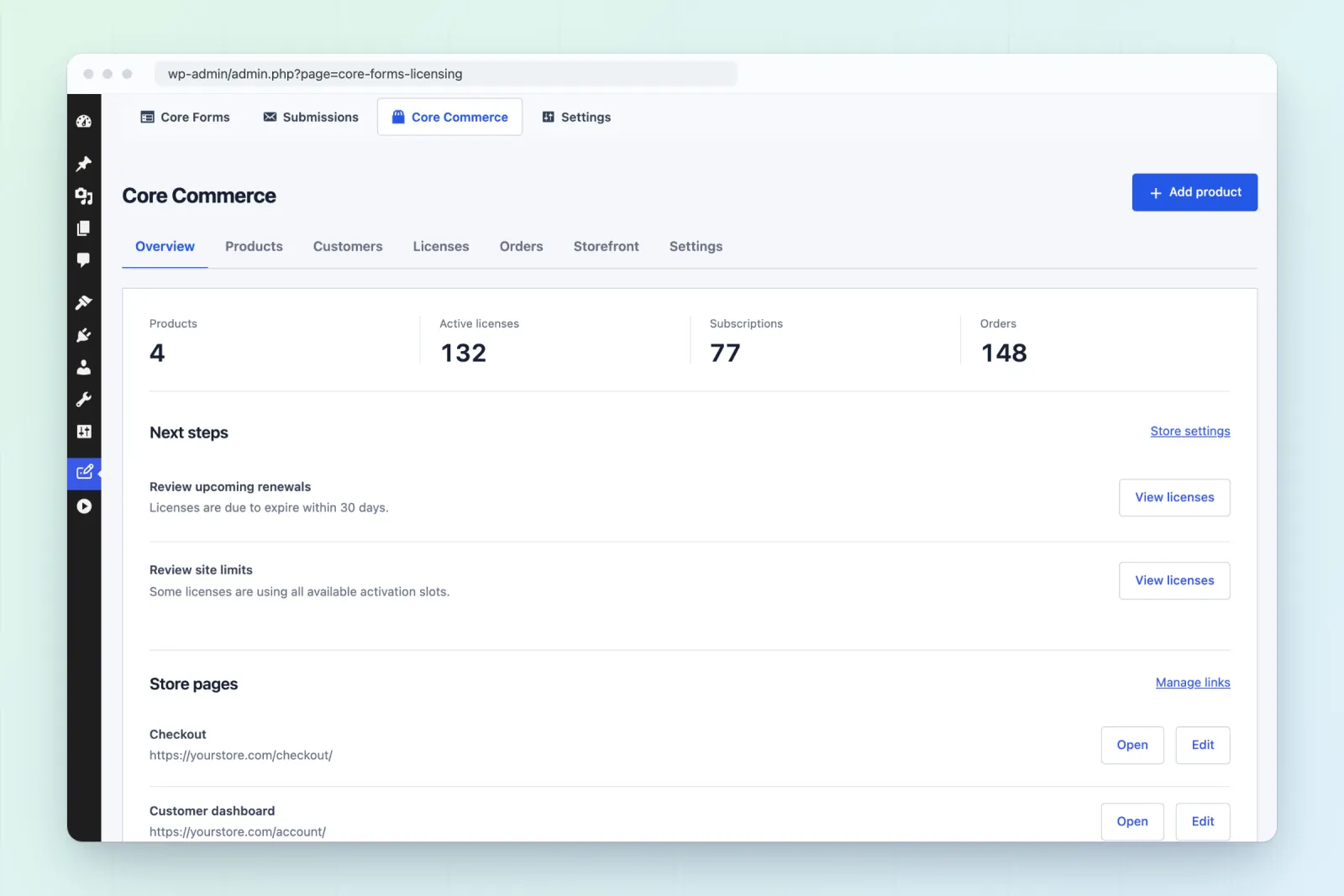
[cf_license_checkout] and a Customer Dashboard page containing [cf_license_dashboard]./core-checkout/?cf_product=product-slug&cf_plan=plan-slug, or use the product catalog. The native checkout reads the product and plan, shows every configured gateway allowed for that currency, stores the order, and issues the license after free checkout or a verified paid webhook. It does not require a Core Form post.Generated Core Forms are non-destructive and optional. Running the action again creates only missing forms or pages and never overwrites a form that has been edited. Billing fields are optional starting points and can be removed or made required in the form editor. The catalog always uses the native shared checkout, which asks for name, email and consent, plus country and tax number with Tax and VAT on and a coupon field with Coupons on; generated pages are available for custom campaigns and richer form workflows.
To explore the workflow without building records by hand, open the Products list and choose Generate sample products. The action inserts only missing sample plugin, theme, and digital-download records and plans, so repeated runs do not create duplicates or replace edits.
Payment-enabled forms do not run fulfillment when the browser merely returns from checkout. Core Forms waits for the gateway’s verified paid webhook, then atomically runs the action. The action logger and order source key make webhook retries idempotent.
Set Product selection field to a form variable such as [products]. Add one mapping per line:
core-forms=12:4:1
agency-bundle=12:7:1
analytics-addon=18:9:2
The format is submitted-value=product_id:plan_id:quantity. Checkbox or multi-select values may be comma- or pipe-separated. Every selected mapping becomes an order item, and the quantity controls how many separate keys are issued.
You may also add the fulfillment action more than once to a form. Existing saved issue_license actions continue to work.
Use the Customers tab for a case-insensitive buyer view that combines orders, licenses, and active sites. See Customers, orders, and activated sites for the administrative workflow.
[cf_license_dashboard] displays orders, full keys with reveal/copy controls, current package downloads, expiry, subscription term, and activated sites.[cf_license_products columns="3" type="plugin" limit="6"] renders a filterable product and plan catalog. It also supports orderby="name|created|updated|version" and order="ASC|DESC".[cf_license_product_list type="plugin" limit="8" show_price="1"] renders a compact directory when full pricing cards would be too heavy.[cf_license_product product="core-forms-pro"] renders one product and all active plans. Add plan="personal" to show one plan, or show_description="0" and show_version="0" for a tighter card.[cf_license_price product="core-forms-pro" plan="personal"] outputs only a formatted plan price.[cf_license_buy_button product="core-forms-pro" plan="personal" label="Buy Core Forms"] outputs a direct checkout button.[cf_license_checkout] uses the product and plan URL parameters on the shared checkout page. In a fixed campaign page, [cf_license_checkout product="core-forms-pro" plan="personal"] pins the selection.Each shortcode has a dynamic Block Editor replacement with product and plan selectors and a server-rendered preview. Editors can find them by searching for “product”, “license”, or “checkout”. The full reference is available under Core Commerce → Storefront and in the global Core Forms settings screen.
Core Forms does not create a public single-product page for every product. Choose a page and insert the relevant blocks or shortcodes. See Product pages, blocks, and shortcodes for copy-ready examples and a publishing checklist.
Package links expire after 15 minutes. New links use an internal license record ID instead of carrying the full license key. Downloads require an active, unexpired license, verify the stored SHA-256 hash, and are written to the download audit and activity tables.
Use a separate paid form with the Renew License Subscription action. Include license_key and email fields. The dashboard links to this form without pre-filling either secret in its URL. After payment confirmation, Core Forms records a renewal order and extends the existing subscription and key from the later of today or the current period end.
Core Forms tracks recurring terms, access, cancellation, expiry, and renewal orders. To charge renewals automatically instead, turn on Automatic Renewals: the payment provider charges each renewal, and Core Forms extends the license after every successful charge.
A verified refund of a purchase marks the order refunded, disables its licenses and cancels its local subscription. Refunding a renewal rolls back only that term, and refunding an upgrade puts the license back on its previous plan. Daily maintenance expires overdue subscriptions and licenses. Run it manually with:
wp core-forms license maintenanceEDD Software Licensing-compatible endpoints remain available:
/wp-json/core-forms/v1/check_license
/wp-json/core-forms/v1/activate_license
/wp-json/core-forms/v1/deactivate_license
/wp-json/core-forms/v1/get_version
Send license plus item_id or item_name, and url for site-specific activation. Legacy ?edd_action= requests remain supported.
See Integrate license keys and automatic updates for a complete WordPress plugin client, activation flow, update hooks, fresh signed package downloads, theme notes, and an end-to-end test checklist.
The authenticated/signed customer endpoint is:
GET /wp-json/core-forms/v1/customer/licensesCookie-authenticated WordPress requests use the normal REST nonce. Guest requests send the access_token from the dashboard link.
Administrators and integrations with manage_core_forms_licenses can operate the complete commerce workspace under /wp-json/core-forms/v1/commerce. WordPress cookie authentication requires the normal REST nonce; application passwords and other standard authenticated REST transports also work. These endpoints never return payment credentials or full license keys.
| Resource | Endpoints |
|---|---|
| Overview | GET /summary |
| Products | GET, POST /products; GET, PATCH /products/{id}; POST /products/{id}/generate-forms |
| Plans | GET /plans; GET, POST /products/{product_id}/plans; PATCH /plans/{id} |
| Releases | GET /releases; GET, POST /products/{product_id}/releases |
| Orders | GET /orders; GET /orders/{id}; POST /orders/{id}/resend-access |
| Licenses | GET /licenses; GET, PATCH /licenses/{id}; reset activations and resend access through the record action endpoints |
| Operations | GET /activations, /subscriptions, /downloads, and /events; deactivate one activation or update one subscription by ID |
| Setup | POST /sample-products; GET, PUT /currency-routes; GET /gateways |
Products and plans are archived by changing status; this API intentionally provides no destructive delete route. Publishing a release accepts a WordPress Media Library attachment_id, validates the ZIP, and requires replace_existing: true before replacing the same product version. Currency-route updates modify only the routing map and preserve stored gateway credentials.
Static sites, JavaScript applications, and external sales pages can read the customer-facing catalog without using an administrator credential:
GET /wp-json/core-forms/v1/storefront
GET /wp-json/core-forms/v1/storefront/products
GET /wp-json/core-forms/v1/storefront/products/{slug}
The product collection accepts page, per_page, type, currency, search, orderby, and order. The single-product route accepts an optional three-letter currency filter. Product responses contain only public slugs, names, descriptions, versions, resolved icons, active plans, formatted and minor-unit prices, billing and license terms, and hosted checkout URLs. Database IDs, form and page references, archived records, releases, orders, customer data, license keys, gateway configuration, and credentials are never included.
The public catalog is available only while Core Commerce → Settings → Store setup → Enable license issuing is on. Responses support cross-origin reads, five-minute shared caching, ETags, and conditional 304 Not Modified requests. Use cf_storefront_enabled, cf_storefront_cache_ttl, cf_storefront_product, and cf_storefront_plan to control availability, caching, or additional public fields.
Astro can load a product during a static build:
---
const response = await fetch(
  'https://store.example.com/wp-json/core-forms/v1/storefront/products/core-forms-pro'
);
const product = await response.json();
---

<h2>{product.name}</h2>
{product.plans.map((plan) => (
  <a href={plan.checkout_url}>{plan.formatted_price}</a>
))}
Checkout remains on the WordPress store so gateway routing, payment verification, orders, and license fulfillment continue to use the existing secured workflow.
On WordPress 6.9 or newer, Core Forms registers the same operations as discoverable abilities in the core-forms-commerce category. The ability names use the core-forms/ namespace, including list-products, save-product, save-plan, publish-release, list-orders, list-licenses, update-license, generate-product-forms, generate-sample-products, get-currency-routes, update-currency-routes, and get-gateway-status.
Every ability:
manage_core_forms_licenses or manage_options;mcp.public for compatible WordPress MCP adapters;WordPress 6.4 through 6.8 continue to use the direct REST API. The Abilities registration is conditional and does not change the plugin’s minimum WordPress version.
wp core-forms license product-list
wp core-forms license product-create "Core Forms" --slug=core-forms --version=4.4.2 --activation-limit=3
wp core-forms license plan-list
wp core-forms license order-list
wp core-forms license license-list --limit=1000 --format=csv
wp core-forms license maintenancecf_license_order_fulfilled( $order_id, $license_ids, $submission, $form )cf_license_renewed( $license_id, $expires_at, $submission, $form )cf_license_order_refunded( $order_ids, $submission )cf_license_maintenance_completed( $subscriptions_expired, $licenses_expired )Core Commerce uses a dedicated /core-checkout/ page. Existing FluentCart and WooCommerce checkout pages stay separate. New links use cf_product and cf_plan so product query variables from other plugins cannot override the checkout page.
Open Core Commerce → Settings → Store compatibility to check checkout ownership, mixed checkout content, and expiry scheduling. The checker detects WooCommerce, FluentCart, Easy Digital Downloads, SureCart, and WP EasyCart. Repair Core Commerce setup creates or selects an owned checkout and restores a missing expiry schedule. It does not disable another plugin or change its checkout content, carts, or orders.
Core Commerce sends private-page cache headers and contributes checkout/dashboard exclusions to GT Performance. Other cache/CDN configurations need matching exclusions. Compatibility checks do not certify every third-party extension or transfer provider subscriptions.
Open Core Commerce → Settings → License key format. Choose lowercase/uppercase hexadecimal, readable Base32, or mixed-case alphanumeric; set random-body length, optional prefix, and groups of four/eight characters. The preview is illustrative and cannot activate a product.
The default is 32 lowercase hexadecimal characters. Minimum lengths preserve at least 128 bits of random entropy. Settings affect newly issued keys only; existing keys are retained exactly. Mixed-case alphanumeric keys are case-sensitive. Key format is currently a store-wide setting.
Without the Automatic Renewals module, native checkout takes a one-time payment, and a yearly license term describes the access period without charging again. With Automatic Renewals on, a purchase of one recurring plan renews through the payment provider, and customers turn renewal off and on from their account.
Store setup, checkout/dashboard page assignments, and key formatting live in Core Commerce → Settings. Payment configuration remains in the shared Core Forms → Settings → Payments section. Use Manage payment settings above Store compatibility to open it directly. Saving shared settings preserves commerce configuration; saving store setup preserves payment credentials and other shared settings.
When Core Commerce is inactive, its admin page shows Activate Core Commerce. Activation enables licensing, preserves existing data and shared payment settings, and prepares separate checkout and customer dashboard pages. Running activation again does not duplicate pages. Native checkout and automatic license fulfillment are unavailable while Commerce is inactive.
Coupons, tax, automatic renewals, upgrades, invoices, reports, page access and client invoices are separate modules that start off. Turn them on under Core Forms → Modules.
The overview groups outstanding setup and license work into Next steps. Recent activity can be expanded when needed. Product and settings screens use one workspace surface with fewer nested panels.
Active products have a virtual URL such as /?product=my-plugin. It renders through the theme without inserting a WordPress post or registering a product CPT. If another store owns the same product slug, the URL uses /?cf_product=my-plugin instead. Product pages link to the separate native checkout.
The product editor includes a releases overview, a copyable product URL, price/checkout previews, and expandable shortcodes. Content connections search pages, posts and public custom content types the merchant can edit. Draft status is shown so a draft connection is not mistaken for published content. Select a search result before saving, or clear the connection.
The customer dashboard now has Dashboard, Purchase history, Subscriptions, Licenses, Downloads and Profile sections. Order details are owner-scoped, paid orders have printable receipts, and product/license lists can be searched. Profile edits require a logged-in account and cannot change account email, roles or another user’s information. Signed guest links retain read access and site-management capabilities.
Email preferences remain an external/custom integration. Add custom destinations through cf_customer_portal_links; change support/shop destinations with cf_customer_portal_support_url and cf_customer_portal_shop_url.
Set Core Commerce → Settings → Store setup → Support URL to choose the customer portal support destination. Use a full HTTP(S) web address; an external help desk works too. Leave it blank to use the site’s /support/ URL.
Products support Plugin, Theme, Digital product, Service, and Event types. The editor shows software version/site-limit controls for the existing licensed product types; services show duration, timeframe and scheduling details, while events show dates, timezone, location and access details. Services/events use one-time plans and create order records without software license keys. After-purchase links and instructions are shown only in paid order details, not in public product data. Scheduling and event attendance remain managed through the supplied links.
The product image falls back to the selected type’s icon. A custom Media Library icon takes priority. Brief description is the default product summary; create a separate page/post/CPT for longer marketing and SEO content.
Choose product gallery images in the product editor. Display them with the Product Gallery block or [cf_product_gallery product="your-slug" columns="3"]. The virtual product page also includes the gallery. Media-library alternative text and responsive image sizes are used automatically.
Checkout and renewal connections accept either searched WordPress content or a direct HTTP(S) URL. A direct checkout URL is opened as supplied; external payment/fulfillment integrations must be connected separately. Product embedding shortcodes are visible without expanding a toggle.
Still stuck? Open a support ticket