
Twilio SMS Integration
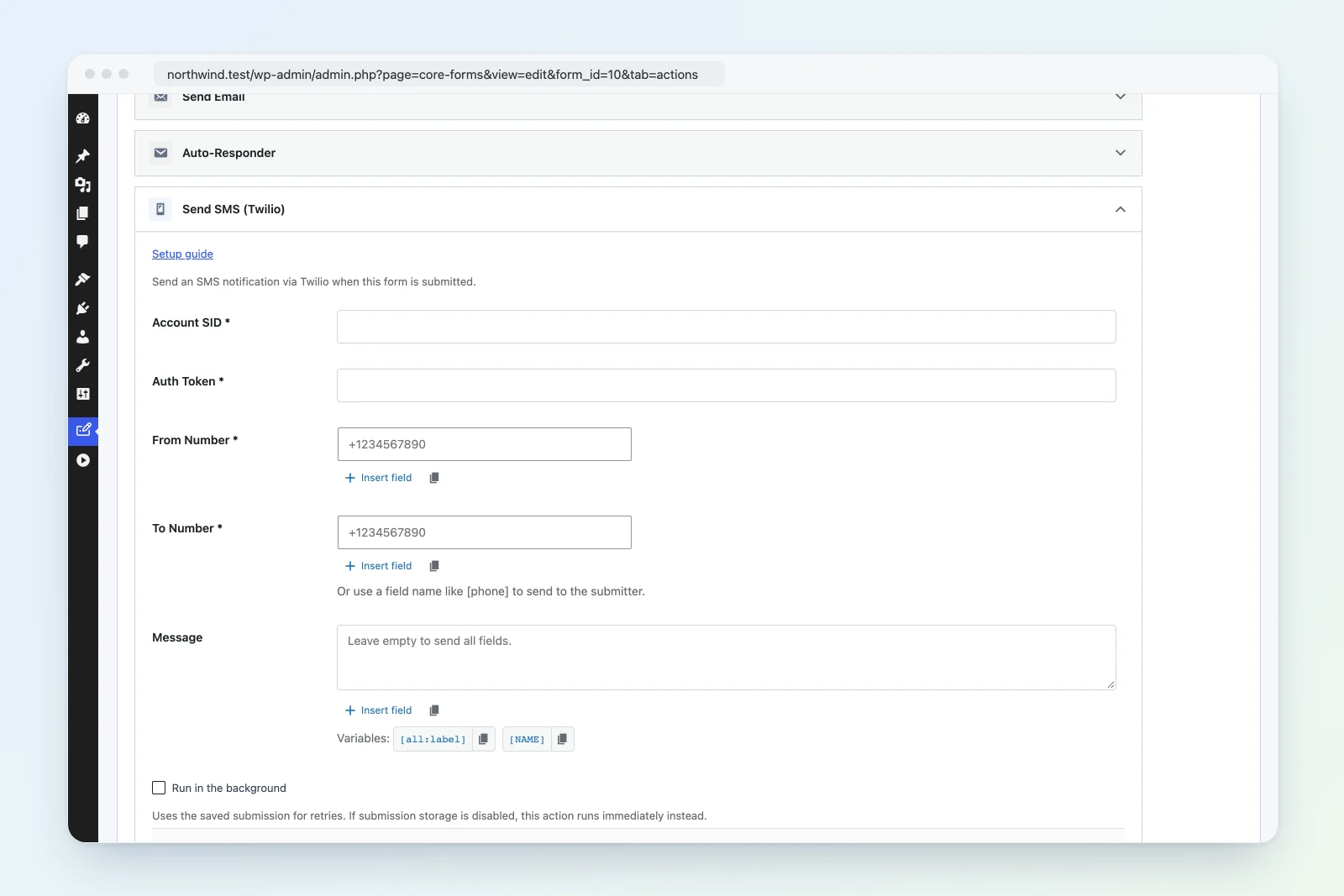
Send an SMS notification via Twilio when a form is submitted.
Action type: twilio_sms Class: Core_Forms\Actions\TwilioSms Source: src/actions/class-twilio-sms.php
Setup
- Sign up at twilio.com and get your Account SID and Auth Token from the console dashboard.
- Purchase or configure a phone number in Twilio to send from.
- In WordPress, edit your form > Actions tab > Add Action > Send SMS (Twilio).
- Enter Account SID, Auth Token, From Number, To Number, and optional message.
Settings Reference
| Setting | Required | Default | Description |
|---|---|---|---|
| Account SID | Yes | — | Twilio Account SID |
| Auth Token | Yes | — | Twilio Auth Token |
| From Number | Yes | — | Twilio phone number to send from (E.164 format: +1234567890) |
| To Number | Yes | — | Recipient phone number or [field_name] variable |
| Message | No | All fields | Custom message template |
Dynamic To Number
The To Number field supports data variables. Use a form field name in brackets to send the SMS to the number submitted by the user:
[phone]This replaces [phone] with the value of the phone form field, allowing per-submission SMS delivery (e.g., order confirmations, appointment reminders).
Message Variables
Use these variables in the Message field:
[all:label]— all submitted fields as “Label: Value” pairs[NAME]— value of the “name” field[field_name]— value of any form field
Auto-Generated Message
When the Message field is left empty, all fields are sent as plain text:
Contact Form -- New submission
Name: Jane Smith
Email: jane@example.com
Message: I'd like to learn more.
SMS Length
Messages are truncated to 1,600 characters (Twilio’s concatenated SMS limit). Standard SMS segments are 160 characters; longer messages are split into multiple segments and may incur additional charges.
Authentication
Twilio uses HTTP Basic authentication: base64(AccountSID:AuthToken). The request is sent to:
https://api.twilio.com/2010-04-01/Accounts/{SID}/Messages.jsonHow It Works
- Validates all required fields (SID, token, from, to).
- Replaces data variables in the To Number field.
- Builds the message (auto-generated or custom with variable replacement).
- Truncates the message to 1,600 characters.
- POSTs to the Twilio Messages API with Basic auth.
- The body is sent as form-urlencoded (Twilio API requirement):
From,To,Body. - The request times out after 15 seconds.
- Returns
trueon success.
Example: Order Notification to Admin
- From Number:
+15551234567 - To Number:
+15559876543 - Message:
New order from [NAME] ([EMAIL]). Amount: [total]
Example: Confirmation to Submitter
- From Number:
+15551234567 - To Number:
[phone] - Message:
Thanks [NAME]! We received your request and will respond within 24 hours.
Troubleshooting
- SMS not delivered: Verify the From Number is a valid Twilio number with SMS capability.
- Invalid To Number: Phone numbers must be in E.164 format (
+1234567890). If using a field variable, ensure the form collects numbers in this format. - Trial account limits: Twilio trial accounts can only send to verified phone numbers.
- Charges: Each SMS segment costs money. Monitor usage in the Twilio console.