
Spam Protection
Core Forms provides six layers of spam protection that can be used individually or combined. Spam submissions are stored in the database (marked as spam) but do not trigger any actions.
Protection Methods
1. Honeypot Field (Default On)
A hidden field that legitimate users never see or fill in. Bots that auto-fill all fields will be caught. This is enabled by default on all forms with no configuration required.
The honeypot field is rendered inside the form automatically and hidden with CSS. If it contains a value on submission, the submission is flagged as spam.
2. Google reCAPTCHA v3
Invisible score-based CAPTCHA that runs in the background without user interaction.
Setup:
- Go to Core Forms > Settings > Spam Protection
- Enter your reCAPTCHA v3 Site Key and Secret Key
- Save settings
reCAPTCHA is automatically added to all forms when configured. It evaluates user behavior and assigns a score (0.0 to 1.0). Scores below the threshold are flagged as spam.
// The reCAPTCHA integration hooks into form validation
add_filter( 'cf_validate_form', [ $recaptcha, 'validate_recaptcha' ], 10, 3 );

// And adds the reCAPTCHA widget to form markup
add_filter( 'cf_form_markup', [ $recaptcha, 'add_recaptcha_to_form' ], 10, 2 );

// And enqueues the script when a form is rendered
add_filter( 'cf_form_html', [ $recaptcha, 'enqueue_recaptcha_on_form_render' ], 10, 2 );
3. Cloudflare Turnstile
A privacy-focused CAPTCHA alternative from Cloudflare. Presents a simple widget that verifies users without puzzles.
Setup:
- Go to Core Forms > Settings > Spam Protection
- Enter your Turnstile Site Key and Secret Key
- Save settings
add_filter( 'cf_validate_form', [ $turnstile, 'validate_turnstile' ], 10, 3 );
add_filter( 'cf_form_markup', [ $turnstile, 'add_turnstile_to_form' ], 10, 2 );
add_filter( 'cf_form_html', [ $turnstile, 'enqueue_turnstile_on_form_render' ], 10, 2 );
4. Akismet Integration
Leverages the Akismet anti-spam service (requires the Akismet plugin to be installed and configured).
Akismet checks submission content against its global spam database. It runs at a lower priority (20) so it executes after CAPTCHA checks:
add_filter( 'cf_validate_form', [ $akismet, 'check_for_spam' ], 20, 3 );5. Math CAPTCHA
A simple math question (e.g., “What is 3 + 7?”) that bots typically cannot solve. No external service required.
add_filter( 'cf_validate_form', [ $math, 'validate_math_captcha' ], 15, 3 );
add_filter( 'cf_form_markup', [ $math, 'add_math_captcha_to_form' ], 20, 2 );
6. Global Blocklist
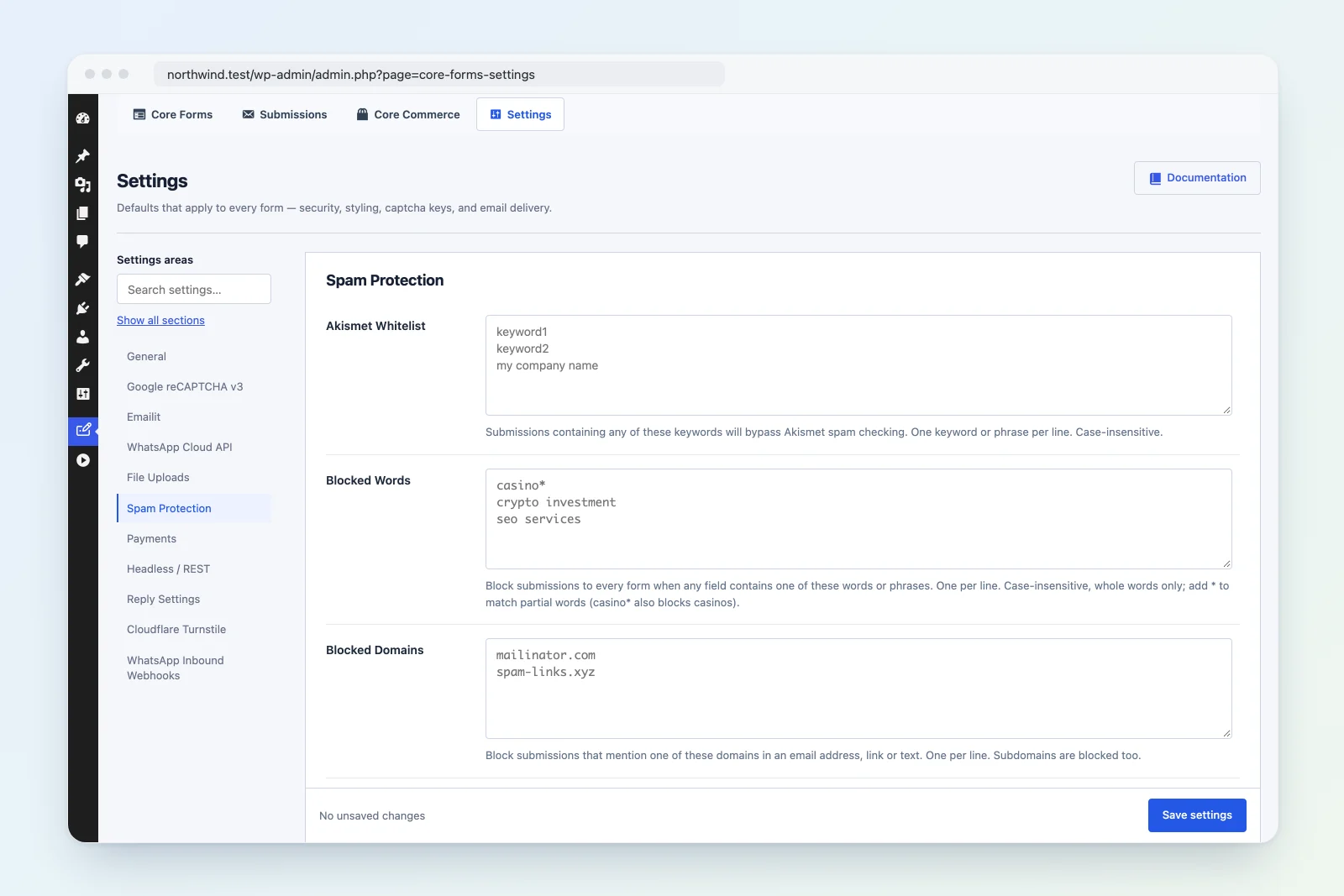
Block submissions to every form that contain words you never want, or that mention domains you don’t trust. The blocklist runs on your own server, before reCAPTCHA, Turnstile and Akismet, so it costs no outside requests.
Setup:
- Go to Core Forms > Settings > Spam Protection.
- In Blocked Words, enter words or phrases, one per line.
- In Blocked Domains, enter domains, one per line.
- Under When Blocked, choose what happens to a matching submission.
- Save settings.
Blocked Words match like this:
- Case doesn’t matter.
- Only whole words match, so
casinodoesn’t blockcasinos. - Add
*to match part of a word:casino*blockscasinoandcasinos. - A phrase such as
crypto investmentmatches those words together.
Blocked Domains match like this:
- A domain is blocked wherever it shows up in the answers: in an email address (
name@spam.com), in a link (https://spam.com/offer), or as plain text (visit spam.com). - Subdomains are blocked too, so
spam.comalso blocksmail.spam.com. - You can paste an entry as
https://www.spam.com/path,@spam.comor*.spam.com. Each becomesspam.com.
Every text answer in the submission is checked. Uploaded files aren’t.
When Blocked has two options:
| Option | What the visitor sees | What happens to the submission |
|---|---|---|
| Mark as spam (default) | The form’s normal success message | Saved as spam when the form saves submissions, and listed in the Spam view. No actions run. |
| Reject | The form’s Blocked content message | Never saved. No actions run. |
Rejecting tells a real person what went wrong so they can fix their answer. Marking as spam gives a bot nothing to learn from, and lets you review false positives later.
Each form has its own Blocked content message on its Messages tab. The default reads: “Your submission contains words or links that are not allowed. Please revise it and try again.”
Developers can adjust the lists per form, or log matches:
// Add words for one form only.
add_filter( 'cf_blocked_words', function ( $words, $form ) {
    if ( 'job-application' === $form->slug ) {
        $words[] = 'guaranteed income';
    }
    return $words;
}, 10, 2 );

// Domains use the same pattern.
add_filter( 'cf_blocked_domains', function ( $domains, $form ) {
    return $domains;
}, 10, 2 );

// Fires when a submission matches. $match is the word or domain that matched.
add_action( 'cf_submission_blocked', function ( $match, $form, $data ) {
    error_log( "Core Forms blocked a submission to {$form->slug}: {$match}" );
}, 10, 3 );
Validation Order
Spam checks run in priority order via the cf_validate_form filter:
| Priority | Check | Class |
|---|---|---|
| 8 | Global blocklist | Blocklist |
| 10 | reCAPTCHA v3 | Recaptcha |
| 10 | Cloudflare Turnstile | Turnstile |
| 15 | Math CAPTCHA | MathCaptcha |
| 20 | Akismet | Akismet |
The honeypot is checked separately during form processing in Forms::process().
Spam Handling
When a submission is flagged as spam:
- The
is_spamflag is set totrueon the submission. - The submission is saved to the database (so you can review false positives).
- No actions are triggered: no emails, webhooks, or integrations fire.
- A success response is returned to the browser to trick bots into thinking the submission succeeded.
- A
spamanalytics event is recorded for reporting.
Custom Validation
Add your own spam checks using the cf_validate_form filter:
add_filter( 'cf_validate_form', function( $error_code, $form, $data ) {
    // If another validator already flagged an error, pass through
    if ( '' !== $error_code ) {
        return $error_code;
    }

    // Block submissions with known spam phrases
    $spam_phrases = [ 'buy now', 'click here', 'free offer' ];
    $message = strtolower( $data['message'] ?? '' );

    foreach ( $spam_phrases as $phrase ) {
        if ( strpos( $message, $phrase ) !== false ) {
            return 'spam';
        }
    }

    return $error_code;
}, 25, 3 );
Recommended Configuration
| Form Type | Recommended Protection |
|---|---|
| Contact form (low traffic) | Honeypot + Math CAPTCHA |
| Contact form (high traffic) | Honeypot + Turnstile or reCAPTCHA |
| Public-facing form | Honeypot + Turnstile + Akismet |
| Internal/logged-in form | Honeypot only |