Core Forms
WordPress forms with payments, digital products and spam protection.
 Gaurav TiwariDocs
Form submissions are stored in a custom database table (wp_cf_submissions) for fast querying and flexible management. The admin interface provides filterable inboxes, status tracking, bulk actions, CSV export, and email replies.

Table: wp_cf_submissions
| Column | Type | Description |
|---|---|---|
id |
INT | Primary key |
form_id |
INT | Form post ID |
data |
LONGTEXT | JSON-encoded field data |
ip_address |
VARCHAR | Submitter’s IP address |
user_agent |
TEXT | Browser user agent string |
referer_url |
TEXT | Page URL where form was submitted |
is_spam |
TINYINT | 1 if flagged as spam, 0 otherwise |
status |
VARCHAR | Submission status |
draft_token |
VARCHAR | Token for save-and-resume |
current_step |
INT | Current step for multi-step forms |
submitted_at |
TIMESTAMP | When the submission was created |
modified_at |
TIMESTAMP | When the submission was last modified |
| Status | Constant | Description |
|---|---|---|
new |
Submission::STATUS_NEW |
Fresh submission, not yet viewed |
draft |
Submission::STATUS_DRAFT |
Saved but not submitted (save-and-resume) |
partial |
Submission::STATUS_PARTIAL |
Multi-step form, partially completed |
read |
Submission::STATUS_READ |
Viewed by an admin |
replied |
Submission::STATUS_REPLIED |
Admin has replied via email |
archived |
Submission::STATUS_ARCHIVED |
Archived/closed |
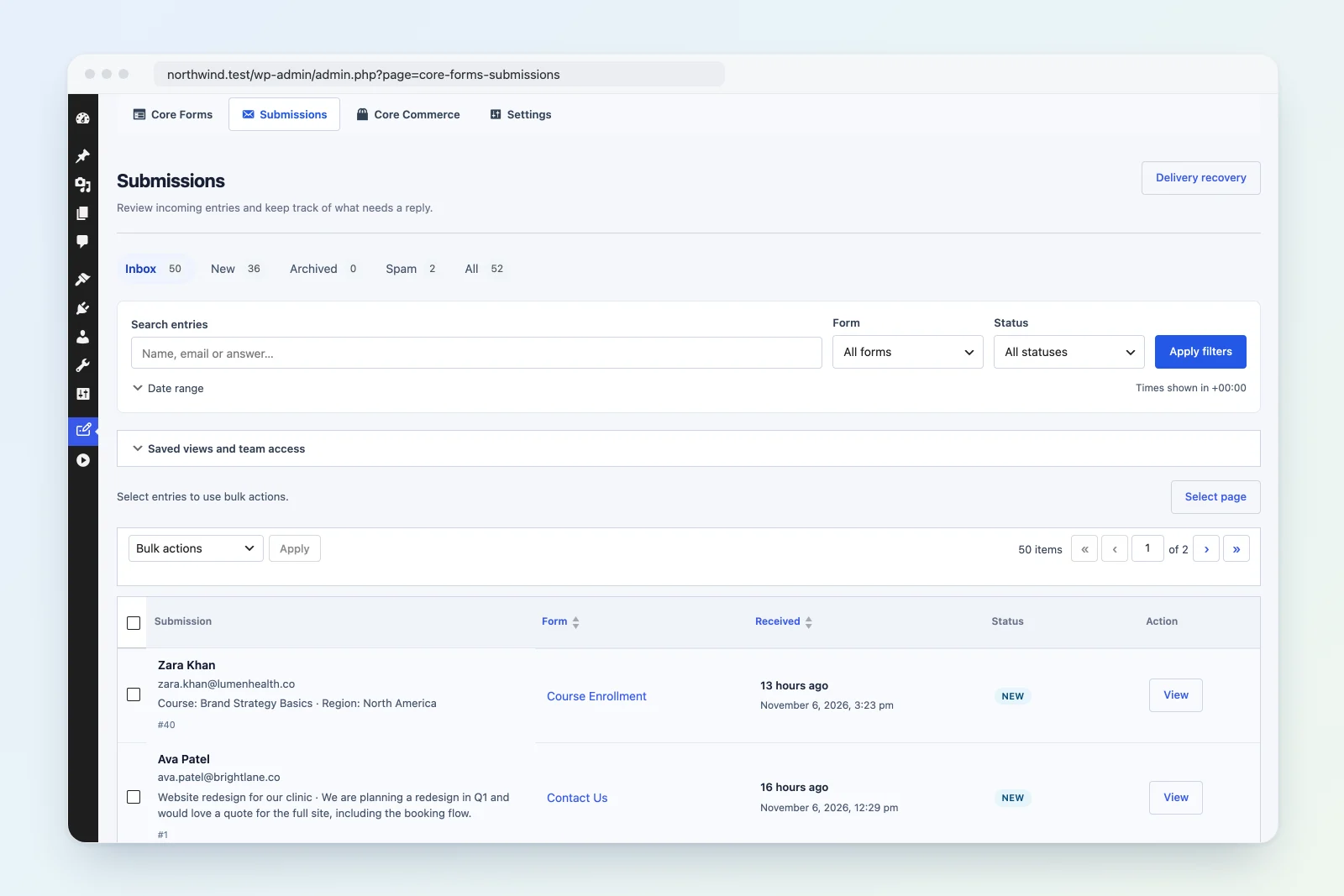
Navigate to Core Forms > [Form Name] > Submissions tab to see submissions for a specific form.
Navigate to Core Forms > All Submissions for a global view across all forms. Uses the AllSubmissions and AllSubmissionsTable classes.
The default list puts the sender first, followed by email and a short answer preview. Entries without recognizable name/email fields use their submission ID. Use View or the sender link to open all details.
Click a submission to open the detail view (SubmissionEditor), which shows: – All submitted field data – File upload links – IP address and user agent – Submission history and status changes – Action logs for this submission – Reply form
The submissions table supports bulk actions: – Mark as read – Archive – Delete – Mark as spam / Not spam
Export submissions via the Data Exporter extension:
The export includes all field data columns plus submission metadata: ID, timestamp, status, a spam flag (is_spam, 1 or 0), IP address, user agent and referrer URL. Spam entries are included, so filter on is_spam in your spreadsheet if you only want real messages.
Reply to a submitter directly from the admin via SubmissionReply:
The reply is sent as an email and the submission status changes to replied. Reply history is stored using the Reply class.
GET /wp-json/cf/v1/submissions
GET /wp-json/cf/v1/forms/{form_id}/submissions
Parameters: per_page, page, status, search.
GET /wp-json/cf/v1/submissions/{id}PATCH /wp-json/cf/v1/submissions/{id}Body: { "status": "archived" }
DELETE /wp-json/cf/v1/submissions/{id}All endpoints require the edit_forms capability.
// Get a single submission
$submission = cf_get_form_submission( $submission_id );

// Get all submissions for a form
$submissions = cf_get_form_submissions( $form_id );

// Create a submission from a database row
$submission = Submission::from_object( $row );

// Check if submission is a draft
if ( $submission->is_draft() ) {
    // Handle partial submission
}$submission->id; // INT - Primary key
$submission->form_id; // INT - Form post ID
$submission->data; // ARRAY - Field data
$submission->ip_address; // STRING
$submission->user_agent; // STRING
$submission->referer_url; // STRING
$submission->is_spam; // BOOL
$submission->status; // STRING - One of the STATUS_* constants
$submission->draft_token; // STRING|NULL
$submission->current_step; // INT - For multi-step forms
$submission->submitted_at; // STRING - Datetime
$submission->modified_at; // STRING|NULL - DatetimeStill stuck? Open a support ticket