Docs Core Forms Integrations
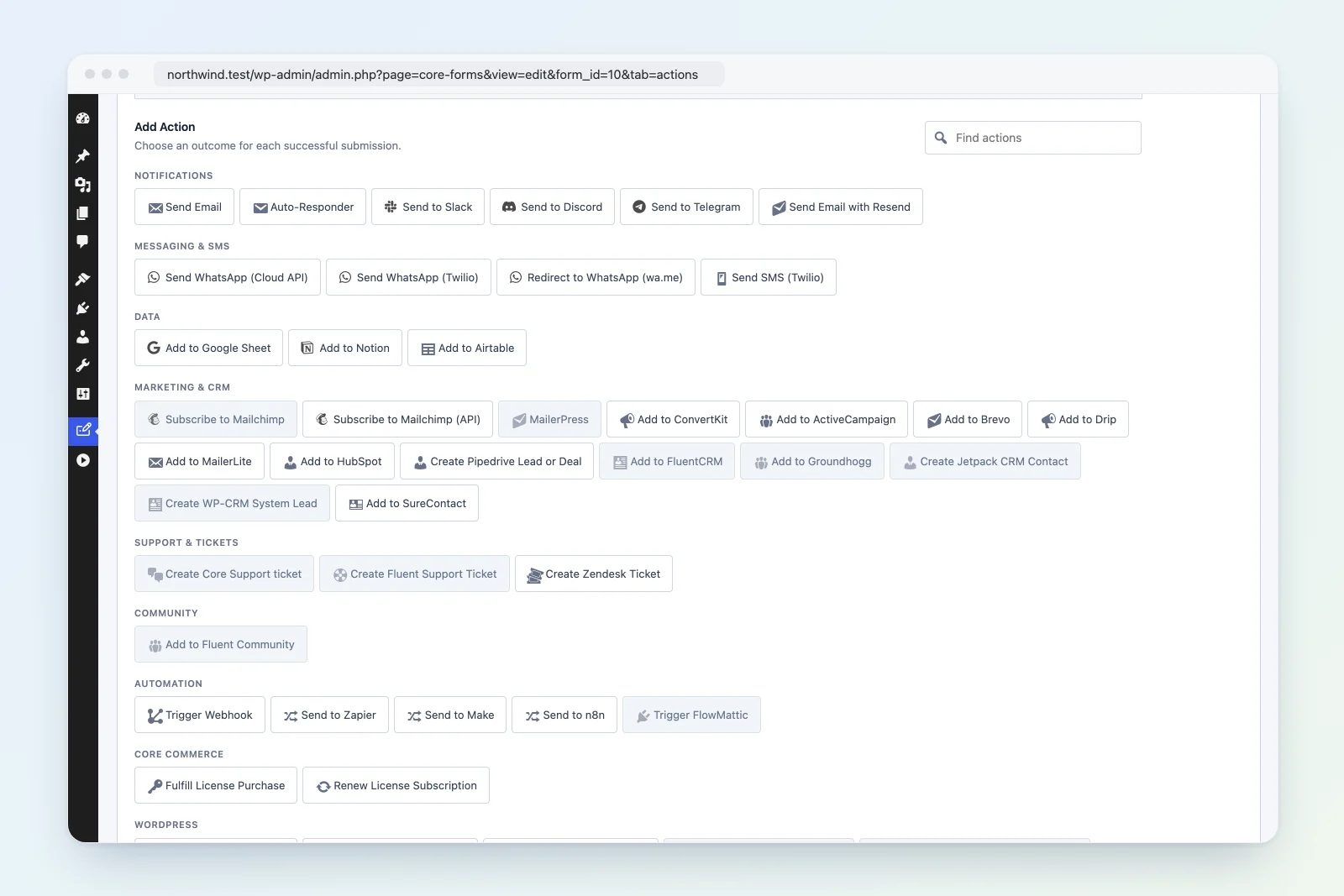
Most outbound integrations are configured in the Actions tab of a form and fire on successful submission. Builder, automation, and analytics integrations can register automatically when the companion plugin is active.
Add an action: Edit Form > Actions tab > Add Action > select type.
Added in 4.9.5
Integration
Supported scope
Fluent Support Same-site customer and ticket creation with product/inbox mapping
n8n Authenticated typed webhooks and an importable workflow
Pipedrive Person/organization matching, leads/deals, custom fields, and follow-up activity
Zendesk Requester tickets, tags, custom fields, and owned submission uploads
Resend Transactional email, idempotency keys, and signed delivery events
FlowMattic Form-specific or shared Plugin Actions trigger with named field data
Analytics & Attribution
Integration
Description
Independent Analytics Automatically track Core Forms submissions, conversion rates, traffic sources, UTM campaigns, user journeys, devices, locations, and individual form performance with Independent Analytics Pro
Messaging & Notifications
Integration
Description
Email Send email notification to admin or custom recipients
Autoresponder Auto-reply email to the person who submitted the form
Slack Post a message to a Slack channel via Incoming Webhook
Discord Send a rich embed notification to a Discord channel
Telegram Send a message to a Telegram chat or group via bot
Twilio SMS Send an SMS notification via Twilio
CRM & Marketing
Integration
Description
HubSpot Create or update a contact in HubSpot CRM
Mailchimp Subscribe to a Mailchimp list (requires MC4WP plugin)
ConvertKit Subscribe to a ConvertKit form with optional tags
ActiveCampaign Add or update a contact in ActiveCampaign with list and tag assignment
Brevo Add or update a contact in Brevo (formerly Sendinblue)
Drip Create or update a subscriber in Drip
MailerLite Add a subscriber to a MailerLite group
Data & Productivity
Integration
Description
Google Sheets Append each submission as a new row in a Google Spreadsheet
Notion Create a new page in a Notion database for each submission
Airtable Add a record to an Airtable base for each submission
Automation & Webhooks
Integration
Description
Zapier Send all form data to a Zapier webhook to trigger any Zap
Make Send form data to a Make (Integromat) webhook scenario
Webhook Generic webhook: POST form data to any URL with auth support
WordPress Actions
Integration
Description
Create User Create a WordPress user account from form data
Create Post Create a post or custom post type entry from form data
Create Article Full article creation with taxonomy, ACF, and meta mapping
Data Variables
All integrations that support message templates can use these variables:
[field_name] — replaced with the value of the matching form field[all:label] — all fields formatted as “Label: Value” pairs[CF_TIMESTAMP] — submission timestamp[CF_IP] — submitter IP address
Conditional Actions
Actions can be set to run conditionally based on field values. Configure conditions in the action settings to control when each action fires.
Source Code
All action classes are in src/actions/ and extend Core_Forms\Actions\Action. The webhook extension is in extensions/webhooks/.