Core Forms
WordPress forms with payments, digital products and spam protection.
 Gaurav TiwariDocs
The Autoresponder sends an automatic confirmation email to the person who submitted the form. It looks up the submitter’s email address from a form field and sends a customizable reply.

Add an Autoresponder action in the Actions tab of the form editor.
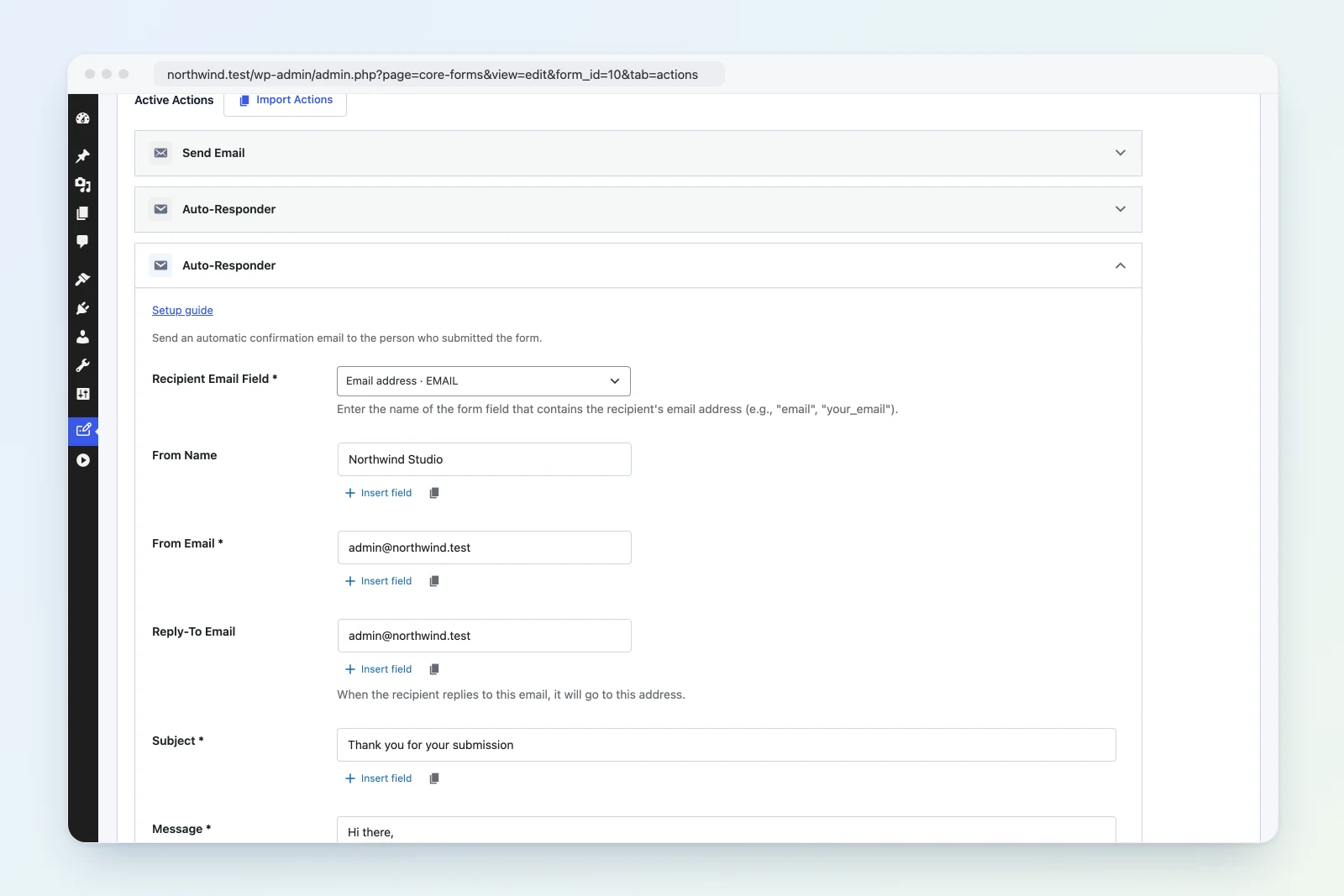
| Field | Required | Default | Description |
|---|---|---|---|
| Recipient Email Field | Yes | email |
Name of the form field containing the submitter’s email |
| From Name | No | Site name | Display name for the sender |
| From Email | Yes | admin_email |
Sender email address |
| Reply-To Email | No | admin_email |
Address that receives replies |
| Subject | Yes | “Thank you for your submission” | Email subject line |
| Message | Yes | (see below) | Email body with data variables |
| Content Type | No | text/html |
text/html or text/plain |
The Recipient Email Field must match the name attribute of your form’s email input. Core Forms auto-detects this when you add the action:
<!-- If your form has this field: -->
<input type="email" name="your_email" required />

<!-- Set Recipient Email Field to: your_email -->
If the field is empty or contains an invalid email, the autoresponder silently skips sending.
Hi there,

Thank you for contacting us. We have received your submission
and will get back to you soon.

Here is a copy of your submission:

[all]

Best regards,
{Site Name}The autoresponder supports the same data variables as the Email action:
[field_name]       Value of a specific form field
[all]              All fields as name: value pairs
[all:label]        All fields with human-readable labels
[CF_FORM_ID]       Form ID
[CF_FORM_TITLE]    Form title
[CF_TIMESTAMP]     Submission timestamp
[CF_IP_ADDRESS] Submitter's IP addressSubject: We received your application, [first_name]!
Message:
Dear [first_name],
Thank you for applying for the [position] role.
We've received your application and our team will review it
within 3-5 business days.
Your reference number: [CF_FORM_ID]-[CF_TIMESTAMP]
Here's what you submitted:
[all:label]
If you have questions, reply to this email.
Best,
The Hiring TeamLike the Email action, every autoresponder email is logged with status tracking:
cf_log_email( [
    'form_id'       => $form->ID,
    'submission_id' => $submission->id,
    'to_email'      => $to,
    'from_email'    => $from_email,
    'subject'       => $subject,
    'message'       => $message,
    'headers'       => $headers,
    'status'        => 'pending',
    'action_type'   => 'autoresponder',
] );// Change the recipient
add_filter( 'cf_action_autoresponder_to', function( $to, $submission ) {
return $to;
}, 10, 2 );
// Modify the subject
add_filter( 'cf_action_autoresponder_subject', function( $subject, $submission ) {
return $subject;
}, 10, 2 );
// Modify the message
add_filter( 'cf_action_autoresponder_message', function( $message, $submission ) {
return $message;
}, 10, 2 );
// Modify the headers
add_filter( 'cf_action_autoresponder_headers', function( $headers, $submission ) {
$headers[] = 'X-Custom-Header: value';
return $headers;
}, 10, 2 );The autoresponder validates before sending:
email_field setting must not be empty.is_email() validation.sanitize_email().If any check fails, the autoresponder returns false and no email is sent.
You can add multiple autoresponder actions to a single form. For example:
Still stuck? Open a support ticket