 by
I shipped the first alpha of Core Support on September 27, 2026. Version 1.0 followed on October 21, and today, November 28, version 1.7 is out. That is 55 releases in 2 months, and every one of them ran my own support first.
I think Core Support is the best product I have ever built. It offers the most convenience of anything I have made and it solves most of the problems I had with customer support.
Core Support is my WordPress helpdesk plugin. It puts tickets, a knowledge base, an AI chatbot, live chat, changelogs and a public roadmap in one plugin, on your own site. It runs the support portal, docs and changelogs on gauravtiwari.org, and I run it on some of my client websites too.
Why I Built Core Support

Before Core Support, my support lived in several places:
- Roadmaps in Trello.
- Changelogs written by hand for every release.
- Chat through free chat tools. I hopped between them and tried every one I could find.
- Tickets as plain email.
Each tool held one piece of the customer. A question came in by email, the feature it asked for went on a Trello card, and the fix went into a changelog I wrote by hand. Nothing connected them, so I had to keep them in sync myself.
So I built Core Support for myself. I wanted one place where a customer’s question, my reply, the docs that answer it and the release that fixes it all live together.
What Core Support Does
Core Support covers the jobs a small product business deals with every day. These are the parts I use most:
- Tickets: one inbox in wp-admin with statuses, priorities, assigned agents, private notes and delivery status on every reply.
- Email to ticket: mail arrives through IMAP, a Cloudflare relay that ships with the plugin, or Zapier, Make and n8n.
- Customer portal: customers follow their tickets on your site, with a Support tab inside WooCommerce and FluentCart accounts.
- Knowledge base: docs at
/docs/that match your theme. - AI chat: an assistant that answers from your own docs, files and web pages.
- Live chat: visitors talk to a person whenever someone on your team is online.
- Changelogs: release notes at
/changelogs/, synced from GitHub, GitLab, Bitbucket, Gitea or Forgejo. - Roadmaps: public roadmaps where customers react to ideas and suggest new ones.
- Customer context: orders and licenses from WooCommerce, FluentCart and Easy Digital Downloads beside the conversation, with contact details from FluentCRM.
- Team alerts: new tickets can ping Slack, Discord, Telegram or Pushover.
- Imports: tickets come over from Zendesk, Freshdesk or Intercom.
Plans cost $69 a year for 10 sites, $99 a year for 20 sites or $199 once for a lifetime license on 25 sites. Every plan has unlimited agents.
The Chat Took the Longest
The chat experience took more of my time than any other part of Core Support. A chat window is the first thing many visitors touch, and if it confuses them, they close it.
So I worked on the small moments in that window, one at a time:
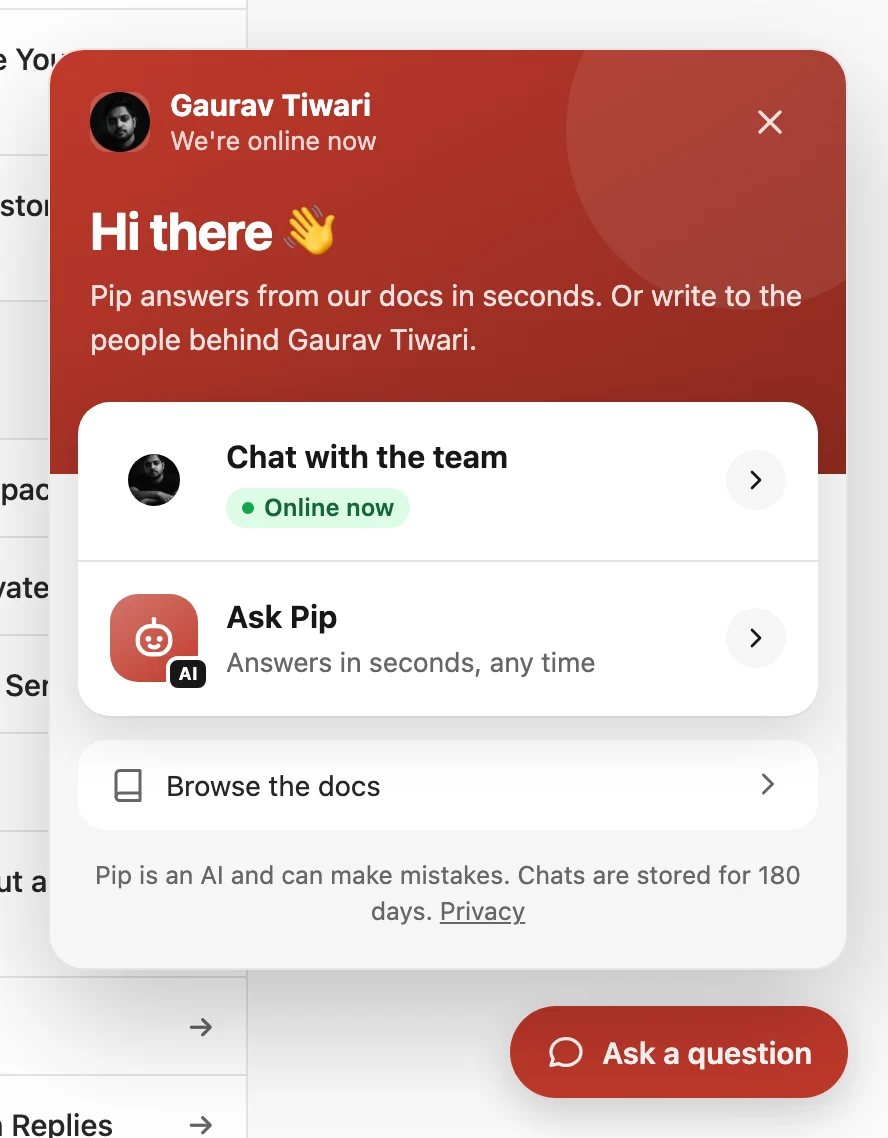
- The first screen asks one plain question. Visitors choose between “Ask Pip”, the assistant, and “Message the team”. While someone is online, the team option becomes “Chat with the team” with an Online now badge.
- The assistant has a name you can change. It’s Pip by default. You can pick Mochi, Juno, Bean or Kiwi, or type your own.
- It doesn’t pretend to know. When the assistant can’t find an answer on your site, it asks for a name and email. The conversation then becomes a ticket with the full transcript.
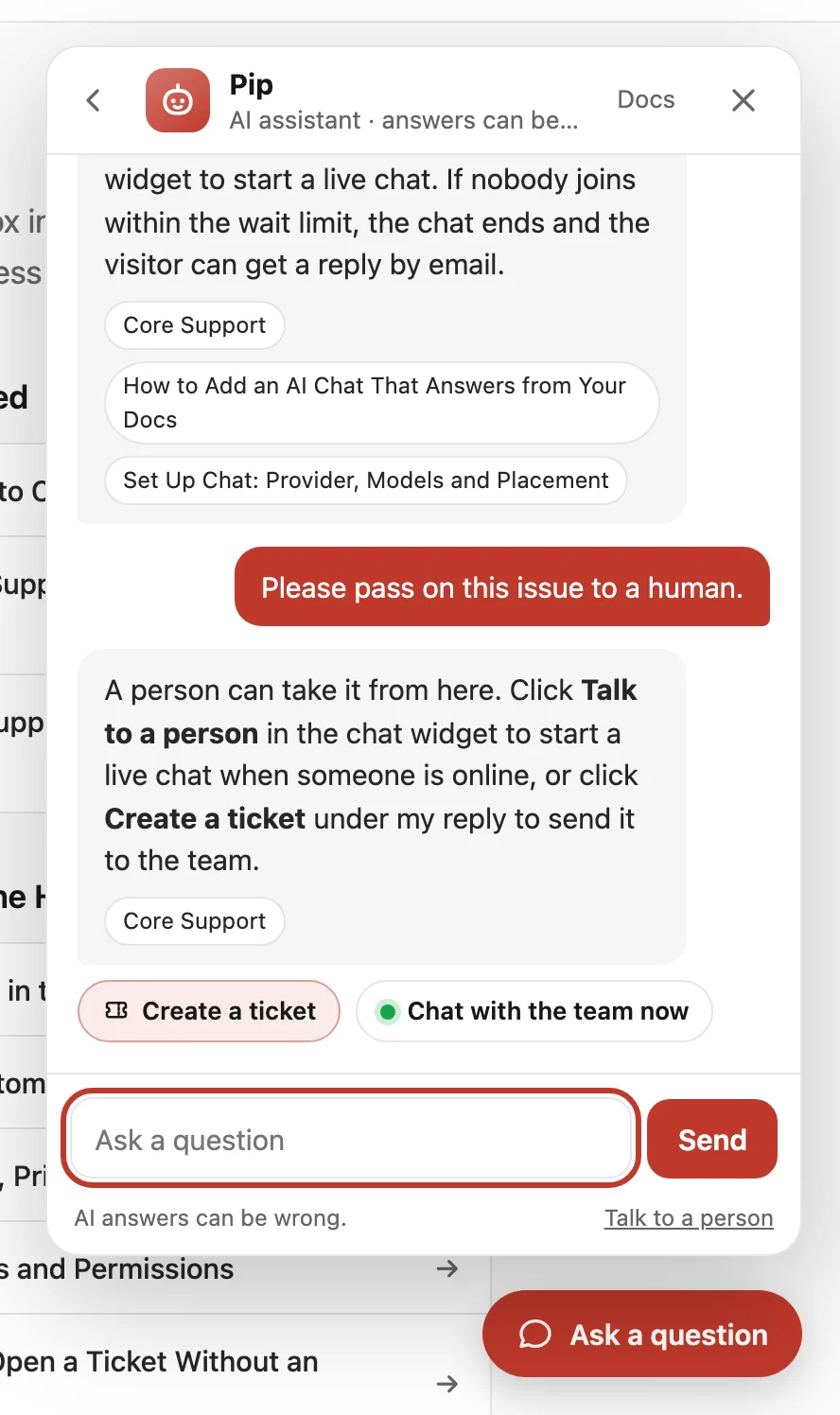
- Asking for a person works. When a visitor writes “Please pass this on to a human” or “Create a ticket”, the reply gets a Create a ticket button. A question like “How do I create a ticket?” still gets a normal answer.
- Greetings aren’t questions. A “hi” or a “thanks!” is never counted as a question the assistant failed to answer.
- Your team stays in control. Agents start as Away, and desktop notifications ask for permission only when an agent clicks, never when a page loads.
- Spam protection is optional. Cloudflare Turnstile can guard the forms that reach your team.
The assistant also learns from your team. When it misses a question, an agent can write the answer under it. The next visitor who asks the same thing gets that answer straight away.
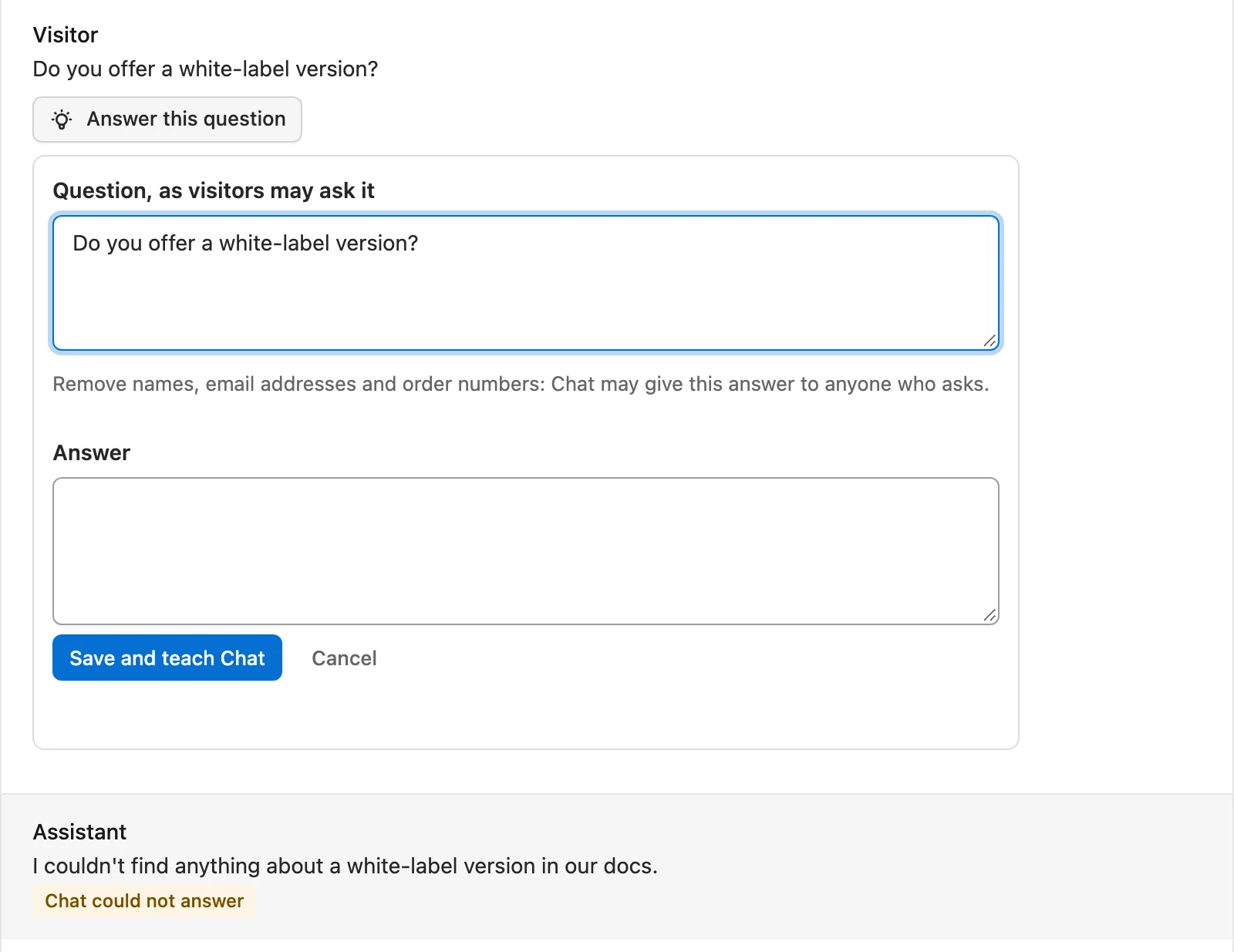
You can teach it from more than your docs. PDF, Markdown and text files, web pages and pasted text all count as knowledge. Only the text is kept, and uploaded files aren’t stored or published.
Most of this came from using it on my own site. During one live test, a visitor asked the assistant to pass the issue to a human, and it replied that it couldn’t. I fixed that the same day. Now the assistant knows about the Create a ticket button.
Then the Ticketing System
The ticketing system took the second-longest time. Tickets are where customers wait for my reply, so the details that keep one from getting lost mattered most to me:
- A spam gate for strangers. A first-time sender waits for a person to accept or discard the message before it becomes a ticket.
- Replies you can trust. Every reply shows whether its email went out.
- Private files stay private. Attachments stay on your server or move to private storage, encrypted before they leave WordPress.
- Forms open tickets too. Contact Form 7, WPForms, Gravity Forms and Fluent Forms can all create tickets.
- Light pages. Ordinary posts load only the chat button, about 6 KB, and only where you place it.
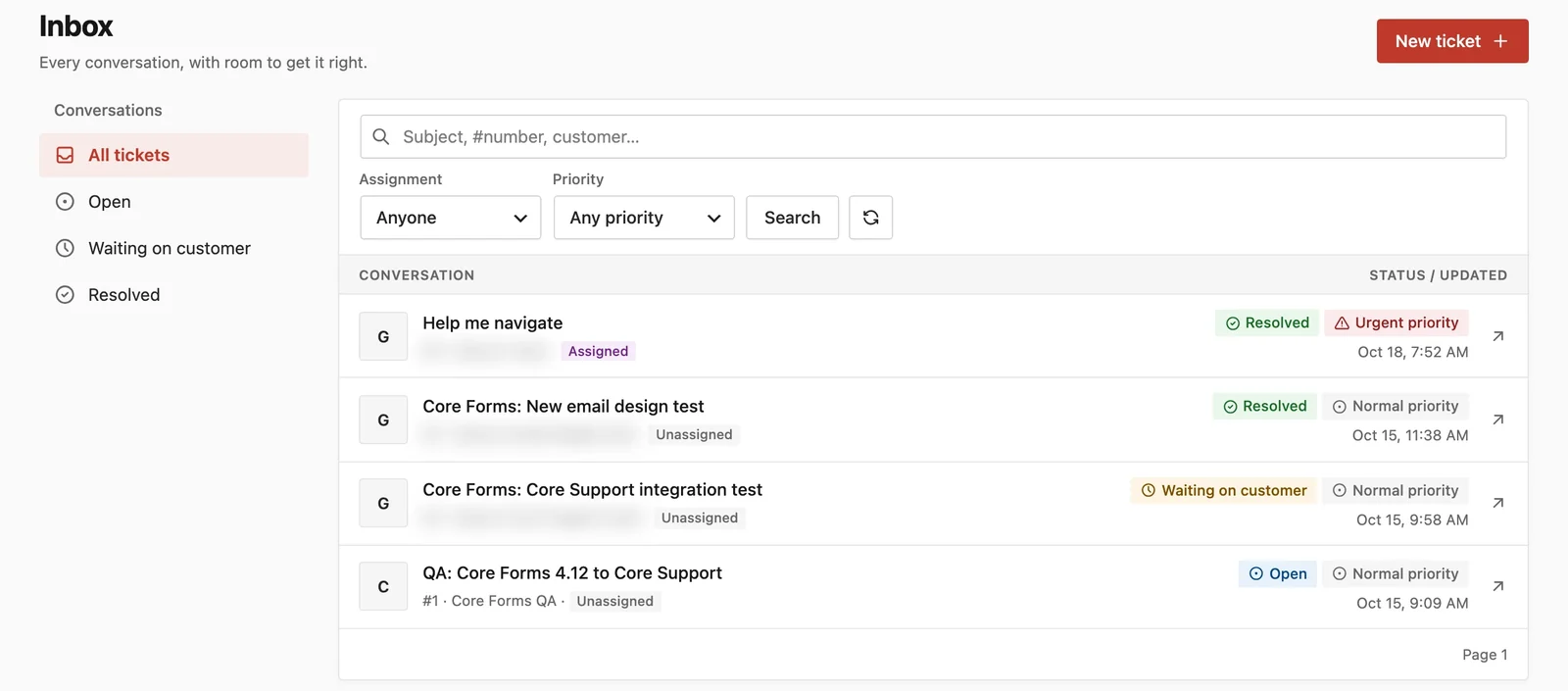
These are small details, but together they keep tickets from getting lost.
How I Build It
I build Core Support the same way I use it. I run new versions on gauravtiwari.org before they go out, and some of my client websites run it too. When something confuses me there, I fix it in the next release.
I also prefer small releases over big ones. 55 releases in 2 months sounds like a lot, but most of them are small fixes and improvements. Each release is listed in the public changelog, with what was added, changed and fixed.
Shaped by Customer Feedback
My customers have shaped Core Support from the start. Nathan, Raman, Andrew and Ragini, in particular, sent me feedback while using it on their sites. Their feedback went into many of the releases since 1.0.
That feedback has a home now. The Core Support roadmap is public, and customers can react to ideas or suggest new ones. Saved replies, satisfaction ratings and response reports are planned there, and Microsoft 365 mailboxes are in progress.
Some of those ideas have already shipped, and the rest help me decide what to build next.
Open to AI Assistants
Core Support is built to work with AI assistants from day one. Its actions are registered with the WordPress Abilities API. Through Site Agent, assistants such as Claude, ChatGPT or Codex can use them over MCP.
In practice, an assistant can:
- list and read tickets
- check new support activity since its last visit
- notify your team
- read the roadmap and add or update items on it
The chat assistant uses your own API key. Core Support works with OpenAI, Anthropic, xAI and DeepSeek, and Voyage AI for search. You pay the provider directly, with nothing added on top.
OpenAI’s GPT-6 Luna is the default chat model, and it is dirt cheap. It costs about $0.10 per million input tokens and $0.50 per million output tokens. On gauravtiwari.org, the whole chat costs me around $1 a month.
What’s Next
My goal is simple. I want Core Support to be the one plugin you need for everything your customers ask of you.
Next, I’m adding native forms to Core Support. These are form blocks for tickets and contact forms that you can insert on any page of your site, and submissions land in your Core Support inbox.
I’m also working through the WordPress plugins you are most likely to run, one integration at a time. SureCart support is already planned. The aim is that Core Support fits your workflow, whatever your site already uses.
Where I’d Start
If you sell plugins, themes, courses or services on WordPress and your support lives in 3 or 4 places, I’d start with Core Support on 1 site. I’d turn on the chat with your docs, point your support email at it and give it a week.
After a week, you’ll know whether it fits the way you work. You can see the plans on the Core Support page.
Want the notes that don't make it into posts?
From the Workbench is my email for people who run a site or a small product business. Each issue is one of three things:
- Releases: what I shipped, and whether it matters for your site.
- Field notes: what moved in WordPress and search, and what I'd do about it.
- Essays: building, pricing and writing, worked out the slow way.
Free, and it goes out only when there's something worth sending. No fixed schedule, no padding.