
 by
by
I’ve been building WordPress sites since 2008. More than 850 clients. And for the last few years, every single form plugin installation has annoyed me.
Not because the plugins didn’t work. They did. But because a simple contact form shouldn’t need 47 JavaScript files, a drag-and-drop builder with 200 field types, and a $199/year subscription. That’s not a form plugin. That’s a SaaS product wearing a WordPress costume.
So I built my own. It’s called Core Forms, and it does exactly what a form plugin should do. Nothing more, nothing less. $59 a year, or $249 once for a lifetime license, both covering unlimited sites with every feature included. Now at version 4.10 with a theme-native form designer, payments, multi-step forms, conditional fields, polls, fullscreen Typeform-style forms, form analytics, headless support, and a REST API.
Let me explain why.
Table of Contents
The Problem with Modern Form Plugins
The WordPress form plugin market has a bloat problem. And I don’t mean “a little extra code.” I mean full-on feature creep that’s been building for a decade.
Take WPForms. Great plugin. I’ve recommended it to clients for years. But the Lite version loads 3 CSS files and 5 JavaScript files on every page where a form exists. The Pro version adds conditional logic scripts, payment integrations, geolocation libraries, and entry management code. Most of that code sits there doing nothing on a simple contact form.
Gravity Forms does the same thing. So does Fluent Forms. So does Ninja Forms.
The pattern is always identical. Start with a form plugin. Add a visual builder. Add conditional logic. Add payments. Add user registration. Add quizzes. Add surveys. Before you know it, your “form plugin” is trying to be an entire application platform.
And all of that costs performance. I measured it on a client site last year. A single WPForms contact form added 127KB of JavaScript and 34KB of CSS to the page. The form itself was three fields: name, email, message.
That’s like shipping a forklift to deliver a letter.
What I Actually Needed
When I sat down to think about what I wanted from a form plugin, the list was short:
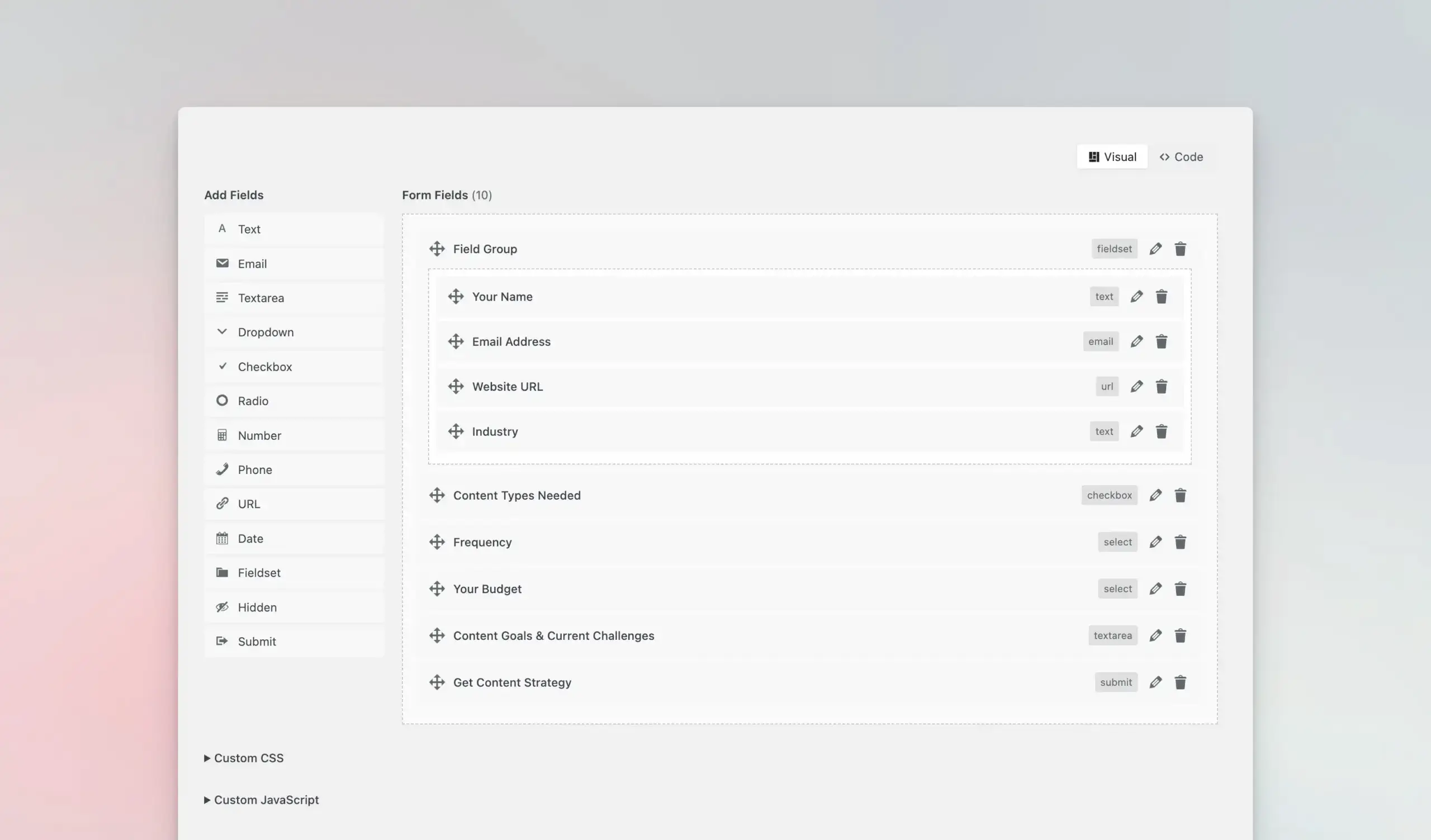
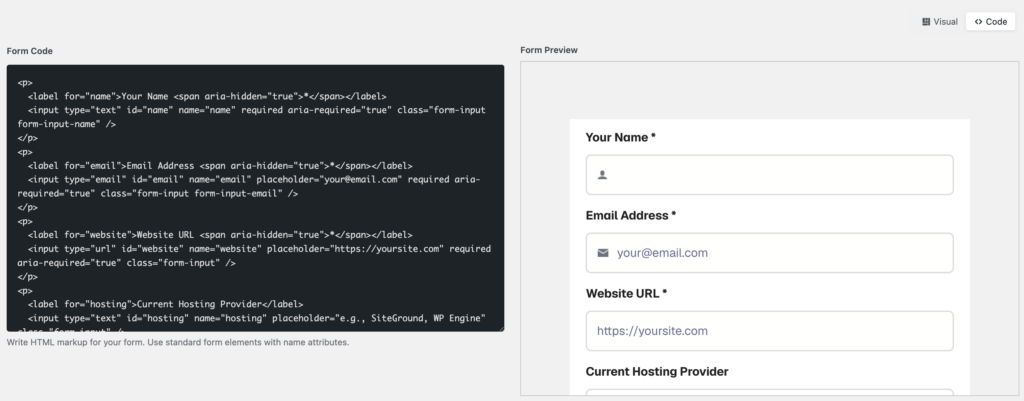
Two ways to build forms. A clean visual builder for quick forms, and a code editor for when I want full HTML control. Most plugins force you into one or the other. I wanted both. The visual builder handles 80% of use cases… drag fields in, rearrange them, done. But when I need custom markup, a conditional layout, or something the builder can’t express, give me a textarea where I can write my form HTML exactly how I want it.
Lightweight output. The plugin should add the absolute minimum JavaScript and CSS needed to handle AJAX submission and basic validation. Nothing else. If the form doesn’t use file uploads, don’t load the file upload script. If I’m not using reCAPTCHA, don’t load the reCAPTCHA library.
All features included. I’m tired of the “free core + paid add-ons” model. You want file uploads? $49/year add-on. Webhooks? Another $39/year. Submission storage? Pro plan at $199/year. A form plugin shouldn’t nickel-and-dime you for basic functionality.
Developer-friendly architecture. Clean namespace (Core_Forms). PSR-4 autoloading. cf_* function prefix. Hooks for everything. If I need to customize how submissions are processed, I should be able to hook in without hacking core files.
That’s it. Four requirements. No AI form generation. No payment processing. Just forms that work, load fast, and don’t cost a subscription.
The Fork That Started Everything
Core Forms didn’t start from scratch. It’s a fork of HTML Forms, which ibericode (the team behind MC4WP, the Mailchimp for WordPress plugin) built and Link Software LLC now publishes. I’d been using HTML Forms on personal projects for years because it was the only form plugin that shared my philosophy: write your own HTML, submit via AJAX, minimal footprint.
But HTML Forms had limitations. So I forked it. Rebuilt the namespace. Added a visual drag-and-drop builder. Added six spam protection methods. Built a fullscreen mode for Typeform-style forms. Added a polls system. Built integrations for MailerPress, Mailchimp, Emailit, and Fluent Cart. Shipped it as Core Forms v2.0.
Dozens of releases later, we’re at the 4.10 series. The full zip is still around 800 KB, every feature included, and it covers everything you’d expect from a $199/year plugin, at $59 a year or $249 once, on unlimited sites.
What Core Forms Actually Includes
Every Core Forms license includes all of this. No tiers. No add-ons.
Visual form builder + code editor. You get both. The visual builder lets you drag and drop 24 field types, from Text, Email and Dropdown to File Upload, Address, Consent and Rating, plus contact presets that insert ready-labeled fields such as Name, Phone and Postal Code. Switch to code view anytime for raw HTML control. Use the Gutenberg block or [cf_form] shortcode to embed forms anywhere. AJAX submission by default, with a fallback for JavaScript-disabled browsers.
Email notifications. Customizable email templates with data variables like [all], [all:label], [CF_FORM_ID], and [CF_FORM_TITLE]. Send to multiple recipients. Auto-responder emails to the person who submitted. Works with Emailit for reliable delivery if you don’t want to mess with SMTP.
Submission management. Every submission is saved to the database with a status workflow: new, read, replied, archived. Browse, search, filter by status, and export as CSV. The REST API (added in v3.5.0) gives you GET, PATCH, and DELETE endpoints for submissions, so headless setups and custom dashboards work too.
File uploads. Let users attach files to their submissions. Files go into the WordPress media library with proper sanitization and size limits.
Webhooks. Send submission data to any external URL via POST. JSON or form-encoded. Custom authentication headers. Connect to Zapier, n8n, Make, or hit any API endpoint directly.
Conditional actions. Skip specific actions based on field values. If someone selects “General inquiry” instead of “Project request,” you can skip the webhook that pings your project management tool. This shipped in v3.5.0 and it’s one of those features that sounds small but saves real headaches.
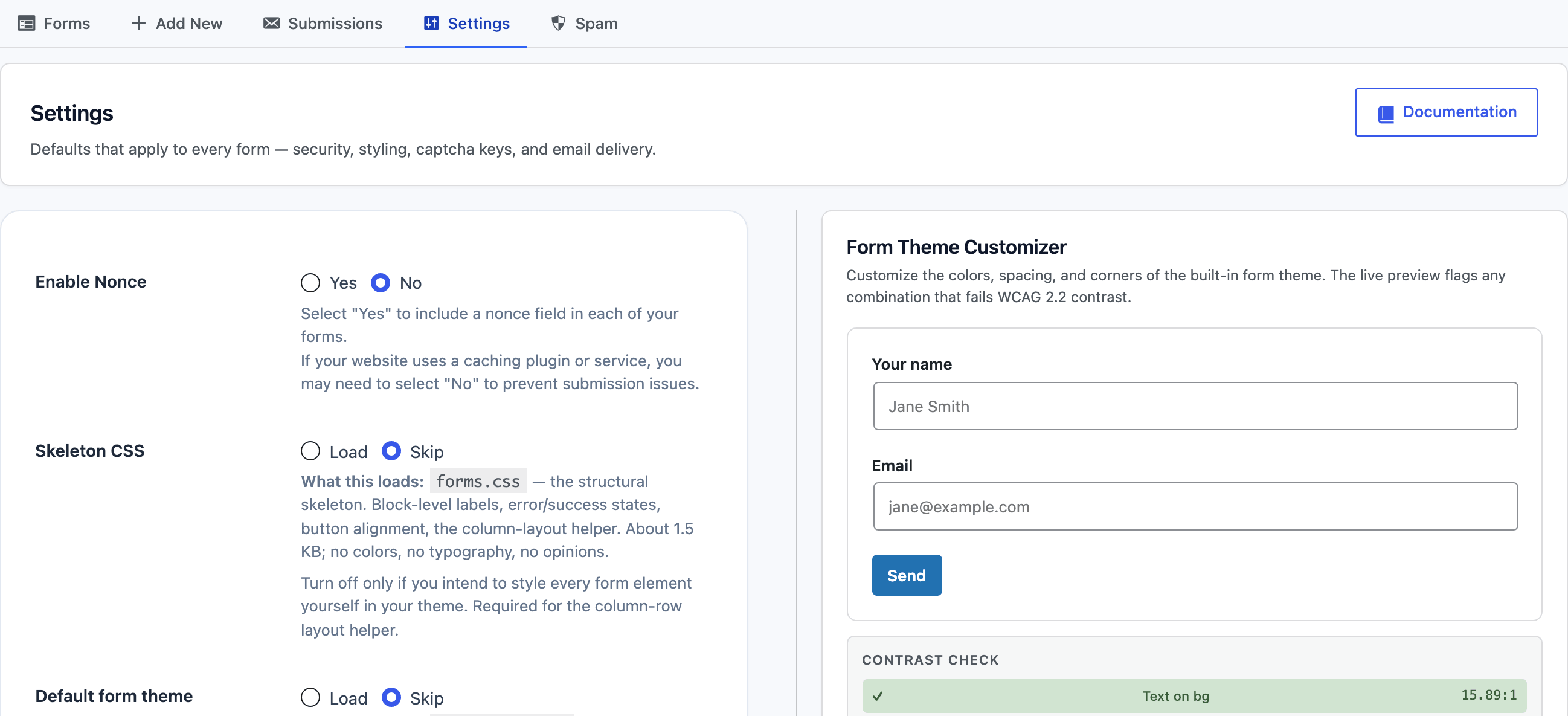
The v4 additions. Version 4 turned the roadmap into shipping code: payments through Stripe, PayPal, Razorpay, and Polar with a pending-payment workflow, multi-step forms, conditional field visibility, field calculations, autosave with draft resume, form scheduling, a form analytics dashboard, a theme customizer with design tokens, and a headless mode that serves forms to Astro, Next.js, or any non-WordPress front end through an API key and a drop-in widget. The settings screen below is from this site’s live install.
Six spam protection methods. Honeypot field (enabled by default), Google reCAPTCHA v3, hCaptcha, Cloudflare Turnstile, Akismet integration (with whitelist keywords to bypass false positives), and a math CAPTCHA. Use one or layer them.

Fullscreen forms. A Typeform-style one-question-at-a-time interface. Light and dark themes. Slide, fade, or scale animations. Progress bar. Keyboard navigation. Custom CSS and JS injection.

Core Polls. A complete polling system with its own post type, AJAX voting, multiple-choice support, vote deduplication (by IP, user, or cookie), end dates, and live results.
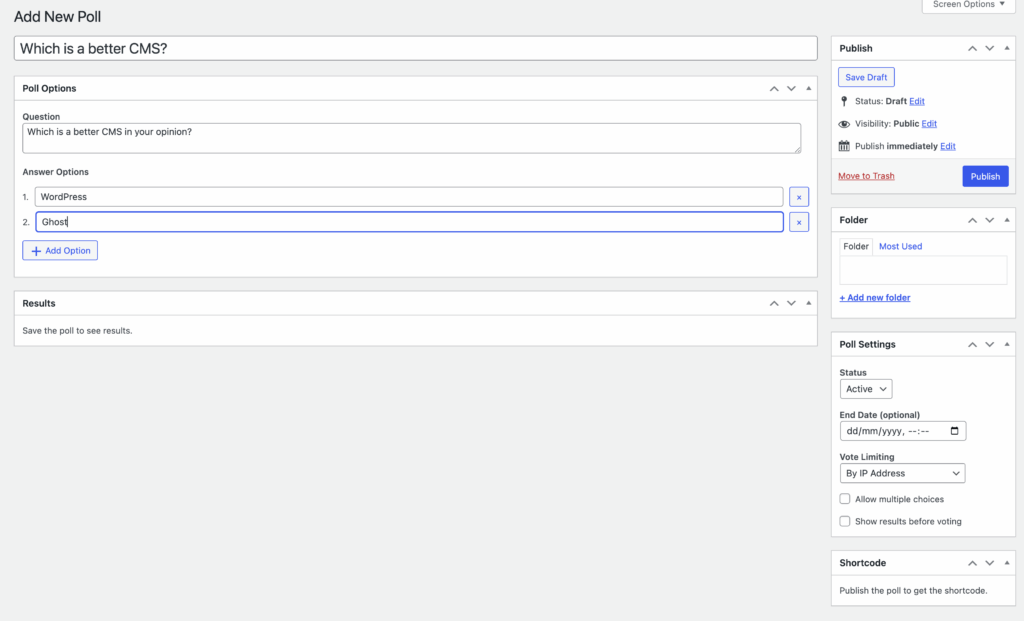
Integrations. Mailchimp (via MC4WP), ported from HTML Forms, MailerPress (with field mapping, tag assignment, and double opt-in), Akismet, Emailit (both sending and subscriber management), WhatsApp Cloud API for template messages and replies, and Fluent Cart. All load conditionally. If the partner plugin isn’t active, the integration code never touches memory.
50+ hooks. Filters and actions for form rendering, processing, validation, email content, webhook requests, admin UI, and more. Every major operation has a hook.
All of this for $59 a year, or $249 once. I didn’t build Core Forms to compete with WPForms on feature count. I built it to prove that a form plugin can include everything you need without becoming a bloated mess.
Who Core Forms Is For (And Who It’s Not For)
I’ll be honest about this. Core Forms isn’t for everyone.
It’s for you if:
You want a lightweight form plugin that doesn’t slow your site down. The visual builder handles most forms in minutes, the code editor gives you full control when you need it. Both approaches produce clean, minimal output.
You care about performance. If you’ve spent time optimizing your Core Web Vitals and you’re annoyed that form plugins undo half your work… Core Forms is the fix.
You’re a developer building client sites. The hook system means you can customize everything without touching plugin code. And at $59 a year (or $249 lifetime) for unlimited sites, the economics make sense across an entire portfolio.
You’re tired of subscriptions. The $249 lifetime license is one payment, done: no renewal emails, no “your license has expired” warnings, no features disappearing because you forgot to renew.
It’s not for you if:
You need full e-commerce. Core Forms takes payments now (Stripe, PayPal, Razorpay, and Polar shipped in v4, plus a FluentCart checkout handoff), and submissions stay in pending-payment until the gateway confirms. What it doesn’t do is carts, shipping, and tax tables. For a storefront, use FluentCart or WooCommerce.
You need deeply branching logic trees. Version 4 added multi-step forms, conditional field visibility, field calculations, and autosave with draft resume, which covers most real-world cases. But if your form is a fifty-branch decision engine, Gravity Forms still goes further down that particular rabbit hole.
I’d rather be upfront about these tradeoffs than pretend Core Forms does everything. It doesn’t. It does forms. And it does them fast, clean, and without the overhead.
WordPress form plugins compared
| Feature | WPForms | Gravity Forms | Fluent Forms | Formidable Forms | Ninja Forms | Core Forms |
|---|---|---|---|---|---|---|
| Free Version | Yes (Lite) | No | Yes | Yes (Lite) | Yes | No |
| Starting Price (1 site) | $49.50/yr first year (Basic) | $59/yr (Basic) | $79/yr | $39.50/yr first year | $59.40/yr first year | $59/yr or $249 once, unlimited sites |
| Drag and Drop | Yes (visual) | Yes | Yes (visual) | Yes | Yes | Yes (visual + code editor) |
| Ease of Use Standout | Easiest | Moderate | Easy | Moderate | Easy | Easy |
| Conditional Logic | Yes (pro) | Yes | Yes (free) | Yes | Yes (pro) | Yes |
| Payment Integration | Stripe, PayPal, Square | Stripe, PayPal, 2CO | Stripe, PayPal | Stripe, PayPal | Stripe, PayPal | Stripe, PayPal, Razorpay, Polar |
| Multi-Page Forms | Yes | Yes | Yes | Yes | Yes | Yes |
| Conversational Forms | Yes (pro) | No | Yes | No | No | Yes (fullscreen) |
| Calculations | Yes (pro) | Yes (advanced) | Yes | Yes (advanced) | Yes (pro) | Yes |
| Best For | Beginners, simplicity | Advanced forms, devs | Best free version | Application-style forms | Flexible free option | Clean markup on unlimited sites |
| Visit WPForms | Visit Gravity Forms | Visit Fluent Forms | Visit Formidable | Visit Ninja Forms | Get Core Forms |
The Economics of “Free” Form Plugins
One thing that drives me crazy: the idea that Contact Form 7 is “free.”
Contact Form 7 is free to install, yes. But it generates useless code and unstyled HTML that you need to write CSS for. It sends emails that end up in spam because it doesn’t integrate with SMTP plugins cleanly. It has no submission storage, so if an email gets lost, the data is gone forever. No file uploads without a third-party add-on. No webhooks without Zapier or a custom plugin.
By the time you’ve patched Contact Form 7 into something usable, you’ve spent 2-3 hours of developer time. At $100/hour, that’s $200-300 of work. For each site.
WPForms Lite is the same story. Free, but limited to basic fields. Want file uploads? $49.50/year. Webhooks? $49.50/year. Submission storage? $49.50/year. The “Pro” plan that includes everything is $199.50/year.
Over three years, WPForms Pro costs $598.50 for one site. Core Forms costs $177 on the yearly plan, or $249 once for lifetime, and both cover unlimited sites. Same features. Less bloat.
I’m not saying WPForms is bad. Their builder is excellent for non-technical users who want guided hand-holding. But if you’re a developer who values performance, you’re paying a premium for overhead you don’t need.
How I Use Core Forms on My Own Sites
On gauravtiwari.org, gatilab and other client sites, every form runs on Core Forms. The contact form is five fields of HTML, submits via AJAX, stores submissions in the database, and sends me an email notification via Emailit. It adds less than 8KB of JavaScript to the page.
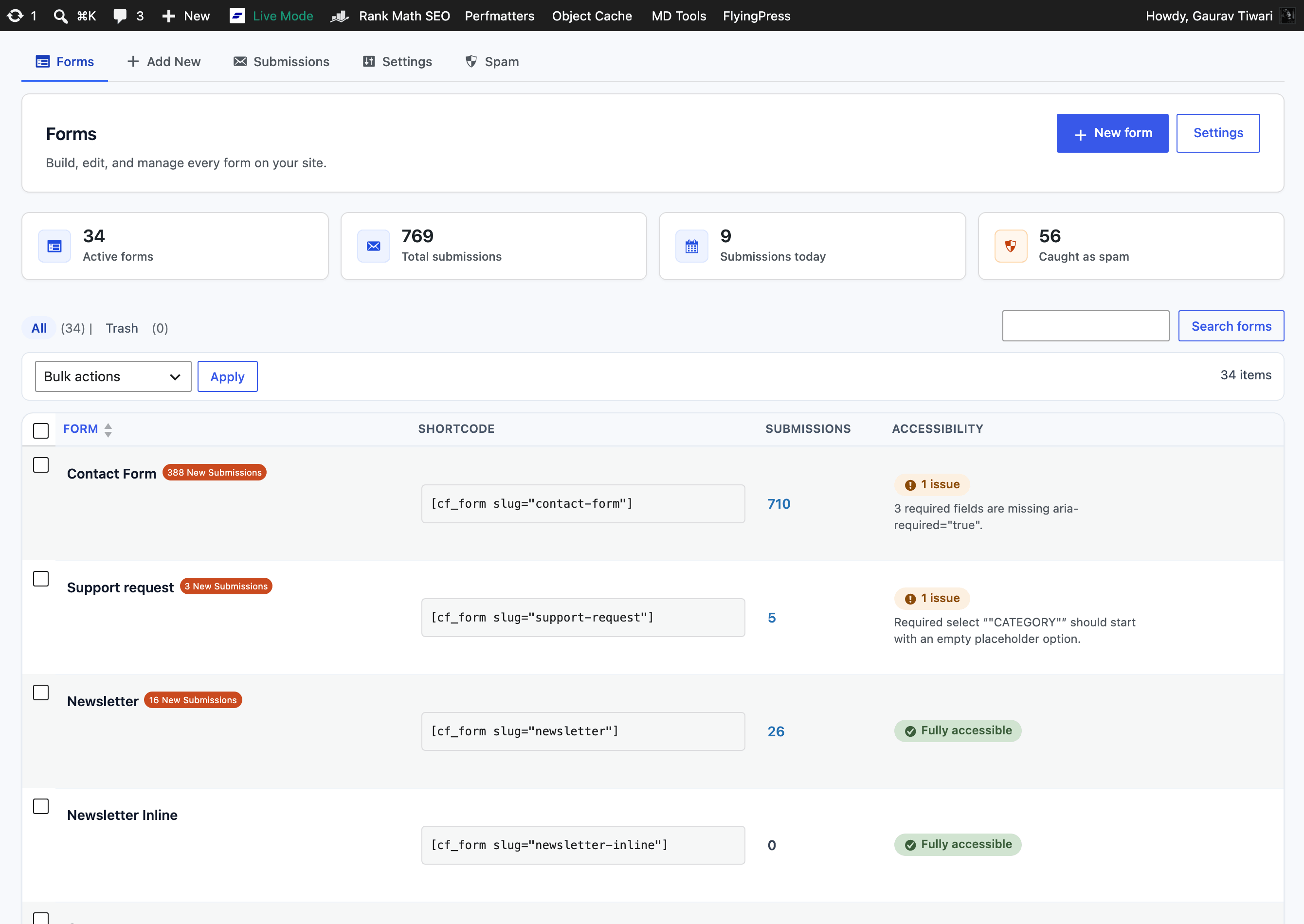
For scale: this site’s Forms dashboard currently lists 34 active forms with 769 stored submissions, and the list view runs a per-form accessibility check so I catch missing labels before readers do.
For client projects at Gatilab, I use Core Forms with webhooks to send form data directly to clients’ CRMs. The webhook sends a JSON payload on every submission. No Zapier middleman. No extra monthly cost. The conditional actions feature means I can route different form responses to different endpoints based on what the user selected.
For service intake forms, I use the visual builder to set up detailed questionnaires: business name, website URL, service area, budget, goals. Drag the fields in, hit save. Takes about five minutes to build a form that would take 20 minutes to code by hand.
For content sites, I use the polls feature to add engagement without installing a separate polling plugin. One poll question, rendered inline with AJAX voting. Adds almost nothing to page weight.
And for landing pages where I want that Typeform look? Fullscreen mode. Dark theme, slide animation, progress bar. Clients love it. They don’t know it’s a WordPress form. They think I built something custom.
The submission status workflow has been surprisingly useful too. New submissions come in, I mark them as “read” when I’ve seen them, “replied” when I’ve responded, “archived” when they’re done. It’s a tiny CRM built into the form plugin. Didn’t think I’d use it much. Now I use it daily.
Why One-Time Pricing
When Core Forms launched, it was one price, once. I wrote in this very post that a form plugin doesn’t justify recurring payments, and I still mostly believe that. So here’s the honest update on how pricing evolved with version 4.
Today there are two plans, and both cover unlimited sites with every feature included: $59 a year, or $249 once for a lifetime license. The yearly plan exists because v4 changed the cost structure on my side. Payments, analytics, headless endpoints, and six spam services mean real integration maintenance every single month; six releases shipped in the first week of June 2026 alone. The lifetime plan keeps the original promise alive for people who, like me, hate renewal emails: one payment, every update forever, including whatever v5 turns out to be.
What I refuse to do is the add-on treadmill. No “file uploads module” for $49 extra, no per-site activation counting, no feature gates between tiers. Both plans are the entire plugin. And everyone who bought v3 kept their original terms; v4 arrived as a regular update, no upgrade fee.
If this model doesn’t scale to millions in revenue, I’m fine with that. I built Core Forms because I needed it. Selling it to other developers who think the same way is a bonus.
Fluent Plugins Ecosystem Comparison
| Feature | FluentCRM | Fluent Forms | FluentSMTP | FluentCart | Fluent Boards | Fluent Community |
|---|---|---|---|---|---|---|
| Category | Email Marketing CRM | Form Builder | Email Delivery | E-commerce | Project Management | Community Platform |
| Free Version | Yes (limited) | Yes (generous) | Yes (full) | No | Yes | Yes |
| Pro Price | $103/yr (5 sites) | $59/yr (1 site) | Free (always) | $77/yr (1 site) | $77/yr (5 sites) | $103/yr (5 sites) |
| Key Strength Why It Stands Out | Self-hosted email automation | Fastest form builder | Reliable SMTP, 0 cost | Modern checkout UX | Kanban boards in WP | Forum + courses in WP |
| Automation | Visual automation builder | Conditional logic, workflows | Auto-routing by sender | Abandoned cart, upsells | Task automation | Drip content, badges |
| Integrations | WooCommerce, EDD, LMS | 50+ integrations | SES, Mailgun, SendGrid, more | Stripe, PayPal, LemonSqueezy | FluentCRM, Fluent Forms | FluentCRM, LearnDash |
| REST API | Yes | Yes | No | Yes | Yes | Yes |
| Performance | Lightweight (no external calls) | Fastest load among form plugins | Minimal overhead | Modern React UI | Fast (Vue.js admin) | Fast (Vue.js frontend) |
| Data Ownership | 100% on your server | 100% on your server | 100% on your server | 100% on your server | 100% on your server | 100% on your server |
| Best For | WP sites replacing Mailchimp | Any WordPress form need | Every WordPress site | Selling digital products | Team task management in WP | Building a branded community |
| Visit FluentCRM | Visit Fluent Forms | Visit FluentSMTP | Visit FluentCart | Visit Fluent Boards | Visit Fluent Community |
What’s Next
When I first published this post at v3.5, the roadmap had three items: conditional field visibility, more integrations, and a form templates library. All three shipped in the v4 series, along with a list I didn’t plan:
- Payments. Stripe, PayPal, Razorpay, and Polar, with a pending-payment submission workflow and payment-ready form templates. Plus the FluentCart handoff for full checkout flows.
- Smart forms. Multi-step navigation, conditional visibility, field calculations, autosave with draft resume, character counters, and form scheduling.
- Headless mode. An API key plus a per-form toggle serves any form to Astro, Next.js, or plain HTML through a drop-in widget, with the same validation and spam pipeline.
- Form analytics. Views, conversions, and per-form performance, tracked locally with no external service.
- Accessibility as a default. Automatic ARIA enhancement, WCAG touch-target sizing, high-contrast-safe focus states, and a per-form accessibility audit right in the forms list.
Development hasn’t slowed: the 4.3 series shipped six releases in the first week of June 2026, and every release goes to the product page with a full changelog. If you’re a developer who shares this philosophy, that WordPress plugins should be lightweight, fairly priced, and developer-friendly, give it a try.
The WordPress ecosystem doesn’t need another form plugin with 500 features and a $299/year price tag. It needs plugins that do one thing well, load fast, and respect both the user’s wallet and their site’s performance.
That’s Core Forms.
FAQs on Core Forms
What is Core Forms?
Core Forms is a lightweight WordPress form plugin forked from HTML Forms, originally built by ibericode. It includes a visual drag-and-drop builder, a raw HTML code editor, file uploads, webhooks, payments, submission storage with status workflows, six spam protection methods, multi-step and fullscreen Typeform-style forms, polls, form analytics, headless support, and integrations with MailerPress, Mailchimp, Emailit, WhatsApp, and Fluent Cart. It runs on WordPress 6.4+ with PHP 8.1+ and costs $59/year or $249 once for lifetime, both on unlimited sites.
How much does Core Forms cost?
Two plans, both covering unlimited sites with every feature included: $59 per year, or $249 one-time for a lifetime license with updates forever. There are no add-on fees and no feature tiers. For comparison, WPForms Pro costs $199.50/year for a single site.
Does Core Forms have a visual form builder?
Yes. Core Forms includes both a visual drag-and-drop builder and a raw HTML code editor. The visual builder supports 24 field types, from Text, Email and Dropdown to File Upload, Address, Consent and Rating, plus contact presets that insert ready-labeled fields such as Name, Phone and Postal Code. You can switch between visual and code view at any time, and the code editor shows a live preview alongside your HTML.
Can Core Forms take payments?
Yes, since version 4. Connect Stripe, PayPal, Razorpay, or Polar once under Settings, then enable payments per form. Submissions stay in a pending-payment status until the gateway’s webhook confirms, and only then do email and integration actions fire. For full checkout flows with tax handling, Core Forms hands off to FluentCart.
What spam protection does Core Forms offer?
Six methods: a honeypot field (enabled by default), Google reCAPTCHA v3, hCaptcha, Cloudflare Turnstile, Akismet integration with whitelist keywords to reduce false positives, and a math CAPTCHA. Use a single method or layer several together.
Can Core Forms replace Contact Form 7 or WPForms?
For most use cases, yes. Core Forms includes submission storage, file uploads, webhooks, payments, multi-step forms, and spam protection out of the box. Those are features Contact Form 7 lacks entirely and WPForms locks behind paid tiers. The main exception now is deeply branching conditional logic trees, where Gravity Forms still goes further.
Does Core Forms work with the WordPress block editor?
Yes. Core Forms includes a native Gutenberg block with a live server-rendered preview, and you can also use the shortcode anywhere shortcodes work. Forms submit via AJAX by default with a fallback for browsers with JavaScript disabled.
Can I use Core Forms on a headless or non-WordPress site?
Yes, since version 4. Set a site-wide API key under Settings, flip the per-form Headless toggle, and embed the form on Astro, Next.js, or any HTML page via a drop-in JavaScript widget, native fetch, or cURL. Submissions run through the same validation, captcha, and action pipeline as on-site forms.
What is the fullscreen form mode in Core Forms?
Fullscreen mode turns any form into a Typeform-style experience: one question at a time, progress bar, step counter, keyboard navigation, light and dark themes, and slide, fade, or scale animations. No separate plugin or Typeform subscription needed.
Does Core Forms have a REST API?
Yes. Submissions have GET, PATCH, and DELETE endpoints (since v3.5), and version 4 extended the API surface with analytics and workflow endpoints plus the headless form delivery. Custom dashboards and external integrations can read and manage form data programmatically.
Tell Google you want more of this.
Add Gaurav Tiwari as a preferred sourceOne tap, and this site shows up more often in your own Top Stories, AI Overviews and AI Mode. Remove it any time.
Disclaimer: This site is reader-supported. If you buy through some links, I may earn a small commission at no extra cost to you. I only recommend tools I trust and would use myself. Your support helps keep gauravtiwari.org free and focused on real-world advice. Thanks. - Gaurav Tiwari