
 by
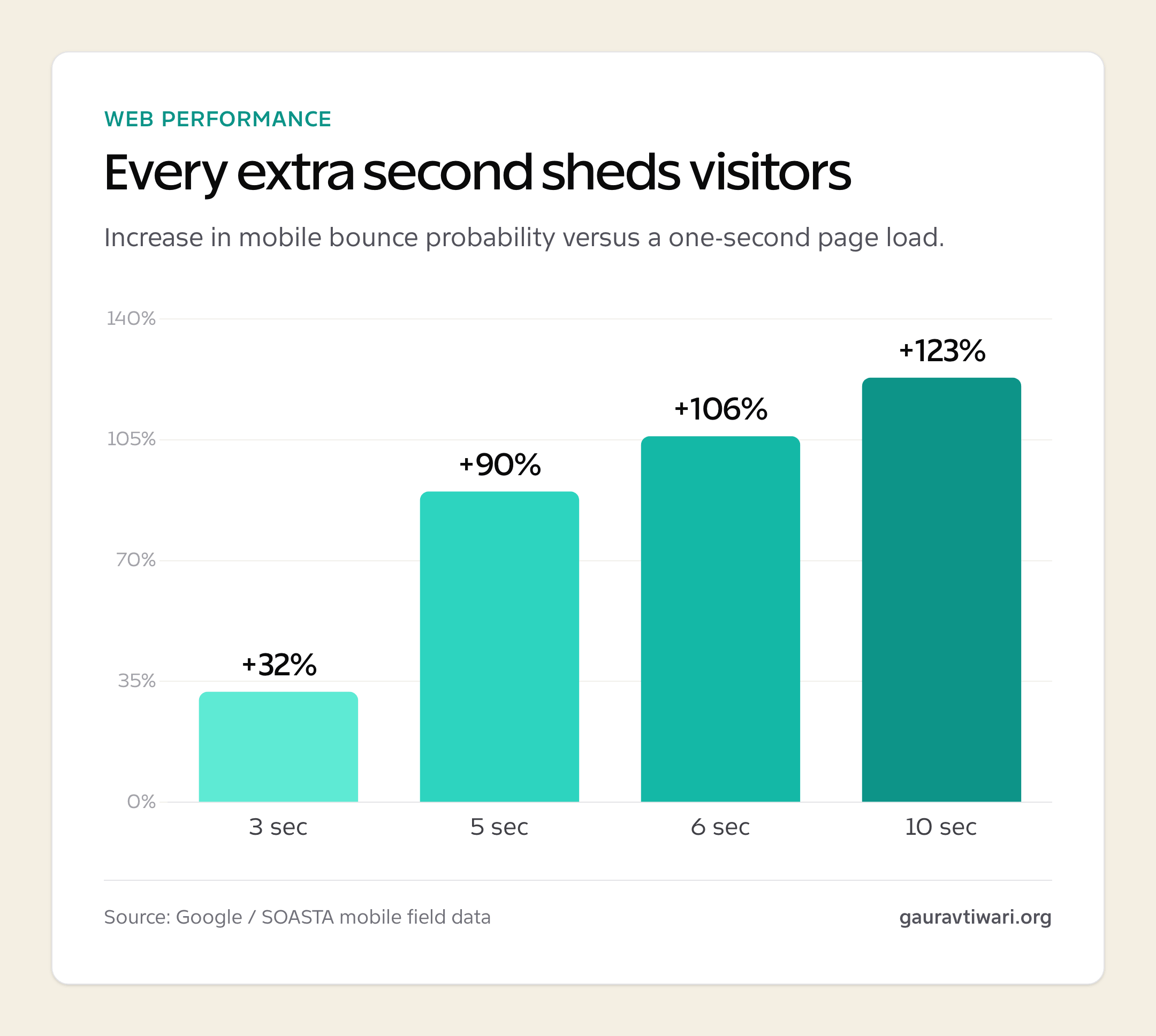
byHave you ever found yourself staring at a loading spinner, feeling your patience evaporate with every rotation? We’ve all been there. Whether you’re trying to check a train schedule or waiting for a high-definition video to buffer, those few seconds can feel like an age. In the world of modern web development, these tiny delays are more than just a nuisance; they’re the difference between a loyal user and a lost opportunity.
When we talk about “engineering engagement,” we’re looking at the invisible scaffolding that keeps a website feeling snappy and responsive. It isn’t just about having pretty pictures or clever copy. It’s about the underlying architecture that ensures everything happens exactly when the user expects it to. As we move through 2026, the bar for what constitutes a “fast” site has been raised significantly.
The 2026 Standard: Why Mobile-First Indexing Demands High-Performance Interactive UX
It’s been quite a while since Google shifted its focus to mobile-first indexing, but the implications are still catching many developers off guard. Nowadays, the desktop version of your site is almost an afterthought for search engines. If your mobile experience is clunky, your search rankings will suffer, regardless of how beautiful the site looks on a 27-inch monitor.
Mobile users are notoriously fickle. They’re often on the move, perhaps using a patchy 4G connection or a crowded public Wi-Fi network. This means the overhead of your site needs to be incredibly lean. If you’re building an interactive platform, the challenge is doubled. You aren’t just serving static text; you’re managing real-time state changes, animations, and user inputs.
I’ve noticed that the most successful platforms recently are those that treat performance as a core feature rather than a technical requirement. They understand that a 100ms delay in response time can lead to a significant drop in user satisfaction. When you’re browsing on a smartphone, you want the interface to feel like a natural extension of your touch. Any lag breaks that illusion of control, and once that’s gone, the user’s engagement starts to drift.
Dissecting the Tech Stack: HTML5, WebGL, and the Transition from Legacy Plugins
If we look back ten or fifteen years, the web was a very different place. We relied heavily on third-party plugins like Flash or Silverlight to handle anything remotely interactive. It was a bit of a nightmare for security and performance, and it often meant that mobile users were left out in the cold.
The transition to native web technologies has been a game-changer. HTML5, combined with CSS3 and modern JavaScript, allows us to do things that were previously unthinkable without external help. For heavy lifting, particularly when it involves complex graphics or real-time data, WebGL (Web Graphics Library) has become the gold standard. It allows the browser to tap directly into the user’s graphics card, providing smooth, hardware-accelerated rendering.
In the realm of high-traffic interactive environments, managing the state of the application is where things get tricky. You need a system that can handle thousands of concurrent users while keeping every single interaction perfectly synchronized. For instance, when looking at the backend of Bally Bet, you can see how modern web standards are pushed to their limits. Their platforms serve as a brilliant benchmark for high-performance UX, demonstrating how to maintain low-latency responses even when the server is under significant load. By moving away from legacy plugins and embracing native HTML5 rendering, these types of platforms ensure that the experience remains fluid across all devices.
Optimizing Core Web Vitals for Real-Time Apps: Balancing Visual Fidelity with LCP and FID Targets
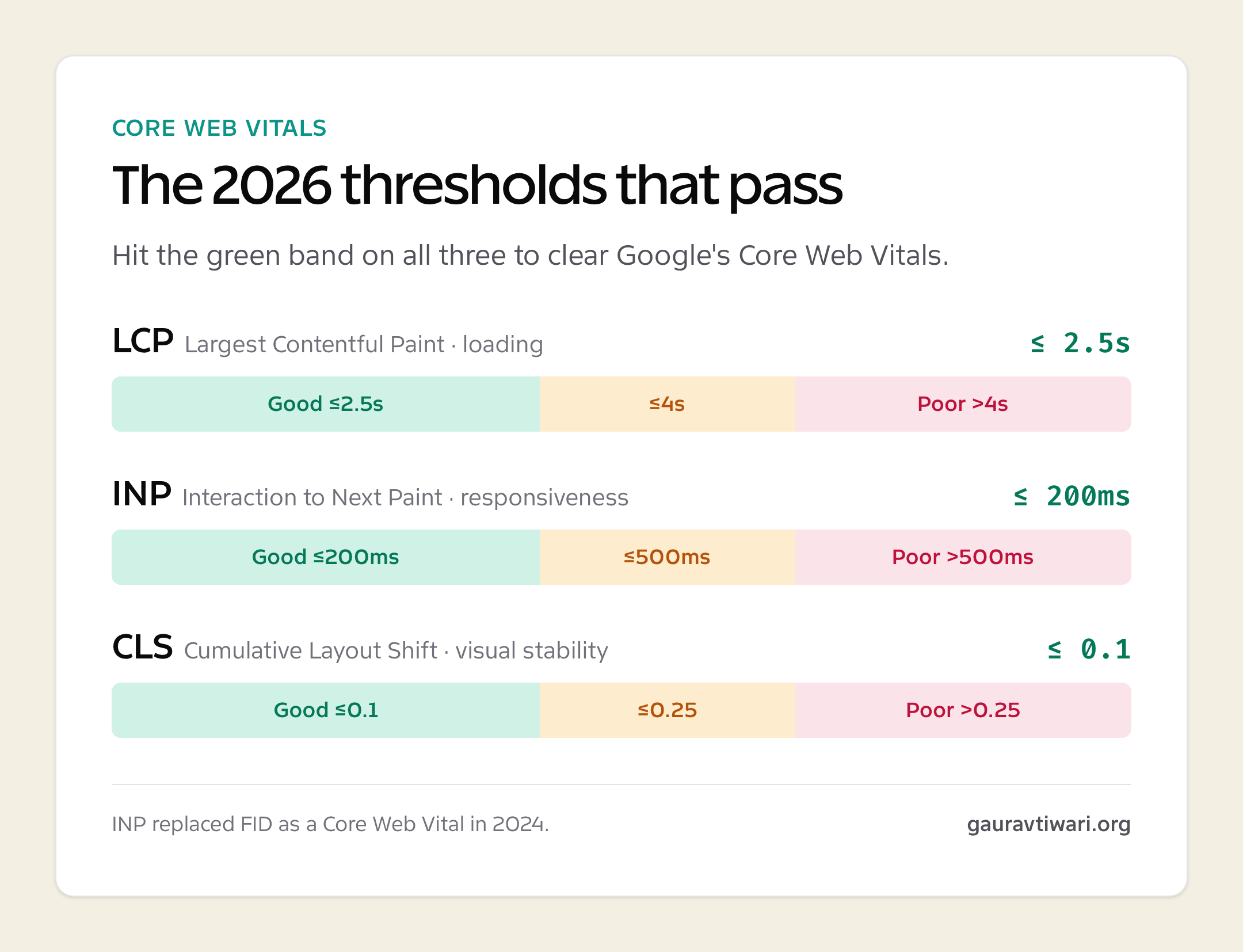
Many of us have spent hours tinkering with images and scripts to get our Core Web Vitals in the green. It’s a bit of a balancing act, isn’t it? On one hand, you want your site to look stunning, with high-resolution assets and smooth transitions. On the other hand, Google is breathing down your neck about Largest Contentful Paint (LCP) and First Input Delay (FID).

LCP is all about how quickly the main content of a page appears. For a blog, that might be the hero image or the first paragraph. For an interactive app, it’s often the main interface. If your assets are too heavy, that LCP score will plummet. I find that using modern image formats like WebP or AVIF, along with lazy loading, can make a massive difference.
FID is perhaps even more critical for engagement. It measures the time from when a user first interacts with your site (like clicking a link or tapping a button) to the time the browser is actually able to respond to that interaction. If your JavaScript is too bloated or your main thread is bogged down with heavy tasks, the user will experience that frustrating “frozen” feeling. To combat this, developers are increasingly moving towards “islands” architecture or using web workers to handle background tasks, leaving the main thread free to respond to the user instantly.
Security and Integrity Architecture: Implementing RNG and SSL Encryption
When you’re dealing with high-stakes environments, security isn’t just a checkbox; it’s the entire foundation of the user’s trust. If a user feels that their data isn’t safe or that the system isn’t fair, they’ll leave and never come back.
SSL (Secure Sockets Layer) encryption is the bare minimum these days. You can’t even get a site indexed properly without an HTTPS certificate. But in interactive platforms where outcomes are determined by software, you need to go much deeper. This is where Random Number Generators (RNGs) come into play. A truly fair RNG ensures that every outcome is genuinely random and hasn’t been tampered with.
From a technical standpoint, implementing these systems requires a robust backend architecture that can handle cryptographic operations without adding unnecessary latency. It’s about creating a secure tunnel for data to flow through, ensuring that neither the user’s personal information nor the integrity of the application is ever compromised. We’ve seen a lot of movement towards decentralised security protocols lately, but for most high-traffic sites, a well-configured, centralised server with rigorous auditing remains the most reliable path.
Case Study: The Fluid Mechanics of Modern Online Slot Engines as Performance Benchmarks
It might surprise you, but some of the most advanced web engineering actually happens within online slot engines. These aren’t just simple animations; they’re complex pieces of software that require perfect synchronisation between visual assets, audio cues, and backend logic.
If you take a moment to analyse how these engines work, you’ll notice a few things. First, the asset management is incredible. They load just enough to get the user started, then stream the rest in the background. Second, the use of WebGL for animations ensures that the “spin” feels physical and responsive, even on an older smartphone.
These platforms are a masterclass in handling high concurrency. Imagine thousands of people hitting a “spin” button at the exact same time. The server has to process the RNG, calculate the result, update the user’s balance, and send that data back to the client in a fraction of a second. If that process takes too long, the animation will stutter, and the user’s immersion will be broken. This level of performance is exactly what every web developer should be aiming for, whether they’re building a complex application or a simple landing page.
Conclusion: Leveraging Gamification Principles to Improve Blog Engagement and User Retention
So, what can we, as writers and developers of more “traditional” content, learn from these high-performance platforms? The core takeaway is that the user’s time is precious. By focusing on low-latency architecture and a snappy UX, we show respect for the reader.
We can also borrow a few tricks from the world of gamification to keep people coming back. This doesn’t mean you need to turn your blog into a video game. It’s about using those same principles of instant feedback and progress. Perhaps it’s a progress bar that shows how far someone has read, or interactive elements that allow users to explore data at their own pace.
Ultimately, the goal is to make the experience of consuming content as frictionless as possible. When the technology fades into the background and the user can simply focus on the information or the entertainment you’re providing, you’ve won. By keeping an eye on our Core Web Vitals, staying updated with the latest HTML5 capabilities, and ensuring our security is watertight, we create an environment where engagement can truly flourish.
Next time you’re working on a project, ask yourself: is this as responsive as it could be? Could a user on a shaky mobile connection still enjoy this? If the answer is yes, you’re well on your way to building something that people will love to use.
Please gamble responsibly. For help and support, visit BeGambleAware.org or call the National Gambling Helpline on 0808 8020 133. 18+ only.
Tell Google you want more of this.
Add Gaurav Tiwari as a preferred sourceOne tap, and this site shows up more often in your own Top Stories, AI Overviews and AI Mode. Remove it any time.