
 by
by
Buying a new laptop looks simple until you open a few product pages. Every listing talks about AI chips and core counts, while the parts that decide whether you’ll still like the machine in its third year sit in the small print. In 2026 a wrong pick also costs more than it used to, because a memory shortage has pushed laptop prices up and some brands are trimming storage in mainstream models to hold their price points.
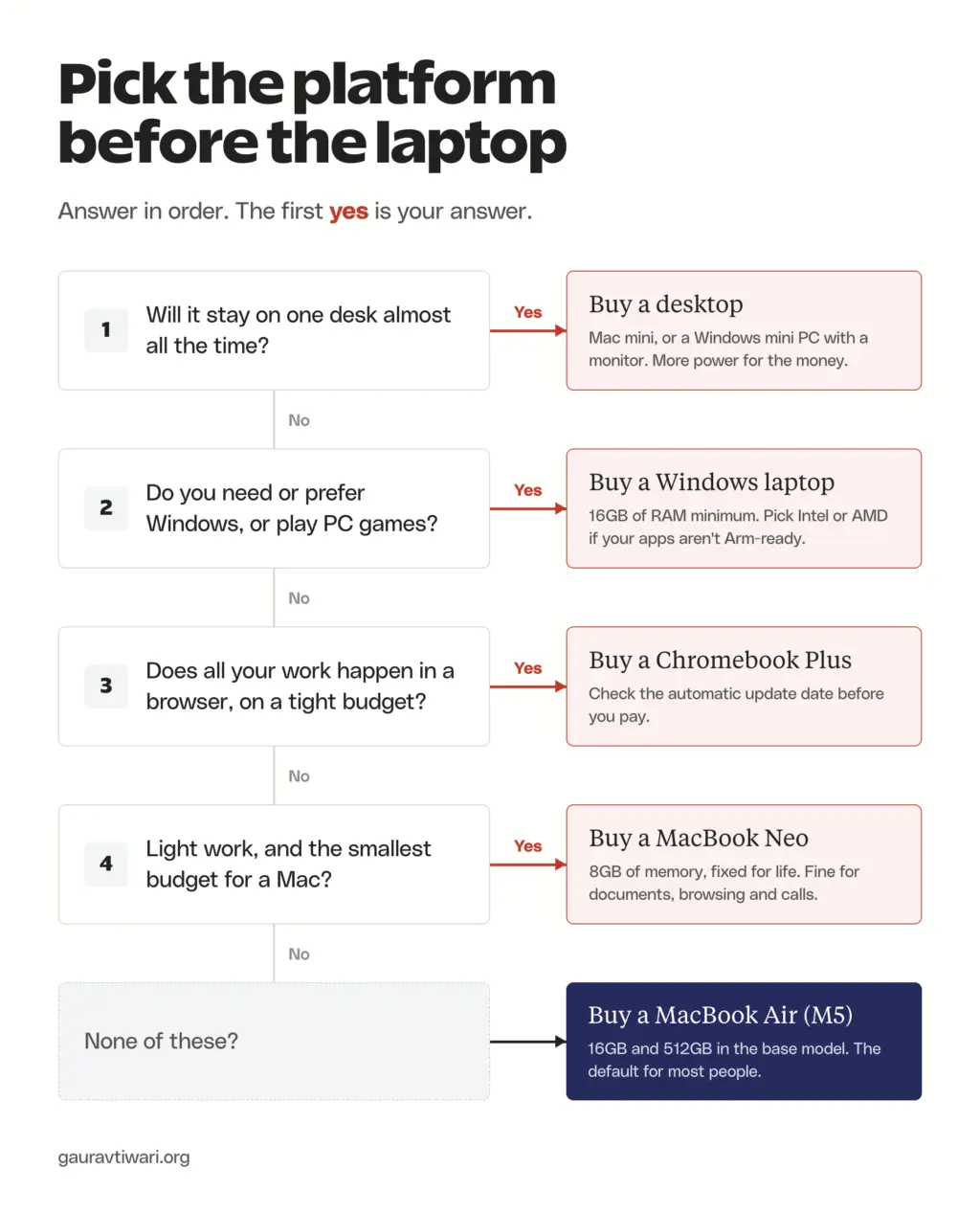
The fix is to decide in the right order. You should settle the things you can’t change later before you compare a single model:
- the platform (Mac, Windows or Chromebook), based on the software you need
- 16GB of RAM and a 512GB SSD as the floor for Windows and macOS
- the screen, battery and keyboard, checked against independent reviews
- whether the computer should be a laptop at all, or a desktop that never leaves your desk
For most people who can stretch to it, my pick is the MacBook Air 13-inch (M5). If your work needs Windows, the Dell XPS 14 is the safer buy, and if everything you do lives in a browser, a Chromebook Plus keeps the bill low.
I own 3 Macs – a MacBook Air M5, a Mac mini M4 and a MacBook Pro M5 Pro – which is also why I’ll tell you plainly when a Mac is the wrong buy. The Windows, Chromebook and gaming picks are based on current specs, list prices and long-term reviews from outlets that test laptops in volume.
Free download: the Laptop Buying Checklist
Stop overpaying for specs you’ll never use. This checklist matches the specs to how you actually use a laptop, then walks the pre-purchase inspection so you don’t get burned on a bad unit.
Enter your email and I’ll send the PDF straight to your inbox.
Which Laptop Should You Buy?
Start with the row that sounds like you. Each pick links to its full section further down, with its tradeoffs and who should skip it.
| If you are | Buy | Why it fits |
|---|---|---|
| Most people, budget from about $1,100 | MacBook Air 13-inch (M5) | 16GB and 512GB in the base model, silent, all-day battery |
| A light user with the smallest budget for a Mac | MacBook Neo | Cheapest new Mac, but 8GB of memory is fixed |
| Tied to Windows for work or school | Dell XPS 14 (2026) | Fast Intel chip, OLED option, long battery life |
| On a Windows budget under $700 | Acer Aspire 14 AI | 16GB and 512GB at a budget price |
| Working only in a browser | ASUS Chromebook Plus CX34 | Fast enough for Google Docs and web apps at the lowest cost |
| A developer, video editor or heavy multitasker | MacBook Pro 14-inch (M5 Pro) | 24GB of memory and full speed under long loads |
| A business traveler on Windows | Lenovo ThinkPad X1 Carbon Gen 14 | About 2.2 lb with a keyboard reviewers rate highly |
| A gamer on a budget | MSI Katana 15 HX | RTX 5050 or 5060 with upgradeable RAM and SSD |
| Never moving it from one desk | Mac mini (M6) or a desktop PC | More performance for the same money |
Laptop Buying Checklist
This is how to choose a laptop, with the checks in the order I’d make them. The first 3 decide most of the purchase, and the rest separate a good laptop from one that annoys you every day.
Mac, Windows or Chromebook
Your software decides the platform. Before anything else, you should list the apps your job, college or hobby actually requires and check where they run.
- macOS runs Microsoft 365, Adobe’s apps, every major browser and every development tool most programmers use. It runs few PC games, and Windows-only apps need a workaround, which I cover in the guide to running Windows apps on a Mac.
- Windows runs the widest range of software, including most engineering and accounting tools and nearly every PC game, and it comes in every price and size.
- ChromeOS runs web apps and Android apps only. It can’t install desktop Office, Photoshop or most IDEs, but it’s cheap, fast on modest hardware and gets automatic updates for 10 years from the platform’s release.
One Windows detail trips people up. Laptops with Qualcomm Snapdragon chips run Windows on Arm, and most apps work through Microsoft’s Prism emulation, but drivers can’t be emulated. An older printer may fall back to a generic driver, and some games with anti-cheat still refuse to run. If you can’t confirm that your apps and devices work on Arm, it is wise to buy a laptop with an Intel or AMD chip.
RAM
RAM is the spec I’d never cheap out on, because on most new laptops it’s soldered to the motherboard. What you buy on day 1 is what you’ll have in year 5.
- 16GB is the floor for Windows and macOS in 2026. Microsoft requires 16GB for a Copilot+ PC, and Apple has shipped 16GB as the MacBook Air base since October 2024.
- 8GB works only for light, browser-first use on systems built around it, such as the MacBook Neo and most Chromebooks. On Windows 11, 8GB fills up with a browser, a video call and antivirus running together.
- 24GB to 32GB makes sense for video editing, virtual machines, Docker-heavy development and running AI models locally.
- If the listing says the memory is socketed rather than soldered, which is common on gaming laptops, 16GB now and an upgrade later is a valid plan.
Storage
Storage fills faster than people expect, and an SSD that’s nearly full slows the whole system down.
- 512GB is the comfortable floor. 256GB is enough only if your files live in OneDrive, iCloud or Google Drive.
- 1TB makes sense for photos, video, games or large codebases.
- Apple charges a lot for internal storage upgrades, so an external SSD is usually the cheaper home for archives and project files.
- Skip any Windows laptop with eMMC storage. It’s slower than an SSD and usually 64GB or 128GB.
Processor
Processor names are the most confusing part of any listing and the least important for most buyers. Every current chip below handles office work, browsing and video calls without trouble. The differences show up in battery life, heat and heavy workloads.
- Apple: M5 in the MacBook Air and the base MacBook Pro, M5 Pro and M5 Max for heavy work, and the A18 Pro, an iPhone chip, in the MacBook Neo.
- Intel: Core Ultra Series 3 (Panther Lake), launched in January 2026, powers most new premium Windows laptops. Core Ultra 200V (Lunar Lake) is still common and efficient. The budget Core 5 320 has a weaker NPU and doesn’t qualify as a Copilot+ PC.
- AMD: Ryzen AI 300 and Ryzen AI 400 in mid-range and premium laptops, and older Ryzen 5 7520U-class chips in budget models.
- Qualcomm: Snapdragon X and X2 chips run Windows on Arm with excellent battery life, with the compatibility caveat above.
- Suffixes: U and V chips are tuned for thin laptops and battery life. H and HX chips are tuned for performance and gaming, with more heat and fan noise.
The Copilot+ PC sticker matters less than the marketing suggests, because most AI tools people use every day run in the cloud. Its useful side effect is the hardware floor: every Copilot+ PC must ship with 16GB of RAM and 256GB of storage, so the label works as a quick filter against starved configurations.
Display
You look at the screen for every minute you use a laptop, so it deserves more attention than the processor.
- Size: 13 to 14 inches if you carry it daily, 15 to 16 inches if it mostly sits on a desk.
- Resolution: at least 1920×1080, or 1920×1200 on taller 16:10 screens. Higher resolution matters more on 14-inch and larger panels.
- Brightness: 300 nits minimum, and 400 to 500 nits if you work near windows or outdoors. Budget gaming laptops often ship with 250-nit panels that look dim in daylight.
- Panel: IPS or OLED. OLED gives deeper blacks and contrast, while a matte IPS panel handles glare better.
- Refresh rate: 60Hz is fine for office work, 120Hz makes scrolling smoother, and 144Hz or higher matters for gaming.
- Color: 100% sRGB coverage if you edit photos or design for clients.
Battery Life
Manufacturer battery claims come from light video playback, so you should treat them as a ceiling. Apple rates the MacBook Air for 18 hours of video and 15 hours of web browsing, and the web figure is the one closer to a normal workday.
- Look for at least 8 hours in an independent review’s web-browsing test.
- Gaming laptops usually manage 3 to 5 hours of light use and much less while gaming.
- Batteries wear with use. Apple designs current Mac batteries to keep up to 80% of their capacity at 1,000 charge cycles, which works out to about 3 years of one full charge a day.
Keyboard, Trackpad and Weight
These never show up in a spec comparison, and they’re the usual reasons people end up disliking a laptop. If you can, type on the model in a store for 5 minutes before you buy it online.
- Under 3 lb (1.4 kg) if it goes in a bag every day.
- A backlit keyboard with full-size arrow keys. The MacBook Neo has no backlight, which surprises people who type at night.
- A large glass trackpad. A small plastic trackpad is the most common corner cut on budget laptops.
- A firm hinge and a lid that doesn’t flex when you open it with one hand.
Ports and Wireless
A laptop with the wrong ports means a bag full of dongles, so you should match the ports to the things you plug in every week.
- USB-C ports that charge the laptop and drive a monitor, ideally on both sides. Thunderbolt 4 or USB4 if you use a dock, and my list of the best USB-C hubs covers the rest.
- HDMI if you present in meeting rooms or connect a monitor without a dock.
- Wi-Fi 6E at minimum. Wi-Fi 7 is built into Intel’s Panther Lake laptops and Apple’s M5 Pro and M5 Max MacBook Pros.
- A 1080p webcam. 720p cameras still appear on budget models and look soft on video calls.
How Much to Spend
Laptop prices went up in 2026, and they aren’t expected to come back down soon. These are the numbers behind that:
- TrendForce reported that conventional DRAM contract prices rose 93% to 98% in the first quarter of 2026.
- Gartner expects PC prices to rise about 17% in 2026 because of memory and SSD costs.
- IDC doesn’t see the shortage easing until early 2028.
- Apple raised prices on June 25, 2026. The 13-inch MacBook Air went from $1,099 to $1,299 and the MacBook Neo from $599 to $699.
So you should set a budget band and buy the best configuration inside it, instead of waiting for prices to fall. These bands reflect US prices in October 2026:
| Budget | What you get | Examples |
|---|---|---|
| Under $500 | A Chromebook Plus, or a basic Windows laptop if you find one with 16GB | ASUS Chromebook Plus CX34, Acer Aspire Go 15 |
| $500 to $800 | A solid Windows laptop with 16GB and 512GB, or the cheapest Mac | Acer Aspire 14 AI, MacBook Neo |
| $800 to $1,400 | Premium thin-and-light: metal build, sharp screen, all-day battery | MacBook Air (M5), Dell XPS 13 and XPS 14 |
| $1,400 and up | Pro workloads, business features and gaming | MacBook Pro (M5 Pro), ThinkPad X1 Carbon, gaming laptops |
In India, the same tiers start at roughly ₹30,000 for a Chromebook, ₹55,000 to ₹70,000 for a 16GB Windows laptop, ₹79,900 for the MacBook Neo and ₹1,49,900 for the 13-inch MacBook Air at Apple’s own prices. Festive sales on Amazon and Flipkart regularly cut those figures, so it’s worth comparing the sale price with Apple’s education price before you pay.
Best Laptops to Buy
These are the laptops I’d shortlist right now, one per job. Prices are US list prices unless I say otherwise, and Amazon often sells below list.
MacBook Air 13-inch (M5)
The MacBook Air 13-inch (M5) is the laptop I’d recommend to most people who can spend about $1,300. Apple made 16GB of memory and a 512GB SSD the base configuration, so the cheapest model already clears the checklist above, and the fanless design means it makes no noise at all. It’s also one of the 3 Macs I own.

Apple MacBook Air 13-inch (M5), 16GB, 512GB
- 16GB of memory and a 512GB SSD in the base model
- Fanless M5 chip, rated for up to 15 hours of web browsing
- 2.7 lb with a 13.6-inch Liquid Retina display
US students pay $1,199 with Apple’s education pricing. The 15-inch model at $1,499 adds a bigger screen and the 10-core GPU, and it’s worth the extra only if you want the larger display. You should skip the Air if you need Windows-only software or play PC games, and if you’re torn between it and the cheaper Mac, the MacBook Neo vs MacBook Air comparison goes through the tradeoff in detail.
MacBook Neo
The MacBook Neo is Apple’s cheapest laptop and the right Mac when $699 is a hard limit. US students get it for $599, and it costs ₹79,900 in India. It uses the A18 Pro, the chip from an iPhone, which is plenty for documents, browsing and video calls. The catch is memory: 8GB, soldered, with no way to add more.

Apple MacBook Neo (A18 Pro), 8GB, 256GB
- A18 Pro chip with 8GB of memory that can't be upgraded
- Rated for up to 11 hours of web browsing
- 512GB model ($799) adds Touch ID
You also give up the backlit keyboard, and the 256GB model has no Touch ID. It is wise to buy the Neo only when your heaviest app is a browser. Anything involving video editing, coding or dozens of open tabs belongs on the Air.
MacBook Pro 14-inch (M5 Pro)
The MacBook Pro 14-inch with M5 Pro is for work that keeps the processor busy for hours, like local builds and containers, 4K video edits and large photo libraries. It starts with 24GB of memory and a 1TB SSD, has a fan so it holds full speed under long loads, and Apple rates it for 22 hours of video playback. This is the configuration I own.

Apple MacBook Pro 14-inch (M5 Pro), 24GB, 1TB
- M5 Pro with 24GB of memory and a 1TB SSD
- Active cooling for sustained performance
- Wi-Fi 7 and Thunderbolt 5 ports
Before you buy one this month, you should wait about 2 weeks. Bloomberg’s Mark Gurman reports that Apple plans to announce M6 14-inch MacBook Pros and a new touchscreen MacBook Pro around October 27, and a launch is when retailers discount the outgoing model. If your work is mostly writing and browsing, the Air does the same job for about half the price.
Dell XPS 14 (2026)
The Dell XPS 14 (2026) is the Windows laptop I’d point most people to. It runs Intel’s Core Ultra Series 3 chips, offers a tandem OLED screen, and Tom’s Guide, Notebookcheck and HotHardware all rate its speed and battery life highly. Configurations start around $1,350 to $1,600, and the OLED model with 32GB of memory and the Core Ultra X7 358H runs about $2,200.

Dell XPS 14 (2026), Intel Core Ultra Series 3
- Intel Core Ultra Series 3 (Panther Lake) with Wi-Fi 7
- 14-inch display with a tandem OLED option
- About 1.36 kg
The price climbs fast as you add memory and the OLED panel, and there’s no microSD slot. If you want something smaller and cheaper, the 2026 XPS 13 starts at $699, but you should buy only the 16GB configuration, which costs $899 to $999. The 8GB base model is the one to avoid.
Acer Aspire 14 AI
The Acer Aspire 14 AI is the budget Windows laptop that clears the checklist. It pairs an Intel Core Ultra 5 226V with 16GB of memory and a 512GB SSD for around $600, and that 16GB plus a 40 TOPS NPU makes it a Copilot+ PC. The Lunar Lake chip inside is one of Intel’s most efficient, which is good news for battery life at this price.
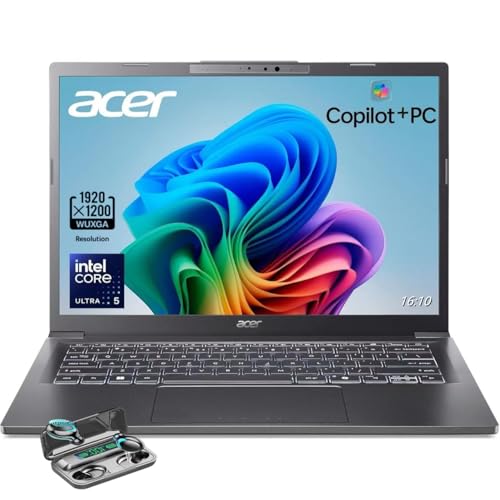
Acer Aspire 14 AI, Core Ultra 5 226V, 16GB, 512GB
- Intel Core Ultra 5 226V (Lunar Lake), Copilot+ PC
- 16GB of LPDDR5X memory and a 512GB SSD
- 14-inch 1920×1200 display
The memory is soldered, so 16GB is permanent, which is fine for office work and college. If it’s out of stock, the Lenovo IdeaPad Slim 3 and the Acer Aspire Go 15 also ship with 16GB and 512GB in the $500 to $570 range. A Windows laptop with 8GB at this price isn’t a bargain at all.
ASUS Chromebook Plus CX34
The ASUS Chromebook Plus CX34 is the pick when your work lives in Chrome and the budget is tight. It has an Intel Core i3-1215U, 8GB of RAM and a 14-inch 1080p screen, which is plenty for ChromeOS, and it usually sells for $320 to $400. PCWorld names it its best Chromebook overall.

ASUS Chromebook Plus CX34, Core i3-1215U, 8GB
- Intel Core i3-1215U with 8GB of RAM
- 14-inch 1920×1080 display
- Chromebook Plus features with Google AI tools
Its 16:9 screen feels cramped next to taller 16:10 laptops. Before you buy any Chromebook, you should check its Auto Update Expiration date, because the 10 years of updates count from the platform’s release, not from the day you buy it. If you want an OLED screen and 16GB, the Lenovo Chromebook Plus 14 at $649 is the upgrade, though at that price the MacBook Neo deserves a look too. Students can find more options in my list of the best Chromebooks for students.
Lenovo ThinkPad X1 Carbon Gen 14
The ThinkPad X1 Carbon Gen 14 Aura Edition is the Windows laptop for people who travel and type all day. It weighs about 2.2 pounds, runs Core Ultra Series 3 chips, offers a 2.8K 120Hz OLED, and its keyboard gets praise from Engadget and HotHardware alike. Notebookcheck measured close to 24 hours of battery life in its test.

Lenovo ThinkPad X1 Carbon Gen 14 Aura Edition
- Intel Core Ultra Series 3 vPro with 32GB of memory
- About 2.2 lb with a 2.8K 120Hz OLED option
- Thunderbolt 4, USB-A and HDMI 2.1 ports
It starts around $2,100, and there’s no 16GB configuration, so you pay for 32GB of soldered memory whether you need it or not. For a laptop you’ll carry for years, I think that’s a fair trade. If you’re choosing for a team, my guide to picking a laptop for your business covers fleet and warranty questions.
MSI Katana 15 HX
The MSI Katana 15 HX is the budget gaming laptop I’d buy. Tom’s Hardware lists it at $999.99 with an RTX 5050, an Intel Core i7-14650HX, 16GB of DDR5 and a 144Hz 1080p screen, and the RTX 5060 version runs $1,248. Its RAM and SSD are upgradeable, which matters on a gaming laptop because games keep getting bigger.
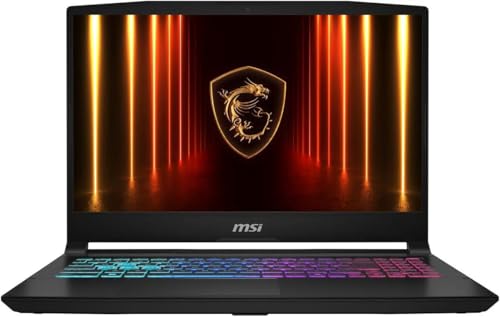
MSI Katana 15 HX, Core i7-14650HX, RTX 5050
- Intel Core i7-14650HX with an RTX 5050 (8GB)
- 16GB of DDR5 and a 512GB SSD, both upgradeable
- 15.6-inch 1080p 144Hz display
The screen is dim at 250 nits and the keyboard gets hot under load. Like every RTX 5050 and RTX 5060 laptop, it has 8GB of video memory, which is enough for 1080p but limits high texture settings in new games. If your budget stretches further, my roundup of gaming laptop deals covers RTX 5070 Ti machines with 12GB.
Students have narrower needs and tighter budgets, so I keep separate lists for college students and computer science students.
Laptop or Desktop?
The laptop vs desktop question comes down to whether the computer moves. A laptop is a desktop you can carry, and you pay extra for the carrying. If the machine will sit on one desk almost all the time, a desktop gives you more performance, a bigger screen and easier repairs for the same money, and an old laptop or a cheap Chromebook can cover the occasional trip.
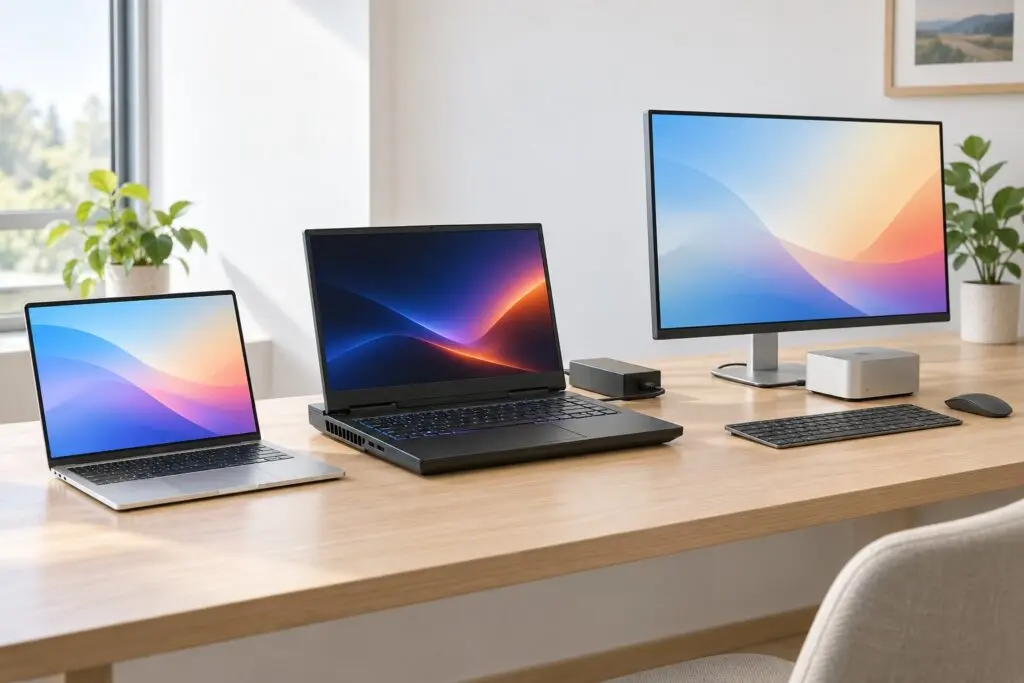
A desktop is the better buy in these situations:
- You work from one desk. A Mac mini (M6) at $899 plus a good monitor costs about the same as a MacBook Air and gives you a 27-inch screen at eye level.
- You play games at home. An RTX 5060 desktop usually costs less than an RTX 5060 laptop, comes with more memory and storage, runs the GPU at full power and stays quieter.
- You want to upgrade later. Desktop RAM, SSDs and graphics cards can be swapped, while most laptop memory is soldered.
A laptop still wins when you move between home, office and class, or when you need the computer in meetings. Plenty of people end up with both: a desktop for focused work and a light laptop for everything else.
Mac mini (M6)
The Mac mini (M6) is the cheapest way into a fast Mac if you already own a monitor, keyboard and mouse. It starts at $899 (₹99,900 in India) with 16GB of memory and a 256GB SSD, and the M5 Pro version with 24GB and 512GB costs $1,699. I own the previous model, a Mac mini M4 with 24GB and 512GB.

- M6 chip with 16GB of memory
- Three Thunderbolt 4 ports, HDMI and 2.5Gb Ethernet
- Five-by-five-inch desktop
The 256GB base SSD is small, so you should plan on an external SSD or step up to 512GB at checkout. If you need Windows, a mini PC with 16GB of RAM, such as Lenovo’s Yoga Mini at about $699, plays the same role, and my guide to monitors for programmers helps with the screen half of the setup.
CyberPowerPC Gaming PC (RTX 5060)
For gaming at a desk, a prebuilt RTX 5060 desktop is a better buy than a gaming laptop. This CyberPowerPC configuration pairs an Intel Core i5-14400F with an RTX 5060, 16GB of DDR5 and a 1TB SSD, and Tom’s Hardware lists its sibling, the Gamer Xtreme, at $1,099.99 with 32GB and 2TB. The desktop RTX 5060 also runs at full power, while laptop versions of the same GPU range from 45W to 115W.

CyberPowerPC Gaming PC, Core i5-14400F, RTX 5060
- Intel Core i5-14400F with an RTX 5060 (8GB)
- 16GB of DDR5 and a 1TB NVMe SSD
- Wi-Fi 6, HDMI and 2 DisplayPort outputs
Prebuilt configurations change every few weeks, so you should check the exact CPU, RAM and SSD in the listing before you pay. The gaming PC deals page tracks the better prebuilt offers through the holiday season.
When to Buy
The best time to buy a laptop is when you need one, with one exception. If a big sale or a product launch is a few weeks away, waiting is worth it. These are the dates that matter for the rest of 2026:
- Black Friday is November 27, 2026, and Cyber Monday is November 30.
- Amazon’s October Prime event ran October 6 and 7, and the summer Prime Day ran June 23 to 26.
- In India, Amazon’s Great Indian Festival started on October 8 and Flipkart’s Big Billion Days on October 9.
- Bloomberg reports that Apple will announce new MacBook Pros and iMacs around October 27. There’s no credible report of an M6 MacBook Air this fall.
- Back-to-school offers run from July through September, and US education pricing takes about $100 off a MacBook.
One thing I wouldn’t do this year is wait for prices to drop. TrendForce expects DRAM prices to rise another 10% to 15% in the fourth quarter of 2026, so a sale is the realistic discount this year.
If you’re replacing a Windows 10 laptop, you have a little more time than you might think. Windows 10 support ended on October 14, 2025, but Microsoft’s consumer Extended Security Updates now run until October 12, 2027, and enrolling is free if you sync your settings to a Microsoft account. That buys time, but it doesn’t fix old hardware, and laptops with processors older than Intel 8th Gen or AMD Ryzen 2000 aren’t supported by Windows 11 at all. If the old machine only feels slow, try the steps in how to speed up a slow computer before you spend anything.
Before You Pay and After It Arrives
Most regrets after buying a new laptop show up in the first 2 weeks, which is also the window you get to return it. Before you pay, check these:
- Return window: Apple gives 14 days, Best Buy 15 days (60 for paid members) and Amazon US 30 days, except 15 days for Apple products.
- Amazon India: laptops are sold as replacement-only, so a working laptop you simply don’t like can’t be returned for a refund. Buy from a store you can visit if you’re unsure about the model.
- Warranty: 1 year is standard. Extended plans like AppleCare+ make the most sense on expensive laptops that travel.
- Refurbished and open-box: Apple Certified Refurbished Macs carry the same 1-year warranty as new ones. For any refurbished laptop, ask for the battery cycle count before you buy.

When the laptop arrives, these checks take about an evening:
- Open a full-screen white image and a full-screen black image, and look for dead pixels and backlight bleed.
- Check the battery cycle count. On a Mac, hold Option, open the Apple menu, choose System Information and look under Power. On Windows, run
powercfg /batteryreportin Terminal and open the report it saves. A new laptop should show close to 0 cycles. - Test every port, the webcam, the speakers, the microphone and every key.
- Install operating system and firmware updates before your own apps.
- Remove trial software on Windows laptops before it starts asking for money.
- Move your files across only after you’ve made a full backup of the old laptop. My list of the best backup software covers both Mac and Windows.
FAQs on Buying a New Laptop
How much RAM do I need in a new laptop?
16GB for most people in 2026. It covers Windows 11 or macOS, a browser with many tabs, Office and video calls, with room for 4 to 5 years of updates. Go for 24GB or 32GB if you edit video, run virtual machines or run AI models locally, and accept 8GB only on a Chromebook or a MacBook Neo used for light work.
Do I need 16GB or 32GB of RAM?
16GB is enough unless you edit 4K video, run virtual machines or Docker stacks, work with large datasets or run AI models locally. Those workloads use memory in large chunks, and 32GB keeps them from spilling onto the SSD. On a laptop with soldered memory, buy 32GB up front if any of these apply, because you can’t add it later.
Is 8GB of RAM enough in 2026?
Only for light use on systems built around it. A MacBook Neo or a Chromebook with 8GB handles browsing, documents and streaming. On Windows 11, 8GB fills up quickly with a browser, a video call and antivirus running together, so I’d skip any Windows laptop with 8GB, especially when the memory is soldered.
How much RAM does Windows 11 need?
Microsoft’s minimum is 4GB of RAM and 64GB of storage, and Copilot+ PCs require 16GB. The minimum only gets Windows to start. For comfortable everyday use, 16GB is the practical number.
What is a good refresh rate for a laptop?
60Hz is fine for office work and streaming. 90Hz to 120Hz makes scrolling and cursor movement noticeably smoother and is worth having on a premium laptop. For gaming, 144Hz to 165Hz is the useful range on a 1080p or 1440p screen, because most budget GPUs can’t produce enough frames to use more.
Is a Copilot+ PC worth paying extra for?
Not for the AI features alone. Most AI tools people use every day, such as ChatGPT, Gemini and Copilot in the browser, run in the cloud and work on any laptop. The label is still a useful filter, because every Copilot+ PC has at least 16GB of RAM, 256GB of storage and a modern, efficient chip.
Should I wait for laptop prices to drop?
Probably not in 2026. Memory prices are still rising, IDC expects the shortage to last until early 2028, and Apple and several Windows brands raised prices this year. If you need a laptop now, buy it during a sale such as Black Friday on November 27, 2026, instead of waiting for a general price fall.
Is a refurbished laptop safe to buy?
Yes, from the manufacturer or a major retailer. Apple Certified Refurbished Macs carry the same 1-year warranty as new ones. Check the battery cycle count and the return window, and avoid sellers who don’t state the battery health.
How long should a new laptop last?
A well-specified laptop should give you 4 to 6 years of good use. Battery wear and the operating system dropping support usually end it before the processor does. Gartner expects people to keep PCs about 20% longer because of higher prices, which makes buying enough RAM and storage up front more important.
Is a Chromebook good enough for a student?
Yes, if every class uses web apps such as Google Docs, Canvas and Microsoft 365 on the web. Check the course requirements first, because engineering, design and many computer science programs need Windows or macOS software that ChromeOS can’t install.
Final Remarks
Pick your row in the table at the top, buy the configuration with 16GB of RAM and 512GB of storage even if it costs a little more, and use the return window to test the laptop properly. The extra memory is the part of the price you’ll still be glad you paid in year 4.
Tell Google you want more of this.
Add Gaurav Tiwari as a preferred sourceOne tap, and this site shows up more often in your own Top Stories, AI Overviews and AI Mode. Remove it any time.
Disclaimer: This site is reader-supported. If you buy through some links, I may earn a small commission at no extra cost to you. I only recommend tools I trust and would use myself. Your support helps keep gauravtiwari.org free and focused on real-world advice. Thanks. - Gaurav Tiwari