
 by
by
The best laptops for mechanical engineering students aren’t the flashiest gaming machines or the thinnest ultrabooks. They’re the ones that rebuild a 500-part SolidWorks assembly without the fans screaming, hold a stable viewport in ANSYS, and still close the lid and survive a lecture hall on battery. I’ve watched too many first-years buy a pretty laptop that chokes the first time CATIA loads a real model.
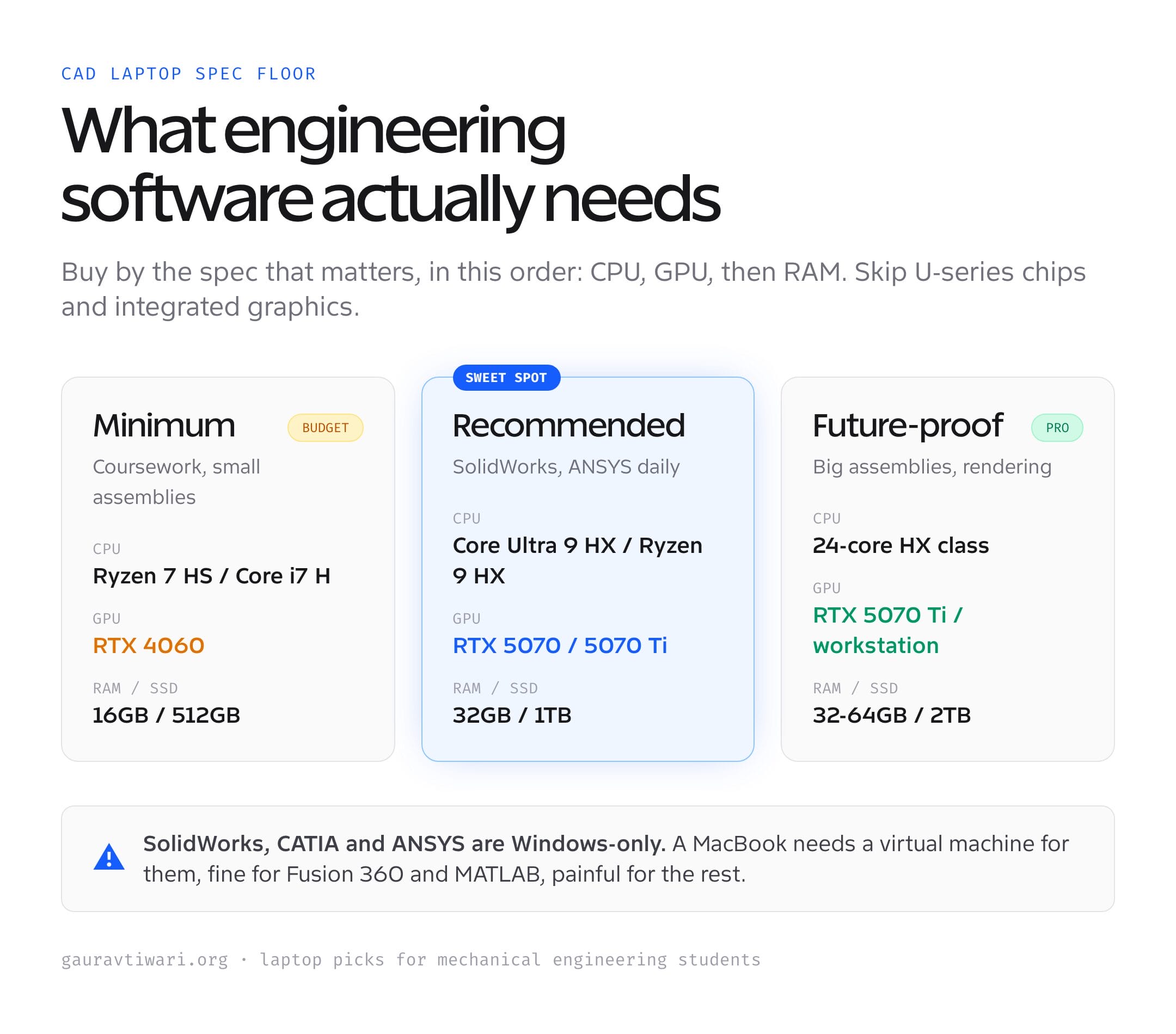
Here’s what the spec sheets won’t tell you. Mechanical engineering software cares about three things in a specific order: a strong CPU with good single-thread speed for CAD math, a dedicated NVIDIA RTX GPU for 3D viewports and rendering, and enough RAM to hold a big assembly in memory. Miss any one of those and the laptop feels broken even if the number on the box looks impressive. Get them right and a $1,000 machine can outwork a $1,800 one that spent its budget on a thin chassis.
Best picks at a glance
Start with the use case, not the brand. The shortlist below separates the strongest recommendations by the job they do best, then shows the one detail you should verify before buying.
| Use case | Recommendation | Why it stands out | What to check |
|---|---|---|---|
| Best overall: MSI Vector 16 HX AI | MSI Vector 16 HX AI | Intel Core Ultra 9 275HX, 24 cores | Confirm the exact RAM, storage, ports, keyboard, and warranty configuration. |
| Best for simulation and rendering: ASUS ROG Strix G16 (2025) | ASUS ROG Strix G16 (2025) | Intel Core Ultra 9 275HX | Confirm the exact RAM, storage, ports, keyboard, and warranty configuration. |
| Best value: Lenovo Legion Pro 5i Gen 10 | Lenovo Legion Pro 5i Gen 10 | Intel Core Ultra 9 275HX, 24 cores | Confirm the exact RAM, storage, ports, keyboard, and warranty configuration. |
| Best premium and portable: Dell Premium 16 (XPS 16) | Dell Premium 16 (XPS 16) | Intel Core Ultra 9 285H | Confirm the exact RAM, storage, ports, keyboard, and warranty configuration. |
How I assessed the shortlist: I compared intended use, practical specifications, current availability, and value. I have not put every item through a standardized laboratory test, so I do not present synthetic benchmark scores. The detailed sections below explain fit, limitations, and alternatives.
So I’ve ranked six laptops that actually handle the load, from a workstation-class MSI down to a budget HP that clears the floor without crossing $1,100. Each pick names the one thing it does best and the honest reason you might skip it. If you want the wider view across all disciplines, the best laptops for engineering students guide covers electrical and civil too, and the checklist for buying a new laptop is worth a read before you spend a rupee or a dollar.
The best laptops for mechanical engineering students at a glance
Short on time? Here’s the ranked shortlist for 2026. Every machine clears the real bar for SolidWorks, AutoCAD, Fusion 360, and ANSYS: a current RTX GPU, at least 16GB of RAM, and a CPU that won’t stall mid-rebuild. Prices shift, so treat them as the range you’re shopping in.
- MSI Vector 16 HX AI — Best overall. Workstation-class RTX 5070 Ti and a 24-core CPU that eats large assemblies and FEA for breakfast.
- ASUS ROG Strix G16 (2025) — Best for simulation and rendering. The fastest multi-core scores here, which is what ANSYS and CAM toolpaths actually want.
- Lenovo Legion Pro 5i Gen 10 — Best value. RTX 5070 Ti and a 2.5K OLED for noticeably less than the other two flagships.
- Dell Premium 16 (XPS 16) — Best premium and portable. The one you can carry all day, with a 4K OLED that doubles as a portfolio display.
- HP Victus 15 — Best budget. RTX 4060, the minimum GPU I’d trust for SolidWorks, under $1,100.
- Apple MacBook Pro 14 (M4 Pro) — Best for Fusion 360, MATLAB, and coding. Brilliant battery and screen, but it can’t run SolidWorks natively. Know that before you buy.
What mechanical engineering students actually need
Before the picks, the specs that matter, in the order they matter. This is the part that saves you from overspending on the wrong number.
CPU first. SolidWorks and AutoCAD lean heavily on single-thread speed for modeling, then on cores for rebuilds and simulation. A current Intel Core Ultra 7/9 HX or Ryzen 9 HX chip is the target. Skip the low-power U-series chips. They’re fine for Word, not for a sketch with 300 mates.
A dedicated NVIDIA RTX GPU, not integrated. Integrated graphics technically open SolidWorks, then stutter the second you orbit a real assembly. An RTX 4060 is the floor I’d accept in 2026. An RTX 5070 or 5070 Ti is the comfortable choice that stays relevant through graduation and into a job. If you need certified drivers for a corporate workflow, a Lenovo ThinkPad P-series with an ISV-certified RTX is the workstation route, just at a higher price.
RAM and storage round it out. 16GB is the floor and handles most coursework. 32GB is the comfortable answer once your assemblies pass 100 parts or you run ANSYS. Storage is simple: a 512GB NVMe SSD minimum, 1TB if you can, because CAD project files and a Windows install fill 512GB faster than you’d think.
Best overall: MSI Vector 16 HX AI
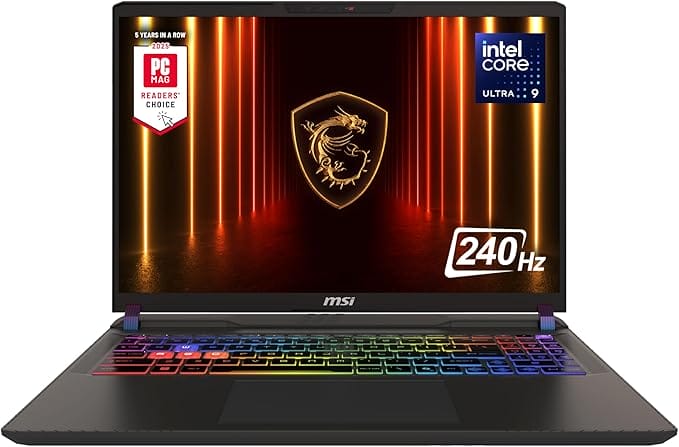
- Intel Core Ultra 9 275HX, 24 cores
- NVIDIA RTX 5070 Ti, workstation-class
- 32GB DDR5 + 1TB NVMe SSD
- 16-inch QHD+ 240Hz display
This is the one I’d hand a serious mechanical engineering student with the budget for it. The Intel Core Ultra 9 275HX is a 24-core chip that rebuilds a heavy SolidWorks assembly fast and chews through ANSYS solves that would leave a thinner laptop thermal-throttling. The RTX 5070 Ti has the VRAM and the muscle for large viewports and GPU rendering in KeyShot. It’s a workstation hiding in a gaming chassis, which is exactly what you want and rarely what’s advertised.
The catch is the obvious one. It’s heavy, the battery is a few hours of real CAD work, and the styling is gamer, not boardroom. None of that matters in a lab or a dorm. If you want the most engineering performance per dollar without stepping up to a $3,000 mobile workstation, you can check the MSI Vector 16 HX on Amazon and see where the price sits this week.
✅ Buy if you run SolidWorks, ANSYS, or CATIA daily and want a machine that won’t be the bottleneck for four years. ❌ Don’t buy if you carry your laptop everywhere and value a light bag over raw power. The Dell XPS 16 below is the portable answer.
Best for simulation and rendering: ASUS ROG Strix G16 (2025)
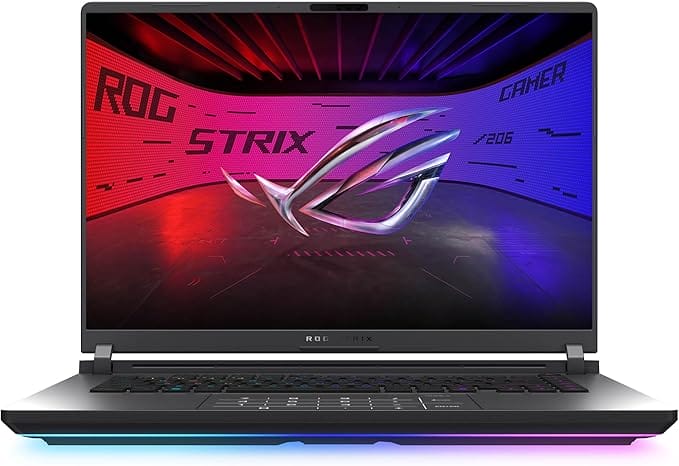
- Intel Core Ultra 9 275HX
- NVIDIA RTX 5070 Ti
- 32GB DDR5 + 1TB SSD
- 16-inch 2.5K 240Hz Nebula display
If your workload tilts toward ANSYS simulation, CAM toolpaths, or rendering, the Strix G16 is the pick. The Core Ultra 9 275HX posts multi-core scores around 35,000 in Cinebench, and that number translates directly into faster FEA solves and quicker render exports. Paired with the RTX 5070 Ti and a 2.5K 240Hz Nebula display, it handles viewport and final-frame work without compromise. The cooling here is genuinely good, which matters because sustained simulation is where lesser laptops quietly throttle.
It overlaps a lot with the MSI on paper. The difference is feel: the Strix runs a touch cooler under long loads and has the nicer screen, while the MSI usually undercuts it on price. Either is a great choice. You can see the ASUS ROG Strix G16 on Amazon and let the live price break the tie.
✅ Buy if simulation and rendering are your bottleneck and you want the strongest sustained CPU here. ❌ Don’t buy if you’re mostly modeling and want to save $300. The Legion Pro 5i gives you the same GPU for less.
Best value: Lenovo Legion Pro 5i Gen 10
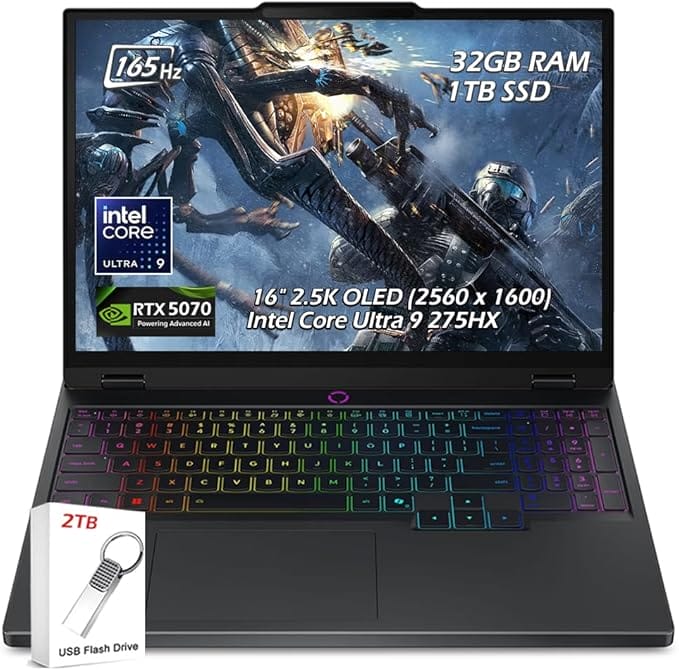
- Intel Core Ultra 9 275HX, 24 cores
- NVIDIA RTX 5070 Ti 12GB
- 32GB DDR5 + 1TB SSD
- 16-inch 2.5K OLED, 165Hz
The Legion Pro 5i is the smart-money pick. You get the same RTX 5070 Ti as the flagships and a 24-core Ultra 9 275HX, but Lenovo prices it noticeably lower, and the 2.5K OLED is genuinely lovely for CAD where color and contrast help you read a model. For most mechanical engineering students, this is the sweet spot: flagship GPU, excellent screen, no flagship tax.
What you trade is a little polish. The chassis is plain next to the Strix, and Lenovo’s stock fan curve runs loud until you tune it in Vantage. Small prices for the performance. I’ve recommended Legion machines to enough students to trust the line, and this is the best one for the money. Take a look at the Lenovo Legion Pro 5i on Amazon for the current price.
✅ Buy if you want flagship-class CAD performance and an OLED screen without paying flagship prices. ❌ Don’t buy if you need the lightest, most premium build. That’s the Dell.
Best premium and portable: Dell Premium 16 (XPS 16)
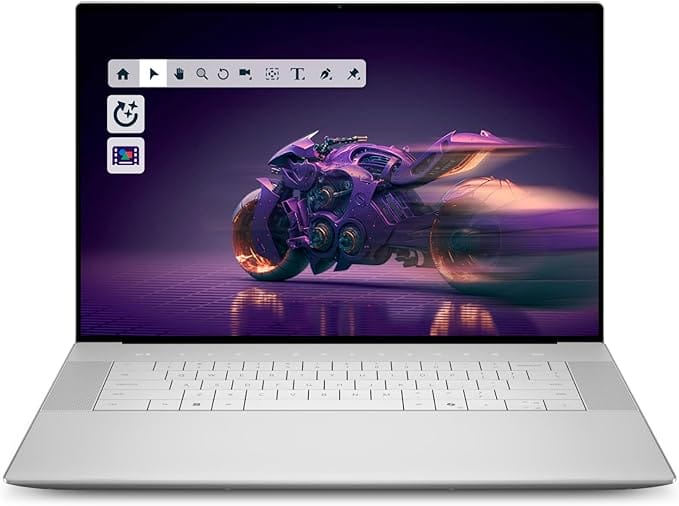
- Intel Core Ultra 9 285H
- NVIDIA RTX 5060 8GB
- 32GB LPDDR5X + 1TB SSD
- 16.3-inch 4K OLED touchscreen
If you carry your laptop to every class and want it to look the part in an internship, the Dell Premium 16 (the line that replaced the XPS 16 name) is the one. The Core Ultra 9 285H and RTX 5060 are plenty for modeling and moderate assemblies, and the 4K OLED touchscreen is the best display on this list for presenting a project or reviewing a render. It’s thinner and lighter than the gaming machines without giving up a usable dedicated GPU.
Be honest with yourself about the workload, though. The RTX 5060 is a step below the 5070 Ti machines, so very heavy ANSYS or 1,000-part assemblies will run slower. For modeling, sketching, coursework, and a beautiful screen you’ll use every day, it’s worth the premium. You can check the Dell Premium 16 on Amazon to compare configurations.
✅ Buy if portability, build quality, and screen matter as much as raw power, and your assemblies are moderate. ❌ Don’t buy if heavy simulation is your daily job. Step up to the MSI or Strix.
Best budget: HP Victus 15
Availability: HP Victus 15 on Amazon.com or check Amazon.in. Prices and configurations can change.
Not everyone has $2,000, and you don’t need it for first and second year. The HP Victus 15 pairs a Ryzen 7 8845HS with an RTX 4060, which is the minimum GPU I’d trust for SolidWorks, and 16GB of RAM that handles student-level assemblies fine. It’s the cheapest machine here that I’d actually call capable rather than just affordable. The build is plastic and the screen is a basic 144Hz IPS, but the parts that matter for CAD are present.
Plan one upgrade. The 16GB is the floor, so if your budget stretches, bump it to 32GB later, it’s usually a simple swap on the Victus. With that, this laptop carries a student comfortably through the early years. Check the HP Victus 15 on Amazon for the live price, and see the best laptops for college students if you want more budget options.
✅ Buy if you’re on a tight budget and want a genuinely CAD-capable laptop under $1,100. ❌ Don’t buy if you run heavy simulations now. The RTX 4060 and 16GB will feel tight. Stretch to the Legion.
Best for Fusion 360, MATLAB, and coding: MacBook Pro 14 (M4 Pro)
Availability: Apple MacBook Pro 14 (M4 Pro) on Amazon.com or check Amazon.in. Prices and configurations can change.
Here’s the honest truth most lists bury. SolidWorks, the software many mechanical programs require, does not run natively on macOS. So the MacBook Pro is a brilliant machine that’s wrong for a big chunk of the major, unless your courses use Fusion 360, MATLAB, Python, and CAD that runs in a browser or a virtual machine. For those workflows, the M4 Pro is exceptional: silent, cool, with battery that lasts a full day and a screen that’s hard to beat.
If your program is SolidWorks-heavy, buy a Windows laptop from the list above. If it leans toward Fusion 360, simulation in the cloud, coding, and you value battery and portability above all, the MacBook Pro earns its place. You can check the MacBook Pro 14 M4 Pro on Amazon, just confirm your required software runs on macOS first.
✅ Buy if your courses use Fusion 360, MATLAB, and coding, and you want the best battery and screen. ❌ Don’t buy if SolidWorks, CATIA, or ANSYS are required. They’re Windows-only or painful in a VM.
Mechanical engineering laptops compared
Here’s the whole list side by side. Read it by your software and budget. The GPU column is the one that decides whether SolidWorks and ANSYS feel smooth or sluggish, so start there and work outward.
| Laptop | CPU | GPU | RAM / SSD | Best for | Price |
|---|---|---|---|---|---|
| MSI Vector 16 HX AI | Core Ultra 9 275HX | RTX 5070 Ti | 32GB / 1TB | Overall | $2,100-2,300 |
| ASUS ROG Strix G16 | Core Ultra 9 275HX | RTX 5070 Ti | 32GB / 1TB | Simulation | $2,200-2,400 |
| Lenovo Legion Pro 5i | Core Ultra 9 275HX | RTX 5070 Ti | 32GB / 1TB | Value | $1,800-2,000 |
| Dell Premium 16 (XPS) | Core Ultra 9 285H | RTX 5060 | 32GB / 1TB | Portability | $2,300-2,500 |
| HP Victus 15 | Ryzen 7 8845HS | RTX 4060 | 16GB / 1TB | Budget | $950-1,100 |
| MacBook Pro 14 (M4 Pro) | Apple M4 Pro | 16-core GPU | 24GB / 512GB | Fusion 360 | $1,900-2,200 |
How to choose a laptop for mechanical engineering
The picks above cover most students. If you’d rather decide for yourself, here’s the framework I use when someone asks what to buy, factor by factor.
Processor: single-thread speed first, cores second
CAD modeling is mostly single-threaded, so a chip with high clocks feels fast in everyday SolidWorks. Simulation and rendering then reward cores. A Core Ultra 9 HX or Ryzen 9 HX gives you both. Avoid the thin-and-light U-series chips no matter how good the laptop looks, because they throttle under sustained CAD loads.
GPU: RTX 4060 is the floor, 5070 is the safe bet
SolidWorks, ANSYS, AutoCAD, and Revit all lean on a dedicated NVIDIA GPU, and integrated graphics struggle with 3D viewports. An RTX 4060 is the minimum I’d accept today. An RTX 5070 or 5070 Ti is the choice that stays relevant past graduation. If a workplace demands certified drivers, that’s when a ThinkPad P-series with an ISV-certified card earns its premium.
RAM: 16GB to start, 32GB to stop worrying
16GB handles coursework and assemblies under roughly 100 parts. Cross that, or open ANSYS, and 32GB stops the slowdowns. Buy 16GB only if the laptop lets you upgrade later, which the Victus does and the soldered-RAM ultrabooks don’t. When in doubt, get 32GB up front on the machines that don’t allow upgrades.
Storage and display
Get a 512GB NVMe SSD at minimum, 1TB if the budget allows, because CAD files and a Windows install fill 512GB quickly. For the screen, a 15 to 16-inch panel at 1920×1200 or higher gives you the working space CAD needs. An OLED is a luxury that genuinely helps when you read models and review renders, but it’s not required. If you do a lot of detailed work, pairing the laptop with one of the best 4K monitors at your desk beats a bigger laptop screen.
Battery and thermals: the specs nobody checks
Two numbers the spec sheet hides matter more than you’d think. Battery on a powerful CAD laptop is short, often 3 to 5 hours of real modeling, so factor a charger into your bag and a seat near an outlet into your lectures. Thermals matter even more: a laptop that throttles under a long ANSYS solve loses the performance you paid for. This is why the chunky gaming chassis on the MSI and ASUS beat thin ultrabooks for sustained engineering work. Cooling is a feature, not a flaw.
Ports, durability, and warranty
You’ll plug in a mouse, an external monitor, and a USB drive full of project files, often all at once. Look for at least one USB-C with display output, a couple of USB-A ports, and HDMI so you don’t live in dongle hell. Build quality matters for a machine that rides in a backpack for four years, and a longer warranty is worth real money on an expensive laptop. Student-focused programs from Dell, Lenovo, and HP sometimes add accidental-damage cover, which pays for itself the first time a corner meets a lab floor.
Which laptop should you buy?
If I were buying for a mechanical engineering student today, I’d get the MSI Vector 16 HX for the most performance per dollar, or the Lenovo Legion Pro 5i if I wanted to spend less and still get the RTX 5070 Ti and an OLED. Both will run anything the major throws at them for four years.
On a budget, the HP Victus 15 is the honest answer: a real RTX 4060 machine under $1,100 that you can upgrade later. If you carry your laptop everywhere and your courses allow it, the Dell Premium 16 is the premium portable, and the MacBook Pro M4 Pro is excellent for the Fusion-360-and-MATLAB crowd, with the one big caveat that SolidWorks won’t run natively. Pick by your software first, your budget second, and your bag third. For a broader cross-discipline view, the laptops for data analysts guide overlaps if your work drifts toward simulation data.
Mistakes mechanical engineering students make buying a laptop
I’ve seen the same wrong calls cost students money and four years of frustration. Avoid these and you’re most of the way to a good decision.
- Buying a thin ultrabook with integrated graphics. It looks great and opens SolidWorks, then stutters on the first real assembly. CAD needs a dedicated RTX GPU, full stop.
- Choosing a MacBook for a SolidWorks program. It won’t run natively, and a virtual machine is slow and clunky. Confirm your required software runs on macOS before you fall for the battery and screen.
- Maxing the GPU and skimping on RAM. An RTX 5070 Ti with 8GB of RAM still chokes on a big assembly. Balance the build: 16GB minimum, 32GB if you can.
- Paying for 4K when 1920×1200 is plenty. A sharp 16-inch panel is enough working space for CAD. Spend the difference on RAM or storage, or a desk monitor instead.
- Ignoring upgradeability. Soldered RAM means what you buy is what you keep. If the budget forces 16GB, get a laptop like the Victus that lets you add more later.
Get those five right and the rest is preference. The hardware on this list is current enough that any pick here will outlast your degree if you match it to the software you actually run. For a sense of how laptop needs differ by field, the laptops for data analysts and computer science students guides make a useful contrast.
Frequently asked questions
What specs do mechanical engineering students need in a laptop?
A Core Ultra 7/9 HX or Ryzen 9 HX CPU, a dedicated NVIDIA RTX GPU (RTX 4060 minimum, 5070 ideal), 16GB RAM minimum with 32GB preferred, and a 512GB+ NVMe SSD. That combination runs SolidWorks, AutoCAD, Fusion 360, and ANSYS without stalling.
Can a MacBook run SolidWorks for mechanical engineering?
Not natively. SolidWorks is Windows-only, so a MacBook needs a virtual machine or cloud workstation, which is slower and clunky. If your program requires SolidWorks, CATIA, or ANSYS, buy a Windows laptop. The MacBook Pro M4 Pro is excellent for Fusion 360, MATLAB, and coding.
Is 16GB of RAM enough for mechanical engineering?
16GB handles coursework and SolidWorks assemblies under about 100 parts. Once you pass that or run ANSYS simulations, 32GB removes the slowdowns. Buy 16GB only if you can upgrade later, otherwise get 32GB up front.
Do I need an RTX GPU or is integrated graphics fine?
You need a dedicated NVIDIA RTX GPU. Integrated graphics open SolidWorks but stutter as soon as you orbit a real assembly. An RTX 4060 is the minimum, and an RTX 5070 or 5070 Ti is the comfortable choice that lasts through graduation.
How much should a mechanical engineering laptop cost?
Around $1,000 gets a capable RTX 4060 machine like the HP Victus 15. The 1440p-and-simulation sweet spot with an RTX 5070 Ti runs $1,900 to $2,300 (Legion Pro 5i, MSI Vector, ASUS Strix). Premium portables and workstations climb past $2,400.
Is a gaming laptop good for mechanical engineering?
Yes. Gaming laptops pack the exact RTX GPUs and strong CPUs that CAD and simulation need, usually for less than a branded mobile workstation. The MSI Vector, ASUS Strix G16, and Lenovo Legion Pro 5i are all gaming machines that double as excellent engineering laptops.
The bottom line
The best laptops for mechanical engineering students get three things right: a strong HX-class CPU, a real RTX GPU, and enough RAM to hold an assembly. The MSI Vector 16 HX is my overall pick, the Lenovo Legion Pro 5i is the value play, and the HP Victus 15 is the budget machine that doesn’t cut the corners that matter.
Whatever you choose, buy for the software your program actually requires. A SolidWorks major on a MacBook is a four-year headache, and a thin ultrabook with integrated graphics is a daily one. Match the GPU and CPU to the work, leave room to add RAM, and the laptop disappears into the background where it belongs, while you get on with the engineering.
Tell Google you want more of this.
Add Gaurav Tiwari as a preferred sourceOne tap, and this site shows up more often in your own Top Stories, AI Overviews and AI Mode. Remove it any time.
Disclaimer: This site is reader-supported. If you buy through some links, I may earn a small commission at no extra cost to you. I only recommend tools I trust and would use myself. Your support helps keep gauravtiwari.org free and focused on real-world advice. Thanks. - Gaurav Tiwari
