
 by
by
The best gaming PC Black Friday deals aren’t the ones with the biggest percentage off the sticker. They’re the ones where a prebuilt with an RTX 5070 and a Ryzen 7 lands under $1,600 because the retailer wants the floor space back before the new model year. I’ve bought three desktops on this exact pattern, and the math only works if you know what the parts cost the rest of the year.
Here’s the part most roundups skip. A “$400 off” gaming desktop is often a clearance SKU with last-gen DDR4, a 600W bronze PSU, and zero upgrade headroom. The deal that actually saves you money is a current-gen build with a Gold PSU big enough to take a bigger GPU in two years. Price-per-frame matters more than price-off, and the two rarely point at the same box.
So this guide ranks five prebuilts that are worth buying when the price drops, sorted by who they’re for and what they actually run at 1080p, 1440p, and 4K. If you’d rather buy the card and slot it into your own case, the Black Friday GPU deals guide covers that route, and the advantages of a PC for gaming piece makes the case if you’re still on the fence about desktop versus console.
The best gaming PC Black Friday deals at a glance
Short on time? Here’s the ranked shortlist. Every pick is a current-generation prebuilt with a Gold-rated PSU and DDR5, so the box you buy in October 2026 still has room to grow. Prices move daily during Black Friday week, so treat the numbers as the ballpark you’re hunting under.
- Skytech King 95 (Ryzen 7 9700X + RTX 5070) — Best 1440p value. The price-per-frame king most years. 12GB GDDR7, 850W Gold PSU that’ll take a 5080 later.
- iBUYPOWER Y40 PRO (Ryzen 7 7800X3D + RTX 5070) — Best for high-refresh esports. The 7800X3D is still the gaming CPU to beat, and you get a keyboard and mouse in the box.
- Skytech King 95 (Ryzen 7 9800X3D + RTX 5070 Ti) — Best for 4K. 16GB of VRAM and the fastest gaming chip Skytech ships. The one I’d buy for a 4K panel.
- CyberPowerPC Gamer Master (Ryzen 5 7600 + RTX 4060) — Best budget 1080p. Maxes any game at 1080p and stays under most people’s “this is reasonable” line.
- Skytech Blaze (Ryzen 5 5600X + RTX 4060) — Cheapest entry that isn’t a trap. The floor where a gaming PC Black Friday deal is still a real PC, not e-waste with RGB.
All five ship assembled with Windows 11 and drivers installed. None of them need you to open the case on day one. That matters more than it sounds if you’ve never built a PC, because the riskiest part of a desktop’s life is the first boot, and these get tested before they leave the warehouse.
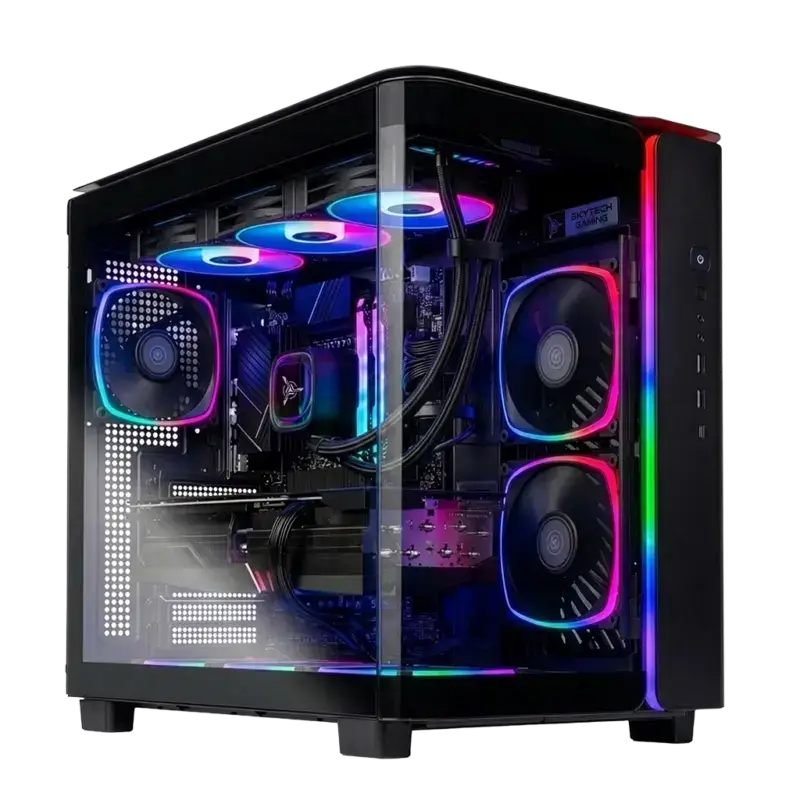
Best 1440p value: Skytech King 95 (RTX 5070)
1. Skytech King 95, Ryzen 7 9700X + RTX 5070 ($1,500-1,700)
If you game at 1440p and you want the most frames per dollar, this is the box. The Ryzen 7 9700X is an 8-core Zen 5 chip that never bottlenecks the RTX 5070, and the 5070 itself is the card that finally makes 1440p at high refresh feel cheap. 12GB of GDDR7, DLSS 4, and frame generation mean you’re clearing 100+ FPS in most titles without dropping settings.
Skytech King 95 (Ryzen 7 9700X, RTX 5070)
- AMD Ryzen 7 9700X, 8-core Zen 5
- NVIDIA RTX 5070 12GB GDDR7
- 32GB DDR5-6000 + 1TB Gen4 NVMe SSD
- 850W Gold PSU + 360mm ARGB AIO
Reasons to buy
- 850W Gold PSU has the headroom to drop in an RTX 5080 in two years
- 360mm AIO keeps the 9700X quiet under a full gaming load
- DDR5-6000 is the sweet spot for Ryzen, not the slow 5200 budget kits use
- Cleanest price-per-frame of any 5070 prebuilt I’ve priced this year
Reasons to avoid
- 1TB fills fast once you install three modern games
- No keyboard or mouse in the box, unlike the iBUYPOWER pick
- The 9700X trails the X3D chips by a few percent in CPU-bound esports titles
✅ Buy if you have a 1440p 144Hz or 165Hz monitor and want the best frames-per-dollar on the list. The 5070 was built for exactly this resolution, and the 9700X won’t hold it back in anything you throw at it.
❌ Don’t buy if you’re gaming at 4K. Step up to the RTX 5070 Ti build below. The extra 4GB of VRAM is the difference between “playable with DLSS” and “comfortable” at that resolution.
I keep coming back to this one because it gets the boring stuff right. The PSU is the part most prebuilt makers cheap out on, and an 850W Gold unit means your next GPU upgrade is a 20-minute job, not a new build. You can grab the Skytech King 95 on Amazon and check the live Black Friday price against the rest of the list.
The one honest knock is storage. 1TB sounds like plenty until Call of Duty wants 120GB on its own. Budget another $60 for a 2TB Gen4 drive, install it yourself in ten minutes, and you’ve fixed the only real weakness. Everything else here is the configuration I’d build for myself if I were starting fresh at this budget.
Best for high-refresh esports: iBUYPOWER Y40 PRO (RTX 5070)
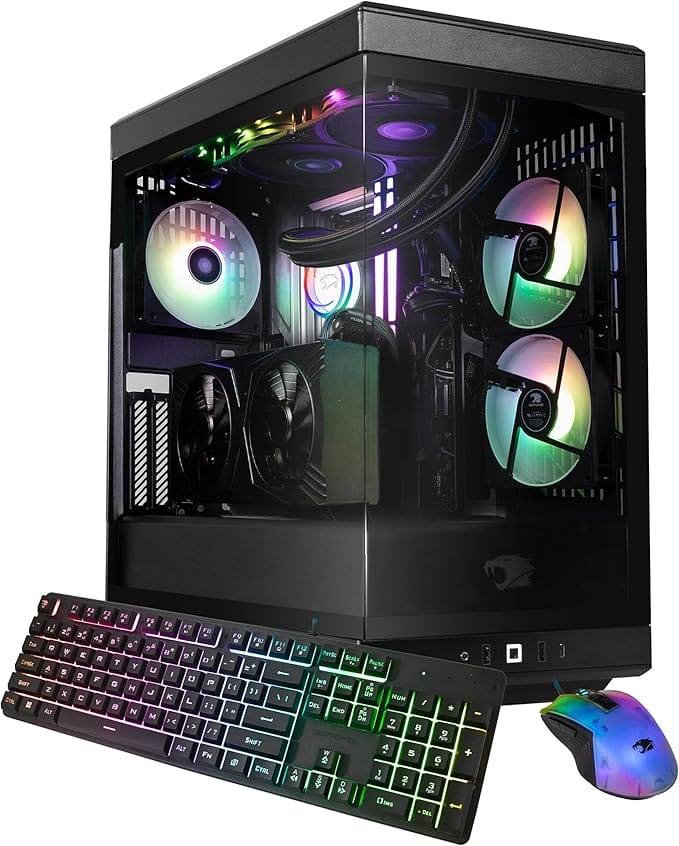
2. iBUYPOWER Y40 PRO, Ryzen 7 7800X3D + RTX 5070 ($1,650-1,850)
The 7800X3D is the reason this one exists. AMD’s 3D V-Cache chips win CPU-bound games by a wide margin, and competitive shooters at 240Hz and above are exactly that kind of game. Pair it with the same RTX 5070 as the King 95 and you get a machine tuned for raw frame rate over everything else. The Y40 PRO also throws in a keyboard and mouse, which quietly saves you $60.
iBUYPOWER Y40 PRO (Ryzen 7 7800X3D, RTX 5070)
- AMD Ryzen 7 7800X3D with 3D V-Cache
- NVIDIA RTX 5070 12GB GDDR7
- 32GB DDR5 + 2TB NVMe SSD
- Gaming keyboard and mouse included
Reasons to buy
- 7800X3D is the best gaming CPU under $400, full stop
- 2TB SSD as standard, so no day-one storage upgrade
- Peripherals included, unlike most prebuilts at this price
- The Y40 case has genuinely good airflow, not just glass for looks
Reasons to avoid
- Usually $100-150 more than the King 95 for the same GPU
- Bundled keyboard and mouse are fine, not great
- RGB-heavy look isn’t for everyone
✅ Buy if you play Valorant, CS2, or Apex on a 240Hz panel and want every frame the GPU can feed. The X3D cache is doing real work there, and you’ll see it in your 1% lows, not just the average.
❌ Don’t buy if you mostly play single-player games at 1440p. The King 95 gives you the same GPU for less, and the 9700X is plenty when the GPU is the limit. Save the difference.
I’ve watched the 7800X3D hold a frame-rate floor that pricier Intel chips couldn’t touch in the same game. That’s the whole pitch. If your monitor refreshes faster than 144Hz, the CPU stops being a checkbox and starts being the thing that decides whether you hit that ceiling. You can see the current iBUYPOWER Y40 PRO price on Amazon and weigh it against the King 95.
One thing to watch: iBUYPOWER rotates configurations constantly, so the exact CPU and storage can shift between SKUs. Confirm it’s the 7800X3D with the 2TB drive before you check out, because there’s a near-identical listing with a slower chip that isn’t worth the same money.
Best for 4K: Skytech King 95 (RTX 5070 Ti)
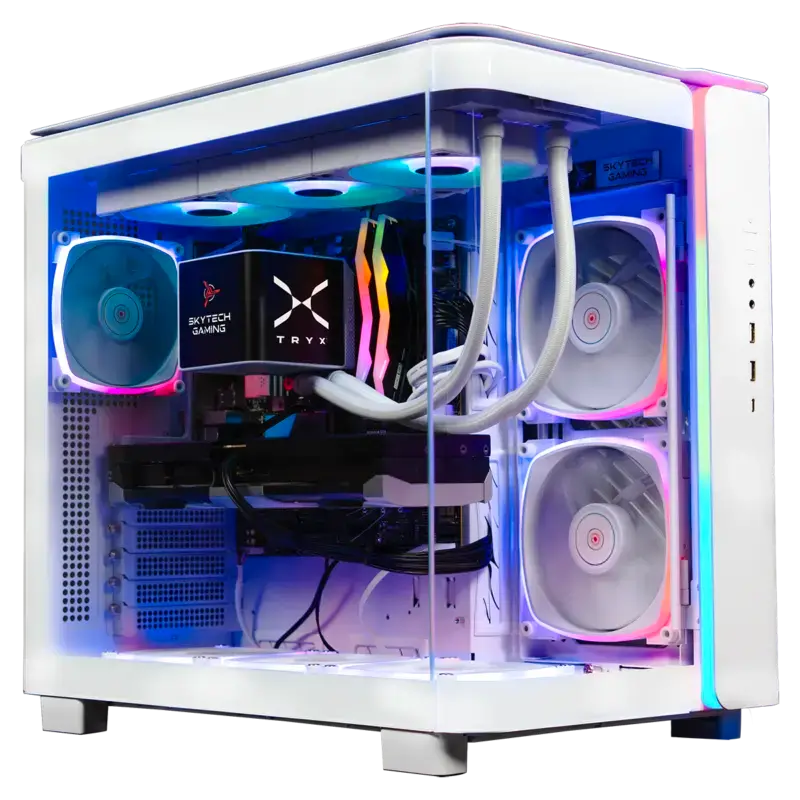
3. Skytech King 95, Ryzen 7 9800X3D + RTX 5070 Ti ($2,000-2,300)
This is the one I’d buy for a 4K monitor. The RTX 5070 Ti carries 16GB of VRAM, which is the number that matters at 4K because textures eat memory long before they eat raw compute. The 9800X3D on top is the fastest gaming CPU AMD ships, so nothing in this box is the weak link. It’s the most expensive pick here, and it’s the only one I’d trust to age well on a 4K panel.
Skytech King 95 (Ryzen 7 9800X3D, RTX 5070 Ti)
- AMD Ryzen 7 9800X3D, Zen 5 + 3D V-Cache
- NVIDIA RTX 5070 Ti 16GB GDDR7
- 32GB DDR5 + 1TB Gen4 NVMe SSD
- 850W Gold ATX 3.0 + 360mm AIO
Reasons to buy
- 16GB VRAM is the right amount for 4K textures, today and in two years
- 9800X3D means zero CPU bottleneck at any resolution
- ATX 3.0 PSU handles GPU power spikes without tripping
- Doubles as a serious workstation for video editing and 3D
Reasons to avoid
- $2,000+ is a lot if your monitor is still 1440p
- 1TB storage is stingy at this price tier
- Overkill for esports, where the cheaper 5070 hits the same frame cap
✅ Buy if you own or are buying a 4K display and want a machine that won’t need a GPU swap for years. The 16GB buffer is the insurance policy that the 12GB cards don’t give you.
❌ Don’t buy if you’re gaming at 1080p or 1440p. You’re paying for VRAM and CPU cache you won’t use. The King 95 with the plain 5070 gets you there for $500 less.
Here’s the thing about 4K prebuilts. Most of them pair a strong GPU with a mid CPU to hit a price, and then the whole thing stutters in CPU-heavy open-world games. This config doesn’t make that compromise. You can check the King 95 RTX 5070 Ti build on Amazon when the Black Friday price lands.
Pair it with a real 4K panel and you’ve got a setup that holds up for a long time. If you don’t have one yet, the best 4K monitors guide covers panels that double for gaming and work without you buying two screens.
Best budget 1080p: CyberPowerPC Gamer Master (RTX 4060)
4. CyberPowerPC Gamer Master, Ryzen 5 7600 + RTX 4060 ($800-950)
For most people buying their first gaming PC, this is the right amount of money. The RTX 4060 maxes any current game at 1080p and holds 60+ FPS, and it does it sipping power, which keeps the whole machine cool and quiet. The Ryzen 5 7600 is a current AM5 chip, so the platform itself has an upgrade path. That last part is what separates this from the clearance junk.
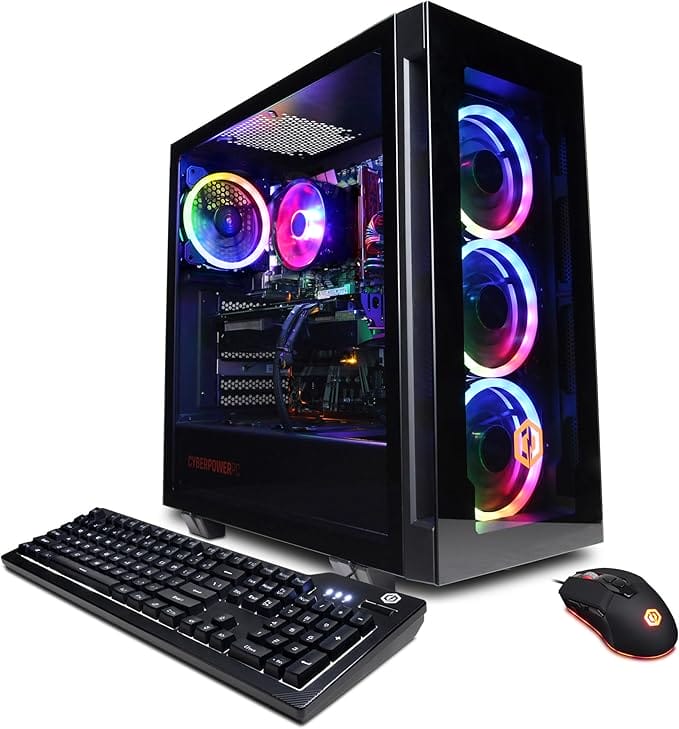
CyberPowerPC Gamer Master (Ryzen 5 7600, RTX 4060)
- AMD Ryzen 5 7600, AM5 platform
- NVIDIA RTX 4060 8GB
- 16GB DDR5 + 500GB NVMe SSD
- Wi-Fi ready, Windows 11 Home
Reasons to buy
- Maxes any 1080p game at 60+ FPS for under $1,000
- AM5 platform means a CPU upgrade later without a new board
- DDR5 already, not the DDR4 you’ll find on cheaper boxes
- Low power draw keeps noise and heat down
Reasons to avoid
- 500GB SSD is genuinely small, plan a second drive
- 8GB VRAM limits you at 1440p ultra in newer titles
- 16GB RAM is the floor, not future-proof for heavy multitasking
✅ Buy if you game at 1080p and want a real current-gen machine without crossing $1,000. This is the configuration I recommend to friends who ask what to get their kid or themselves for a first PC.
❌ Don’t buy if you already have a 1440p monitor. The 8GB 4060 runs out of VRAM at that resolution in newer games. Stretch to the King 95 5070 instead, or wait for a deal on it.
The trap at this price is the DDR4 clearance build that looks $150 cheaper. It isn’t cheaper. It’s a dead-end platform with no upgrade path, so when you outgrow it, you replace everything. This Gamer Master is the cheapest box on the list I’d actually call a long-term buy. Check the CyberPowerPC Gamer Master on Amazon for the live price.
Add a 1TB or 2TB SSD on day one and you’re set for years. That single upgrade fixes the only complaint I have, and it’s a part you can move to your next PC later. For the GPU side of the value question, the best graphics cards for gaming breakdown explains why the 4060 still earns its spot at this tier.
Cheapest real entry: Skytech Blaze (RTX 4060)
5. Skytech Blaze, Ryzen 5 5600X + RTX 4060 ($700-800)
This is the floor. Below roughly $700, gaming PC Black Friday deals stop being PCs and start being boxes with a graphics chip that can’t keep up. The Blaze pairs a last-gen-but-still-strong Ryzen 5 5600X with the same RTX 4060, so it plays everything at 1080p. You give up the newer AM5 platform to hit the price, which is the honest trade-off.
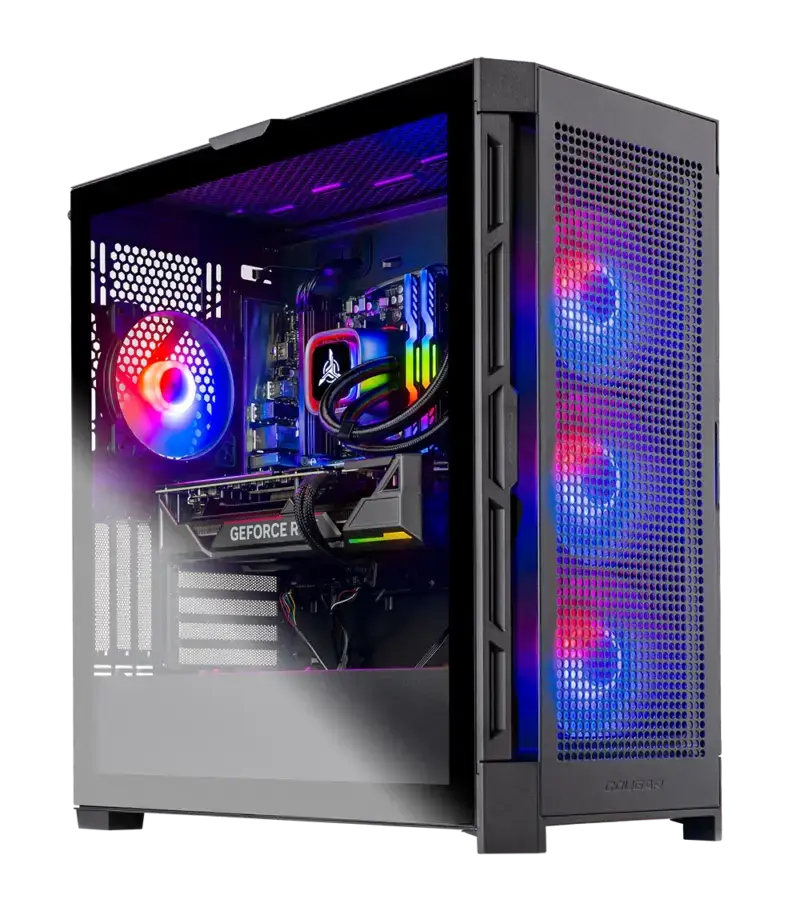
Skytech Blaze (Ryzen 5 5600X, RTX 4060)
- AMD Ryzen 5 5600X, 6-core
- NVIDIA RTX 4060 8GB
- 16GB DDR4-3200 + 1TB NVMe SSD
- 600-650W 80+ Gold PSU
Reasons to buy
- Cheapest box here that still plays everything at 1080p
- 1TB SSD as standard, more than the Gamer Master
- Gold PSU, not the bronze unit you’d expect at this price
Reasons to avoid
- AM4 is end-of-life, so the CPU upgrade path is basically done
- DDR4, not DDR5, so the whole platform is older
- Only worth it if the discount is real, check against the Gamer Master
✅ Buy if your budget caps out around $750 and you just want to play current games at 1080p without compromise on the GPU. The 4060 here is the same card as the $900 build.
❌ Don’t buy if the price gap to the CyberPowerPC Gamer Master is under $100. The AM5 platform on the Gamer Master is worth that much for the upgrade path alone. At that point, spend the extra and get the newer base.
I’d only pick the Blaze over the Gamer Master when the Black Friday discount genuinely opens a gap, say $120 or more. The GPU is identical, so you’re really choosing between a cheaper old platform and a slightly pricier current one. You can compare the Skytech Blaze on Amazon against the Gamer Master and let the gap decide.
Gaming PC Black Friday deals compared
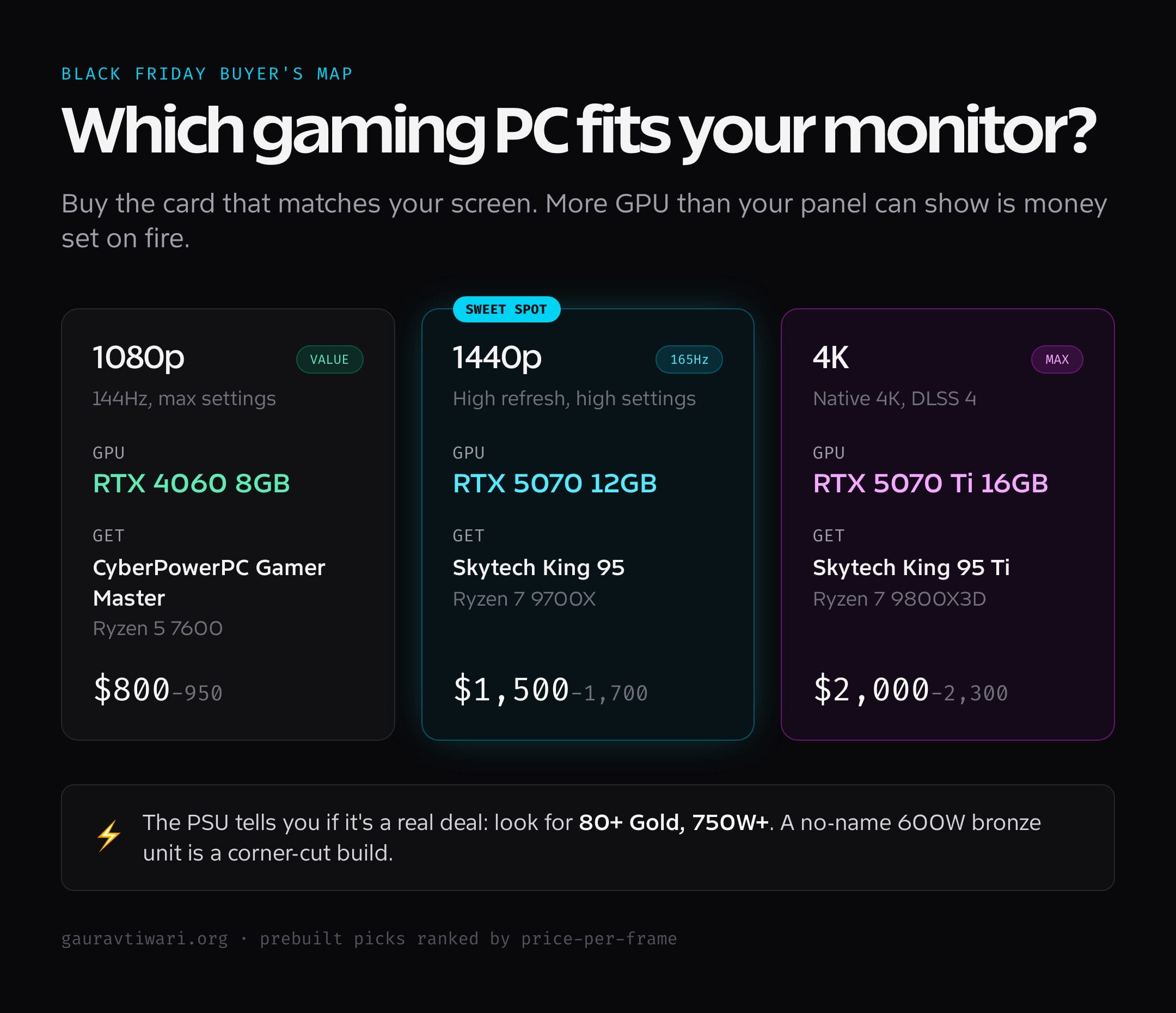
Here’s the whole list side by side. Read it by your monitor first, then your budget. The resolution column is the one that should drive the decision, because buying more GPU than your screen can show is the most common way people overspend on a gaming PC Black Friday deal.
| PC | CPU | GPU | Best for | Price range |
|---|---|---|---|---|
| Skytech King 95 | Ryzen 7 9700X | RTX 5070 12GB | 1440p value | $1,500-1,700 |
| iBUYPOWER Y40 PRO | Ryzen 7 7800X3D | RTX 5070 12GB | High-refresh esports | $1,650-1,850 |
| Skytech King 95 Ti | Ryzen 7 9800X3D | RTX 5070 Ti 16GB | 4K gaming | $2,000-2,300 |
| CyberPowerPC Gamer Master | Ryzen 5 7600 | RTX 4060 8GB | Budget 1080p | $800-950 |
| Skytech Blaze | Ryzen 5 5600X | RTX 4060 8GB | Cheapest entry | $700-800 |
How to choose a gaming PC on Black Friday
I’ve bought, returned, and upgraded enough prebuilts to know where the money should go and where it gets wasted. The headline GPU gets all the attention, but the parts that decide whether a deal is actually good are the ones the marketing copy buries. Here’s what I check, in order.
Match the GPU to your resolution, not the price tag
This is the whole game. An RTX 4060 is perfect at 1080p and runs out of VRAM at 1440p ultra. The RTX 5070 owns 1440p and stretches to 4K with DLSS. The RTX 5070 Ti’s 16GB is what you want for native 4K. Buy the card that matches the panel you actually own. A 5070 Ti feeding a 1080p monitor is money set on fire, because the screen can’t display the frames you paid for.
The PSU tells you if it’s a real deal
Open the spec sheet and find the power supply. An 80+ Gold unit at 750W or higher means the builder spent real money on the part you never see, and it gives you headroom for a bigger GPU later. A no-name 600W bronze PSU is the tell of a corner-cut build. The PSU is the cheapest way for a maker to inflate margins and the most expensive thing to replace, so it’s the single best signal of whether a gaming PC Black Friday deal is genuine.
DDR5 and AM5 over a slightly cheaper old platform
DDR4 and AM4 builds still game fine today. But they’re a dead end. When you want a faster CPU in two years, an AM5 board takes a new Ryzen chip; an AM4 board sends you shopping for a whole new base. The $100-150 you save on the old platform comes back as a $600 rebuild later. Pay the small premium now for the platform that has a future.
Storage is the easiest thing to fix, so don’t overpay for it
A 500GB or 1TB SSD is small for modern games, but it’s also the cheapest upgrade you’ll ever do. A 2TB Gen4 NVMe drive is about $90 and slots in without tools in ten minutes. Don’t pay a $200 premium for a config that ships with 2TB when you can add it yourself for less than half that. Buy the cheaper storage tier and upgrade it on a separate sale.
Prebuilt versus building your own
During Black Friday, prebuilts are often cheaper than the sum of their parts, because system builders buy GPUs in volume at prices you can’t match as one shopper. If you’ve never built a PC and the deal is good, a prebuilt is the safer call. Build your own when you want exact part choices or you already have a case, PSU, and storage to carry over. For pure value during a sale, the assembled box usually wins.
My pick and what I’d actually buy
If I were spending my own money this Black Friday, I’d buy the Skytech King 95 with the RTX 5070 and put the savings toward a 2TB SSD and a good 1440p 165Hz monitor. That combination is the sweet spot for almost everyone: high frames at the resolution most people actually game at, an 850W PSU that takes a future GPU, and money left over for the parts that make the experience feel good. It’s the configuration I’d build for myself, prebuilt at a price I couldn’t beat sourcing the parts alone.
If the budget is tight, the CyberPowerPC Gamer Master at under $1,000 is the one I’d hand a first-time buyer without a second thought. If 4K is the goal, the King 95 with the 5070 Ti is the only pick here I’d trust to hold up for years. And whatever you buy, sort the rest of the setup, because a great PC behind a bad chair and slow internet still feels bad. A gaming chair deal and the right internet speed for gaming do more for your day-to-day experience than people expect.
Frequently asked questions
Is Black Friday a good time to buy a gaming PC?
Yes, for prebuilts especially. System builders clear inventory before the new model year, so current-gen desktops like the Skytech King 95 and iBUYPOWER Y40 PRO see their best prices of the year. Individual GPUs discount less, which is why a prebuilt is often cheaper than the parts during the sale.
What GPU should a gaming PC have in 2026?
An RTX 4060 for 1080p, an RTX 5070 for 1440p, and an RTX 5070 Ti or higher for 4K. Match the card to your monitor’s resolution. Buying a 4K-class GPU for a 1080p screen wastes money because the display can’t show the extra frames.
How much should I spend on a gaming PC?
Around $800 gets you a strong 1080p machine like the CyberPowerPC Gamer Master. $1,500-1,700 gets the 1440p sweet spot with an RTX 5070. Plan on $2,000+ for native 4K. Below $700, the compromises start outweighing the savings.
Is a prebuilt or a custom build better value on Black Friday?
Prebuilts usually win on price during the sale because builders buy GPUs in bulk at rates a single shopper can’t match. Build your own only if you want specific parts or have components to reuse. For pure value during Black Friday, the assembled desktop typically costs less than the sum of its parts.
How important is the power supply in a prebuilt?
It’s the best signal of a genuine deal. An 80+ Gold PSU at 750W or more means quality parts and headroom for a future GPU upgrade. A no-name 600W bronze unit is the sign of a corner-cut build. The PSU is cheap to skimp on and expensive to replace, so check it first.
Can I upgrade a prebuilt gaming PC later?
Yes, if you buy the right base. An AM5 platform with an 850W Gold PSU, like the Skytech King 95, lets you drop in a faster CPU and a bigger GPU down the line. Avoid end-of-life AM4 and DDR4 builds if upgrading matters to you, because that platform’s CPU path is finished.
The bottom line
The best gaming PC Black Friday deals reward people who shop by resolution and PSU, not by the size of the discount banner. Buy the Skytech King 95 with the RTX 5070 if you game at 1440p and want the most frames per dollar. Drop to the CyberPowerPC Gamer Master if you’re at 1080p and want to stay under $1,000. Step up to the 5070 Ti build only if you’ve got a 4K panel to feed.
Ignore the clearance DDR4 boxes no matter how cheap they look. A current platform you can grow beats a dead-end one you’ll replace, every time. Get the PSU and the GPU right, add storage yourself, and you’ll have a machine that’s still fast long after the Black Friday banners come down.
