
 by
by
Every year around July and August, brands drop prices on laptops, tablets, software, and subscriptions specifically for students and teachers. I’ve been tracking these sales since 2009, and the pattern is always the same: the best deals disappear within weeks, and the stragglers aren’t worth your time. If you’re heading back to school (or sending someone back), this is the list I’d use to shop smart in 2026.
I’ve sorted everything by category so you can jump straight to what you need. Some of these are Amazon deals with real discounts. Others are direct from brands like Apple, Wondershare, and Coursera. I only include deals I’ve verified myself, and I’ll keep updating this page as new ones go live.
One thing I want to be upfront about: “back to school” is a marketing phrase that brands love to slap on everything. Not all of these deals are genuinely good. I’ve filtered out the noise and kept only the ones where you’re actually saving real money on products worth buying.
Best Laptop Deals for Students
A laptop is the single most important purchase you’ll make before the semester starts. I’ve seen students waste money on flashy gaming machines they don’t need, and I’ve seen others suffer through four years on a cheap Chromebook that couldn’t run a spreadsheet properly. The sweet spot for most students is a mid-range ultrabook with at least 8GB of RAM and an SSD. Check my best budget laptops guide if you’re working within tight limits.
Apple MacBook Deals
Apple’s education pricing is consistent and real, but 2026 changed the math. Apple raised prices across the Mac and iPad lines on June 25, citing memory and storage costs, so the numbers you remember from spring are gone. The $100 education discount still applies on MacBooks, and this year’s back to school promo adds an Apple Gift Card on top of it. You verify through UNiDAYS on the Apple Education Store, and the promo runs through September 24, 2026.
- MacBook Air 13-inch (M5) from $1,199 with the education discount ($1,299 retail); the 15-inch starts at $1,399
- MacBook Pro 14-inch (M5) from $1,899 with the education discount ($1,999 retail)
- iMac from $1,449 with the education discount (the iMac discount is $50, not $100)
- $100 Apple Gift Card with a MacBook Air, iPad Air, or iPad Pro; $150 with a MacBook Pro, through September 24, 2026
- AppleCare+ education discount is now up to 10%, down from the old 20%
If you’re a student deciding between the Air and Pro, I’d pick the MacBook Air for 90% of use cases. The M5 chip handles everything from Zoom lectures to Photoshop without breaking a sweat, and the $700 gap buys a lot of textbooks. The Pro only makes sense if you’re doing video editing, 3D rendering, or running heavy engineering software. The 2 Macs worth most students’ money this season are below.
Apple MacBook Air 13-inch (M5)
The Air is the default college laptop for a reason, and the M5 refresh made the base model genuinely future-proof: 16GB of unified memory and a 512GB SSD are now standard, which used to cost hundreds in upgrades. Amazon has it at $1,259.99 against the $1,299 sticker, while the Apple Education Store sells it at $1,199 with the $100 gift card on top through September 24. Price both routes before you buy.
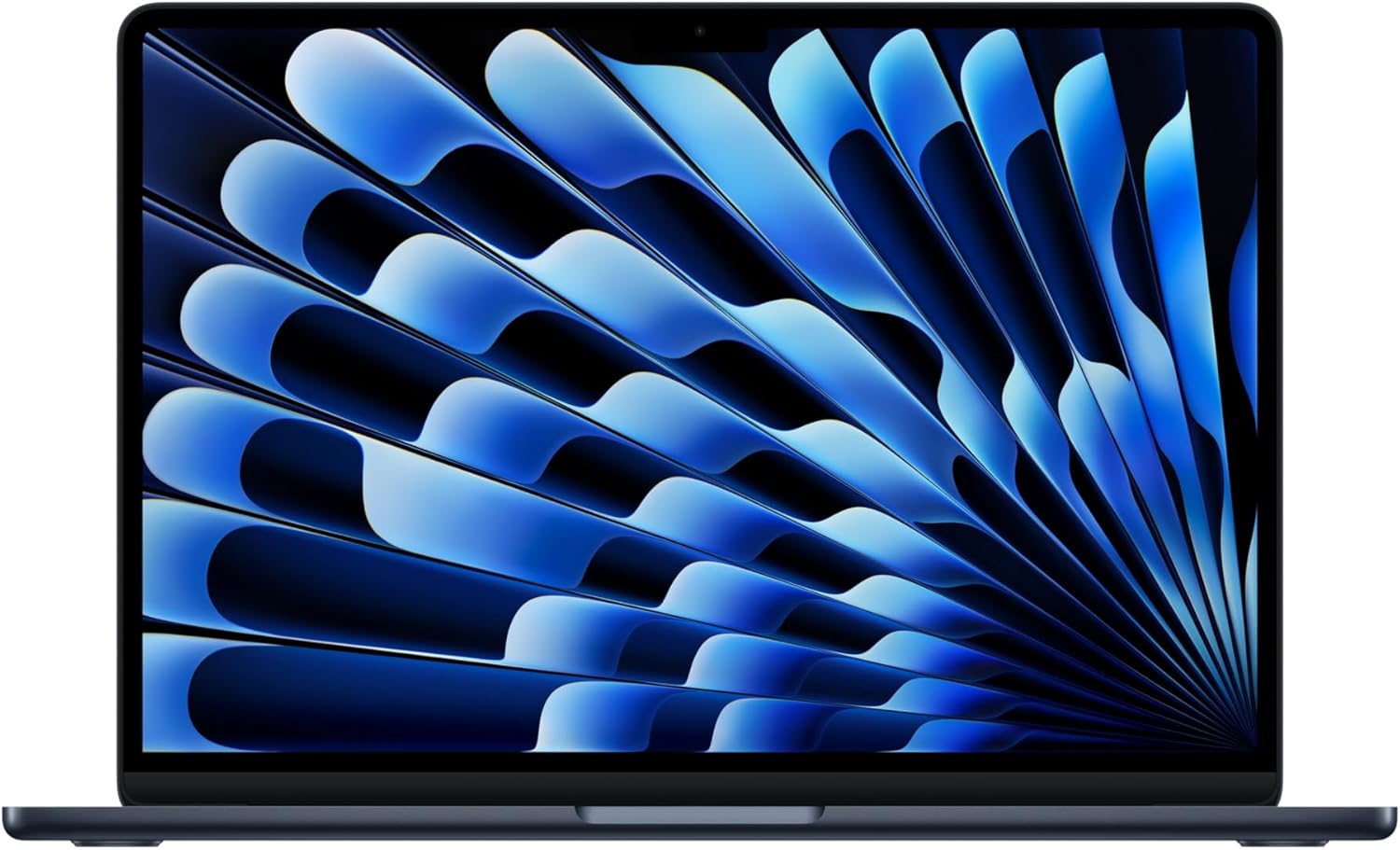
Apple MacBook Air 13-inch (M5) – 16GB Unified Memory, 512GB SSD, Liquid Retina, Touch ID
- M5 chip with 16GB unified memory and a 512GB SSD as the new base, enough for years of coursework
- 13.6-inch Liquid Retina display with a 12MP Center Stage camera for classes over video
- Up to 18 hours of battery life, Touch ID, Wi-Fi 7
18 hours of battery means the charger stays in the dorm. And the 12MP Center Stage camera matters more than it sounds, because half your seminars still happen over video.
Apple MacBook Neo
New this year, and the answer to the oldest student question: what’s the cheapest real Mac? The MacBook Neo runs the A18 Pro chip, iPhone-class silicon tuned for a laptop, in an aluminum body at $699 list, with Amazon currently a touch under at $689. It handles writing, browsing, streaming, and Apple Intelligence without drama.

Apple MacBook Neo 13-inch – A18 Pro Chip, 8GB Unified Memory, 256GB SSD, Liquid Retina
- A18 Pro chip with Apple Intelligence in a durable aluminum design
- 13-inch Liquid Retina display with a 1080p FaceTime HD camera
- Up to 16 hours of battery life, in Silver, Blush, Citrus, or Indigo
The honest limits: 8GB of memory and 256GB of storage are fixed, and the Neo sits outside Apple’s gift card promo. For a browser-and-Office degree it’s terrific value. If your coursework leans on heavy software, or you want 1 laptop to last all 4 years, the Air’s 16GB is worth the stretch.
Dell XPS 13
The dual-screen ASUS ZenBook Duo I recommended here for years is gone: Amazon lists it as unavailable, and the current Zenbook Duo costs $2,000 and up, which is workstation money, not student money. The best Windows laptop deal for students right now is Dell’s XPS 13 student offer.
Dell’s back to school page has the XPS 13 at $599.99 for verified students, $100 under the regular price. You sign in, verify through Dell Rewards, and the price drops at checkout. The offer runs through November 2, 2026, so this is one deal you can actually sleep on.
- 13.4-inch 2.5K touch display in a chassis light enough to forget in your bag
- Core 5-320 processor, 8GB RAM, 512GB SSD: enough for writing, spreadsheets, research, and streaming
- $599.99 student price after Dell Rewards verification, regular $699.99
Fair warning: 8GB of RAM is the honest limit here. It’s fine for a degree lived in a browser, Office, and PDFs. If you’re compiling code, editing video, or running lab software, spend more on RAM before you spend on anything else.
Best Tablet Deals for Students
Tablets have become essential for students, especially if you’re annotating PDFs, taking handwritten notes in class, or just want something lighter than a laptop for reading. I’ve covered the best tablets for students in a dedicated guide, but here are the standout deals right now. If you’re specifically looking at iPads, check my best iPad for students comparison.
Apple iPad Air 11-inch (M4)
The iPad Air with the M4 chip is the tablet I recommend to most students. It’s powerful enough for serious work, supports Apple Pencil and Magic Keyboard, and costs significantly less than the Pro. The Liquid Retina display is gorgeous for reading textbooks, and with 128GB of base storage, you won’t run out of space in your first semester.
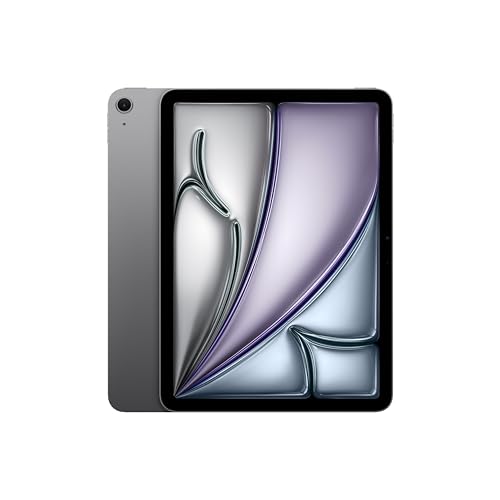
Apple iPad Air 11-inch (M4) – Liquid Retina Display, 128GB, Wi-Fi 7, Touch ID
- M4 chip with Apple Intelligence support for powerful multitasking and creative work
- 11-inch Liquid Retina display with True Tone and P3 wide color
- Wi-Fi 7, 12MP front and back cameras, Touch ID, all-day battery life
Apple Intelligence is baked in, which means features like writing assistance, smart summaries, and image generation work natively. For students writing research papers or summarizing lecture recordings, that’s genuinely useful and not just a marketing checkbox. The 12MP cameras on both sides are solid for scanning documents and joining video calls.
My recommendation: grab the iPad Air if you want a capable tablet for notes, reading, and light creative work. Amazon has the Wi-Fi model from $712 against Apple’s $749 sticker, and buying through the Apple Education Store instead gets you the $100 gift card through September 24. You don’t need the Pro unless you’re doing professional-grade video editing or illustration work on the tablet itself.
And if $700 is over budget, the base iPad 11-inch with the A16 chip is $399.99 on Amazon right now. It skips Apple Intelligence and the laminated display, but for PDFs, notes, and lecture videos it does the job. It’s also excluded from Apple’s gift card promo, which stings less at this price.
Apple iPad Pro 11-inch (M5)
The iPad Pro with the M5 chip is overkill for most students, and I mean that as a compliment. If you’re studying design, architecture, filmmaking, or any field where you need desktop-class power in a tablet form, this is the one. The Ultra Retina XDR display is the best screen Apple has ever put on a tablet, and the LiDAR scanner opens up augmented reality apps that architecture and engineering students will actually use.
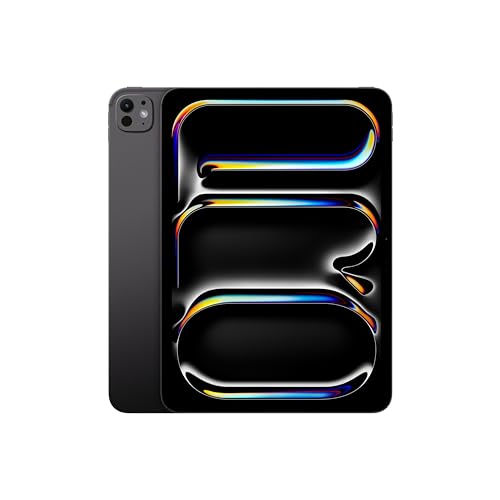
Apple iPad Pro 11-Inch (M5) – Ultra Retina XDR, 256GB, LiDAR, Face ID, Thunderbolt
- M5 chip with Apple Intelligence for desktop-class performance in a tablet
- Ultra Retina XDR display with ProMotion, extreme brightness, and nano-texture option
- LiDAR Scanner, Face ID, 12MP front and back cameras, Thunderbolt/USB 4 support
From $1,139 on Amazon ($1,199 direct from Apple after the June price rise), it’s a serious investment. But consider that some students use this as their only device, pairing it with the Magic Keyboard to create a full laptop replacement. Add the keyboard and you’re brushing against MacBook Air money, so decide whether you want iPadOS or macOS before you spend it. The Thunderbolt/USB 4 port means you can connect external displays, fast storage, and audio interfaces directly.
My honest take: unless you have a specific creative or technical use case, save the $400 difference and get the iPad Air instead. The Air handles 95% of student tasks just as well.
Samsung Galaxy Tab S10 FE
The best Android tablet deal this season. The Galaxy Tab S10 FE with 128GB is $379 on Amazon against a $499.99 list price, and the S Pen comes in the box while Apple sells the Pencil separately.
- 10.9-inch display with the S Pen included, ready for handwritten notes out of the box
- 128GB Wi-Fi model, comfortable for a semester of notes, PDFs, and downloads
- $379 at Amazon vs $499.99 list, roughly 24% off
For note-taking and media on a student budget, this is the value pick of the whole tablet section. It won’t match an iPad for app polish, but at $330 less than the iPad Air, it doesn’t have to.
Drawing and Pen Tablet Deals
If you’re studying art, graphic design, animation, or even just taking handwritten notes on a large screen, a dedicated drawing tablet makes a real difference. Wacom still dominates this category, but the model I listed here for years is finished: Amazon renamed the old Wacom One 13.3 listing “Old Gen (2019)” and has one unit left at full price. The current line gives you two sensible entries.
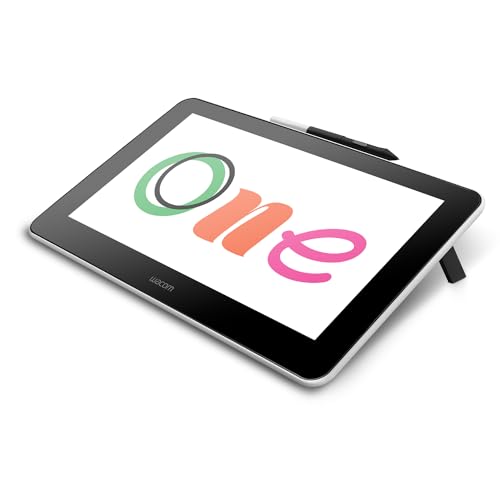
Wacom One 14 – Full HD Pen Display with Battery-Free Pen
- 14-inch Full HD laminated display for drawing, notes, and photo editing
- Battery-free pen with pressure sensitivity, included in the box
- Works with Windows and Mac and the major creative apps: Photoshop, Illustrator, Clip Studio
At $299.95 the Wacom One 14 sells at list price, not a discount, and I’d rather tell you that than dress it up. It’s still the entry point I’d pick for a design class: the 14-inch Full HD screen is laminated, so the pen tip sits right on the line instead of floating above it, and it works with the software you’d actually use in class, from Photoshop to Clip Studio.
The pen doesn’t need charging, which is a small detail that matters more than you’d think. No batteries, no USB-C top-ups mid-session. You just pick it up and draw. For students getting into digital art, this beats spending $700+ on a Cintiq. And if you want the genuinely discounted Wacom right now, it’s the Movink 13 at $499.95, an OLED portable display with the Pro Pen 3 that launched at $749.95. That’s the one for serious art students who carry their screen between studio and dorm.
Best Software Deals for Students
Software discounts are where students save the most money during back to school season. Unlike hardware deals that shave off $50 here and there, software deals regularly hit 40-70% off. That’s hundreds of dollars saved on tools you’ll use throughout your degree.
PDFelement
If you’re a student, you deal with PDFs constantly: research papers, lecture slides, assignment submissions, forms. PDFelement’s education pricing runs up to 69% off, with plans from $39.99 a year, and you verify through Student Beans. The old flat “60% off everything” campaign is gone; the education store is now the route that actually saves you money.
I’ve used PDFelement for client contracts and proposals, and it handles annotation, editing, and OCR scanning without the bloat of Adobe Acrobat. For students, the annotation features alone are worth it. You can highlight, comment, and markup any PDF without converting it to another format first.
Parallels Desktop
If you own a Mac but need Windows for a specific course, Parallels Desktop is the cleanest solution. It runs Windows inside macOS without rebooting, which means you can have your Mac apps and Windows apps open side by side. The education discount takes 50% off both Standard and Pro, you verify your academic status at checkout in about 5 minutes, and the discount keeps renewing for as long as you stay enrolled.
This is especially relevant for engineering, accounting, and business students who need Windows-only software like AutoCAD, certain versions of Excel with macros, or specialized lab programs that don’t have Mac versions.
Wondershare DemoCreator
Online presentations are a fact of student life now. DemoCreator lets you record your screen, add webcam overlays, and edit everything into polished presentation videos. The lifetime license runs $49.99 on Mac and $79.99 on Windows, with an extra 10% off at checkout, and lifetime means you keep it after graduation, which no subscription tool offers. I’d grab this if you’re regularly creating video presentations for classes or thinking about starting a YouTube channel alongside your studies.
EdrawMax and EdrawMind
Diagramming that survives your whole degree. EdrawMax handles flowcharts, org charts, UML diagrams, and floor plans; EdrawMind covers mind maps for brainstorming and study notes. The current Edraw sale runs up to 50% off, with EdrawMind’s perpetual license at $118 and a 3-product bundle that cuts about $270 off list. Students with a school ID can apply for education pricing on individual plans instead. The old “70% off” number you’ll still see on coupon sites was never Edraw’s own offer.
Wondershare Filmora
Video assignments stopped being optional somewhere around 2020. Filmora is the editor I point students to because it cuts, captions, and exports without a learning cliff, and its back to school sale is live until September 30: up to 42% off on Windows and 40% on Mac, with the perpetual license at $59.99, down from $79.99. That perpetual license is the version to buy. It’s the cheapest own-it-forever video editor from a major vendor right now.
Microsoft 365
Before you pay for any office suite, check what your school already gives you. Office 365 Education is free with an eligible school email: web versions of Word, Excel, PowerPoint, OneNote, and Outlook for as long as you’re enrolled. If you want the desktop apps, Microsoft sells Microsoft 365 Personal at 50% off for verified college students. The 12-months-free Premium offer from January is over, so ignore any article still promising it.
Online Course and Learning Platform Deals
This is where I get genuinely excited. The cost of quality online education has dropped dramatically, and back to school sales make it even more accessible. Whether you’re supplementing your coursework or building skills your degree doesn’t cover, these platforms are worth your money. I recommend checking my study tools for college students guide for more resources.
DataCamp
DataCamp is the platform I recommend for learning to code and work with data. With 380+ courses, career tracks, and hands-on projects, it’s a complete learning system, not just a collection of videos. There’s no seasonal sale running this year, but verified college students get 50% off Premium year-round, no promo code needed, and the regular annual plan works out around $25 a month.
Do I recommend it? Yes, especially if you’re studying anything STEM-related. Even if your degree isn’t in computer science, knowing Python or SQL gives you an edge in almost every field now. The interactive coding exercises are better than watching someone else code on YouTube.
Coursera Plus
Coursera Plus gives you unlimited access to 7,000+ courses from universities like Stanford, Yale, and Google. The annual plan lists at $399, and there’s a 40% off promo running on it right now, which brings a year of unlimited certificates under $240. You get hands-on projects, professional certificates, and courses that actually carry weight on a resume. If you’re going to invest in one learning platform this year, this is the one that gives you the most breadth.
Skillshare
Skillshare is ideal for creative students. Design, branding, illustration, photography, video editing: it covers the creative skills that traditional education often skips. The free trial is 7 days on the website (signing up through the mobile app sometimes stretches it to a month), and the annual plan runs $13.99 a month billed yearly. The 50% off codes floating around coupon sites are expired Black Friday leftovers, so don’t waste time hunting them.
Teachable
This one’s for teachers and educators who want to sell their own online courses. Teachable rebuilt its plans (Starter at $39 a month, Builder at $89, Growth at $189, each about 22% cheaper billed annually), and the current promo gives you 3 months for the price of 1. If you’ve been thinking about turning your expertise into a course, that’s a cheap way to test the idea. I’ve seen teachers build significant side income through Teachable, and the platform handles payments, student management, and content delivery without you needing any technical skills.
Codecademy
If DataCamp’s data focus isn’t your lane, Codecademy covers the broader programming map: web development, Python, JavaScript, and full career paths. Verified college and high school students get 35% off Pro, and it’s a standing discount, not a sale that dies in September.
Amazon Prime Student and Subscription Deals
Amazon’s student benefits are genuinely generous, and most students don’t even know about half of them. One naming change first: Amazon has rebranded Prime Student as Prime for Young Adults, and the deal got wider, not worse.
Amazon Prime for Young Adults
The old Prime Student, renamed, and you no longer need to be a student: anyone 18 to 24 qualifies, plus college students of any age with a school email. You get a 6-month free trial, then $7.49 a month or $69 a year, half the regular Prime price. The perks stack up: free Grubhub+, 5% cash back on select categories, 10 cents off per gallon at partner gas stations, Prime Video, Amazon Music, and Prime Gaming. Prime Video still carries ads unless you pay $2.99 a month extra, which is worth knowing before you binge.
I’d sign up even if you only care about the free shipping. When you’re ordering textbooks, supplies, and dorm essentials, free 2-day shipping pays for itself within the first month.
Kindle Unlimited
Kindle Unlimited normally runs $11.99 a month for access to over a million titles, including reference books and fiction for when you need a break from studying. There’s a recurring 3-months-for-$0.99 promo, but Amazon shows it only to eligible accounts, so log in and check the Kindle Unlimited page rather than trusting any blog’s screenshot, mine included. If your account doesn’t get the offer, the 30-day free trial is always there.
New Kindle e-readers also ship with 3 months of Kindle Unlimited bundled. If you don’t already own a Kindle, that’s the cheaper route into it.
Audible
Audible doesn’t run a student program, whatever older articles claim. What’s real: a 30-day free trial that renews at $8.99 a month, a student route through Student Beans at $0.99 a month for 3 months, and a 3-months-free offer that shows up for some Prime members. If you commute to campus, audiobooks turn dead commute time into listening time. I listen during my morning routine, and over a semester that adds up to dozens of books you wouldn’t have otherwise read.
Music and Streaming Student Plans
Streaming is where student verification quietly pays monthly rent. These are the standing US student prices:
- Spotify Premium Student – $6.99/month with Hulu (With Ads) included, against $12.99 for regular Premium
- Apple Music Student – $6.99/month with Apple TV access thrown in
- YouTube Premium Student – $8.99/month
- Hulu, Max, Peacock, and Paramount+ all run separate student tiers; verify through SheerID and the price roughly halves
Stack 2 of these against their regular prices and you’ve saved a textbook per semester.
More Back to School Deals Worth Checking
Here are additional deals that didn’t fit neatly into the categories above but are still worth your attention:
- Notion – the Plus plan is free for verified students, and Notion AI is 50% off. The free student plan is the single best note-taking deal on this page.
- Sony WH-1000XM5 – $248 on Amazon against a $399.99 list, 38% off, because the XM6 replaced it. Last-generation flagship noise cancelling is the classic dorm-study play.
- Apple AirPods Pro 3 – $199.99 on Amazon, $50 off list, matching the usual retail sale price.
- HP Envy Inspire 7255e – a wireless all-in-one printer around $90, down from $199.99. A printer feels optional until the first 11pm “submit a hard copy” assignment.
- pdfFiller – annual billing runs $7 to $12.50 a month, roughly 60-70% under the monthly rate, with a 30-day trial. signNow works the same way: about $8 per user monthly on annual against $20 month-to-month. Nobody needs a coupon; the annual toggle is the discount.
- Careerist – up to 55% off tech career training, now centered on AI automation and QA tracks, with a job guarantee attached. Good for students with no tech background who want to pivot into tech roles.
- Udacity – the big 50% sales are gone; the current offer is 15% off the 4-month All Access bundle. Nanodegrees still carry real weight in the job market, but wait for a deeper sale if you can.
- The Economist – 50% off your first year of annual digital ($144.50), and verified students get 75% off through the education store plus a free Espresso subscription. Essential reading if you’re studying economics, business, or international relations.
- Chegg Study – 20% off your first month of Chegg Study or Study Pack. One honest note: Chegg has shrunk hard since AI chatbots arrived, with repeated layoff rounds since 2024, so keep it monthly rather than prepaying anything long-term.
- MEL Science – the annual plan gives you 12 months for the price of 8, about 33% off, from $29.90 a month. If you have younger siblings or kids curious about science, these hands-on kits make learning genuinely fun.
How to Get the Best Back to School Deals
After tracking these sales for years, I’ve noticed a few patterns that help you save more:
- Sign up for Prime for Young Adults first. The free 6-month trial gives you early access to deals and free shipping. Many of the best prices are Prime-exclusive.
- Don’t rush into laptop purchases. Laptop prices fluctuate throughout the back to school season. The best deals often show up in the last two weeks of August.
- Stack education discounts. Apple, Microsoft, and Adobe all have separate education stores with verified student pricing (Adobe’s student plan is $19.99 a month for the first year against $69.99 regular). Apple’s seasonal gift card lands on top of its education price, which is genuine double-dipping.
- Mind the deadlines that actually matter. Apple’s gift card promo ends September 24, ASUS’s sale windows close in early September, and Dell’s student pricing runs to November 2. The “sale ends tonight” banners elsewhere mostly reset weekly.
- Check software licensing. Many student software licenses expire after graduation. Others, like lifetime licenses from Wondershare, stay with you forever. Read the fine print before buying.
- Bookmark this page. I update it as new deals go live throughout the season. The best offers don’t all drop on the same day.
What to Skip During Back to School Sales
Not everything labeled “back to school deal” is actually a good deal. Here’s what I’d avoid:
- Cheap Chromebooks under $200. They feel great for the first month, then the limited storage and slow performance catch up. If you need a budget laptop, get a refurbished ThinkPad instead.
- Extended warranties on electronics. Amazon’s extended warranty on a $500 laptop costs $80-$120 and rarely pays off. Manufacturer warranties cover defects for the first year, which is when failures happen.
- “Bundle” deals that include accessories you don’t need. A laptop + case + mouse + headphone bundle sounds great until you realize the accessories are low quality items the retailer is trying to offload.
- Previous-generation tablets at tiny discounts. A 10% discount on a 2-year-old iPad isn’t a deal. It’s clearing inventory. Either buy current-gen or look at certified refurbished for real savings.
- Coupon codes from aggregator sites. Most are expired or never worked; half the “back to school codes” circulating this year are Black Friday leftovers. If a discount is real, it lives on the vendor’s own pricing or education page.
Final Thoughts
Back to school shopping in 2026 has a twist: hardware got more expensive after Apple’s June price rise, so the real savings moved to software, subscriptions, and verified student pricing. My top recommendations: start with Prime for Young Adults (it’s free for 6 months), grab the iPad Air or the $379 Galaxy Tab S10 FE if you need a tablet, and put real money into one good learning platform like DataCamp or Coursera Plus.
I’ll keep this page updated as new deals come in throughout the 2026 back to school season. If you find a deal I’ve missed, drop it in the comments and I’ll verify and add it.
When do back to school sales start and end?
Back to school sales typically start in early July and run through mid-September. The best deals peak in late July through August, and Apple’s education gift card promo runs through September 24 this year. Some deals, like the Prime for Young Adults 6-month free trial, are available year-round but get extra attention during this period.
Do I need a .edu email to get student discounts?
Most student discounts require verification through a .edu email, UNiDAYS, or Student Beans. Amazon Prime Student verifies through SheerID. Apple’s education store works on the honor system for most products but may require verification for larger discounts. International students can typically use their university email even if it’s not a .edu address.
Should I buy a laptop or a tablet for college?
For most students, a laptop is the safer choice. You’ll need it for writing papers, running software, and taking exams. A tablet works as a supplement for note-taking and reading, but it can’t fully replace a laptop for most coursework. The exception is if you’re pairing an iPad Pro with a Magic Keyboard and your program doesn’t require Windows-only software.
Is Amazon Prime Student worth it?
Absolutely. The program is now called Prime for Young Adults and covers anyone 18 to 24, plus college students. You get 6 months free, then 50% off the regular Prime price. That includes free 2-day shipping, Prime Video, Prime Music, Prime Reading, and early access to deals. If you order textbooks, supplies, or dorm essentials through Amazon even a few times per semester, the free shipping alone covers the cost. The streaming services are a bonus.
What’s the best budget laptop for students in 2026?
The MacBook Neo at $699 is now Apple’s cheapest laptop, and the MacBook Air 13-inch starts at $1,199 with the education discount. If you need Windows, Dell’s XPS 13 student offer at $599.99 is the standout this season. Whatever you pick, aim for at least 8GB of RAM (16GB if the budget allows) and a 256GB SSD, and avoid anything with a traditional hard drive.
Are refurbished electronics a good option for students?
Yes, certified refurbished products are often the smartest buy for students on a budget. Apple’s certified refurbished store offers like-new products with full warranty at 15-20% off. Amazon Renewed also has solid options with 90-day return policies. The key is buying certified refurbished from the manufacturer or a trusted retailer, not random third-party sellers on eBay.
Can teachers get back to school discounts too?
Yes. Apple’s education pricing is available to teachers, not just students. Parallels offers a 50% student and teacher discount. Teachable’s current promo, 3 months for the price of 1, applies to educators building their own courses. Most software companies with education pricing include K-12 teachers, college professors, and school administrators. You’ll usually need to verify through your school email or an ID verification service.
How do I stack multiple discounts for the biggest savings?
Start with Prime Student for free shipping and early deal access. Then use Apple’s education store for hardware (the education price stacks with the seasonal gift card promo). For software, check if the brand has a separate education portal before buying through the regular store. Some platforms like Coursera and DataCamp offer student pricing that’s separate from their seasonal sales, and you can sometimes combine both. Always check UNiDAYS and Student Beans for additional coupon codes.
Tell Google you want more of this.
Add Gaurav Tiwari as a preferred sourceOne tap, and this site shows up more often in your own Top Stories, AI Overviews and AI Mode. Remove it any time.
Disclaimer: This site is reader-supported. If you buy through some links, I may earn a small commission at no extra cost to you. I only recommend tools I trust and would use myself. Your support helps keep gauravtiwari.org free and focused on real-world advice. Thanks. - Gaurav Tiwari