
 by
by
You can turn a blog post into video without ever asking ChatGPT to summarise the whole article, and I would argue you shouldn’t. Extract twelve answer-sized ideas instead, give each one its own viewer and its own payoff, and let the model draft the spoken versions.
A summary gets you twelve weak copies of one argument. A content map gets you twelve videos that each do something different: definition, mistake, step, comparison, proof, objection, checklist, decision. That distinction is the entire method, and it is the part people skip because summarising is easier.
Let me be blunt about the division of labour, because most tutorials on this are deliberately vague about it. ChatGPT builds the content map, the scripts, the shot lists, the on-screen text, and the platform variants. It verifies nothing, films nothing, and edits nothing. Think of it as the planning layer that feeds your actual video tools, whether that is an AI generator, a phone editor, or a professional timeline. The post stays the source of truth, the model is a transformation step, and the judgment stays yours. Anyone selling you a one-click blog-to-video button is selling you the twelve weak summaries.
Choose a Blog Post Worth Repurposing
The best source post already earns attention, answers a question people keep asking, and has sections that stand up on their own. My test is simple: if I couldn’t defend the post in a comment thread, it isn’t ready to become twelve videos. Don’t pick a thin post because it’s long. Long isn’t deep, and twelve videos will expose that faster than a reader ever would.
- Search evidence: the page earns impressions or clicks for several related questions.
- Audience evidence: readers, customers, or subscribers ask follow-up questions.
- Proof: the article contains screenshots, examples, tests, calculations, or clear tradeoffs.
- Structure: headings and paragraphs contain answer-sized units.
- Business fit: the article connects naturally to a useful next step.
If the source needs a rewrite, fix the article first. My content distribution guide explains why repurposing works best after the core asset is useful and complete. Use the content marketing strategy guide when you still need to decide which topic should own the source asset.
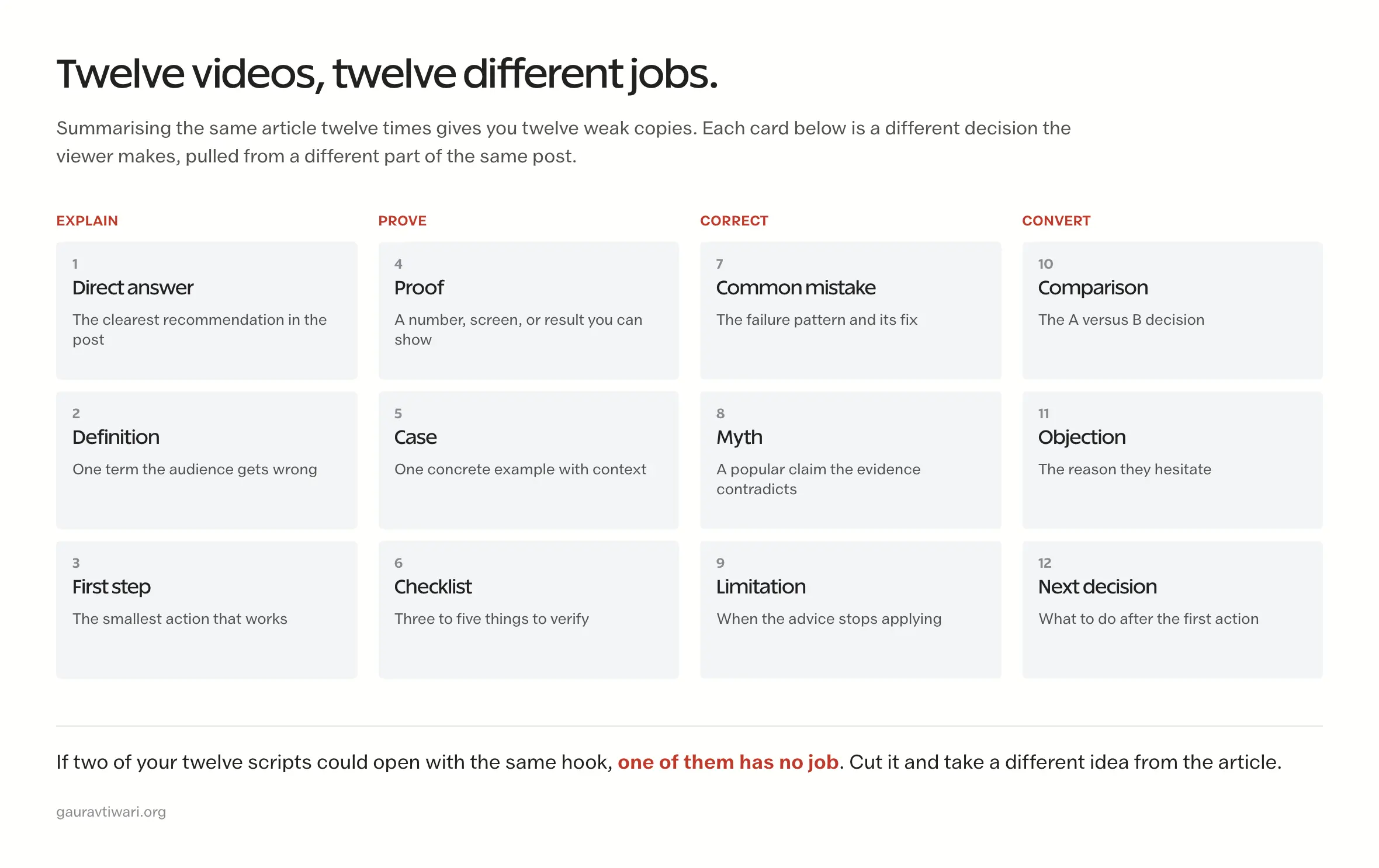
Turn a Blog Post Into Video With 12 Different Jobs
Don’t make twelve clips that begin with the same hook and repeat the same three tips. Give each video a distinct reason to exist.
| Video | Job | Source material |
|---|---|---|
| 1 | Direct answer | The article’s clearest recommendation |
| 2 | Definition | A term readers must understand |
| 3 | Common mistake | A failure pattern and correction |
| 4 | First step | The smallest useful action |
| 5 | Comparison | A versus B decision |
| 6 | Proof | A number, screenshot, result, or demonstration |
| 7 | Objection | A reason the reader hesitates |
| 8 | Limitation | When the advice doesn’t apply |
| 9 | Checklist | Three to five verification points |
| 10 | Myth | A popular claim the evidence contradicts |
| 11 | Case | A concrete example with context |
| 12 | Next decision | What to do after the article’s main action |
Prepare a Source Packet Before Opening ChatGPT
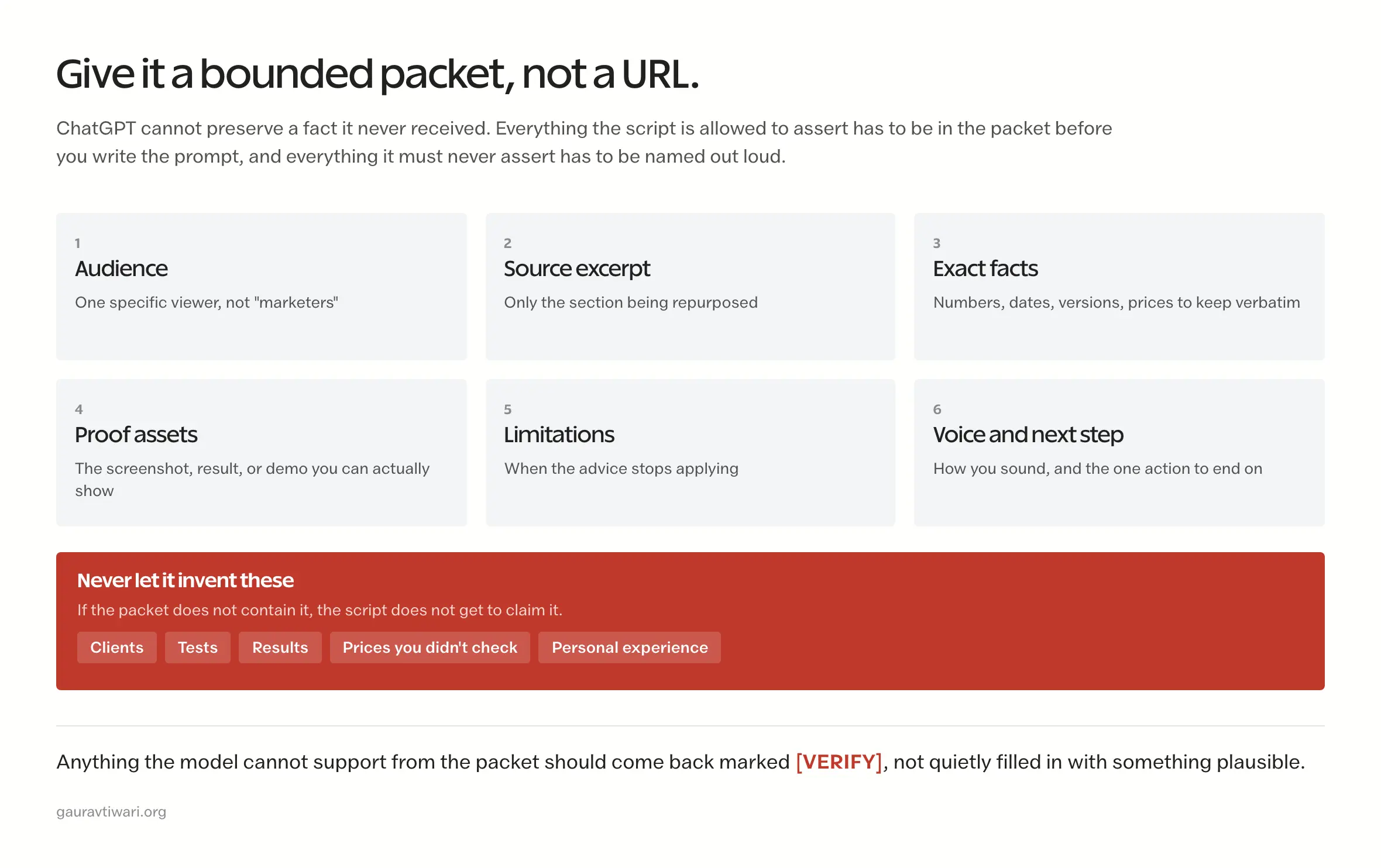
ChatGPT cannot preserve a fact it never received. That sounds obvious and it is still the single most common reason these scripts go wrong, because a URL and a vague request feel like enough. Give it a bounded packet instead.
- Copy the article title, audience, promise, and relevant section text.
- Add the facts, dates, prices, versions, examples, and limitations that must remain exact.
- List claims the model must not invent, including personal tests, clients, results, and product experience.
- Define the platform, intended viewer, target length range, and useful next step.
- Provide two or three lines of voice guidance and the words you don’t use.
Use ChatGPT to transform that packet. The rule is not “never let it browse”, it is this: don’t mix source transformation, open-web research, and personal-experience claims inside one uncontrolled prompt. Those are three different jobs and they fail in three different ways.
Run It As Two Passes, Not One
Put the article in a ChatGPT Project rather than opening twelve unrelated chats. A Project holds the files, the instructions, and the related conversations in one place, so every new chat starts from the same packet. I resisted this for a while and re-pasted context by hand, which was pure stubbornness. The packet drifts when you retype it.
Set the project instruction once: work only from the supplied article and approved sources while drafting, never invent tests, clients, quotations, or first-person experience, and mark anything unsupported as [VERIFY].
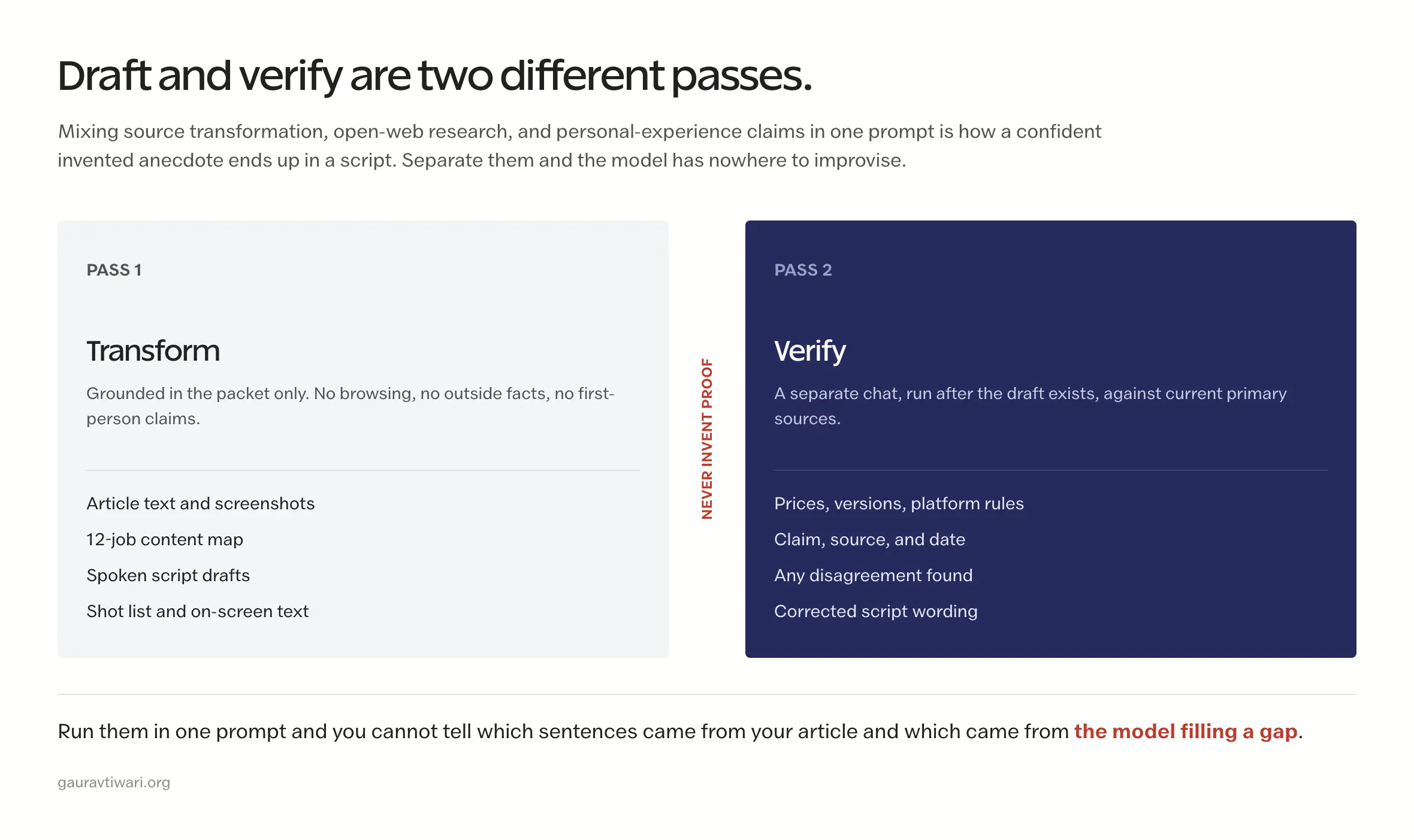
Pass 1 is grounded transformation. Content map, scripts, shot lists, on-screen text. No browsing, no outside facts, no first person. Keep each of those in its own chat inside the project so you can go back and change one without disturbing the rest.
Pass 2 is verification, in a separate chat, after the draft exists. Now let it search for current prices, versions, platform rules, and statistics, and make it report the claim, the source, the date it checked, and any disagreement it found. Separating the passes is what stops a freshly discovered fact from getting quietly blended with an invented anecdote.
One caution worth stating plainly: don’t upload confidential client material, unpublished data, private analytics, or identifying case-study details without checking your account’s data controls and whatever you have contractually agreed. On personal plans, model-training sharing can be on by default and needs switching off. Business and enterprise workspaces are treated differently.
Decide What the Viewer Sees Before You Write a Word
This is the step almost everyone skips, and skipping it is exactly why so many AI scripts end up as someone talking at a camera about something that needed a screen. Decide the format first and the script comes out shaped differently. Decide it afterwards and you will be re-recording.
| Format | Best for | Honest limitation |
|---|---|---|
| Talking head | Direct answers, objections, opinions, limitations | Weak the moment the claim needs visual proof |
| Screen recording | Tutorials, settings, comparisons, software demos | Gets dense fast on a phone screen |
| Narrated graphics | Definitions, myths, checklists, formulas | Needs the graphics prepared before you record |
| Mixed | Cases, comparisons, proof, product decisions | Takes noticeably longer to shoot and cut |
Then match the format to the job. A definition wants a graphic. A first step wants a screen. An objection wants your face. Proof wants whatever you can actually show, which is the constraint that decides most of these.
Add two lines to the prompt below once you have chosen: Visual format: [talking head, screen recording, narrated graphics, or mixed] and For each sentence, say what the viewer should see. Do not suggest generic stock footage when the source contains a real screen, example, or result.
Use a Prompt That Produces Decisions, Not Filler
The prompt should force separation between source facts, draft language, and items that need human verification.
You are converting one verified blog section into a short spoken video.

Audience: [one specific viewer]
Platform: [TikTok, Instagram Reels, or YouTube Shorts]
Video job: [answer, mistake, comparison, proof, objection, or checklist]
Target length: [a range, not a hard quota]
Next step: [one relevant action]

Source material:
[paste only the relevant article section and verified facts]

Write:
1. Three opening options with different angles.
2. One spoken script that gives the answer before background.
3. One on-screen text plan with no more than one idea per frame.
4. One accurate caption.
5. A list of claims that still require human verification.

Rules:
- Do not invent tests, clients, results, prices, dates, or personal experience.
- Preserve stated limitations and tradeoffs.
- Use direct American English, contractions, and varied sentence length.
- No em dashes, hype, throat-clearing, or generic conclusion.
- If the source does not support a claim, mark it [VERIFY] instead of guessing.
Edit the Script Back Into Your Voice
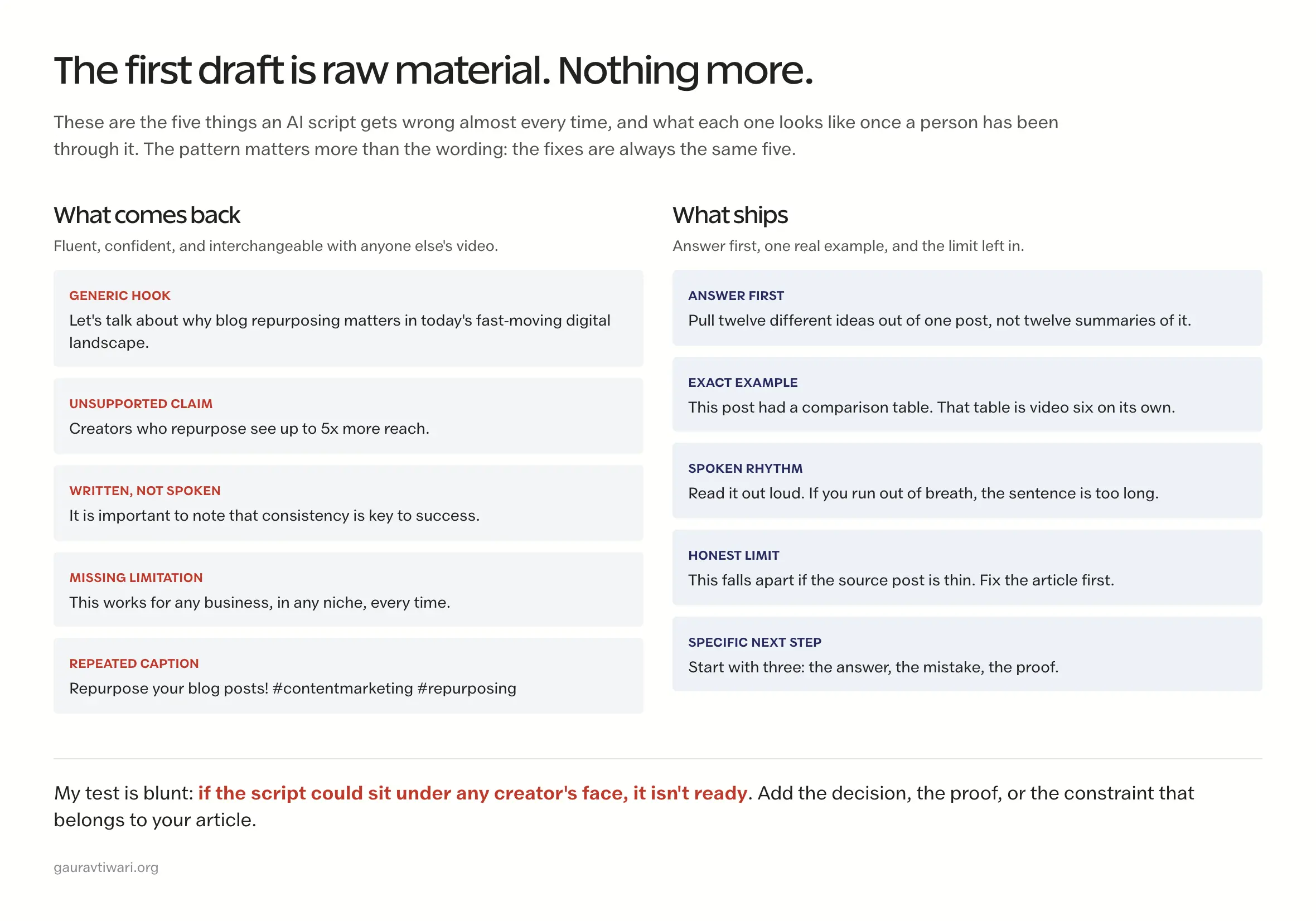
The first AI draft is raw material. Nothing more. Read it out loud, and cut anything that sounds like a presenter, a brochure, or a productivity thread. Reading aloud is not a nice-to-have here. It is the only reliable way I know to catch a sentence that looks fine and cannot be said.
- Lead with the answer. Move the useful decision ahead of context.
- Replace abstractions. Use the actual tool, screen, number, or example.
- Restore the tradeoff. AI often smooths away the condition that makes advice honest.
- Cut repeated hooks. The first line and on-screen text shouldn’t say the same thing twice.
- Mark real emphasis. Bold delivery comes from contrast and pauses, not shouting adjectives.
- Verify every claim. Check the source, product, date, and current platform rule before recording.
My test is blunt: if the script could sit under any creator’s face, it’s not ready. Add the decision, proof, or constraint that belongs to this article, then run the draft through my AI slop editing process.
Turn One Script Into Three Platform Versions
Reuse the answer, but adapt the package. ChatGPT can draft the variations after the master script is approved.
| Platform | Adapt | Keep |
|---|---|---|
| TikTok | Searchable opening, native caption, relevant sound, profile or series CTA | Core answer, proof, and limitation |
| Instagram Reels | Visual cover where useful, caption context, Story or DM connection | Core answer, proof, and limitation |
| YouTube Shorts | Precise title, useful description, corrected captions, related video | Core answer, proof, and limitation |
Approve one accurate master script, then adapt only the opening, metadata, cover, audio, and next step per platform. Create the clean vertical master before adding native audio, stickers, or platform captions. It’s an extra export, to be fair, but it prevents watermarks and makes corrections cheaper.
I keep the deeper platform work in its own guides rather than repeating it here. For the weekly production system and cross-platform publishing, see short-form video marketing for small businesses. For YouTube search intent, titles, descriptions, and Shorts analytics, see the YouTube Shorts search strategy.
Record and Edit the Clean Master
The scripts are the hard part. They are also not the video, which is the gap most of these guides quietly leave open. Here is what actually happens between an approved script and a file you can upload.
When you record:
- Shoot a clean master with no platform watermark on it.
- Keep captions and anything load-bearing away from the edges, where the interface sits over your video.
- Record screen demos zoomed in far enough to read on a phone, not on your monitor.
- Capture the proof separately, so you can swap it later without reshooting the whole script.
- Leave a beat of silence between sections. It makes the cuts cheaper.
- Shoot one alternate opening while the lights and mic are still set up.
- Check how you pronounce names, versions, and numbers before the take, not after.
When you edit:
- Cut anything that delays the answer.
- Correct the auto-captions by hand. They will get a product name wrong.
- Show the evidence on screen whenever the script makes a factual claim.
- Use on-screen text to emphasise, not to repeat what you just said.
- Keep the limitation in. It is the first thing that gets trimmed for time and the last thing you should lose.
- Delete stock footage that proves nothing.
- Export the clean master before you add native audio or stickers.
- Watch it once with sound and once without, then once on an actual phone.
Hand the Plan to a Real Video Tool
Here is the part I think most ChatGPT tutorials get backwards. ChatGPT is not where the video gets made. It is where the video gets decided, and its real output is a set of artifacts that other software knows how to consume. Once you see it that way, the question stops being “can AI make my video” and becomes “what do I hand to which tool”.
Ask for these in the shapes your editor actually accepts, and the handoff costs you nothing:
| Ask ChatGPT for | Hand it to | What it saves you |
|---|---|---|
| The spoken script, one sentence per line | A teleprompter app or your phone’s notes | Reading naturally instead of memorising |
| Caption text as timed SRT | Any editor that imports subtitles | Most of the caption correction pass |
| The shot list with timecodes | Timeline markers in your editor | Cutting to a plan instead of scrubbing |
| The on-screen text plan, one idea per frame | Canva, CapCut, or your title tool | Text that emphasises rather than repeats |
| A B-roll list tied to specific lines | Stock search or an AI video generator | Footage that proves something |
| Platform titles, descriptions, and hashtags | The upload form | The packaging you always rush at midnight |
Then pick the tool by what the video actually is. These are three different jobs and people keep buying the wrong one for theirs.
| Category | Reach for it when | My honest caveat |
|---|---|---|
| AI video generators | You need B-roll that does not exist and cannot be filmed | Generated footage rarely proves anything. It decorates. Use it for atmosphere, not evidence |
| Browser and mobile editors | Captions, quick cuts, platform versions, graphic-led explainers | Fast and good enough for most Shorts, and they hit a ceiling on complex edits |
| Professional editing software | Multi-cam, colour, real audio work, or a house style you repeat weekly | Overkill for one talking-head Short, and the right call once you are shipping twelve at a time |
For a plain talking-head answer, opening a professional timeline is a waste of an afternoon. For a comparison video with screen recordings, split-screen, and corrected captions, I would not fight a phone editor. The script does not change. The tool does.
One thing to stop planning around: Sora is gone. OpenAI discontinued the Sora web and app experiences on 26 April 2026, and the API stops working on 24 September 2026, which is weeks away as I write this. If a tutorial still tells you to script in ChatGPT and render in Sora, it was written for a workflow that no longer exists. Pick from the generators that are still running, and check any AI video tool is alive before you build a weekly system on top of it.
Whatever you choose, check the current plans before paying. Features and regional pricing in this category change faster than almost anything else I write about.
Batch the 12 Videos Without Building a Factory
Batching should strip out setup cost, not judgment. Approve the content map before you film anything, and stop the batch the moment a script has no proof behind it. I would rather ship nine videos than pad to twelve with three that assert things I cannot show.
| Session | Work | Deliverable |
|---|---|---|
| 1. Source | Choose the post, extract facts, and map 12 video jobs | One approved content map |
| 2. Draft | Generate options and edit spoken scripts | Twelve verified scripts |
| 3. Record | Film talking head, screen, product, or demonstration footage | Twelve clean masters |
| 4. Edit | Add captions, proof, pacing, and brand treatment | Twelve approved masters |
| 5. Adapt | Create platform copy, covers, audio, and next steps | Upload packages |
| 6. Review | Check analytics and comments by video job | The next article or batch decision |
Sequence the batch so what you learn from the first three videos improves the packaging of the rest. Check current plans before paying for any editor; features and regional pricing change often.
Measure the Video Job, Not the Prompt
How much you used ChatGPT is not an outcome, and I see people report it as though it were. Judge each video against the job you assigned it in the content map, because a proof video and a definition video fail in completely different ways.
- Answer and definition: search traffic, saves, completion, and qualified comments.
- Mistake and myth: shares, watch behavior, and whether the correction is understood.
- Comparison and objection: profile actions, related-video choices, and qualified visits.
- Proof and case: trust actions, leads, and sales tied to the demonstrated result.
- Checklist and next decision: saves, return viewing, and the next useful action.
Track production time too, and be ruthless about it. A format that performs slightly better and takes four times as long does not belong in a weekly system, whatever the numbers say. That is the calculation I got wrong for a long time.
Common ChatGPT Repurposing Failures
The fastest way to turn a blog post into video badly is to ask for a summary and publish the first twelve variations.
Look, the invented stories are the part that actually annoys me. ChatGPT will hand you a confident little anecdote about a client who never existed, and it reads fine right up until a viewer asks a follow-up question.
- Summarizing the whole post twelve times. Each video needs a different job.
- Inventing first-person proof. A smooth fake story is still false.
- Removing limitations. The tradeoff often contains the real expertise.
- Using one caption everywhere. The viewer state and next step differ by platform.
- Recording before verification. A factual correction is cheaper in the script than in twelve exports.
- Publishing all twelve at once. Sequence the batch so early results can improve later packaging.
Frequently Asked Questions
Can ChatGPT turn a blog post into a finished video?
Not on its own, and it is worth being exact about the split. ChatGPT produces the content map, the scripts, the shot list, the on-screen text plan, the captions, and the platform variants. You still verify the claims, record or capture the visuals, correct the auto-captions, cut the timeline, and approve the export. It removes the blank page and the twelve-way planning problem. It does not remove the filming or the judgment.
Should I paste the entire article into ChatGPT?
Usually no. Work section by section so the model can preserve the relevant facts and produce one focused video instead of a vague summary.
How many short videos can one blog post create?
A substantial post can often support twelve distinct video jobs, but do not force the number. Stop when the remaining ideas repeat the same answer or lack proof.
Can I post the same script on TikTok, Reels, and Shorts?
Reuse the approved answer, proof, and limitation, then adapt the opening, metadata, audio, cover, and next step for each platform.
How do I stop AI scripts from sounding generic?
Provide source facts and voice constraints, request several opening options, read the draft aloud, restore the tradeoff, replace abstractions with real examples, and cut any line that could belong to anyone.
Which metrics should I track?
Track the metric tied to each video’s job, such as search traffic, watch behavior, saves, shares, follows, related-video choices, tagged visits, leads, sales, and production time.
Should I upload the article or let ChatGPT read the URL?
Upload it, or paste the section. A URL invites the model to fetch whatever is at that address today and summarise around it, which is how details drift. Putting the article into a Project as a file means every chat in that project works from the same fixed text, and you can add screenshots and a voice guide alongside it.
What is the best video format for a blog-based Short?
It depends on what the claim needs, which is why format comes before script. Direct answers, objections and limitations work as talking head. First steps, settings and comparisons want a screen recording. Definitions, myths and checklists suit narrated graphics. Proof takes whatever you can genuinely show. Choose the format first or you will write a monologue about something that needed a screen.
How do I stop ChatGPT from inventing client stories or results?
Give it a bounded packet and name the forbidden categories out loud: no tests, no clients, no results, no prices you have not checked, no personal experience. Then require it to mark anything it cannot support as [VERIFY] rather than filling the gap. The failure mode is not random, it is the model completing a pattern your prompt asked for, so stop asking for proof the source does not contain.
Can I upload confidential client articles to ChatGPT?
Check the account’s data controls and your own contractual obligations before you do. On personal plans, sharing data to improve the model can be enabled by default and needs switching off, while business and enterprise workspaces are handled differently. Unpublished client work, private analytics, embargoed material, and identifying case-study details are the ones to think hardest about.
Can I turn someone else’s blog post into videos?
Only when you own it, have permission or a licence, or otherwise have a proper basis for the use. Facts and ideas are not protected the way a writer’s particular expression is, so you can cover the same topic. Lifting their phrasing, structure, examples, or images is a different matter. This is general guidance rather than legal advice for your jurisdiction.
Can YouTube Shorts be longer than 60 seconds?
Yes. YouTube categorises qualifying square or vertical uploads of up to 3 minutes as Shorts, so the old 60-second reflex is out of date. That does not make longer better. Use the length the answer actually needs and let the format rule follow the idea rather than the other way round.
Should I embed the finished video back into the original article?
Usually yes, where it genuinely helps the reader, since a short demonstration often answers something the prose is labouring over. If you do, give it a real thumbnail, a visible transcript, and an accurate description. Only add VideoObject structured data on a page where someone can actually watch the video.
Start With One Section, Not Twelve Scripts
Take the strongest section of one post and build three videos from it: the direct answer, the common mistake, and the proof. Approve those three before you let ChatGPT anywhere near the other nine. If the first three are dull, twelve will not fix it, and you will have spent a weekend finding that out. Good repurposing multiplies judgment. It does not multiply filler.
Tell Google you want more of this.
Add Gaurav Tiwari as a preferred sourceOne tap, and this site shows up more often in your own Top Stories, AI Overviews and AI Mode. Remove it any time.