Best AI Text to Video Generators in 2026: 20+ Tools by Job
Video production used to require a camera, lighting, editing software, and hours of post-production. Even a simple 60-second explainer could take a full day. For most businesses and solo creators, that meant either paying $500+ per video or not making videos at all.
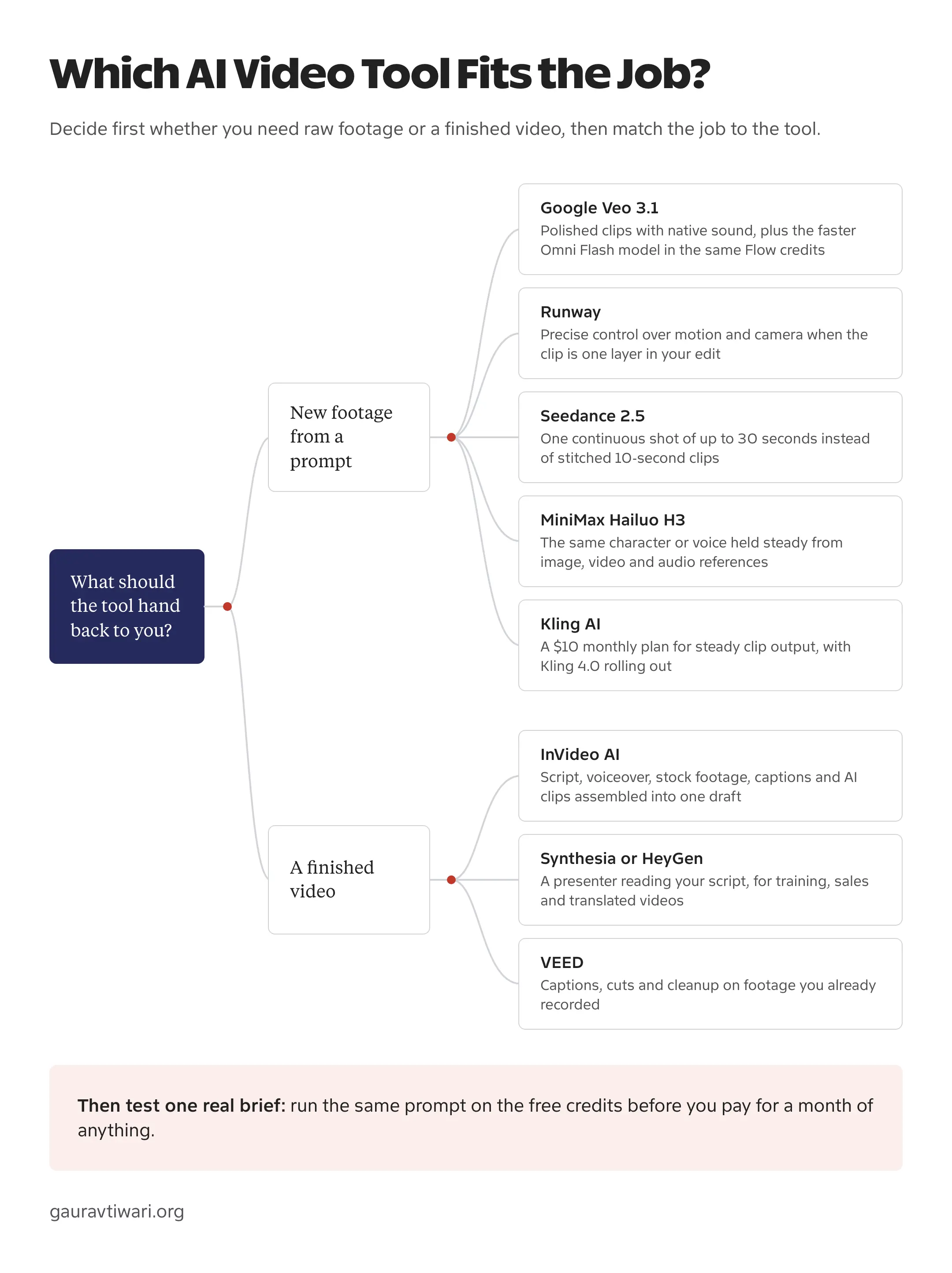
If you want the short answer: Google Veo 3.1 is the safest all-round AI text to video generator for cinematic work with sound, MiniMax Hailuo H3 and Seedance 2.5 beat it on raw output quality if licensing is not a concern, Kling AI is the best free way to try the technology today, InVideo is my pick for marketing videos when you have no footage, and Synthesia owns avatar-led training video.
The longer answer matters, because “AI video generator” means four different products wearing one name. Some tools create footage from a text prompt. Some put an AI avatar on screen so you never need a camera. Some edit footage you already have, and some slice long videos into shorts. Here are 20+ tools organized by what they actually do, so you buy the right kind.
No matter how good these AI video tools get, they still need human direction. The best results come from treating AI as a starting point, not a finished product. Every video here required editing after the AI did its thing.

The best AI text to video generators at a glance
| Tool | Best for | Free plan | Plan model |
|---|---|---|---|
| Google Veo 3.1 | Cinematic text-to-video with native audio | Trial credits in Gemini | Bundled into Google AI subscription tiers |
| MiniMax Hailuo H3 | Best-rated output per dollar | Trial credits in the Hailuo app | Consumer tiers, plus usage-based API |
| Kling AI | Free daily text-to-video | 66 credits daily | 4 credit-metered tiers |
| Seedance 2.5 | 30-second clips in one generation | Trial credits via host apps | Usage-based per generation |
| Runway Gen-4.5 | Filmmaker-grade creative control | 125 one-time credits | 3 credit-metered tiers, plus enterprise |
| Higgsfield | Running many models on one bill | Daily credits | 3 credit-metered tiers |
| InVideo | Marketing videos without footage | 40-min exports, watermark | Subscription tiers by export volume |
| Synthesia | Avatar training videos | 3 minutes/month | Per-seat tiers by video minutes |
| HeyGen | Multilingual avatar marketing | 3 videos/month | Subscription tiers by video minutes |
| Opus Clip | Turning long videos into shorts | Watermarked tier | Subscription tiers by upload minutes |
Every category below has its own winner, and the full entries carry the honest catches the table can’t hold.
- AI Video Editors: InVideo for quick social videos, Leonardo AI for animating images and cheaper Veo access, VEED for beginners, Kapwing for teams, Submagic for short-form content
- AI Avatars: Synthesia for enterprise training, HeyGen for multilingual marketing, Elai.io for quick avatar videos, Colossyan for L&D teams
- Text-to-Video: Google Veo 3.1 for cinematic quality, MiniMax Hailuo H3 for the best output per dollar, Runway Gen-4.5 for filmmakers, Kling AI for best value, Seedance 2.5 for 30-second clips, PixVerse for stylized content, Grok Imagine for fast image-to-video, Wan for open weights, LTX-2 for local generation, Higgsfield for many models on one bill
- Blog-to-Video: Lumen5 for repurposing articles, Designs.AI for multi-format content
- Video Repurposing: Opus Clip for turning long videos into viral shorts
AI Video Editors with Smart Features
These AI video makers won’t generate footage from nothing. You bring in your clips or use their stock libraries, and AI handles the tedious parts: cutting silences, adding captions, suggesting B-roll, matching music to mood. Think of them as video editors with a competent assistant built in.
InVideo

InVideo is my go-to recommendation when someone asks for a simple AI video creator that doesn’t require learning Premiere. You describe what you want, pick a template, and the AI assembles a rough cut using stock footage and text overlays.
The template library is massive (5,000+ options), and the text-to-video feature actually understands context reasonably well. I’ve used it to create quick explainer videos for clients who needed something “by tomorrow” and didn’t have footage ready. The free plan lets you export videos up to 40 minutes, which is generous compared to most AI video generators.
Where it falls short: the output looks like InVideo. After you’ve seen a few dozen videos made with it, you recognize the style. Fine for social media content, less ideal if you need something distinctive for your brand.
Best for: Quick social videos, YouTube content, ads, and explainers when you don’t have raw footage.
Pricing: Free tier available. Paid plans start at $25/month.
Leonardo AI

Leonardo AI started with AI image generation tools and grew into something more interesting: a creative suite that lets you generate images, animate them into video, and access third-party video models like Veo 3.1 and Kling, all from one platform. If you’re already using Leonardo for image generation (and a lot of creators are), the video tools are a natural extension.
The first-party video models, Motion 2.0 and Motion 2.0 Fast, handle image-to-video and text-to-video at 480p and 720p. The results are decent for short clips (4-8 seconds), with controls for vibe, lighting, shot type, and color theme. Motion 2.0 Fast is the quicker option at roughly half the token cost. But the real draw is access to third-party models. You can generate a Veo 3 video on Leonardo for about $0.30 worth of tokens, compared to $0.75 on Google’s own platform. Same model, lower entry price.
The token system is where things get tricky. Free users get 150 tokens daily, which is enough for a few images but barely scratches the surface for video. A single Veo 3 generation costs 2,500 tokens. That one 8-second video eats the same tokens as 300+ basic images. The “Unlimited Relaxed Generation” on higher-tier plans sounds great, but it only covers Leonardo’s own Motion models. Third-party models like Veo 3.1 and Kling always burn fast tokens, no exceptions. This catches a lot of people off guard.
Paid plans run from $12/month (Apprentice, 8,500 tokens) to $60/month (Maestro, 60,000 tokens). Annual billing drops those to $10 and $48 respectively. Free plan generations are public and Leonardo retains usage rights. Paid plans give you private generations and commercial licensing. If video is your primary use case, you’ll burn through tokens fast and the value proposition weakens compared to going directly to Kling AI or Runway. But if you’re already generating images on Leonardo and want to animate them or occasionally tap into premium video models without separate subscriptions, it’s a solid all-in-one option.
Best for: Creators already using Leonardo for image generation who want video capabilities in the same platform, and anyone who wants cheaper access to Veo 3 and other premium video models without separate subscriptions.
Pricing: Free tier with 150 daily tokens. Apprentice at $12/month ($10/month annually, 8,500 tokens). Artisan at $30/month ($24/month annually, 25,000 tokens). Maestro at $60/month ($48/month annually, 60,000 tokens). API access from $9/month.
VEED

VEED positions itself as the simplest browser-based AI video editor, and it delivers on that promise. The interface is clean enough that you can hand it to someone who’s never edited video and they’ll figure it out in minutes.
The AI features focus on practical time-savers: auto-subtitles in 100+ languages, background noise removal, and eye contact correction (genuinely useful for webcam recordings where you’re looking at notes). Unlimited file uploads and unlimited projects on all plans.
The auto-subtitle feature occasionally trips up on technical jargon and heavy accents. Not a dealbreaker, but expect to do a proofread pass. Free plan exports up to 10 minutes with a watermark.
Best for: Beginners, webcam content, podcast clips, and anyone who values simplicity over advanced features.
Pricing: Free tier available. Paid plans start at $18/month.
Kapwing

Kapwing started as a meme generator and evolved into a surprisingly capable AI video creator. The free tier is one of the most generous in this space, which makes it perfect for creators testing the waters with AI video generation.
Their AI features include Smart Cut (removes silences and filler words automatically), auto-resize for different platforms, and a text-to-video generator that pulls relevant clips from stock libraries. The collaborative features are solid if you’re working with a team.
The interface feels slightly less polished than VEED, but the functionality is comparable. Good choice if budget is your primary constraint.
Best for: Teams, meme content, social media clips, and budget-conscious creators.
Pricing: Generous free tier. Pro starts at $16/month.
Submagic

Submagic does one thing exceptionally well: turning talking-head videos into scroll-stopping short-form content. If you’re creating TikToks, Reels, or YouTube Shorts, this AI video maker is purpose-built for that workflow.
The auto-captions are accurate (99.5% in my testing across 50+ languages), but the real value is in the styling. Animated captions that highlight words as they’re spoken, auto-zoom on key moments, B-roll suggestions from StoryBlocks, and sound effects that actually match the content. The “viral video” aesthetic that takes hours to create manually happens in minutes here.
Over 700,000 creators use it, which tells you something about product-market fit. If short-form is your focus, this is the specialized tool worth paying for.
Best for: TikTok, Instagram Reels, YouTube Shorts, and any vertical video content.
Pricing: Free trial available. Plans start at $20/month.
AI Avatar and Presenter Tools
These AI video generators create videos featuring synthetic human presenters. You write a script, pick an avatar (or create one from your own footage), and the AI generates a realistic talking head. Useful for training videos, product demos, multilingual content, and any situation where you need a presenter but don’t want to be on camera.
Synthesia

Synthesia was the first AI avatar video creator to gain serious enterprise traction, and it’s still the name most people think of in this category. You pick from 240+ AI avatars (or create a custom one), paste your script, and it generates a video of that avatar speaking your words.
The lip-sync is good enough that viewers often don’t realize they’re watching AI. Support for 160+ languages makes it popular for companies creating training content across multiple regions. The template library and brand kit features help maintain consistency across videos. Their October 2025 update (version 3.0) added “Video Agents” that can hold real-time conversations with viewers, which is a significant leap for training applications.
The limitation: it’s expensive for individual creators, and the avatars, while realistic, still have that slightly-off quality if you look closely. The video minute caps on lower tiers run out faster than expected. Best suited for corporate use cases where the alternative is expensive video production.
Best for: Corporate training, product demos, multilingual content, and L&D teams.
Pricing: Free plan with 3 minutes/month. Starter at $29/month ($18/month annually) for 10 minutes/month. Creator at $89/month ($64/month annually) for 30 minutes/month. Enterprise pricing available.
HeyGen

HeyGen has quietly become the strongest Synthesia alternative, and in some ways, it’s surpassed the original. Their Avatar IV engine (launched August 2025) delivers full-body motion, micro-expressions, and hand gestures that sync with your script’s emotional tone. The lip-sync quality is noticeably better, especially for non-English languages.
The standout feature is video translation. You can take an existing video of yourself speaking English, and HeyGen will generate a version where you’re speaking Spanish, French, or 173 other languages with matching lip movements. I’ve seen this used for YouTube channels expanding internationally, and the results are impressive. The November 2025 update added Speed Mode for quick turnaround and Precision Mode for high-stakes content.
If you’re choosing between Synthesia and HeyGen today, I’d start with HeyGen unless you specifically need Synthesia’s enterprise features or existing integrations.
Best for: Video translation, personalized sales videos, and creators who want custom avatars.
Pricing: Free tier with 3 videos/month (watermarked). Creator plan at $29/month ($24/month annually) with unlimited avatar videos. Team plan at $30/month per seat.
Elai.io

Elai.io targets the same market as Synthesia but with a focus on ease of use. The interface is cleaner, and the learning curve is shorter. You can go from script to finished AI video in under 10 minutes on your first try.
The unique angle here is the URL-to-video feature. Paste a blog post URL, and Elai automatically generates a video summary with an AI presenter. I’ve tested this with a few of my articles, and while the output needs editing, it’s a solid starting point for repurposing written content.
Avatar quality is a step below Synthesia and HeyGen, but the price reflects that. Good middle-ground option if you need AI avatar videos but don’t have enterprise budgets.
Best for: Content repurposing, quick explainers, and teams new to AI video generation.
Pricing: Free trial available. Basic plan starts at $23/month.
Colossyan

Colossyan takes a slightly different approach to AI avatars. Instead of purely synthetic faces, they filmed real actors in a studio and created AI versions of those performances. The result is avatars that feel more natural, with better emotional range and body language.
The platform supports 70+ languages with automatic translation and lip-sync. The built-in learning features (quizzes, assessments) make it particularly suited for corporate training and e-learning. If you’re building a course and want a presenter without filming yourself, Colossyan handles that workflow well.
Enterprise-focused pricing puts it out of reach for most individual creators, but for L&D departments, it’s worth evaluating alongside Synthesia.
Best for: Corporate training, e-learning courses, and enterprise teams.
Pricing: Starter plan at $27/month. Enterprise pricing for larger teams.
Text-to-Video AI Generators
This is what most people imagine when they hear “AI video generator.” You type a text prompt describing what you want to see, and the AI creates video footage from scratch. No stock libraries, no templates, no existing footage. Pure generation.
The field consolidated hard this year. Native audio stopped being a differentiator and became table stakes, OpenAI pulled Sora out of the market entirely, and the models leading blind preference tests today mostly come from Chinese labs. Clip length is the new battleground. Generating 30 seconds in a single pass is the number to beat, up from 8 a year ago.
Google Veo 3.1

Google’s Veo 3.1 is still the model most creators should start with, even though it no longer tops the quality charts. Released in October 2025, it generates 8-second clips at 1080p or 4K with native audio in the same pass: dialogue with accurate lip-sync, sound effects, and ambient noise. Longer sequences come from extending a clip inside Flow, not from one generation, which is worth knowing before you plan a 60-second spot around it.
The standout feature is “Ingredients to Video.” Upload up to 3 reference images of characters, objects, or backgrounds, and Veo 3.1 holds them consistent across scenes. Create a character in one shot and they appear identically in the next. For anyone who has fought character drift in other generators, that alone justifies the subscription.
Google now ships a second video model beside it. Gemini Omni Flash, announced at I/O in May 2026, trades Veo’s cinematic control for speed and conversational editing. You generate a clip, then refine it in follow-up turns instead of rewriting the prompt and starting over. It runs in the Gemini app, Flow, and the Gemini API. If you iterate more than you polish, start there and move to Veo when a shot has to look expensive.
Access runs through the Gemini app, Flow (the dedicated filmmaking interface), Google Vids, and Vertex AI for enterprise. Flow is where the real creative control lives: scene building, camera movement presets, and clip extension into longer sequences.
Here is the honest limitation. Veo 3.1 has slipped down the blind-preference rankings, where people vote on unlabeled pairs of clips without knowing which model made them, and Wan 3.0, Gemini Omni Flash, and MiniMax H3 all sit above it now. What Veo still wins is the surrounding toolchain and clean commercial licensing from a vendor that isn’t in the middle of a copyright fight. For client work, that is worth more than a few rating points.
Best for: Cinematic storytelling, multi-scene narratives that need character consistency, and anyone who wants synchronized audio without post-production.
Plans: Bundled into Google’s consumer AI subscription tiers, with the entry tier metering you to a monthly allowance of the faster Veo variant and the top tier unlocking the full model plus 4K upscaling. Developers pay per second of output through the Gemini API.
MiniMax Hailuo H3
MiniMax released H3, the model behind the Hailuo app, on 31 July 2026, and it went straight into the top handful on blind preference tests. It reads text, images, video, and audio as a single context and returns a finished clip with native stereo sound.
The specification is unusually generous for what it costs:
- 4 to 15 second multi-shot clips at up to 2K, 24fps
- 6 aspect ratios, from 21:9 cinematic down to 9:16 vertical
- Up to 9 reference images, 3 reference video clips, and 3 reference audio clips per generation
- Native stereo audio and dialogue in 11 languages, generated in the same pass as the frames
That reference stack is the practical answer to character consistency. Instead of describing your character again in every prompt and hoping, you show the model what they look like and what they sound like. And because the audio comes out of the same pass as the picture, footsteps land on the footfall and dialogue tracks the lips, where a voiceover stitched on afterward drifts within a few seconds.
Where it costs you: 15 seconds is a hard ceiling if you’re building anything narrative, and the consumer app and the API are separate purchases with separate credit pools. MiniMax has said it plans to publish the model weights, which would make this the strongest open model available, but that hasn’t happened yet.
Best for: Top-tier output without top-tier pricing, vertical social video, and anyone whose real problem is keeping one character consistent across shots.
Plans: Free trial credits in the Hailuo app, then consumer subscription tiers. API billing is usage-based per second and lands well under the mainstream models at 2K.
Runway Gen-4.5

Runway has been the industry standard for text-to-video, and Gen-4.5, announced on 1 December 2025, is the current model. It took the number one spot on the main blind-preference arena at launch, ahead of Veo 3, Kling 2.5, and Sora 2 Pro, and held it for months before the 2026 wave of Chinese models went past.
What you’re actually buying is control. Motion Brush, keyframing, image-to-video, and video-to-video are built for people who already know the shot they want, and the interface assumes you will iterate rather than accept the first result. Runway is what professional editors reach for when the generation is one layer in a real timeline instead of the finished piece.
Gen-4.5 keeps Gen-4’s speed and pricing while improving motion quality and prompt adherence. Runway is unusually candid about what it still gets wrong: causal reasoning, object permanence, and a bias toward showing actions succeed. Ask for a glass that doesn’t break and you’ll often get one that does.
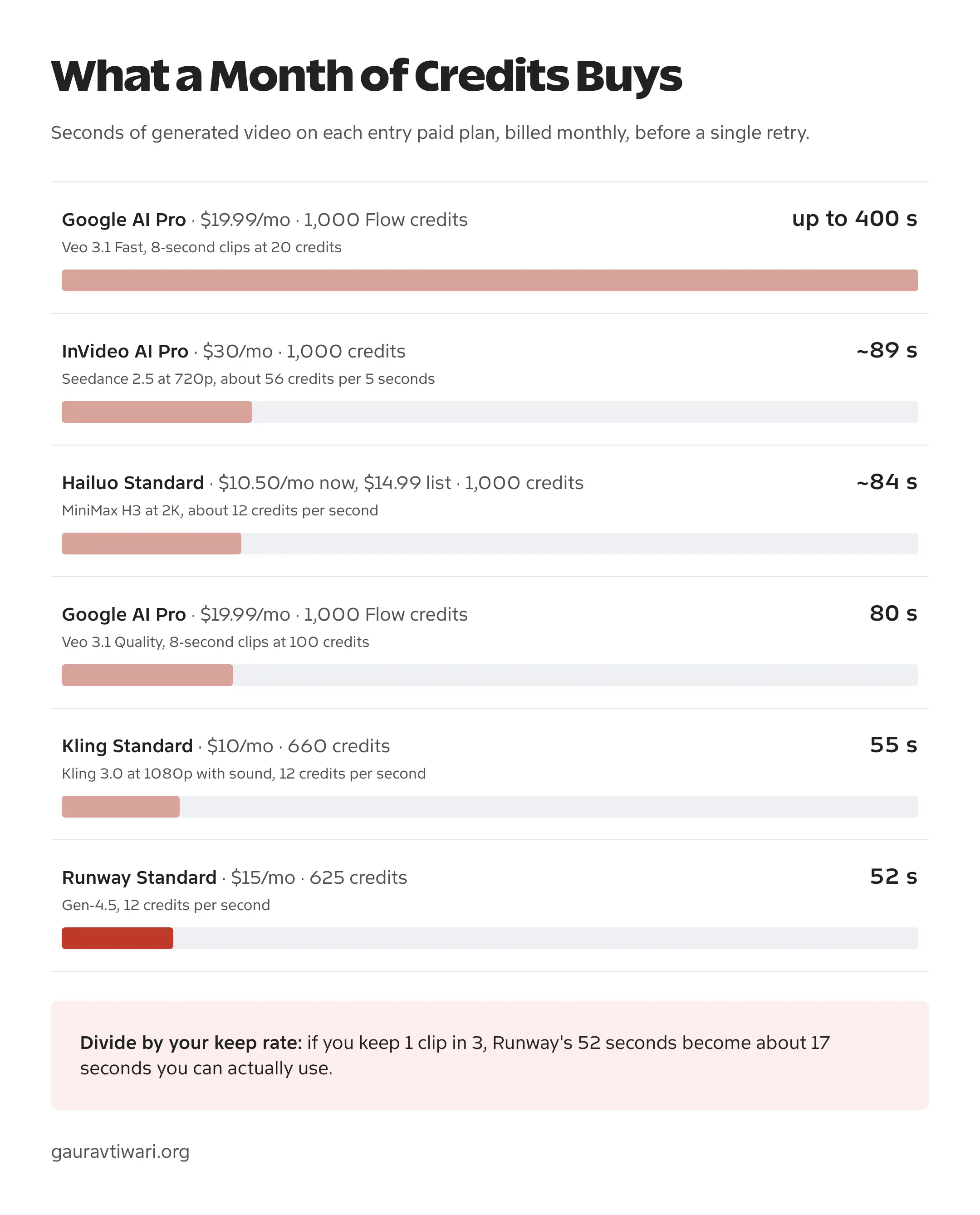
Credits are the unit of cost, priced per generation by model, duration, and resolution. So your real monthly bill tracks how much you iterate, not the sticker price of the plan. Budget for the failures, not the keeper.
Best for: Filmmakers, music videos, and anyone who needs original footage that doesn’t exist and expects to art-direct it rather than accept it.
Plans: Free tier with a one-time credit grant, then 3 paid tiers and an enterprise option, all credit-metered, with a discount for annual billing.
Kling AI

Kling AI came out of Kuaishou and kept undercutting the big labs without giving up much quality. Kling 3.0 landed on 5 February 2026 and pushed clips to 15 seconds with native audio that handles English, Chinese, Japanese, Korean, Spanish, and a range of accents and dialects. Multi-character scenes can even run a different language per character.
The free tier is why it keeps showing up in this article. 66 daily credits covers a clip or two a day, it resets every 24 hours, and you don’t need a card to start. For anyone still deciding whether AI video belongs in their workflow at all, that is the cheapest way to find out.
Human figures and faces are where Kling has always outperformed its price, and 3.0 widened that gap. The multi-element editor lets you add, remove, or replace things in a finished video by pointing at them with an image or a line of text, which saves a full regeneration every time a client asks for one small change.
The catches are real. Free credits expire daily instead of accumulating, so you can’t save them up for one big project. Queue times stretch during peak hours. And a consumer subscription buys you nothing on the API, which is a separate product with its own credits, so don’t subscribe now expecting to automate later.
Best for: Experimentation, creative work on a budget, and anyone curious about text-to-video but not ready to pay for it.
Plans: Free tier with daily credits, then 4 paid tiers, credit-metered, with an annual discount on everything except the top plan.
Seedance 2.5
ByteDance’s Seedance line sits at or near the top of independent benchmarks, and Seedance 2.5 is the current model. It shipped as a creator product on 31 July 2026, with the public developer API following on 7 August.
The headline number is 30 seconds in a single generation, with scene changes and tempo shifts inside one clip and no stitching afterward. Every other model here tops out between 8 and 15 seconds, apart from Wan 3.0, which matches it and is still in public beta. If you’re making something with a beginning, a middle, and an end, that difference alone picks the tool.
It accepts up to 50 references at once, mixing images, audio, and video, and adds controllable editing so you can change one detail in one scene without regenerating the whole thing. Native 4K, 3D previsualization, and genuinely stable motion round it out. Faces stay in focus, scenes hold together, and the frame-to-frame jitter that gives away cheaper generators mostly isn’t there.
Now the part most roundups skip. In February 2026 the Motion Picture Association sent ByteDance its first ever cease-and-desist to a generative AI company over Seedance 2.0, and Disney, Paramount Skydance, Netflix, Warner Bros. Discovery, and Sony Pictures filed their own in the days before it. ByteDance and the MPA signed a copyright safeguards agreement in August 2026, which settles the immediate dispute and tightens what the model will generate.
For a personal project, none of that changes much. For client work that goes through legal review, ask whose indemnity covers the output before you build a campaign on it.
Best for: Narrative shorts, music videos, product demos, and anyone who needs more than 15 seconds without editing clips together.
Plans: Available through ByteDance’s own Dreamina and Doubao apps and through third-party hosts including fal.ai, Replicate, and Freepik. API billing is usage-based per generation.
PixVerse V6
PixVerse is the generator that took over TikTok and Instagram with viral effects like AI Kiss, AI Hug, and AI Muscle. If you’ve seen two photos merge into an animated scene, PixVerse probably made it. V6 landed on 30 March 2026.
V6’s improvements aim at exactly what short-form needs, which is camera work and performance. Tracking shots, perspective shifts, and environmental reveals render with fewer artifacts, and facial expression and body language hold continuity through a scene change rather than resetting at every cut. It generates multi-shot sequences with native audio from one prompt, and it renders readable text inside the frame in English, Chinese, and other languages, which matters when your captions are burned in.
The newer trick is a command line interface that works with coding agents. You can call PixVerse from a script and put generation inside a real pipeline instead of a browser tab. For anyone producing at volume, that is the difference between a tool and a system.
Style range is the other reason it sticks. Photorealistic, cinematic fantasy, stylized animation, period looks, and you can switch between them inside a single sequence. For social content where visual impact beats perfect realism, that’s the right trade.
Best for: TikTok and Reels creators, viral effect videos, anime-style content, and teams generating short-form at volume.
Plans: Free tier with daily credits, then subscription tiers, credit-metered, with API access on the top plan.
Grok Imagine
xAI’s Grok Imagine is the fastest way to get a usable clip out of a still image you already have. Video 1.5 reached general availability on 16 June 2026 and runs inside grok.com/imagine, the Grok iOS and Android apps, and the xAI API.
Speed is the entire argument. The Fast variant returns a 6-second 720p clip in roughly 25 seconds, down from more than 40 on the previous model, and sound effects, ambience, and dialogue are generated in the same pass as the frames. It tops out at 720p, so nobody is grading it against Veo on fidelity. That isn’t the job.
The job is iteration count. When a generation costs 25 seconds instead of 2 minutes, you try 20 framings instead of 3, and the best of 20 usually beats the best of 3 by a wider margin than a sharper model would have given you. That advantage never shows up on a spec sheet, and it’s the one most model comparisons miss.
Where it falls short: a single generation caps at 10 seconds and 720p, and the model is built around image-to-video, so a bare text prompt gives you less control here than the dedicated generators do. Don’t plan a client deliverable on it. Do use it to find the shot before you spend real credits rendering it properly somewhere else.
Best for: Rapid iteration, animating stills you already own, quick social clips, and storyboarding a shot before committing budget to it.
Plans: Included with Grok’s consumer subscription tiers on web and mobile. API billing is usage-based per second of output.
Wan
Alibaba’s Wan is the best value in this category, and it’s one of the few here you can actually download and keep. Wan 2.7 is the current open-weights release. Wan 3.0 went into public beta on 10 August 2026 through Alibaba Cloud’s Model Studio and Qwen Cloud.
Wan 3.0 is worth understanding even in beta, because it currently sits at the top of the blind-preference arena. It doubles clip length to 30 seconds and takes text, image, video, audio, web pages, PDFs, and slide decks as input. Handing a model a PDF and getting a video back is a genuinely different interaction than writing a prompt, and it points at where this category is going.
Wan 2.7 is what to build on today. Open weights, first and last frame conditioning, a thinking mode for complex prompts, and reference video support, which is what holds a character and a voice steady across shots. Run it on your own hardware or through a hosted provider.
The tradeoff is version churn. Wan shipped 2.6, 2.7, and a 3.0 beta inside 9 months, and anything you tune against one release you re-tune against the next. Beta also means beta. Don’t put a client deadline behind Wan 3.0 until it’s generally available.
Best for: Budget-conscious creators, social teams, product marketers, and developers who want open weights and local control.
Plans: Open weights are free to run yourself. Hosted access goes through Alibaba Cloud and third-party providers on usage-based billing, with consumer subscription tiers on wan.video.
LTX-2
LTX-2 from Lightricks is the open-source generator that actually runs on hardware you own. Lightricks published the full weights, inference pipelines, and training code in January 2026, and LTX-2.5 arrived in August 2026 with native multi-shot generation and a pretrained checkpoint built for domain-specific fine-tuning.
Local speed is the reason to care. LTX-2.5 generates a 10-second video in under 7 seconds. Cloud models take 1 to 2 minutes for comparable output, and when you’re 30 iterations deep into finding a shot, that gap is the whole afternoon.
It covers text-to-video, image-to-video, and video-to-video, with multi-keyframe conditioning, 3D camera logic, and LoRA fine-tuning for custom styles. Native 4K at up to 50fps with synchronized audio, from a model you can open and inspect. LTX-2.3 added a desktop editor in March 2026, so the whole thing runs locally without living in a terminal.
The catch is fidelity. Motion still reads slightly mechanical in complex scenes, character consistency across longer videos is unreliable, and it sits near the bottom of the preference rankings against the hosted flagships. Licensing is free for academic use and for companies under 10 million dollars in annual recurring revenue, with a commercial license above that.
Best for: Developers building video pipelines, creators who want generation with no per-clip cost, and anyone who needs a model that keeps working regardless of a vendor’s roadmap.
Plans: Free to download and run. Hosted access through Fal, Replicate, and ComfyUI, plus paid tiers on LTX Studio.
Higgsfield
Higgsfield solves a different problem from everything above, which is deciding which model to use at all. It puts more than 15 video models behind one subscription, Veo, Kling, Seedance, and Wan among them, so you can run the same prompt through several and keep whichever result won.
Camera work is what people actually come for. Higgsfield ships a large library of cinematic camera presets, crash zooms, dolly moves, orbits, and effect templates, applied on top of whichever model you picked. If you know the shot you want but not the prompt language that produces it, a preset gets there faster than a paragraph of description ever will.
Around that sit Cinema Studio for scene building, an ad multiplier that turns one advertisement into variations, a Blender plugin, and a CLI. It’s built for people shipping volume, not making one clip.
Two things to know before subscribing. Credits burn at each underlying model’s rate, so one premium generation can cost what a dozen cheap ones do, and the entry tier locks the full versions of the best models behind higher plans. Aggregators also inherit their suppliers’ problems. Several still list Sora 2 in their model menus, and that option stops working on 24 September 2026.
Best for: Comparing models without paying for several subscriptions, camera-driven cinematic shorts, and producing ad variations at volume.
Plans: Free tier with daily credits, then 3 paid tiers, credit-metered, with rotating unlimited windows on selected models for the higher plans.
What Happened to OpenAI Sora
You will still find Sora 2 recommended in most AI video roundups. Skip it.
OpenAI discontinued the Sora web and app experiences on 26 April 2026. The API outlived them, but not by much. OpenAI announced the deprecation on 24 March 2026 and removes the Videos API, along with the sora-2 and sora-2-pro endpoints and every dated variant of them, on 24 September 2026.
- sora.com and the iOS and Android apps closed on 26 April 2026
- API access, including Sora 2 and Sora 2 Pro, ends 24 September 2026
- Anything you generated can be exported at sora.chatgpt.com/sunset until that window closes
- OpenAI has not named a successor video model, so this is an exit rather than a migration
If you’re reading this before the API shuts off and you still have work inside Sora, export first and migrate second. The export link stops working at the same time everything else does.
Sora was the most talked-about video model of 2025, and it’s being switched off roughly 18 months later, while Wan, Kling, Seedance, and MiniMax kept shipping releases through the same period. That is the real lesson for anyone choosing a tool this year. Hype is not a roadmap, and the model with a vendor’s full attention today can be a deprecation notice by spring.
If you built something on Sora, the closest replacements by job: Veo 3.1 or Gemini Omni Flash for the polished single-vendor experience, MiniMax Hailuo H3 or Seedance 2.5 for photorealism, and Grok Imagine if what you liked was how fast the app felt. For the scripting side of that workflow, I’ve written up how to turn one blog post into 12 short videos using whichever generator you land on.
Blog-to-Video Converters
These AI video creators specialize in turning written content into videos. Paste a blog URL or article text, and they generate a video with relevant visuals, text overlays, and voiceover. Not true video generation, but useful for content repurposing at scale.
Lumen5

Lumen5 pioneered the blog-to-video category and remains the most polished option. Paste your article URL, and it automatically extracts key points, finds matching stock footage, and generates a video storyboard.
The AI is good at identifying the most important sentences to highlight and selecting visually relevant B-roll. You’ll still want to review and adjust the output, but it gets you 70% of the way there in minutes instead of hours.
RSS feed integration means you can automatically create video drafts for every new blog post. Marketing teams love this for scaling social video without scaling headcount. If you’re building a full content marketing toolkit, Lumen5 fits right in.
Best for: Content marketers, bloggers repurposing articles, and social media managers.
Pricing: Free tier available. Creator plan at $19/month.
Designs.AI

Designs.AI bundles video creation with logo design, banner creation, and other AI design tools. The video maker works similarly to Lumen5: input text or a URL, and it assembles a video using stock media.
The asset library is massive (170+ million images, 10 million video clips, 500,000 audio files), which means more options for matching visuals to your content. The 50 AI voices cover most languages and accents you’d need.
The all-in-one approach makes sense if you need multiple design tools. If you only need video, Lumen5 or InVideo are more focused options.
Best for: Small businesses needing multiple design tools, and creators who want everything in one platform.
Pricing: Basic plan at $29/month. Pro at $69/month.
AI Video Repurposing Tools
These AI video tools take existing long-form content and automatically extract the best moments for short-form platforms. Different from editors, different from generators. A specific solution for a specific workflow.
Opus Clip
Opus Clip has become the default tool for turning podcasts, webinars, and long YouTube videos into TikTok/Reels-ready clips. Upload a video, and it automatically identifies the most engaging segments, adds captions, and crops to vertical format.
The AI is trained on viral content patterns, so it’s good at finding moments with natural hooks, clear points, and emotional peaks. It’s not perfect (you’ll still reject some of the suggestions), but the hit rate is high enough that it saves hours of manual scrubbing through footage.
If you’re creating long-form content and want to maximize its reach across platforms, this is the tool to try first. The workflow improvement is significant.
Best for: Podcasters, YouTubers, webinar hosts, and anyone repurposing long content to short platforms.
Pricing: Free tier with watermark. Starter at $15/month.
Two more tools worth trying: CapCut for fast, free social-video editing with built-in AI features, and Filmora by Wondershare for a full desktop editor with AI tools baked in.
Which AI Video Generator Should You Use?
Here’s how I’d break down the decision:
- For cinematic quality with synchronized audio: Google Veo 3.1 is the safest pick, even though it no longer leads on raw output. “Ingredients to Video” keeps characters consistent, native audio means less post-production, and the licensing is clean enough for client work.
- For true text-to-video generation on a budget: Kling AI has a generous free tier for experimentation and native audio in several languages. Wan offers the best quality-to-price ratio, and you can download the weights and run 2.7 yourself.
- For photorealism: MiniMax Hailuo H3 and Seedance 2.5 lead the blind-preference tests right now, both at a fraction of what the Western flagships charge, and both generating audio in the same pass as the frames. Seedance also gives you 30 seconds in one clip.
- For professional filmmaking workflows: Runway Gen-4.5 offers the best creative control tools. Motion Brush, keyframing, and the overall interface are built for people who art-direct rather than accept the first result.
- For short-form social content: Submagic if you’re editing talking-head videos. PixVerse V6 for viral effects and anime-style content. Opus Clip for repurposing long content into shorts.
- For developers and local generation: LTX-2 is the open-source leader. Run it on your own hardware with no per-clip cost, generate far faster than cloud alternatives, and fine-tune with LoRAs for custom styles. Wan 2.7 is the other set of open weights worth your time.
- For AI presenter videos: HeyGen offers the best quality-to-price ratio for avatar generation and video translation. Synthesia if you need enterprise features and compliance.
- For quick social videos from text: InVideo remains the go-to for template-based creation when you don’t have footage ready.
- For blog-to-video conversion: Lumen5 is still the most polished option for turning articles into video content.
- For simple editing with AI assist: VEED if you value simplicity. Kapwing if you’re on a tight budget.
- For trying several models before committing: Higgsfield puts most of the flagships behind one subscription with camera presets on top, which is cheaper than four trials and faster than four signups.
- For fast iteration on stills you already have: Grok Imagine returns a clip in about 25 seconds, so you can find the shot cheaply and render it properly elsewhere.
- And don’t forget, Canva has been adding AI video features steadily. If you’re already using Canva for design work, their video tools might be enough without adding another subscription.

If you’re not a Canva user yet, here’s an exclusive 47-day free trial to Canva Premium (the longest you can get).
The landscape moves faster than the subscriptions do. Runway led outright at the start of this year, Sora was the name everyone repeated, and today neither statement holds. Pick for the job in front of you, keep the commitment short, and check a tool is still alive before you build a weekly system on it. And if you need help scheduling and distributing those videos, check out the best social media automation tools.
Bottom line: Veo 3.1 if one vendor and clean licensing decide, MiniMax Hailuo H3 or Seedance 2.5 if raw quality decides, Kling AI if budget decides, InVideo if the deadline decides. Start on the free tier that matches your actual job, and upgrade the day you hit its wall, not before.
AI Video Generator FAQ
What is the best free AI video generator in 2026?
Kling AI offers 66 free daily credits for true text-to-video generation with native audio, and the credits reset every 24 hours. Kapwing has the most generous free tier for general video editing. InVideo allows 40-minute exports on its free plan with a watermark. For AI avatars, HeyGen provides 3 free videos monthly. PixVerse and Higgsfield both run daily free credits for short viral-style clips.
Can AI actually generate video footage from text prompts?
Yes. Google Veo 3.1, MiniMax Hailuo H3, Runway Gen-4.5, Kling 3.0, Seedance 2.5, and Wan all create original footage from a text description, with no stock library involved. These are different from template-based tools like InVideo and Lumen5, which assemble videos out of existing clips. Current models produce 1080p to 4K output with synchronized audio, and Seedance 2.5 and Wan 3.0 reach 30 seconds in a single generation, though character consistency across longer sequences is still the weak point.
Which AI video generator has the best audio generation?
MiniMax Hailuo H3 generates native stereo audio in the same pass as the frames, with dialogue in 11 languages, which is why its lip-sync holds where stitched-on voiceover drifts. Google Veo 3.1 remains excellent for synchronized dialogue, sound effects, and ambient noise. Kling 3.0 covers English, Chinese, Japanese, Korean, and Spanish with per-character language selection, and Wan and PixVerse V6 both ship solid audio-visual integration. LTX-2 generates audio too, though at lower fidelity than the hosted flagships.
What’s the difference between AI video editors, AI avatars, and text-to-video generators?
AI video editors (InVideo, VEED, Kapwing) help you edit footage you already have, automating captions, silence removal, and B-roll suggestions. AI avatar tools (Synthesia, HeyGen) create videos featuring a synthetic presenter who speaks your script. Text-to-video generators (Veo 3.1, MiniMax Hailuo H3, Runway Gen-4.5) create entirely new footage from a text description. A fourth group, aggregators like Higgsfield, resells access to several generators on one subscription. Each serves a different job and a different budget.
How much do AI video generators cost per month?
Most tools run a free tier with daily or one-time credits, then paid plans metered in credits rather than videos. That distinction matters more than the sticker price, because a credit buys a different amount of output on every model: a premium generation can cost 10 times what a cheap one does on the same plan. Consumer subscriptions and API access are almost always billed separately, and a subscription rarely includes API credits. Check the current plans and the per-model credit cost before paying, since both change often in this category.
Which AI video tool is best for TikTok and Instagram Reels?
For editing existing footage into short-form, Submagic excels with animated captions and auto-zoom. PixVerse V6 dominates viral effects like AI Kiss and AI Hug, and handles vertical 9:16 natively. Opus Clip automatically pulls the best moments out of long videos. For generating original vertical clips, MiniMax Hailuo H3 supports 9:16 with native audio, and Kling AI and Wan both offer good quality at budget-friendly prices. Grok Imagine is the fastest option if you are animating stills.
Is there an open-source AI video generator I can run locally?
Two are worth your time. LTX-2 from Lightricks publishes full weights, inference pipelines, and training code, generates native 4K at up to 50fps with synchronized audio, and the 2.5 release makes a 10-second video in under 7 seconds on local hardware. Licensing is free for academic use and for companies under 10 million dollars in annual recurring revenue. Alibaba Wan 2.7 is the other open-weights option, with first and last frame conditioning and reference video support. Both trade some fidelity against the hosted flagships, but neither can be discontinued out from under you.
Are AI-generated videos good enough for professional and commercial use?
It depends on the use case. Avatar videos from Synthesia and HeyGen are already used in corporate training at major companies. AI-edited videos are routine in social media marketing. Generated footage from Runway Gen-4.5 and Veo 3.1 appears in music videos and commercials. For high-stakes corporate communication or news, traditional production is still preferred. Most paid plans include commercial usage rights, but check the indemnity terms specifically: the Motion Picture Association issued cease-and-desist letters over Seedance in February 2026, settled by a copyright agreement with ByteDance in August, and that history is worth knowing before a campaign goes through legal review.
Is OpenAI Sora still available?
No. OpenAI discontinued the Sora web and app experiences, including sora.com and the iOS and Android apps, on 26 April 2026. The API followed: OpenAI announced the deprecation on 24 March 2026 and removes the Videos API along with the sora-2 and sora-2-pro endpoints on 24 September 2026. No successor video model has been named. Anything you generated can be exported at sora.chatgpt.com/sunset until that window closes. If you need a replacement, Veo 3.1 and Gemini Omni Flash cover the polished single-vendor experience, while MiniMax Hailuo H3 and Seedance 2.5 cover photorealism.
Tell Google you want more of this.
Add Gaurav Tiwari as a preferred sourceOne tap, and this site shows up more often in your own Top Stories, AI Overviews and AI Mode. Remove it any time.
Disclaimer: This site is reader-supported. If you buy through some links, I may earn a small commission at no extra cost to you. I only recommend tools I trust and would use myself. Your support helps keep gauravtiwari.org free and focused on real-world advice. Thanks. - Gaurav Tiwari