
 by
by
If you searched for a stop slop skill, you want a filter you can use before AI-generated copy, docs, or code leaves your machine. Mine is a Claude Code Agent Skill. It started as Hardik Pandya’s open-source Stop Slop, and my edition adds the rules I kept needing on top of his. Claude loads the instructions on demand, then checks the text I care about most: button labels, error messages, documentation, product copy, and docstrings.
Cold LLM output still has a recognizable shape: round phrasing, fragment drama, “let me be clear” openers, and a closing that could fit any topic. The visual version is just as predictable: a gradient mesh, three pricing cards, “elevate your workflow”, and a violet “Get Started” button 1. The biggest content AI slop. . I use Stop Slop for the words and Design Slop for the interface around them. Setup takes about ten minutes. My test is simple: every choice has to carry information.
What Is AI Slop?
AI slop is low-effort, predictable AI-generated content that looks finished but carries little information or intention. In writing, it shows up as smooth paragraphs with weak claims, recycled phrases, fake balance, and no lived proof. Google calls the scaled version “large amounts of unoriginal content”, and the 2025 Measuring AI Slop in Text paper ties text slop to low information density, overused terms, and structural quirks like lists-as-answers. AI can be part of the workflow; unedited output is the failure.
The workplace version has a cost too. BetterUp Labs and the Stanford Social Media Lab surveyed 1,150 full-time U.S. desk workers in September 2025 and found that 40% had received “workslop” in the previous month. Each incident took about 2 hours to resolve and cost an estimated $186 per employee per month 2. That is the part people miss: bad AI work does not only read badly. It creates follow-up work for someone else. . That’s why I treat AI slop as a shipping problem, not a taste problem.
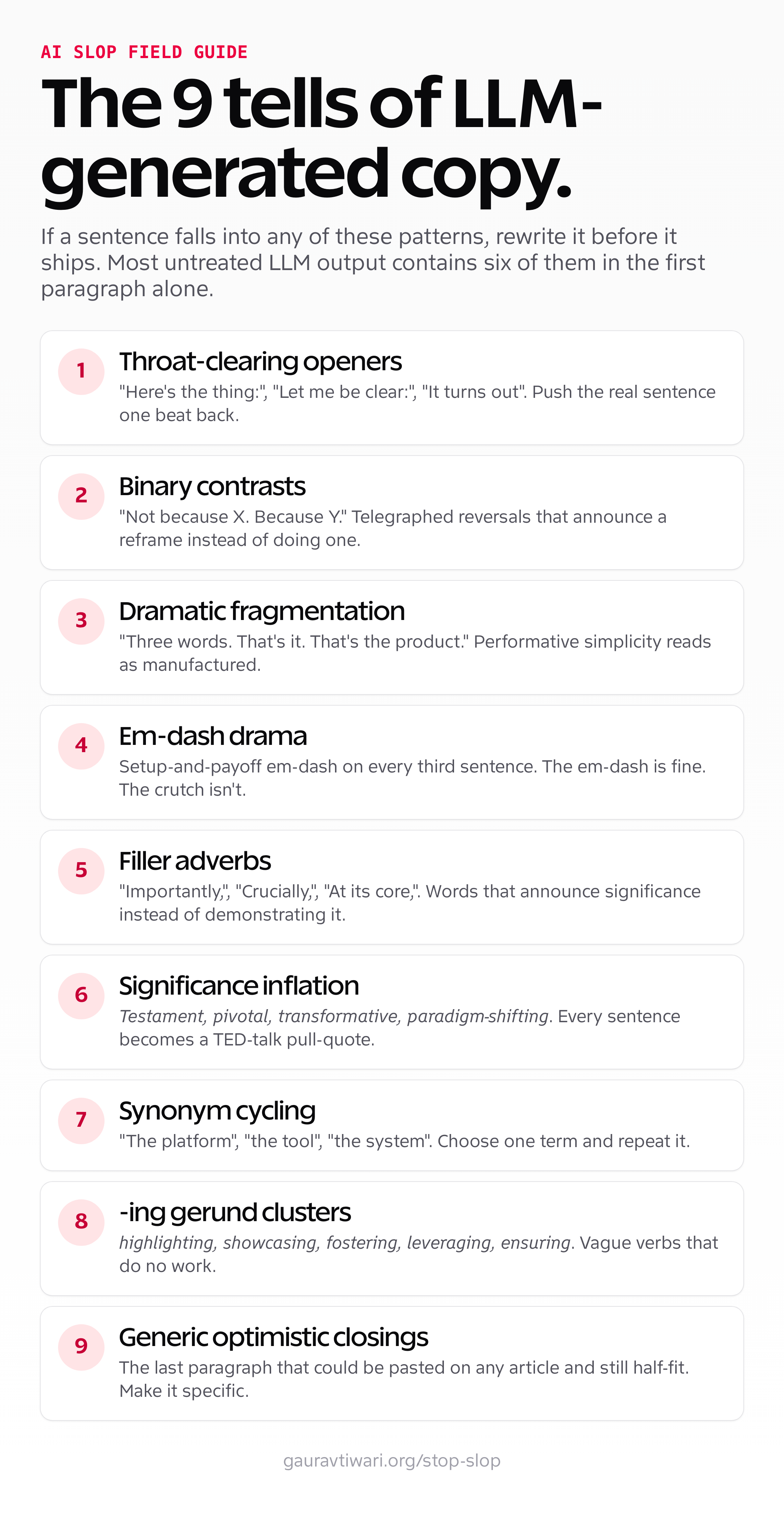
These are the surface-level tells that show up in almost every untreated LLM output:
- Throat-clearing openers. “Here’s the thing:”, “The uncomfortable truth is:”, “Let me be clear:”, “It turns out”. Add nothing, push the real sentence one beat back.
- Binary contrasts. “Not because X. Because Y.” “It feels like X. It’s actually Y.” Telegraphed reversals that announce a reframe instead of doing one.
- Dramatic fragmentation. “Three words. That’s it. That’s the product.” Performative simplicity.
- Cadence uniformity. The 2026 tell that survives longest. Eighteen-to-twenty-four-word sentences, one after another, with the same shape and the same rhythm. Vocabulary tells fade as models update; this one persists across prompt rewrites.
- Em-dash drama (fading, not gone). The em-dash itself isn’t bad. LLMs used it as a setup-and-payoff crutch on every third sentence. Newer models suppress it by default now, so its absence no longer proves a human wrote the text.
- Filler adverbs. “Importantly,”, “Crucially,”, “Interestingly,”, “At its core,”. Words that announce significance instead of demonstrating it.
- Significance inflation. Words like testament, pivotal, transformative, paradigm-shifting. They flatten meaning and make every sentence sound like a TED-talk pull-quote.
- Synonym cycling. Calling the same noun three different things in three sentences (“the platform”, “the tool”, “the system”) because the model wants to avoid repetition. Repetition is fine. Choose one term and stick with it.
- -ing gerund clusters. highlighting, showcasing, fostering, leveraging, ensuring. Vague verbs that do no work.
- Generic optimistic closings. The last paragraph that could be pasted on any article on any topic and still half-fit.
In my own reviews, a cold draft often exposes six of these patterns in its first paragraph 3. Not a lab statistic. A field note from reviewing cold drafts, generated landing pages, and AI-written docs every week. . The overlap matters more than any one tell.
How to Spot Slop Fast: Detection Signals
I use a six-part read before I trust a draft. No detector is required. One signal can be noise; several signals in the same paragraph are evidence.
- Read three sentences in a row out loud. If they’re all roughly the same length and breathe the same way, that’s cadence uniformity. When the thought changes shape, the sentence usually should too.
- Cut the first sentence of every paragraph. If the paragraph still says everything it needed to, the opener was throat-clearing. Slop front-loads warm-up; humans front-load the point.
- Count the claims with a number, name, or date. Low information density is the most reliable slop signal in the 2025 research. A paragraph that asserts a lot and specifies nothing is almost always untreated AI output.
- Look for the “from X to Y” sweep. “From startups to enterprises”, “whether you’re a beginner or a pro”. False comprehensiveness that adds words and removes meaning.
- Check the last paragraph against the topic. If you could paste that closing onto an unrelated article and it would still half-fit, it’s a generic optimistic closing. Delete it.
- Don’t trust the em-dash test anymore. Through 2024 a wall of em-dashes flagged AI writing. Newer models suppress them, so their presence or absence proves nothing in 2026. Judge rhythm and density instead.
Automated detectors exist, but I treat them as a tiebreaker, not a verdict 4. A detector is useful like a smoke alarm is useful. You still need to find the fire. . They throw false positives on clean human prose and false negatives on lightly-edited AI text. The signals above are faster and harder to game because they target structure, not surface vocabulary. The detector I published takes a different route from the commercial ones: it scores severity instead of returning a verdict, so a quoted phrase or a technical term can’t fail a draft on its own.
If your real question is how to avoid AI slop, start with AI slop examples you can recognize without a detector. Same-length sentences, empty claims, vague verbs, and generic closings are easier to fix than a model score. The Stop Slop skill turns those examples into rules Claude can apply before the next draft leaves your machine.
What an Agent Skill Is in Plain Terms
Claude Code Agent Skills are folders containing instructions, metadata, and optional resources. Anthropic introduced them in October 2025 so Claude could load specialized guidance on demand. Claude sees the lightweight discovery metadata first, reads SKILL.md when a task matches, and loads reference files or scripts only when needed. Anthropic calls that progressive disclosure. The useful consequence is a smaller context cost for rules that are not relevant to the current job.
I treat a skill like a job description with examples and a review checklist. “Write the error message” leaves every editorial decision open. “Write the error message according to clarify/SKILL.md” supplies a specific standard: name what happened, give the next action, and cut the rest. That is enough to prevent the default “An unexpected error has occurred. Please try again later.”
Claude Code supplies native discovery and on-demand loading. ChatGPT, Codex, Gemini, Mistral, local models, and other LLM providers can use the same SKILL.md rules in a system prompt, custom instruction, or agent policy. The loader changes by product; the editorial judgment remains portable
5.
That is the useful separation: the loader is product-specific, the editorial taste is portable.
.
Stop Slop began as Hardik Pandya’s stop-slop skill, which he published in January 2026. I’ve published my edition of the Stop Slop skill in the claude-code-skills repository, next to the Slop Detector that scores drafts against it and the design and UX skills covered below. Stop Slop and Slop Detector are both MIT-licensed. The repository’s NOTICE file records which parts of Stop Slop are Hardik’s and which I added. It also records which of the other skills are other people’s work and under which license, because several are. You can install it once and it works against prose Claude generates inside Claude Code, the API, or any compatible runner, and the same markdown rules adapt to other LLM workflows. In Claude Code, custom skills live as folders with SKILL.md files and Claude discovers them automatically. How I run the whole set is in Claude Skills: How I Run 168 of Them in Production.
What Does the Stop Slop Skill Do?
The main instructions fit in a short file because I want the rule set legible at a glance. When the model has to sift through a manual, enforcement gets weaker. The first five rules are Hardik’s, and they still do most of the work.
Rule 1: Cut filler phrases. A banned-list of throat-clearing openers, emphasis crutches, and business jargon. The skill ships with a references/phrases.md file that catalogues over a hundred specific tokens and their plain-language replacements. “Navigate (challenges)” becomes “handle”. “Game-changer” has no default replacement; the sentence has to name what actually changed. “At the end of the day” gets cut entirely.
Rule 2: Break formulaic structures. A taxonomy of structural patterns to avoid: binary contrasts, dramatic fragmentation, rhetorical setups, false comprehensiveness (“from X to Y”, “whether A or B”). The reference file in references/structures.md shows the pattern, names why it fails, and gives a direct rewrite.
Rule 3: Vary rhythm. Mix sentence lengths. Two items beat three. End paragraphs differently. Three consecutive sentences that match length get one rewritten. This rule does the heavy lifting against cadence uniformity 6. If you only fix one thing in AI prose, fix rhythm. Vocabulary swaps are easy. Rhythm is where the machine leaks through. , which is the single hardest tell to remove by hand.
Rule 4: Trust readers. State facts directly. Skip softening, justification, and hand-holding. Cold drafts tend to stack caveats around simple claims. Stop Slop keeps the caveat that changes the reader’s decision and removes the rest.
Rule 5: Cut quotables. If a sentence sounds like a pull-quote, rewrite it. The instinct that produces “this isn’t a feature, it’s a philosophy” is the same instinct that produces slop.
My edition adds four rules. They come from the failures I kept seeing after those five had done their job:
- Rule 6: Keep production off the page. Captions, alt text and body copy name what the reader sees, never the tool, prompt or renderer that made it.
- Rule 7: Don’t fake a human. Random fragments, invented typos and “actually, wait” corrections are slop too. Rhythm should change only when the thought changes.
- Rule 8: Give every detail a job. A number that looks measured but wasn’t gets replaced by the mechanism behind it.
- Rule 9: Leave working prose alone. Every edit has to fix a real problem. A smoother synonym is not a reason.
It also lists what a pass must not remove, because most slop lists over-correct and strip the writer along with the slop:
- Plain evaluative words such as important, ensure and wise
- First person that owns a judgment, like “I’d start with shared hosting”
- A short host line that tells the reader where they are
- A dry closer at the end of a paragraph, after the evidence lands
- The writer’s own grammar and idiom, including a missing Oxford comma
The public skill closes with a self-audit: “What makes this obviously AI-generated?” Its quick score covers directness, rhythm, trust, authenticity, and density. That score is a self-check, not a gate. The gate is the Slop Detector covered below, which grades a draft by severity instead of by taste. I also make the vague authenticity test more concrete with particularity: does the paragraph contain a choice, observation, or consequence that belongs to the author? A polished paragraph still fails when none of those is present.
My edition reads every match with the same four severity tiers the Slop Detector uses, so a broad word only prompts a review while production narration fails outright. It also adds a last check: compare the edit with the original, and if the writer’s idiom, warmth or opinion went out with the slop, put it back.
AI Slop Examples, Before and After
This pricing-component example shows what the Stop Slop skill changes and what it leaves alone. The cold draft came from a frontier LLM; the second pass used the skill.
Before (cold output):
Unlock the full power of our platform with our Pro plan. It’s a game-changer for teams looking to navigate the complexities of modern collaboration. Whether you’re a solo founder or a growing organisation, this tier delivers everything you need to take your workflow to the next level.
After (Stop Slop pass):
Pro: 10 seats, unlimited projects, priority support. $29 per seat per month.
The cold output is 47 words and gives the buyer nothing to compare. The 12-word revision keeps the four facts that change a pricing decision: seats, project limit, support level, and price. That selection is the editorial work 7. This is why I like skill files more than heroic one-off prompts. The prompt asks nicely. The skill enforces a house rule. . The cold version also carries four familiar tells: “unlock the full power” (significance inflation), “game-changer” (jargon), “navigate the complexities” (gerund filler), and “whether you’re X or Y” (false comprehensiveness).
One more, this time prose. Cold: “In today’s fast-paced digital landscape, leveraging AI can be a transformative way to elevate your content strategy and unlock new levels of engagement.” That is 25 words and one idea: AI helps content. Stop Slop version: “AI gets a first draft onto the screen faster. I still own the claims, examples, and final edit.” The revision names the useful speed gain and the work AI cannot own.
The Bigger Toolkit: Skills That Fight Slop in Adjacent Jobs
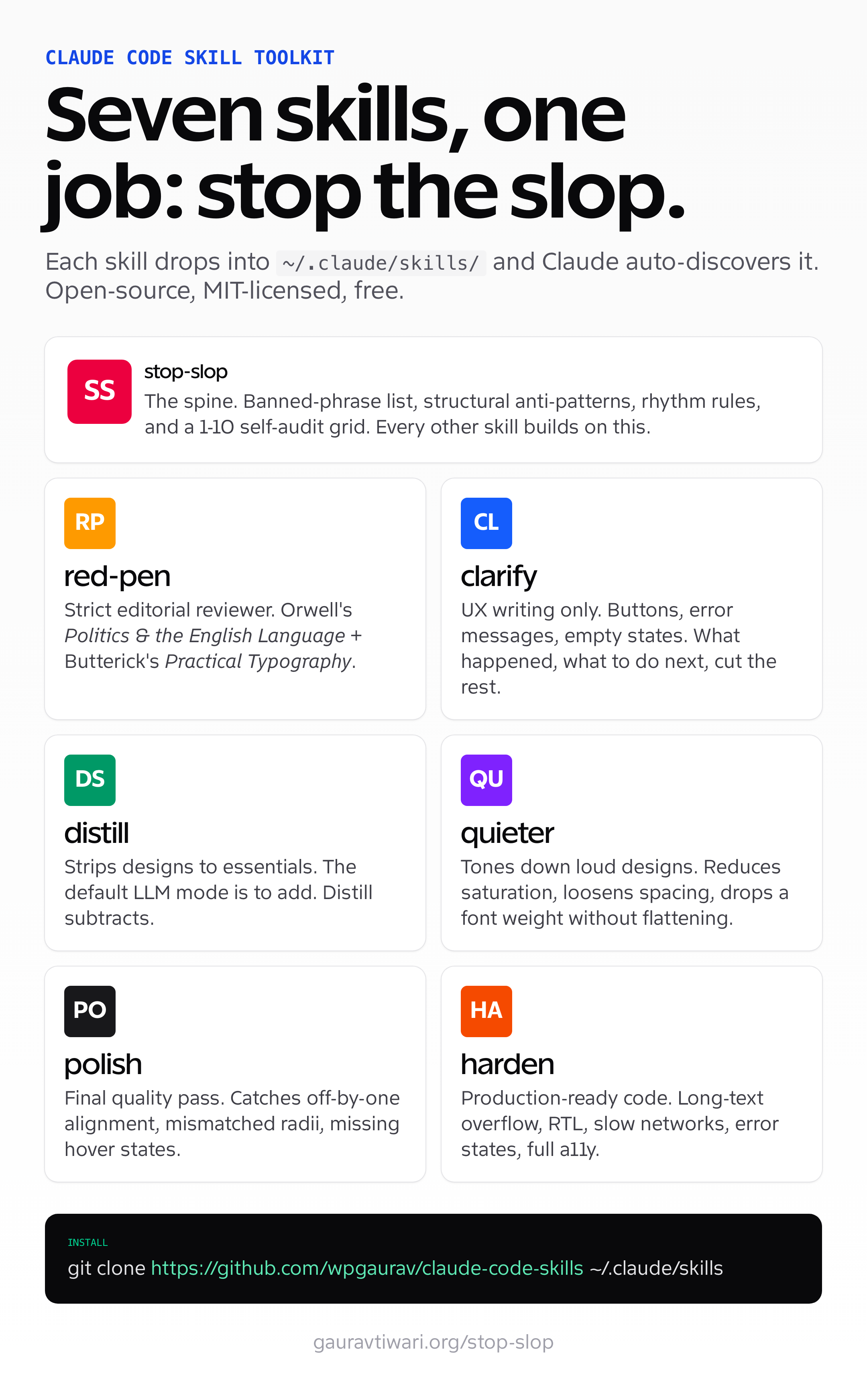
The Stop Slop skill handles prose. I keep the adjacent tools separate because each one owns a different decision: scoring, UX wording, editorial review, layout restraint, interface specificity, visual finish, or code resilience. Not all of them are mine. Clarify, distill, quieter, polish, and harden are Paul Bakaus’s impeccable commands, redistributed under their Apache-2.0 license with an attribution note in each file, and red-pen is Rich Tabor’s. The repository’s NOTICE file says exactly what changed in each.
Slop Detector
The slop-detector skill is the scoring half of Stop Slop. Stop Slop tells the model what not to write. Slop Detector reads what was written and says how bad it is, with a severity tier attached to every finding instead of one banned-words verdict.
Four tiers do the work.
| Severity | What it catches | What happens |
|---|---|---|
hard_fail | Exact production or process narration in reader-facing copy: “captured with Playwright” in a caption, “Status in this study” as a table column, “Weak spot: I didn’t test” as a per-item confession | Blocks publication. A low score never rescues it. |
warn_if_repeated | Rhetorical scaffolds that can carry one real turn: mirrored “not X, it’s Y” contrasts, “No X. No Y. No Z.” triads, per-item disclaimers, templated roundup filler | Counted across the piece. Warns only at the family’s repeat threshold. |
contextual_review | Broad lexical tells: “leverage”, “seamless”, “here’s the thing”, academic connectors, empty intensifiers | A review prompt, not a verdict. Quotes, code, proper names, and precise technical terms stay. |
structural_diagnostic | Document-level patterns: identical paragraph lengths, a table column with the same value in every row, the same sentence closing every item, passive-voice density | Diagnosed at the cause. Never cleared by inserting fragments or emotion. |
A banned-words list fails in both directions. It flags “robust” in a sentence about a nonce implementation, and it passes a caption that says “a fresh capture, not a generic mockup.” The tiers separate the two.
The score comes only from confirmed findings.
- A
warn_if_repeatedfamily past its threshold adds 2 points. A confirmedcontextual_reviewfinding adds 1. Astructural_diagnosticadds 3, 2, or 1 by priority. - 0 to 5 is clean. 6 to 15 needs editing. 16 and above means rewriting the affected passages or structure.
- Hard fails are never scored. They block on their own.
- Truth sits above the score. An invented test or an unsupported price blocks publication at a score of 0.
The folder ships a scanner for Markdown, HTML, and plain text (python3 scripts/scan.py draft.md), a caption and alt-text linter built for CI, and a regression test that locks the contract so a later edit can’t quietly promote a lexical tell into a hard fail. Matches inside quotation marks, blockquotes, and code are downgraded automatically, because a sentence that discusses “leverage” isn’t a sentence that leverages. This article scores clean against it. Almost every prompt it raises is a tell quoted as an example, and the rest are words I read in context and kept, which is the behavior a severity model exists to produce.
Red Pen
The red-pen skill, originally from Rich Tabor, is the editorial sibling to Stop Slop. Where Stop Slop is preventive (it tells the model what not to do), red-pen is corrective (it scans existing prose and flags violations). It enforces principles drawn from George Orwell’s Politics and the English Language and Matthew Butterick’s Practical Typography. I run it against any block of marketing copy, technical documentation, or in-product microcopy that I didn’t generate myself. It returns line-by-line edits with a justification per change.
Clarify
The clarify skill is for UX writing specifically: button labels, error messages, form helper text, empty-state copy, onboarding tooltips, table column headers. It enforces three rules. Tell the user what just happened. Tell the user what they can do next. Cut everything else. “An unexpected error has occurred” becomes “We couldn’t save your changes. Try again, or copy your work and refresh.” Same information, ten times more useful.
Distill
The distill skill is a design skill with the same philosophy applied to layout. It strips a hero section, a pricing card, or a feature grid down to its essential elements and asks whether each addition earns its place. The default mode of an LLM doing UI is to add. Distill makes it subtract. Useful before any “ship” decision on a page that started life as a Figma comp generated by an AI tool.
Design Slop
Design Slop handles the interface patterns that make AI-built pages feel interchangeable. I use it to catch card soup, decorative gradients, fake dashboards, generic SaaS heroes, and rounded panels with thick borders. The checks go past taste: hierarchy, real content, responsive behavior, keyboard access, loading and error states, and whether a claim has proof. Its strictest surface rule rejects rounded containers with borders 2px or thicker. Spacing, a 1px divider, or a restrained background tint usually creates cleaner grouping unless the outline has a functional job. The skill judges the artifact, not whether AI touched it. It lives in its own repository with an installer for Claude Code, Codex, and Cursor, plus a packaged .skill file for assistants that accept uploads.
Quieter
The quieter skill is a counterweight. When a design comes back too loud (gradient overload, screaming CTAs, pulsing animations on every card), quieter tones it down without flattening it. Reduces saturation, loosens spacing, drops a font weight. The output reads like a senior designer’s edit pass, not a beginner’s “make it less ugly” reflex.
Polish
The polish skill is the final quality pass before any UI ships. It catches inconsistent spacing, off-by-one alignment, mismatched border radii, missing hover states, and the small visual bugs that expose a rushed implementation. Polish turns a convincing screenshot into a component that survives use.
Harden
The harden skill is for development work specifically. Tells the model to handle edge cases the cold output skipped: long text overflow, RTL layouts, missing data, slow networks, error states, accessibility for keyboard and screen readers. Cold AI code passes the happy path. Harden makes it pass everything else.
Copy Editing
The copy-editing skill I run on inbound text, like a client’s existing marketing copy, a third-party tool’s product page, or a homepage that needs a refresh, is adapted from Corey Haines’ MIT-licensed copy-editing skill. His version edits in seven sequential passes, starting with clarity, voice, and the “so what” test. My fork adds a house layer that flags credential stacking, repeated proof numbers, and workbench narration, then returns a marked-up version with line-level comments. The fork stays private because its reference files are my own voice and product notes. The upstream is the part worth installing.
Where I Actually Use These Skills
I use the skills at specific handoff points. These are the ones that recur before work leaves my workstation.
- Component microcopy in design-system documentation. Button states, tooltip text, form validation messages, accessibility labels.
- Error messages across the WordPress plugins I ship. Every
WP_Errorinstance, every admin notice, every Settings API description. - README files for open-source repositories. For example, the README for GT AI Provider for OpenAI went through three Stop Slop passes before the first commit. The previous draft contained the phrase “leverages cutting-edge AI capabilities”. That’s gone now.
- Inline code documentation. Function-level docblocks, class-level descriptions, plugin headers. The naming and the description must read as if a senior engineer wrote them by hand.
- Marketing copy for the products I build. Pricing-page bullets, feature-card descriptions, FAQ answers, hero-section subheadings. Every word earns its slot or it gets cut.
- Design system tokens. The names of color tokens, spacing tokens, font scales.
--color-base-50not--color-snowy-meadow-whisper. - CTA buttons. “Try Pro free for 14 days” not “Unlock the full experience”. “Save changes” not “Confirm and proceed”. Specific verbs, specific outcomes.
- Modal copy. Title, body, and the two buttons. Most modals get a 50% word-count reduction after a clarify + Stop Slop pass.
- Email subject lines. No question-mark hooks, no “URGENT” caps, no “you won’t believe”. Just the actual subject of the email.
- Onboarding flows. Empty states, first-run tooltips, success messages. Every screen the user sees during their first ten minutes with a product runs through clarify before it ships.
Repeated use changes the operator too. After enough prose, design specs, and UI copy pass through these checks, the patterns become easier to catch before generation. I now notice my own defaults sooner, which is more useful than treating slop as a problem only a model can create.
How to Avoid AI Slop Before You Ship
If you do not want to install the Stop Slop skill yet, run this by hand. It compresses the same logic into nine checks for a draft, UI label, README, product page, or interface. Anything that fails gets rewritten, not patched.
- Does the first sentence carry information, or is it a warm-up? Cut warm-ups.
- Are three consecutive sentences the same length? Rewrite one to break the cadence.
- Is there a number, name, or date the reader can verify? If not, the paragraph is probably empty.
- Did I write “leverage”, “elevate”, “unlock”, “navigate”, “robust”, “seamless”, “transformative”? Replace each with a plain verb or cut it.
- Is there a “from X to Y” or “whether A or B” sweep? Collapse it to the one case that matters.
- Does any sentence sound like a pull-quote? Rewrite it as a plain statement.
- Could the closing paragraph be pasted onto a different article? Then it says nothing. Cut or replace it.
- Read the whole thing aloud. Where you stumble or get bored is where the slop lives.
- If the copy sits inside an interface, check the container too: clear hierarchy, no card soup, no thick border plus rounded corners, and complete loading, error, empty, and disabled states.
Print the three-page checklist and run it against your next draft or interface before you publish. Enter your email and I’ll send the secure download link. The newsletter checkbox is optional and can be cleared if you only want the checklist.
How to Install Stop Slop
Installation takes three steps.
- Clone the claude-code-skills repository and run
./install.sh claude stop-slop, which copies the folder into~/.claude/skills/stop-slop. Addslop-detectorto the same command if you want the scorer. Thecodexandcursortargets install into those tools’ skill folders instead, and a symlink from the cloned folder works too if you’d rather track the repository withgit pull. - Restart Claude Code or open a new session. Claude auto-discovers skills in the standard directory.
- When you want the stop slop skill to fire, invoke it via
/stop-slopfollowed by the prose you want cleaned, or trigger it implicitly by asking for “slop-free copy”. Keep the folder namestop-slopand the main instructions file namedSKILL.md.
The skill is portable across any Claude runner that supports skills. I run it locally inside Claude Code on macOS, on the Anthropic API directly via the SDK, and inside the Claude Agent SDK for one of my internal tools that pre-processes contractor copy before it touches my repository. For non-Claude tools, copy the main instructions and the relevant reference files into that provider’s system prompt or custom-instructions layer 8. The closer your tool gets to durable system instructions, the better this works. A pasted chat message helps once. A saved instruction layer helps every time. . Current frontier models are cleaner than they were a year ago, but the structural tells still need the skill to catch them.
What Stop Slop Doesn’t Do
The Stop Slop skill is opinionated, but it cannot supply lived judgment. It removes predictable tells and restores rhythm. My voice-DNA file handles the part that has to remain mine: which detail I notice, why I select it, what I reject, and what the decision changes for the reader. Without that layer, clean AI prose can still be generic.
Its limits are concrete.
- It does not fact-check. If a cold draft invents a model name, context window, release date, API limit, or pricing claim, Stop Slop won’t catch the error. Run a separate verification pass against official docs before you publish technical claims.
- It does not handle long-form structure. A 5,000-word piece needs an outline pass before the prose pass. Stop Slop edits sentence by sentence and paragraph by paragraph; structural slop sits one level above that.
- It does not replace a human editor. It moves the mechanical first pass earlier 9. This is my editing shorthand, not a time guarantee. The repetitive fixes move earlier; taste stays at the end. , but a human still owns the facts, structure, and taste.
What Repeated Use Changed in My Own Editing
Repeated use changed how I write before I open an AI tool. The rule list has become a set of reflexes. When I write a button label, I ask whether it trusts the reader. When I write an error message, I cut the warm-up and name the next action.
The checklist now catches my own defaults, not only a model’s. Slop is not proof of AI use. People reach for familiar cadence, inflated claims, and empty closings when we are rushed too. A useful skill improves the editor operating it.
I keep the skill file short enough to read, fork, and argue with. If you adopt it, change a rule when your own evidence disagrees. A house style should record judgment, not freeze it. That’s how my edition of Hardik’s skill started.
Related resources I would open next: use my guide to writing better blog posts when the draft needs structure, read SEO Meets AI if you care about AI search citations, and keep the website and blog copywriting guide open when you are cleaning landing-page copy.
Frequently Asked Questions
What is AI slop?
AI slop is low-effort, predictable AI-generated content that looks polished but carries little information. In text, it shows up as throat-clearing openers, repeated sentence rhythms, generic claims, and weak proof. The September 2025 Measuring AI Slop in Text paper tied text slop to low information density and overused terms.
How do you detect AI slop without a tool?
Read three sentences in a row. If they are all the same length and rhythm, that is cadence uniformity. Then count claims with a number, name, or date. Cut the first sentence of each paragraph to test for throat-clearing, and check whether the closing could fit any unrelated article.
What is a Claude Code Agent Skill?
A Claude Code Agent Skill is a folder with a SKILL.md instruction file and optional reference files. Claude discovers the skill and loads the relevant instructions when the task matches. Anthropic launched Agent Skills in October 2025 as a way to package procedural knowledge for Claude, Claude Code, the API, and agent workflows.
Is the Stop Slop skill free and open-source?
Yes. Stop Slop is MIT-licensed and free on GitHub. My edition builds on Hardik Pandya’s original skill. Clone the repository into your Claude Code skills directory at ~/.claude/skills/stop-slop, restart Claude Code, and keep the main instructions file named SKILL.md. The skill is plain markdown, so you can read, fork, or edit it.
Will Stop Slop work with ChatGPT or other LLMs?
Yes. The native skills feature is Claude-specific, but the rules inside SKILL.md are model-agnostic. You can paste the same rules into ChatGPT, Codex, Gemini, Mistral, local models, or another LLM as a system prompt or custom instruction. You lose Claude’s automatic skill discovery, but the editing logic still works.
How is Stop Slop different from a regular style guide?
A style guide is a passive document a human has to remember. Stop Slop is an active instruction set the model loads before or during generation. The difference is enforcement. Instead of fixing every ‘leverage’ and ‘unlock’ after the draft, you teach the model to avoid those patterns before the first pass.
What other Agent skills pair well with Stop Slop?
The natural pairings are slop-detector for a scored audit, red-pen for editorial review, clarify for UX microcopy, distill for layout simplification, Design Slop for generic interface patterns and incomplete states, polish for UI quality, harden for resilient code, and quieter for toned-down design. All of them except Design Slop live in the same claude-code-skills repository. Design Slop has its own.
Can I score a draft for AI slop automatically?
Yes. The slop-detector skill in the same repository scores Markdown, HTML, or plain text with four severity tiers. Exact production narration fails outright, rhetorical scaffolds warn only when repeated, lexical tells become review prompts, and document-level patterns are diagnosed. A score of 0 to 5 is clean, 6 to 15 needs editing, and 16 or more means a rewrite. Hard fails block regardless of score.
Footnotes
- The biggest content AI slop. ↩
- That is the part people miss: bad AI work does not only read badly. It creates follow-up work for someone else. ↩
- Not a lab statistic. A field note from reviewing cold drafts, generated landing pages, and AI-written docs every week. ↩
- A detector is useful like a smoke alarm is useful. You still need to find the fire. ↩
- That is the useful separation: the loader is product-specific, the editorial taste is portable. ↩
- If you only fix one thing in AI prose, fix rhythm. Vocabulary swaps are easy. Rhythm is where the machine leaks through. ↩
- This is why I like skill files more than heroic one-off prompts. The prompt asks nicely. The skill enforces a house rule. ↩
- The closer your tool gets to durable system instructions, the better this works. A pasted chat message helps once. A saved instruction layer helps every time. ↩
- This is my editing shorthand, not a time guarantee. The repetitive fixes move earlier; taste stays at the end. ↩
Tell Google you want more of this.
Add Gaurav Tiwari as a preferred sourceOne tap, and this site shows up more often in your own Top Stories, AI Overviews and AI Mode. Remove it any time.