
 by
by
YouTube doesn’t want you saving anything in 4K. Their built-in download button gives you a low-bitrate copy that streams inside the YouTube app and disappears after 30 days. If you actually need a clean 4K MP4 on your hard drive (offline class for spotty hotel Wi-Fi, source footage for a reaction video, archival of a channel before it gets deleted), you need a real desktop downloader.
I’ve used a bunch of these over the years. The category is full of sketchy installers, browser extensions that quietly siphon clicks, and “free” web tools that hand you a 480p file when you asked for 2160p. The good ones are mostly paid and they’re worth it. A $25 lifetime license beats a year of malware roulette every time.
Here’s the shortlist I actually keep installed in 2026, with current pricing, the catch you should know about each one, and a clear pick for which one to grab first.
Quick picks
If you only read one section, read this one.
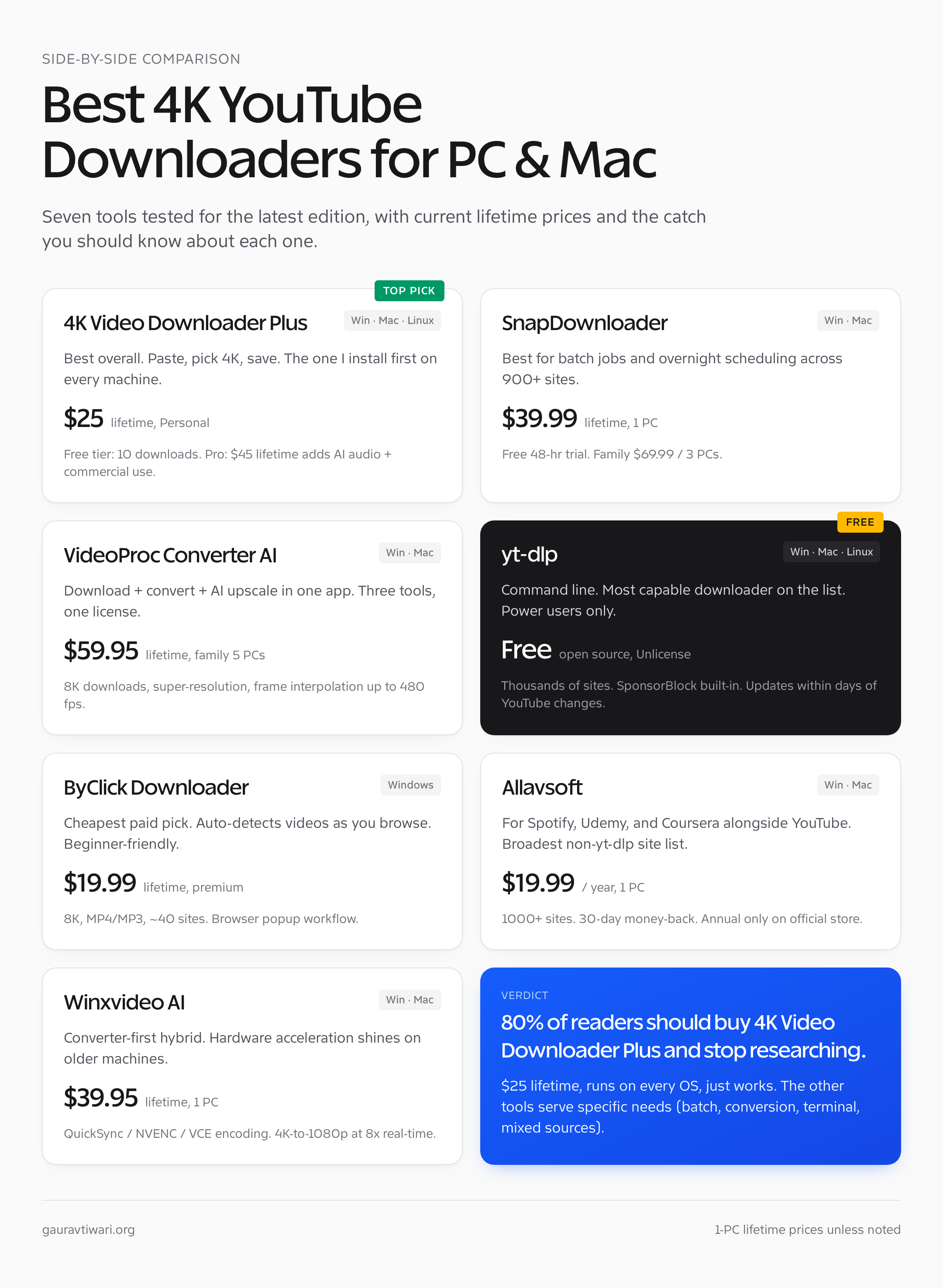
- 4K Video Downloader Plus — best overall, $25 lifetime, the one I install first on every new machine.
- SnapDownloader — best for batch downloads and scheduling, 900+ sites supported, $39.99 lifetime.
- VideoProc Converter AI — best if you also need conversion and AI upscaling, family lifetime around $59.95 for 5 PCs.
- yt-dlp — best free option, command line, the one power users live in.
- ByClick Downloader — best Windows-only beginner pick, $19.99 lifetime, browser-aware.
- Allavsoft — best for Spotify and Udemy alongside YouTube, $19.99 a year.
- Winxvideo AI — best converter-and-downloader hybrid for older Windows machines, $39.95 lifetime.
What “4K YouTube downloader” actually means
A 4K download means a 3840×2160 MP4 file at the original bitrate YouTube served. That’s roughly 50 to 100 MB per minute for typical content, and 200+ MB per minute for high-motion 60fps footage. If your tool gives you a 4K-labeled file that’s only 10 MB per minute, it’s been re-encoded and you’ve lost detail.
Real 4K downloaders pull the original VP9 or AV1 stream from YouTube and remux it (no re-encode, no quality loss). They handle the audio track separately and merge them into one MP4 or MKV file. Most of them also let you fall back to lower resolutions, extract audio as MP3, grab subtitles in SRT, and pull entire playlists or channels in one click.
8K is the new flex. Few channels actually publish in 8K, but every tool on this list claims support. In practice you’ll use 4K most of the time and never miss the rest.
Comparison table
A quick side-by-side of the seven tools. Prices verified in October 2026.
| Tool | Best for | Free tier | Paid (lifetime) | Mac | Linux |
|---|---|---|---|---|---|
| 4K Video Downloader Plus | Overall daily use | 10 downloads | $25 Personal / $45 Pro | Yes | Yes |
| SnapDownloader | Batch + scheduling | 48-hour trial | $39.99 (1 PC) | Yes | Soon |
| VideoProc Converter AI | Convert + upscale + download | Limited free | $57.95 (1 PC) / $59.95 (5 PCs) | Yes | No |
| yt-dlp | Power users, free | Fully free | Free, open source | Yes | Yes |
| ByClick Downloader | Beginner-friendly Windows | Watermarked | $19.99 lifetime | No | No |
| Allavsoft | Spotify, Udemy, broad sites | 30-day trial | $19.99 / year only | Yes | No |
| Winxvideo AI | Older Windows + conversion | Limited free | $39.95 (1 PC) | Yes | No |
4K Video Downloader Plus
Best for: Daily 4K downloads from YouTube, Vimeo, and a handful of other sites without thinking about settings.
This is the one I install first. Single-purpose, fast, and honest about what it does. Paste a URL, pick a quality, save the file. That’s the whole interface and that’s the whole point.
The current version (4K Video Downloader Plus, the rebranded successor to plain “4K Video Downloader”) supports 720p, 1080p, 4K, and 8K. It handles MP4 and MKV containers, pulls MP3, M4A, or OGG audio, and grabs subtitles in over 50 languages as SRT. Smart Mode lets you set “always 4K MP4 with English subs” once and never touch the dialog again. The built-in browser handles age-restricted and login-only videos without needing a separate Chrome extension.
What pushes it ahead of the rest: the channel and playlist downloads work. Paste a channel URL, click download, and it queues every public video. Auto-download subscriptions let you set a channel to keep downloading new uploads automatically, which is the closest thing to a YouTube DVR that exists.
The free tier gives you a permanent 10-download limit. The Personal license is $25 (lifetime, one device, removes the limit). The Pro license at $45 lifetime adds commercial-use rights, AI audio cleanup (vocal removal, noise reduction), and dubbed multi-language audio tracks. There’s also a $15/year Lite subscription if you genuinely won’t be downloading much.
Honest limit: The Linux build is GNOME-only on Ubuntu 22.04+. If you’re on KDE or older distros, fall back to yt-dlp.
Get it: 4kdownload.com
SnapDownloader
Best for: Batch jobs across 900+ sites and scheduling overnight downloads.
SnapDownloader’s pitch is breadth. The site list is big (YouTube, Twitch, Vimeo, Twitter/X, Facebook, Instagram, Reddit, TikTok, Telegram, SoundCloud, Dailymotion, Pinterest, LinkedIn, and roughly 880 others). The interface is built around batch jobs. You can queue 50 URLs, pick one quality preset for all of them, hit go, and walk away. There’s a built-in trimmer if you only want a clip from a long video.
8K, 4K, QHD, and 1080p are all there. Output formats cover MP4, MP3, AVI, WMA, AAC, and a few others. Proxy support handles geo-restricted content. The scheduler lets you say “download this at 2am” if your ISP throttles peak hours or your day-job network blocks streaming.
The 48-hour trial is fully unlocked, so you can stress-test it before paying. The Personal lifetime license is $39.99 for one machine. The Family edition covers three machines for $69.99. Annual is $29.99/year, monthly is $7.99 if you only need it for a single project.
Honest limit: It’s not the fastest single-video downloader of the bunch. 4K Video Downloader Plus and yt-dlp finish a one-off URL faster. SnapDownloader earns its keep on jobs of 20+ videos.
Get it: snapdownloader.com
VideoProc Converter AI
Best for: People who also need conversion, screen recording, or AI upscaling, and don’t want a third tool on the dock.
VideoProc Converter AI is a different category from the others. The download feature is one of four major modules (the others are conversion, editing, and screen recording). The whole thing has been re-engineered around AI features in the last two releases: 2x/3x/4x super-resolution upscaling, frame interpolation up to 480fps, and stabilization that actually works on handheld footage. If you’re downloading YouTube videos to use as B-roll, you’re going to use the conversion module right after, and having both in the same app saves an export round-trip.
The downloader supports 8K and pulls from 1000+ mainstream sites with another 2000+ niche sites in the long tail. It’s multi-threaded and genuinely fast on large files. Subtitles auto-detect and download. Playlists and channels work the way you’d expect.
Pricing is the messy part. Official lifetime for one PC is around $57.95 at full price, but VideoProc runs heavy promos. The Family lifetime license (5 computers) is regularly $59.95 on StackSocial and the official store, which is a steal if you have a couple of machines or a household.
Honest limit: No Linux build. Mac version exists but lags Windows by a release or two on the AI features.
Get it: videoproc.com
yt-dlp
Best for: Power users, scripting, headless servers, and anyone who wants something that won’t get bought and ruined.
yt-dlp is a command-line downloader. There’s no GUI, no installer, no upgrade dialog. You install a single binary, run yt-dlp <URL>, and a video lands in your folder. That’s the whole thing.
It also happens to be the most capable downloader on this list. Thousands of supported sites. Format selection so granular you can pick the exact codec, container, and audio bitrate. SponsorBlock integration that auto-removes sponsor segments while downloading. Live stream capture from the start. Cookie support so you can download private content you have legitimate access to. Plugin system. JavaScript runtime support for the sites that gate downloads behind player obfuscation.
The release cadence is fast (multiple versions a month) and the project responds to YouTube’s anti-download changes within days, which is why every other tool on this list either uses yt-dlp internally or borrows its extractors.
If you’ve never opened a terminal, this isn’t for you. If you live in one, this is the only downloader you need.
# Download a video at the best 4K quality available
yt-dlp -f "bv*[height<=2160]+ba/b[height<=2160]" <video_url>

# Download an entire channel as MP4
yt-dlp -f "bv*[ext=mp4]+ba[ext=m4a]/b[ext=mp4]" <channel_url>
Honest limit: No GUI. The format-selection syntax is genuinely confusing the first time you see it.
Get it: github.com/yt-dlp/yt-dlp
ByClick Downloader
Best for: Windows users who want a beginner-friendly tool that catches videos automatically as they browse.
ByClick (formerly YouTube By Click) takes the opposite approach to yt-dlp. There’s no manual paste step. You install it, browse YouTube in any browser, and a small popup appears whenever you land on a video, asking if you want to download it as MP3 or MP4. Click yes and it goes. That’s the entire workflow.
It supports MP4, MKV, AVI, FLV, WMV, 3GP, WEBM, MP3, AAC, M4A, WAV, and a handful of others. Resolution tops out at 8K. It handles playlists, channels, Instagram pages, Facebook videos, Twitter, Vimeo, Dailymotion, and around 40 other sites. Long videos work fine (the older one-hour limit was lifted in the 2.x series). YouTube Live downloads, age-restricted content, and private videos with browser cookies all work.
The free version watermarks output and limits formats. Premium is $19.99 lifetime, which is the cheapest paid option on this list and unlocks 1080p, 4K, 8K, batch downloading, and the auto-tag MP3 feature that pulls artist and title metadata from YouTube Music.
Honest limit: Windows only. The “browser detection” magic doesn’t work on every Chromium fork (Brave is hit or miss in my testing).
Get it: byclickdownloader.com
Allavsoft
Best for: Mixed-source downloading where Spotify, Udemy, and Coursera matter as much as YouTube.
Allavsoft is the tool I reach for when someone says “I need to save this Udemy course before my access expires” or “can you get this Spotify playlist as MP3 files.” Its site list (1000+) leans heavier into music streaming and online learning platforms than the YouTube-focused tools. Spotify, Deezer, SoundCloud, Apple Music previews, Udemy, Coursera, edX, Vimeo, and the usual social platforms are all there.
For YouTube specifically, it handles 8K, 4K, 1080p, and the rest, with 360° VR support. Output covers the standard MP4/AVI/WMV/MOV/WebM/FLV plus Apple ProRes and a long audio list (MP3, FLAC, OPUS, AAC, M4A, AIFF). Breakpoint resume saves big downloads when your connection drops. The scheduler runs jobs at set times.
Pricing is annual only on the official site. The 1-year license is $19.99 (currently discounted from $29.99). Family and lifetime options exist on partner stores like StackSocial periodically but aren’t the default.
Honest limit: No native lifetime tier on the official store, which makes the long-run cost higher than 4K Video Downloader Plus or SnapDownloader. The interface also looks like 2016 in 2026.
Get it: allavsoft.com
Winxvideo AI
Best for: Older Windows hardware where you want a converter and downloader in one tool that won’t melt your CPU.
Winxvideo AI (formerly WinX HD Video Converter Deluxe, same product, new name) is a converter-first tool that happens to have a competent YouTube downloader bolted on. The downloader pulls 4K and 8K from YouTube, Vimeo, Facebook, and around 1000 other sites, with batch support and playlist handling. The converter side handles every codec you’d realistically need, including hardware-accelerated H.264 and H.265 encoding on Intel QuickSync, NVIDIA NVENC, and AMD VCE.
If your machine is older or underpowered, the hardware acceleration is the reason to pick it. I tested a 4K-to-1080p convert on a 2017 Dell with QuickSync enabled and it ran at roughly 8x real-time, which beat VideoProc on the same hardware.
Lifetime for 1 PC is $39.95 after the recurring discount (full price $89.95). The downloader is included; there’s no cheaper “downloader only” tier.
Honest limit: The downloader is fine but it’s not the strongest module in this app. If you don’t need the conversion features, you’re paying for them anyway.
Get it: winxdvd.com/products-video-converter.htm
How to choose
If you’re not sure where to start, this is the decision tree I’d give a friend.
- Want one tool that just works? 4K Video Downloader Plus. $25 once, done.
- Downloading 50+ videos at a time on a regular basis? SnapDownloader. The batch UI and scheduling are worth the price gap.
- Already need a video converter and screen recorder? VideoProc Converter AI. One app, three jobs.
- Comfortable with a terminal? yt-dlp. Free, fastest, never going away.
- Cheapest paid option, Windows only? ByClick Downloader. $19.99 lifetime.
- Need Spotify and Udemy too? Allavsoft. Broadest non-yt-dlp site list.
The honest truth: 80% of people reading this should grab 4K Video Downloader Plus and stop researching. The other 20% have a specific need (batch, conversion, terminal, mixed sources) that one of the alternatives serves better.
If your shortlist is “save YouTube videos to watch on a phone offline,” you might also like my 11 best Instagram Reels downloaders and the easy way to rewatch Instagram Reels offline for the cross-platform side of this problem.
A note on legality
Downloading YouTube videos is a grey area, not a crime in most places. YouTube’s Terms of Service prohibit downloading content unless YouTube provides a download button (Premium, the YouTube app’s offline mode) or the rights holder has explicitly licensed it. Violating ToS can get your YouTube account terminated. It’s not, by itself, a copyright issue.
Copyright is a separate question. Public-domain content, Creative Commons content, your own uploads, and content where the rights holder has granted permission are all fine to download. Re-uploading someone else’s video to your own channel without a license is copyright infringement, regardless of how you got the file.
The legitimate use cases I see most often: archiving educational lectures before a channel deletes them, saving content from your own channel as a backup, downloading licensed footage you’ve paid for through a separate agreement, watching content offline on a long flight where YouTube Premium’s offline mode is too restrictive. Use your judgment.
If you’re a creator and you’re worried about your own content getting downloaded, the answer is the same as it’s been for 15 years: if it’s public on the internet, someone can save it. Watermark, claim revenue through Content ID, and don’t lose sleep over it.
For YouTube channel owners specifically, the better investment is in your own asset library. My piece on the best cameras for YouTube and the YouTube thumbnail downloader covers the upstream side of the same workflow.
What I actually use
Two tools, both running.
4K Video Downloader Plus Personal license on my Mac mini for daily use. It’s the one I open without thinking. Paste, pick 4K, save. Five years and three OS upgrades on the same $25 license.
yt-dlp on the same machine for everything else. Bulk channel rips, sites that 4K Video Downloader doesn’t support, anything that needs cookie-based authentication, anything I want to script. Free, fast, never breaks for long.
I don’t run more than that. The other tools on this list are good and I’ve tested all of them, but two is enough. If your needs are simpler than mine, just install 4K Video Downloader Plus and skip the rest.
Frequently asked questions
What’s the best free 4K YouTube downloader?
yt-dlp is the best fully-free option. It’s a command-line tool, so there’s no GUI, but it pulls 4K and 8K from YouTube, supports thousands of sites, and runs on Windows, Mac, and Linux. 4K Video Downloader Plus has a free tier too, but it caps at 10 downloads.
Can I download YouTube videos in 4K on a Mac?
Yes. 4K Video Downloader Plus, SnapDownloader, VideoProc Converter AI, Allavsoft, Winxvideo AI, and yt-dlp all run natively on macOS 11 or later and support 4K. ByClick Downloader is Windows only. For most Mac users, 4K Video Downloader Plus is the easiest place to start.
How do I download a YouTube playlist in 4K?
Paste the playlist URL into 4K Video Downloader Plus or SnapDownloader, pick 4K MP4 as the format, and the tool will queue every video in the playlist. yt-dlp does the same with yt-dlp -f "bv*[height<=2160]+ba" <playlist_url>. Channel URLs work the same way and grab every public video.
Why does my 4K download look the same as 1080p?
YouTube serves 4K at lower bitrates than the original master. A 4K download from YouTube is sharper than 1080p but not visibly different on a small screen. The difference shows up on a 27-inch 4K monitor or a TV. If a 4K download is under 50 MB per minute, it’s been re-encoded.
Can I download YouTube videos in 4K on iPhone or Android?
Direct 4K downloads on iOS are restricted by Apple’s App Store policies, so most apps that claim to do this are web wrappers or shortcuts. Android has more options: 4K Video Downloader Plus has a native Android app, and yt-dlp runs through Termux. The cleanest path is downloading on a desktop and syncing.
Does YouTube Premium let me download videos in 4K?
YouTube Premium’s offline mode caps at 1080p on most devices and the file is encrypted to the YouTube app, expires after 30 days, and can’t be moved or edited. If you need a real 4K MP4 you can keep, edit, or move between devices, you need a desktop downloader like 4K Video Downloader Plus or yt-dlp.
Will downloading YouTube videos get my account banned?
Downloading public videos through a desktop tool doesn’t trigger account-level penalties because the request looks like normal playback to YouTube. Account bans usually come from re-uploading downloaded content, automated scraping at scale, or bypassing paywalls on YouTube Premium content. Personal offline use of public videos is a grey area.
What’s the difference between 4K Video Downloader and 4K Video Downloader Plus?
4K Video Downloader Plus is the rebranded successor to the original. The original is no longer sold. Plus adds Smart Mode presets, an in-app browser for login-only content, AI audio cleanup, multi-track dubbed audio downloads, and a unified interface across Windows, Mac, and Linux. If you have an old 4K Video Downloader license, the upgrade is paid.
Tell Google you want more of this.
Add Gaurav Tiwari as a preferred sourceOne tap, and this site shows up more often in your own Top Stories, AI Overviews and AI Mode. Remove it any time.
Disclaimer: This site is reader-supported. If you buy through some links, I may earn a small commission at no extra cost to you. I only recommend tools I trust and would use myself. Your support helps keep gauravtiwari.org free and focused on real-world advice. Thanks. - Gaurav Tiwari