
 by
by
AI is in WordPress now, and it lives in core. Not as a paid add-on, not as a third-party SaaS layer, not as another plugin you have to evaluate against twenty competitors. WordPress 7.0 ships with a native AI architecture: the Abilities API in core, an AI Client library that talks to every major model provider, and an official AI plugin from the Make WordPress AI team that wires it all up. WordPress 7.0 is running on production sites everywhere now, and the shape of the next decade of WordPress is already visible.
THIS is one of those production sites. WordPress 7.0 has been running on gauravtiwari.org in production since launch. And I feel that this is the most quietly important release WordPress has shipped since the Block Editor landed in 5.0, and almost nobody outside of the Make WordPress AI channel is talking about it yet.

What Is AI in WordPress?
AI in WordPress is the umbrella term for the generative-AI capabilities landing in WordPress core and the official plugin ecosystem during the WordPress 7.0 cycle. It rests on three pillars. The Abilities API is the core registration system that exposes discoverable, REST-callable actions to any client. The AI Client library is the provider-agnostic abstraction that routes model calls to OpenAI, Anthropic, Google Gemini, OpenRouter, Mistral, or any compatible model server. The AI Plugin, maintained by the Make WordPress AI team, is the user-facing experience layer that ships image generation, alt-text suggestions, summarisation, content classification, and editorial review notes.
In plain terms: WordPress 7.0 AI features are not a single AI button. They are an architecture. Plugins register abilities. The AI Client picks the model. The AI Plugin (or any other consumer) calls those abilities through a standard REST endpoint at /wp-json/wp-abilities/v1/. Everything else (image generation in the Block Editor, automatic alt text in the Media Library, Rank Math meta description suggestions) is a thin shell over that architecture.
What WordPress 7.0 Ships for AI
The base WordPress 7.0 release introduces the Abilities API as a first-class WordPress primitive. Think of an “ability” as a registered, REST-exposed action that any client (wp-admin UI, an MCP server, a Claude or ChatGPT agent, an external REST consumer) can discover and invoke. Plugins register abilities. WordPress core registers two of them. AI features then call those abilities by name instead of hardcoding their own implementation. It’s WordPress’s version of tool calls, and it ships in WordPress 7.0 today.
That foundation is already spawning a wave of third-party agent tools. Plugins like Novamira and Easy MCP AI turn your site into an MCP server that an external agent can drive directly. Novamira goes the deepest, giving a Claude Code or Cursor agent PHP-level access to run code, edit files, and manage the database, which is genuinely powerful and a genuinely bad idea anywhere but a staging copy. Easy MCP AI stays safer, exposing 200-plus REST-level tools for content and reporting instead of raw code execution. Different risk profiles, same backbone: the Abilities API and MCP are what let all of them speak WordPress without each one reinventing the wiring.
On top of that, the official AI plugin from the WordPress.org AI team provides the user-facing layer. Settings page, Abilities Explorer, dashboard widgets, image generation in the editor, alt-text generation in the media library, content classification, summarisation, excerpt generation, meta description suggestions, title generation, and a “Review Notes” feature that does block-by-block review for accessibility, readability, grammar, and SEO. All swappable, all opt-in, all routed through whichever provider you’ve configured.
The AI plugin ships as a canonical, experimental plugin rather than bundled into core, the same way Gutenberg sat as a plugin before it merged. The Abilities API itself is in core; the AI plugin is the recommended layer on top. If you’ve been watching the Make WordPress AI channel, none of this is news. If you haven’t been watching, this is the article.
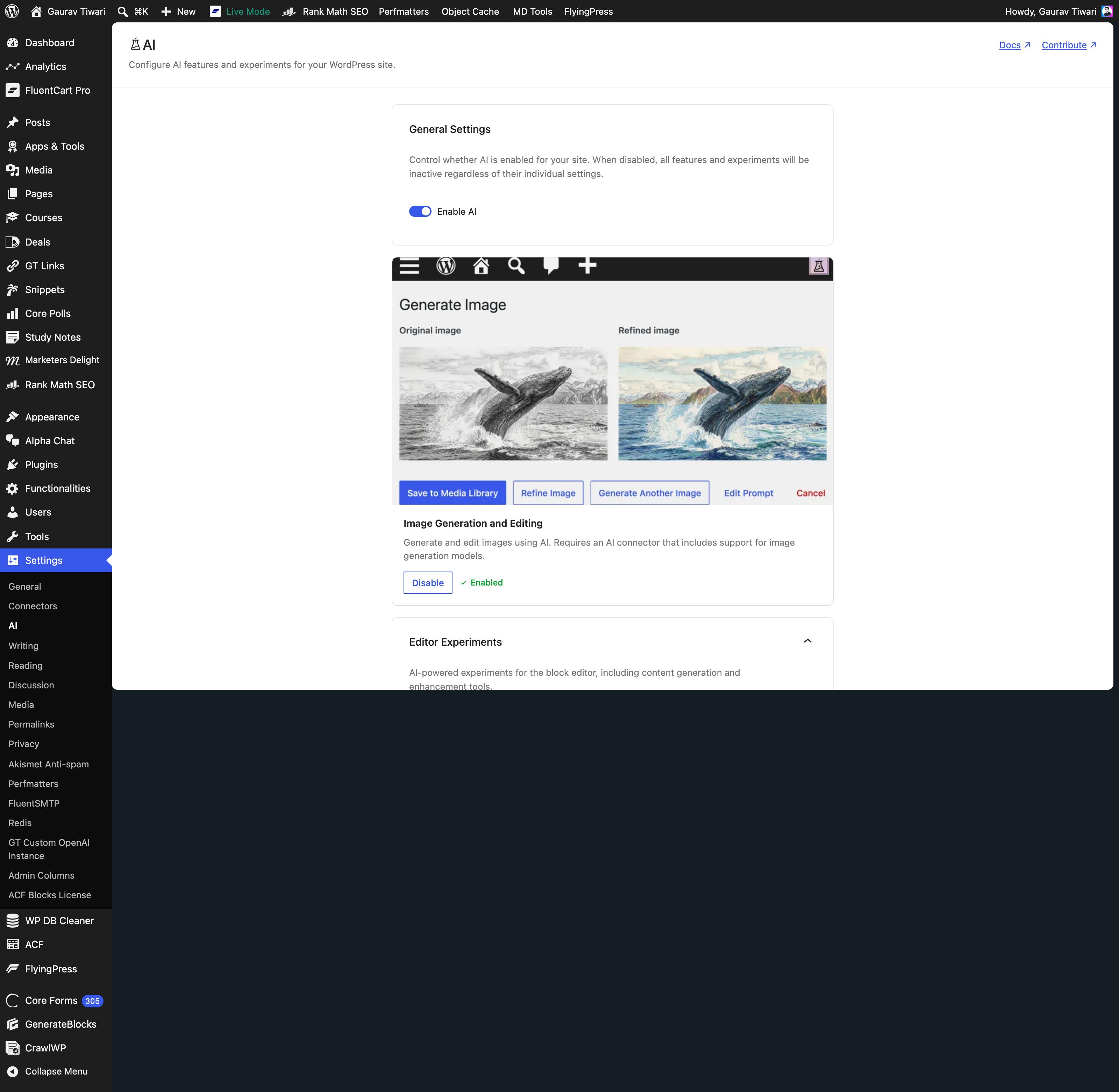
The WordPress Abilities API Is the Real Story
Forget the WordPress AI plugin for a minute. The Abilities API is the part you’ll still care about in five years.
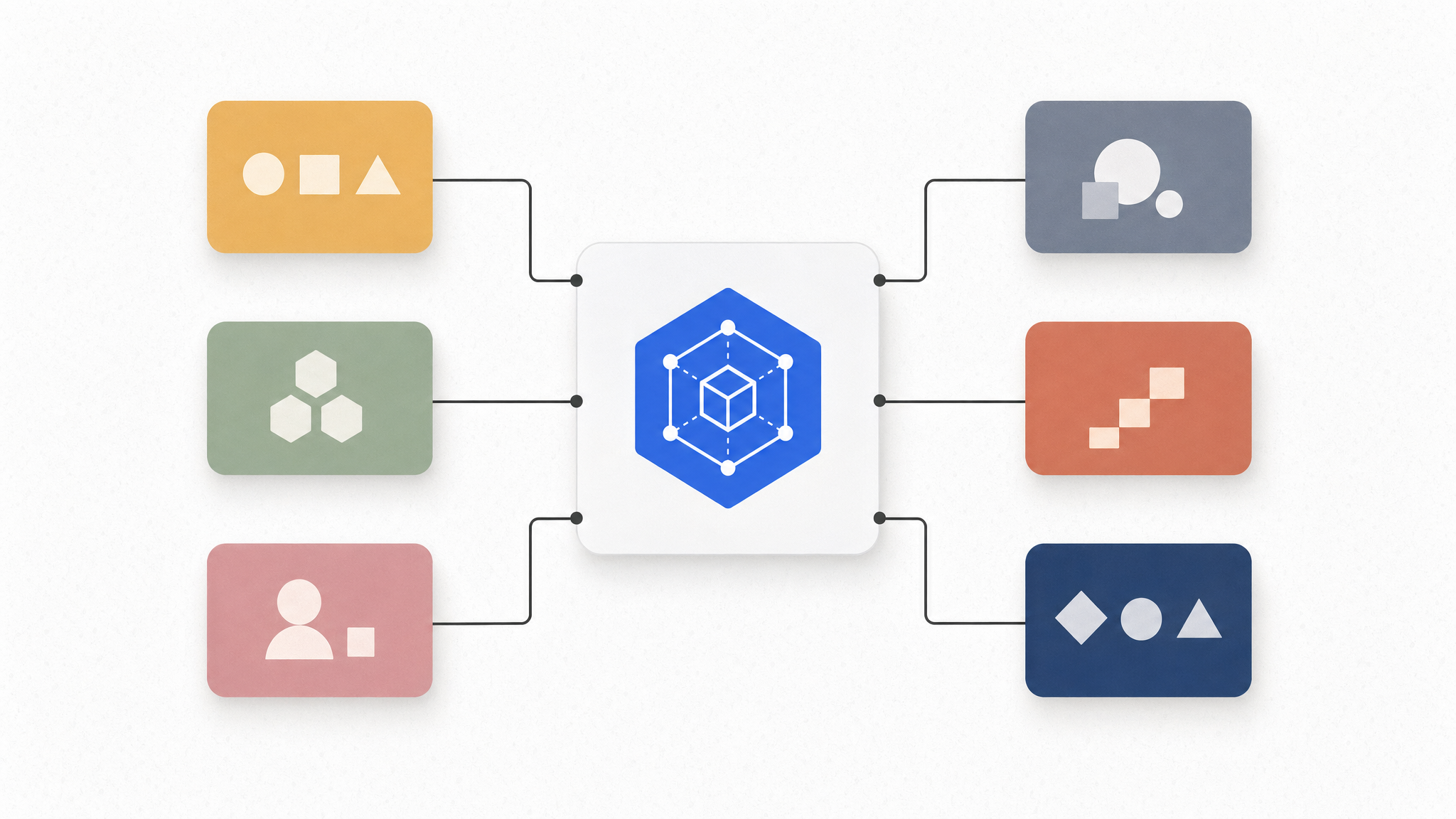
I queried /wp-json/wp-abilities/v1/abilities on this site five minutes ago. The site has 32 registered abilities right now. Three are core. Twenty-nine come from plugins. The categories include site, user, ai-experiments, gt, md-theme, md-page-blocks, akismet. The shape of every ability is the same: a slug, a label, a description, an input schema, an output schema, a permission callback, and a runner. Any client that speaks REST can list them, validate inputs against the schema, and invoke the runner with POST /wp-json/wp-abilities/v1/abilities/{name}/run.
That’s how the AI plugin’s “Generate Excerpt” button works. It doesn’t have its own bespoke endpoint. It calls the ai/excerpt-generation ability. The ability, in turn, calls the ai/get-post-details ability to fetch post context, then routes through the AI Client to whichever provider is configured. Same pattern for title generation, alt text, summarisation, and the rest. The UI is just a thin shell over the abilities.
The implication is bigger than “WordPress now does AI.” Any agent, MCP server, or external integration can discover what a WordPress site can do without hardcoding URLs. A site with FluentCart adds fluentcart/ abilities. A site with Akismet adds akismet/ abilities. The agent doesn’t need to know FluentCart exists. It asks the abilities endpoint and finds out.
This is the substrate for everything WordPress will do with AI for the next decade, and it’s the part the WordPress.org AI team got right. The AI plugin is the demo. The Abilities API is the platform.
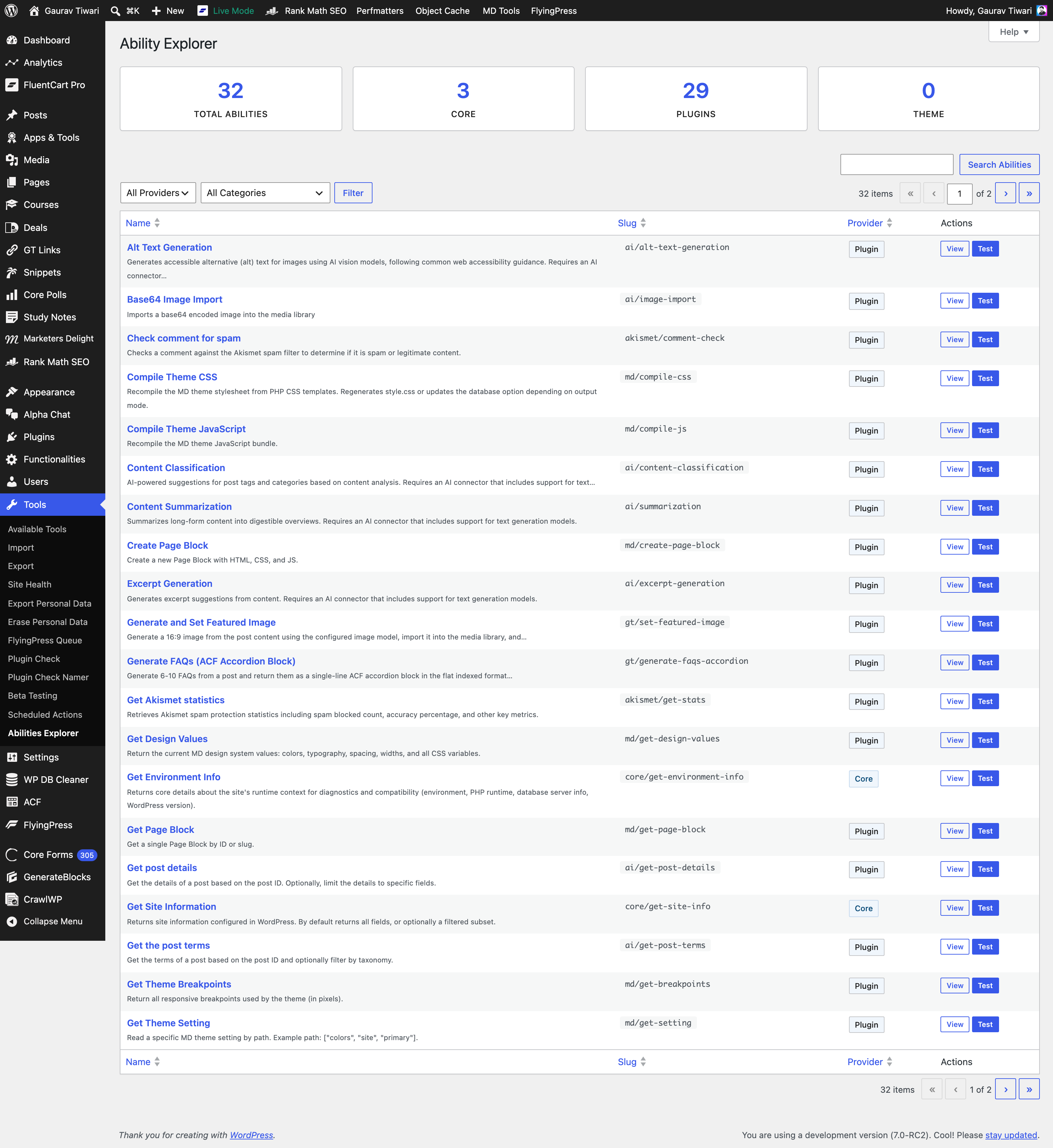
WordPress AI Plugin Features: A Hands-On Tour
Eight months of poking at this codebase, and months of running 7.0 in production on this site. Here’s what each feature does in practice, ranked by how often I actually use it.
Image Generation Inside the Editor
This is the one that earns its slot. From any post in the editor, command palette opens a “Generate Image” dialog that takes a prompt, generates the image through whichever image-capable provider you’ve connected, and lets you refine, regenerate, or save to the media library directly. No leaving wp-admin, no third-party tab, no copy-paste of the URL into a media block. The generated image lands in your media library with an auto-generated alt text and a human-friendly title.
I’ve been using this for in-article diagrams and concept illustrations on technical posts. The latency is two to six seconds depending on the model I’ve selected. The output is the same gpt-image-2-2026-04-21 quality I’d get from the OpenAI dashboard, except now it’s wired into the post I’m writing.
Alt Text Generation in the Media Library
For accessibility, this is the highest-value feature in the pack, full stop. Open any image in the media library, click “Generate Alt Text,” wait two seconds, accept or refine the suggestion. The model sees the image, not the filename, so the output is actually descriptive. I batch-ran this against the last 200 images in the library and the only ones that needed manual edits were screenshots where I wanted to call out a specific UI region the model couldn’t infer from pixels alone.
Title and Meta Description Generation
I’ve been using Rank Math’s AI module for these for a while. The 7.0 native version is competitive. It reads the post body, generates five title candidates and three meta description candidates, and lets you pick or edit. The Rank Math integration takes the chosen meta description and writes it to rank_math_description so I don’t have to copy-paste between fields. If you’re already in the Rank Math ecosystem, the Rank Math review covers why I trust it as the SEO layer; the AI plugin slots into that workflow without friction.
Review Notes
The Review Notes feature is a sleeper. It reads your draft block-by-block and adds Gutenberg notes for accessibility issues, readability flags, grammar suggestions, and SEO opportunities. Unlike Yoast’s binary green/red scoring, these are actual sentences that explain what to fix and why. I disagreed with maybe 30% of the suggestions on the article you’re reading. I accepted the other 70%.
Content Classification
Pick categories and tags from existing taxonomy based on post content. Saves the click-through-the-dropdown step I was doing manually. The model sticks to terms you already have unless you give it permission to create new ones, which is the right default. Last thing anyone needs is an LLM hallucinating new categories on every draft.
Excerpt and Summarisation
Excerpt generation is fine. Summarisation is the one I’ve used least, because if I’ve already written the post I don’t need a summary. The use case is older content where I never wrote one and want to backfill structured data.
WordPress AI Connectors: The WordPress.org Plugin Roster
The WordPress AI plugin is provider-agnostic by design. To do anything useful, you need at least one connector plugin installed and an API key from the upstream provider: OpenAI, Anthropic, Google, OpenRouter, or Mistral. In WordPress 7.0, here’s the official roster of AI connectors on the WordPress.org plugin repository.
| Connector | Author | Version | Active Installs |
|---|---|---|---|
| AI Provider for OpenAI | WordPress.org AI Team | 1.0.2 | 300+ |
| AI Provider for Anthropic | WordPress.org AI Team | 1.0.2 | 800+ |
| AI Provider for Google | WordPress.org AI Team | 1.0.3 | 400+ |
| AI Provider for OpenRouter | Jonathan Bossenger | 1.0.0 | 10+ |
| AI Provider for Mistral | Lauri Saarni | 1.2.0 | 0+ |
The three first-party providers (OpenAI, Anthropic, Google) cover the realistic majority. OpenRouter is the universal-router escape hatch for anyone who wants access to 200+ models behind a single API key. Mistral is the fresh entrant from a community contributor. Small install base, but a decent option if you’re committed to European-hosted inference. All five plugins are GPL-licensed, all are tested up to 7.0, and all sit on the same WordPress\AiClient\AiClient interface so the AI plugin treats all five connectors interchangeably.
The pattern across all five is identical. You install the connector, paste the API key into Settings → AI → Connectors, pick which provider handles which capability (text, image, embeddings, audio), and you’re done. The AI plugin lights up. The Abilities Explorer starts populating with provider-backed abilities. Generate Image, Alt Text, Title Generation. All of them start working.
What’s missing from the official roster: AWS Bedrock, Azure OpenAI, Cohere, Groq, xAI, DeepSeek. I expect community plugins for at least three of those as the ecosystem fills in.
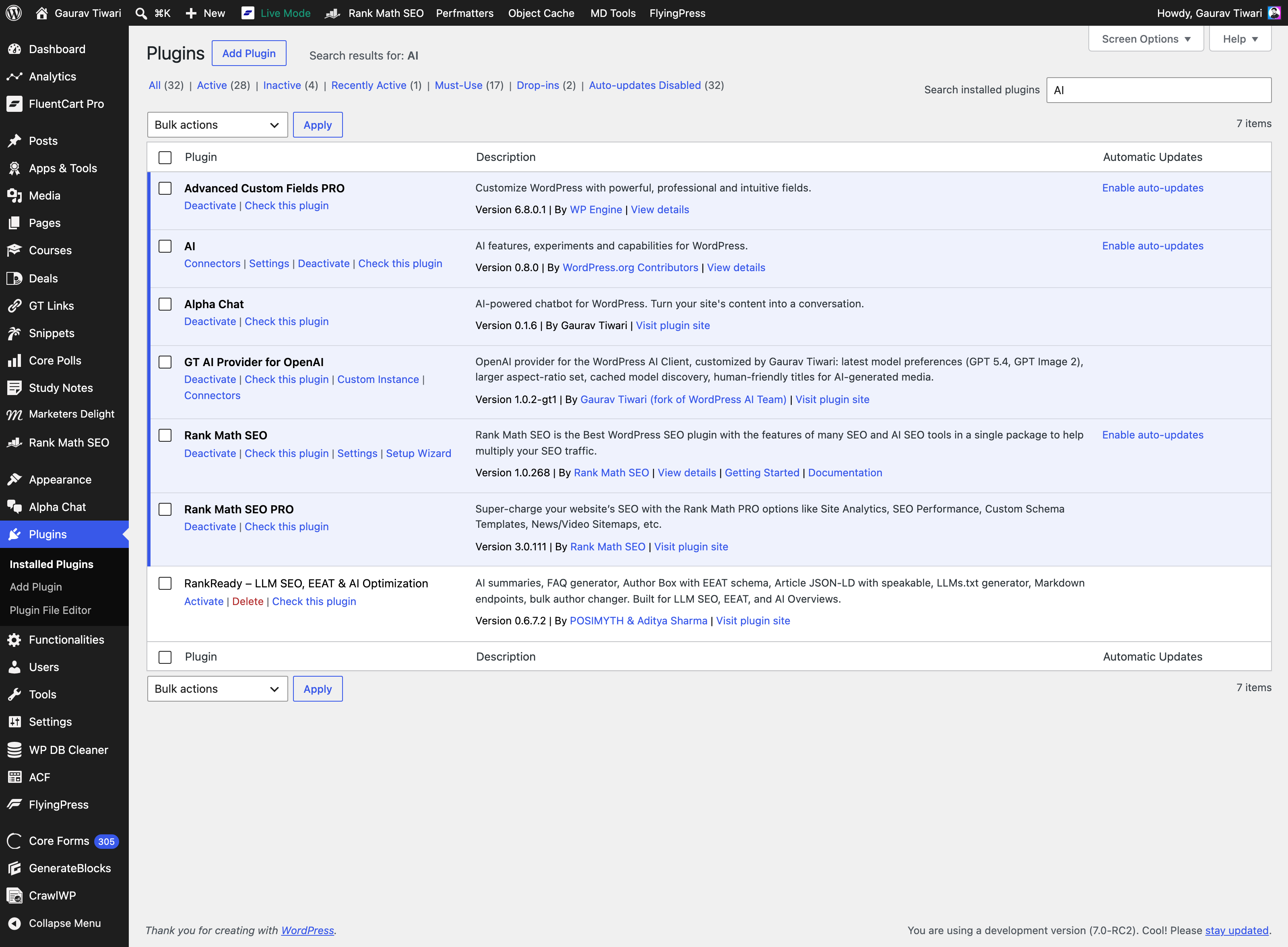
Outside that WordPress.org roster, GT DeepSeek for AI provides a separate DeepSeek route using your own API key. It supports documented text and editorial workflows; it does not generate images or turn text-based ALT suggestions into visual understanding.
GT AI Provider for OpenAI: My WordPress AI Fork
The official ai-provider-for-openai is solid. It’s also conservative about model selection because it has to be. It ships to 300+ sites with mixed needs. I have one site, opinions about which models I want, and the source code right in front of me. So I forked it.
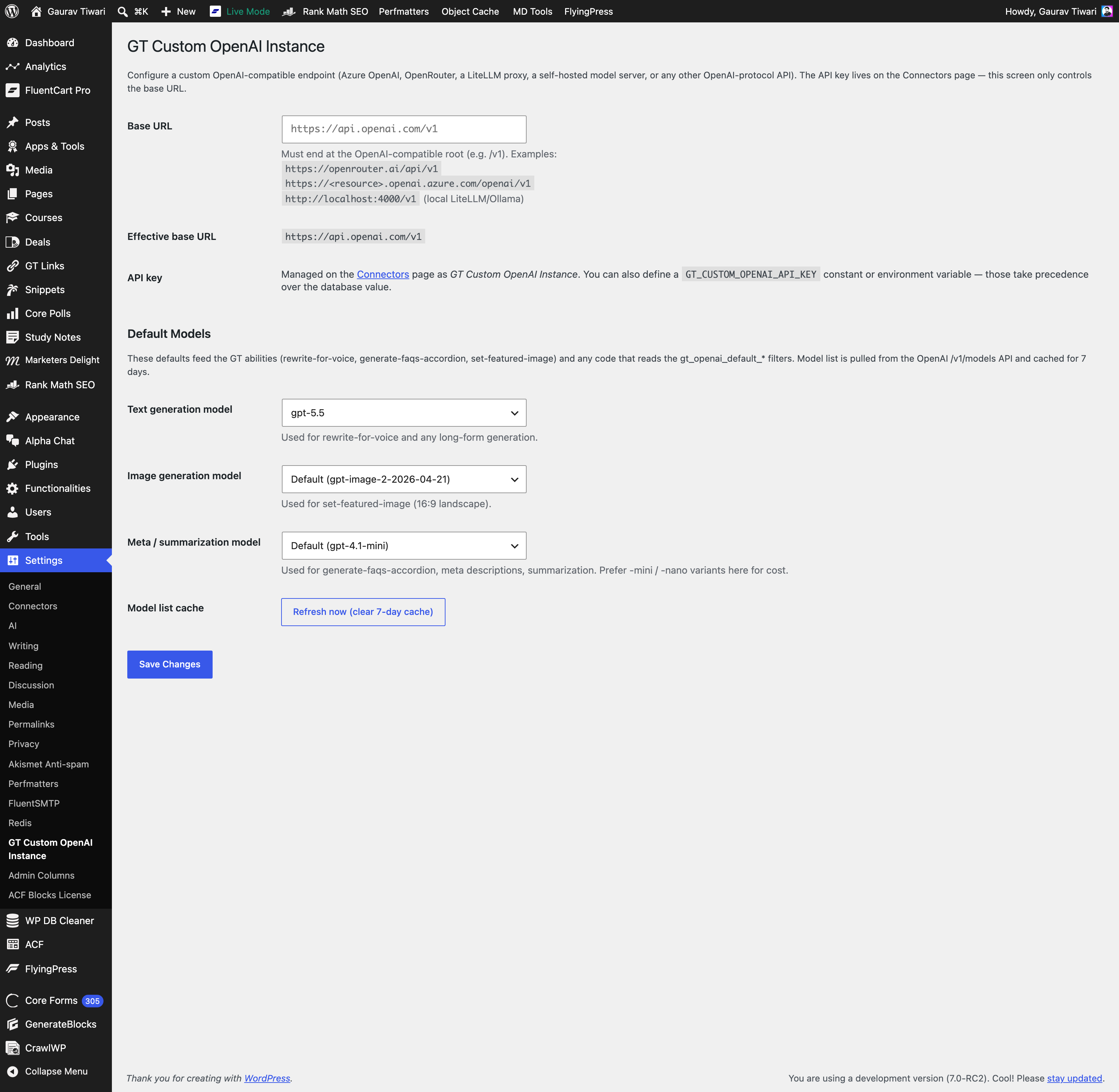
GT AI Provider for OpenAI v1.0.2-gt1 is what’s running on this site. The diff against upstream is intentionally small:
- Latest model defaults. Text generation defaults to
gpt-5.5. Image generation defaults togpt-image-2-2026-04-21. Meta and summarisation tasks default togpt-4.1-minifor cost. The upstream still defaults to older models for safety. - Larger aspect-ratio set for images. Upstream ships 1:1, 3:4, 4:3. My fork adds 16:9, 9:16, 3:2, 2:3. I needed those for blog featured images and social cards.
- Cached model discovery. When the AI plugin asks “what models can this provider serve?” the upstream calls
/v1/modelsevery time. My fork caches the answer for seven days and exposes a “Refresh now” button. Saves a round-trip on every dashboard load. - Custom OpenAI Instance support. A “GT Custom OpenAI Instance” settings page that lets you point the connector at any OpenAI-compatible base URL such as Azure OpenAI, OpenRouter, LiteLLM proxy, vLLM, Ollama on a private network, or your own self-hosted gateway. The API key for the custom instance is configured separately, so you can run the official provider for one workflow and the custom instance for another.
- Human-friendly titles for AI-generated media. Upstream uses the prompt as the title. My fork generates a short, slugified title from the first three to five meaningful words of the prompt, so the media library doesn’t end up with 200 attachments named “create a flat vector illustration of a confident WordPress site owner sitting at a wooden desk.”
That last one is petty. It’s also been the most useful change after a month of daily use.
The fork is open-source, GPL-licensed, and the source lives on GitHub. I’m not submitting it to the WordPress.org repo because the upstream is the canonical version for the average user. If you want my opinionated defaults, you can clone the fork or copy the patches into your own build. If you want the safe path, install the official OpenAI provider and ignore my changes.
Custom WordPress Abilities I Built on Top of the AI Plugin
The Abilities API is interesting precisely because it’s open to your code. I’ve registered nine custom abilities under the gt/ namespace on this site, all visible in the Abilities Explorer screenshot above. The honest list:
gt/stop-slop-scan: runs my stop-slop AI-tells detector against any post content and returns a structured score plus the offending sentencesgt/rewrite-for-voice: rewrites a paragraph or block in my voice DNA, using the voice-dna.md reference as the system promptgt/suggest-internal-links: scans the post for entities, queries the published-articles index for matches, and returns three to five suggested internal links with rationalegt/generate-faqs-accordion: produces 6-8 FAQs as a single-line ACF Accordion block, in the exact format my publishing pipeline expectsgt/set-featured-image: generates a featured image from the post title and excerpt, uploads to media, and sets it as the featured_media on the post in one callgt/tts-readaloud: converts post content to an ElevenLabs V3 audio script with my ElevenLabs voice ID baked ingt/rankmath-meta-sync: syncs Rank Math meta fields from generated AI suggestions, using WP-CLI over SSH because the REST API still has rough edges around Rank Math meta
None of these would exist if I had to build a parallel REST API for each one. The Abilities API gives me a contract, schema validation, REST exposure, and discovery for free. I write the runner, register the ability, and it shows up in the Explorer with a “Test” button. Total wiring code per ability: about 60 lines of PHP including docblocks.
This is what makes 7.0 different from “WordPress added an AI button.” The button is the surface. The API is the substrate. And the substrate is what lets your site become specifically yours instead of generic.
What’s Missing in WordPress 7.0
concrete list. None of these are dealbreakers, but they’re real.
- No streaming output yet. Title generation and excerpt generation return the full string when complete, so on slower providers you sit at a spinner for two to four seconds. Streaming would land that text token-by-token. The AI Client library supports streaming under the hood, the UI hasn’t wired it up.
- No request log / cost dashboard. You can’t see how many tokens you spent yesterday or which features ate your budget. The roadmap says this is coming as the “AI Request Logging & Observability Dashboard,” but it’s not in 0.8.0.
- No comment moderation yet. The roadmap promises AI-assisted comment classification. Akismet’s
akismet/comment-checkability is registered, so the wiring is there, but the moderation UI hasn’t shipped. - No type-ahead in the editor. Roadmap item. I want it. It’s not here.
- Provider switching is per-capability, not per-task. You set “image generation provider” globally. You can’t say “use Anthropic for review notes but Google Gemini for summarisation.” For most sites this is fine. For my use, I’d want it.
- The Abilities Explorer is admin-only. The Explorer is gated to
manage_options. There’s no read-only view for editors or contributors who’d benefit from seeing what abilities are available. I’ll probably patch this locally.
For an experimental plugin in its eighth release, that’s a remarkably short list of complaints.
How I’m Using WordPress AI Tools Day-to-Day
The article you’re reading went through a WordPress-first workflow. Nothing fancy, no third-party agent stack, just the wp-admin you have access to today.
- Draft locally in Markdown. I write every article in a plain Markdown file on my Mac. The keyboard, the file, and the outline from research. No fancy editor pipeline.
- Paste into the WordPress Block Editor. Markdown pastes cleanly into Gutenberg as native blocks: paragraphs become
wp:paragraph, H2s becomewp:heading, lists becomewp:list. Two seconds, no plugins required. - Generate the featured image inside the editor. From the post sidebar, the WordPress AI plugin opens a “Generate Featured Image” dialog. I write a prompt, the OpenAI provider runs it through
gpt-image-2, the output lands in the media library, and the plugin sets it asfeatured_mediaautomatically. Total time: about ten seconds. - Generate in-content images on demand. When a section needs a diagram or illustration, I trigger the editor’s “Generate Image” command from the block toolbar, give it a one-line prompt, refine if needed, and save to media. Same model, same provider, same wp-admin tab.
- Generate alt text in the Media Library. For every uploaded image, whether featured, in-content, or a screenshot, I open the Media Library, click “Generate Alt Text,” and accept or refine the result. The AI plugin reads the image, not the filename, so the output is genuinely descriptive.
- Assign categories with Content Classification. Instead of clicking through the categories meta box, I trigger the AI plugin’s content classification ability. It reads the post body, suggests the closest match from existing categories, and lets me confirm. No new categories get created unless I explicitly authorise it.
- Assign tags the same way. Same classification call, same UX. The model picks from existing tags. Net effect: my taxonomy stays tidy, no AI-hallucinated tags ever land in the database.
- Generate the title and meta description. The plugin reads the finished post, returns five title candidates and three meta description candidates, and writes the chosen meta description straight to the Rank Math
rank_math_descriptionfield. - Run Review Notes on the finished draft. The plugin walks every block and adds notes for accessibility, readability, grammar, and SEO. I accept or dismiss each one inline.
- Publish. Click the button. Done.
That’s the whole workflow. It runs entirely inside wp-admin, uses only the official AI plugin and a connector, and replaces about an hour of manual work per article with about ten minutes of guided AI assistance. The classifier didn’t exist on WordPress 6.9. Neither did the alt-text-from-pixels capability. Both became baseline-cheap because the Abilities API gave the AI plugin somewhere to register against.
Should You Run WordPress 7.0 in Production?
Now that it’s stable, yes. But treat the upgrade with the same respect you’d give any major WordPress version.
I run a managed VPS with proper backups, a staging environment that mirrors production, and database snapshots I can roll back to if anything misbehaves. That’s the setup any major-version upgrade deserves. If you’re on a shared host with one-click installs and no backups, take it slowly: back up first, update on staging, confirm your plugins and theme are happy on 7.0, then push to production. The AI features are additive and opt-in, so nothing forces your hand, but there’s no reason to stay on 6.x either. The WordPress release cycle keeps moving, and 7.0 is where the AI foundation lives.
If you want to start building against the Abilities API, you just need to be on WordPress 7.0 or later, which is now the stable channel. Run it on managed WordPress hosting with a staging environment, install the AI plugin and a connector, and you can register and call abilities today. To keep testing the next wave of AI features before they land, the WordPress Beta Tester plugin still lets you opt into the bleeding-edge channel without a manual core swap.
Verdict: AI in WordPress Has Finally Landed
I called this the most important release since 5.0 in the opening paragraph. I’ll defend that here. Not because the AI features are revolutionary in isolation. They’re not. Every standalone AI plugin in the marketplace already does most of this. The reason 7.0 matters is that WordPress core has finally given developers a clean, opinionated, REST-discoverable substrate for AI integration. The Abilities API is what makes this WordPress release matter.
The WordPress AI plugin v0.8.0 is the proof-of-concept. The connector ecosystem on the WordPress.org plugin repository is healthy enough at launch that you have real choice between OpenAI, Anthropic Claude, Google Gemini, OpenRouter, and Mistral without forking anything. My GT AI Provider for OpenAI fork is one example of how to extend the official OpenAI connector. There will be a hundred forks like it within six months of WordPress 7.0 stable.
If you write content on WordPress, ship WordPress plugins, or build AI agents that touch WordPress sites: this is the release that makes those workflows ten times cheaper to build than they were on WordPress 6.9.
Should you care about AI in WordPress? Yes, more than you think.
Frequently Asked Questions
Do I need WordPress 7.0 to use AI features in WordPress?
The AI plugin works on WordPress 6.9 and above, but the Abilities API ships natively in 7.0. On 6.9 you get the AI plugin features (image generation, alt text, summarisation, etc.) but not the discoverable abilities endpoint that makes the system extensible. For full functionality, run WordPress 7.0 or stay on the latest beta channel via the WordPress Beta Tester plugin.
Which AI provider should I use with the WordPress AI plugin?
If you already pay for one of the major three, use that. Anthropic Claude is the strongest for review notes and editorial review. OpenAI is the strongest for image generation (gpt-image-2 is the model behind every featured image on this site). Google Gemini is the cheapest for high-volume summarisation and meta description work. The AI plugin lets you mix and match per capability, so a sensible default is Anthropic for text and OpenAI for images.
Is the WordPress AI plugin free?
Yes. The AI plugin and all five official provider connectors on the WordPress.org repository are 100% free and GPL-licensed. The cost is the API tokens you spend on the provider you connect. OpenAI, Anthropic, and Google all bill per request. Expect $5 to $20 per month for a personal site with regular publishing, more if you run image generation aggressively.
Can I use the WordPress Abilities API without the AI plugin?
Yes, and you should. The Abilities API is a generic registration system that ships in WordPress 7.0 core. It’s not AI-specific. Any plugin can register abilities for any kind of action, and any client can discover and run them via the REST API at /wp-json/wp-abilities/v1/. The AI plugin is just the most prominent consumer of the API in 7.0.
What’s the difference between AI Services and the new AI plugin?
AI Services (v0.7.4 by Felix Arntz) was the predecessor library that proved the multi-provider abstraction could work in WordPress. It’s still maintained but the WordPress.org AI team has consolidated the official direction around the AI Client library and the new AI plugin. New projects should target the AI plugin and its provider connectors. Existing AI Services integrations will continue to work but won’t get the Abilities API integration.
How do I add a custom AI ability to my WordPress site?
Call wp_register_ability() with a slug, label, description, input schema, output schema, permission callback, and execute callback. Drop the call inside an init or wp-abilities-init hook in a custom plugin or your theme’s functions.php. The ability will appear in the Abilities Explorer immediately and become callable at /wp-json/wp-abilities/v1/abilities/{slug}/run. Total code per ability is roughly 50 to 80 lines of PHP including the schema definitions.
Is GT AI Provider for OpenAI on the WordPress.org plugin repository?
No. The fork is GitHub-only, GPL-licensed, and free for anyone to clone or self-host. I’m not submitting it to WordPress.org because the official AI Provider for OpenAI is the canonical version for the average user. The fork exists for me and for developers who want my opinionated defaults, including latest model preferences (GPT 5.5, gpt-image-2), cached model discovery, expanded aspect ratios, and human-friendly media titles. Install the official one if you want safety. Clone the fork if you want my preferences.
Tell Google you want more of this.
Add Gaurav Tiwari as a preferred sourceOne tap, and this site shows up more often in your own Top Stories, AI Overviews and AI Mode. Remove it any time.