
 by
by
GA4 kept giving me more reporting options and less of the answer I opened it to find: which article brought the right visitors, what they did next, and whether the change mattered. I was spending more time assembling reports than reading them.
Independent Analytics put that answer inside WordPress. The page, referrer, campaign, and journey reports are visible without building an exploration or sending reader data to a separate Google account.
I now use Independent Analytics for daily decisions on my WordPress sites and keep GA4 only where advertising, cross-platform measurement, or a client requirement justifies the extra machinery. That is the boundary of this review: simpler editorial analytics, not a universal replacement for Google’s entire measurement stack.
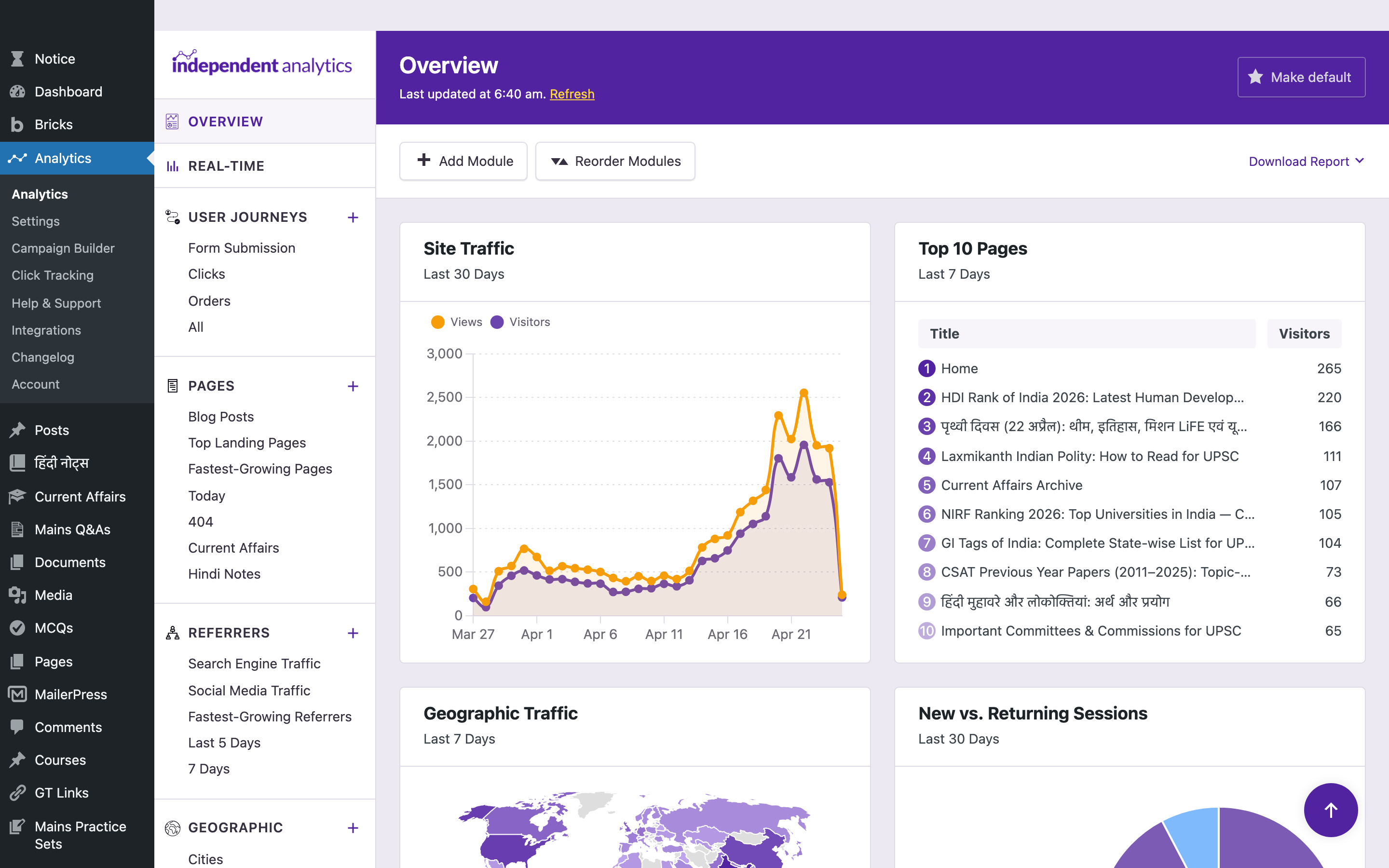
Independent Analytics is a privacy-friendly WordPress analytics plugin that lives inside wp-admin and stores every pageview in your own database, with no cookies and no Google account. This review is the honest verdict on whether it can replace Google Analytics 4 for your site, who it fits, and who should skip it.
Verdict: Independent Analytics is the analytics tool I’d pick for most WordPress sites in 2026. Buy it if you want privacy-friendly, in-dashboard, self-hosted analytics that counts the 15-30% of traffic GA4 loses to adblockers, with no cookie banner and a one-time annual price that doesn’t scale with traffic. Skip it if you live inside the Google Ads ecosystem, run non-WordPress properties, or need 5-step funnels and heatmaps in one tool. Verdict reached after running the Pro version on every site I personally own and most client sites for eight months.
How I tested: I ran Independent Analytics Pro daily for eight months across roughly a dozen properties, including gauravtiwari.org and a live UPSC content site doing 2,000 to 3,000 daily visitors, with GA4 running side by side for a direct traffic comparison. I bought the Agency lifetime license at $597 with my own money. Every screenshot below is my real data.
| Pros | Cons |
|---|---|
| Captures 15-30% more traffic than GA4 because the tracker runs server-side and ignores adblockers, ITP, and consent rejections. | No drag-and-drop funnel builder yet. User Journeys plus filters get close, but it’s not GA4 funnels. |
| Lives entirely inside wp-admin. No external dashboard, no second login, no API key, no JavaScript snippet adblockers can nuke. | No A/B testing or heatmaps. Pair it with Microsoft Clarity (free) or Hotjar for that layer. |
| Cookie-free and GDPR/CCPA compliant out of the box, so there’s no consent banner to show. | Geo precision tops out at city level. Fine for marketing, not for fraud detection or geo-fencing. |
| Every Pro feature ships on every paid tier. The Agency lifetime at $597 covers unlimited sites and never bills again. | Dashboard density assumes a 1440px+ screen. On a 13-inch laptop you’ll horizontal-scroll the wider reports. |
- vs Google Analytics 4: Independent Analytics wins on accurate numbers, data ownership, and no cookie banner. GA4 wins only if you need Google Ads attribution, BigQuery export, or cross-channel retargeting.
- vs Plausible: Independent Analytics keeps the data on your server at $199/year unlimited. Plausible costs $59/month at 1M pageviews but tracks non-WordPress properties from one dashboard.
- vs Fathom: Independent Analytics adds per-post stats, forms, eCommerce, and click tracking inside wp-admin. Fathom is the cleaner standalone SaaS counter if you don’t want anything in your database.
Who Should Not Use Independent Analytics
Skip Independent Analytics if you depend on the GA4 ecosystem and its API, need real-time event funnels, or want Google’s free cross-product integrations. For those needs, GA4 with Google Tag Manager stays the right tool, and you should run Independent Analytics alongside it for accurate numbers rather than instead of it.
Ad agencies that report to Google Ads. GA4 is still the source of truth for Google Ads attribution. If you live inside the Google Ads ecosystem, you need GA4. Run Independent Analytics alongside it for accuracy, but don’t rip out GA4.
Multi-platform brands tracking Shopify, mobile apps, SaaS dashboards, and WordPress. Independent Analytics is WordPress-only. For unified cross-platform analytics, look at Plausible, Fathom, or Matomo Cloud.
Teams that need 5-step funnels, A/B tests, and heatmaps in one tool. Use Matomo, or pair Independent Analytics with Microsoft Clarity for the heatmap layer.
Sites with existing GA4 setups that work. If GA4 is solving your problems, don’t switch for switching’s sake. Independent Analytics is the right answer when GA4 is the wrong tool, not a replacement for the sake of it.
What Independent Analytics Actually Does
Independent Analytics records pageviews, sessions, and visitors directly in your WordPress MySQL database using a deferred REST API request. No Google. No external server. No JavaScript snippet that adblockers nuke before it fires. The data lives on your host, and it shows up as a menu item in wp-admin called “Analytics.”
That’s the architecture. Now the practical part.
The plugin gives you twelve report types in one interface: Overview, Real-Time, Pages, Referrers, Geographic, Devices, Campaigns, Click Tracking, eCommerce, User Journeys, Forms, and Authors. Pro unlocks Real-Time, Campaigns, Click Tracking, eCommerce, User Journeys, Forms, the Overview dashboard with custom modules, Solo Reports, and Email Reports. The free tier still gives you Pages, Referrers, Geographic, and Devices with no pageview cap, no site cap, no nag screen the size of a billboard.
Independent Analytics counts about 15 to 30 percent more traffic than Google Analytics 4 on the same sites. Same period, same filters. The gap is the adblocker tax, the iOS Safari ITP tax, and the consent-banner-rejection tax. GA4 sees what visitors let it see. Independent Analytics sees what actually happened, because the tracker runs server-side and doesn’t drop a cookie a privacy extension can refuse.
That single fact is why I’m writing this Independent Analytics review.
Pricing: Honest, Boring, Cheap
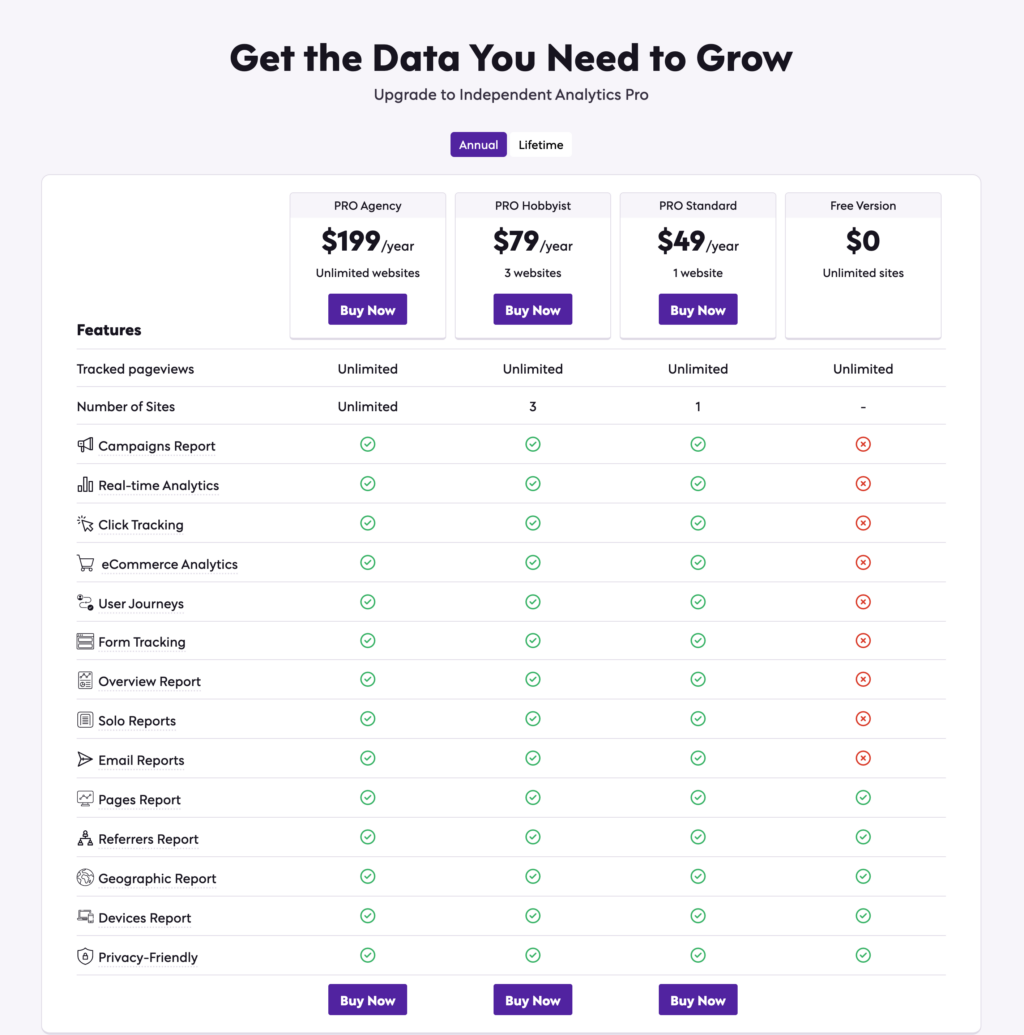
Independent Analytics keeps pricing simple, and has unlimited sites + lifetime licenses available.
Annual:
- PRO Standard: $49 per year, 1 site
- PRO Hobbyist: $79 per year, 3 sites
- PRO Agency: $199 per year, unlimited sites
Lifetime:
- PRO Standard: $147 one-time, 1 site
- PRO Hobbyist: $237 one-time, 3 sites
- PRO Agency: $597 one-time, unlimited sites
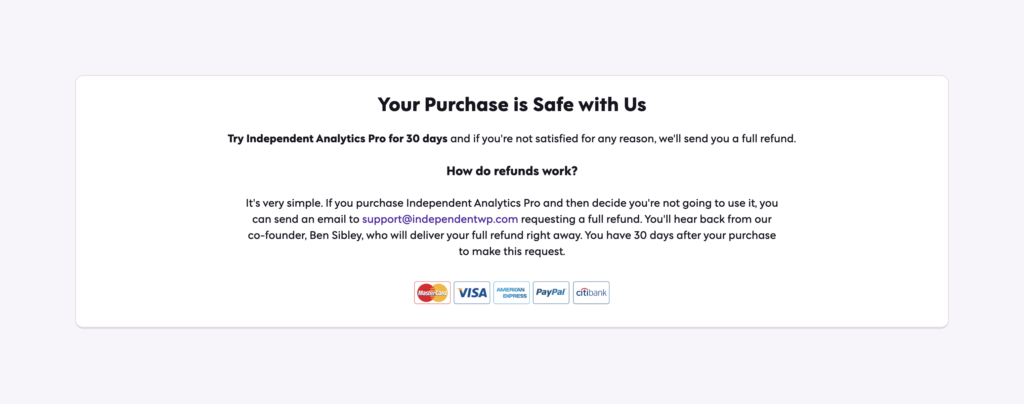
Every tier ships every Pro feature. The only thing that changes between tiers is the site count. There’s a 30-day money-back guarantee, and the free .org version stays unlimited on sites and pageviews forever.
It’s the same pricing posture FlyingPress takes, and I trust it for the same reason: no surprise feature gating six months in.
For comparison, Plausible Analytics charges $9 a month for 10,000 monthly pageviews and scales up from there. At 1 million pageviews, Plausible costs $59 a month, or $708 a year. Independent Analytics Agency is $199 a year for unlimited sites, unlimited pageviews. That’s not a small difference. That’s three times the value, paid once a year, with the data staying on your own server.
If you run more than three sites, the Agency lifetime at $597 pays for itself in three years and never bills again. I bought the lifetime tier and stopped thinking about it.
Why I Switched From Google Analytics 4
I want to be precise about what GA4 actually broke for me, because vague complaints about Google are a dime a dozen.
Complaint 1: GA4 takes more time to read than to build the website. I have to open Reports, then Engagement, then Pages and screens, then change the date range, then add a filter, then realize I want to compare to last week and start over. With Independent Analytics, I open the Pages report, pick the period from a dropdown, and I’m done.
Complaint 2: GA4 misses 15-30% of traffic. Run a privacy-respecting analytics tool side by side with GA4 for a week. The gap is real. On my site, GA4 reports about 18,000 monthly visitors. Independent Analytics reports about 23,000 on the same period, same filters. That’s not a rounding error. That’s content I assumed wasn’t working that was actually getting read.
Complaint 3: Cookie banners suck. GA4 needs a consent banner under GDPR. Independent Analytics doesn’t track personal data, doesn’t use cookies, and is GDPR-compliant out of the box. One less popup the visitor has to dismiss. One less compliance headache. (If you still need a consent layer for other tags, I cover that stack in my Cookiebot review.)
Complaint 4: Sampling. Once you cross GA4’s data thresholds, your reports start showing sampled data. Independent Analytics never samples because the data is yours and lives in your database. What you see is what happened.
Complaint 5: I can’t see analytics next to the post. In GA4, looking at how a single blog post is performing means leaving WordPress, finding the URL filter, and praying GA4 hasn’t renamed the report this quarter. Independent Analytics shows view counts inside the post editor, in the post list table, and in a dedicated Pages report. Three clicks total.
I didn’t quit GA4 because I’m a Google hater. I quit because the tool stopped helping me make decisions.
My Independent Analytics Setup
Here’s what’s actually running on the sites I’m using for this review. The screenshots come from a new and live UPSC content site with about 2000-3000 daily visitors that I run alongside gauravtiwari.org and a handful of client properties.
The Real-Time Report
Real-Time refreshes every ten seconds and counts anyone who’s loaded a page in the last five minutes. It shows live visitor count, the pages they’re on, where they came from, the country they’re in, and a 5-minute and 30-minute chart underneath.
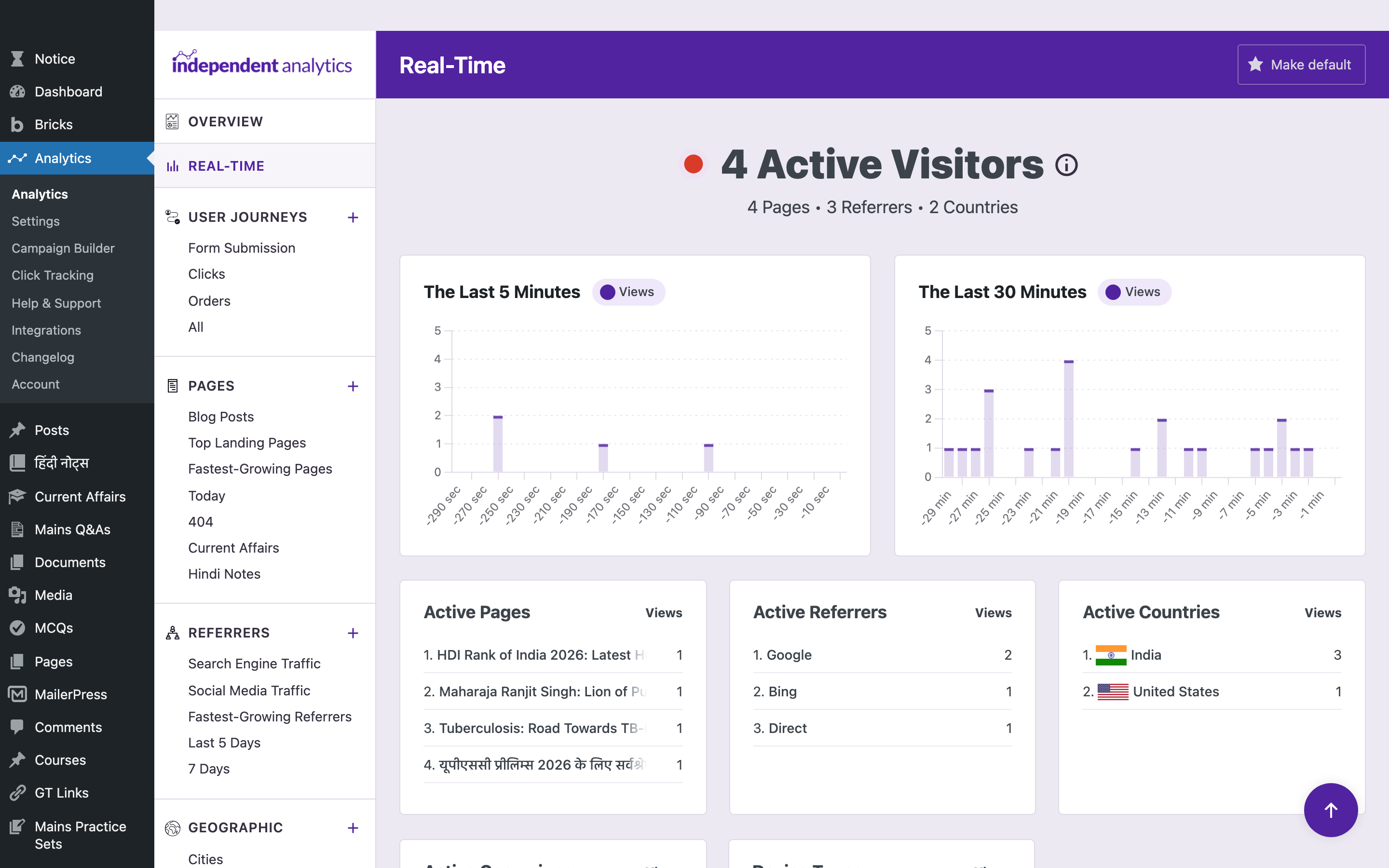
I use this exactly twice a day. Once when I publish, to confirm the post is actually loading and being clicked. And once when something goes viral on Reddit or Hacker News and I want to watch the wave hit. That’s it. Real-time analytics is not a productivity tool. It’s a checkpoint, and Independent Analytics gets it right by keeping it boring and accurate.
GA4’s Realtime report shows the same data buried under three submenus and rounded into a 30-minute window. Independent Analytics ships the 5-minute and 30-minute window side by side on the same screen.
The Pages Report
This is the report I open most. It shows visitors, views, sessions, average session duration, bounce rate, and views per session, all anchored against the previous period with a percentage delta in green or red.
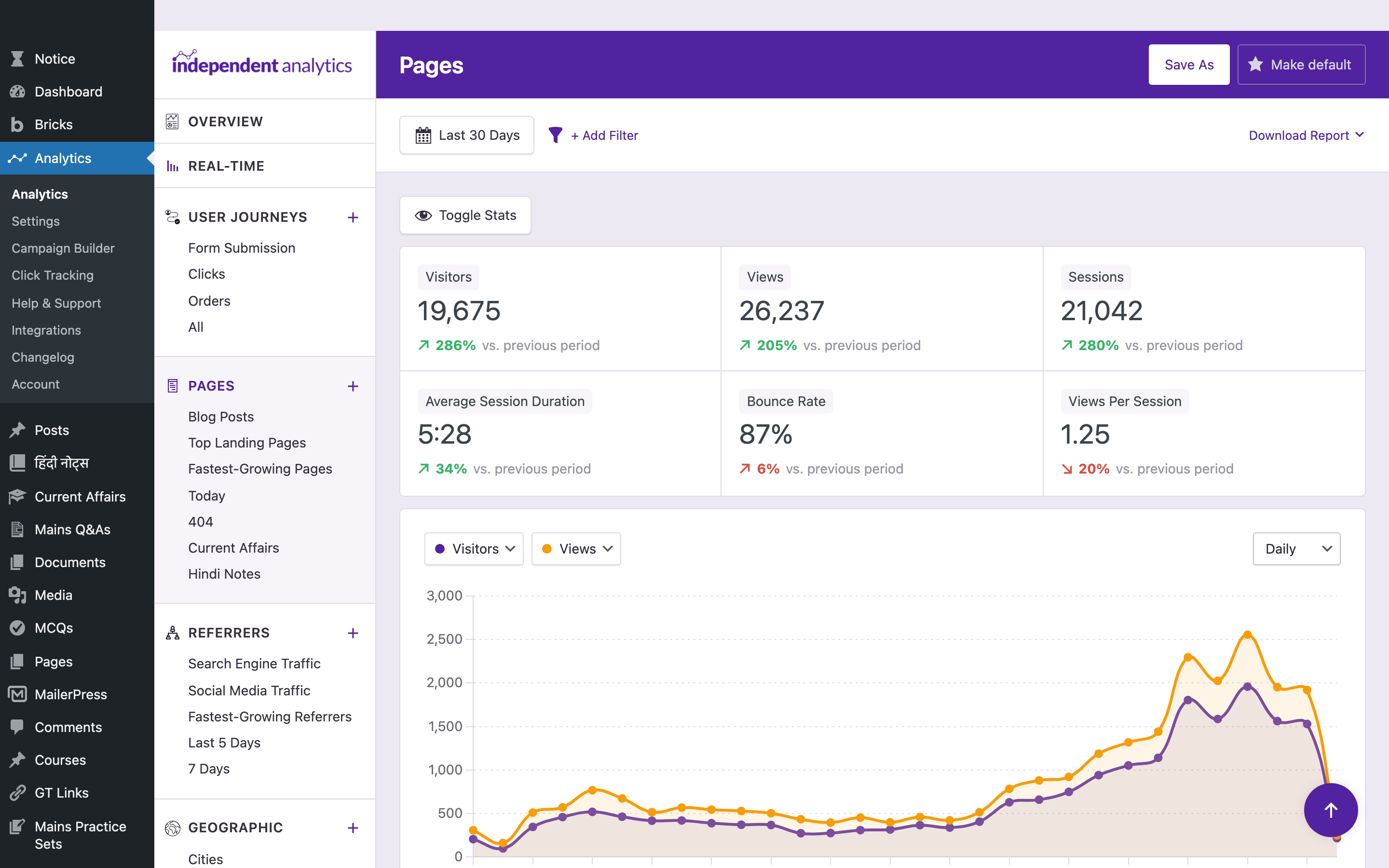
Last 30 days: 19,675 visitors, 26,237 views, 21,042 sessions, 5:28 average session duration, 87% bounce rate, 1.25 views per session. The “+286% vs previous period” annotation tells me the site nearly tripled its traffic month over month, which matches the publishing burst that drove it.
Underneath the chart, I get a table of every page sorted by visitors, with a click into per-post detail. This is where the GA4 comparison breaks down completely. Pulling this same view in GA4 takes a custom Explorations report, and the metric definitions don’t quite map.
The Geographic Report
The Geographic report renders a country-level heatmap of where your visitors live, with a stats grid above and a sortable table of countries underneath. Click a country and you get the cities. Add a filter and you get traffic by country combined with referrer, device, or campaign.
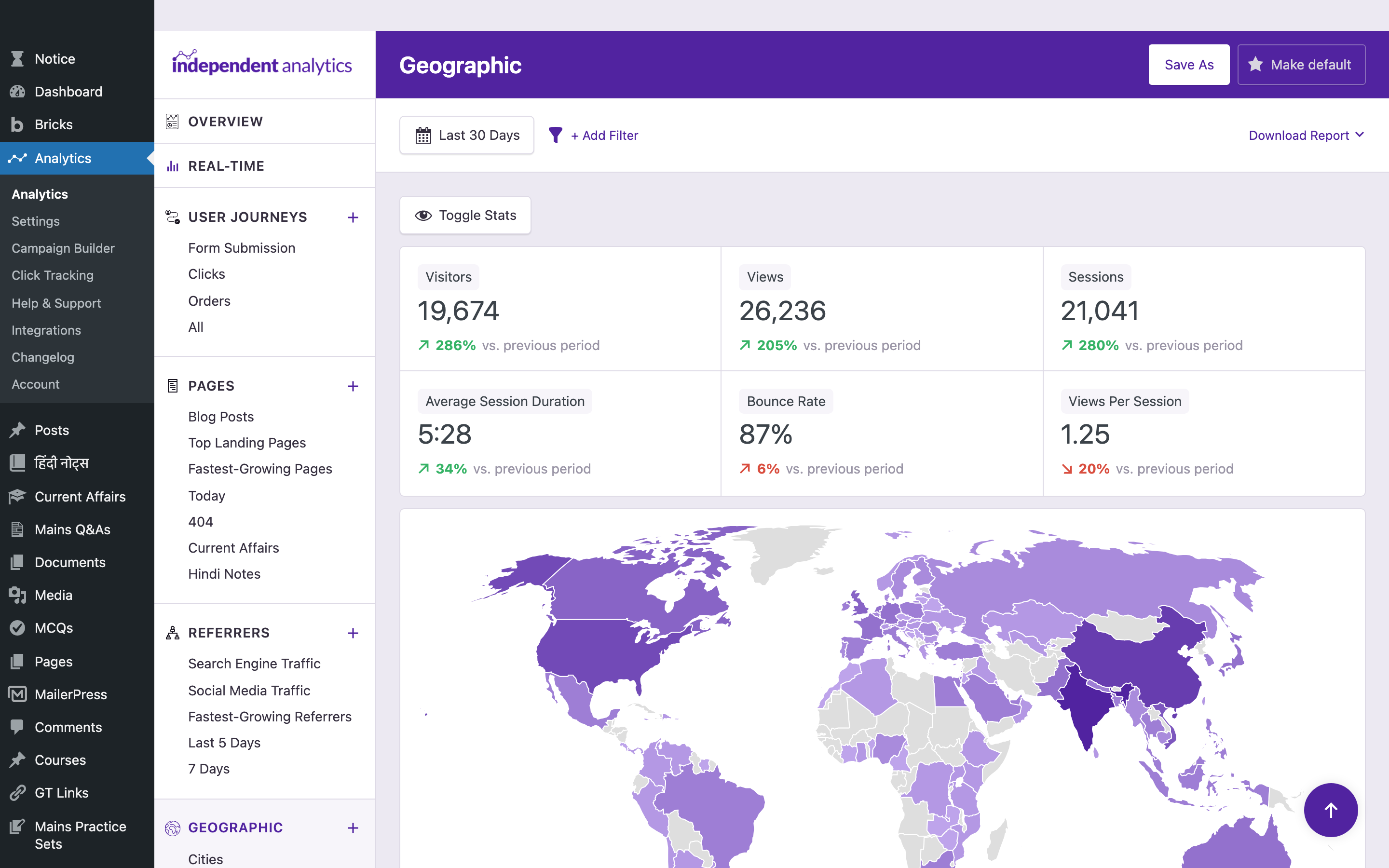
The geolocation lookups are powered by DB-IP, credited in a small attribution line at the foot of the Geographic report (“Geolocation data powered by DB-IP”). The bundled snapshot updates with every plugin release. It’s good enough for marketing decisions. It is not GeoIP-grade for fraud detection, and Independent Analytics doesn’t pretend it is.
User Journeys: The Standout Feature
User Journeys is the report I expected to ignore and now check daily. It shows you a session-by-session timeline of what visitors actually did on your site. Landing page, referrer, UTM source, every subsequent page they viewed, time on each page, every click they made, every form they submitted, every order they placed.
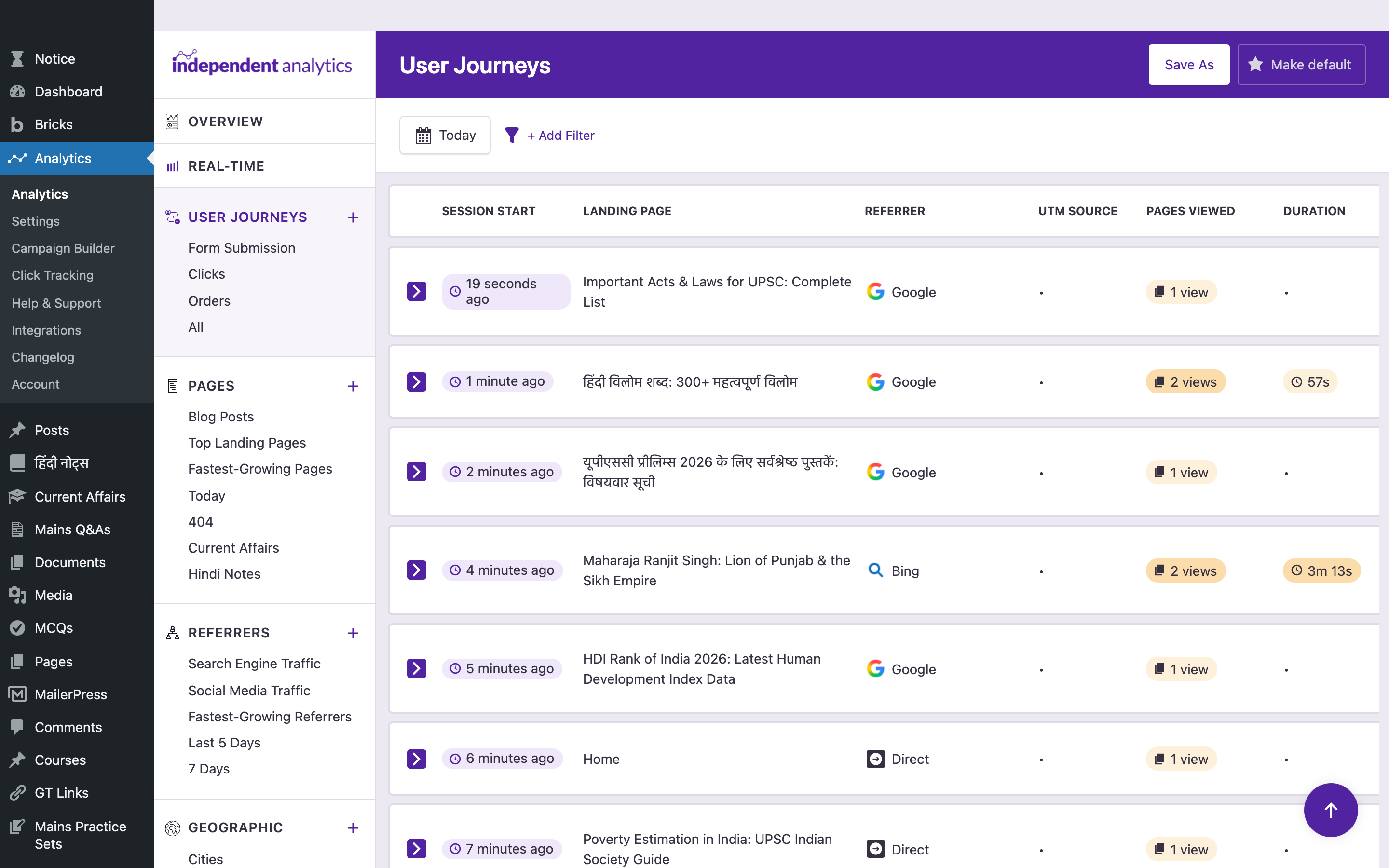
That screenshot shows my actual data. A visitor landed on “Important Acts & Laws for UPSC: Complete List” from Google 19 seconds ago, viewed one page, and bounced. Another came from Bing, landed on “Maharaja Ranjit Singh: Lion of Punjab,” viewed two pages, and stayed three minutes thirteen seconds.
That’s session replay without the privacy nightmare. Hotjar charges $80 a month to show you something less complete than this. Microsoft Clarity gives it away free, but it ships your visitors’ data to Microsoft and only works through a JavaScript snippet adblockers will block. Independent Analytics gives you the same insight, server-side, in your own database, included in the Pro license.
User Journeys shipped in version 2.14.0 in January 2026. It’s a two-person team’s biggest release of the year, and it’s the feature that single-handedly made me commit to lifetime.
UTM Campaigns and the Campaign Builder
The Campaigns report breaks down every visit that hit your site with a UTM-tagged URL. Visitors, sessions, conversions if eCommerce is hooked up, average order value, earnings per visitor. Filter or regroup by source, medium, campaign, content, or term.
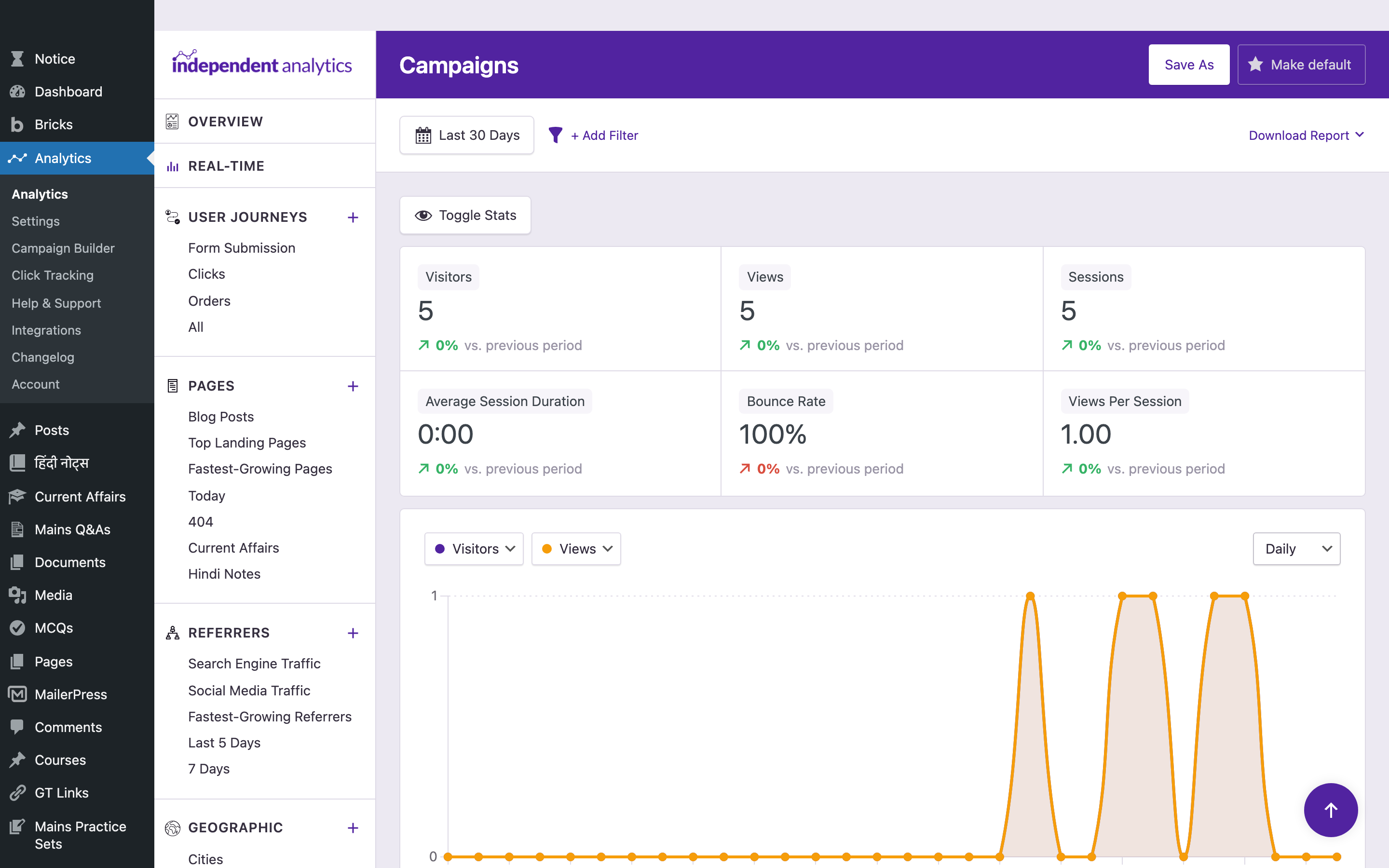
The Campaign Builder is a separate page that constructs UTM-tagged URLs without you having to remember the parameter names. You paste a destination URL, fill in five fields, save the URL for re-use, copy. It’s exactly the tool every marketer cobbles together in a spreadsheet, except now it lives next to the report that consumes it.
That tight loop, build the URL, ship it, see the conversion in the same dashboard, is the difference between using UTM tagging and pretending you’re going to use UTM tagging.
Click Tracking with Link Patterns
Click Tracking is the marketing feature I underestimated until I started using it.
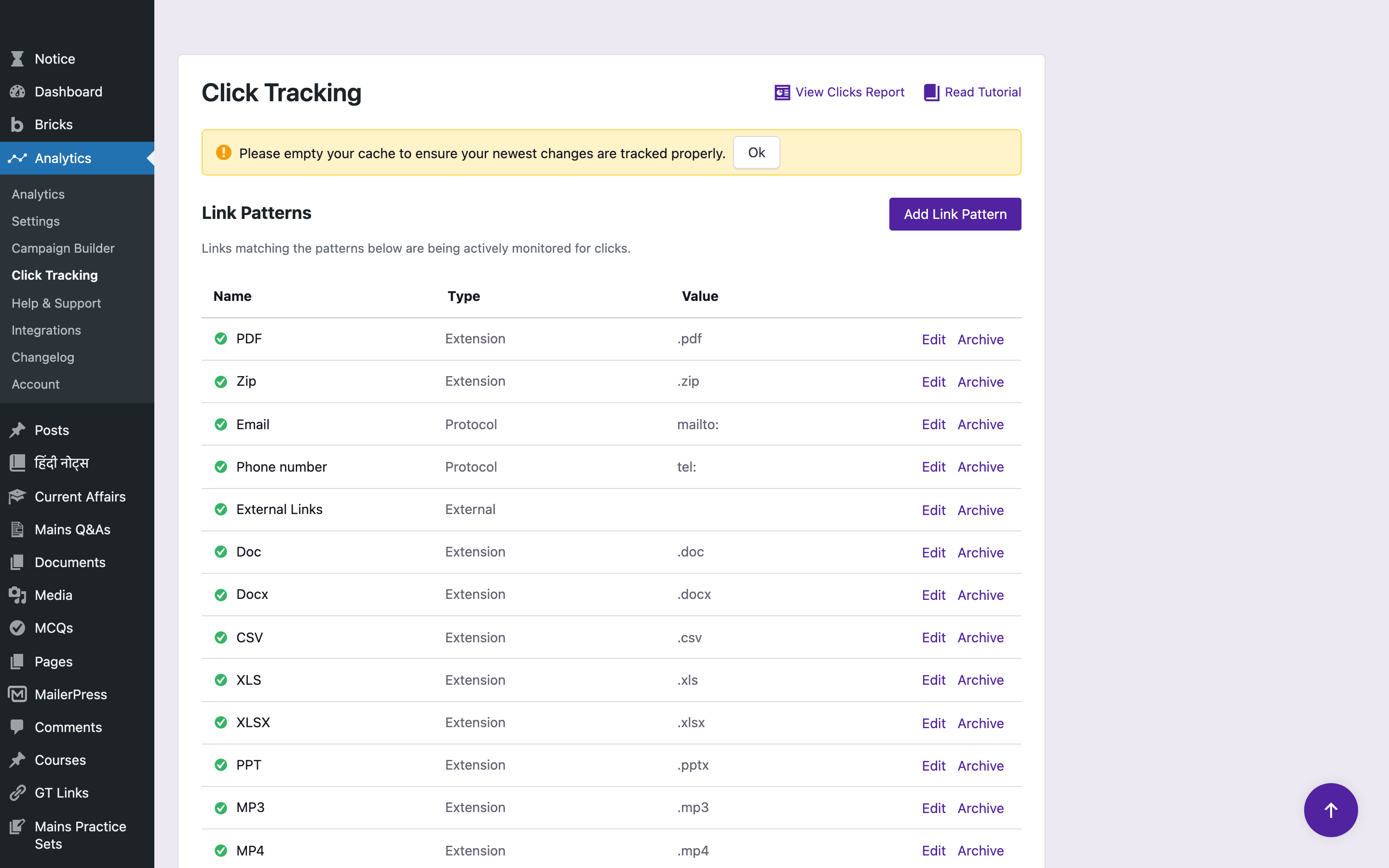
Instead of asking you to tag every link manually, you define “patterns” and the plugin tracks every click that matches. The default patterns cover PDF, ZIP, DOC, DOCX, CSV, XLS, XLSX, PPT, MP3, MP4, mailto, tel, and all external links. You add custom patterns for things like a specific affiliate redirect path, a CSS class, a subdirectory, or any external domain.
For me, the magic pattern is /go/. That’s the URL prefix my GT Link Manager plugin uses for affiliate redirects. One pattern, and now every affiliate click on the site flows into the Click Tracking report with the destination, the source page, the visitor’s country, and the referring traffic source. I used to need three plugins for this. Now I need none.
Click data is buffered to a file and synced to the database every 60 seconds, so it doesn’t slow the page response. That’s the same architecture FlyingPress uses for cache logging, and it’s the right choice.
eCommerce, Forms, and the Integrations Page
If you run a store or capture leads, the Integrations page is where you’ll spend ten minutes and never look again.
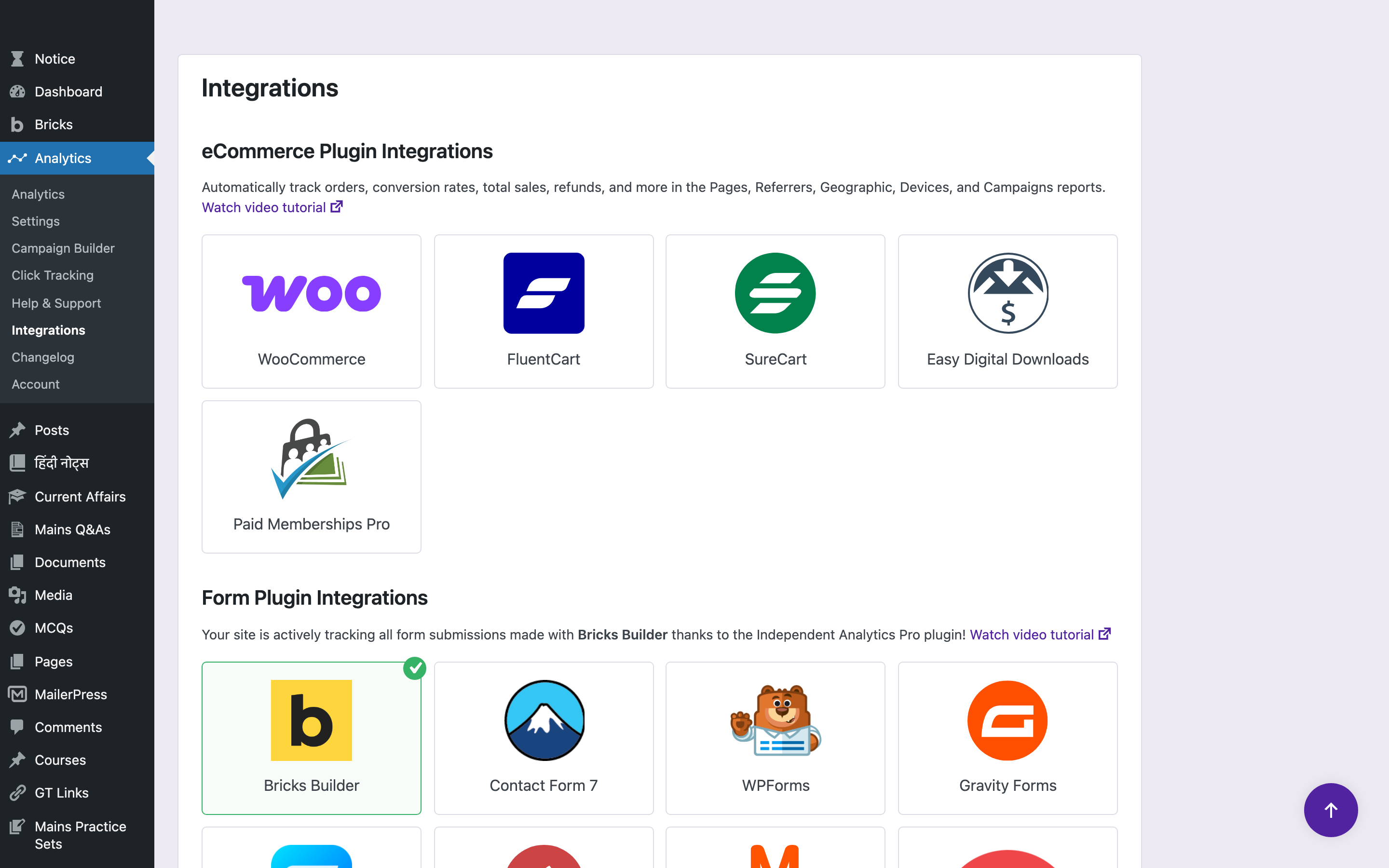
Out of the box, eCommerce tracking auto-detects WooCommerce, FluentCart, SureCart, Easy Digital Downloads, and Paid Memberships Pro. You enable the integration with one click. Orders, gross sales, total sales, conversion rate, average order value, earnings per visitor, refunds, all attributed back to the landing page that drove the session, not to the product page or checkout. That last detail matters. Most analytics tools tell you “the cart page converted.” Independent Analytics tells you “the blog post that drove the user to the cart converted.”
Form tracking covers more than 20 form plugins. Contact Form 7, WPForms, Gravity Forms, Fluent Forms, Formidable, Forminator, Elementor Pro, Ninja Forms, Divi, Bricks Builder, Convert Pro, MailOptin, MC4WP, Newsletter, Kadence Blocks, Everest Forms. Submissions show up in Forms reports and inside User Journeys. Custom forms get tracked with one PHP hook.
The integrations page is a wall of logos with green checkmarks on the ones that auto-activated. It’s the cleanest “this plugin works with your stack” UX I’ve seen in WordPress.
The Marketing Stack You Already Paid For
Pull these features apart from the analytics half and you’re looking at a marketing stack you’d otherwise stitch together from four plugins.
UTM tracking would be MonsterInsights at $199.50 per year. Click tracking would be Pretty Links Pro at $99 per year, or ThirstyAffiliates Pro at $79 per year. Form analytics would be the form plugin’s add-on, usually $50 to $100 per year per form plugin. eCommerce attribution would be Enhanced eCommerce setup in GA4, which technically costs nothing and practically costs your weekend.
Stack the cheap versions of those four and you’re at $400+ a year. Independent Analytics Agency runs $199 a year, or $597 lifetime, and it’s all one dashboard.
That’s the part the marketing copy on independentwp.com undersells. They lead with “Get Analytics You Understand,” which is true but quiet. The louder pitch is: it’s a marketing stack that happens to come with analytics.
What’s Under the Hood
A few things I dug into because the architecture matters when you’re going to bet your data on a small team.
Storage: Everything lives in your site’s MySQL database in a few custom tables. Independent Analytics estimates 200 to 300 MB per million sessions, which I can confirm roughly matches what I’m seeing. The plugin includes auto-delete settings to age out old data, which keeps the table size predictable.
Tracker: A deferred REST API request fires after the page loads, so it doesn’t compete with the browser’s render path. The plugin’s docs claim a 100/100 PageSpeed Insights score is achievable, and on my GeneratePress/Marketers Delight/Bricks + FlyingPress setup, it is.
Bot filtering: Self-identifying bots are filtered automatically. For malicious bots that lie about their user agent, Independent Analytics defers to a real WAF like Cloudflare or Shield Security. That’s the correct division of labor. An analytics plugin should not also be a security plugin.
Geolocation: A bundled IP-to-location database from DB-IP, refreshed with most plugin releases. The plugin credits DB-IP openly in the Geographic report footer, which is the kind of attribution I always look for. For marketing-grade geo data, what’s there works.
Visitor identity: Independent Analytics hashes a visitor identifier with a server-side salt. You can configure the salt to refresh daily, weekly, or monthly to tighten the privacy compliance posture. No personal data ever hits the database.
Licensing layer: The Pro version uses Freemius for licensing, checkout, and update delivery. That’s the part I want to address head-on, because it has consequences for both the user and the developer.
The Freemius Question
Freemius is a SaaS company that handles in-plugin licensing, payment, EU VAT collection, refunds, an affiliate program, and the upgrade flow for paid WordPress plugins. It’s the second most common plugin commerce stack after EDD-based stores. Independent Analytics uses it. So do dozens of plugins you probably already own.
What Freemius gets right: It removes a six-month engineering project from a small plugin team’s roadmap. The two people running Independent Analytics get to write code that improves the plugin instead of building a license server, a checkout, a refund queue, an EU VAT MOSS handler, and an affiliate dashboard. That’s why you see new features shipping in IA every two weeks. Freemius is paying for that velocity.
What Freemius gets wrong, sometimes: The in-plugin upgrade prompts can feel pushy, especially right after activation. The license activation flow occasionally hangs if Freemius’s API is slow. And as a developer, the platform takes a revenue cut. Under the simplified 2025 pricing it’s around 7% total, sliding down to 0.5% above $100k in monthly revenue. That’s reasonable. Older Freemius pricing took up to 27% on the first $1,000 in monthly revenue, which is one reason some plugin makers route around it.
For Independent Analytics specifically, the Freemius integration is unobtrusive once you’ve activated the license. You don’t see it in normal operation. No surprise prompts during reports. No checkout-funnel banner inside settings. They’ve configured it about as politely as Freemius lets you.
The honest read: Freemius is the right call for a two-person team that wants to ship features instead of plumbing. It’s a slight tax on you, the buyer, in the form of occasional sales prompts. And it’s a tradeoff I’d take every time over a smaller plugin team trying to build their own commerce stack.
The Small-Team Question
Independent Analytics is built by Ben Sibley and Andrew Mead in Philadelphia. That’s it. Two people. Ben also runs Compete Themes (about 2 million theme downloads over a decade). Andrew is a Udemy instructor with 380,000+ students.
A two-person team behind a plugin you store all your analytics in deserves a hard look.
The case for trusting them: 16 patch releases between December 2025 and April 2026. A major feature drop (User Journeys) in January. 100,000+ active installs on .org. A 4.8 average rating across 159 reviews, with 145 of them at 5 stars. 12 out of 12 support issues resolved in the last two months. The plugin is six years younger than Compete Themes, and Compete Themes is still updating its themes monthly. That’s a track record.
The case for caution: A two-person team is one founder burnout away from a maintenance-only plugin. There’s no “if Ben gets hit by a bus” plan I can verify. The contributor list is short. If your business literally cannot lose its analytics data for two months, you should architect for that risk regardless of which plugin you pick.
My personal answer: I’m comfortable. The data lives in my database, so a maintenance-only future doesn’t lock me out of my own numbers. The plugin’s database schema is documented in the developer API, so even an export-and-import is feasible. And the development pace today is high enough that the bus-factor scenario is hypothetical, not imminent.
If your risk profile is different, this is the section where you’d weigh that.
Where Independent Analytics Falls Short
No tool is perfect. Here are the gaps I noticed after eight months.
- No funnels or goals report yet. GA4 funnels and Matomo goals are still ahead. If you need a 5-step funnel with drop-off rates, Independent Analytics will get you there with User Journeys plus filters, but it’s not a drag-and-drop funnel builder.
- No A/B testing or heatmaps. This is in the “deliberately not their job” bucket. If you want heatmaps and session recordings, pair Independent Analytics with Microsoft Clarity (free, but external) or buy Hotjar.
- Geo precision tops out at city. No street-level. Fine for marketing, not for fraud or geo-fencing.
- The dashboard can feel dense on a 13-inch laptop. Most reports are designed for a 1440px+ screen. On a small laptop, you’ll horizontal-scroll a lot.
These are all small. Three of them are on the roadmap. None of them push me to a different tool.
Independent Analytics vs Google Analytics 4
I’ve covered this implicitly throughout. Here’s the explicit comparison.
GA4 wins if you need: multi-touch attribution across channels you don’t own, BigQuery export, Google Ads native integration, audience building for retargeting, predictive metrics, or you’re inside an ad agency that has to report data Google’s ecosystem demands.
Independent Analytics wins if you need: accurate traffic numbers (no adblocker tax), data ownership, GDPR compliance with no cookie banner, per-post stats inside WordPress, or you’ve ever closed GA4 in frustration without finding what you came for.
For a content site, a small business site, or anything that doesn’t run paid ads through Google, Independent Analytics is the better tool. For a Shopify-scale brand running multi-channel attribution, GA4 still has the broader ecosystem. My pick for a WordPress site: Independent Analytics, every time.
Independent Analytics vs Burst Statistics
Burst Statistics is the closest competitor. It’s also privacy-first, server-side, GDPR-native, built by Really Simple Plugins (the team behind Really Simple SSL with 7+ million installs).
Where Burst is stronger: backed by a much larger team, slightly cleaner UI on small screens, and bundled into the Really Simple ecosystem if you already use their SSL plugin.
Where Independent Analytics is stronger: User Journeys (Burst doesn’t have a session-timeline view), broader eCommerce platform support (5 platforms vs primarily WooCommerce), the Click Tracking pattern system, the Campaign Builder, the white-label dashboard for agencies, and the deeper form-plugin roster.
My pick: Independent Analytics if you want the marketing stack alongside the analytics. Burst if you want the simplest possible privacy-first counter and you’re already on the Really Simple SSL ecosystem.
Independent Analytics vs Plausible / Fathom
Plausible and Fathom are the two darlings of the privacy-first SaaS analytics world. Both are clean, fast, well-designed, and externally hosted.
Where Plausible/Fathom win: zero impact on your database, multi-site dashboards in a single UI, public dashboards you can share with a link, and a UI optimized purely for analytics with nothing else competing for attention.
Where Independent Analytics wins: data ownership (the data is on your server), one-time annual cost that doesn’t scale with traffic ($199/year unlimited vs Plausible’s $59/month at 1M pageviews), per-post stats inside WordPress admin, deep WordPress integrations (forms, eCommerce, click patterns, UTM builder), and no dependency on a third-party staying in business.
My pick: Independent Analytics if you’re WordPress-only and want the data on your server. Plausible if you also need to track non-WordPress properties from one dashboard, and you don’t mind the per-pageview pricing.
Independent Analytics vs MonsterInsights
MonsterInsights and ExactMetrics are GA4 dashboards bolted onto WordPress. They don’t replace Google Analytics. They give you a prettier window into it.
If you’d already decided to use GA4, MonsterInsights makes GA4 less painful to read. If you’re trying to leave GA4 behind, MonsterInsights doesn’t solve the problem because you’re still inside Google’s ecosystem with cookies and adblocker losses.
Pricing: MonsterInsights Pro is $199.50/year for one site. Independent Analytics Pro Standard is $49/year for one site, and you don’t need GA4 underneath.
My pick: Independent Analytics. The MonsterInsights category exists to soften GA4’s UI. Independent Analytics exists to replace it.
Independent Analytics vs Matomo
Matomo is the heavyweight. Self-hosted free, Cloud from €19/month. It’s the only tool on this list with funnels, goals, heatmaps, session recordings, A/B testing, custom reports, a tag manager, and ten years of enterprise deployment behind it.
Matomo wins on feature breadth. Period.
But Matomo self-hosted demands a separate server, ongoing maintenance, a database the size of your analytics history, and a learning curve that approaches GA4’s. Matomo Cloud removes the server pain but reintroduces the SaaS pricing pain.
Independent Analytics is “Matomo Lite” living entirely inside WordPress. Roughly 80-90% of what most site owners actually use Matomo for, with 10% of the operational pain.
My pick: Independent Analytics if you’re running WordPress and you want to spend zero hours on analytics infrastructure. Matomo if you need funnels, goals, A/B testing, and heatmaps in one tool, and you have a sysadmin or budget for the Cloud tier.
Who Should Use Independent Analytics
- WordPress bloggers and publishers. If your traffic comes from organic search and social, and your decisions are “what should I write next” and “which posts are converting,” this plugin is built for you.
- Small business and service sites. Form submissions and contact-form attribution are the two metrics that matter, and Independent Analytics ships both with a 20+ form-plugin integration roster.
- WooCommerce, SureCart, FluentCart, EDD, and Paid Memberships Pro stores. Especially if you’ve been wrestling with GA4’s Enhanced eCommerce setup and lost. The auto-integration here is one click.
- Agencies and freelancers managing client sites. White-label dashboard, role-based access, email reports, and the Agency lifetime at $597. The math is obvious if you have more than five clients.
- Anyone who has to comply with GDPR, CCPA, or any cookie-consent regime. No cookies, no personal data, no banner required.
- Anyone who’s tired of GA4. The whole pitch in one line.
How It Worked For Me
Eight months in, here’s the practical recap.
I check Independent Analytics every morning. The Overview dashboard tells me what’s trending. The Pages report tells me which posts moved. The Real-Time view tells me whether the morning post landed. The User Journeys view tells me what specific visitors did, which has changed how I write internal links and CTAs.
I haven’t opened GA4 in three months on my personal sites, and I keep it installed on client sites only because some clients want to see “Google Analytics” in the report email. I’ve switched two of those clients over after showing them Independent Analytics side by side.
I bought the Agency lifetime license. I’d buy it again at twice the price.
Get Independent Analytics here, or grab the free version on the WordPress plugin repository and try it for a month before upgrading. If you’re still shopping the broader category, my marketing analytics tools roundup covers the wider landscape.
Independent Analytics Review
Pros
- Captures 15-30% more traffic than GA4 because the tracker runs server-side and ignores adblockers, ITP, and consent rejections.
- Lives entirely inside wp-admin. No external dashboard, no second login, no API key, no JavaScript snippet.
- Cookie-free and GDPR/CCPA compliant out of the box. No consent banner required.
- Every Pro feature ships on every paid tier. The only difference between Standard, Hobbyist, and Agency is site count.
- Lifetime licenses available. Agency lifetime at $597 for unlimited sites pays for itself in three years and never bills again.
- Auto-integrates with WooCommerce, SureCart, FluentCart, EDD, Paid Memberships Pro, and 20+ form plugins in one click.
Cons
- No drag-and-drop funnel builder yet. User Journeys plus filters get close, but it's not GA4 funnels.
- No A/B testing or heatmaps. Pair with Microsoft Clarity (free) or Hotjar if you need that layer.
- Geo precision tops out at city level. Fine for marketing decisions, not for fraud detection or geo-fencing.
- Dashboard density assumes a 1440px+ screen. On a 13-inch laptop you'll horizontal-scroll the wider reports.
Summary
Independent Analytics is the WordPress analytics plugin I’d build if I had to start from scratch. It lives in wp-admin, stores everything in your own MySQL database, captures the 15-30% of traffic GA4 misses to adblockers and ITP, and ships every Pro feature on every paid tier. After eight months of daily use across roughly a dozen sites, I bought the Agency lifetime at $597 and haven’t opened GA4 on my personal sites in three months. Best fit for WordPress publishers, small-business sites, WooCommerce stores, and agencies who want accurate numbers without a cookie banner or a sysadmin.
Price: USD 49 /year
Get Independent AnalyticsFrequently Asked Questions
Is Independent Analytics actually GDPR compliant?
Yes. Independent Analytics doesn’t drop cookies, doesn’t store IP addresses, and doesn’t send data to any third party. The plugin records aggregated, anonymised pageviews directly in your own MySQL database. That removes the legal need for a cookie consent banner under GDPR, CCPA, and the UK PECR rules. I run it on EU client sites with no consent banner and no compliance complaints in eight months.
Does Independent Analytics slow down my WordPress site?
No measurable impact in my testing. The tracker fires through a deferred REST API request after the page has rendered, so it doesn’t block paint or interactivity. Across the dozen sites I run it on, Core Web Vitals didn’t change after install. The dashboard itself runs inside wp-admin, so it never touches your front-end performance.
Can I run Independent Analytics alongside Google Analytics 4?
Yes, and I recommend it for the first month. Run both side by side and you’ll see the 15-30% gap in traffic GA4 is missing. After a month of comparison, most people I’ve put through this exercise either drop GA4 entirely or keep it only for Google Ads attribution. The two tools don’t conflict.
Does Independent Analytics work with WooCommerce?
Yes, and the integration is one click. Independent Analytics auto-detects WooCommerce, SureCart, FluentCart, Easy Digital Downloads, and Paid Memberships Pro, and starts tracking revenue, orders, top products, and conversion sources without configuration. It’s the easiest eCommerce attribution setup I’ve ever done.
What happens to my data if I cancel the Pro subscription?
Your historical data stays in your WordPress database. Cancelling a Pro license downgrades you to the free tier, which still gives you Pages, Referrers, Geographic, and Devices reports with no pageview cap. You lose access to Real-Time, Campaigns, Click Tracking, eCommerce, User Journeys, Forms, and email reports, but nothing is deleted.
How is it different from Plausible or Fathom?
Plausible and Fathom are platform-agnostic SaaS tools with their own dashboards. You pay monthly, your data lives on their servers, and you bounce out of WordPress to read it. Independent Analytics is WordPress-native — the dashboard sits inside wp-admin, the data sits in your database, and Agency-tier pricing is $199/year (or $597 lifetime) for unlimited sites and pageviews. For a WordPress-only operator, the math and the workflow both favour Independent Analytics.
Does Independent Analytics support multisite or multiple sites?
Yes. The Pro Hobbyist license covers 3 sites, and the Pro Agency license covers unlimited sites at $199/year or $597 lifetime. WordPress multisite networks are supported — install once at the network level and each subsite gets its own analytics dashboard. Agencies get a white-label dashboard, role-based access, and email reports across the entire portfolio.
Is there a free version of Independent Analytics?
Yes. The free version on the WordPress.org plugin repository ships Pages, Referrers, Geographic, and Devices reports with no pageview cap, no site cap, and no upsell nags. It’s enough to replace GA4 for a content-only site that doesn’t need Real-Time, eCommerce, or Forms reporting. Install it, run it for a month, then upgrade to Pro if you need the advanced reports.
Tell Google you want more of this.
Add Gaurav Tiwari as a preferred sourceOne tap, and this site shows up more often in your own Top Stories, AI Overviews and AI Mode. Remove it any time.
Disclaimer: This site is reader-supported. If you buy through some links, I may earn a small commission at no extra cost to you. I only recommend tools I trust and would use myself. Your support helps keep gauravtiwari.org free and focused on real-world advice. Thanks. - Gaurav Tiwari