
 by
by
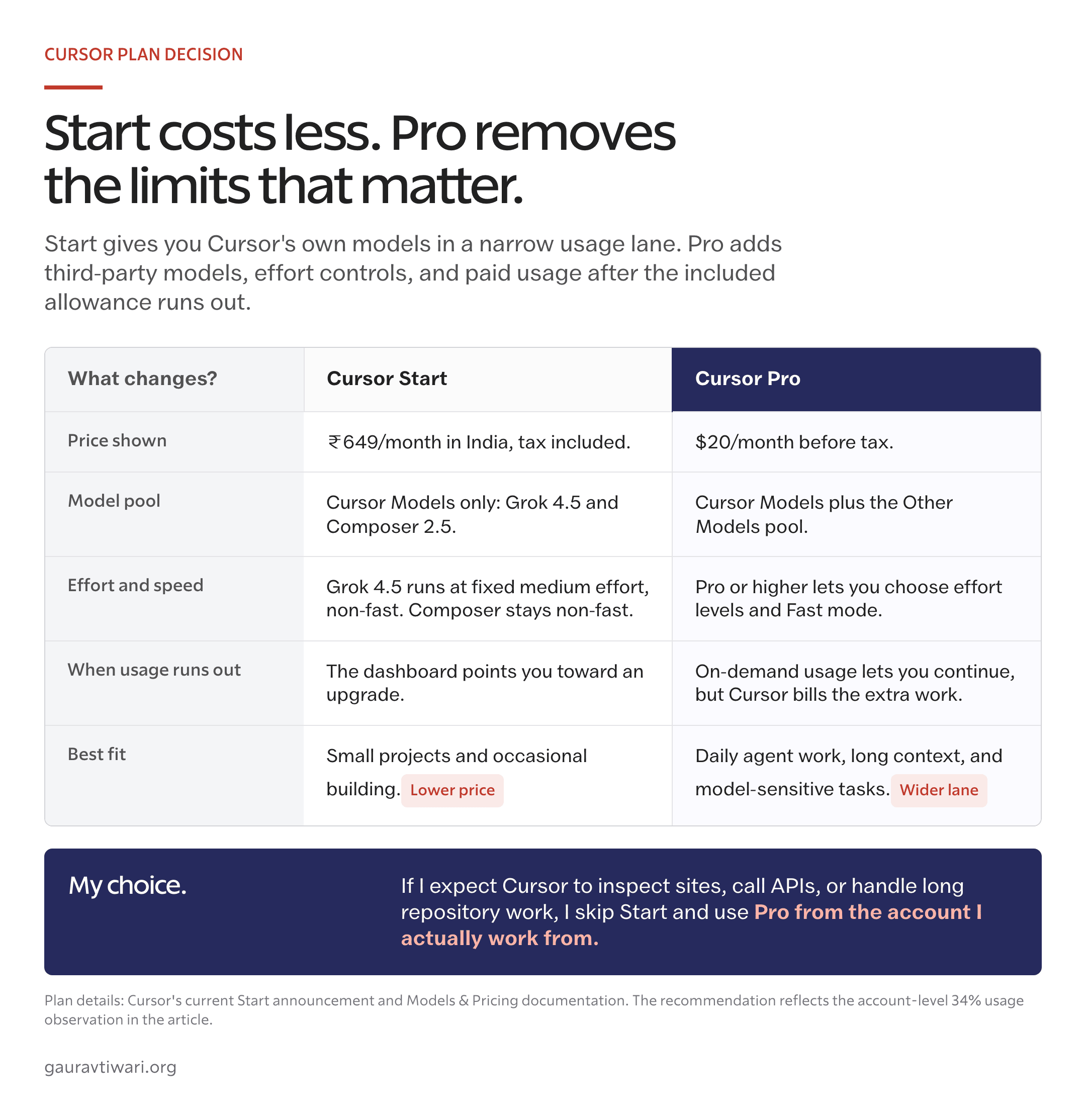
Cursor Start vs Pro comes down to the work you expect the agent to handle. Start costs ₹649 per month in India and covers Cursor’s own models in a fixed lane. Pro costs $20 before tax and adds third-party models, selectable Grok effort, Fast mode, on-demand usage, and the agent features needed for a broader workflow. For occasional edits, Start is good value. For serious agent work, skip it.
My Start account used 34% of its Cursor Models monthly allowance during one unfinished article workflow that included an SSH connection and a WordPress REST API crawl. The dashboard still showed 31 days before reset.
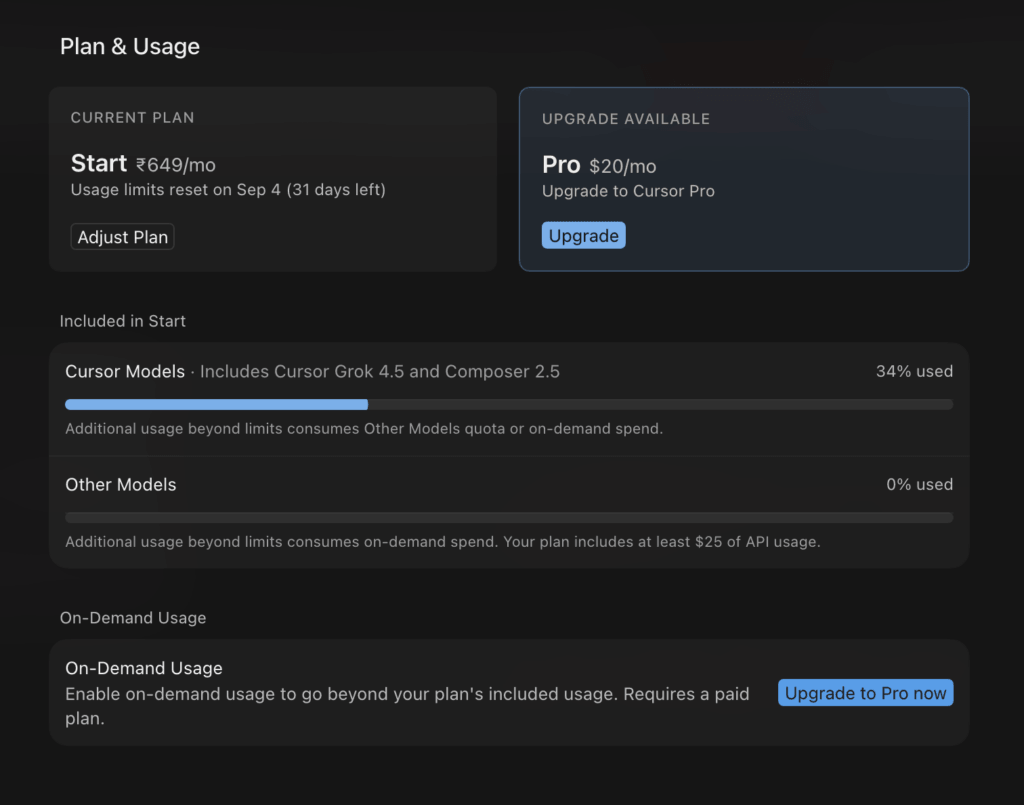
That is one account and one workload, not a universal quota benchmark. It does show the risk clearly: Start can run a tool-heavy workflow without being the right plan to sustain it.
Cursor launched Start in India on July 28, 2026, at ₹649 per month, tax inclusive. The current Cursor Models and Pricing documentation draws the harder boundary:
- Start gets only the Cursor Models pool.
- Pro gets that pool, a separate Other Models pool, and the controls Start removes.
Cursor Start vs Pro verdict
Buy Start only when you want a low-cost introduction to Cursor and most of your work is small, occasional, and model-agnostic. Buy Pro when you need third-party models, selectable Grok effort, Fast mode, Auto, Automations, the Cursor SDK, Bugbot, or paid usage after the included allowance runs out.
There is one more boundary that matters. Pro is the minimum serious-work plan, not necessarily the right plan for all-day Agent use. Cursor recommends Pro+ for daily Agent users and says daily Agent workloads typically reach $60-$100 in total monthly usage.
| Decision | Cursor Start | Cursor Pro |
|---|---|---|
| Price | ₹649/month, India only, tax inclusive | $20/month before applicable taxes |
| Cursor Models pool | Included, amount described as “generous” | Included, amount described as “generous” |
| Grok 4.5 | Fixed medium effort, non-fast | Selectable effort levels and Fast mode |
| Composer 2.5 | Non-fast | Fast mode available where offered |
| Other Models pool | Not included | $20 of third-party model usage included |
| Claude, GPT, Gemini, and other third-party models | Not included | Available through the Other Models pool |
| On-demand usage | Not included | Available at published model rates |
| Shared features | Cloud agents, iOS, plugins, MCP servers, hooks, skills | The same shared features |
| Additional agent features | None of Auto, Automations, SDK, or Bugbot | Auto, Automations, Cursor SDK, and Bugbot |
| Best fit | Learning, small projects, occasional agent work | Model-sensitive and regular agent work; heavy daily use may need Pro+ |
For this Cursor Start vs Pro comparison, the published plan boundary matters more than a request estimate. Start does not include the Other Models pool. Pro includes $20 of third-party model usage and paid overflow. Cursor describes the separate Cursor Models allowance as generous but does not publish its dollar value, token count, or task count.
Your dashboard percentage is useful for judging your own workload. It cannot tell another subscriber how many prompts they will get.
What 34% proves
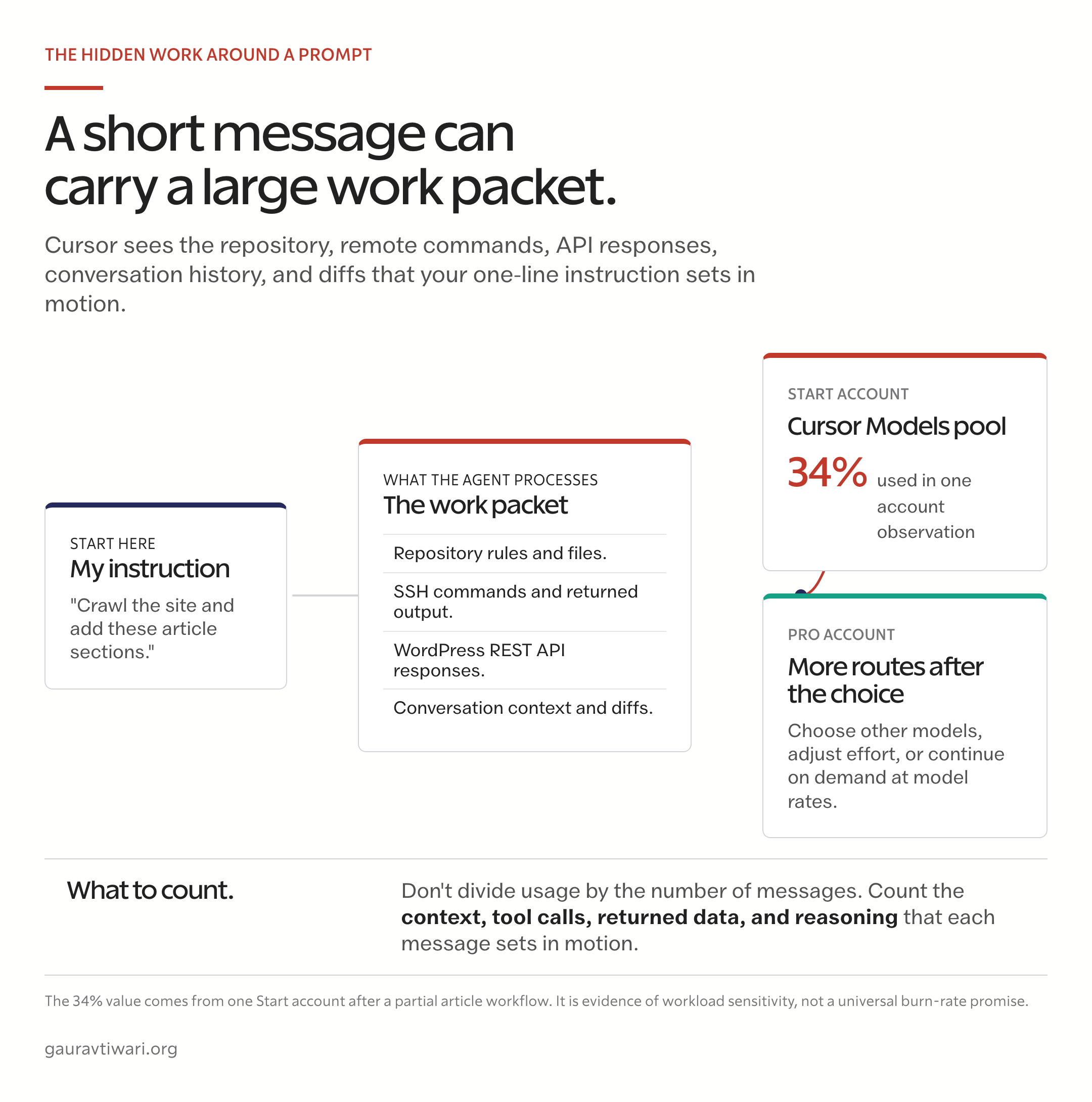
The 34% result is evidence about my workload, not a universal burn rate. Cursor does not sell Start as a fixed message bundle, and it does not publish a token or task allowance for the Cursor Models pool.
The work behind the visible messages included:
- project instructions, repository files, and article context;
- an SSH connection and remote inspection;
- WordPress REST API responses;
- proposed edits, returned output, and verification.
The screenshot cannot separate the cost of each ingredient. A short instruction can still trigger file reads, tool calls, remote output, edits, and follow-up reasoning before one response reaches you. Cursor measures the work packet, not the length of your prompt.
That is why I will not convert 34% into a rupee value or claim that Start provides a fixed number of SSH crawls. The price and model restrictions are published. The exact size of the Cursor Models pool is not.
Why the dashboard misleads
The hardest part of Cursor Start vs Pro is that the Start dashboard and the current plan documentation do not describe Other Models the same way. My dashboard showed the Other Models row at 0% and said the plan included at least $25 of API usage. Cursor’s current documentation says Start does not include the Other Models pool or on-demand usage.
That contradiction annoyed me more than the quota did. A paying subscriber shouldn’t need to cross-reference a plan table to learn whether a number on their own billing page means anything. The safest reading: the $25 line is shared billing-interface text, not a promise that Claude, GPT, Gemini, and other third-party models are available on Start. The model picker and the published plan table are the checks that matter.
A usage row is not a model catalog. If the picker does not offer the model and the plan documentation excludes its pool, do not budget around the number shown under that row.
Where the free plan fits
Cursor’s free plan is the third option in this decision, and it clarifies what Start is for. Free includes limited Agent requests and access to Composer, with no credit card required. It’s a trial lane. The limits are sized for evaluating the editor, not for working in it.
Start is the paid step above Free for Indian users: the same editor, a much larger Cursor Models allowance, cloud agents, Cursor for iOS, and the plugin layer. Pro is the step where model choice, Fast mode, and paid overflow begin.
So the ladder in India runs Free for trying Cursor, Start for regular light use of Cursor’s own models, and Pro for model-sensitive work. Skipping straight from Free to Pro is the right move when you already know your work depends on third-party models or tool-heavy agent sessions. Paying for Start first only to outgrow it in a month is the expensive version of that decision.
What Start includes
Cursor Start is a capable ₹649 plan for learning and occasional building. It includes tax, bills in INR, supports UPI and cards, and gives Indian users much of Cursor’s agent layer:
- Grok 4.5 at fixed medium effort in non-fast mode;
- Composer 2.5 in non-fast mode;
- always-on cloud agents and Cursor for iOS;
- plugins, skills, MCP servers, and hooks.
That is enough for local edits, small projects, cloud tasks, and learning how an agent works inside a repository. The limitation appears when those features are combined with SSH, APIs, long context, or a large codebase. They increase what the agent can inspect without adding third-party models, paid overflow, Auto, Automations, the Cursor SDK, or Bugbot.
Grok 4.5 High is not a separate model entitlement. It is Grok 4.5 running at a higher effort level. Start fixes Grok 4.5 at medium effort and disables Fast mode, which is the same model answering with less waiting, not a smarter one. Pro or higher lets you change both effort and speed.
High effort is unnecessary for a variable rename or a small CSS fix. It matters when the task is an architecture decision, a multi-file migration, or a bug that requires investigation. Start removes the routing choice before the difficult work begins.
I compare Cursor with Claude Code, and explain why I moved to Claude Code, in Cursor vs Claude Code.
When Start runs out, you wait
Start has no usage recovery. When the Cursor Models allowance runs out mid-cycle, you can’t buy more; the choices are waiting for the monthly reset or upgrading to Pro or higher. Cursor’s documentation lists on-demand usage as a Pro-and-above option, and Start is excluded.
That changes how the allowance should be spent. My 34% reading came from one tool-heavy workflow, which means two or three similar assignments could exhaust the month early with no overflow valve. A few habits stretch the pool without changing plans:
- Scope Agent sessions to the files that matter instead of pointing them at the whole repository.
- Use Tab and inline edits for renames and small fixes; reserve Agent for multi-file work.
- Keep SSH crawls, REST API dumps, and long log reads out of Start sessions. Tool output is billed as part of the work packet.
- Start a fresh chat when the task changes. Long threads carry old context into every new request.
If you’re rationing by the second week, treat that as the upgrade signal rather than a discipline problem. The plan is mismatched to the workload, and the ₹649 saved will cost you in stalled work.
What Pro buys
Pro earns its higher price through model choice, usage recovery, and workflow features. It adds the Other Models pool, selectable Grok effort, Fast mode, on-demand usage, Auto, Automations, the Cursor SDK, Bugbot, and extended Agent limits.
- Choose a model for the task. Use Cursor’s own models or third-party models from Anthropic, OpenAI, Google, and other providers. The differences are real; when I ran the same prompts on GPT-5.6 and Claude Fable 5, the better model changed with the task.
- Change effort and speed. Save higher effort for decisions where a wrong answer costs more than extra model usage.
- Continue after the included amount. On-demand usage prevents a hard stop, but Cursor bills the additional work at published model rates.
Start and Pro also show their prices on different terms. Start is ₹649 per month with tax included. Pro is $20 per month before applicable taxes. Exchange rates and card conversion change the final rupee amount, so compare the checkout total rather than a rounded currency conversion.
One clarification, though. The $20 in Pro’s Other Models pool is included model usage, not cash back. It resets monthly. Each third-party model consumes it at its own API rate, and the separate Cursor Models pool sits beside it, still unquantified. The official pricing page confirms that on-demand usage is billed in arrears, after the work, not before.
Pro is still metered
Cursor’s own usage guidance is more useful than the vague phrase “extended limits.” Its documentation currently gives these workload ranges:
| Usage pattern | Cursor’s published guidance |
|---|---|
| Daily Tab users | Stay within $20 |
| Limited Agent users | Often stay within the included $20 |
| Daily Agent users | Typically use $60-$100 per month in total |
| Power users with multiple agents or automation | Often use $200 or more per month |
The pricing page separately recommends Pro+ for daily Agent users and Ultra for Agent power users. Pro+ costs $60 per month, includes $70 of Other Models usage, and provides three times the Pro Agent limits. Ultra costs $200, includes $400 of Other Models usage, and provides twenty times the Pro limits.
To be fair, this does not mean every developer who opens Agent each day must buy Pro+. Repository size, model choice, context, caching, tool output, and task complexity all change consumption. But it kills the idea that the $20 Pro subscription promises unlimited named-model Agent work.
For occasional and moderate use, Pro can be enough. For agents running through much of the working day, Pro is better treated as the entry point than the final budget. That’s the same logic I use for Claude Code pricing: buy the plan that matches the workload you actually run, not the one with the nicest headline price.
Who should buy each plan
Start is the better buy when the lower price and fixed model lane match your work. Pro is the safer minimum when Cursor is becoming part of your working stack.
Buy Start when
Choose Start when most of these statements are true:
- You are in India and want the lowest paid entry into Cursor.
- Most tasks are local edits, small projects, and short agent sessions.
- Grok 4.5 at medium effort and Composer 2.5 cover what you need.
- You do not need third-party models, Fast mode, or paid overflow.
For that workload, Start is a focused plan with a low local price.
Buy Pro when
Choose Pro when you regularly:
- work across large repositories or connected services;
- use SSH, REST APIs, MCP servers, or cloud agents in one assignment;
- need a specific model, selectable effort, or Fast mode;
- want Auto, Automations, the Cursor SDK, Bugbot, or on-demand usage.
For sustained daily Agent work, compare Pro with Pro+. Cursor recommends Pro+ for daily Agent users, and its own usage guidance puts that workload at $60-$100 per month often enough that the $20 Pro subscription can become a false saving.
Check the active account
My Start subscription was attached to a personal email, while Pro was attached to my professional account. The model picker changed with the login, which made the two plans easy to compare but also created an avoidable source of confusion.
Before deciding that a model has disappeared, check the email shown in Cursor and the plan attached to it. A Pro subscription on one identity does not widen the picker on another.
Keep both accounts only when they serve two different jobs. A cheap personal sandbox and a professional work account can make sense. Two subscriptions doing the same work are just two renewals to remember.
Final verdict
Cursor Start is a good low-cost plan for light use. It is the wrong plan for my work.
The 34% reading did not prove that Start has a tiny allowance or that every SSH task will burn one-third of the month. It proved something narrower and more useful: my normal workflow is not a Start workload. It combines repository context, remote access, APIs, content, edits, and verification, and I want control over model effort plus a way to continue when the included usage runs out.
My Cursor Start vs Pro recommendation is simple. Buy Start when you consciously want a cheaper introduction to Cursor’s own models and accept fixed medium effort, no third-party models, and no on-demand usage. Buy Pro as the minimum for serious, model-sensitive work. Compare Pro+ when agents run every day.
Frequently asked questions
These answers separate Cursor’s current plan rules from the behavior visible in my Start account.
Does Cursor Start include Grok 4.5?
Yes. Start includes Grok 4.5 at fixed medium effort in non-fast mode. It also includes Composer 2.5 in non-fast mode.
Does Cursor Start include Grok 4.5 High?
No. Start does not let you change Grok 4.5’s effort level. Pro or higher is required to choose high, medium, or low effort and to enable Fast mode.
Does Cursor Start include Claude, GPT, or Gemini models?
No. Cursor’s current plan documentation places those third-party models in the Other Models pool, which is available on Pro and higher plans, not Start.
Why does Cursor Start show Other Models and $25 of API usage?
The Start dashboard can show shared usage-interface text that conflicts with the published plan table. Cursor’s current documentation says Start does not include the Other Models pool or on-demand usage. Use the model picker and plan documentation to check access.
Is Cursor Pro unlimited?
No. Pro includes generous but unquantified Cursor Models usage and $20 of Other Models usage. On-demand billing lets you continue after the included amount, but the additional usage is charged at published model rates.
Is Cursor Pro enough for daily Agent use?
Sometimes. Cursor says daily Agent users typically consume $60-$100 per month and recommends Pro+ for that group. Pro is the safer minimum for serious use, not a promise that every daily workload fits inside $20.
What happens when Cursor Start usage runs out?
You wait or upgrade. Start does not include on-demand usage, so when the Cursor Models allowance is exhausted, the options are waiting for the monthly reset or moving to Pro or higher. There is no way to buy extra usage on Start.
Is Cursor Start available outside India?
No. Start launched as an India-only plan at ₹649 per month with tax included. It bills in INR and supports UPI and cards. Other regions choose between the free plan and Pro.
Tell Google you want more of this.
Add Gaurav Tiwari as a preferred sourceOne tap, and this site shows up more often in your own Top Stories, AI Overviews and AI Mode. Remove it any time.