
 by
by
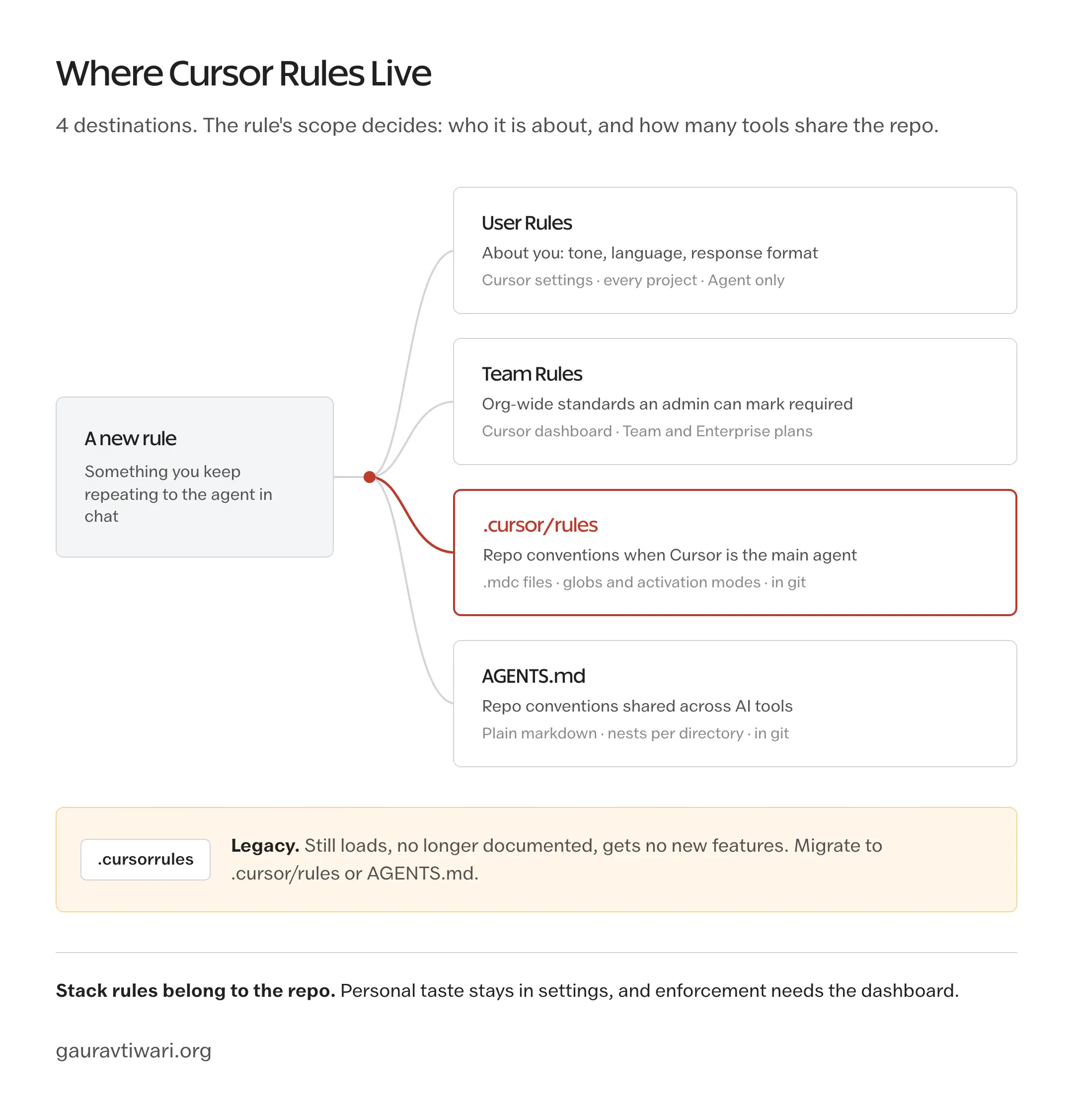
Cursor rules are the standing instructions Cursor reads before every agent run: your stack, your conventions, your banned patterns, written down once instead of repeated in every prompt. In current Cursor builds they live in 3 places: a .cursor/rules directory of .mdc files, a plain AGENTS.md, or your editor settings as User Rules.
The .cursorrules file most tutorials still teach is none of these. Cursor deprecated it in late 2024, and the current docs no longer mention it at all. A leftover .cursorrules still loads for backward compatibility, but every rules feature shipped since then, glob scoping, per-rule activation modes, nested AGENTS.md files, only works in the new formats.
The short version: Cursor-only projects put rules in .cursor/rules, and repos shared with more than one AI tool lead with AGENTS.md. Everything below assumes those 2 routes, with the legacy file covered only long enough to migrate off it.
How Cursor Rules Work Now
Cursor recognizes 4 kinds of rules, and it applies them in a fixed order: Team Rules first, then Project Rules, then User Rules. AGENTS.md sits at the project level as a plain-markdown alternative to the .mdc system.
| Rule type | Lives in | Scope | Best for |
|---|---|---|---|
| Team Rules | Cursor dashboard (Team and Enterprise plans) | Every repo in the org | Org-wide standards admins can mark as required |
| Project Rules | .cursor/rules/*.mdc, version-controlled | One repo | Stack conventions, scoped by file globs |
| AGENTS.md | Repo root, or nested per directory | One repo | Simple instructions shared across AI tools |
| User Rules | Cursor settings | All your projects | Personal style: tone, language, response format |
One precedence order, one decision: which layer owns which instruction. Stack rules belong to the repo, personal taste belongs to User Rules, and anything an admin would enforce belongs to Team Rules.
Project Rules and the .mdc format
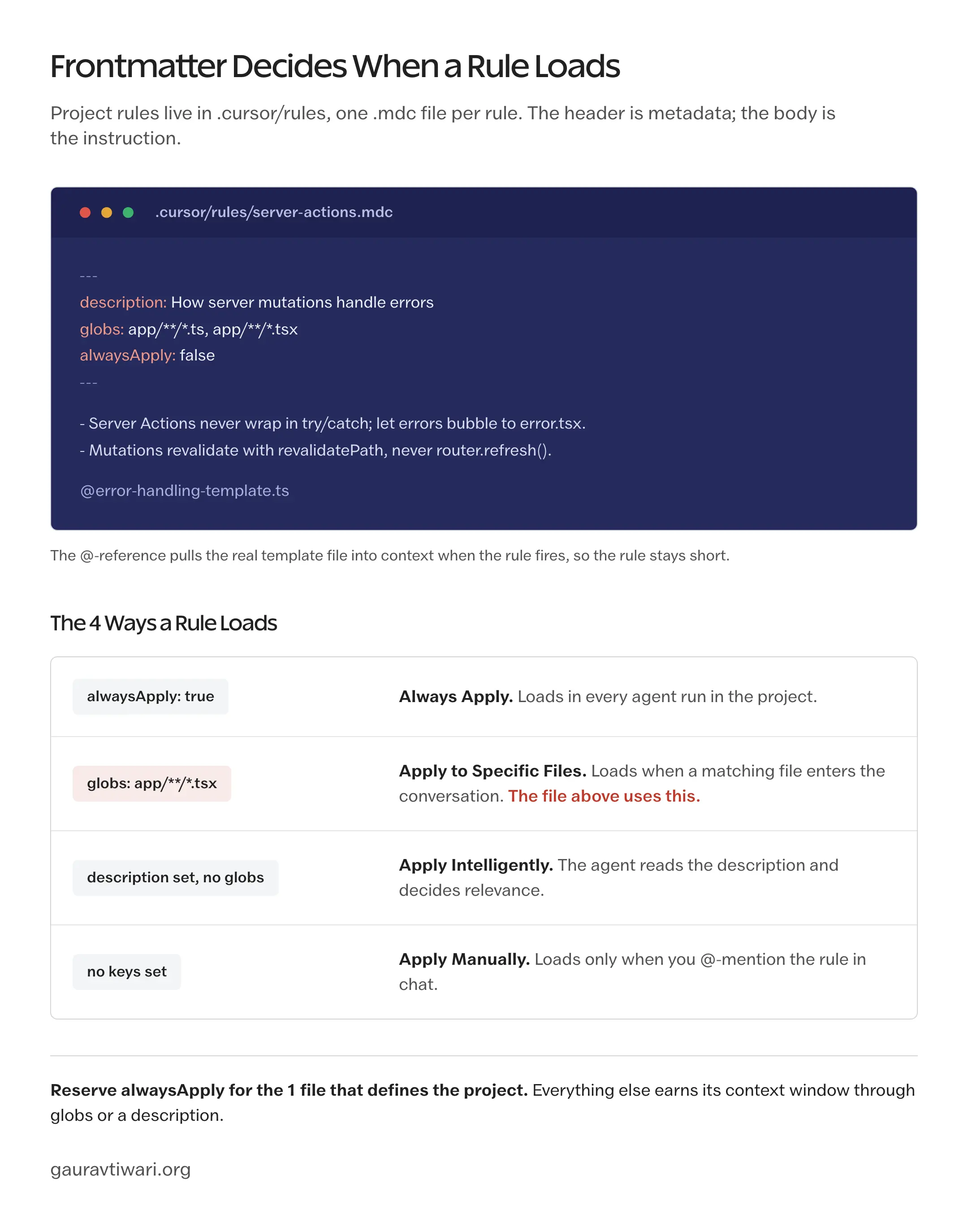
Project rules live in a .cursor/rules directory at the repo root, one rule per .mdc file, with optional subfolders for organization. An .mdc file is markdown with a frontmatter header, and the frontmatter is what the old .cursorrules format never had: metadata that controls when the rule loads.
---
description: How server mutations handle errors
globs: app/**/*.ts, app/**/*.tsx
alwaysApply: false
---

- Server Actions never wrap in try/catch; let errors bubble to error.tsx.
- Mutations revalidate with revalidatePath, never router.refresh().

@error-handling-template.ts
The @-reference on the last line pulls a real file into context when the rule fires, so the rule stays short and the template stays in one place.
The frontmatter combination decides one of 4 activation modes, and picking the right mode per rule is most of the craft:
| Mode | Frontmatter | When the rule loads |
|---|---|---|
| Always Apply | alwaysApply: true | Every agent run in the project |
| Apply to Specific Files | globs set | When a matching file enters the conversation |
| Apply Intelligently | description set, no globs | When the agent judges the description relevant |
| Apply Manually | Neither field | Only when you @-mention the rule in chat |
Reserve Always Apply for the 1 core file that defines the project. Everything else earns its context window through globs or a good description.
You don’t have to write the frontmatter by hand. Type /create-rule in Agent, describe what you want, and Cursor generates the .mdc file with frontmatter and saves it to .cursor/rules.
AGENTS.md in Cursor
AGENTS.md is the plain option: one markdown file in the repo root, no frontmatter, no activation modes. Cursor reads it on every agent run, and so do Claude Code, Codex, and most other coding agents, because AGENTS.md is a cross-tool convention rather than a Cursor invention.
It also nests. Drop an AGENTS.md in a subdirectory and its instructions combine with the parent files, with the more specific file winning where they conflict. A monorepo gets a root file for shared conventions and a per-package file for the parts that differ.
That portability is the deciding factor. My repos get an AGENTS.md because Cursor and Claude Code both work the same codebases daily, and maintaining 2 rule systems with identical content is a drift generator. If Cursor is your only agent, .cursor/rules is the stronger system because of glob scoping; the moment a second tool shows up, AGENTS.md becomes the shared layer and .mdc files carry only the Cursor-specific extras.
User Rules and Team Rules
User Rules are plain text in Cursor settings that follow you across every project: response language, tone, how much explanation you want. They’re the right home for anything about you rather than the code. One caveat worth knowing: User Rules apply only to Agent chat, not to Inline Edit (Cmd+K), so an instruction like “always answer in German” won’t reach inline edits.
Team Rules are the same idea at organization scale, managed from the Cursor dashboard on Team and Enterprise plans, with an admin switch that marks individual rules as required. They apply before project and user rules, which makes them the one layer a local file can’t override.
What happened to .cursorrules
The single .cursorrules file at the repo root was the original mechanism, and Cursor deprecated it around version 0.43 in late 2024. The current rules documentation doesn’t mention it anymore. It still loads if present, so nothing breaks overnight, but it gets no frontmatter, no globs, no activation modes, and no place in anything Cursor ships next.
Treat it as read-only legacy. Keep it working while you migrate, then delete it.
How to Write Cursor Rules That Actually Change Output
The format moved; the craft didn’t. A rule file works when a model reading it cold, with no memory of your preferences, produces code you’d merge. That takes structure, and the structure that keeps working is 4 sections in a fixed order.
- Identity line first. 2 sentences: what the project is, what stack and versions it runs, what role the AI plays.
- Hard rules as a numbered list. Banned imports, banned APIs, mandatory patterns, phrased as imperatives the model can’t reinterpret.
- Conventions section. Naming, file organization, error handling. Anything with a project-specific answer.
- Glossary at the end. Project jargon mapped to concepts the model already understands.
The glossary earns its place more often than people expect. It’s a phrasebook for your project’s dialect: if your codebase calls customers “tenants”, say so once, or the model will drift between users, customers, and clients across files.
Specificity is the whole game. Compare the 2 versions of the same intent.
What most rule files say:
Write clean, maintainable, well-documented code. Follow best practices.
What changes output:
Functions max 30 lines. No nested ternaries. Every exported function has an explicit return type. Comments only where the code can’t say it.
Same intent. The second version is checkable, so the model can comply with it and you can catch it when it doesn’t.
Cursor’s own documentation adds constraints worth taking at face value:
- Keep each rule under 500 lines. That’s a ceiling, not a target; the useful working range is far lower, and a rule past 200 lines usually wants splitting.
- Reference files with @filename instead of pasting their contents into the rule.
- Don’t copy your style guide into rules. Linters and formatters enforce style; rules carry what a linter can’t check.
- Split large rules into small composable ones, each with its own activation mode.
- Check rules into git so the whole team gets them on pull.
And version them with the code they describe. When the framework upgrades or a convention changes, the rule edit belongs in the same pull request as the migration. A rule that contradicts the repo is worse than no rule.
Migrating From .cursorrules to .cursor/rules
The migration is an afternoon, not a project. A typical .cursorrules file converts in 4 steps:
- Split the old file by domain: core identity, framework rules, testing rules, glossary. Each group becomes one .mdc file in .cursor/rules.
- Give each file frontmatter. The core identity file gets
alwaysApply: true. File-specific groups getglobs. Situational ones get adescriptionand let the agent decide. - Run a few agent tasks and confirm the rules show up as applied in the agent’s context. Then delete .cursorrules so the 2 systems can’t drift apart.
- If other AI tools work the same repo, put the shared conventions in AGENTS.md instead and keep .cursor/rules for the glob-scoped extras.
Step 4 matters more than it looks. The same AGENTS.md that instructs Cursor also drives Claude Code sessions without a single duplicated line, which is the entire reason the convention exists.
Cursor Rules Examples by Stack
Each example below is a complete .mdc file: frontmatter chosen for how that stack’s rules should load, then the rule body. Copy one into .cursor/rules/, rename the identity line and glossary to your project, and commit it. For an AGENTS.md, drop the frontmatter and paste the body as-is.
Next.js + TypeScript + Tailwind
---
description: Core conventions for the whole app
alwaysApply: true
---

# Project: SaaS dashboard
Stack: Next.js 16 App Router, TypeScript strict, Tailwind v4, Drizzle ORM, Postgres.

## Hard rules
1. Server Components by default. 'use client' only when interaction or a browser API requires it.
2. Server Actions for mutations; let errors throw and bubble to error.tsx.
3. NEVER 'any' or @ts-ignore. Use 'unknown' and narrow.
4. Data fetching in Server Components or Server Actions. NEVER useEffect for data.
5. Forms: React Hook Form + Zod schema in actions/.
6. Tailwind v4 syntax: bg-linear-to-r (not bg-gradient-to-r), size-* utilities.

## Conventions
- File names kebab-case. Components PascalCase function declarations, no React.FC.
- Server Actions in actions/, Drizzle queries in db/queries/.
- Tailwind class order: layout, spacing, type, color, state, responsive.

## Glossary
- "Workspace": multi-tenant entity. ALWAYS scope queries by workspace_id.
- "Member": user within a workspace. Roles: owner, admin, member, viewer.
This is the 1 file in the set that earns alwaysApply: true: it defines the project rather than a corner of it.
WordPress
---
description: Gutenberg block and PHP conventions
globs: **/*.php, src/blocks/**
alwaysApply: false
---

# Project: WordPress block theme + custom blocks
Stack: WordPress 6.8+, block theme with theme.json, @wordpress/scripts.

## Hard rules
1. New blocks use block.json + render.php (no inline JS save).
2. NEVER $wpdb directly. Use WP_Query, get_posts, get_option, get_post_meta.
3. Escape all output: esc_html, esc_attr, esc_url, wp_kses_post.
4. Every translatable string: __( 'text', 'textdomain' ).
5. Colors, spacing, and type come from theme.json tokens. NEVER hardcode hex in CSS.
6. NEVER bundle React directly; import from @wordpress/element.

## Conventions
- Block names: mytheme/hero-section. PHP files kebab-case.
- Block-specific CSS via wp_enqueue_block_style.
- Custom post types registered with show_in_rest => true.
Python FastAPI
---
description: API and database conventions
globs: **/*.py
alwaysApply: false
---

# Project: REST API for analytics platform
Stack: Python 3.13, FastAPI, SQLAlchemy 2.0 async, Pydantic v2, Alembic, pytest.

## Hard rules
1. Every endpoint has Pydantic request and response models.
2. SQLAlchemy 2.0 select() style. Never legacy .query().
3. Async DB throughout: AsyncSession, await session.execute().
4. Catch specific exceptions, never bare Exception.
5. Tests: pytest-asyncio + httpx.AsyncClient against SQLite in-memory.

## Conventions
- snake_case functions, PascalCase classes.
- Pydantic models: ResourceCreate, ResourceRead, ResourceUpdate.
- Routers in api/routers/{resource}.py with prefix='/v1/{resources}'.
- DB models in db/models/, schemas in db/schemas/.
Rust
---
description: Service conventions for handlers and errors
globs: src/**/*.rs
alwaysApply: false
---

# Project: Rust API service
Stack: Rust 2024 edition, Axum, sqlx, Tokio, serde.

## Hard rules
1. Handlers return Result<T, AppError>. Never panic in request paths.
2. thiserror for library error types, anyhow only at the binary edge.
3. NEVER unwrap() outside tests. expect() needs a message naming the invariant.
4. SQL through sqlx::query! macros for compile-time checking.
5. Async fn in traits natively; async-trait only where dyn dispatch requires it.

## Conventions
- snake_case modules and functions.
- Error types per module: db::Error, api::Error.
- Unit tests in mod tests at the bottom of each file.
React Native + Expo
---
description: Navigation, styling, and list conventions
globs: app/**/*.tsx, components/**/*.tsx
alwaysApply: false
---

# Project: mobile app
Stack: Expo SDK 57, React Native 0.86, TypeScript, expo-router, NativeWind.

## Hard rules
1. expo-router for ALL navigation. No react-navigation imports.
2. NativeWind className styling; StyleSheet only where animation requires it.
3. Images through expo-image, never the react-native Image component.
4. Server state via TanStack Query. AsyncStorage never holds server data.
5. FlashList for any list over 50 items.

## Conventions
- File-based routing: app/(tabs)/index.tsx, app/(auth)/login.tsx.
- Components in components/, hooks in hooks/, types in types/.
Astro
---
description: Content and island conventions
globs: src/**/*.astro, src/content/**
alwaysApply: false
---

# Project: content site
Stack: Astro 6, Tailwind v4, MDX content collections.

## Hard rules
1. Astro components first; framework islands only when interaction requires them.
2. Content lives in collections with Zod schemas in src/content.config.ts.
3. Images go through the built-in Image component for optimization.
4. No client-side fetching for build-time content; query collections instead.

## Conventions
- Layouts in src/layouts/, components in src/components/.
- Pages in src/pages/ follow file-based routing.
SvelteKit
---
description: Runes and server boundary conventions
globs: src/**/*.svelte, src/**/*.ts
alwaysApply: false
---

# Project: SvelteKit app
Stack: SvelteKit 2, Svelte 5 runes, TypeScript, Tailwind v4.

## Hard rules
1. Svelte 5 runes ($state, $derived, $effect). No Svelte 4 reactive statements.
2. Server logic only in +page.server.ts and +server.ts.
3. Forms via form actions + use:enhance, not manual fetch.
4. Component-local state uses $state, never stores.

## Conventions
- Routes: src/routes/{path}/+page.svelte.
- API endpoints: src/routes/api/{resource}/+server.ts.
Go
---
description: Service and error-handling conventions
globs: **/*.go
alwaysApply: false
---

# Project: Go service
Stack: Go 1.26+, chi router, sqlx, Postgres, slog.

## Hard rules
1. Every error checked and returned. Never _ = err.
2. context.Context is the first param of any public function doing I/O.
3. JSON tags on every struct field exposed through the API.
4. Tests: testify/require, testcontainers for DB integration.
5. No init() for app state. Explicit constructors.

## Conventions
- Packages by domain (users/, orders/), not by layer (handlers/, models/).
- camelCase unexported, PascalCase exported.
Laravel
---
description: App architecture conventions
globs: app/**/*.php, routes/**/*.php
alwaysApply: false
---

# Project: Laravel app
Stack: Laravel 13, PHP 8.3+, Inertia.js + Vue 3 OR Livewire, Vite.

## Hard rules
1. Form Requests for ALL validation. No inline $request->validate().
2. API responses through Resources, never raw model arrays.
3. Eloquent relationships over raw joins wherever Eloquent can express it.
4. Long jobs (mail, exports) go to the queue; nothing slow runs in-request.
5. env() only inside config/ files. Never env() in app code.

## Conventions
- Invokable single-action controllers for single-action routes.
- Complex business logic in app/Actions/ classes.
- Migrations snake_case, timestamped.
9 stacks, same skeleton every time: identity, hard rules, conventions, glossary where the domain has one. The frontmatter differs because the loading behavior should differ; a WordPress rule has no business in context while you edit a README.
Patterns That Consistently Fail
Most dead rule files die the same few deaths, and none of them announce themselves with an error.
Vague rules. “Write clean code” and “be concise” feel like guidance and change nothing, because there’s no way to comply with them. Every rule that can’t be violated in a reviewable way is decoration.
Aspirational process rules with no enforcement hook. “We practice TDD” doesn’t change output; “generate the failing test before the implementation” does. The first describes a culture, the second describes an action.
Rules that contradict the codebase. If the rule says functional components and the repo is full of class components, the model trusts the 400 examples over the 1 instruction. The codebase is the loudest voice in the room; rules can’t shout it down. Update the code or update the rule.
Setting alwaysApply on everything. It feels safe and it quietly bloats every conversation, because rules that always load crowd out the context the task actually needs. Scope by globs and let descriptions do their job.
Pasting the style guide in. A 400-line formatting spec in a rule file duplicates what Prettier, ESLint, or php-cs-fixer already enforce for free, and the model half-follows it at best. Rules carry judgment calls; tools carry mechanics.
Project jargon with no glossary. A codebase that says “tenant” while the team says “workspace” gives the model 2 dialects and no dictionary, and the naming drift shows up in every generated file.
The Limits
Rules steer; they don’t enforce. A model can still violate a hard rule on a long task with a full context window, so the rules file never replaces the linter, the type checker, or CI. It reduces corrections; it doesn’t eliminate review.
Coverage has gaps you should know about. User Rules skip Inline Edit entirely, so Cmd+K behaves as if your personal rules don’t exist. And no rule system fixes a codebase that disagrees with it: the migration PR that aligns the code comes first, the rule that locks it in comes second.
Team Rules, the one layer with actual teeth, sits behind the Team and Enterprise plans. On an individual plan, convention-by-agreement plus a version-controlled .cursor/rules is as much enforcement as you get.
FAQs on Cursor Rules
Where do Cursor rules go now?
Project rules go in a .cursor/rules directory at the repo root, one .mdc file per rule. AGENTS.md in the repo root works as a simpler alternative, and personal User Rules live in Cursor settings.
Is .cursorrules deprecated?
Yes. Cursor deprecated the single .cursorrules file in late 2024 and no longer documents it. An existing file still loads for backward compatibility, but everything shipped since, including glob scoping and activation modes, only works in .cursor/rules.
What is an .mdc file?
Markdown with a frontmatter header. The description, globs, and alwaysApply fields tell Cursor when to load the rule; the body below the frontmatter is the instruction itself.
Should I use AGENTS.md or .cursor/rules?
Cursor-only projects get more from .cursor/rules because of glob scoping and activation modes. Repos shared with other AI tools lead with AGENTS.md and keep .cursor/rules for Cursor-specific extras.
How long should a rule file be?
Cursor caps a rule at 500 lines, but the useful range is far lower. Split anything past roughly 200 lines into smaller composable rules, each with its own activation mode.
Should I commit Cursor rules to git?
Yes. The .cursor/rules directory and AGENTS.md are designed to be version-controlled, so the whole team gets the same rules on pull and rule changes go through review like any other code.
Do Cursor rules work with Claude Code or other tools?
.mdc files are Cursor-specific. AGENTS.md is the portable layer: Claude Code, Codex, and most other coding agents read the same file, so shared conventions belong there.
What is the difference between User Rules and Project Rules?
User Rules live in Cursor settings and follow you across every project; Project Rules live in the repo and apply to everyone working in it. Rules apply in the order Team, then Project, then User, and User Rules skip Inline Edit.
Final Remarks
The file format was never the point. Teams don’t get better Cursor output by finding a better template; they get it by writing down decisions they’ve already made and were repeating in chat anyway. The rules system is just where those decisions live now, with enough metadata that they load when relevant instead of all the time.
The trade is upkeep. A rules directory is code: it rots when the repo moves on without it, and a rotten rule actively misleads. Budget the 5 minutes per PR that keeps it true.
Start with 1 file, 40 lines, this afternoon. You’ll know within a day whether it was worth writing the other 4.
Tell Google you want more of this.
Add Gaurav Tiwari as a preferred sourceOne tap, and this site shows up more often in your own Top Stories, AI Overviews and AI Mode. Remove it any time.