
 by
by
WP Rocket and Perfmatters overlap more than their sales pages suggest. Both minify files, delay JavaScript, lazy load media and strip unused CSS, so running both without a plan means paying twice for the same work and debugging 2 plugins that fight over one script.
The real split is narrower. WP Rocket caches your pages and Perfmatters doesn’t. Perfmatters unloads scripts page by page and WP Rocket doesn’t. I used WP Rocket for years, and Perfmatters ran on this site for years next to a separate page cache, so the WP Rocket vs Perfmatters question, for me, comes down to which of those 2 layers a site is missing.
Table of Contents
WP Rocket in 2026

WP Rocket is a fully fledged cache and performance plugin for WordPress. It has been around since 2013, and the license now also covers performance monitoring, a starter CDN and an MCP server for AI clients.
Key Features
- Caching: Page and browser caching switch on when you activate the plugin, and the cache preloads from your sitemap.
- Remove Unused CSS: WP Rocket’s SaaS builds the CSS each page actually uses, inlines it and drops the original stylesheets.
- Critical CSS: Generated through Load CSS Asynchronously, the fallback when Remove Unused CSS breaks a layout.
- Minify CSS/JS: Strips whitespace and comments, and has been on by default since version 3.18.
- Combine JS: Still available, but it switches itself off when Delay JavaScript is on. Combine CSS was removed in 3.15.
- Delay JS Execution: Postpones non-critical scripts until user interaction, with one-click exclusions for common plugins and themes.
- Media: LazyLoad for images, iframes, videos and CSS backgrounds, Optimize Critical Images for the LCP image and Automatic Lazy Rendering for long pages.
- Fonts: Self-hosts Google Fonts since version 3.18.
- Database and Heartbeat: Scheduled database cleanup and Heartbeat control.
- CDN Integrations: RocketCDN plus add-ons for Cloudflare, Sucuri and Varnish.
WP Rocket Setup & Configuration
- Install, activate and enter your license. Page and browser caching turn on by themselves.
- In File Optimization:
- Leave Minify CSS/JS on. It’s the default now.
- Turn on Remove Unused CSS. Switch to Load CSS Asynchronously if a page builder layout breaks.
- Activate Delay JS Execution and use the one-click exclusions for anything that has to run early, such as a cookie banner or a slider.
- Under Media: turn on LazyLoad for images, iframes and videos. Optimize Critical Images runs on its own and keeps the LCP image out of lazy loading.
WP Rocket does most of its heavy lifting through its own SaaS, so most sites get faster on activation with very little tuning. For a deeper walkthrough, see my WP Rocket best settings guide.
Perfmatters in 2026

Perfmatters offers almost everything WP Rocket does except caching. But it adds features WP Rocket doesn’t have.
Advanced Features Unique to Perfmatters
- Script Manager: Control CSS/JS assets per page, post or device.
- Advanced Remove Unused CSS:
- Choose inline or file method.
- Set fallback: delay, async or full removal.
- Add global or page-specific exclusions by file or selector.
- Minify CSS/JS: With per-file or per-page exclusions.
- Advanced Defer/Delay JS: Device targeting, timeouts and custom exclusions.
- Local Hosting: Google Fonts and Analytics with subsetting and display swap.
- Enhanced LazyLoad: Video previews, leading-image exclusion, CSS background images, DOM monitoring and lazy elements.
- Cloudflare Early Hints: Sends preload hints through Cloudflare’s 103 Early Hints before the page arrives. It arrived as a beta in version 2.4.6.
- Code Snippets: PHP, CSS, JS and HTML snippets stored as flat files, out of beta since version 2.5.8.
- Safe Mode: A sitewide switch, added in 2.6.8, for troubleshooting a page that an optimization broke.
- Speed Toggles: Disable emojis, embeds, dashicons, XML-RPC, WooCommerce cart scripts, REST API endpoints, Heartbeat.
- Filters & API Hooks: For custom optimization logic.
- Database Cleanup: Targeted deletion of transients, revisions and drafts.
Setup Guide
See: The Easiest Guide to Pass Core Web Vitals (Verified)
- Install and activate the license.
- Use toggles to disable non-essential scripts like emojis, embeds, XML-RPC, REST API and WooCommerce cart fragments.
- Adjust Heartbeat settings for reduced server load.
- In CSS settings:
- Enable Remove Unused CSS.
- Select inline or file method.
- Add exclusions as needed.
- In JS settings:
- Enable minification, defer and delay.
- Use Script Manager to unload unnecessary assets.
- Enable local font/analytics hosting and Cloudflare Early Hints if applicable.
Perfmatters gives you surgical control over what loads, when it loads and where.
CSS & JS Optimization Showdown
| Feature | WP Rocket | Perfmatters |
|---|---|---|
| Page Caching | Yes | No |
| Remove Unused CSS | Yes, used CSS built by its SaaS and inlined | Yes, inline or file with fallback and exclusions |
| Compatibility Controls | Per-page on/off for optimizations, no asset manager | Per-page & per-device asset control |
| Minify CSS/JS | Yes, on by default | Yes, with file and page exclusions |
| Combine CSS/JS | JS only (Combine CSS removed in 3.15) | No, built for HTTP/2 and HTTP/3 |
| Critical CSS | Yes | No |
| Defer/Delay JS | Yes, with one-click exclusions | Yes, with advanced targeting |
| LazyLoad | Yes, plus Automatic Lazy Rendering | Yes, includes video previews, skip-first and lazy elements |
| Google Fonts/Analytics | Self-hosted Google Fonts, no local analytics | Local fonts and local analytics |
| Early Hints | No | Cloudflare Early Hints (beta) |
| Fine-grained toggles | Limited | Full asset toggles |
| API & Hooks | Minimal | Extensive |
| Database Cleanup | Yes, scheduled | Yes, advanced targeting |
| MCP Server for AI Clients | Yes (3.23) | No |
WP Rocket delivers strong, global optimization with minimal setup. Perfmatters excels at fine-grained control for developers and advanced users. Used together, they cover each other’s gaps, as long as you switch off the overlapping features in one of them.
Both plugins ship updates often, but they grow in different directions. WP Rocket leans on its SaaS for Remove Unused CSS and keeps bundling services with the license, such as monitoring, a starter CDN and AI access. Perfmatters runs everything on your own server and keeps adding finer controls.
Here’s what each plugin has actually shipped recently.
| Release | Date | What Changed |
|---|---|---|
| WP Rocket 3.23 | July 9, 2026 | Built-in MCP server, so AI clients can read performance data, change settings and purge the cache |
| WP Rocket 3.22 | June 11, 2026 | RocketCDN free tier for 3 pages on 10 edge locations |
| WP Rocket 3.21 | March 19, 2026 | Rocket Insights included with every license, up to 10 URLs |
| WP Rocket 3.18 | January 7, 2025 | Self-hosted Google Fonts, minify on by default and one-click Delay JS exclusions |
| Perfmatters 2.6.8 | September 9, 2026 | Sitewide Safe Mode and Inline Excluded Stylesheets |
| Perfmatters 2.5.8 | February 26, 2026 | Code Snippets out of beta |
| Perfmatters 2.5.3 | November 19, 2025 | Code Snippets (beta) with flat-file storage |
| Perfmatters 2.4.6 | June 17, 2025 | Cloudflare Early Hints (beta) |
The pattern matters more than any single release. WP Rocket keeps adding services around the plugin, while Perfmatters keeps adding controls inside it.
WP Rocket MCP and Rocket Insights
WP Rocket 3.23, released on July 9, 2026, shipped a built-in MCP server. Connect Claude, ChatGPT or Gemini to it, and the AI client reads your real performance data and WP Rocket settings, purges the cache site-wide or per page, and reports on client sites without you opening wp-admin. Perfmatters has no MCP equivalent yet, so if you run AI-assisted maintenance across client sites, that workflow currently exists only on the WP Rocket side.
2 more inclusions matter for the price math below:
- Rocket Insights: a performance hub, included with every license since 3.21, that runs GTmetrix lab tests on up to 10 URLs as often as you like and tells you which optimization to apply next.
- RocketCDN free tier: accelerates 3 key pages through 10 edge locations with unlimited bandwidth, at no extra cost.
So the $59.95 Single license now covers caching, monitoring and a starter CDN in one bill.
Pricing Comparison for 2026
WP Rocket

- Single (1 site): $59.95/year
- Plus (3 sites): $119.95/year
- Multi (50 sites): $299.95/year, expandable to 100 or 500 sites
- The Growth (10-site) and legacy unlimited tiers are discontinued. See the full WP Rocket pricing breakdown for details.
Notes:
- During WP Rocket sales, the subscriptions are discounted by up to 30% for new users.
- Renewals run at the full plan price. WP Rocket emails you 15 days before the auto-renewal charge.
- Upgrades cost the difference.
- 14-day money-back guarantee.
Perfmatters
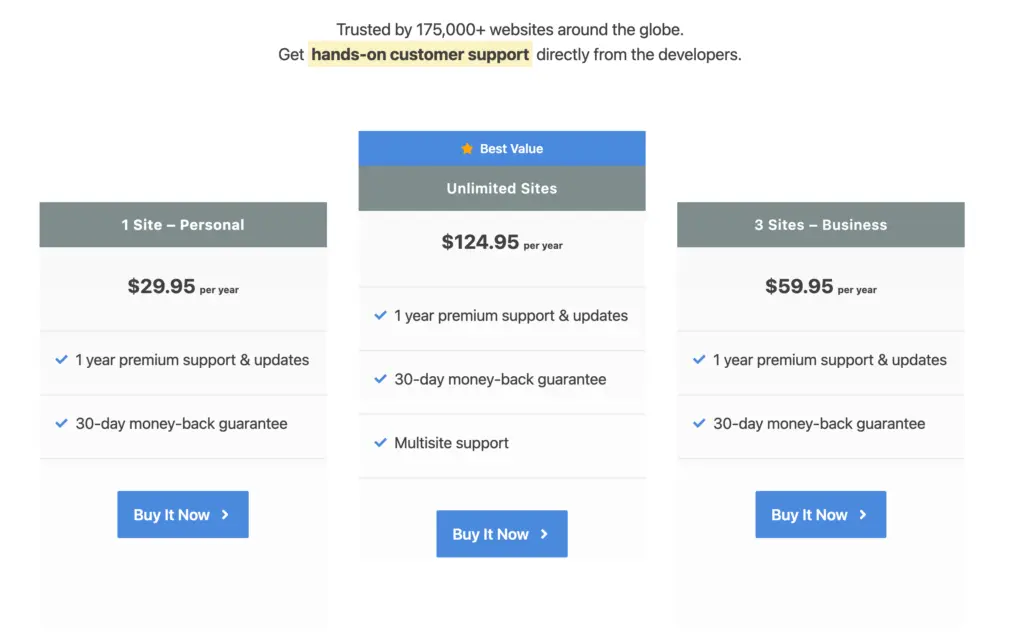
- Personal (1 site): $29.95/year. Use the coupon code
GAURAVTIWARIfor 20% OFF - Business (3 sites): $59.95/year. Use the coupon code
GAURAVTIWARIfor 20% OFF - Unlimited: $124.95/year. Use the coupon code
GAURAVTIWARIfor 20% OFF
Includes all features on every plan, plus a 30-day refund policy and 15% renewal discount. Check out my Perfmatters Discount Code (Save 20%).
| Plugin | 1 Site | 3 Sites | Multi / Unlimited |
|---|---|---|---|
| WP Rocket | $59.95 | $119.95 | $299.95 (50 sites) |
| Perfmatters | $29.95 | $59.95 | $124.95 (unlimited) |
Which Combo Makes Sense?
A. Solo WP Rocket
Best for those wanting a one-plugin solution that just works. Reliable caching, asset optimization, lazy loading and cleanup.
Costs from $59.95 for one site to $299.95/year for 50 sites.
B. Solo Perfmatters + Free Cache
Best for budget-conscious users who want granular control. Pair it with a free cache plugin such as WP Super Cache, LiteSpeed Cache on a LiteSpeed server or GT Performance, the free cache plugin I built. I’ve covered more ways to boost WordPress performance for free if you want to squeeze every bit of speed without spending.
GT Performance and Perfmatters were the pair this site ran until GT Performance took over Perfmatters’ jobs too. GT Performance has a Perfmatters setting that either takes over the features you enable in it or hands every front-end optimization to Perfmatters and sticks to caching, so the two plugins don’t both delay the same script. Try it on staging first, as with any cache change. Then confirm that cart, checkout and account pages stay uncached.
Costs only $29.95 for one site and $124.95 for unlimited sites. GT Performance adds nothing to that bill.
C. WP Rocket + Perfmatters
Best for power users and agencies managing multiple sites. WP Rocket handles global optimization, Perfmatters cleans up per-page.
Cost when using both (minimum):
- 1 site: $89.90/year
- 3 sites: $179.90/year
- 50 sites: $424.90/year
Final Recommendations
- WP Rocket alone: Choose if you want quick, global speed boosts with minimal setup. If WP Rocket doesn’t fit, check out the best WP Rocket alternatives.
- Perfmatters alone: Choose if you want per-page control at a lower cost (pair with free caching like GT Performance, W3 Total Cache or LiteSpeed Cache).
- Both together: Choose if you want the best of both worlds and maximum performance.
Cost-Per-Site Value & Returns
Solo WP Rocket
- 1 site: $59.95/year
- Global optimization with plug-and-play setup.
- Most of the gain arrives on activation, since caching and the defaults do the heavy lifting.
Solo Perfmatters + Free Cache
- 1 site: $29.95/year, plus a free cache
- Unloading unused scripts page by page cuts the most weight on plugin-heavy sites.
- Big Core Web Vitals gains with careful setup.
WP Rocket + Perfmatters Combo
I’ve covered both plugins in depth: the Perfmatters review explains my asset management setup, and the FlyingPress review covers why I moved off WP Rocket. For alternatives beyond these two, see the WP Rocket alternatives roundup. If you want the whole performance stack configured, my performance optimization services include caching, asset management and server tuning.
- 1 site: ~$90/year
- Combines global optimization with fine-tuned asset control.
- Ideal for complex, high-traffic or resource-heavy sites.
- On a budget? Go with Perfmatters + free caching.
- Want zero hassle? Use WP Rocket.
- Performance-obsessed? Use both.
Tell Google you want more of this.
Add Gaurav Tiwari as a preferred sourceOne tap, and this site shows up more often in your own Top Stories, AI Overviews and AI Mode. Remove it any time.
Disclaimer: This site is reader-supported. If you buy through some links, I may earn a small commission at no extra cost to you. I only recommend tools I trust and would use myself. Your support helps keep gauravtiwari.org free and focused on real-world advice. Thanks. - Gaurav Tiwari