
 by
by
WP Rocket pricing starts at $59.95 a year for 1 website. The Plus license covers 3 websites for $119.95 and Multi covers 50 for $299.95, with bigger Multi options for 100 and 500 websites. Every license is billed once a year and there is no free version, no monthly plan and no lifetime license.
The price on the card is only a part of what you will pay. You also need to know what the renewal will cost, which features stop working if the license expires and whether your host already does the caching you are about to buy. The license you pick is important as well, because the next step after 3 websites is a 50-site license and it is easy to pay for slots you never fill.
WP Rocket is a premium caching and performance plugin for WordPress, made by WP Media, the company behind Imagify and RocketCDN. It starts caching your pages as soon as you activate it and adds lazy loading, delayed JavaScript, unused CSS removal and preloading on top. I used it for years and kept renewing it, so in this guide I have kept the prices and terms you get today apart from what older customers like me were paying.
You should buy the license for the websites you maintain today, budget the renewal at the full list price and test the plugin inside the 14-day refund window.
How Much Does WP Rocket Cost?
WP Rocket sells 3 licenses and the only difference between these is the number of websites. Every license gets the same features, with support and updates for 12 months. These are the list prices in October 2026, in US dollars and before taxes.
| License | Websites | Price per year | Cost per site with every slot used |
|---|---|---|---|
| Single | 1 | $59.95 | $59.95 |
| Plus | 3 | $119.95 | $39.98 |
| Multi | 50 | $299.95 | $6.00 |
| Multi | 100 | $399.95 | $4.00 |
| Multi | 500 | $599.95 | $1.20 |
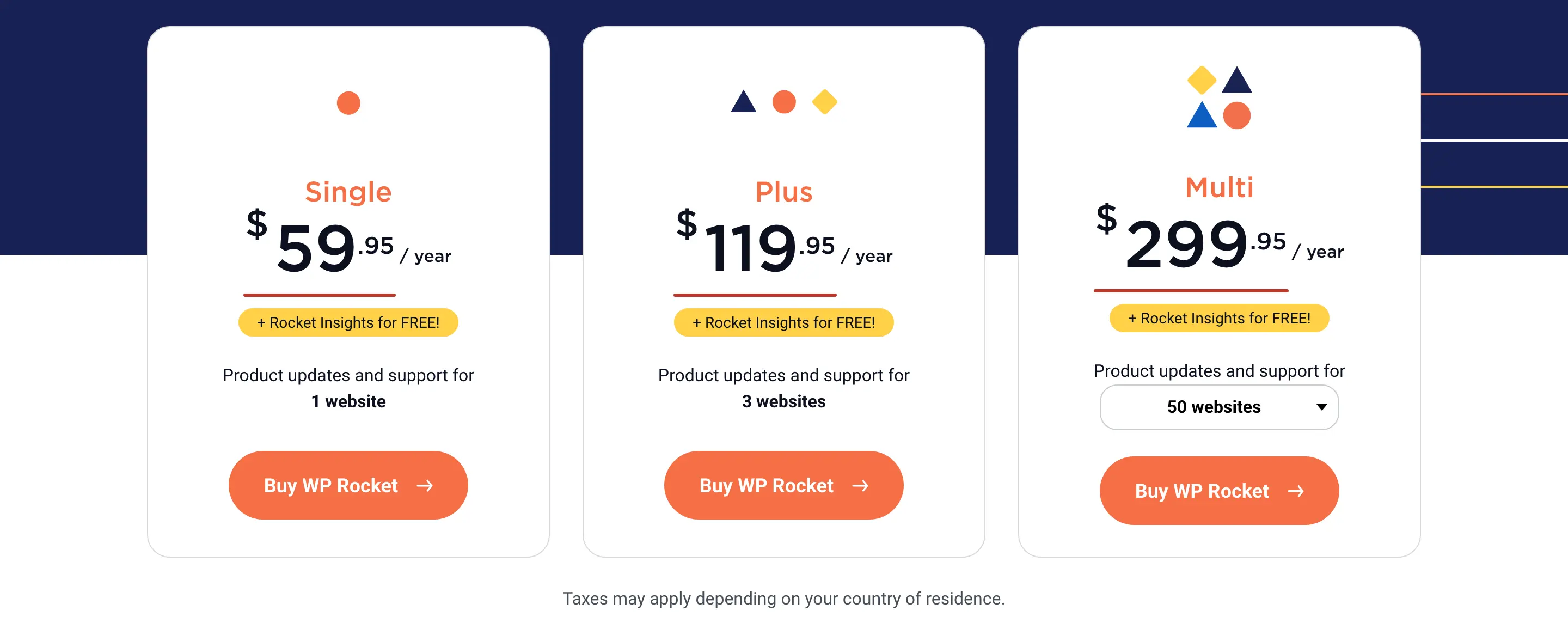
The last column is true only when you fill the license. A 50-site Multi license running on 4 websites costs you about $75 per site, which is more than Single. You should calculate the cost against the websites you maintain and ignore the maximum printed on the card.
The pricing card leaves out a few details:
- For more than 500 websites, WP Rocket asks you to contact them for a custom license.
- Taxes depend on your country and WP Rocket adds them at checkout.
- A hosting company can’t use Multi for its customers. WP Rocket runs a separate reseller program for hosts.
Which WP Rocket License Should You Buy?
You should count the websites you maintain today and buy for that number. WP Rocket lets you upgrade later by paying the difference, so extra slots bought in advance don’t save you anything.
There is one rule you should know before doing the math. Since December 2024, WP Rocket doesn’t sell 2 licenses under the same email address. You either upgrade the license you have or open a second account with a different email.
Single
Single is the license for 1 website and it has every feature the bigger licenses have. If a second website comes later, you can move to Plus by paying the $60 difference.
Plus
Plus is the license for 2 or 3 websites. Buying 2 Single licenses would cost $119.90, so Plus costs 5 cents more and gives you a 3rd slot and a single account to manage. Against 3 Single licenses at $179.85, it saves you $59.90 every year.
Multi
Multi is where the math changes. The 4th website takes your bill from $119.95 to $299.95 a year, because WP Rocket has nothing between 3 websites and 50. The cost per site on the 50-site license depends on how many slots you use:
- 4 websites: about $75 each
- 5 websites: about $60 each, the same as Single
- 10 websites: $30 each
- 50 websites: $6 each
So Multi matches the Single price per site at 5 websites and gets cheaper with every site after that. If you run 4 to 6 websites, you have 2 cheaper routes to look at first.
- Separate accounts: WP Rocket’s documentation on multiple licenses allows a second license under a different email address. Plus and Single on 2 accounts cover 4 websites for $179.90, and 2 Plus licenses cover 6 websites for $239.90. You will have 2 renewal dates, 2 license keys and 2 invoices to manage. From 7 websites, Multi costs the same and keeps everything in one account.
- A different plugin: FlyingPress has a 25-site plan at $229 a year, which fits this range better. I have compared both plugins in FlyingPress vs WP Rocket.
How WP Rocket Counts Websites
WP Rocket counts a website by the top-level domain in your WordPress Site URL, so several WordPress installs can share 1 slot.
- Subdomains and subdirectories: example.com, dev.example.com and example.com/shop/ count as 1 website, even when each one is a separate WordPress install.
- Local and staging sites: local domains such as
.local,.testand.localhostdon’t count at all. WP Rocket also recognizes the staging domains of many hosts, including Kinsta, WP Engine, Cloudways, Flywheel and InstaWP. These can show up in your account but they don’t use a slot. - Multisite: WP Rocket can’t be network-activated. You activate it on each sub-site, and the whole network shares 1 slot as long as it stays on one top-level domain.
- Mapped domains: a sub-site that runs on its own domain needs its own slot.
- Client websites: you can use Multi on your clients’ websites, and each client domain takes 1 slot.
A staging site on a separate domain that you registered yourself counts as a website. You can move it to a subdomain of the live site and it stops counting.
WP Rocket Renewal Price
WP Rocket renews automatically every 12 months and charges the card or PayPal account you paid with. You can turn the automatic renewal off at any time from the Billing section of your WP Rocket account.
WP Rocket doesn’t publish a renewal price and it doesn’t promise that your first-year price stays locked. Its automatic renewal policy says you get an email 15 days before the renewal with the date and the amount. Its coupon page adds that discounts are applied at checkout depending on your customer profile, the timing and the type of order. So 2 customers on the same license can get different renewal amounts.
I have seen this on my own account. One renewal on an older single-site license cost me $24.50. That amount belongs to my purchase history and you shouldn’t expect it on a license you buy today.
For budgeting, it is wise to plan at the list price and treat any discount as a bonus. This is how 3 years of the Single license look with the 20% newsletter coupon on the first order:
- Year 1: $47.96 with the coupon
- Year 2: $59.95
- Year 3: $59.95
- Total for 3 years: $167.86 before taxes
The renewal email reaches you 15 days ahead, so you have time to cancel if the amount doesn’t suit you. If the charge has already gone through, the 14-day refund policy covers renewals too.
What Happens When Your License Expires
WP Rocket keeps running after the license expires, but you lose more than support and updates. WP Rocket takes things away in 2 stages.
- On the day of expiry: support, plugin updates, updates to the dynamic exclusion and inclusion lists and the free RocketCDN plan.
- 15 days after expiry: the cloud features, which are Remove Unused CSS, Load CSS Asynchronously, Rocket Insights and the pre-warmup for Priority Elements.
- What keeps working: page caching, preloading, lazy loading, Delay JavaScript and the other features that run on your own server. Priority Elements still work when real visits trigger them.
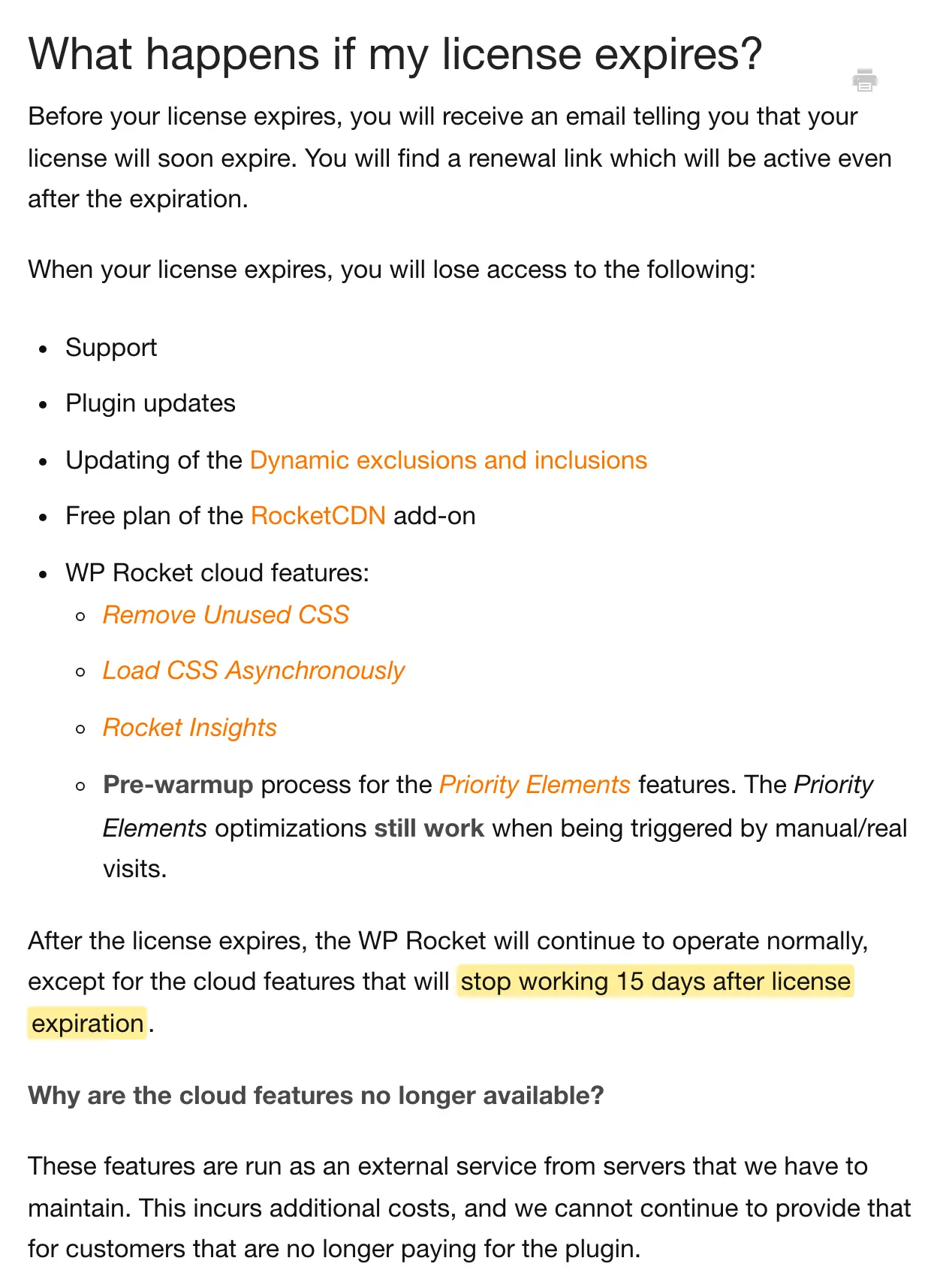
The cloud features run on WP Rocket’s servers, which is why these need a paid license. If your pages depend on Remove Unused CSS, they go back to loading the full stylesheets 15 days after expiry and your Core Web Vitals can slip without any change from your side.
Separate subscriptions such as RocketCDN Pro and Imagify continue until their own billing ends. The renewal link in your account also stays active after expiry, so you can renew late.
An expired copy stops getting fixes for new WordPress and PHP releases as well. A caching plugin rewrites every page it serves, so I wouldn’t run it without updates on a website that earns money.
Upgrading Your License
You can upgrade from the plugin’s dashboard or from your WP Rocket account, and you pay the difference in price between the 2 licenses. At list prices, that is $60 from Single to Plus and $180 from Plus to the 50-site Multi.
An upgrade doesn’t move the expiry date. WP Rocket’s upgrade documentation treats the two separately: an upgrade adds websites and a renewal adds time. If you upgrade in the 11th month, you pay the difference today and the full price of the bigger license a month later.
If your license has already expired and you need more websites, WP Rocket recommends renewing first and upgrading after that. The 14-day refund policy covers upgrades.
What Is Included and What Costs Extra
Every WP Rocket license includes the full plugin and there are no feature tiers. The extras are separate subscriptions from the same company.
| Item | Included in the license | What you get |
|---|---|---|
| WP Rocket plugin | Yes | Page caching, preloading, lazy loading, Delay JavaScript, Remove Unused CSS and the other optimization features |
| Support and updates | Yes, for 12 months | Support tickets and new versions while the license is active |
| Rocket Insights | Yes | Performance monitoring for your key pages inside the WP Rocket dashboard |
| RocketCDN Free | Yes | Up to 3 pages served from 10 locations |
| RocketCDN Pro | No | Every page on the full network, at $8.99 a month per domain |
| Imagify | No | Image optimization, sold as a separate product |
The free RocketCDN plan is meant for your 3 busiest pages, so it doesn’t replace a CDN for the whole website. If your site already sits behind Cloudflare, you may not need RocketCDN Pro at all. For what each feature does, you can read my WP Rocket review.
Discounts and Refunds
WP Rocket has one standing coupon and 4 sales in a year. It says it prefers this over handing out coupon codes, so you can skip the coupon websites.
- Newsletter coupon: 20% off when you subscribe to the newsletter from WP Rocket’s coupon page. You enter this code yourself at checkout.
- Seasonal sales: spring at the end of March, the anniversary sale at the beginning of July, Halloween at the end of October and Black Friday at the end of November. Each sale lasts a few days.
- Automatic discounts: WP Rocket applies most of its offers at checkout on its own, depending on your account and the type of order.
If a sale is only a few weeks away and your site can wait, waiting is the simplest way to pay less.
WP Rocket has no free trial. It has a 14-day refund policy and it covers more than the first purchase.
- First purchases, upgrades and yearly renewals are covered for 14 days from the date of the order.
- You ask for the refund through WP Rocket’s contact form, and the team may offer to fix the problem first.
- WP Rocket doesn’t promise a processing time for refunds.
- RocketCDN has its own rule, which is a refund within 24 hours of subscribing.
WP Rocket Alternatives by Price
WP Rocket has the same entry price as FlyingPress and costs more than the plugins that do only a part of its job. Here is the cheapest paid plan of each.
| Plugin | Cheapest paid plan | Websites | What to know |
|---|---|---|---|
| WP Rocket | $59.95 a year | 1 | 14-day refund, no trial |
| FlyingPress | $59 a year | 1 | 14-day free trial, with a 25-site plan at $229 and unlimited sites at $279 |
| Perfmatters | $29.95 a year | 1 | Script manager and cleanup plugin that needs a page cache beside it |
| NitroPack | $7 a month, billed yearly | 1 | Includes 8,000 pageviews a month, with a free plan for 1,000 |
| WP Fastest Cache Premium | $49 one time | 1 | Lifetime license, and a free version exists |
| LiteSpeed Cache | Free | Unlimited | Page caching needs a LiteSpeed server or QUIC.cloud |
| GT Performance | Free | Unlimited | My own plugin, which this site runs |
FlyingPress is the closest match on features and it is cheaper at every size. The gap is small for 1 to 3 websites and grows to about $70 a year once you cross 3. Perfmatters doesn’t cache pages, so you would run it beside a cache plugin, and I have explained that split in WP Rocket vs Perfmatters.
NitroPack charges by pageviews, so its bill grows with your traffic while WP Rocket’s stays the same. WP Fastest Cache Premium is a one-time payment of $49, which is less than a single year of WP Rocket. LiteSpeed Cache’s CSS, JavaScript and image optimizations work on Apache and Nginx too, and only its page cache needs a LiteSpeed server or QUIC.cloud.
GT Performance is the free caching plugin I built, and this site has run on it since July 2026. It is my own product, so you should test it on staging and judge it by what it does on your site. For a wider shortlist, I have a guide to the best WP Rocket alternatives and another on the best WordPress cache plugins by hosting stack.
Is WP Rocket Worth the Price?
I would judge WP Rocket by the problem it fixes on your website. $59.95 a year is a fair price when the plugin removes a problem you can measure and saves you the hours of tuning a free plugin. It is a poor purchase when your host or your current setup has already done that work.
- One website with slow pages on shared, VPS or cloud hosting: WP Rocket is worth trying, because caching works from the moment you activate it and the refund covers you if it doesn’t help.
- Managed hosting with its own page cache: on Kinsta, WP Engine, WordPress.com and Pressable, WP Rocket switches its page caching off and keeps the other optimizations on. You are paying for file optimization, lazy loading and Remove Unused CSS there, and Perfmatters covers much of that for half the price.
- 4 to 6 websites: you should compare the separate-account route and FlyingPress before paying $299.95 for Multi.
- A website that already passes Core Web Vitals: Google counts an LCP of 2.5 seconds or less as good. If your pages are already there, one more plugin will not earn anything back.
I used WP Rocket for years and kept renewing it, which I wouldn’t have done for a plugin I didn’t trust. This site moved to FlyingPress later and now runs GT Performance. I would still pick WP Rocket for a website where safe defaults and a support team matter more than the last bit of control.
The 14-day refund window is your trial, so you should use it properly:
- Note the PageSpeed Insights results of 3 to 5 important pages before you install anything.
- Activate WP Rocket and turn on one group of settings at a time.
- Test each page at least 5 times and compare the median, because a single run can swing a lot.
- Check the parts that break first: forms, menus, the cookie banner, analytics, cart and checkout.
- Ask for the refund before day 14 if the numbers haven’t moved.
FAQs on WP Rocket Pricing
Can you pay monthly or buy a lifetime WP Rocket license?
No. Every WP Rocket license is valid for 12 months and billed once a year, and WP Rocket doesn’t sell a lifetime license. It ties support, updates and the cloud features such as Remove Unused CSS to an active license in your own WP Rocket account, so a copy sold elsewhere as lifetime doesn’t give you those.
Does WP Rocket have a free version or a free trial?
No. WP Rocket isn’t listed on WordPress.org and it has no trial version. You pay first, and you can ask for a full refund within 14 days of the order.
Can you use WP Rocket on client websites?
Yes. WP Rocket allows the Multi license on your clients’ websites, and each client domain uses 1 slot. If you sell hosting, WP Rocket asks you to join its reseller program.
Do WP Rocket prices include tax?
No. WP Rocket shows its prices before tax. Taxes depend on your country of residence and get added at checkout.
What happens to an old WP Rocket Infinite license?
WP Rocket sold an Infinite license for unlimited websites before 2025, and it stays valid until your next renewal date. At renewal, WP Rocket switches it to the Multi license that matches the number of websites you use and tells you the details before the switch.
Final Remarks
You can check the current WP Rocket pricing on its website before you buy, and if one of the 4 sales is close, waiting a few weeks will cost you less. Once the plugin is installed, my WP Rocket settings guide covers what to turn on and what to leave alone.
Tell Google you want more of this.
Add Gaurav Tiwari as a preferred sourceOne tap, and this site shows up more often in your own Top Stories, AI Overviews and AI Mode. Remove it any time.
Disclaimer: This site is reader-supported. If you buy through some links, I may earn a small commission at no extra cost to you. I only recommend tools I trust and would use myself. Your support helps keep gauravtiwari.org free and focused on real-world advice. Thanks. - Gaurav Tiwari
