
WordPress table plugin 1.0 beta
Core Tables.
Edit once.
Publish everywhere.
Publish searchable tables and clear charts from one reusable dataset. Review changes in a draft before they reach readers across your WordPress site.
WordPress 6.9+ · PHP 8.3+ · 1.0.0-beta.1
The working plugin
Good data deserves
a clear view.
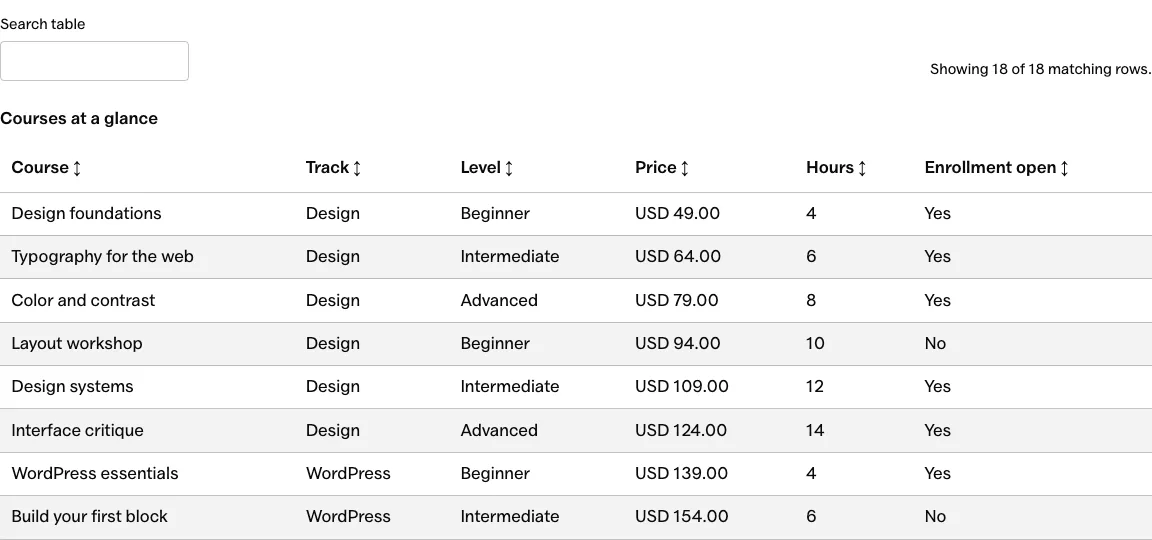
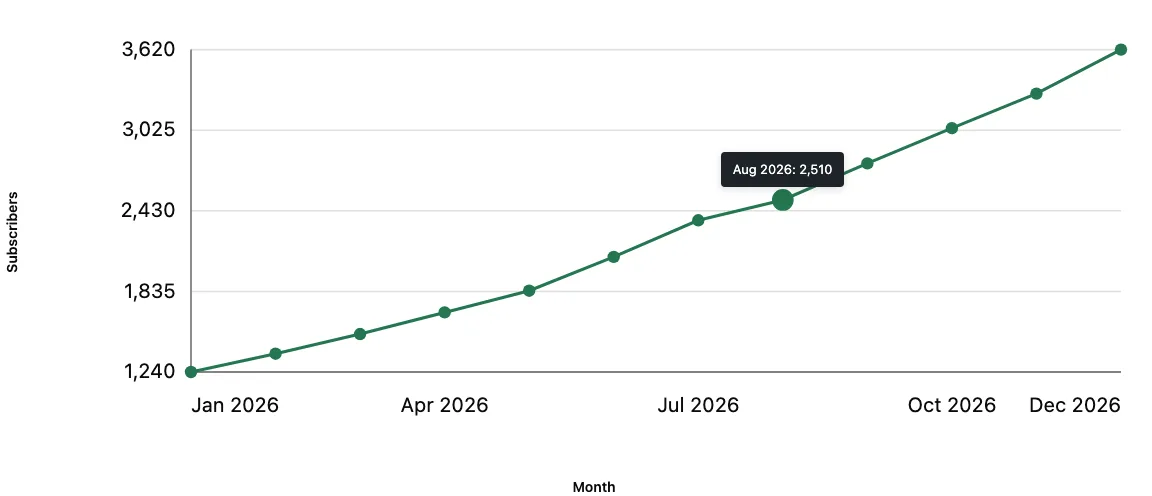
Search a course list. Compare a budget. Follow a trend. Your readers get the view they need, while you maintain one dataset.
- 10,000
- Rows per dataset
- 30
- Typed columns
- 16 MiB
- Snapshot / import limit
- 2
- Chart types
- Standalone
- No form plugin required
One plugin, several useful jobs
Keep the structure.
Change the story.
These are different views of the same workflow. Every feature below is included in the lifetime license.
- Compare the options
- Course catalogs, product comparisons, and resource lists with columns that mean something.
- Text, number, currency, date, URL, and boolean fields
- Rich text and Media Library images
- Search, sorting, and exact column filters
- Phone and tablet row-stacking options
- Opt-in public CSV downloads
- See the table view
- Keep a source in sync
- Bring in the rows you already maintain. Keep a working draft between the source and your public pages.
- CSV import with a preview
- Single-table HTML conversion
- Read-only Google Sheets mapping
- Manual, hourly, or daily refresh
- Pause, resume, and retry controls
- Explore Sheets refresh
- Make numbers readable
- Turn published rows into a visual comparison or a trend without maintaining a second copy of the data.
- Horizontal bars and line charts
- Automatic X and Y axis labels
- Exact values on hover, focus, or touch
- Positive, negative, and zero values
- A data table alongside every chart
- See the chart view
A deliberate publishing step
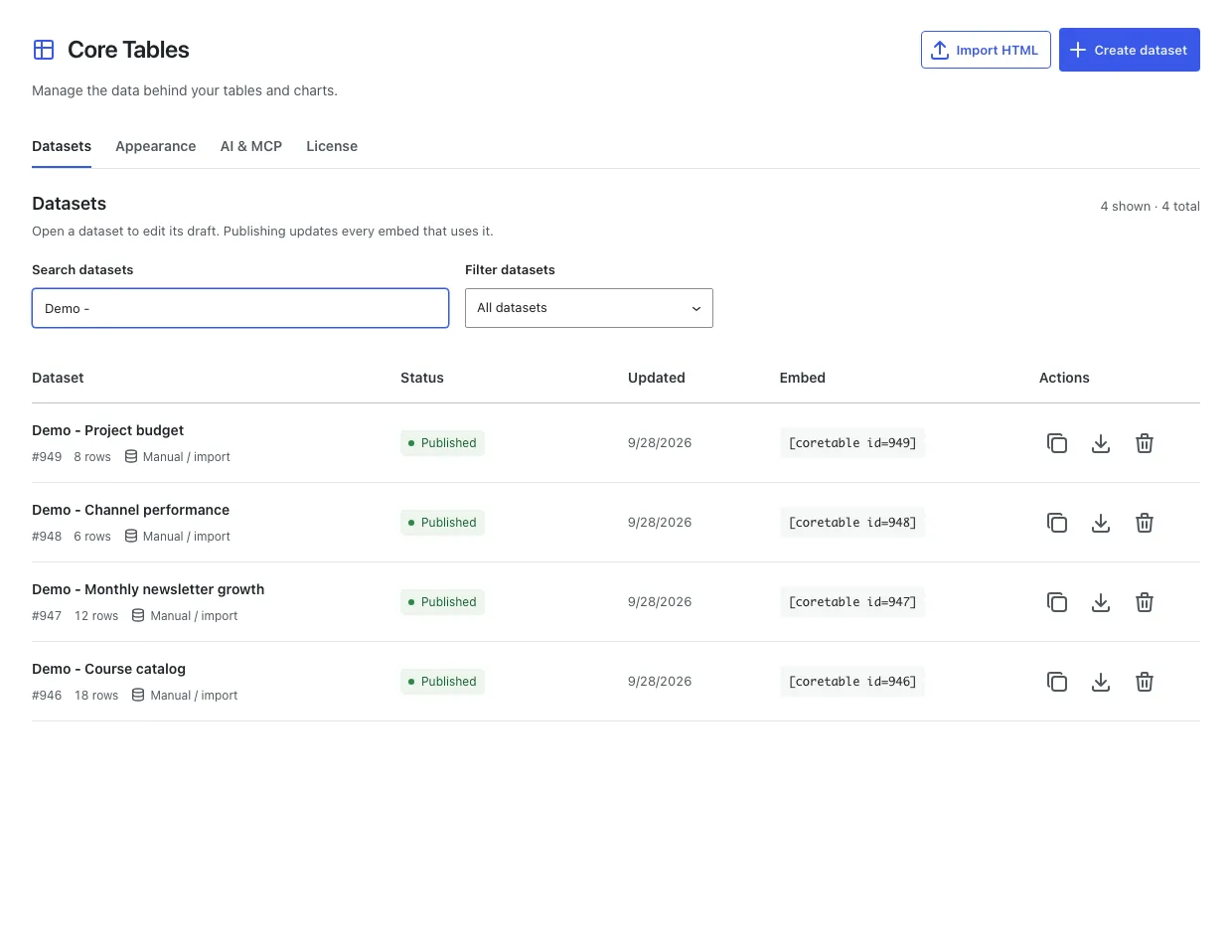
Your draft is yours.
Until you publish.
A saved edit doesn’t quietly replace a live table. You choose when the dataset’s public version changes.
Your result: one dataset you can reuse in multiple tables and charts. No copying rows between posts.
Google Sheets, read-only
The spreadsheet can stay.
The copy-paste can go.
Connect a selected range with a service account, match its columns, and refresh into a draft. You can review each update before publishing.

- Refresh on your terms
- Run a refresh now, queue it, or choose an hourly or daily schedule.
- Keep the last good version
- A failed refresh or invalid mapped value doesn’t replace the published table.
- Make automation explicit
- Draft review is the default. Automatic publication is an opt-in setting.
Buy for what works today
A capable beta.
Clear boundaries.
Core Tables is for publishers who want structured data and a controlled publishing workflow inside WordPress.
See lifetime and yearly pricing- Current release
- 1.0.0-beta.1
- Requirements
- WordPress 6.9+ / PHP 8.3+
- Dataset capacity
- 10,000 rows / 30 columns
- Snapshot or import
- Up to 16 MiB
- Without pagination
- Every published row is displayed
Keep these limits in mind
Sheets setup requires a service account. This isn’t a formula engine, a two-way Sheets editor, or a public data-entry form. Large tables create more browser work; turn on pagination when it suits the page.
Supported LiteSpeed and WP Super Cache integrations receive purge requests. Other page and CDN caches may need a manual purge. Start on staging and keep backups.
Works where you publish
A block when you want it.
A shortcode when you need it.
Add Core Table or Core Chart in the Block Editor. Classic themes can use a shortcode with the same published dataset.
[coretable id=123]Replace 123 with your dataset’s ID. Copy its shortcode from the dashboard.
Your first table
- Install the ZIP. Activate Core Tables in WordPress.
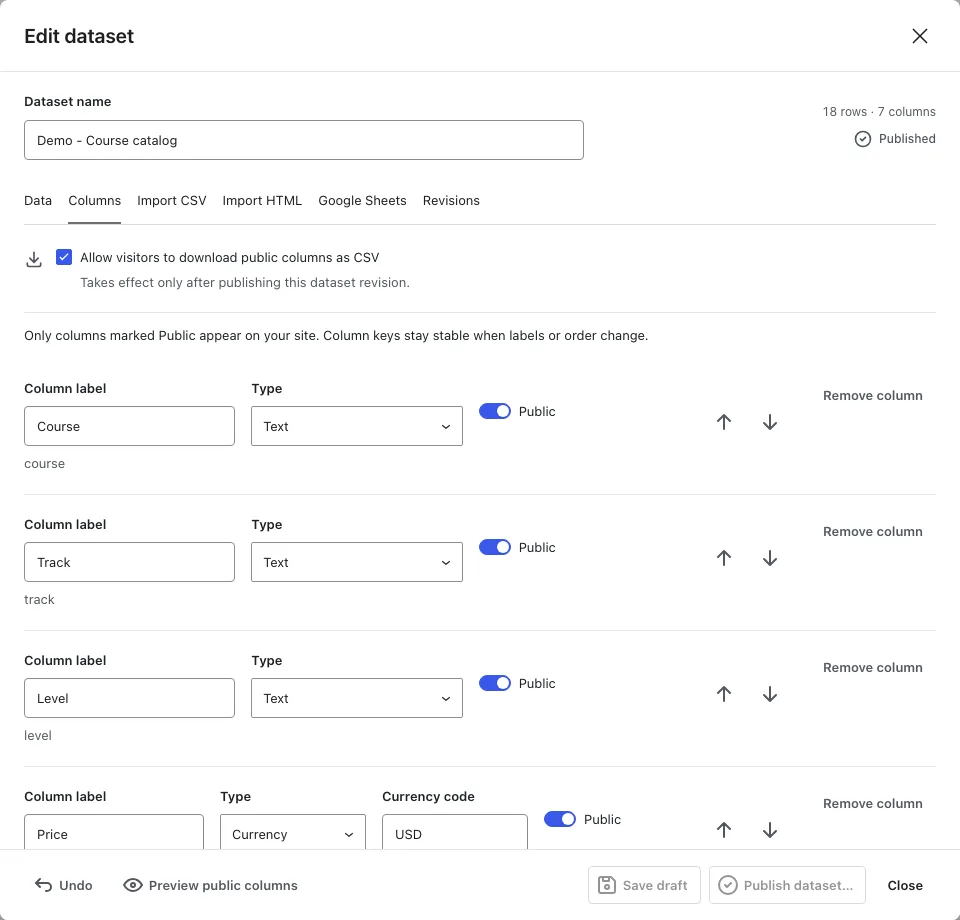
- Add your dataset. Type rows, import CSV or HTML, or connect Sheets.
- Review and publish. Choose public columns and publish the dataset.
- Place the result. Insert a block or shortcode, then save the page.
Can I use Core Tables with my theme?
Yes. Use Core Table and Core Chart blocks in the Block Editor, or place a shortcode in a classic theme. Core Tables is standalone; it does not require Core Forms or a custom-field plugin.
How does the Google Sheets connection work?
Share the intended spreadsheet with your service account as a viewer, then choose a range and map its columns. Refresh manually or on an hourly or daily schedule. Core Tables reads the sheet; it never writes back. Draft review is the default, and automatic publication is optional.
Will saving a draft change my published tables?
No. Save draft keeps edits separate. Publish dataset updates every block and shortcode using that dataset. A failed import or refresh leaves the last published version available.
What is included in the lifetime license?
One payment of $99 USD covers unlimited sites, lifetime plugin updates, and support. A $39/year license is also available, with updates and support while it stays active. Checkout may show your local currency. The installed plugin keeps working if you disconnect its license; the license controls protected updates and support.
What are the beta limits?
This beta supports up to 10,000 rows, 30 columns, and 16 MiB per snapshot or import. It needs WordPress 6.9+ and PHP 8.3+. It does not evaluate spreadsheet formulas, write to Google Sheets, or provide a publicly editable spreadsheet. Start on staging and keep a backup.
Can I keep some columns private?
Yes. Non-public columns are excluded from newly generated visitor HTML, search, charts, exports, and public API responses. Clear any external page or CDN caches when removing previously published information. Media Library files retain their own direct URLs.
The lifetime license
Make the next update
the easy one.
Use Core Tables on unlimited WordPress sites, with lifetime plugin updates and support.
$99 USD, one time
1.0 beta · Unlimited sites
Get Core TablesPrefer to pay yearly? Get Core Tables for $39/year, with updates and support while active.
Checkout may show your local currency.
Read the refund policy.
1.0.0-beta.1 · September 28, 2026
New: labeled chart axes, tick values, and values on hover, focus, or touch. Includes the dataset, Sheets, and publishing workflows introduced in 0.2.0.
Back to top ↑