
How to Keep Newsletter Signups Consent-Safe
A newsletter list grows in quiet ways you don’t always see. A contact form gets a MailerPress action during a redesign, or a checkbox ends up pre-ticked. A reader who unsubscribed last year signs up for a download and lands back on the list.
Any of those can turn into a complaint you can’t answer, because nobody saved what the reader actually agreed to. MailerHive’s consent policy closes those gaps. Only forms you’ve registered can add contacts, the consent box has to be ticked and worded exactly as recorded, and earlier opt-outs stay opted out.
MailerHive is my newsletter plugin for WordPress. Its consent policy sits between Core Forms and MailerPress and checks every signup before a contact is created.
Before You Start
The policy works with this setup:
- MailerHive 1.4.6 or newer.
- Core Forms, with a signup form that has a MailerPress action.
- MailerPress, with the list that form sends contacts to.
- A required consent checkbox on the form. Its label is the disclosure MailerHive records, so write it the way you’d want it read back to you, for example “Email me new issues of the newsletter. Unsubscribe anytime.”
MailerHive doesn’t add a checkbox of its own. The wording is yours, in Core Forms.
Turn On the Consent Policy
- Go to Newsletter → Settings → General and pick the form in Signup form.
- Open the Modules tab.
- Tick Consent policy, “Gate Core Forms → MailerPress signups on a reviewed consent route”.
- Click Save Changes.
From this point, an unregistered form fails closed: it can’t add anyone to MailerPress.
Register the Signup Form
- On the same Modules tab, click Register the signup form.
- MailerHive reads the form’s MailerPress action and its consent checkbox, then records the checkbox label as the disclosure.
- Set Consent version to something you’ll recognize later, such as
newsletter-2026-10. - Save.
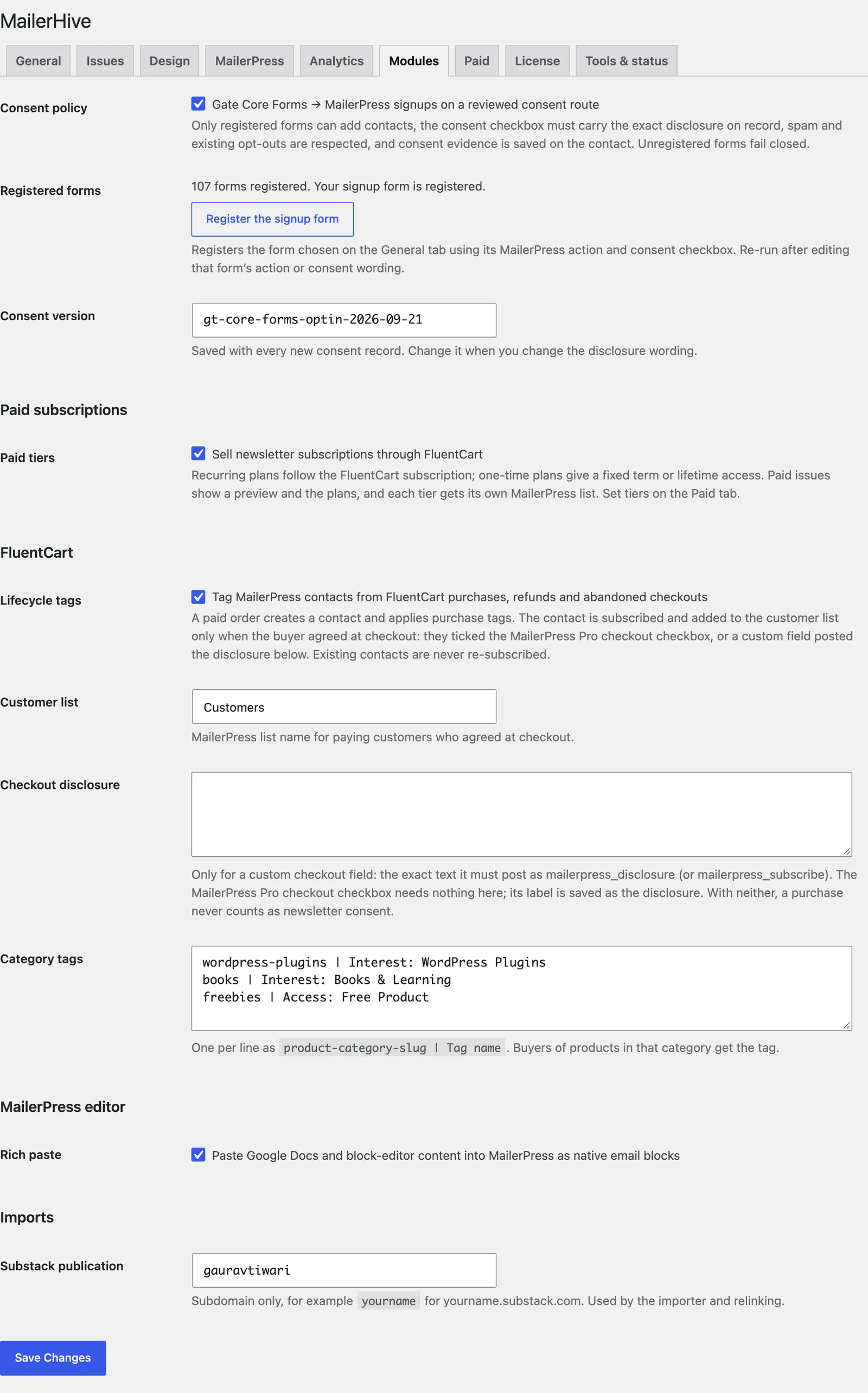
The status line confirms it: “Your signup form is registered.”
Re-run the registration whenever you edit the form’s action or its consent wording. Change the consent version when the wording changes. Old records keep the version they were made under.
What Happens on Each Signup
The policy checks every submission from a registered form:
- The box must be ticked. An unticked box creates no contact: “Newsletter consent was not given; no MailerPress contact was created.”
- The box must match the record. A missing checkbox, a changed label or a pre-ticked box fails the signup with “The MailerPress consent control is missing or changed.”
- Opt-outs stay opted out. An unsubscribed, bounced or complained address, or one with a “Suppression:” tag, is left as it was.
- Spam is skipped. Spam submissions and Core Forms test submissions never reach MailerPress.
When a signup passes, MailerHive saves the evidence on the MailerPress contact: the form, the consent field and value, the time, the consent version and the exact disclosure text. The contact also gets the consent_form, consent_recorded_at and consent_version custom fields.
Use Double Opt-In
Double opt-in follows MailerPress’s own Sign-up confirmation setting:
- With confirmation on, new contacts start as pending and MailerPress sends a confirmation email. They join the list only after they click the link.
- With confirmation off, contacts are added as subscribed straight away.
Turning confirmation on is the safer default for a public signup form. It proves the address belongs to the person who typed it.
With confirmation off, an active MailerPress automation on the list makes every signup fail. The message is “MailerPress automation state requires review before capture.” Turn confirmation on, or review that automation, before you go live.
Consent at Checkout
Buyers can join your list from a FluentCart checkout, but only with their agreement. With the Lifecycle tags module on, a purchase counts as newsletter consent in 2 cases:
- The buyer ticks the MailerPress Pro checkout checkbox. Its label is saved as the disclosure.
- A custom checkout field posts the exact text you saved in Checkout disclosure.
Without either, a buyer becomes a MailerPress contact for purchase tags but is not subscribed to your list. Buying a paid newsletter tier is different, because the purchase is itself a request to receive the newsletter. How to Sell a Paid Newsletter Tier with FluentCart covers that case.
Check It Works
Test the form 3 ways from a private browser window:
- Ticked box, new address. The contact appears in MailerPress, pending or subscribed, with the consent fields filled.
- Unticked box. No contact is created.
- An address you’ve unsubscribed. The contact stays unsubscribed.
Then open Modules and check the status line still says your form is registered.
When Signups Fail
| Message | What it means | Fix |
|---|---|---|
| “MailerPress capture requires a reviewed site consent route.” | The form isn’t registered | Click Register the signup form |
| “The MailerPress route changed and needs consent/mapping review.” | The form’s MailerPress action changed after registration | Register the form again |
| “The MailerPress consent control is missing or changed.” | The checkbox was removed, relabeled or pre-ticked | Restore the checkbox, then register again |
| “The signup form needs a required consent checkbox.” | The form has no required consent field | Add one in Core Forms and mark it required |
| “Choose a Core Forms signup form on the General tab first.” | No form is picked | Pick it under General → Signup form |
| “MailerPress automation state requires review before capture.” | Confirmation is off and an automation is active | Turn on Sign-up confirmation in MailerPress |
What It Won’t Do
The policy guards the door. These parts stay elsewhere:
- It doesn’t write your disclosure. The checkbox label in Core Forms is the record.
- It doesn’t handle unsubscribes. MailerPress runs unsubscribe links, the manage-subscription page and its own headers.
- It doesn’t export or erase contacts. MailerHive’s privacy tools cover paid membership rows only. Contact and consent data lives in MailerPress.
- It doesn’t make you compliant by itself. Your privacy policy, your disclosure wording and how you use the list still decide that.
The consent policy reference lists every check and message in full.